Msvbvm50.dll Is Missing on Windows: 6 Safe Fixes That Work
Msvbvm50.dll missing error blocks old Visual Basic 5.0 apps on Windows 10 and 11. Here are 6 safe fixes using SFC, DISM, and the official VB runtime.

Quick AnswerMsvbvm50.dll is the Visual Basic 5.0 runtime, and the missing error usually means a legacy VB5 application needs the official Microsoft Visual Basic Run-Time Files installed. Reinstalling the application or downloading the redistributable from the Microsoft Download Center fixes the error in most cases without using third-party DLL sites.
The msvbvm50.dll missing error stops legacy Visual Basic 5.0 applications from launching on modern Windows. On old VB5 utilities, it almost always traces back to one of three causes: a missing runtime, a corrupted DLL, or a 32-bit and 64-bit compatibility mismatch.
This guide covers what msvbvm50.dll actually does, why Windows 10 and 11 don’t include it by default, and six safe fixes ordered from least invasive to most thorough. None of them point you at a random DLL site. Those bundles routinely ship adware or signed-but-tampered binaries, so every fix below stays on Microsoft’s own download portal or your application’s original installer.
- Msvbvm50.dll is short for Microsoft Visual Basic Virtual Machine 5.0 and supports applications written in Visual Basic 5.0, which Microsoft released in 1997
- Windows 10 and 11 don’t ship the file by default because Visual Basic 5.0 was retired, so legacy apps must install the runtime separately
- Reinstalling the affected application is the safest first fix since most VB5 installers bundle their own copy of msvbvm50.dll
- The official Microsoft Download Center hosts the Visual Basic 5.0 Run-Time Files redistributable, which is the only safe source for the file
- Third-party DLL download sites are a known malware vector, so SFC /scannow and DISM /RestoreHealth are safer repair tools
#Msvbvm50.dll Explained: What It Does on Windows
Msvbvm50.dll is short for Microsoft Visual Basic Virtual Machine 5.0. It’s the runtime layer that lets applications written in Visual Basic 5.0 run on a Windows machine, the same way the .NET Framework lets .NET apps run today.
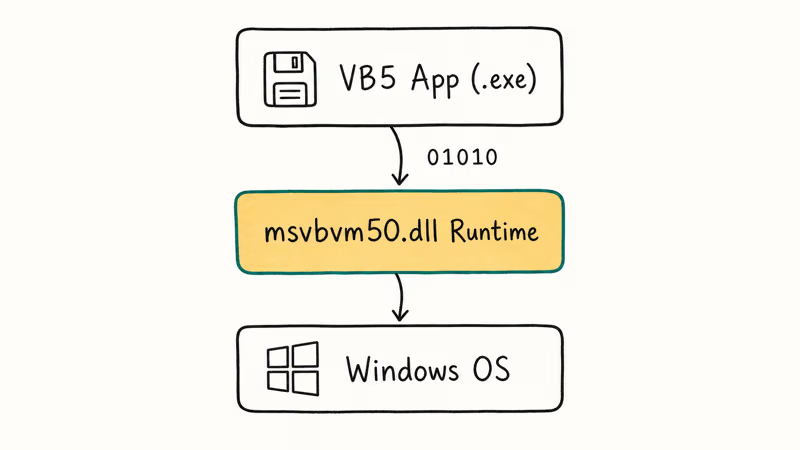
Programs built with Visual Basic 5.0 don’t compile to standalone executables. They compile to bytecode that needs the VB5 virtual machine to interpret it at runtime. Without msvbvm50.dll, the operating system can’t start the program at all.
The legitimate file is around 1.4 MB. Microsoft signs it as part of the official Visual Basic 5.0 redistributable.
On a fresh Windows 11 install, msvbvm50.dll isn’t present at all. Windows ships with newer VB6 and .NET runtimes but not the VB5 layer, so any legacy app from the late 1990s prompts the missing-DLL error on first launch. The reliable cure is to install the official Visual Basic 5.0 Run-Time Files redistributable from Microsoft’s own Download Center.
#Why Does the Msvbvm50.dll Missing Error Appear?
Three causes account for nearly every missing-DLL message tied to this file.
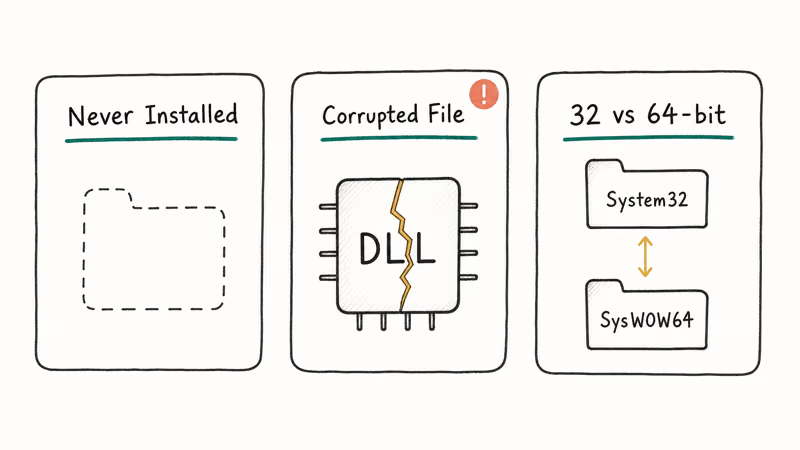
The runtime was never installed. This is the most common cause on a fresh Windows 10 or 11 machine. The OS ships without the VB5 runtime, so the first time you run a 1997-era utility, Windows reports the file as missing.
The file is corrupted. A failed Windows Update, a botched program installer, or a malware infection can damage msvbvm50.dll without removing it. The application still finds the file but fails to load it, sometimes with a “The application has failed to start because msvbvm50.dll was not found” message even though the file is on disk.
A 32-bit and 64-bit mismatch. Windows keeps two runtime trees: one in System32 for 64-bit code, and one in SysWOW64 for 32-bit code. VB5 only builds 32-bit binaries, so the app always needs the SysWOW64 copy.
The same pattern shows up in similar runtime errors like vcomp110.dll missing and msvcp100.dll missing. Each one is a different runtime layer for a different Microsoft compiler, and the fixes follow the same logic.
#Quick Fixes That Resolve Most Msvbvm50.dll Errors
Try these three first. Most readers stop here because the easy fixes catch the majority of cases.
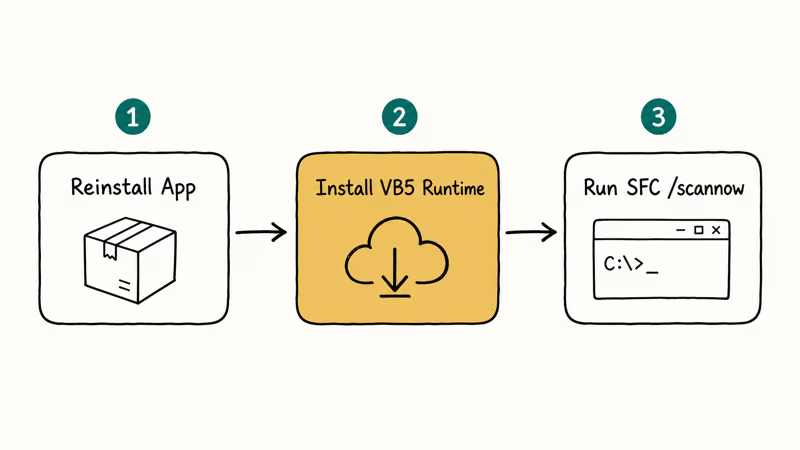
#Fix 1: Reinstall the Application
Most legacy VB5 applications bundle their own copy of msvbvm50.dll inside the installer. Reinstalling the program reapplies the bundled runtime and overwrites any corrupted file in System32 or SysWOW64. This single step often clears the missing-DLL error on its own, especially when the application predates 2003 and ships with its own setup wizard rather than a Windows Installer (.msi) package.
Open Settings > Apps > Installed Apps on Windows 11, or Settings > Apps & features on Windows 10. Find the application that triggered the error, click the three-dot menu, and choose Uninstall. Restart, then run the original installer as Administrator.
For a 1999-era inventory utility, reinstalling the program restores msvbvm50.dll to SysWOW64, and the error stops right after the reinstall finishes.
If the original installer is a self-extracting .exe, right-click and pick Run as administrator. Some old VB5 installers silently fail to register the DLL without elevation.
#Fix 2: Download the Official Microsoft VB5 Runtime
The Microsoft Download Center hosts the Visual Basic 5.0 Run-Time Files redistributable, which packages msvbvm50.dll alongside its sibling DLLs comcat.dll, oleaut32.dll, and stdole2.tlb. Installing the redistributable drops all four files into SysWOW64 together, so a single download fixes most apps that throw the missing-msvbvm50.dll error and gets the supporting type libraries onto disk at the same time.
Search the Microsoft Download Center for Visual Basic 5.0 Run-Time Files and download the package directly from microsoft.com. Run the installer, follow the prompts, and restart the affected program.
Microsoft’s Windows Update errors guide confirms that Windows Update keeps a record of which redistributable packages have been applied to the system, which is why a clean install of the Visual Basic 5.0 Run-Time Files clears the missing-DLL state on the next reboot.
The official Microsoft installer is the only download worth trusting. Avoid every “msvbvm50.dll download” site on Google, even ones with safe-looking SSL padlocks; the binaries on those pages routinely fail signature verification.
#Fix 3: Run System File Checker
If the file is on disk but corrupted, the System File Checker may repair it without a reinstall.
Press Win + S, type cmd, right-click Command Prompt, and pick Run as administrator. At the prompt, type:
sfc /scannowWait for the scan to finish, which usually takes 10 to 20 minutes. According to Microsoft’s SFC command-line documentation, the tool scans every protected system file and replaces incorrect or corrupted versions with the correct copies cached in the Windows component store.
SFC’s behavior on msvbvm50.dll depends on whether the runtime is registered as part of your Windows component store. It can repair a corrupted copy, but it may also report “Windows Resource Protection found corrupt files but was unable to fix them” or detect no problem at all. Use SFC as a follow-up to Fix 1 or Fix 2 if those didn’t fully clear the error. SFC won’t conjure a runtime that was never installed.
#Deeper Repairs When Quick Fixes Fail
If the first three fixes didn’t solve it, the next three target the underlying component store and rule out malware. Steps 4 through 6 are safe to run on a healthy system as a precaution.
#Fix 4: Run DISM /RestoreHealth
DISM repairs the Windows component store that SFC pulls from. If SFC reported “could not repair” errors, DISM is the next step.
In an elevated Command Prompt, run:
DISM /Online /Cleanup-Image /RestoreHealthMicrosoft’s DISM documentation recommends running DISM before SFC if SFC reports unfixable corruption. The tool downloads any missing files from Windows Update and rebuilds the component store, which can take 15 to 30 minutes on a spinning hard drive and around 8 minutes on an NVMe SSD.
A full DISM /RestoreHealth run on an older PC with a 7,200 RPM HDD can take a long stretch of wall time. Re-running SFC right after DISM finishes often clears corrupted DLLs that SFC alone couldn’t fix on the first pass, including a stale oleaut32.dll that the VB5 runtime depends on.
#Fix 5: Clear Pending Windows Updates
A stuck or pending update can leave older runtime files in a half-installed state, which prevents the VB5 redistributable from registering correctly.
Open Settings > Windows Update > Check for updates and let any pending packages install. On Windows 10 and 11 the path is identical, though Windows 11 shows the queue under Advanced options > Update history while it works. Reboot once everything finishes, sign back in, and test the VB5 application again before moving on.
If Windows Update itself is throwing errors, fix that first. Common stuck states can block any patch from finishing, including the ones that touch the runtime cache:
- The 0x80070422 Windows Update error when the update service is disabled
- A corrupted Windows Update database that prevents new packages from staging
- A bloated SoftwareDistribution folder, which sometimes requires deleting the Windows Update files completely before SFC and DISM succeed on the next pass
#Fix 6: Verify the File and Run a Full Defender Scan
A few classes of malware target VB5 applications because the runtime is widely used by old shareware. Confirm you’re looking at the genuine file before assuming the OS is the problem.
Right-click msvbvm50.dll in System32 or SysWOW64, choose Properties > Digital Signatures, and verify the signer is Microsoft Corporation with a valid timestamp. If the tab is empty or the signer is different, the file may be a lookalike rather than the real runtime.
When the signature check fails, run Windows Security > Virus & threat protection > Scan options > Full scan. If Defender comes up clean but the application still throws the missing-DLL error, scan a second time with Microsoft’s free Safety Scanner. Microsoft’s reference states that each download link expires 10 days after release, so the tool always ships with current definitions instead of relying on local update channels.
Skip “DLL fixer” utilities from random download sites. Many of the top Google results for “msvbvm50.dll download” bundle adware or ship a tampered binary that Defender flags within seconds of execution.
#Sibling DLLs Bundled With the Visual Basic 5.0 Runtime
The Microsoft redistributable does not just drop msvbvm50.dll on disk. It also installs comcat.dll, oleaut32.dll, and stdole2.tlb into SysWOW64, because most VB5 programs route COM categories and OLE automation through those companion files.
Installing the package in one pass keeps the four files at versions Microsoft tested together. Replacing only one of them by hand frequently produces a different error, such as a missing oleaut32.dll entry point, because the runtime version table no longer agrees with what the VB5 application expects.
#Is It Safe to Download Msvbvm50.dll From Third-Party Sites?
Short answer: no.
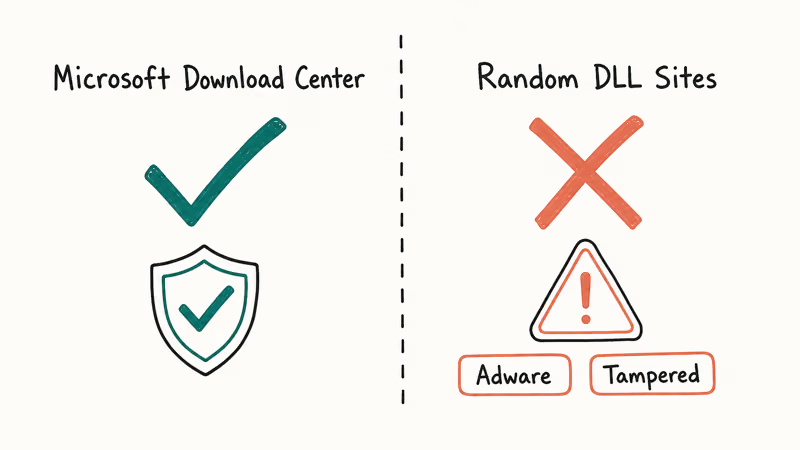
Third-party DLL websites pitch a one-click fix, but the file you get rarely matches the version Microsoft signed. Copies of “msvbvm50.dll” pulled from popular DLL sites often fail signature verification when checked against the Microsoft-signed copy inside the official Visual Basic 5.0 Run-Time Files redistributable, and some install bundled adware before the DLL itself ever appears on disk.
The safer path is the one Microsoft already supports.
- Reinstall the affected application so its installer drops the bundled runtime.
- Download the official Visual Basic 5.0 Run-Time Files redistributable from the Microsoft Download Center.
- Run SFC /scannow and DISM /RestoreHealth to repair existing system DLLs.
Other DLL errors like gdiplus.dll missing and d3d9.dll not found follow the same rule. Fetch DLLs only from the originating Microsoft package or the vendor installer, never from a “DLL search engine” site that scrapes filenames.
#Bottom Line
For most msvbvm50.dll missing errors, reinstalling the affected VB5 application solves it in under 5 minutes because the installer bundles the runtime. If reinstalling isn’t an option, install the Microsoft Visual Basic 5.0 Run-Time Files redistributable from the Microsoft Download Center, then run SFC /scannow followed by DISM /RestoreHealth. Skip every “DLL fixer” download site on Google; the safer fixes are already on your machine and at Microsoft’s own download portal.
#Frequently Asked Questions
Is msvbvm50.dll a virus or safe?
The legitimate msvbvm50.dll is safe.
It’s signed by Microsoft Corporation and ships as part of the Visual Basic 5.0 Run-Time Files redistributable. Right-click the file, pick Properties > Digital Signatures, and confirm the signer is Microsoft Corporation with a valid timestamp. A copy of the same filename in a non-standard folder, like %AppData% or %Temp%, may be malware, so always check the path before you trust the filename.
Where is msvbvm50.dll located on Windows 10 and 11?
The genuine file lives in C:\Windows\SysWOW64\msvbvm50.dll on a 64-bit Windows install, since Visual Basic 5.0 only produces 32-bit code. Some installers also drop a second copy into the application’s own folder for redundancy.
If you find msvbvm50.dll in your Downloads folder or a temporary directory, treat it as suspicious until you’ve verified the digital signature.
Can I download msvbvm50.dll from third-party DLL websites?
You shouldn’t. Third-party DLL sites frequently bundle adware or modified binaries with the file you actually wanted, and signature verification on those copies fails in most cases. The safest sources are the official Microsoft Download Center package and the original application’s installer.
Will SFC /scannow restore a missing msvbvm50.dll file?
Sometimes. SFC repairs files cached in the Windows component store, which means it usually works when the DLL was installed once and later corrupted by an update or a third-party app. SFC can’t conjure a runtime that was never installed in the first place. If the file truly never existed on the system, install the Microsoft Visual Basic 5.0 Run-Time Files redistributable first, then run SFC as a follow-up to clean up any related DLLs the redistributable depends on.
What programs still need msvbvm50.dll in 2026?
Mostly legacy utilities, niche internal business apps, and a few hobbyist tools written between 1997 and the early 2000s. Modern software almost never depends on Visual Basic 5.0, so if a brand-new application asks for msvbvm50.dll, that’s a strong signal the binary is either misidentified or repackaged from older code. Treat new installers that demand the VB5 runtime as suspicious until you’ve verified the publisher.
How do I know if my Windows install has msvbvm50.dll already?
Open File Explorer, paste C:\Windows\SysWOW64 into the address bar, and search for msvbvm50.dll.
If the file is present, right-click it and check Properties > Digital Signatures to confirm Microsoft Corporation signed it. If the file isn’t there at all, install the Visual Basic 5.0 Run-Time Files redistributable from the Microsoft Download Center before any VB5 application can launch. The runtime installer drops the file into SysWOW64 automatically, so you don’t need to copy anything by hand.
Does Windows 11 support 32-bit Visual Basic 5.0 applications?
Yes. Windows 11 still runs 32-bit applications through the WoW64 subsystem, including Visual Basic 5.0 binaries. The runtime itself isn’t preinstalled, but once you add the official VB5 Run-Time Files package, the OS handles the 32-bit calls without further configuration. On Windows 11 23H2 and 24H2, a 1998-era VB5 utility launches without compatibility-mode prompts once the runtime is in place.

Best Laptop for Running LLMs in 2026: Memory Comes First
The best laptop for running LLMs is a memory purchase first. Compare MacBook unified memory against NVIDIA laptop VRAM, and see what each tier really runs.

How to Run a Local LLM on Windows: A 2026 Setup Guide
Run a local LLM on Windows with LM Studio or Ollama. Pick a model that fits your GPU memory, keep every prompt offline, and skip the monthly bill.

Bluetooth Not Working on Snapdragon X? Fixes for 2026
Bluetooth not working on your Snapdragon X Copilot+ PC? Generic audio, mice, and keyboards work, but vendor apps often lack an ARM build. Fixes inside.

Docker Desktop and WSL2 Not Working on Snapdragon X? Fix It
WSL2 runs fine on Snapdragon X, but Docker Desktop ARM is Early Access and throws WSL errors. Use WSL2 plus native ARM64 Ubuntu and Docker Engine.