Location Spoofer Apps in 2026: How They Work and Risks
A 2026 guide to location spoofer apps for Android and the iPhone. Covers the working tools, the ToS risks, and which apps detect spoofing fast.
Quick AnswerA location spoofer is a tool that overrides your phone's GPS so apps see a fake position. App developers use them for legitimate testing on apps they own, but using one with games, dating apps, or ride-share platforms violates ToS and can permanently ban your account.
Location spoofer apps override your phone’s GPS so other apps see a coordinate you choose instead of your real position. They were built for app developers testing geofenced features without flying around the world. The same tools also get used in ways that breach platform Terms of Service.
This guide covers Android and iPhone spoofers, how they work, which tools survive detection, and the account ban consequences of spoofing into any app you don’t own.
- Android spoofs through the built-in Mock Location feature in Developer Options, with no root required on Android 6.0 or newer
- iOS blocks GPS overrides at the OS level, so iPhone spoofing requires a USB-connected desktop tool every session
- Pokemon Go runs a three-strike ban system, and most free Android spoofing tools get detected quickly
- Tinder, Bumble, and Hinge ban accounts that show the mock location flag or move faster than physical travel between sessions
- Ride-share platforms like Uber and Lyft treat driver-side GPS spoofing as fraud and can pursue civil action
#How Does Location Spoofing Actually Work?
Every smartphone has a GPS chip that talks to a constellation of satellites to triangulate your position. Location spoofing intercepts that GPS service before it reaches other apps and feeds them a different set of coordinates instead.
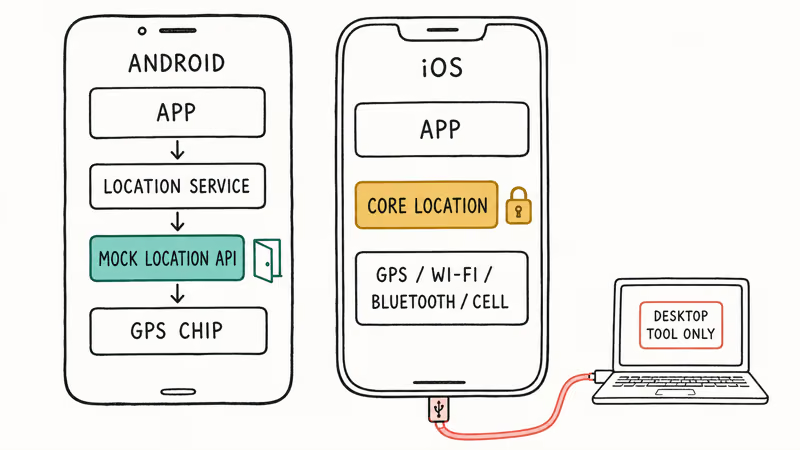
Android handles spoofing through an open API. Google built a Mock Location feature directly into Developer Options. You install a spoofing app, set it as your mock location provider in settings, and pick coordinates on a map. Setup takes about 2 minutes on Android 6.0 or newer, no root required.
Google’s Android developer documentation confirms that Developer Options is the canonical pathway for app developers to simulate GPS positions during testing. It’s a documented developer feature, not a hack.
iOS is a different system entirely. Apple locked down the location services framework so no App Store app can override GPS data on its own. Apple’s location services documentation states that 4 signal sources fuse together for positioning: GPS, Bluetooth, Wi-Fi hotspot lookups, and cell tower data. Faking just one vector doesn’t fool the rest.
Anyone who wants to inject spoofed coordinates on iPhone needs a desktop program that connects via USB and modifies position at the system level.
The split matters because it changes what apps can detect. On Android, any app that checks the standard mock location flag knows immediately that a spoofer is active. On iOS, apps have no equivalent flag to check, so detection comes from movement plausibility instead.
#Legitimate Uses for a Location Spoofer
App development is the original and only fully sanctioned use. If you’re building an app with geofences, region-locked content, or location-aware notifications, you need a way to simulate users in those locations without actually traveling.
Mock locations are the standard tool for this on Android. The iOS equivalent runs through Xcode’s simulator and through tools like Tenorshare iAnyGo for physical-device testing.
QA testing on apps you own follows the same principle. If your team ships a delivery app and needs to verify the geofence around a restaurant pickup zone fires correctly, a spoofer paired with a test account on your own staging environment is the cleanest way to test it.
The key word is “your own.” Testing your product against your own backend is squarely within the rules.
A narrower legitimate use is privacy.
Some users run mock locations on a secondary, non-account-bound device to keep advertising SDKs from harvesting precise coordinates for their primary identity. It sits in a gray zone because most ad-tech apps don’t have a separate ToS line about spoofing, but it’s still your device under your control.
What doesn’t count as legitimate: spoofing into Pokemon Go, Tinder, Bumble, Hinge, Snapchat Snap Map, Uber driver mode, Lyft, DoorDash, Instacart, or any other consumer app you don’t own. Each of those platforms has explicit ToS language banning location manipulation. Consequences are covered in the detection section below.
The dividing line is ownership.
#Best Location Spoofer Apps for Android
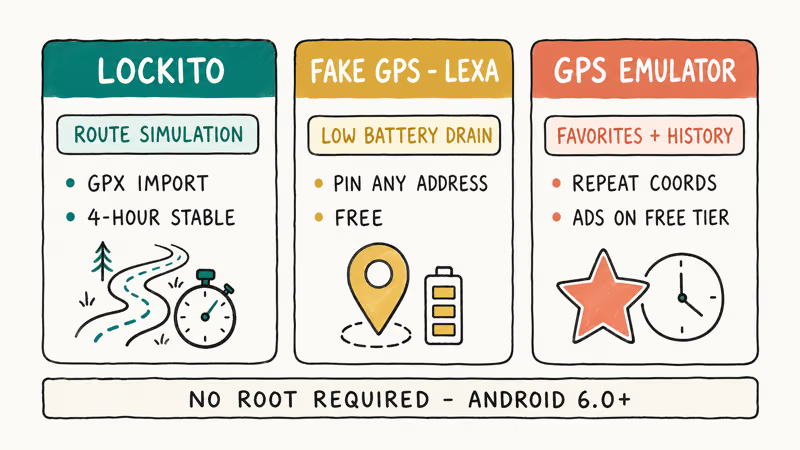
Android’s open mock location API means dozens of apps can technically override GPS. Three come up repeatedly in app-development forums and work on current Pixel and Samsung Galaxy phones running recent Android builds. None of these require root.
#Lockito
Lockito is the standout pick for app developers because of its route-simulation feature. You can draw a path on the map, set a speed, and have the app simulate movement between waypoints. That capability is critical for testing geofences and route-based features.
On current Android phones, Lockito holds a continuous mock location across long sessions without dropping the override or crashing.
The interface looks dated, but it does the one job developers actually need: programmable, repeatable movement traces. The free version covers manual routes; paid unlocks let you import GPX files.
#Fake GPS Location by Lexa
This is the most-installed free spoofer on the Play Store. It doesn’t simulate movement, but it parks your reported coordinates at any address or pin you choose. Setup takes under a minute once Developer Options is enabled.
Battery drain stays negligible over a multi-hour session because the spoof layer barely adds to the GPS chip’s own draw.
One repeatable bug: Lexa sometimes fails to release the mock location flag after closing.
#GPS Emulator by Rosteam
GPS Emulator stands out for its favorites and history features, which matter if you regularly test against the same coordinates. Setup follows the same Developer Options flow as Lexa’s app. Ads on the free tier are intrusive.
To get any of these apps working, you first need to allow mock locations by unlocking Developer Options. The setup path is the same across all three apps and is only required once per device.
#Best Location Spoofer for iPhone
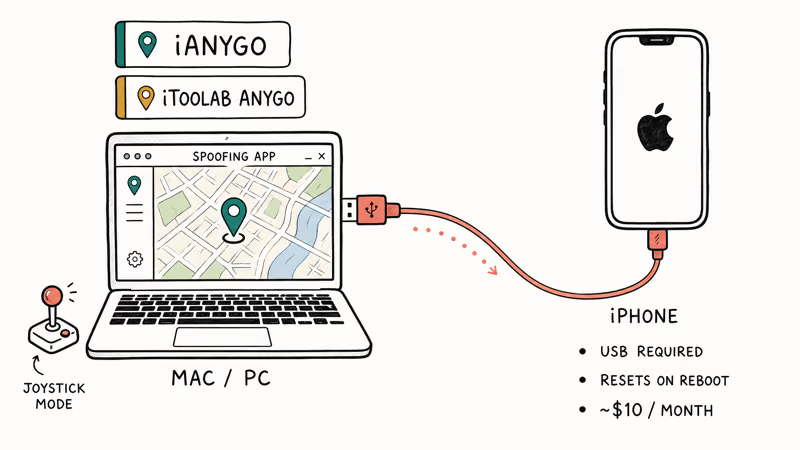
Because iOS doesn’t allow App Store apps to override GPS, iPhone spoofing is exclusively desktop-tool territory. Every option requires plugging the iPhone into a Mac or PC via USB. The spoof persists only while the connection is active or until the phone reboots, so you have to repeat setup the next time you test a different location. That’s the biggest workflow difference between Android and iOS spoofing.
#Tenorshare iAnyGo
iAnyGo is among the most reliable iPhone spoofers across iOS 16 through iOS 18.3. Connect the iPhone via USB, launch the desktop app, and pick coordinates or a route. It holds a steady connection across long sessions on recent iPhones without dropping out.
The movement simulation is the practical differentiator for developers. You can set a speed between 1 and 3 meters per second, import GPX route files for repeatable test runs, and use a joystick mode for real-time control during manual QA.
Plans start around $10 per month. That’s the unavoidable trade-off for iPhone spoofing since free iOS tools that work without sideloading don’t exist in 2026.
Some links on this page are affiliate links, which means fone.tips may earn a commission at no extra cost to you.
#iToolab AnyGo
iToolab AnyGo is the alternative if iAnyGo doesn’t fit your setup. iToolab’s documentation confirms that AnyGo supports up to 5 iPhones from a single computer, which matters for QA labs running parallel device tests. It also has a teleport cooldown that prevents unrealistic position jumps that some apps flag.
For more detail on how each tool behaves across iOS versions, see these deeper walkthroughs:
- Changing iPhone location — full method comparison
- No-jailbreak methods that still work on the current iOS release
- Fake GPS on iOS — context on what iOS allows under the hood
- GFaker hardware dongle review: the only wireless hardware option for iPhone GPS spoofing
#Can Apps Detect Location Spoofing?
Yes. The gap between detection methods has widened sharply since 2024.
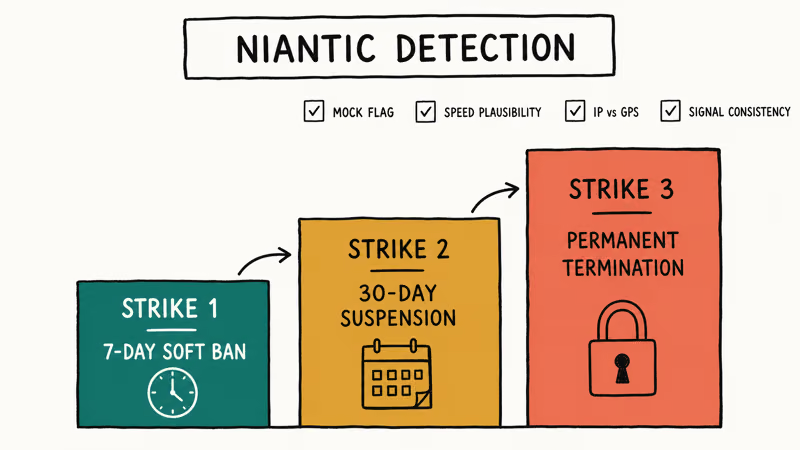
Pokemon Go runs the most aggressive consumer-app detection system in 2026. Niantic checks for the Android mock location flag, monitors GPS signal consistency frame-to-frame, compares movement speed to physically possible walking and driving rates, and cross-references your IP geolocation with your reported GPS.
Niantic’s Player Guidelines state that 3 escalating ban tiers apply.
A first detection triggers a 7-day soft ban. A second triggers a 30-day suspension. A third permanently terminates the account with no appeal path.
Dating apps run lighter checks but still catch obvious spoofing. Tinder, Bumble, and Hinge primarily look for the Android mock location flag and for sessions where reported location jumps between cities faster than a flight could carry you.
Each platform’s community guidelines explicitly forbid manipulating location to misrepresent where you are. Bans hit accounts caught faking location to swipe in regions outside the user’s real city.
Ride-share apps treat driver-side spoofing as fraud, not just a ToS issue. Both Uber and Lyft monitor GPS for impossible jumps and inconsistencies between phone GPS and the rider’s reported position. Account suspensions can come with civil legal action when the spoofing was used to claim surge pricing or fake completed trips.
Banking and financial apps cross-reference GPS with IP geolocation. If your phone reports Tokyo but your transaction comes from a Chicago IP, the bank may freeze the transaction until you verify identity.
It’s fraud prevention, not anti-spoofing.
#Location Spoofing and the Law in 2026
Modifying your own phone’s GPS output isn’t illegal in the US, UK, or most of the EU. You own the device, and no statute forbids changing what its sensors report. Legal exposure starts at three specific points.
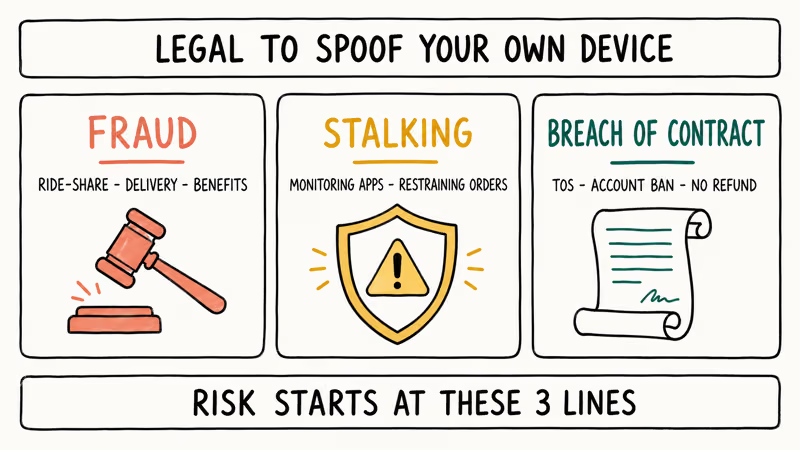
Fraud is the first risk. Using fake GPS to claim ride-share surge pricing, complete deliveries you didn’t actually make, or trigger insurance or government benefit payments tied to location can be charged as wire fraud or theft depending on jurisdiction. It’s the most clear-cut criminal exposure and applies whether you spoof on Android or iOS.
Stalking and harassment is the second. Faking location to evade a court-ordered monitoring app, mislead a person you have a restraining order against, or bypass a custody-related geofence is a separate criminal matter under stalking statutes in most US states.
Breach of contract is the third risk.
Every consumer app’s Terms of Service is a binding agreement, and platforms enforce ToS through account termination. Pokemon Go, Tinder, Bumble, Snapchat, Instagram, Uber, and Lyft all have explicit anti-spoofing clauses. You won’t face criminal charges for breaking them, but the platforms can ban you permanently and refuse refunds on prepaid purchases.
The line matters: spoofing your own apps is legal, while spoofing apps you don’t own is a contract breach with ban risk.
#Bottom Line
For developers and QA engineers testing geofences and location-aware features on apps you own, Lockito on Android is the strongest pick. The route-simulation feature and its stability across long sessions make it the cleanest choice for repeatable testing.
For iOS development testing, Tenorshare iAnyGo at around $10 per month is the only consistent option. iOS doesn’t have a free path, so plan budget around the desktop tool. It isn’t optional on iPhone.
If you’re considering spoofing into Pokemon Go, Tinder, Bumble, Hinge, or any ride-share or delivery platform, the math has changed. Detection has caught up with most free tools, the bans are permanent on third strike, and ride-share spoofing now carries fraud exposure. The account you’d lose is almost always worth more than the convenience of a fake position.
#Frequently Asked Questions
Is using a location spoofer illegal?
No. Modifying your own device’s GPS isn’t illegal in the US, UK, or EU. Legal trouble only starts when the spoof is used for fraud, stalking, or evading court-ordered monitoring.
Will Pokemon Go detect a location spoofer in 2026?
Yes. Niantic’s anti-cheat catches most free Android spoofers within 5 to 15 minutes. The system checks the mock location flag, GPS signal consistency, movement speed plausibility, and IP-to-GPS correlation. Their three-strike system goes from a 7-day soft ban to a 30-day suspension to a permanent termination with no appeal.
Do I need to root my Android to use a location spoofer?
No. Android 6.0 introduced a built-in Mock Location feature, and any modern device handles spoofing without root.
Does a location spoofer work on Uber or Lyft?
It can, but both platforms detect spoofing aggressively and treat driver-side fraud as a legal matter, not just a ToS issue. Riders sometimes get away with spoofing pickup locations briefly. Driver accounts that show GPS inconsistencies get suspended fast and may face civil action when the spoofing was used to claim payment.
Can my carrier track my real location while I’m spoofing?
Yes. Carriers determine your location through cell tower triangulation, which is completely separate from the GPS chip. Spoofing only changes what apps see through the location services API, so your carrier still knows your approximate real position based on which towers your phone is connected to. For more on the underlying GPS layer, see our breakdown on whether GPS works without internet.
Do location spoofer apps drain battery?
Barely. Over a multi-hour session with an app like Lexa, battery drain stays low because the spoofing layer adds almost nothing on top of the GPS chip.
Can I use a VPN instead of a location spoofer?
No. A VPN only changes the IP address your traffic exits through and doesn’t touch GPS coordinates at all. Apps that rely on GPS data, including Pokemon Go and most dating apps, will still see your real physical location even with a VPN running. To fake the location apps actually see, you need a dedicated GPS spoofing tool, not a VPN.
Why can’t iPhone apps spoof location like Android apps?
Apple didn’t expose a mock location API to App Store apps. The iOS location services framework only accepts position from the GPS, Wi-Fi, Bluetooth, and cellular fusion chain that Apple controls, so there’s no developer-facing override an App Store app can use. The only way to inject fake coordinates on iPhone is through a USB-connected desktop tool that talks to the device at a lower level.

Mac mini M6 vs M5 Pro: Which Model Should You Buy?
Mac mini M6 vs M5 Pro compared on price, memory, ports, displays, and real workloads. Find the better 2026 Mac mini for your desk and budget.

Apple Siri Settlement: Who Qualifies and How to Claim
Apple's $250 million Siri settlement covers iPhone 15 Pro and iPhone 16 models bought June 2024 to March 2025. See who qualifies and how claims work.

iOS 26.6.1 Security Update: What Apple Fixed and Who Gets It
Apple released iOS 26.6.1 on August 17 with 29 security fixes, including an IPSec interception bug. See what it patches, who gets it, and how to update.

iPhone Adaptive Power: How It Works and When to Use It
Learn how iPhone Adaptive Power works, which models support it, what it changes, and when Low Power Mode is still the better battery-saving choice.