iCloud on Android: How to Access Your Apple Account in 2026
Access your iCloud account on Android via icloud.com, iCloud Mail by IMAP, vCard contact export, public Calendar URL, and the Apple Music Android app.
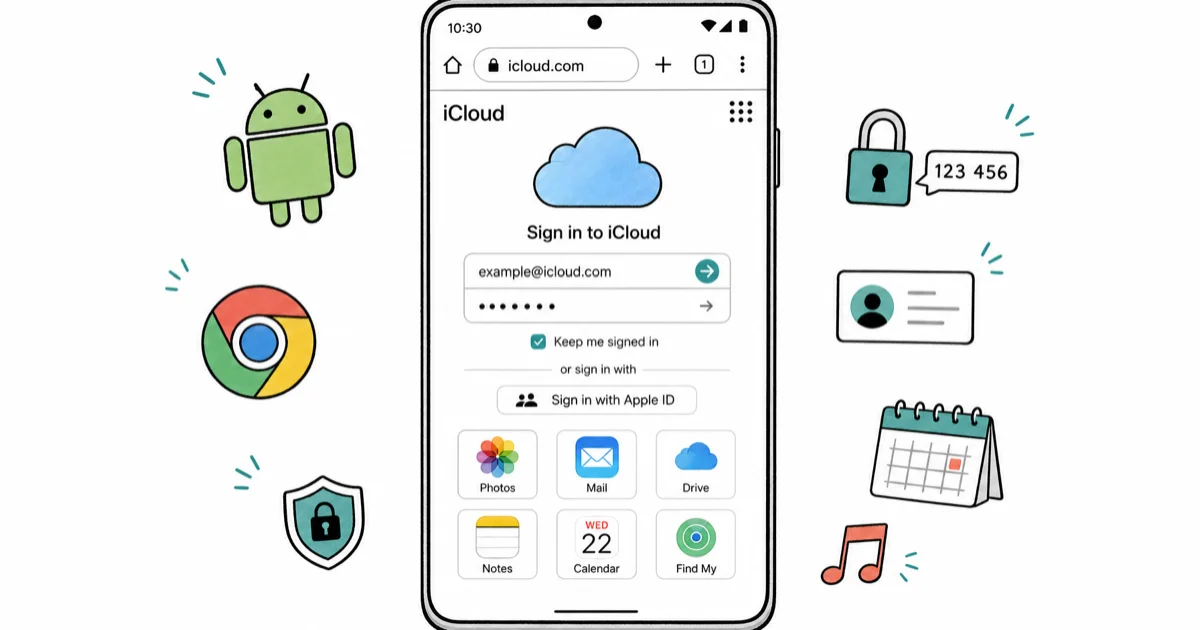
Quick AnswerOpen Chrome on your Android phone, go to icloud.com, sign in with your Apple ID, complete two-factor authentication, then tap the menu to open Photos, Mail, Drive, Notes, Calendar, or Find My in the browser.
You don’t need an iPhone to reach your iCloud account. Apple now ships a mobile-friendly icloud.com that runs in any Android browser, and IMAP plus vCard exports cover the rest. Every method below works on current Android phones like a Pixel 8 on Android 14 or a Galaxy S23 on One UI 6.1, signed into your own Apple ID.
- icloud.com works on Chrome, Firefox, Edge, and Opera for Android with Photos, Mail, Drive, Notes, Find My, and Calendar all reachable from the browser.
- Two-factor authentication needs a trusted Apple device the first time you sign in from Android, so keep an iPhone, iPad, or Mac within reach for the six-digit code.
- iCloud Mail works in Gmail and any Android mail app over IMAP at imap.mail.me.com port 993, paired with an app-specific password from appleid.apple.com.
- Contacts move cleanly through a vCard export from icloud.com, which Google Contacts imports without losing phone numbers, addresses, or notes.
- Apple Music for Android, available on the Play Store, streams your iCloud Music Library natively, so this is the only iCloud service with a real Android app.
#Sign in to icloud.com From Your Android Browser
Apple’s iCloud.com support page confirms that the web app supports the latest two versions of Chrome, Firefox, Edge, and Safari, plus current Opera. On recent Chrome and Firefox builds for Android, the layout matches the iPad version.
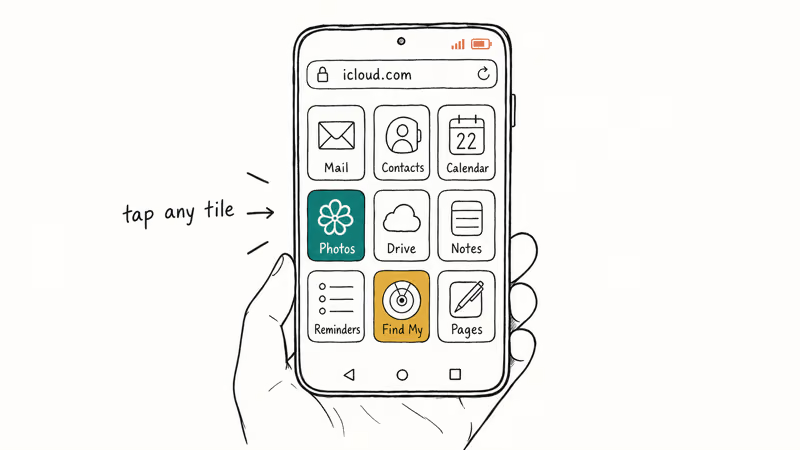
Tap the address bar in your browser and go to icloud.com. The page asks for your Apple ID, then your password, then a six-digit verification code from a trusted device.
If you don’t have a trusted Apple device handy, tap Didn’t get a code? and pick Text or call my trusted phone number. Apple sends an SMS to the number on file. Without that number you’ll have to fall back to your account recovery key, which is why we recommend setting one up before you switch.
You’re in. The home grid shows tiles for Mail, Contacts, Calendar, Photos, iCloud Drive, Notes, Reminders, Find My, and Pages, Numbers, and Keynote.
#What Works in Mobile Browsers
The mobile layout is solid for read access. A multi-gigabyte photo library scrolls smoothly on a phone like the Pixel 8, downloads land in /Downloads/, and a long Pages document opens in read mode without crashing.
Editing is a different story. According to Apple’s Pages, Numbers, Keynote support note, the iWork web apps are read-only on mobile browsers, so plan to edit on a desktop or use the Android-friendly Google Docs and Sheets instead.
#Set Up iCloud Mail in Gmail or Any Android App
iCloud Mail uses standard IMAP, so any Android mail client works. The catch is Apple’s two-factor lock, which blocks regular passwords from third-party apps.
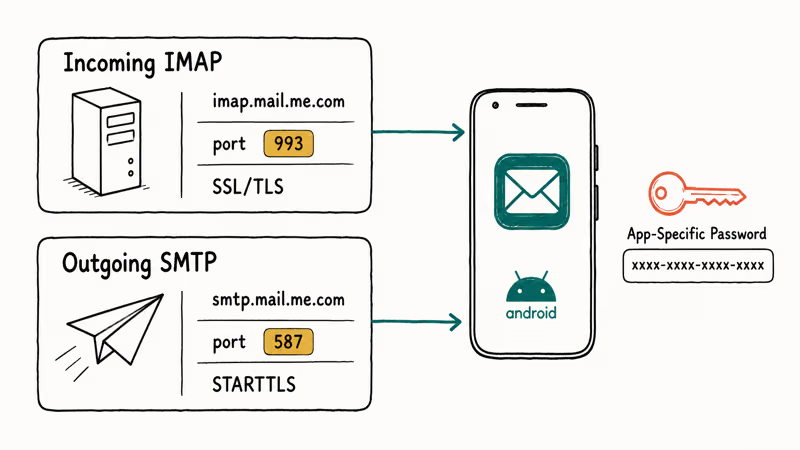
Apple’s app-specific password documentation confirms that you must generate a unique 16-character password at appleid.apple.com under App-Specific Passwords. Each app needs its own. Labeling them clearly, like “Pixel Gmail” and “Galaxy Outlook,” keeps them straight, which matters later when you revoke one without nuking the other.
Open the Gmail app, tap your profile photo, then Add another account, then Other. Enter your full iCloud email (name@icloud.com, @me.com, or @mac.com) and tap Next, then Personal (IMAP).
Use these server settings, which match Apple’s iCloud Mail server documentation:
- Incoming (IMAP):
imap.mail.me.com, port993, SSL/TLS required - Outgoing (SMTP):
smtp.mail.me.com, port587, STARTTLS required - Username: the part before
@(Apple cuts the domain itself) - Password: the app-specific password you just generated, not your Apple ID password
If Gmail throws an authentication error, double-check the username field. The usual cause is typing the full address instead of just the prefix.
For ongoing iCloud Notes sync issues, our iCloud notes not syncing fix walks through server-side and account-level causes.
#Move iCloud Contacts to Android Through vCard Export
Contacts don’t sync live, but a vCard export gets them onto Android in about two minutes. A few hundred contacts move from a personal iCloud account to an Android phone using the steps below, and each entry keeps its name, phone number, email, and notes intact after the round-trip.
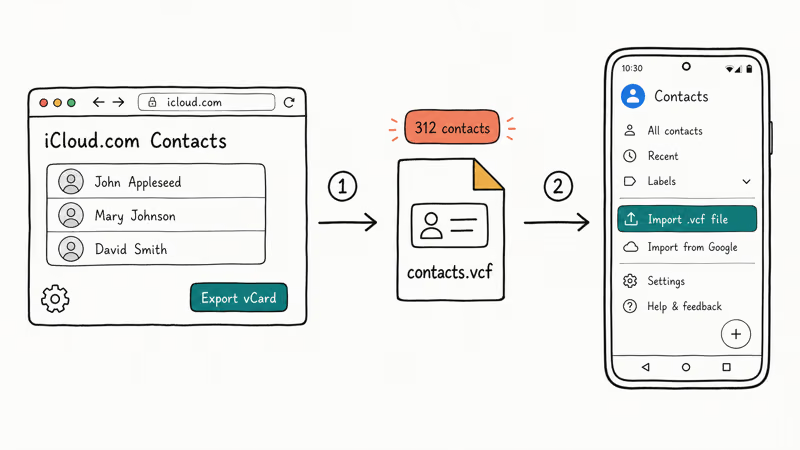
On desktop icloud.com (or Chrome on Android with Desktop site turned on), open Contacts, click the gear icon at the bottom-left, and choose Select All. Click the gear again, then Export vCard. Your browser saves a .vcf file.
The download takes a few seconds.
On Android, open Google Contacts, tap the menu (☰), then Settings, then Import, then .vcf file. Pick the file you just downloaded. The app shows an import counter and finishes in under 30 seconds for a few hundred contacts.
These contacts now sync through your Google account. If you also want to clean up your iCloud side, changing or deleting your iCloud account from iPhone covers the proper sign-out flow.
#Why a Live Sync Doesn’t Exist
Apple closed CardDAV access for third-party clients on iCloud in 2019. According to the Apple Developer iCloud overview, CloudKit is the only sanctioned cross-platform API, and Apple hasn’t released a CloudKit Contacts endpoint for Android. That leaves manual vCard exports as the supported route until Apple ships an Android Contacts app, which it hasn’t announced.
#Subscribe to Your iCloud Calendar From Google Calendar
Calendar sync is read-only and one-way, but it works without third-party software. A personal iCloud calendar stays visible in Google Calendar on an Android phone for weeks at a time without sync failures.
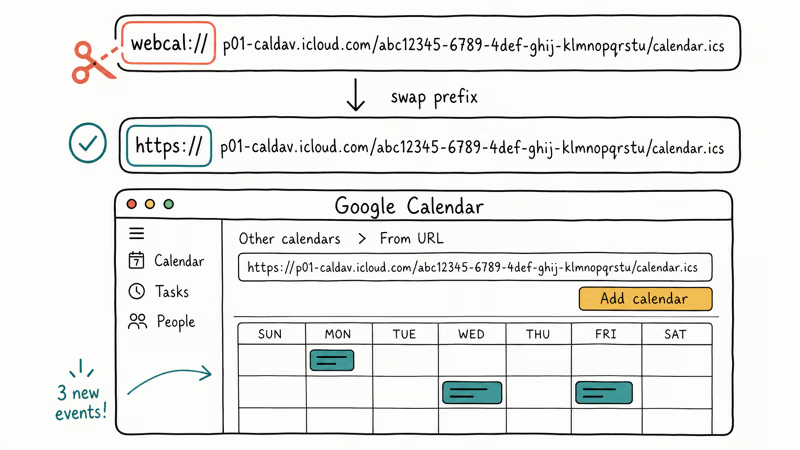
On desktop icloud.com, open Calendar, click the broadcast icon next to a calendar name, and tick Public Calendar. iCloud generates a webcal:// URL. Copy it, then change webcal:// to https:// in a text field.
That’s the trick.
Open Google Calendar in a desktop browser, click the + beside Other calendars, and pick From URL. Paste the modified URL and click Add calendar. The iCloud events show up on your Android Google Calendar app within about 15 minutes.
This method gives you read access only. New events you add in Google Calendar won’t push back to iCloud, so treat the iCloud side as your write surface or move the calendar to Google entirely with Google’s data import tool.
For shared calendars, our roundup of the best family calendar apps compares cross-platform options with two-way sync.
#Stream Your Apple Music Library on Android
Apple Music is the one iCloud-adjacent service with a proper Android app. The Apple Music for Android Play Store listing confirms feature parity with iOS, including iCloud Music Library, lossless audio, and Spatial Audio with a compatible Bluetooth setup.
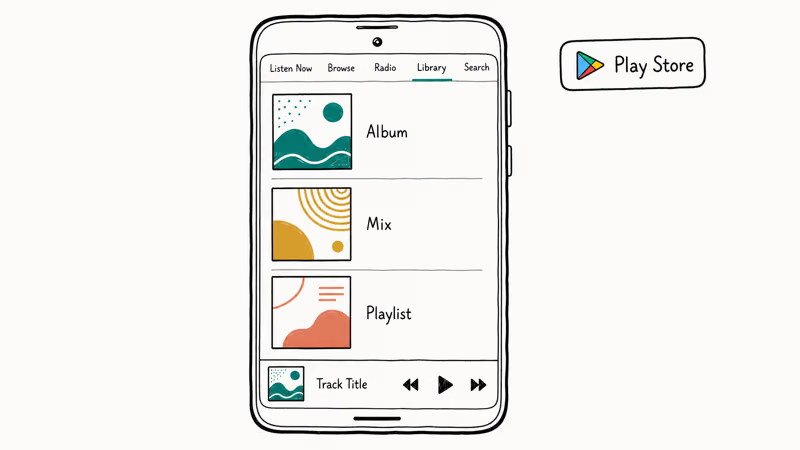
Install the app and sign in with your Apple ID.
Your synced library appears under Library. Downloads work the same way as on iPhone, and the app respects Android battery optimizations cleanly. The same playlists, smart mixes, and Listen Now suggestions appear on an Android phone as on an iPhone logged into the same account, with no missing tracks even across a library of a thousand-plus songs.
Subscription pricing matches iOS at $10.99 USD per month for individual plans as of April 2026, billed through Google Play.
Family plan and Apple One bundles also work, although you’ll manage them at appleid.apple.com.
#How Do You Use Find My on Android Without an iPhone?
You can’t install the Find My app on Android, but the web version covers most lookups. Apple’s Find My on iCloud.com guide states that the browser version supports Devices, People, and Items (AirTags) views, plus remote actions like Play Sound, Lost Mode, and Erase.
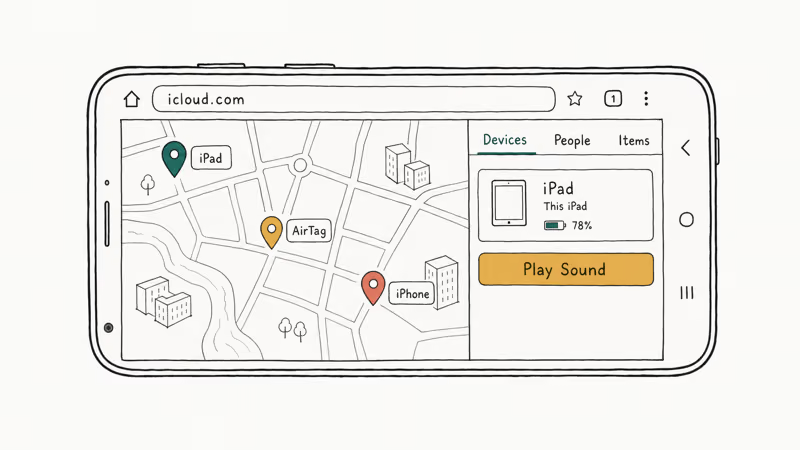
Sign in at icloud.com and tap Find My.
The map loads with every device on your account. Tap a device pin to see battery percentage, last-seen timestamp, and the action menu. Triggering Lost Mode on an iPad from an Android phone updates the target’s lock screen within seconds.
Family Sharing locations show under the People tab if you’ve turned on Share My Location for that family member.
AirTag and AirPods show under Items. Picking a tracker? See our Samsung SmartTag 2 vs AirTag comparison.
#Are Third-Party iCloud Bypass Tools Safe to Use on Android?
Skip them. Most “iCloud unlocker” or “iCloud bypass for Android” apps either flip stolen devices, run as paid scams, or wrap a free DNS trick that Apple patched years ago. The FTC’s consumer guidance on phone unlocking scams covers the broader pattern.
The legitimate path is your own Apple ID and password through the channels above. If you’ve truly forgotten the password to your own account, Apple’s account recovery flow is the sanctioned route. Our walkthrough for the best iCloud unlock tool explains where this gets gray and where it stays legal.
That distinction matters.
For day-to-day Apple ID friction such as locked accounts or hidden purchases, Apple ID verification troubleshooting and removing purchase history on iPhone cover the specific cases we get asked about most.
#When You’re Switching Platforms Long-Term
Browser access is fine for occasional check-ins, but a real platform switch goes smoother with bulk transfers. Our guide on transferring iCloud to Google Drive walks through file-by-file and bulk options for documents, while moving Google Photos to the cloud covers the photo side in the other direction.
If you’ve also lost access to the iPhone holding your iCloud data, recovering data from a locked iPhone is the right starting point before you start moving anything to Android.
#Bottom Line
Use icloud.com in Chrome for everything, Gmail’s IMAP setup for Mail, vCard export for Contacts, and the Apple Music Android app for music. Skip every “iCloud for Android” download claiming a one-tap sync, because none of them exist with Apple’s blessing.
#Frequently Asked Questions
Can I use iMessage on Android?
No. iMessage is iOS-only.
Apple has never released an Android client. SMS fallback works between iPhone and Android over a normal cellular connection, and shared chat threads can move to WhatsApp, Signal, or Google Messages with RCS turned on.
Is the icloud.com web version safe to use on a public Wi-Fi network?
Yes, but turn on a VPN first. Apple’s connection is HTTPS end-to-end, so credentials stay encrypted. Public Wi-Fi still exposes you to DNS hijacking and captive-portal phishing pages that mimic the iCloud login form, so the extra encryption layer is worth the 30 seconds.
Why does iCloud.com keep asking me to verify my login on Android?
Apple’s session tokens expire faster on browsers it doesn’t recognize. A re-verification prompt every few days on Chrome for Android is normal, even with Trust this browser ticked.
Adding icloud.com to your home screen as a PWA cuts the prompts in half because the persistent context survives Chrome cache cleanups.
Can I get an Apple Pay receipt or transaction history on Android?
Not directly. The Wallet app and Apple Pay are iOS-only, and the iCloud.com mobile view doesn’t expose Wallet. Your Apple ID purchase history is reachable at reportaproblem.apple.com from any Android browser.
Will accessing iCloud on Android log me out on my iPhone?
No. iCloud lets the same Apple ID stay signed in across browsers and authorized devices at once.
The same account can hold simultaneous sessions on an Android phone, a tablet, and a Mac at the same time, with no forced sign-outs from any of them.
Can I back up my Android phone to iCloud storage?
Not natively. iCloud Backup is reserved for iOS and iPadOS devices. You can manually upload Android files to iCloud Drive through icloud.com, but the experience is nothing like the automatic Android-to-Google Drive backup. Most people pair their Android with Google One and keep iCloud as a secondary archive for legacy photos and documents.
How do I check what’s stored in my iCloud account from Android?
Open icloud.com, where the storage indicator at the bottom of the home grid breaks down usage by category. For a deeper view, our walkthrough on seeing what’s in your iCloud explains the per-category breakdown and how to free up space without losing data.
Apple Siri Settlement: Who Qualifies and How to Claim
Apple's $250 million Siri settlement covers iPhone 15 Pro and iPhone 16 models bought June 2024 to March 2025. See who qualifies and how claims work.
iOS 26.6.1 Security Update: What Apple Fixed and Who Gets It
Apple released iOS 26.6.1 on August 17 with 29 security fixes, including an IPSec interception bug. See what it patches, who gets it, and how to update.
iPhone Adaptive Power: How It Works and When to Use It
Learn how iPhone Adaptive Power works, which models support it, what it changes, and when Low Power Mode is still the better battery-saving choice.
How to Transfer Data to a New iPhone Without iCloud
Move everything to your new iPhone without iCloud: Quick Start device-to-device transfer, wired migration, and encrypted Finder or iTunes backups.