How to Block Spam Calls on iPhone: 5 Layers (2026)
Stop spam and scam calls on your iPhone with Silence Unknown Callers, per-number blocking, carrier filters, and call-screening apps, ranked by trade-off.
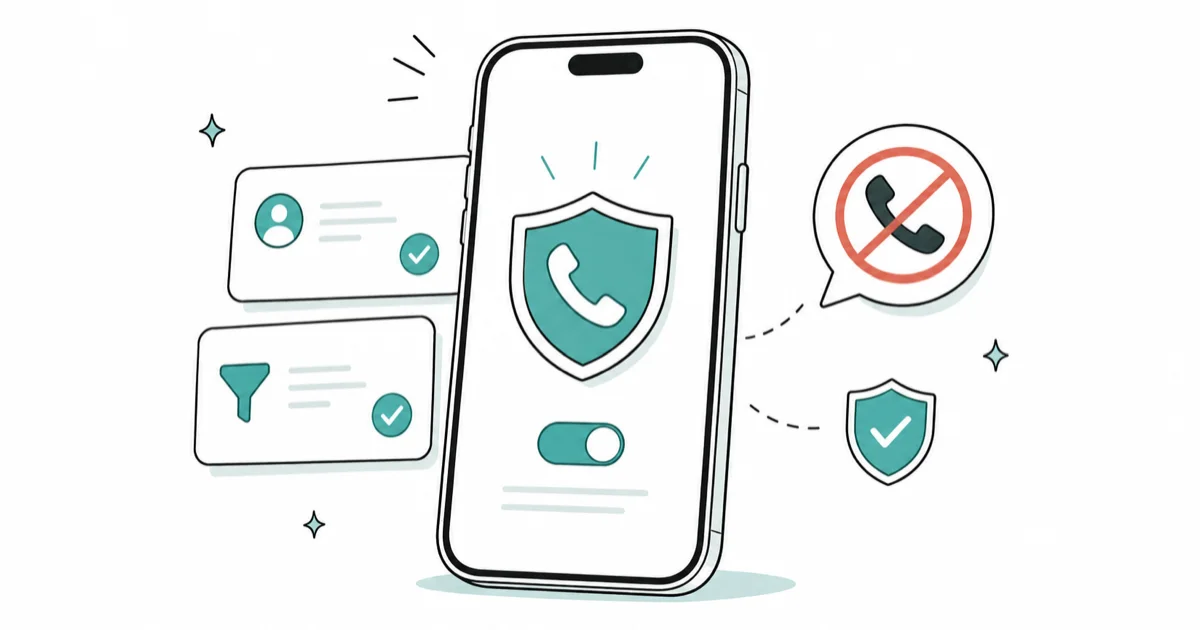
Quick AnswerTurn on Silence Unknown Callers under Settings, Apps, Phone to send any number not in your contacts to voicemail, block individual numbers from Recents, and add your carrier's free spam filter.
Learning how to block spam calls on iPhone is less about one magic switch and more about stacking a few layers that each catch a different kind of junk. Apple gives you a setting that silences strangers, a per-number block list, and a junk-reporting tool, and your carrier adds a free filter on top. Together, those layers cut down ringing without relying on one magic switch.
- Silence Unknown Callers sends every number not in your contacts straight to voicemail, the single biggest cut in ring volume
- Blocking a number stops its calls, FaceTime, and texts, but the caller is never told they’re blocked
- Carrier filters from AT&T, Verizon, and T-Mobile are free and label suspicious calls “Scam Likely” before you answer
- The Do-Not-Call Registry stops legitimate telemarketers, not scammers who already ignore the law
- Call-screening apps catch the leftovers, but they see your call activity, so read the permissions first
#Why Are You Getting So Many Spam Calls?
Spam calls spike for one reason: dialing is cheap and numbers are easy to fake.
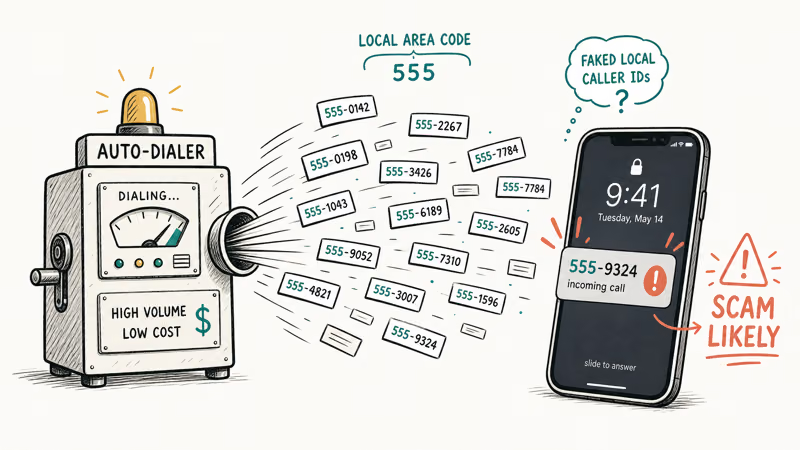
Scammers spoof a caller ID so the incoming call looks local, sometimes matching your own area code and first three digits, which is why a “neighbor” number you don’t recognize is often junk. Auto-dialers can churn through millions of numbers an hour, and a spoofed local prefix lifts the odds that a curious person picks up, which is the entire economic model behind the flood you’re seeing on your lock screen each day.
The volume feels personal. It rarely is. Because spammers rely on you picking up an unknown call, simply not letting unknown numbers ring is the most effective single move you can make.
There’s a security angle too. Some of these calls are phishing attempts that try to rush you into sharing a code or a payment. The same instincts that help you tell if your phone has been hacked apply on a call: slow down, hang up, and call the company back on a number you trust. Never read a verification code aloud to an inbound caller.
#Turning On Silence Unknown Callers
Silence Unknown Callers is the layer that does the heavy lifting. Go to Settings, tap Apps, tap Phone, then choose how to handle calls from unsaved numbers. According to Apple’s guide to managing unknown callers, choosing Silence “automatically silences these calls and sends them to voicemail,” and the missed calls still appear in your call history under an Unknown Callers list.
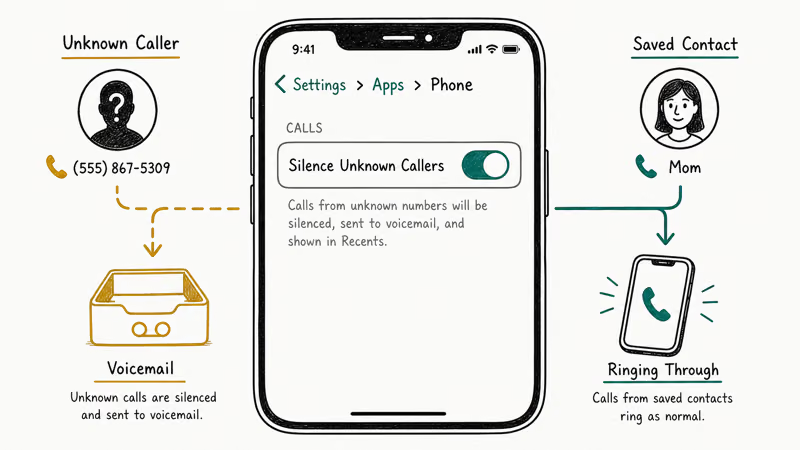
The trade-off is real. Any legitimate caller who isn’t in your contacts, such as a delivery driver, a clinic callback, or a recruiter, lands in voicemail without ringing.
If you expect an unfamiliar callback, check voicemail while this setting is on. If you keep finding that real callers go straight to voicemail, this setting is usually the cause.
One reassuring detail makes the feature smarter than a blanket mute. Apple’s documentation states that if you call emergency services, “call screening turns off for 24 hours” so a callback can reach you. Calls from people in your contacts, recent calls, and Siri Suggestions still ring through normally.
#Blocking and Reporting Individual Numbers
When a specific number keeps calling, block it directly. Open the Phone app, tap Recents, tap the info button next to the number, then tap Block this Caller.
Apple’s guide to blocking calls and contacts confirms that a blocked contact’s “phone calls, messages, and FaceTime calls” are all stopped, and the caller is never notified. The same flow handles callers who hide their own number, which our guide to blocking No Caller ID walks through.
Blocking is precise but reactive. It only helps after a number has already bothered you, and spammers rotate numbers constantly, so a block list alone is a game you can’t win. For the junk texts that ride along with spam calls, a message from an unknown sender shows a Report Junk option that forwards the sender to Apple and your carrier. Many of those are smishing attempts worth recognizing on sight.
#Carrier Spam Filters and the National Registry
Your carrier runs a network-level filter that flags suspected scams before they reach you, and the basic tier is free. AT&T offers ActiveArmor, Verizon offers Call Filter, and T-Mobile offers Scam Shield, each of which can label a call “Scam Likely” on your lock screen. When a carrier filter recognizes a pattern, the label can appear before you answer, which makes the screening decision easier.
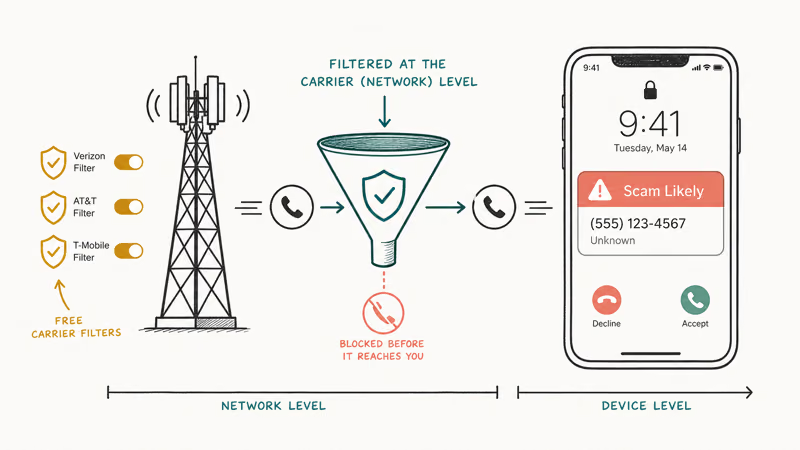
These carrier tools layer cleanly on top of Apple’s settings, since one works at the network and the other on the device. Turn the carrier app on and enable automatic blocking of high-risk calls. Run both, since the network filter sees patterns your phone alone never could.
The National Do-Not-Call Registry is the layer people overestimate. The FTC’s guide to blocking unwanted calls states plainly that being on the Registry “won’t stop calls from scammers making illegal calls,” and that “your best defense against unwanted calls is call blocking and call labeling.” Register your number at donotcall.gov to quiet legitimate telemarketers, but treat blocking and labeling as the real shield. It’s housekeeping for honest businesses, nothing more.
#Do Call-Screening Apps Actually Help?
Third-party apps like Nomorobo, Hiya, and Truecaller keep large databases of known spam numbers and intercept them before your phone rings. They earn a spot as the last line of defense.
The cost is privacy, not just money. To identify callers, these apps typically need access to your call activity and sometimes your contacts, and some sync that data to their servers. Read the permissions and privacy policy before installing. That isn’t automatically bad, but the same skepticism you’d bring to a suspicious app belongs here too.
A free complement that costs no privacy is Focus mode. Set a Focus to allow calls only from your favorites and everyone else stays silent during those hours.
#Layering the Five Defenses
Think of the five tools as a funnel, widest net first. Silence Unknown Callers stops the random churn, the carrier filter labels what’s left, blocking handles the stubborn repeat numbers, the Registry trims legal sales calls, and a screening app mops up the rest.
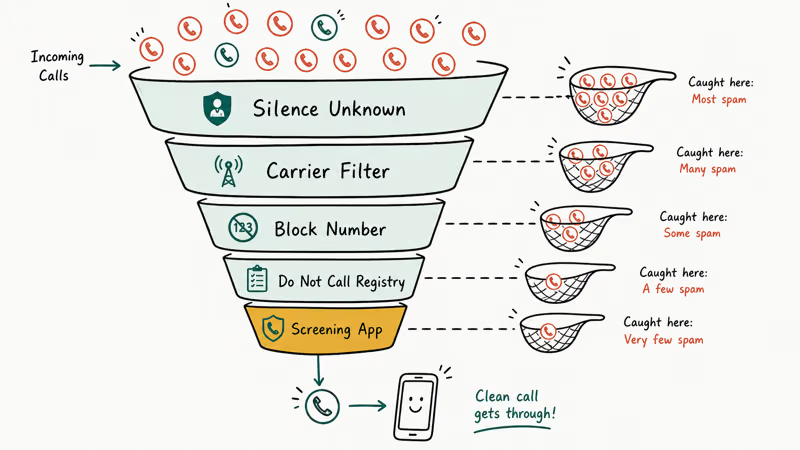
Most people never need all five. If your problem is mostly robocalls from rotating numbers, the first two layers alone usually do it, and a short block list plus Report Junk handles a few persistent real numbers on its own. Match the layers to your actual problem instead of switching everything on at once and missing real callers in the process.
Scammers target older relatives heavily, so help family set up the same layers. A dropped signal is unrelated, and our fix for iPhone showing no service covers it.
#Bottom Line
Start with Silence Unknown Callers and your carrier’s free filter. Together they kill most junk calls at zero cost. Accept the one real trade-off, that legitimate unknown callers land in voicemail, and check voicemail when you’re expecting a new number. Add a paid screening app only if spam still gets through, and read its permissions first.
#Frequently Asked Questions
Does Silence Unknown Callers block important calls?
It doesn’t block them, but it does silence them. Any caller who isn’t in your contacts, recents, or Siri Suggestions goes straight to voicemail without ringing, so a real unknown caller like a delivery driver or clinic won’t get through live. Check voicemail when you’re expecting a call from an unfamiliar number.
What happens to the spammer when I block their number?
Nothing visible to them. Apple’s documentation confirms their calls, texts, and FaceTime attempts simply don’t reach you, and they receive no notice that they were blocked.
Are carrier spam-blocking apps free?
The basic versions are. AT&T ActiveArmor, Verizon Call Filter, and T-Mobile Scam Shield all offer free tiers that flag and can block suspected scam calls. The paid tiers add reverse number lookup and similar extras, but the free filter stops most spam, so start there and only upgrade if junk keeps slipping through after a few weeks of real use.
Will the Do Not Call Registry stop scam calls?
No. The FTC says the registry stops legitimate telemarketers who follow the rules, not scammers running illegal robocalls who already ignore the law. Register anyway to cut legal sales calls, but your real defense is on-device blocking and carrier labeling.
Are call-screening apps safe to use?
Reputable ones like Nomorobo, Hiya, and Truecaller are widely used and effective, but they need access to your call activity to identify spam, and some upload that data. Read the permissions and privacy policy before installing, and pick one with a clear data policy if privacy matters to you.
Why do spam calls come from numbers like my own?
That’s caller-ID spoofing. Scammers fake the number shown on your screen to look local, often matching your area code and prefix so the call seems like a neighbor. The displayed number is almost never the real source. Carriers now use a verification framework called STIR/SHAKEN to flag calls whose origin can’t be authenticated, which is part of why “Scam Likely” labels appear more often, but spoofing still slips through.

Apple Siri Settlement: Who Qualifies and How to Claim
Apple's $250 million Siri settlement covers iPhone 15 Pro and iPhone 16 models bought June 2024 to March 2025. See who qualifies and how claims work.

iOS 26.6.1 Security Update: What Apple Fixed and Who Gets It
Apple released iOS 26.6.1 on August 17 with 29 security fixes, including an IPSec interception bug. See what it patches, who gets it, and how to update.

iPhone Adaptive Power: How It Works and When to Use It
Learn how iPhone Adaptive Power works, which models support it, what it changes, and when Low Power Mode is still the better battery-saving choice.

How to Transfer Data to a New iPhone Without iCloud
Move everything to your new iPhone without iCloud: Quick Start device-to-device transfer, wired migration, and encrypted Finder or iTunes backups.