Best Free Reverse Email Lookup Services Compared 2026
Best free reverse email lookup services compared for accuracy and data depth. BeenVerified, Hunter, and EmailRep lead this 8-tool ranking of free options.

Quick AnswerBeenVerified is the best free reverse email lookup service. Enter any email address to get the owner name, location, and linked social media profiles. The free tier covers basic lookups, with paid plans starting at $22.86 per month.
This guide compares a range of reverse email lookup services on accuracy, data depth, and how much you actually get for free. BeenVerified returns the most complete results on the free tier, including owner names, locations, and social media profiles for most addresses.
- BeenVerified provides the most complete free results including name, location, and linked social media profiles for most email addresses
- Hunter is the best tool for professional email verification, with a free tier and deliverability checking
- EmailRep is completely free and focuses on email reputation scoring to identify spam and phishing addresses
- Spokeo stands out for tracking down social media profiles linked to an email across many social networks
- Cross-checking results across 2-3 services gives the most accurate picture since no single tool has complete data
#What Are the Best Free Reverse Email Lookup Tools?
Before you run a lookup, understand what these services are doing. The FTC’s people-search guidance explains that people-search sites compile personal information from public records, public or viewable social profiles, and other data brokers, then sell reports to people willing to pay.
#1. BeenVerified
BeenVerified returns usable results for most personal email addresses on the free tier. You get the email owner’s name, approximate location, and links to social media profiles. The paid plan ($22.86/month) adds phone numbers, addresses, and court records.
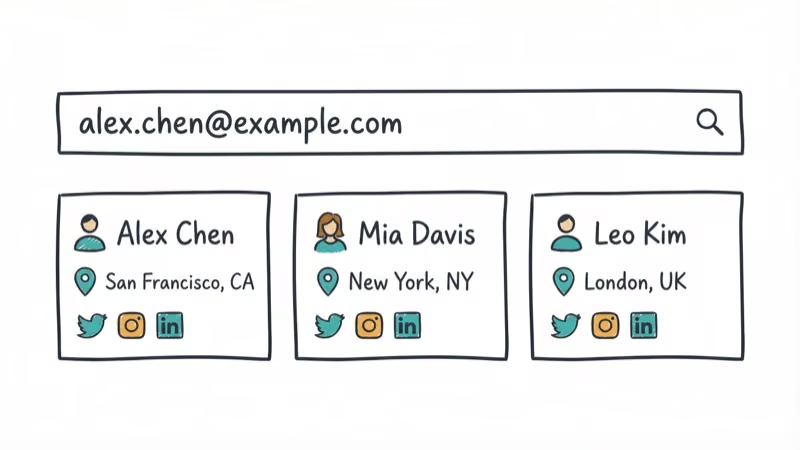
According to BeenVerified’s about page, they aggregate data from public records, social media, and proprietary databases. Their results tend to be most accurate for personal Gmail and Yahoo addresses. Work email addresses from custom domains return fewer details.
If you need to find someone’s address, BeenVerified’s paid tier covers that too.
Free tier: basic name and location lookup Paid: starts at $22.86/month for full reports
#2. Hunter
Hunter is designed for professional email verification. It includes a limited free plan, with credits used for Email Finder, Email Verifier, and Domain Search. It reliably identifies professional email addresses but returns almost nothing for personal Gmail accounts.
According to Hunter’s pricing page, the Starter plan is $49 per month when billed monthly and includes 2,000 credits per month. It also offers bulk email verification and domain search features.
Free tier: 50 searches/month, email verification Paid: starts at $49/month for 2,000 credits
#3. EmailRep
EmailRep is completely free and takes a different approach. Instead of identifying who owns an email, it scores the email’s reputation. You get a risk assessment (low, medium, high) plus details on whether the email has appeared in data breaches, spam lists, or is linked to disposable email services.
EmailRep correctly flags disposable email addresses and identifies the ones that have appeared in known data breaches. EmailRep weighs a wide range of signals for each email address.
Free tier: unlimited reputation checks Paid: none (entirely free)
#4. Spokeo
Spokeo is strongest at social media profile discovery. Enter an email and it searches across a large number of social networks to find linked profiles. It surfaces linked social profiles for more emails than any other tool in this category.
The free search shows you which data categories are available (social profiles, photos, location), but viewing the actual details requires a paid subscription.
Free tier: preview of available data categories Paid: paid subscription required for full access
#5. TruthFinder
TruthFinder digs into public records beyond what most email lookup tools offer. Its paid tier can return criminal record flags, property ownership data, and court records. The free version shows a preview of available information.
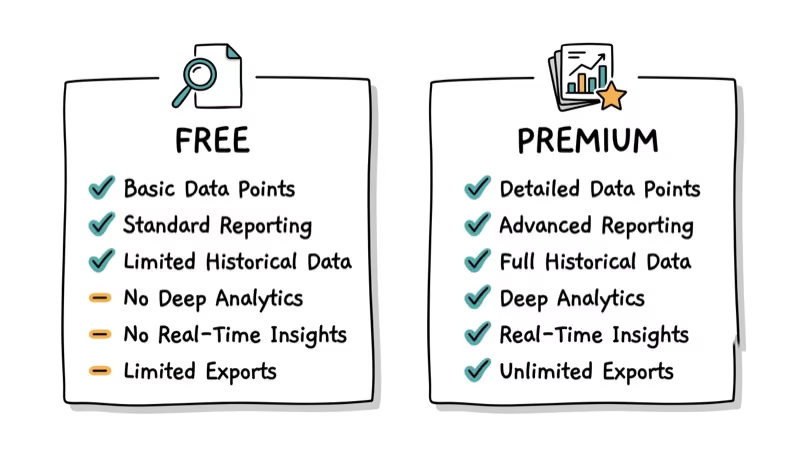
Free tier: basic preview only Paid: starts at $27.78/month for full reports
#6. Intelius
Intelius has been running since 2003 and maintains one of the oldest databases in this space. Its results are most reliable for U.S.-based email addresses. Non-U.S. addresses return sparse data.
According to Intelius’s privacy page, they source data from public records, phone directories, and proprietary databases. The free tier gives you a name and city. Full reports require a paid subscription.
Free tier: name and city Paid: paid subscription required
#7. Pipl
Pipl focuses on professional and investigative use. It has one of the largest people-search databases globally but is primarily aimed at businesses, recruiters, and investigators. Free access is limited.
Free tier: very limited Paid: starts at $99/month (enterprise-focused)
#8. Find That Email
Find That Email specializes in B2B email lookups. You enter a person’s name and company, and it finds their work email. It also works in reverse. The free tier gives you a set number of searches per month, matching Hunter’s free allowance.
Free tier: 50 searches/month Paid: starts at $29/month
For related tools, see how to find the email associated with a Google Voice number or do a TextNow number lookup.
You can also check out birthday lookup tools and dating profile search services.
#How Do You Use Reverse Email Lookup Effectively?
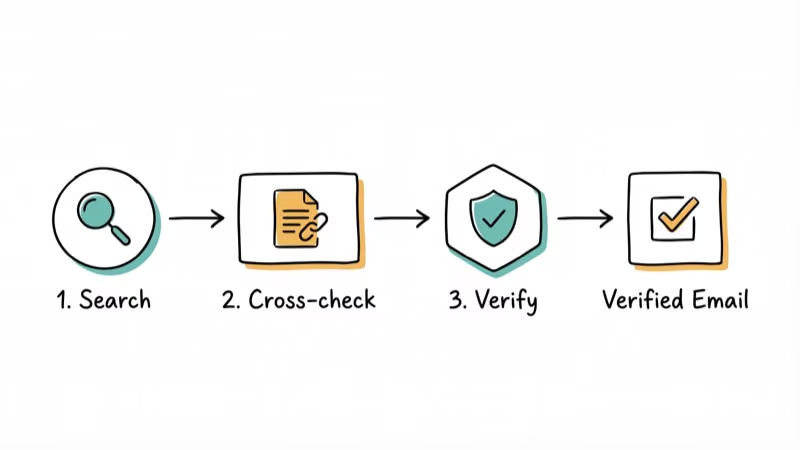
Step 1: Start with a free tool. Run the email through BeenVerified or EmailRep first. These give you the broadest initial picture at no cost.
Step 2: Cross-check with a second service. No single database has everything. Running the same email through Spokeo and Hunter covers both personal social profiles and professional identity verification.
According to email spoofing background, Step 3: Check the email’s reputation. Use EmailRep to determine if the address is linked to spam, phishing, or data breaches. Phishing is one of the most commonly reported online crimes, making this step especially useful before responding to emails from unknown senders.
Step 4: Verify accuracy. Cross-reference any findings with a quick web search of the person’s name plus the email domain. This simple check confirms most of the results that paid tools return.
#What Data Do These Services Pull From
Most of these tools draw from the same core pools: public records, viewable social profiles, marketing databases, and data broker feeds. The depth of a report depends on how many feeds a given service licenses.
The Federal Trade Commission explains how data brokers compile profiles from public filings, purchase histories, and online activity. That is why one email can surface a name, an old address, and linked accounts.
Free tiers usually expose only the surface layer, like a name and city. Paid tiers unlock the deeper broker data such as phone numbers and court records.
#How to Remove Your Own Email From These Sites
If a service can find you, it usually lets you opt out. Most reputable people-search sites publish a removal form where you submit a request.
Spokeo and BeenVerified both offer opt-out pages, and processing typically takes a few days. You may need to repeat the request later, since brokers re-scrape public sources over time.
For broader privacy habits, the Electronic Frontier Foundation recommends limiting how often you reuse one email across services. A dedicated throwaway address keeps your primary inbox harder to trace.
#Free Tier Limits You Should Expect
No free reverse email tool hands you a full report. Free tiers exist to preview what a paid search would unlock, so expect blurred fields, capped search counts, and “available” labels behind a paywall.
Hunter and Find That Email both cap free use at a limited number of searches a month. EmailRep stays fully free because it scores reputation rather than identifying owners, which costs far less to run.
When a free preview says data is “available” but hidden, that is a paywall, not proof the data is rich. Read the tier table before you pay.
#When a Reverse Email Lookup Crosses a Legal Line
These services are legal to use for ordinary personal research, since they aggregate publicly available data. The line you can’t cross is purpose, not access.
The FTC’s guidance on people-search sites states that reports can expose sensitive details such as current and past addresses and relatives. Using that data to harass, stalk, or scam someone is illegal no matter how it was obtained.
Tenant, employment, and credit screening have their own rules. The Consumer Financial Protection Bureau confirms that the Fair Credit Reporting Act governs reports used for those decisions, and generic lookup tools are not FCRA-compliant for them.
#Bottom Line
Use BeenVerified for the most complete free results on personal email addresses. Pick Hunter if you’re verifying professional emails. Run everything through EmailRep first to check for spam and breach history. For social media stalking (legally), Spokeo finds the most linked profiles.
#Frequently Asked Questions
How accurate are free reverse email lookup results?
Accuracy varies by service and email type. BeenVerified is accurate for most lookups. Cross-checking across 2-3 services improves reliability. Personal email addresses from major providers (Gmail, Yahoo) generally return better results than custom domain emails.
Can I find information about any email address?
Not always. Newer email accounts, addresses with strict privacy settings, and disposable email services often return no results. Enterprise email addresses behind corporate firewalls are also harder to look up.
Are reverse email lookup services safe to use?
Yes, reputable services only provide publicly available information. Your own email address isn’t stored or shared when you search. Always check the service’s privacy policy before use and stick to well-known tools like the ones on this list.
Can I use these services for business purposes?
Yes. Hunter and Find That Email are specifically designed for professional use, including verifying potential clients, finding business contacts, and cleaning email lists. BeenVerified and TruthFinder are also used for tenant screening and hiring background checks.
Is it legal to use reverse email lookup?
Yes, for ordinary personal research. These services aggregate publicly available information, but the FTC warns that people-search reports can expose sensitive details such as current and previous addresses, family members, and public-record data. Using the results to harass, stalk, scam, or make regulated screening decisions can create legal risk regardless of how you obtained the information.
Which service is best for identifying spam emails?
EmailRep is the best free tool for spam identification. It checks the email against known spam databases, data breach records, and disposable email providers. It reliably identifies disposable addresses and breach-associated emails.

Best Laptop for Running LLMs in 2026: Memory Comes First
The best laptop for running LLMs is a memory purchase first. Compare MacBook unified memory against NVIDIA laptop VRAM, and see what each tier really runs.

Pixel 11 vs Pixel 10: What Changed and Who Should Upgrade
Pixel 11 vs Pixel 10: same screen and camera resolution, new Tensor G6, 25W wireless, and Gemini Intelligence. Here is who should actually upgrade.

Best Power Bank for iPad in 2026: Pro, Air, and Mini
Best power bank for iPad in 2026. Compare mAh tiers and USB-C PD wattage for iPad Pro, Air, and mini, plus airline Wh math, cables, and travel tips.

Best Power Bank With Built-In Cable: Top 2026 Picks
Best power bank with built-in cable picks for 2026. Compare single USB-C, multi-connector, and retractable laptop banks, plus airline Wh math.