How to Prevent SIM Swapping: A Defensive Guide for 2026
Set a carrier port-out PIN, move two-factor authentication off SMS, and follow a first-hour recovery checklist if your own line gets swapped.
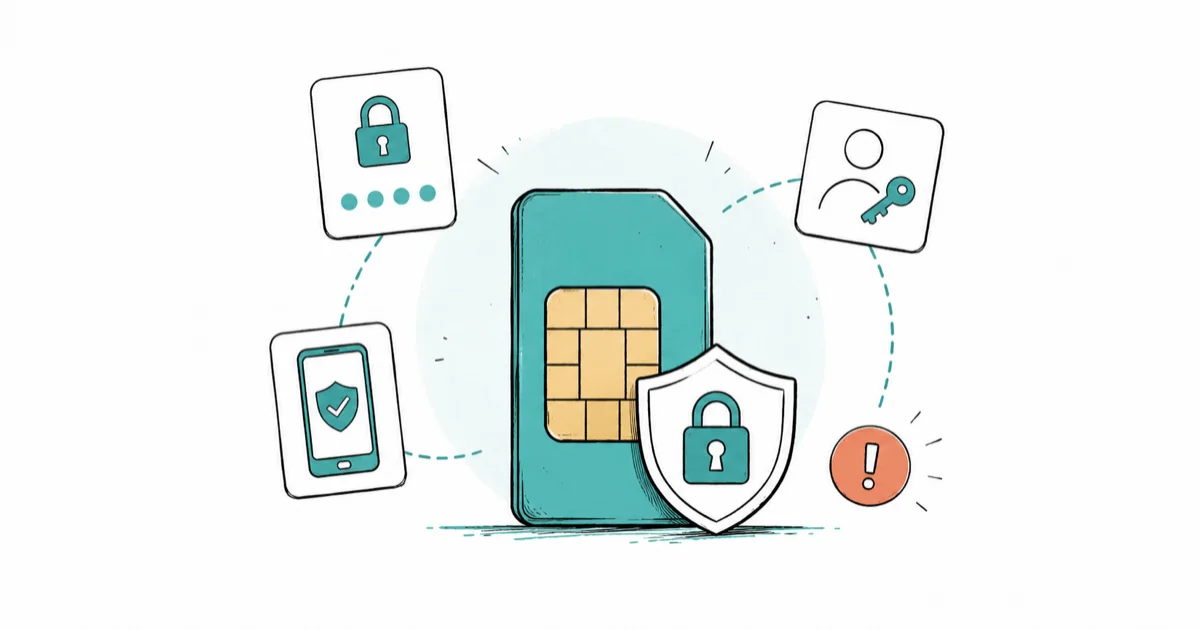
Quick AnswerSet a carrier port-out PIN with Verizon, AT&T, or T-Mobile, move SMS two-factor off to an authenticator app or passkey, and call your carrier the moment your phone loses service.
Learning how to prevent SIM swapping starts with one uncomfortable fact. Your phone number is a key to most of your accounts, and the carrier holds it. This guide stays strictly on the defender side.
- Set a carrier port-out PIN or Number Lock on your own line today. It’s the single biggest barrier between a stranger and your phone number.
- Move two-factor authentication off SMS for email, bank, and crypto accounts. Use an authenticator app or a passkey instead.
- A sudden loss of service when others nearby have signal, or a “No SIM” message you did not trigger, is the strongest early sign of a SIM swap in progress.
- In the first hour after a swap, call the carrier from another phone, freeze affected accounts, and file complaints with the FCC and FTC.
- The FBI treats SIM swapping as federal wire fraud. Reporting matters, both for your own case and for victim restitution programs.
#What Is a SIM Swap and Why It Matters
The attacker convinces your carrier to move your number to a SIM they control. The moment that transfer succeeds, your phone loses signal and your SMS codes land on their device, and the social engineering required to get there is the carrier’s problem to solve, not yours.
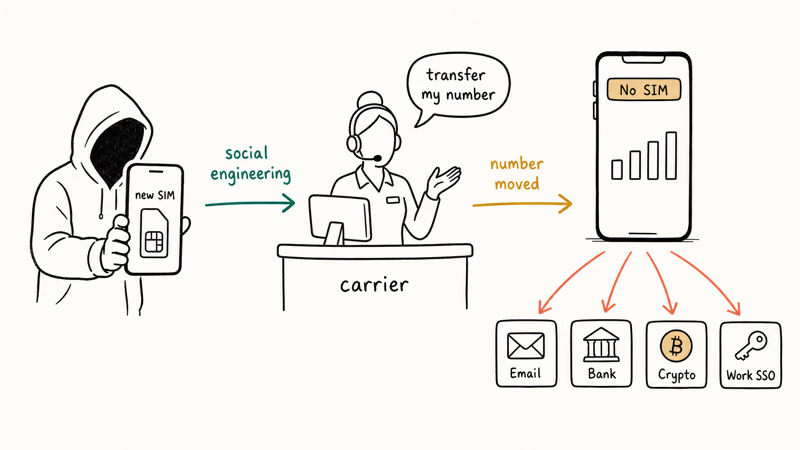
According to the FBI’s Internet Crime Complaint Center 2023 report, SIM-swap losses have been a recurring category every year since 2018, and the bureau now classifies the activity as federal wire fraud, which is what gives a complaint at ic3.gov real weight when you ask a bank for restitution later.
The danger isn’t lost service.
It’s what runs on top of your phone number. Many banks and crypto exchanges still default to SMS for second-factor verification, which means a single hijacked number can chain into bank login codes, email recovery, exchange confirmations, and work single sign-on, then out again into anything that lets a one-time code reset a password.
This guide describes how to protect your own line and your own accounts.
#What Are the Signs Your SIM Has Been Swapped?
Three signals show up in the first few minutes, and they show up together more often than people expect.
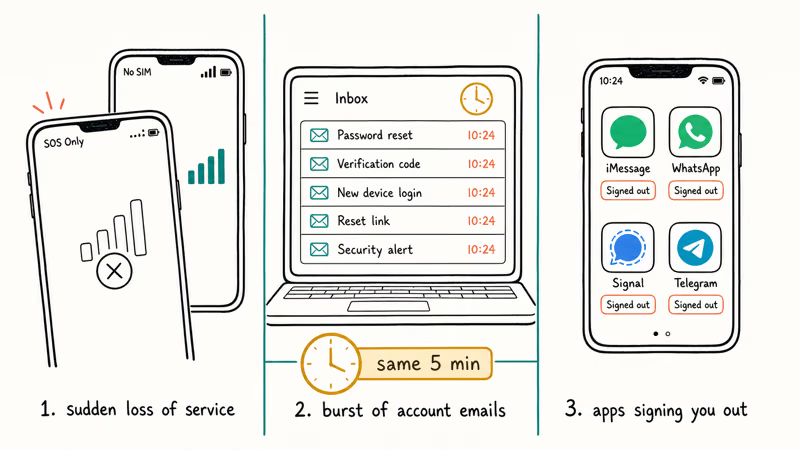
A sudden loss of cell service is the first. Your phone shows “No SIM,” “SOS Only,” or full bars that refuse to send anything, another phone next to you still has service, and this isn’t a flaky tower — it’s your number leaving your SIM.
Account-activity emails come next. Password reset links, “your verification code is” messages, and new-device login alerts arrive in clusters of five or ten within a minute. Each one corresponds to an account the attacker is trying to hijack with your number.
Apps signing you out is the third.
iMessage, WhatsApp, Signal, and Telegram all rely on your number for activation, so forced logouts on multiple apps at once within the same minute are not a coincidence — they’re a strong indicator that the number has already moved off your SIM.
If two of these signals fire in the same five minutes, treat it as a SIM swap in progress and skip straight to the first-hour checklist below. For broader compromise indicators outside SIM-swap scope, see our writeup on signs your phone has been compromised.
#Set a Port-Out PIN With Your Carrier
This is the most important defensive step. A port-out PIN, sometimes called a transfer PIN or Number Lock, is a separate code that your carrier requires before they will move your number off your line. It sits in front of your account password and acts as a second hurdle even when an attacker has every other detail about you.
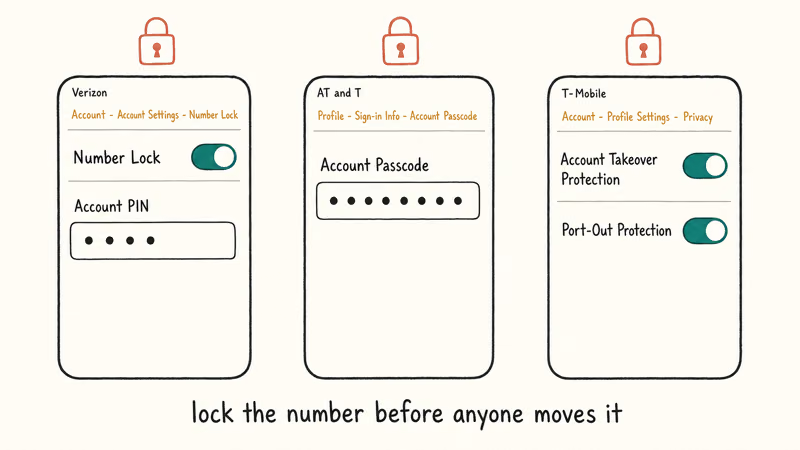
Set the PIN on your own line, from your own logged-in account, on your own carrier’s app or website. Don’t call to “verify” yours after reading this article. Set it yourself in the app.
#Verizon
On Verizon, the feature is called Number Lock. Open the My Verizon app or sign in to verizon.com, go to Account, then Account Settings, then Number Lock, and switch the toggle on for each line. Verizon’s official Number Lock FAQ confirms the lock blocks port-out requests until you turn it off yourself.
The Account PIN that Verizon also asks for during port-out is a separate four-to-six-digit code you set in the same Account Settings area.
#AT&T
AT&T calls it a Wireless Account PIN plus an extra Account Passcode.
The AT&T account passcode support page states that the passcode is required for any account change, including a number transfer. To set it, sign in to att.com or the myAT&T app, open Profile, then Sign-in Info, and pick Account Passcode. Use eight digits, don’t reuse a banking PIN, and write the value down somewhere offline because losing it locks you out of changes during an actual fraud event.
#T-Mobile
T-Mobile groups its protection under Account Takeover Protection and Port-Out Protection. T-Mobile’s Account Takeover Protection page recommends turning both on for every primary line.
Open the T-Mobile app and turn both on.
If voice is easier, dial 611 from the T-Mobile line and ask the rep to add Port-Out Protection. In the app, the toggles live under Account, then Profile Settings, then Privacy and Notifications, and the change takes effect within a few minutes on the underlying line database.
Prepaid lines, MVNOs, and business plans differ. Call from a different phone and ask for “port-out protection.”
A PIN doesn’t stop a swap if the attacker also compromises the carrier login itself, so pair it with a strong, unique password and an authenticator-app code on the carrier account, not SMS.
#Move Two-Factor Authentication Off SMS
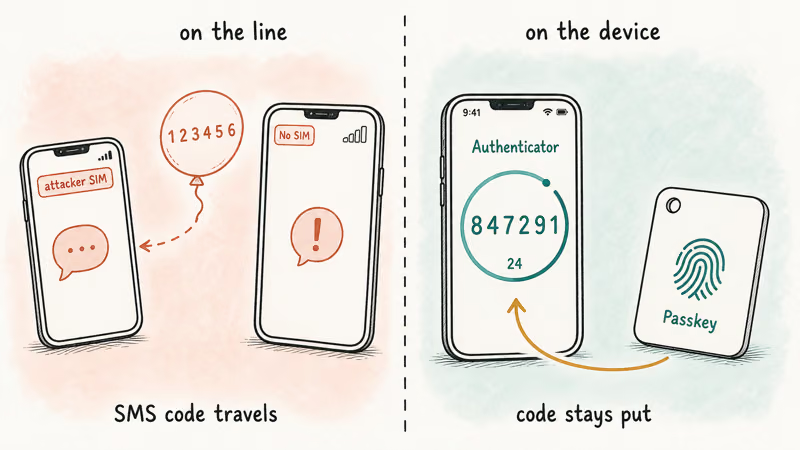
A port-out PIN reduces the chance of a swap. Moving 2FA off SMS reduces the value of a successful swap to almost zero. Each account you switch removes one room the attacker can walk into.
Start with the four account categories that matter most:
- Primary email. Gmail, iCloud Mail, Outlook. Whichever account other accounts use for password reset.
- Bank and brokerage. Each US bank and brokerage that touches your money.
- Crypto exchanges and wallets. Coinbase, Kraken, Binance.US, plus any non-custodial wallet that uses email or SMS for recovery.
- Work single sign-on. Your employer’s identity provider, usually Okta, Microsoft, or Google.
For each one, open security settings, remove the SMS phone number as a verification method, and add either a passkey or an authenticator app. The NIST Digital Identity Guidelines SP 800-63B restrict SMS to the lowest assurance level and recommend authenticator apps or hardware keys for any high-value account.
Authenticator apps generate codes on the device itself, so a SIM swap can’t intercept them. Passkeys go further: there’s no code to intercept at all.
We covered the trade-offs in passkeys vs SMS 2FA, and the iPhone walkthrough lives in set up passkeys on iPhone.
After you finish each account, log out of all sessions and log back in once with the new factor. This confirms the recovery path actually works before the SMS option is gone.
#Lock Down the Accounts Attackers Target First
Most SIM-swap attacks chase three things in roughly this order: your email, your money, and your identity.
Email is first because almost every other account uses it for password reset. Set the recovery method on your primary email to an authenticator app and a hardware key or passkey. Remove your phone number from the recovery list, or replace it with a secondary number on a different carrier that you only use for email recovery. Apple’s iCloud account recovery contact feature lets you set a trusted person who can vouch for you.
Money is second. Call your bank and ask whether you can require in-branch ID or a video call for any password reset or wire transfer above a threshold you set. Many banks now offer this as a free feature.
Identity exposure is third. It’s the slowest fix.
Attackers use details from data-broker sites to answer carrier security questions about you, so removing your information from the largest aggregators raises the cost of impersonation. We walked through this in remove your data from broker sites. The same logic applies if you also want to check if your email is on the dark web so you can rotate passwords on accounts that were already exposed.
#What Should You Do in the First Hour After a SIM Swap?
If two of the signs in the earlier section fire at once, work from this list in order. Speed matters more than perfection.
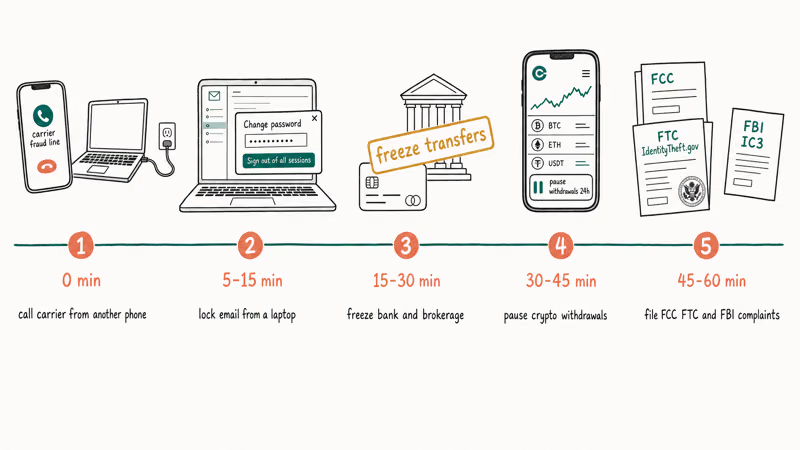
Minute 0–5. Use a different phone or a wired connection.
Don’t troubleshoot the dead phone. Call your carrier’s fraud line directly. The FCC consumer guide on SIM swap fraud lists the official carrier fraud numbers and the federal reporting path you’ll need for any later restitution claim.
Minute 5–15. Email next.
From your laptop, sign in to your primary email, change the password, remove any phone number as a recovery method, and sign out of all other sessions. If you can’t sign in because the attacker already changed the password, use the account-recovery link on the provider’s login page.
Minute 15–30. Log in to your bank and brokerage. Change passwords and disable SMS 2FA. If you see unfamiliar transfers in progress, call the bank’s fraud line and ask them to put a hold on outgoing transactions.
Minute 30–45. Do the same for crypto exchanges. Some exchanges will pause withdrawals for twenty-four hours after a reported takeover. Ask for that pause explicitly.
Minute 45–60. File a complaint with the FTC’s IdentityTheft.gov SIM swap report, then file a separate complaint with the FBI’s Internet Crime Complaint Center at ic3.gov. Save the case numbers. Banks and exchanges that consider restitution want to see federal complaint numbers on file.
Once the immediate sixty minutes are done, sit with a notebook and list every account that ever used the affected phone number for SMS recovery. Work down the list and replace SMS with an authenticator app or a passkey on each one. This step takes a weekend, not an hour, but it’s what stops the same attack from succeeding twice.
If you suspect the attacker also installed monitoring software on a device you still control, the indicators in spot phone monitoring software are a good follow-up.
#Bottom Line
Two actions, on your own carrier account, this week. Set the carrier port-out PIN or Number Lock with Verizon, AT&T, or T-Mobile in the next ten minutes. Then move 2FA off SMS for your email, bank, brokerage, and crypto accounts by the end of the week, using an authenticator app or a passkey.
Those two steps cut SIM-swap value to a stranger by an order of magnitude, and they cost nothing.
If a swap is already in progress, call the carrier fraud line from a different phone first, freeze your accounts second, and file the FCC and FTC complaints third. SIM swapping is federal wire fraud.
#Frequently Asked Questions
What is a SIM swap attack?
A SIM swap is a port-out fraud where someone convinces your carrier to move your phone number to a SIM card they control. Once the transfer succeeds, your phone loses signal and incoming SMS codes go to the attacker. They use those codes to take over email, bank, and exchange accounts that rely on SMS two-factor authentication. The FBI classifies it as federal wire fraud, and ic3.gov complaints carry investigative weight for restitution claims.
How do I set a port-out PIN with my carrier?
On Verizon, open the My Verizon app, go to Account Settings, and turn on Number Lock plus set an Account PIN. On AT&T, sign in to myAT&T, open Profile, Sign-in Info, Account Passcode, and set an eight-digit passcode. On T-Mobile, open the T-Mobile app, go to Profile Settings, Privacy and Notifications, and enable both Account Takeover Protection and Port-Out Protection.
Is an authenticator app safer than SMS 2FA?
Yes. Authenticator apps like Authy, Google Authenticator, and 1Password generate codes on the device itself, so a SIM swap can’t intercept them. NIST’s Digital Identity Guidelines restrict SMS to the lowest assurance tier and recommend authenticator apps or hardware keys for any high-value account.
What are the signs of a SIM swap?
Sudden loss of cell service while others nearby have signal is the strongest early sign. A “No SIM” or “SOS Only” message you didn’t trigger is another. A burst of account-activity emails, password reset links, and login alerts arriving on a secondary device within the same minute is the third. If two of those three fire together, treat it as a swap in progress and start the first-hour checklist.
What should I do right after a SIM swap?
Call your carrier’s fraud line from a different phone or a wired connection and ask them to freeze the line and reverse the transfer. Then change your primary email password from a laptop and disable SMS recovery. Freeze your bank accounts and crypto exchanges next. End the hour by filing complaints with the FCC, the FTC at IdentityTheft.gov, and the FBI’s IC3.
Does a port-out PIN protect my eSIM too?
Yes on the major US carriers. Verizon’s Number Lock, AT&T’s Account Passcode, and T-Mobile’s Port-Out Protection all apply to the line, not to the physical SIM. Transferring a line to an eSIM still counts as a port-out and still requires the PIN.
Can a SIM swap drain my bank account?
It can, which is why moving the bank account off SMS 2FA is the highest-priority defensive step. Many US banks will reverse fraudulent transfers reported within a short window, often the same business day, but the success rate drops sharply after that. Calling the bank’s fraud line during the swap itself, before the attacker triggers transfers, is the single most effective intervention. Federal complaint numbers from the FTC and FBI strengthen any restitution claim that follows.

Is This Bank App Real? Spot a Fake App on Your Home Screen
A bank app can land on your home screen from a web page with no install warning. Learn the checks that tell a real banking app from a phishing web app.

Passkeys Not Syncing Between iPhone and Windows? Read This
Passkeys not syncing between iPhone and Windows is by design, not a bug. Here is why iCloud passkeys skip Windows Hello and the three ways to fix it.

VPN Not Working on Snapdragon X? Why It Fails, How to Fix
Your VPN won't install or connect on a Snapdragon X Copilot Plus PC because Windows on ARM can't emulate the network driver. Here are the fixes that work.

How to Check If a Link Is Safe Before You Click It
Learn how to check if a link is safe with official-first steps: read the real domain, use the app instead, and treat scanners as a second opinion only.