How to Avoid Chargebacks on PayPal: A Seller Guide for 2026
Stop PayPal chargebacks before they hit your account. Learn the 10-day response rule, Seller Protection eligibility, and evidence that wins disputes.
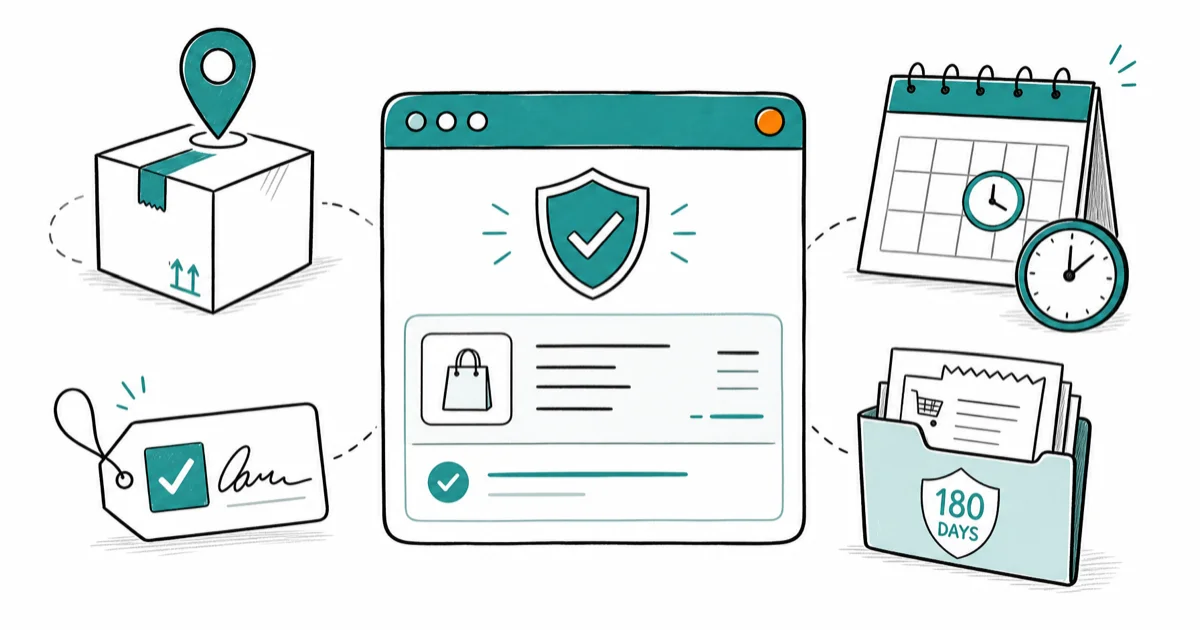
Quick AnswerTo avoid PayPal chargebacks, ship with tracked carriers and signature confirmation on orders over 250 dollars, respond to disputes within 10 days, and keep order records for 180 days. Enrolling in PayPal Seller Protection adds an extra safety net when buyers claim items were never received or payments were unauthorized.
A PayPal chargeback can pull money out of your account days after a sale ships, with the buyer’s bank making the call instead of PayPal. The fastest way to stop chargebacks is a paper trail that wins the dispute before it starts: tracked shipping, signature confirmation on higher-value orders, fast replies, and Seller Protection enrollment. This guide covers what triggers chargebacks, what evidence wins them, and the daily habits that keep your dispute rate near zero.
- PayPal sellers typically have 10 days to respond to a chargeback before the funds are pulled and the case is closed against them.
- Buyers can open a payment dispute in PayPal’s Resolution Center up to 180 days after the transaction date.
- Seller Protection covers two claim categories: unauthorized payment and item not received, but only when you ship to the address on the transaction.
- Signature confirmation is the single strongest defense against “item not received” disputes on orders above 250 dollars.
- A response inside 24 hours converts most buyer complaints into refunds or replacements before they escalate into formal chargebacks.
#What Are PayPal Chargebacks and Why Should They Worry Sellers?
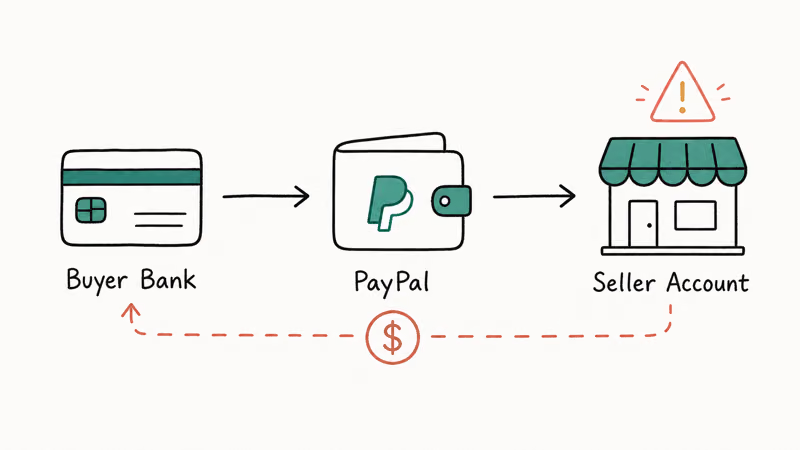
A chargeback happens when a buyer asks their card issuer to reverse a transaction. The issuer freezes the funds, contacts PayPal, and PayPal in turn pulls the money from the seller’s account while the case is reviewed. Unlike a PayPal dispute, which is handled inside the Resolution Center, a chargeback runs through the buyer’s bank network and follows card scheme rules.
According to Wikipedia’s chargeback overview, chargebacks were introduced in the United States in 1974 as a consumer-protection mechanism alongside the Fair Credit Billing Act. That history matters: the system is built to favor the buyer by default, so the burden of proof sits with you.
The real cost goes past the lost sale. PayPal charges a dispute fee per chargeback, and accounts with a high chargeback ratio risk reserves, account holds, or termination. Card networks generally treat a chargeback rate above 1 percent of monthly volume as a red flag.
Common chargeback triggers fall into five buckets:
- Unauthorized transactions (stolen card or account takeover)
- Item not received
- Item significantly not as described
- Duplicate or accidental charges
- Processing or authorization errors
#How Does PayPal’s Chargeback Process Actually Work?
When a buyer’s bank initiates a chargeback, PayPal opens a case in your Resolution Center and emails the seller. From that point, the clock starts. Here’s the order things happen in:
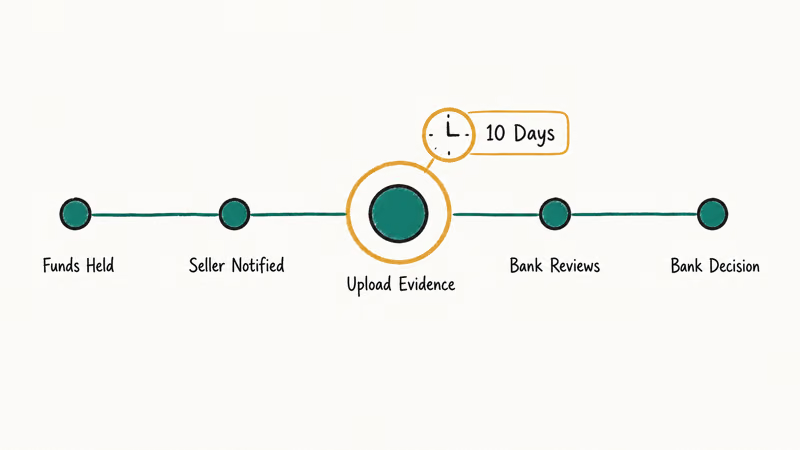
- PayPal flags the transaction and places the disputed funds on hold.
- The seller receives a notification with a deadline to respond.
- The seller uploads evidence (tracking, signed delivery, communication logs).
- PayPal forwards the seller’s evidence to the buyer’s bank.
- The bank rules in favor of one party, usually within 30 to 75 days.
PayPal’s chargeback help center confirms that the seller’s window to provide a response and evidence is typically 10 days. Miss the deadline and PayPal can’t fight the chargeback on your behalf, which almost always means a loss. The Resolution Center page shows the exact deadline for each open case, and you should treat that timestamp like a payroll deadline.
Win rates depend almost entirely on what’s in your evidence pack. Sellers who upload only an order screenshot lose most of the time; sellers who upload tracking with signature confirmation, the buyer’s shipping address match, and timestamped customer service logs win significantly more often.
#Ten Prevention Strategies That Stop Chargebacks Before They Start
1. Write product descriptions that match reality.
“Item not as described” is the second-most-common chargeback reason after fraud. Photos from at least three angles, exact measurements, and honest notes about wear or color variation cut down on this category fast. Don’t airbrush flaws out of listing photos. Describe condition with the same words a buyer would use in a complaint email.
2. Turn on PayPal’s built-in fraud filters.
PayPal recommends enabling its standard risk filters for any merchant account that takes card payments, including Address Verification Service (AVS) and Card Verification Value (CVV) checks. These flag mismatches between the cardholder’s billing address and the shipping address, which is the strongest single signal of a stolen-card transaction.
3. Reply quickly and consistently.
Most chargebacks start as a buyer complaint that didn’t get answered. A short reply within a business day, even one that says “this is being checked and you’ll hear back by Friday,” can prevent the escalation. Set a response queue so no complaint sits until it turns into a bank dispute.
4. Ship tracked, and require signature on higher-value orders.
For higher-value items, signature confirmation is non-negotiable: it produces a delivery record the buyer’s bank can’t wave away. Most carriers offer it as a small add-on. A signed delivery scan gives the buyer’s bank a cleaner record than basic tracking. If your category is electronics, jewelry, or collectibles, build the fee into pricing.
5. Keep transaction records for at least 180 days.
The 180-day window matches PayPal’s dispute filing limit. Keep the buyer’s confirmed address, order timestamps, full message thread, shipping label, tracking number, and proof of delivery in one place. A shared cloud folder per month is simpler than a database for most small sellers. Sellers running multi-channel sales might also consider how eBay compares to Poshmark before deciding which platforms to consolidate records on.
6. Publish a refund and return policy buyers can actually read.
A clear return window encourages buyers to refund through you, where you keep the relationship, rather than to chargeback through the bank, where you pay a fee and lose the goods. State the timeframe, the condition requirements, and whether shipping is buyer-paid in plain language. Post it on the listing page and inside the order confirmation email.
7. Verify before you ship anything unusual.
If an order looks off (mismatched billing and shipping, rush delivery on a brand-new account, gift-card-style buying patterns), pause it. A quick verification email or phone call costs five minutes. Shipping to a freight forwarder or a different state than the cardholder’s billing address is a classic fraud setup.
8. Enroll in and follow PayPal Seller Protection rules.
According to PayPal’s Seller Protection eligibility page, the program covers eligible transactions against 2 claim categories: unauthorized payment and item not received. Coverage requires shipping to the address on the transaction details, keeping proof of delivery, and meeting tangible-goods rules.
9. Communicate after the sale, not just before.
Send the order confirmation, the shipping notification with tracking, the delivery confirmation, and a polite “everything OK?” follow-up two days after delivery. Each of those touchpoints gives the buyer somewhere to raise an issue with you instead of with their bank.
10. Audit your chargeback history every month.
Pull a chargeback report on the first of each month and look for repeat patterns. Same product, same shipping zone, same buyer type? Adjust. If a particular SKU keeps producing “not as described” disputes, the listing is the problem, not the buyer.
#Responding to a PayPal Chargeback Step by Step
Speed matters more than polish. Here’s the response order that wins disputes:
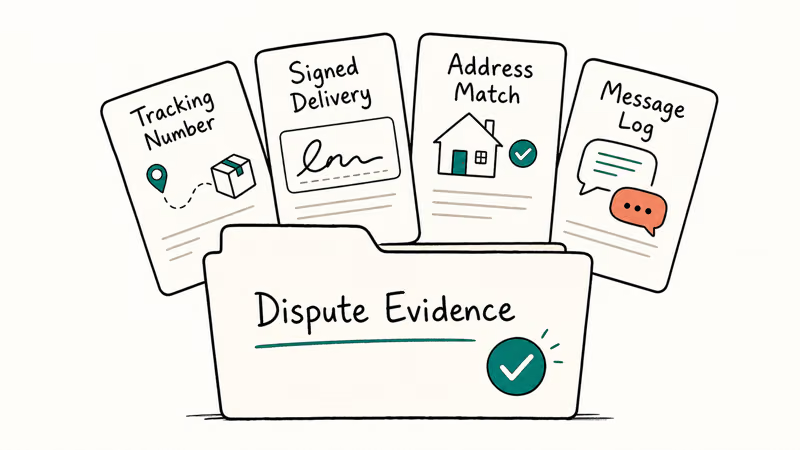
- Open the case in the Resolution Center the day you get the notification.
- Pull the buyer’s confirmed shipping address from the transaction details.
- Attach tracking, the delivery confirmation, and a signed proof of delivery if you required signature.
- Add a short, factual statement (200 words or less) explaining the order and noting Seller Protection eligibility if it applies.
- Upload screenshots of any pre-sale messages where the buyer confirmed the item and shipping address.
- Submit before the deadline shown in the Resolution Center, ideally 2 days early.
Avoid emotional arguments. The reviewer at the buyer’s bank reads dozens of cases a day and isn’t interested in fairness; they’re interested in whether the evidence matches the rules. State facts, link to evidence, stop. Suspicious orders linked to repeat disputers can also be blocked outright; PayPal supports blocking a buyer from your account once you’ve seen the pattern more than once.
#Closing the Gaps in PayPal Seller Protection Coverage
Seller Protection is the safety net most sellers under-use because they miss one of the eligibility rules. The big ones, per PayPal’s own documentation:
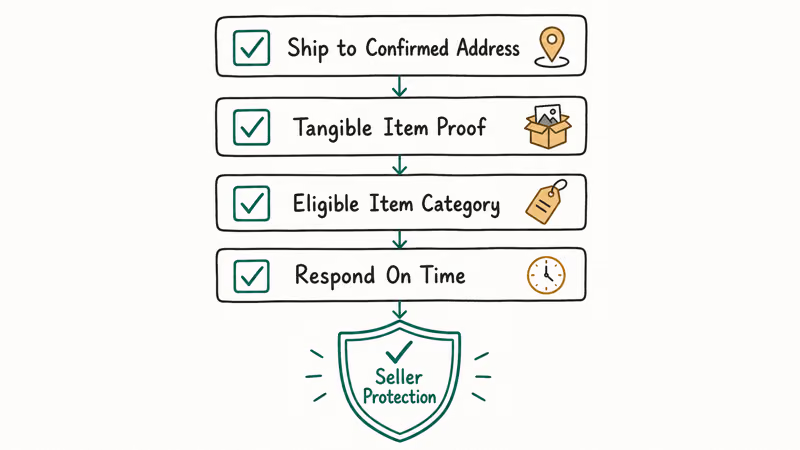
| Requirement | What it means | Common mistake |
|---|---|---|
| Ship to confirmed address | Use the address PayPal returns in the transaction | Shipping to an email request that overrides it |
| Tangible item proof | Tracking and proof of delivery | Digital-only goods (separate rules apply) |
| Single-item eligibility | Covered items are listed in the policy | Selling a banned category and assuming coverage |
| Respond on time | Hit the Resolution Center deadline | Treating notifications as low priority email |
Table 1. Core Seller Protection eligibility rules and the failure modes that knock sellers out of coverage.
Seller Protection won’t cover everything. Items shipped after the dispute opens, intangible goods in non-eligible categories, and orders where you ignored a fraud filter warning are typical exclusions. Read the program page once a quarter; PayPal updates the eligible item list and regional carve-outs without sending out push notifications.
#Common Chargeback Scenarios and What Wins Them
Item not received. The buyer claims the package never arrived. Win condition: tracking with a signed delivery scan to the address on the transaction, plus carrier GPS scans where available. High-value orders without a signature are usually losses, period.
Significantly not as described. The buyer says the product didn’t match the listing. Win condition: dated product photos taken before shipping, a clear listing description that accounts for any imperfections, and timestamped customer-service replies showing you offered a refund or replacement before the dispute opened. Sellers handling event tickets or memorabilia can borrow tactics from the StubHub seller fees and refund flow for setting expectations up front, since high-emotion categories generate disproportionate “not as described” complaints.
Unauthorized transaction. The cardholder says they didn’t approve the purchase. Win condition: AVS and CVV match at sale time, plus shipping to the cardholder’s billing address.
Duplicate transaction. The buyer claims they were charged twice. Win condition: PayPal transaction IDs for both payments showing different timestamps, items, or amounts. Banks rule against sellers who let real duplicates linger, so refund the second one immediately if it’s legitimate.
#Tools and Resources That Reduce Chargeback Risk
Beyond PayPal’s native tools, a few categories of software pay for themselves quickly once you’re past 20 chargebacks a year:
- Chargeback alert services (Verifi, Ethoca) intercept disputes from major card networks before they convert to chargebacks, giving you 24 to 72 hours to refund instead.
- 3D Secure authentication on your payment gateway shifts liability for “unauthorized transaction” chargebacks from the seller to the issuing bank.
- Address verification add-ons flag freight forwarders, prison addresses, and high-risk ZIP codes before you print a label.
Multi-platform sellers usually need to also juggle other payment apps. If you accept Venmo, here’s how to use a Venmo balance to pay for orders cleanly, and the reverse problem of unfreezing a Venmo account shows up often when buyers’ accounts get held mid-transaction.
If your business spans Apple Pay too, our Apple Pay setup guide covers the basic plumbing.
#Bottom Line
Do two things first. Require signature confirmation on every order above 250 dollars, and confirm Seller Protection eligibility before printing the label. Those changes alone close most of the chargeback risk for typical PayPal sellers without any new software or training. The third move that pays for itself within a month is a strict 24-hour reply policy on every buyer message, since the cheapest place to defuse a chargeback is the first complaint email.
If you sell low-margin, high-volume goods where the signature fee eats your unit economics, the alternative is to turn on AVS and CVV checks, ship only to confirmed billing addresses, and treat the residual fraud as a line item.
#Frequently Asked Questions
How long do I have to respond to a PayPal chargeback?
Ten days from the notification date. The exact deadline shows on the case in your Resolution Center, and missing it almost always means the case closes against you.
Can I prevent customers from filing chargebacks at all?
No, chargebacks are a card-network right you can’t waive in a terms-of-service clause. You can still cut their frequency dramatically by combining tracked shipping, signature confirmation on high-value orders, a clear refund policy posted on every listing, and a 24-hour customer service response standard. The goal isn’t zero chargebacks; it’s a chargeback-to-revenue ratio under the 1 percent threshold that triggers account reserves.
What evidence wins a PayPal chargeback dispute?
Tracking with delivery confirmation to the buyer’s confirmed address is the foundation. Add a signed delivery scan for higher-value items, AVS and CVV match records from the original payment, and timestamped customer-service messages showing you tried to resolve the issue before the dispute. Top it off with a short factual statement that ties each piece of evidence to the dispute reason.
How is Seller Protection different from regular chargeback coverage?
Seller Protection is a PayPal-specific program that reimburses eligible sellers for unauthorized payment and item-not-received claims.
Can I get banned from PayPal for too many chargebacks?
Yes. PayPal doesn’t publish a strict ratio, but card networks treat a chargeback rate above 1 percent of monthly volume as excessive, and PayPal mirrors that benchmark internally. Sellers who cross it usually see rolling reserves first, then limited functionality, and finally a termination notice if the ratio stays high. The right move is preventive: pull a monthly chargeback report and adjust listings or fraud filters before the ratio creeps up.
Does Seller Protection cover digital goods or services?
Sometimes. PayPal extended coverage to some intangible categories, but the proof requirements differ.
How long should I keep order records for chargeback defense?
At least 180 days to match PayPal’s dispute filing window, and ideally 12 to 18 months because card network chargebacks occasionally arrive after PayPal’s window has already closed.

Google Messages Error 3100: Why RCS Is Broken on Galaxy
Google Messages RCS error 3100 hits Galaxy owners after phone or carrier switches. Google told 9to5Google a fix is coming. Here's what actually helps.

Is This Bank App Real? Spot a Fake App on Your Home Screen
A bank app can land on your home screen from a web page with no install warning. Learn the checks that tell a real banking app from a phishing web app.

Apps Crashing After iOS 27 Update? Fix Order (2026)
Apps crashing after the iOS 27 update? Update the app in the App Store first, then offload and reinstall to clear stale cache, then restart. The fix order.

Do AI Translation Earbuds Work Offline? What to Know
Do AI translation earbuds work offline? A few do with downloaded language packs, but most need the cloud. Here's what works offline and what you give up.