Apple Pay Stores, Troubleshooting, and Setup (2026 Guide)
How to set up Apple Pay on iPhone and Apple Watch, the major US stores that accept it in 2026, plus fixes for pending and failed transactions.
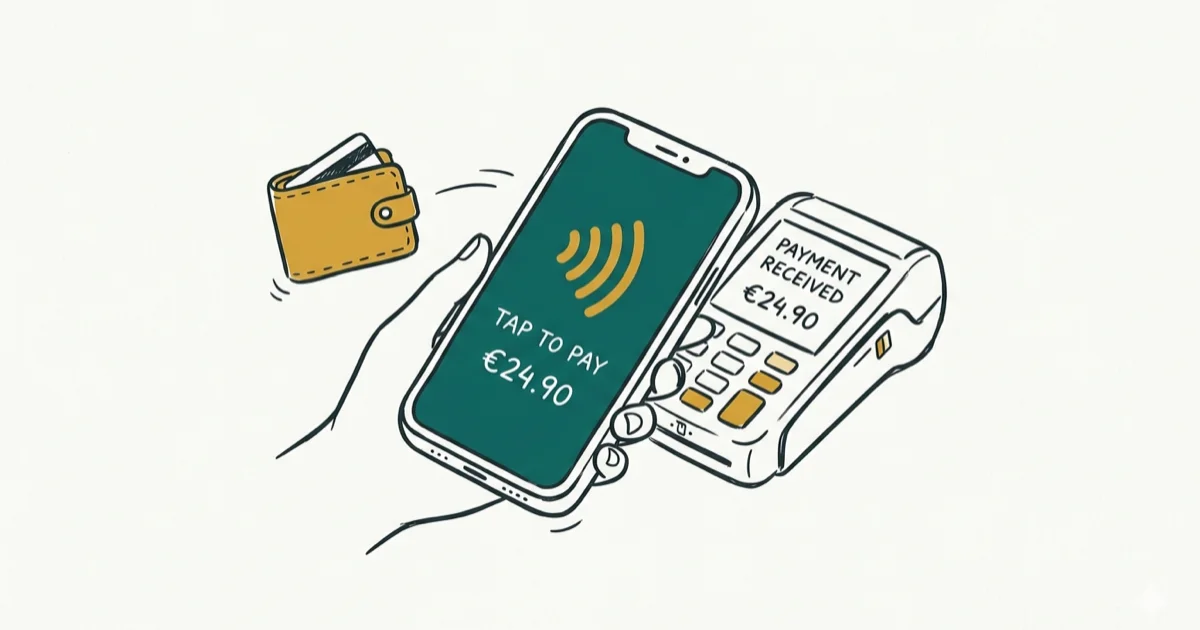
Quick AnswerApple Pay lets you tap an iPhone or Apple Watch against a contactless reader and authenticate with Face ID, Touch ID, or your passcode. Most major US retailers accept it; Kroger and H-E-B don't.
Apple Pay works at millions of US locations in 2026. Knowing which stores commonly accept it, how to set it up, and what to do when a tap fails saves real time at the register.
Store policies still change by franchise, pump, and terminal provider. Check for the contactless symbol at checkout before relying on Apple Pay as your only payment method.
- Add a card in the Wallet app, verify with your bank, then double-click the side button to pay at a contactless terminal
- Major grocery chains like Whole Foods, Albertsons, Safeway, Publix, Aldi, and Wegmans accept Apple Pay, but Kroger and H-E-B don’t
- Most fast food chains accept Apple Pay including McDonald’s, Starbucks, Subway, Taco Bell, and Chipotle, in-store and at drive-throughs
- Look for the four-curved-lines contactless symbol or the Apple Pay logo at checkout to confirm the terminal supports tap-to-pay
- If Apple Pay fails at a supported terminal, open Wallet and check that your default card has a green checkmark before switching cards, restarting, or blaming the reader
#How Do I Set Up Apple Pay?
Open the Wallet app on your iPhone, tap the plus button in the top-right corner, choose Debit or Credit Card, then either hold your physical card inside the camera frame or enter the details manually. Your bank verifies the card by text, email, or app push before Wallet marks it ready for payments.
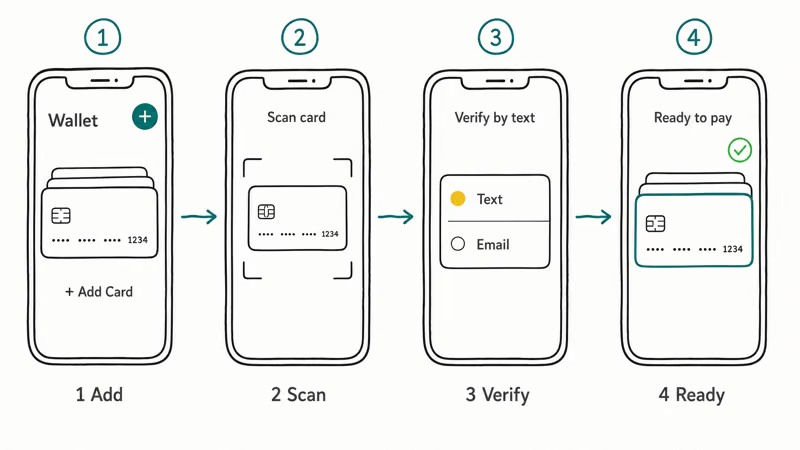
According to Apple’s Set up Apple Pay in Wallet on iPhone walkthrough, you can store up to 16 cards on iPhone XS or later, and the first card you add becomes the default for payments. Tap and hold any card in Wallet, then drag it to the top of the stack to change which one pays first.
To add the same card to an Apple Watch, open the Watch app on your paired iPhone, tap Wallet & Apple Pay, then choose Add Card.
If your Apple ID is grayed out when you try to add a card, that has to be fixed before Wallet will accept it. Our walkthrough on the Apple ID grayed out issue covers the five most common causes.
#How to Use Apple Pay In-Store
Hold your iPhone or Apple Watch near the contactless payment terminal, authenticate with Face ID, Touch ID, or your passcode, and wait for the checkmark.
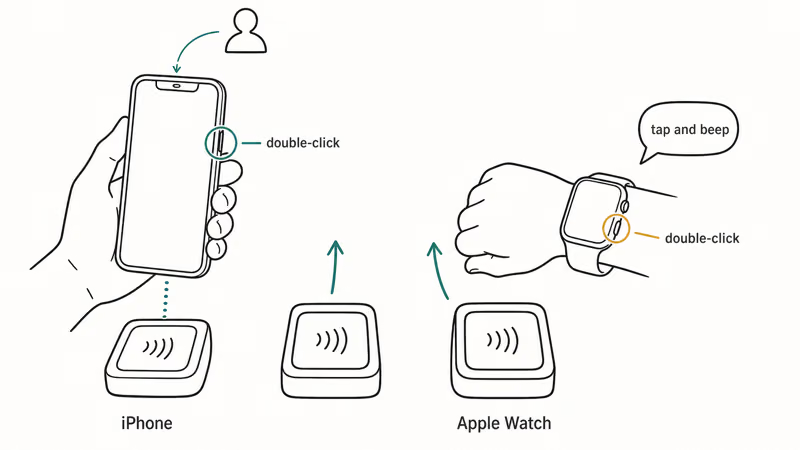
Apple’s Make purchases using Apple Pay guide recommends a specific sequence: double-click the side button on an iPhone with Face ID, glance at the screen, and hold the top of the phone within an inch of the reader. On an iPhone with Touch ID, double-click the Home button and keep your finger on the sensor while you tap.
On Apple Watch, double-click the side button, then hold the display face-down near the reader until you feel a tap and hear a beep.
Look for the contactless payment symbol (four curved lines) or the Apple Pay logo at checkout, and wait until the reader shows the amount before you authenticate. If you approve too early, some terminals cancel the token and force you to start over.
If you’re having trouble with Face ID during authentication, see our guide on fixing Face ID issues. Keep one physical card with you for travel days, because some older terminals still accept chip cards but reject NFC taps.
#Grocery Stores That Accept Apple Pay
Apple Pay support at major US grocery chains in 2026.
| Store | Apple Pay Accepted | Notes |
|---|---|---|
| Whole Foods | Yes | All locations |
| Albertsons | Yes | All locations |
| Safeway | Yes | All locations |
| Publix | Yes | All locations |
| Aldi | Yes | All US locations |
| Dollar General | Yes | Most locations |
| Dollar Tree | Yes | Most locations |
| Food Lion | Yes | All locations |
| Sprouts | Yes | All locations |
| Vons | Yes | All locations (Safeway-owned) |
| Wegmans | Yes | All locations |
| Harris Teeter | Yes | All locations |
| Kroger | No | Uses Kroger Pay instead |
| H-E-B | No | Uses its own payment system |
| Walmart | Not confirmed | Select-store Tap to Pay starts Aug. 24, 2026 |
| Sam’s Club | Not confirmed | Select-club Tap to Pay starts Aug. 24, 2026 |
According to Walmart’s August 21 announcement, Tap to Pay begins August 24, 2026, at select US Walmart stores and Sam’s Club locations for eligible contactless cards, phones, and smartwatches. Walmart plans to reach all US stores and clubs by the end of 2026, then fuel stations by mid-2027.
Google’s Google Pay announcement confirms Google Pay at the select US stores and clubs, but Walmart’s own announcement doesn’t name Apple Pay.
If a grocery cashier says Apple Pay is unavailable, ask whether the terminal supports contactless debit or credit. Some stores don’t advertise Apple Pay by name even when the same NFC reader accepts it, and self-checkout lanes sometimes get terminal updates before staffed lanes. When in doubt, try one tap and keep your physical card ready.
#Restaurants and Fast Food That Accept Apple Pay
Major US restaurant chains accepting Apple Pay.
| Restaurant | Apple Pay Accepted | Notes |
|---|---|---|
| McDonald’s | Yes | In-store and drive-through |
| Starbucks | Yes | In-store and in-app |
| Subway | Yes | All locations |
| Taco Bell | Yes | Most locations |
| Chipotle | Yes | In-store and in-app |
| Dunkin’ Donuts | Yes | All locations |
| Burger King | Yes | Most locations |
| KFC | Yes | Most locations |
| Wendy’s | Yes | Most locations |
| Popeyes | Yes | Most locations |
| Arby’s | Yes | Most locations |
| Dairy Queen | Yes | Most locations |
| Sonic | Yes | Most locations |
| Little Caesars | Yes | Select locations |
| In-N-Out | Yes | All locations |
| Wingstop | Yes | All locations |
| Zaxby’s | Yes | Most locations |
| Dutch Bros | Yes | All locations |
Drive-through support depends on whether the card reader can reach your phone safely. If the terminal is mounted inside the window, ask the employee to present the reader rather than handing over an unlocked iPhone.
#Retail Stores That Accept Apple Pay
Major US retail chains and pharmacies that accept Apple Pay.
| Store | Apple Pay Accepted | Notes |
|---|---|---|
| Target | Yes | In-store and in-app |
| Walgreens | Yes | All locations |
| CVS | Yes | All locations |
| Costco | Yes | All locations (added 2022) |
| Home Depot | Yes | All locations |
| Lowe’s | Yes | All locations |
| Sephora | Yes | All locations |
| Ulta Beauty | Yes | All locations |
| TJ Maxx | Yes | All locations |
| Marshalls | Yes | All locations |
| Ross | Yes | All locations |
| Kohl’s | Yes | All locations |
| Burlington | Yes | Most locations |
| AutoZone | Yes | All locations |
| Barnes & Noble | Yes | All locations |
| Bath & Body Works | Yes | All locations |
| PetSmart | Yes | All locations |
| Petco | Yes | All locations |
| Michaels | Yes | All locations |
| Hobby Lobby | No | Cash, debit, and credit only |
For mall retailers, acceptance can differ between the main checkout counter and mobile point-of-sale devices used by floor staff. Try the main register first if a handheld reader rejects Apple Pay.
#Gas Stations That Accept Apple Pay
Many gas stations now accept Apple Pay at the pump or inside:
- Shell (at pump and inside)
- ExxonMobil (via Speedpass+ app and at pump)
- Chevron (at most locations)
- BP (at pump and inside)
- Speedway (all locations)
- Wawa (at pump and inside)
- 7-Eleven (at most locations)
- Circle K (at most locations)
If the pump doesn’t have Apple Pay, go inside instead — most gas station convenience stores have NFC-enabled terminals. At the pump, wait for the screen to ask for payment before double-clicking the side button. Starting Wallet too early can time out before the pump is ready to read the NFC token.
#Online and Delivery Services
Apple Pay support across popular online and delivery platforms.
| Service | Apple Pay Accepted | Notes |
|---|---|---|
| DoorDash | Yes | In-app payment option |
| Amazon | Limited | Apple Pay on amazon.com via Safari only, not in Amazon app |
| SHEIN | Yes | In-app and website |
#Getting Cash Back with Apple Pay
Yes, you can get cash back with Apple Pay at stores that offer cash back on debit purchases. Select “cash back” when prompted at checkout. Target, Walgreens, CVS, and many grocery stores that accept Apple Pay support it.
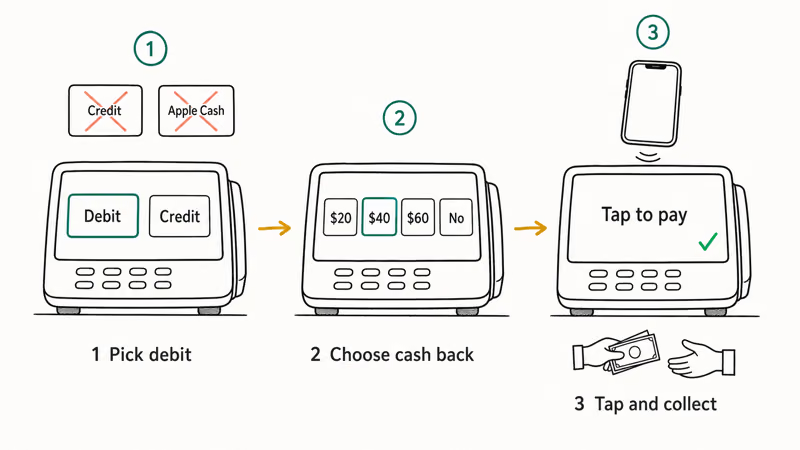
Kroger is the exception. Its terminals reject Apple Pay entirely, so use Kroger Pay or a debit card to get cash back at Kroger.
Cash back only works with a debit card linked to Apple Pay, never with a credit card. Apple Cash, which lives only on iPhone and Apple Watch, can’t trigger a cash back option at any retail terminal, and credit-linked transactions are treated as purchases without any cash component. Cashier override is rare; if the first attempt is refused, switch to a debit card before retrying.
#Can You Use Apple Pay at an ATM?
Yes, many ATMs now support cardless withdrawals using Apple Pay. Major banks with NFC-enabled ATMs include Bank of America, Chase, Wells Fargo, and Capital One. Look for the contactless symbol on the ATM, hold your iPhone or Apple Watch near the reader, authenticate, and follow the on-screen prompts.
If the ATM asks for your physical card after the tap, cancel and use another machine. That usually means the terminal advertises contactless support but your bank hasn’t enabled cardless withdrawal on that ATM.
#How to Add PayPal to Apple Pay
You can’t directly add PayPal as a payment method in Apple Pay. Your options are:
- Use a PayPal Cash Card (Mastercard debit) — add it to Apple Wallet like any other card.
- Use PayPal’s own contactless payment through the PayPal app’s built-in NFC feature.
- Transfer PayPal funds to your bank, then use your bank’s debit card through Apple Pay.
#What Do You Do When Apple Pay Fails?
Here’s how to fix the most common Apple Pay problems.
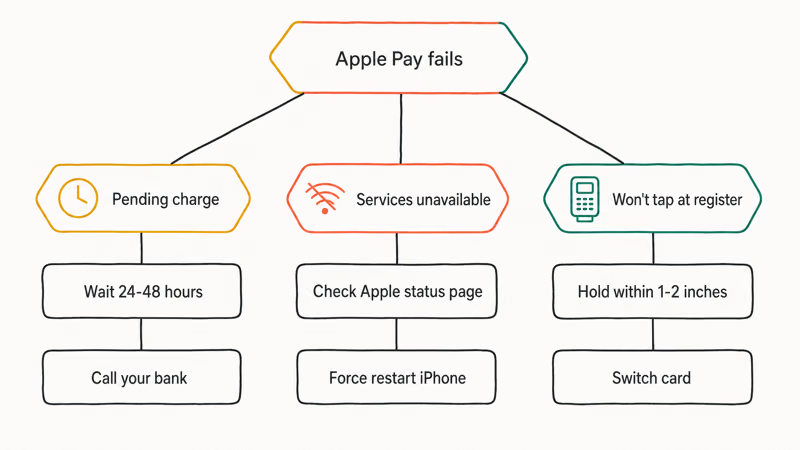
#Apple Pay Pending Transaction
If your Apple Pay transaction shows as “pending”:
- Wait 24-48 hours. Most pending transactions clear automatically.
- Check with the merchant. The store may not have processed the charge yet.
- Verify your card. Open the Wallet app and make sure your card shows a green checkmark.
- Contact your bank. If pending for more than 3 days, call your card issuer.
Gas station pre-authorizations, restaurant tips added later, and weekend processing delays are the most common causes. According to Apple, authorization holds typically clear within 24 to 48 hours and aren’t completed payments yet, so your final receipt is what counts. See the Apple Pay transactions FAQ for the official explanation.
#Apple Pay Services Currently Unavailable
If you see “Apple Pay Services Are Currently Unavailable”:
- Check Apple’s System Status at apple.com/support/systemstatus
- Force restart your iPhone by pressing Volume Up, Volume Down, then holding the Side button until the Apple logo appears
- Re-add your card by removing and re-adding it in Wallet settings
- Update iOS in
Settings>General>Software Update - Reset network settings in
Settings>General>TransferorReset>Reset>Reset Network Settings
If your Apple ID is grayed out and you can’t access Wallet, that has to be cleared first. As noted in Apple’s Wallet troubleshooting guide, an unverified or disabled Apple ID blocks Wallet card operations entirely, so the system status check above won’t help until your account is active again.
#Apple Pay Not Working at Checkout
If Apple Pay won’t work at the terminal:
- Confirm the store accepts Apple Pay. Look for the contactless symbol.
- Hold your phone closer. Keep it within 1-2 inches of the terminal.
- Switch cards. Open Wallet and select a different card.
- Restart your device. If your iPhone is restarting on its own first, see our guide on why an iPhone keeps restarting before retrying the payment.
- Check for Apple ID verification issues if you recently changed your password.
#How to Get Money Back If Scammed via Apple Pay
If you sent money to a scammer through Apple Pay:
- Contact your bank immediately. Report the unauthorized transaction.
- File a dispute. Request a chargeback through your card issuer.
- Report to Apple. Contact Apple Support at support.apple.com.
- File a police report. For significant amounts, file a local report.
- Report to FTC. File a complaint at reportfraud.ftc.gov.
Apple Pay person-to-person payments (Apple Cash) work like cash, so they’re harder to reverse than store purchases. Act quickly for the best chance of recovery. You may also want to verify your Apple ID to ensure your account hasn’t been compromised.
#Is Apple Pay Safe to Use?
Yes. According to Apple’s Apple Pay security and privacy overview, your real card number is never stored on the device or shared with merchants. Each transaction uses a unique Device Account Number that lives only inside the Secure Element chip, paired with a one-time dynamic security code generated just for that purchase.
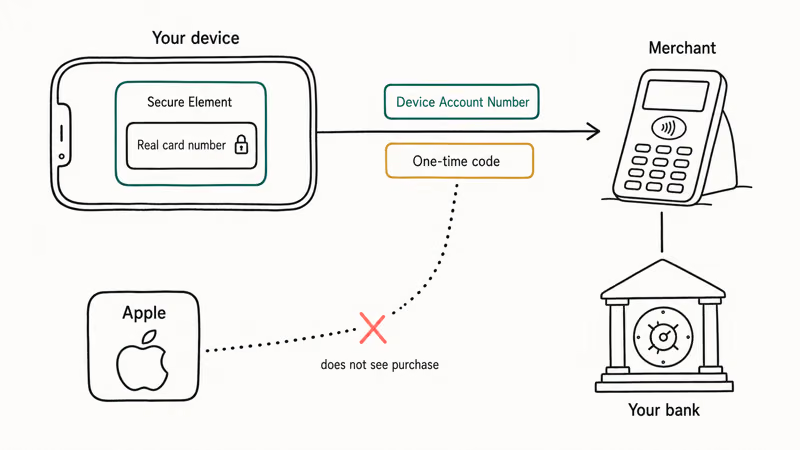
Apple itself doesn’t see what you bought, where you bought it, or how much you paid. That data stays between you, the merchant, and your bank. If you lose your iPhone, you can suspend Apple Pay remotely from iCloud.com without canceling the underlying card. For person-to-person payments through Apple Cash, treat them like physical cash: once sent to someone you don’t recognize, recovery is much harder than a regular store purchase.
#Bottom Line
Apple Pay works at the vast majority of US retailers, restaurants, and gas stations in 2026. Setup happens in the Wallet app, and in-store payments work through NFC contactless terminals.
If a transaction fails, check your card in Wallet for the green active-card checkmark first, then restart your device before assuming the terminal is broken. Kroger and H-E-B remain the biggest grocery holdouts, and Hobby Lobby still refuses Apple Pay entirely. For online purchases, Apple Pay works through Safari on iPhone and Mac, but not yet inside the Amazon app.
#Frequently Asked Questions
Does Costco accept Apple Pay?
Yes. Costco has accepted Apple Pay at all US locations since 2022, both in the warehouse and at the gas pump.
Does Kroger accept Apple Pay?
No. Kroger pushes its own Kroger Pay app, though Kroger-owned Fred Meyer and QFC accept Apple Pay.
Why don’t some stores accept Apple Pay?
Retailers set their own payment policies, and the reason isn’t always public. Check the retailer’s current policy or look for the Apple Pay logo at checkout; a contactless symbol alone doesn’t confirm that the retailer has named Apple Pay as a supported wallet.
Can I use Apple Pay without internet?
Yes. In-store NFC payments don’t require an active internet connection. Your iPhone stores the payment credentials locally, and the transaction data syncs to your bank when you reconnect.
How do I add a card to Apple Pay?
Open the Wallet app, tap the plus button, and follow the prompts to scan or manually enter your card. Your bank verifies the card before it becomes available for Apple Pay. To swap which card pays by default or remove an old one, see how to change payment method on iPhone.
Can I get a refund through Apple Pay?
Yes. Refunds for Apple Pay transactions go back to the same card you used. The merchant processes the refund, and it typically appears in your Wallet within 3-5 business days.
Does Apple Pay work at drive-throughs?
Yes. Most fast food drive-throughs with NFC terminals accept Apple Pay. Availability still depends on the location’s terminal setup and whether staff can present the reader safely.
What countries does Apple Pay support?
Apple Pay is available in more than 80 countries and regions, including the US, Canada, UK, most of the EU, Australia, Japan, and China. Features vary by region. For example, Maestro cards work in Italy for in-store payments but not in apps. Check Apple’s country list inside the Wallet app under your card details for the current local rules.

Apple Siri Settlement: Who Qualifies and How to Claim
Apple's $250 million Siri settlement covers iPhone 15 Pro and iPhone 16 models bought June 2024 to March 2025. See who qualifies and how claims work.

iOS 26.6.1 Security Update: What Apple Fixed and Who Gets It
Apple released iOS 26.6.1 on August 17 with 29 security fixes, including an IPSec interception bug. See what it patches, who gets it, and how to update.

iPhone Adaptive Power: How It Works and When to Use It
Learn how iPhone Adaptive Power works, which models support it, what it changes, and when Low Power Mode is still the better battery-saving choice.

How to Transfer Data to a New iPhone Without iCloud
Move everything to your new iPhone without iCloud: Quick Start device-to-device transfer, wired migration, and encrypted Finder or iTunes backups.