Run VirtualBox or VMware on Snapdragon X? What Works in 2026
VMware Workstation does not run on Snapdragon X. Use VirtualBox 7.2 (Arm guests only) or Hyper-V. No x86 VMs on ARM Windows. Full 2026 guide.
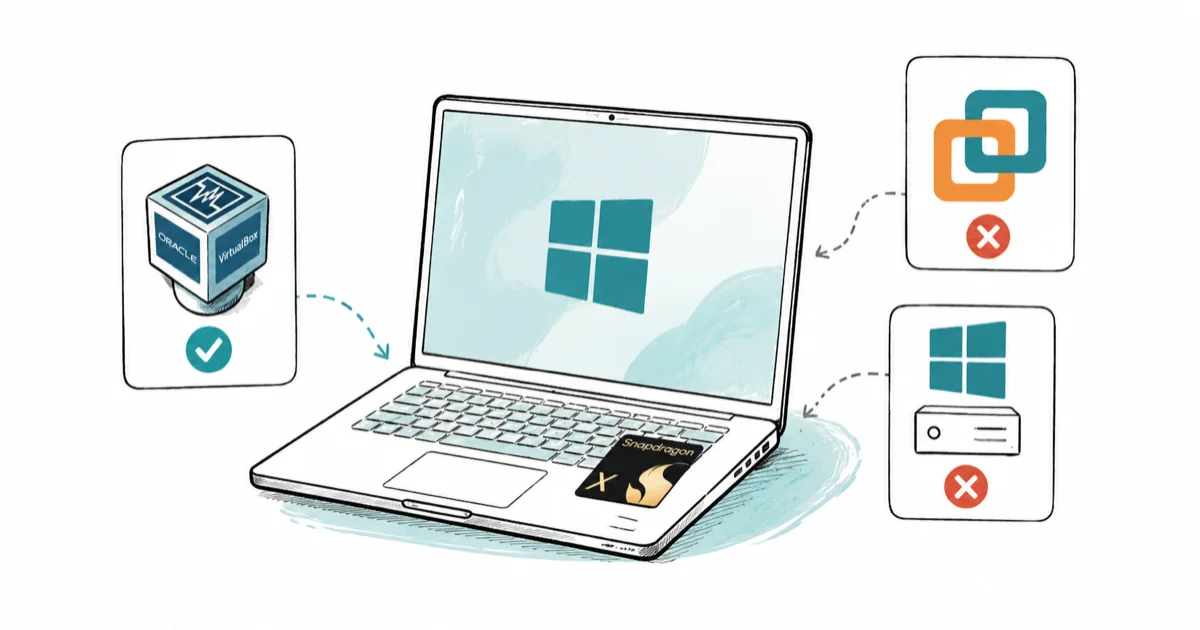
Quick AnswerVMware Workstation does not run on Snapdragon X because it has no ARM build. Your real options are VirtualBox 7.2 (Arm hosts, Arm guests only) and Hyper-V, neither of which can run an x86 VM on ARM Windows.
Want to run VirtualBox or VMware on a Snapdragon X laptop? Here’s the part most pages bury: VMware Workstation has no ARM build, and you can’t run an x86 virtual machine on ARM Windows at all. The tools that work are VirtualBox 7.2 and the built-in Hyper-V, and both are limited to Arm guest operating systems.
- VMware Workstation Pro has no ARM build, so it won’t install on Snapdragon X devices.
- VirtualBox 7.2 added an experimental Windows on Arm host, but it runs Arm guests only.
- x86 VMs won’t boot on an Arm64 host in either VirtualBox or Hyper-V.
- Hyper-V is built into Windows 11 Pro and Enterprise, with nothing to download.
- For most people, Hyper-V is the steadier choice and VirtualBox is the cross-platform one.
#Why Won’t VMware Workstation Run on Snapdragon X?
VMware Workstation Pro is an x86-only product. It has never shipped a build compiled for ARM, so the installer either refuses to run or throws an unsupported-CPU error on a Snapdragon X machine. According to a [Microsoft Q&A thread on the unsupported-CPU prompt](https://learn.microsoft.com/en-au/answers/questions/5738261/getting-an-unsupported-cpu-prompt-on-arm-laptop-(v), “VMware Workstation Pro 25H2 is not supported on an ARM CPU, only the VMWare Fusion software is supported on ARM.”
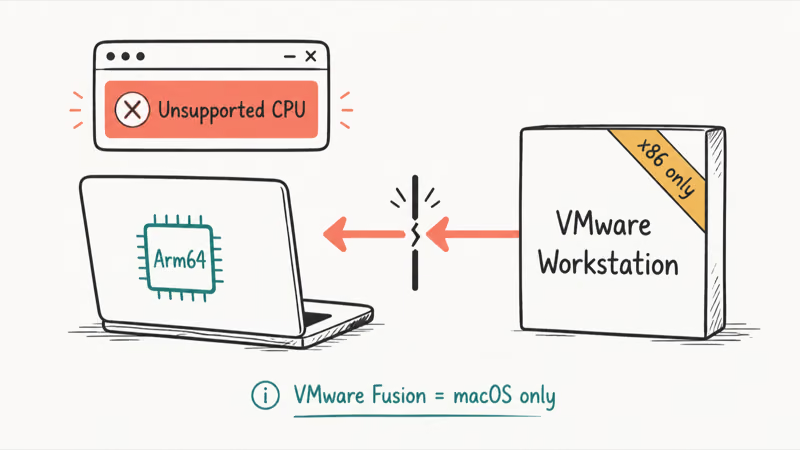
That last point trips people up. VMware Fusion does support Arm, but it runs only on macOS for Apple Silicon. Any forum post saying “use Fusion” means a Mac.
The fix isn’t a workaround. It’s switching tools. If you only need VMware because a course or a coworker uses it, the disk images themselves often open in other hypervisors, so you may not be stuck after all.
#Does VirtualBox Work on Snapdragon X?
Yes, but only with VirtualBox 7.2 or newer, and only for Arm guests. Oracle extended the installer to cover ARM Windows in this release. The VirtualBox 7.2 release notes state that the package now includes “hosts running Windows 11 on an Arm64 processor, as an experimental feature.”
Experimental is the key word here. The same release notes confirm this path “is not covered by Oracle Premier Support.” Treat it as a test setup, not a production tool.
Skip the older releases entirely. Earlier VirtualBox versions, including the long-running 6.x line, have no ARM host support at all, so the installer either refuses or leaves you with a hypervisor that has nothing to attach to on an Arm64 chip.
The guest side has a hard wall too. Oracle’s release notes confirm that x86_64 virtual machines simply won’t run on an Arm64 host. So your existing x86 VirtualBox appliances won’t boot here. What does work: installing Windows 11 as an Arm guest, which the release notes list as a new ability with guest additions available.
With VirtualBox 7.2, a Windows 11 on Arm guest requires an arm64 ISO. Expect it to feel slower than a native install, even when it installs correctly.
If you also work on a Chromebook or want to compare hypervisor setups, our walkthrough on installing Chrome OS in VirtualBox covers the same app on a different host. And if you’re weighing whether a VM is even the right call, the trade-offs in our guide to the benefits and drawbacks of virtualization apply directly to ARM laptops, where the x86 limitation changes the math.
#Setting Up Hyper-V on Snapdragon X
Hyper-V is the option most Snapdragon X owners overlook, even though it ships inside Windows. It’s built in as an optional feature with no separate download. There’s one catch: edition.
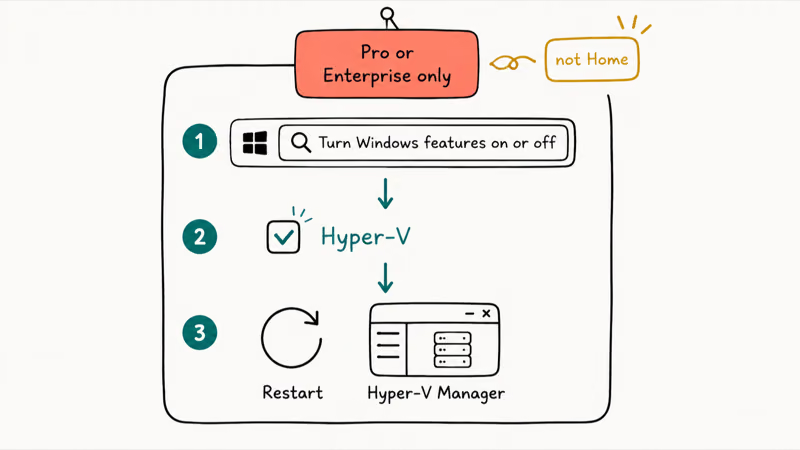
The Microsoft Learn install guide for Hyper-V lists “Windows 11 (Pro or Enterprise)” as a requirement and states that “The Hyper-V role can’t be installed on Windows 10 Home or Windows 11 Home.” Many Copilot+ laptops ship with Windows 11 Home, so check Settings > System > About first.
If you have Pro or Enterprise, turning Hyper-V on takes three clicks:
- Open the Start menu and type Turn Windows features on or off, then open it.
- Check the box next to Hyper-V and click OK.
- Restart when prompted, then open Hyper-V Manager from the Start menu.
Once it’s running, the same Arm-only rule applies. Microsoft’s Arm Learning Path for Hyper-V states that “Arm virtual machines on Windows with Hyper-V require Windows 11 version 22H2 or newer.” You’ll need an Arm ISO, not the standard x86 download, to install any guest.
#What These VMs Can Actually Run
The honest answer reshapes most people’s plans. Here’s the breakdown by guest type rather than by hypervisor.
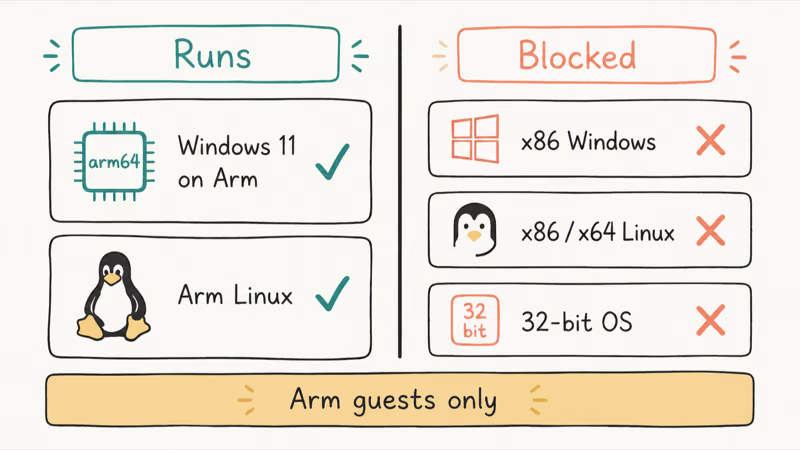
What runs in a VM on Snapdragon X by guest OS type
| Guest OS | VirtualBox 7.2 | Hyper-V | Notes |
|---|---|---|---|
| Windows 11 on Arm | Yes | Yes | Needs an arm64 ISO |
| Arm Linux (Ubuntu, Fedora) | Yes | Yes | Use the arm64 build |
| x86 Windows (any) | No | No | Architecture mismatch |
| x86 / x64 Linux | No | No | Architecture mismatch |
| 32-bit OS | No | No | Not supported on Arm hosts |
So the practical guest list is short: a second Windows 11 on Arm, or an Arm Linux build. That covers sandboxed testing, a clean dev environment, or trying a Linux distro without dual-booting. It does not cover the most common reason people install a VM, which is running an x86 operating system.
Nesting x86 emulation inside an Arm guest isn’t a dependable substitute for a real x86 VM.
#Running Old x86 Apps Without a VM
If your goal was to run an old x86 Windows program in a VM, virtualization is the wrong tool on ARM. Windows on Arm already has a built-in x86 and x64 emulation layer, so much legacy software runs directly.
The app compatibility on Windows on ARM breakdown explains which programs run natively, which lean on emulation, and which still break. For most “I just need this one old app” cases, that emulation layer beats spinning up a VM you can’t even create on Arm hardware.
#Choosing a Snapdragon X Laptop for Virtualization
Any current Snapdragon X or Snapdragon X Elite chip can run Hyper-V and VirtualBox 7.2, so the deciding factors are RAM and which generation you buy. VMs are memory-hungry. A 16GB machine fills up fast once a guest claims its share, and a 32GB machine makes Arm Linux and ARM Windows guests far more comfortable. For a closer look at the silicon, our explainer on the Snapdragon X2 Elite covers what the newer generation changes for heavier workloads.
If you’re still choosing a chip family, it helps to see how these stack up against the competition. Our comparison of Snapdragon X versus Intel Core Ultra versus AMD Ryzen AI is worth a read, because the x86 platforms keep full VMware and x86-VM support that ARM simply doesn’t have. That single difference is often the tiebreaker for anyone who relies on x86 virtual machines daily.
#Bottom Line
Skip VMware Workstation on Snapdragon X entirely. It has no ARM build, and there’s no Fusion for Windows on Arm to fall back on.
If you have Windows 11 Pro or Enterprise, enable Hyper-V first, since it’s free, built in, and the most stable path for an Arm Windows or Arm Linux guest. Reach for VirtualBox 7.2 instead when you need the same hypervisor across a Mac, a Linux box, and your Snapdragon laptop. Whichever you pick, plan around Arm-only guests and lean on Windows on Arm’s built-in emulation for old x86 apps.
#Frequently Asked Questions
Can I run a regular x86 Windows VM on Snapdragon X?
No. Both VirtualBox 7.2 and Hyper-V on Snapdragon X can only run Arm guest operating systems. Oracle’s release notes confirm that x86_64 VMs won’t run on an Arm64 host, and the same limit applies to Hyper-V. You’d need an x86 PC for x86 virtual machines.
Is there any version of VMware that works on Snapdragon X?
Not for Windows. VMware Workstation Pro has no ARM build, and VMware Fusion, which does support Arm, runs only on macOS for Apple Silicon. There’s currently no VMware desktop hypervisor for Windows on Arm devices.
Why does the VirtualBox or VMware installer say my CPU is unsupported?
That error means you’re running an x86-only installer on an Arm processor. For VMware Workstation there’s no ARM version to install at all. For VirtualBox, you need version 7.2 or newer, which is the first release to include an experimental Windows on Arm host package.
Do I need Windows 11 Pro for Hyper-V on Snapdragon X?
Yes. Microsoft’s documentation lists Windows 11 Pro or Enterprise as a requirement, and the Hyper-V role can’t be installed on Windows 11 Home. Many Copilot+ laptops ship with Home, so check your edition in Settings before counting on Hyper-V.
Can I run Linux in a VM on a Snapdragon X laptop?
Yes, as long as you use the arm64 build of your Linux distribution. Arm versions of Ubuntu and Fedora install fine in both VirtualBox 7.2 and Hyper-V. The standard x86/x64 Linux ISOs won’t boot on an Arm host.
What about running old x86 apps without a VM?
Windows on Arm includes a built-in emulation layer that runs many x86 and x64 apps directly, no VM required. For a single legacy program, this is usually faster and simpler than trying to set up a virtual machine, which can’t run an x86 guest on ARM anyway.
Will future Snapdragon chips support x86 VMs?
There’s no sign that they will. The x86-guest limit comes from the CPU architecture difference, not a missing feature, so a newer Snapdragon X2 Elite faces the same wall. If you depend on x86 VMs, an Intel or AMD laptop remains the safer bet.

Bluetooth Not Working on Snapdragon X? Fixes for 2026
Bluetooth not working on your Snapdragon X Copilot+ PC? Generic audio, mice, and keyboards work, but vendor apps often lack an ARM build. Fixes inside.

Docker Desktop and WSL2 Not Working on Snapdragon X? Fix It
WSL2 runs fine on Snapdragon X, but Docker Desktop ARM is Early Access and throws WSL errors. Use WSL2 plus native ARM64 Ubuntu and Docker Engine.
Does iTunes Work on Snapdragon X? ARM Windows 11 Guide
Yes, iTunes runs on Snapdragon X laptops through Prism emulation, but the Apple Devices app is the smoother route. Here is what to install on ARM.
Does OBS Studio Work on Snapdragon X? ARM64 Build Guide
Yes, OBS Studio has an experimental ARM64 build since version 31.1, but x64 plugins won't load and hardware encoding is missing. Here is what works.