Apple Intelligence vs Windows Copilot: The 2026 Face-Off
Apple Intelligence vs Windows Copilot in 2026: Apple is more polished on M1+ Macs, Windows reaches more hardware and Office. Which OS AI fits you.

Quick AnswerApple Intelligence is more polished and tightly integrated into macOS today, running on any M1 or later Mac. Windows Copilot reaches far more hardware and ties into Office, but its on-device exclusives need a 40-TOPS Copilot+ PC. Apple wins on integration, Windows wins on reach.
Apple Intelligence vs Windows Copilot is the first real Mac-versus-Windows AI fight, and in 2026 the two platforms have clearly different strengths. Apple’s on-device AI is more polished and more tightly woven into macOS, and it runs on any M1 or later Mac. Windows Copilot reaches far more hardware and plugs deep into Office, but its best on-device features are gated behind a 40-TOPS Copilot+ PC.
So the honest summary is a trade. Apple wins on integration today. Windows wins on reach.
- Apple Intelligence runs on-device on any Mac with an M1 chip or later, macOS Sequoia 15.1, and 7GB of free storage
- Windows Copilot+ exclusives need an NPU rated 40 TOPS or higher, plus 16GB RAM and 256GB storage
- The base Copilot chatbot runs on any Windows 11 PC, so Windows reaches far more existing machines
- Apple Intelligence is more polished and consistent across Apple’s apps today; Windows has broader hardware reach
- Apple keeps more work on the device, while Windows splits between local NPU features and cloud Copilot
#How Apple Intelligence Works on the Mac
Apple Intelligence is Apple’s on-device AI layer built into macOS. According to Apple’s Apple Intelligence requirements page, it runs on any “Mac with M1 or later” on macOS Sequoia 15.1 or later, and the on-device models download to the machine after you update. It needs 7GB of free storage for those models.
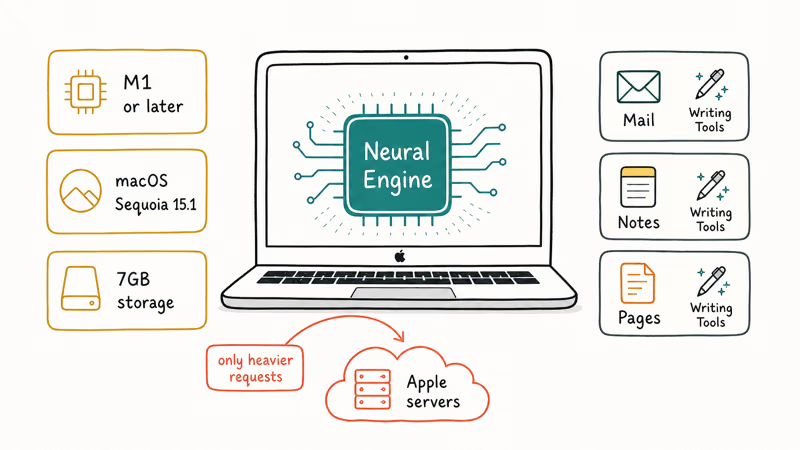
The design philosophy is local-first. Writing Tools, summaries, and image cleanup run on the Mac’s Apple silicon when they can, and only heavier requests reach Apple’s servers. The feature set ships as one update across Apple’s apps, so the same rewrite tool shows up in Mail, Notes, and Pages, and it behaves identically in each, which is what makes the experience feel so consistent compared to the patchwork on other platforms.
That consistency is Apple’s edge. The features are fewer than Windows offers, but they behave the same way everywhere in the OS. Apple’s Neural Engine does the same job here that the NPU does on a Windows machine, and our explainer on what an NPU actually does covers that shared role.
#How Windows Copilot Works
Windows Copilot is really two things, and that split matters. The base Copilot chatbot runs on any Windows 11 PC through the cloud, so almost every Windows machine already has it. The on-device exclusives are separate.
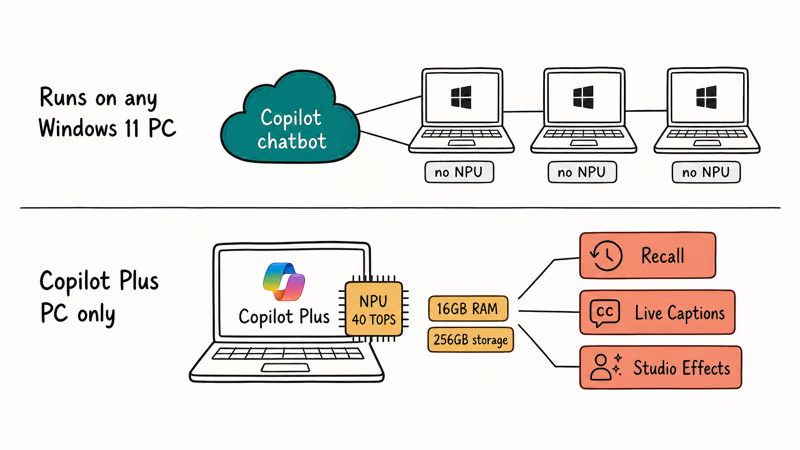
Microsoft’s Copilot+ PCs differences page states that the on-device features need an NPU “capable of at least 40 TOPS,” plus 16GB of RAM and 256GB of storage. Those exclusives include Recall, Live Captions with translation, and Windows Studio Effects, which run on the NPU. Our Copilot+ PC features list breaks down which feature needs the NPU and which runs anywhere.
So Windows reaches wider but splits the experience: Copilot everywhere, local AI only on certified hardware.
#Which One Is More Polished Today?
Apple Intelligence is the more polished and consistent experience right now. Tom’s Guide’s reviewer, who tests PCs for a living, concluded in their Apple Intelligence vs Windows Copilot piece that Apple’s integration already edges out Windows Copilot for everyday use. The ecosystem continuity, where a draft started on iPhone finishes cleanly on the Mac, is the part Windows can’t easily match.
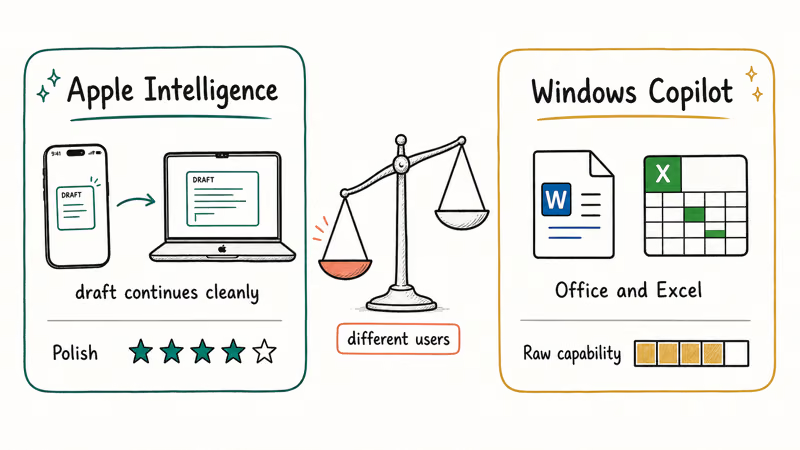
Windows isn’t behind on everything, though. On heavier productivity work, Copilot’s tie-in to Office and its stronger handling of Excel data give it the lead. That distribution advantage is hard for Apple to match.
The practical split is that Apple feels more finished at the OS level, while Windows Copilot has more raw productivity reach through Office. They’re tuned for different users.
#How Each One Handles Your Data
Privacy is where the two philosophies diverge most. Apple’s documentation states that the on-device models download to the Mac and run locally, sending only heavier requests off the device. That local-first stance means a lot of your text and content never leaves the machine.
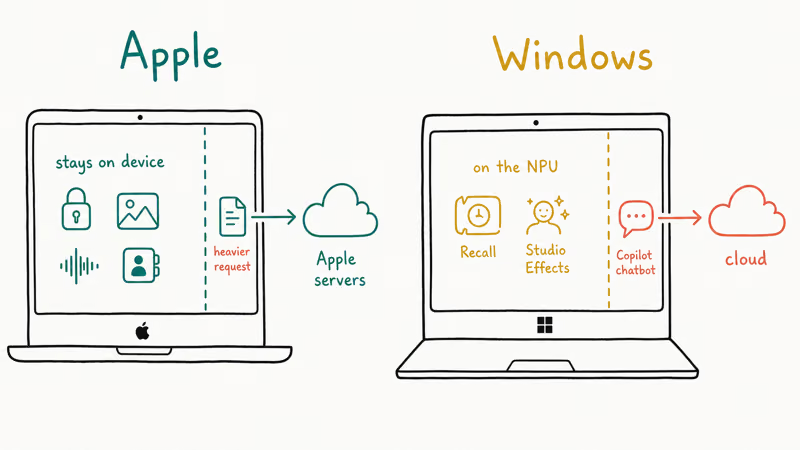
Windows takes a split approach. The on-device Copilot+ features, like Recall and Studio Effects, run locally on the NPU, but the main Copilot chatbot processes your prompts in the cloud. So where your data goes depends on which feature you’re using. Recall-style local features and cloud Copilot queries follow different data paths, so the privacy profile depends on the feature you’re using.
For privacy-focused users, Apple’s broader local processing is the easier story to trust. Windows gives you local AI too, just not for everything.
#The Hardware Each One Reaches
Windows wins reach by a wide margin. The base Copilot chatbot runs on any Windows 11 PC, which is hundreds of millions of existing machines, no NPU required. Apple Intelligence, by contrast, draws a hard line at M1 silicon, so older Intel Macs are simply out.
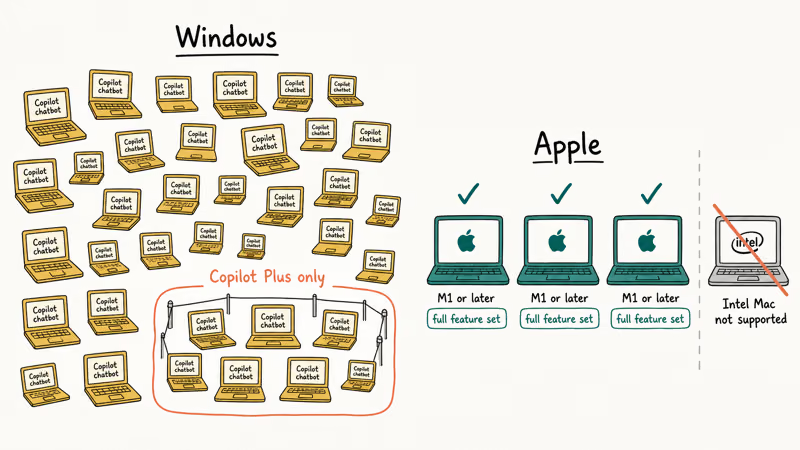
The catch is the Windows on-device tier. To get Recall or Studio Effects, you need a Copilot+ PC. So Windows reaches everyone with the chatbot but gates the local features.
Apple’s situation is the reverse. Its hardware base is narrower, but every supported Mac gets the full Apple Intelligence feature set with no extra tier to buy. There’s no second purchase to access the good stuff, the way a Copilot+ PC works on the Windows side. If you want a deeper hardware comparison, our MacBook vs Copilot+ PC guide lays out the silicon side by side.
#Which Should You Choose?
Pick by the ecosystem you already live in. If your phone is an iPhone and your laptop is a Mac, Apple Intelligence is the smoother, more consistent choice, and any M1 or later Mac runs it today.
If you’re on Windows, you already have Copilot, and the question is whether the on-device exclusives are worth a Copilot+ PC. For Office-heavy work, Copilot’s productivity tie-ins are the real draw. Our guides on whether you need an AI PC and what a Copilot+ PC is help you weigh that upgrade.
#Bottom Line
Choose Apple Intelligence if you’re already in Apple’s ecosystem, since it’s the more polished, more integrated experience and runs on any M1 or later Mac without a special tier. Choose Windows Copilot if you want the widest hardware reach or live in Office, because the chatbot runs on any Windows 11 PC and the Office tie-ins are stronger. Match the AI to the platform you already use, and don’t switch ecosystems just for it.
AI PCs and Copilot+ Laptops
#Frequently Asked Questions
Is Apple Intelligence better than Windows Copilot?
For polish and ecosystem integration, most reviewers give Apple Intelligence the edge in 2026. It feels more consistent across Apple’s apps. Windows Copilot has more raw capability for productivity and Office work, so the better choice depends on what you do and which ecosystem you’re in.
What devices can run Apple Intelligence?
Apple Intelligence runs on any Mac with an M1 chip or later, on macOS Sequoia 15.1 or newer, with 7GB of free storage. It also works on iPhone 15 Pro and iPhone 16 models and newer iPads. Older Intel Macs are not supported at any macOS version, since the feature needs the Neural Engine on Apple silicon.
Does Windows Copilot need a Copilot+ PC?
No, not for the basic chatbot. It runs on any Windows 11 PC through the cloud. You only need a Copilot+ PC with a 40-TOPS NPU for the on-device exclusives like Recall.
Which keeps more data on the device?
Apple Intelligence keeps more work local by design, running many features on the Mac’s Apple silicon and sending only heavier requests to Apple’s servers. Windows splits its experience: the local NPU features run on the device, but the main Copilot chatbot runs in the cloud.
Can I use both Apple Intelligence and Windows Copilot?
Yes, if you own both a Mac and a Windows PC. Each runs only on its own platform, with no app that bridges them.
Does Apple Intelligence work on Intel Macs?
No. Apple Intelligence requires Apple silicon, starting at the M1 chip. Intel-based Macs can’t run it at all, regardless of the macOS version installed. This is a hard hardware cutoff, not a software limit.
Is Windows Copilot good for Office work?
Yes, this is one of its strongest areas. Copilot ties directly into Microsoft 365, helping with drafting in Word, analyzing data in Excel, and summarizing email. That deep Office integration is a clear advantage over Apple Intelligence for document-heavy and spreadsheet-heavy users.

Best Laptop for Running LLMs in 2026: Memory Comes First
The best laptop for running LLMs is a memory purchase first. Compare MacBook unified memory against NVIDIA laptop VRAM, and see what each tier really runs.

How to Run a Local LLM on Windows: A 2026 Setup Guide
Run a local LLM on Windows with LM Studio or Ollama. Pick a model that fits your GPU memory, keep every prompt offline, and skip the monthly bill.

Bluetooth Not Working on Snapdragon X? Fixes for 2026
Bluetooth not working on your Snapdragon X Copilot+ PC? Generic audio, mice, and keyboards work, but vendor apps often lack an ARM build. Fixes inside.

Docker Desktop and WSL2 Not Working on Snapdragon X? Fix It
WSL2 runs fine on Snapdragon X, but Docker Desktop ARM is Early Access and throws WSL errors. Use WSL2 plus native ARM64 Ubuntu and Docker Engine.