Copilot+ PC Features List: Every Exclusive, Explained (2026)
The full Copilot+ PC features list for 2026: Recall, Cocreator, Live Captions, Click to Do, Studio Effects, and which need the 40-TOPS NPU vs any PC.

Quick AnswerCopilot+ PC exclusives include Recall, Cocreator and Photo Restyle in Paint, Live Captions with translation, Click to Do, Windows Studio Effects, and improved on-device search. They run locally and need an NPU rated 40 TOPS or higher. Regular Copilot chat runs on any Windows 11 PC.
Copilot+ PCs unlock a set of on-device AI features that ordinary Windows 11 laptops don’t get. The headliners are Recall, Cocreator, Live Captions with translation, Click to Do, and Windows Studio Effects. This guide lists every exclusive, says what each one does, and draws the line between features that need the 40-TOPS NPU and features any PC already has.
The split matters when you’re shopping. Plain Copilot chat works everywhere. The features below are the ones that actually justify the Copilot+ badge.
- Copilot+ exclusives run on-device and require an NPU rated at least 40 TOPS, plus 16GB RAM and 256GB storage
- The core exclusives are Recall, Cocreator, Photo Restyle, Live Captions with translation, Click to Do, and Windows Studio Effects
- Regular Copilot chat is NOT exclusive; it runs on any Windows 11 PC through the cloud
- Recall is optimized for six languages today: English, Chinese, French, German, Japanese, and Spanish
- Live Captions translates speech from 40+ languages into English captions, all on the device
#What Counts as a Copilot+ PC Feature?
A Copilot+ feature is one that runs locally on the NPU and stays locked unless your laptop clears the certification bar. According to Microsoft’s Copilot+ PCs differences page, that bar is an NPU “capable of at least 40 TOPS,” paired with 16GB of RAM and 256GB of storage, on a machine running Windows 11 version 24H2 or newer.
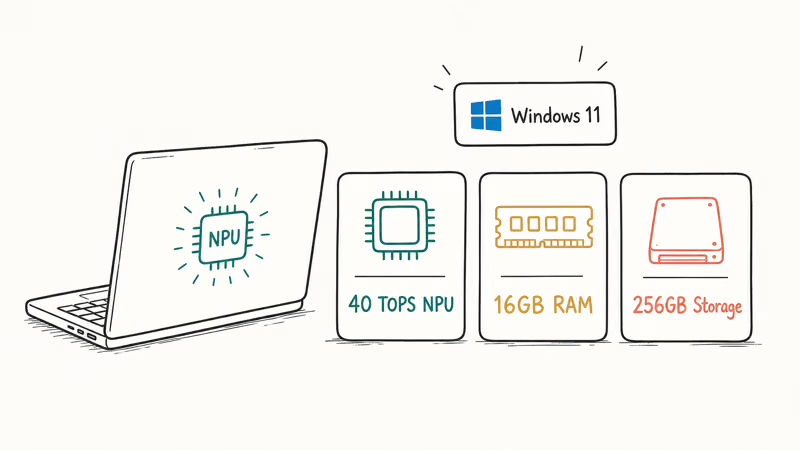
Anything that runs in the cloud, like the main Copilot chatbot, is not in this list. Those work on any PC. The features here are the on-device ones Microsoft gates behind the NPU. As Microsoft expanded the program from Snapdragon to Intel and AMD silicon, the core exclusives stayed consistent across all three.
Here’s the full list, with what each does and whether it needs the NPU.
| Feature | What it does | Needs 40-TOPS NPU? |
|---|---|---|
| Recall | Searchable timeline of what’s been on your screen | Yes |
| Cocreator (Paint) | Generates images from text prompts and sketches | Yes |
| Photo Restyle | Restyles photos locally with art presets | Yes |
| Live Captions + translation | Captions and translates audio on-device | Yes |
| Click to Do | Smart actions on text and images on screen | Yes |
| Windows Studio Effects | Webcam blur, gaze correction, voice clarity | Yes |
| Improved Windows search | Find files by describing them | Yes |
| Copilot chat | General AI assistant | No (any Windows 11 PC) |
#The NPU-Exclusive Features in Detail
Recall keeps a timeline of what’s been on your screen, including web pages, documents, and images, so you can jump back by describing what you remember. Microsoft’s three must-try features page states that Recall is optimized for 6 languages today: English, Chinese (Simplified), French, German, Japanese, and Spanish, as listed in its Copilot+ feature guide. It ships as a preview and runs entirely on the device.
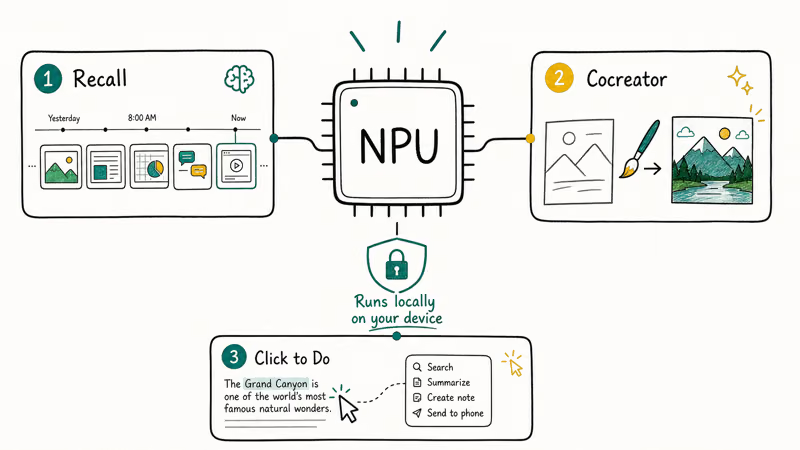
Cocreator lives in Paint. You type an idea, optionally add a rough sketch, and it generates image options in styles like comic book or soft watercolor. Photo Restyle is its sibling, applying art presets to your own photos. Microsoft confirms that Photo Restyle “runs locally on your Copilot+ PC” without a cloud round trip.
Click to Do is the newest of the bunch. It surfaces smart actions on whatever text or image is on screen, like summarizing a paragraph or removing a photo background, without opening a separate app.
#How Live Captions and Studio Effects Work
Live Captions with translation is the feature most people notice first. Microsoft states that it can translate live or recorded audio from over 40 languages into English captions, on the device, with no internet needed. Running on the NPU keeps the caption and translation pipeline local instead of sending audio to the cloud.
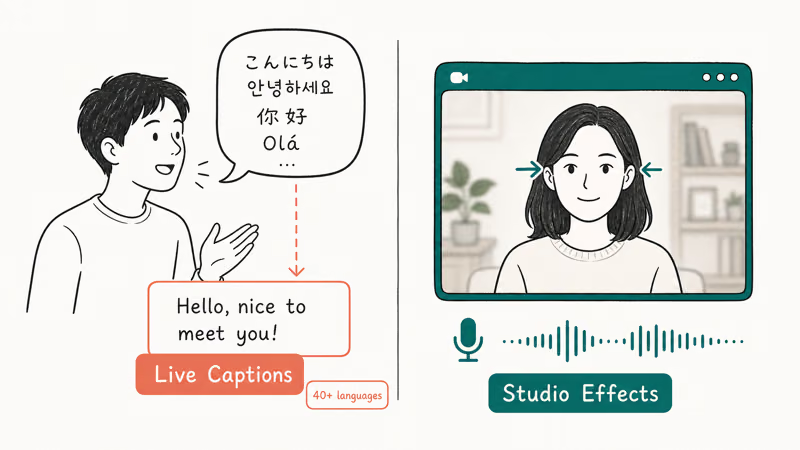
Windows Studio Effects is the webcam bundle. It blurs your background, corrects your gaze so you appear to look at the camera, and cleans up your voice. Microsoft describes it as “intelligent lighting, gaze correction, and voice clarity.” Because it runs on the NPU, it can stay on through a long call without spinning the fan.
Both features show the real point of the NPU: small, always-on AI that’s private and instant. For a deeper look at the chip behind them, see the guide to what an NPU actually does.
#Is Recall Safe to Use?
Recall drew the loudest privacy criticism of any Copilot+ feature, and Microsoft reworked it before launch. According to Microsoft’s Recall privacy and control page, the feature is now opt-in: if you don’t proactively turn it on during setup, snapshots are never taken. Microsoft also states you must confirm with Windows Hello every time you open Recall, and the snapshots are always encrypted with keys protected by the TPM.
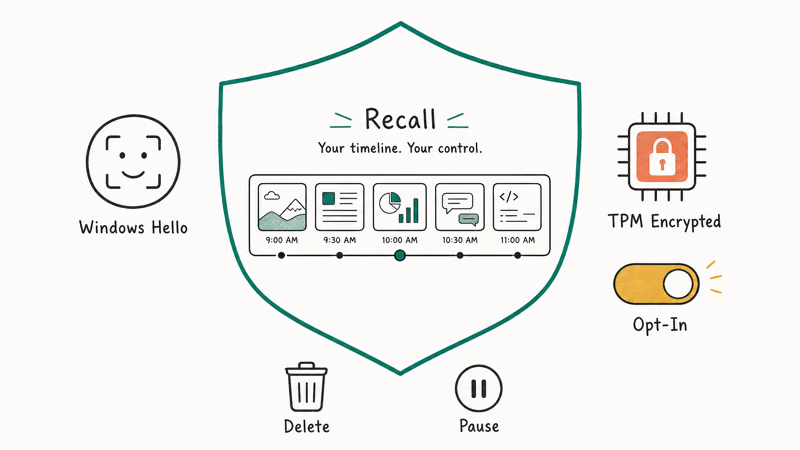
You stay in control after that. You can pause capture, filter out specific apps and websites, and delete snapshots at any time. The processing happens locally on the device, never in the cloud.
So Recall is safer than the early reports suggested, but it’s still your call whether to enable it. That matches Microsoft’s stated default: Recall stays off unless you explicitly opt in.
#The Copilot+ Features That Run on Any PC
The big one is Copilot chat, the general AI assistant. It’s not a Copilot+ exclusive at all. It runs on any Windows 11 PC because the model lives in the cloud, not on your NPU. If you’ve used Copilot to draft an email or answer a question on a normal laptop, you’ve already seen this.
That’s the most common point of confusion. People assume a Copilot+ PC is the only way to get Copilot, but the chatbot is everywhere. The walkthrough on how to use Copilot in Windows 11 covers the assistant that ships on every machine, Copilot+ or not, and the snapdragon vs Intel vs AMD breakdown shows which chips clear the NPU bar.
The exclusives are the on-device features in the table above. Everything cloud-based is free game for any PC.
#Whether You Need the Copilot+ Features
For most buyers, the deciding feature is Studio Effects or Live Captions. If you live on video calls, the webcam cleanup and on-device captions are useful every day, and they’re the features the NPU clearly improves. Recall and Cocreator are nice extras, but few people build a buying decision around them.
If you mostly want the Copilot chatbot, you don’t need a Copilot+ PC at all. That runs anywhere. The piece on whether you need an AI PC and the AI PC vs regular laptop comparison lay out exactly when the upgrade pays off.
#Bottom Line
Buy a Copilot+ PC if Live Captions or Windows Studio Effects fit your daily routine, since those two on-device features are the strongest reason the 40-TOPS NPU exists and the ones you’ll actually use on calls. Skip the upgrade if you only want the Copilot chatbot, because that runs on any Windows 11 machine. Match the exclusive features to your real work before you pay the premium.
AI PCs and Copilot+ Laptops
#Frequently Asked Questions
What are the main Copilot+ PC features?
The core exclusives are Recall, Cocreator and Photo Restyle in Paint, Live Captions with translation, Click to Do, Windows Studio Effects, and improved on-device search. They all run locally on the NPU. Regular Copilot chat is separate and works on any Windows 11 PC.
Do all Copilot+ features need the 40-TOPS NPU?
The on-device exclusives do. Recall, Cocreator, Live Captions, Click to Do, and Studio Effects all require an NPU rated at least 40 TOPS, which is the Copilot+ certification floor. The cloud-based Copilot chatbot does not need any NPU.
Can I get Copilot on a regular Windows 11 PC?
Yes. The Copilot chatbot runs on any Windows 11 PC because it works through the cloud. You only need a Copilot+ PC for the on-device exclusives.
What languages does Recall support?
Recall is optimized for six languages right now: English, Chinese (Simplified), French, German, Japanese, and Spanish. Microsoft lists these on its Copilot+ features page. The feature ships as a preview and runs entirely on the device.
Is Recall a privacy risk?
Recall keeps a local timeline of your screen, which raised early privacy concerns before launch. Microsoft now gates it behind Windows Hello sign-in, encrypts the snapshots with TPM-protected keys, and makes the feature opt-in, so you choose whether to turn it on at all. It also lets you pause capture, filter out specific apps, and delete snapshots whenever you want, all processed locally on the device.
How many languages does Live Captions translate?
Live Captions can translate audio from over 40 languages into English captions on the device. It works on both live and recorded audio with no internet connection. The translation runs on the NPU, which is why it’s a Copilot+ exclusive.
Is Copilot+ worth it just for these features?
It depends on which features you’d actually use. If you’re on video calls daily, Studio Effects and Live Captions can justify the cost. If you mainly want the Copilot chatbot, a regular Windows 11 PC does the same job for less.

Best Laptop for Running LLMs in 2026: Memory Comes First
The best laptop for running LLMs is a memory purchase first. Compare MacBook unified memory against NVIDIA laptop VRAM, and see what each tier really runs.

How to Run a Local LLM on Windows: A 2026 Setup Guide
Run a local LLM on Windows with LM Studio or Ollama. Pick a model that fits your GPU memory, keep every prompt offline, and skip the monthly bill.

Bluetooth Not Working on Snapdragon X? Fixes for 2026
Bluetooth not working on your Snapdragon X Copilot+ PC? Generic audio, mice, and keyboards work, but vendor apps often lack an ARM build. Fixes inside.

Docker Desktop and WSL2 Not Working on Snapdragon X? Fix It
WSL2 runs fine on Snapdragon X, but Docker Desktop ARM is Early Access and throws WSL errors. Use WSL2 plus native ARM64 Ubuntu and Docker Engine.