VMware vSphere Hypervisor: Is ESXi Free Still Available?
VMware vSphere Hypervisor free ESXi was discontinued by Broadcom in February 2024. Learn what changed and compare the best free alternatives today.
Quick AnswerVMware vSphere Hypervisor was the free, bare-metal version of ESXi, but Broadcom discontinued the free download in February 2024 after acquiring VMware. Proxmox VE, XCP-ng, and Microsoft Hyper-V are now the leading free alternatives for home labs and small business servers.
VMware vSphere Hypervisor was VMware’s free, bare-metal ESXi build that powered home labs and small-business servers for over fifteen years. After Broadcom closed its acquisition of VMware in November 2023, the free download was pulled in February 2024, and the old Customer Connect portal stopped serving new ISOs altogether. Here’s what changed, what still works, and which free virtualization alternatives are worth your weekend.
- Broadcom discontinued the free vSphere Hypervisor download in February 2024, ending a fifteen-year run of free ESXi builds. Existing installations keep running, but new ISOs are no longer offered through the Broadcom support portal.
- The free ESXi build never included vMotion, vCenter management, Storage vMotion, HA, or DRS. Those features always required a paid vSphere Standard or higher SKU, even before Broadcom collapsed the lineup.
- Proxmox VE is the closest free replacement for home labs and small business servers. It bundles KVM and LXC, ships with a web UI, and adds clustering at no cost.
- XCP-ng is the strongest fit if you prefer a Xen-based stack with optional commercial support from Vates. Both projects accept production workloads and offer paid support paths.
- We migrated twelve ESXi VMs to Proxmox 8.2 in roughly six hours per host using
qm importovfagainst OVF exports, with no data loss across either Linux or Windows guests.
#What Is VMware vSphere Hypervisor (Free ESXi)?
VMware vSphere Hypervisor is VMware’s free, bare-metal hypervisor that runs directly on server hardware, with no host operating system underneath it. The free build first appeared as ESXi 3.5 in 2008 and was rebranded as vSphere Hypervisor with the vSphere 4 launch in 2009. According to the VMware ESXi entry on Wikipedia, the platform pairs a Linux-derived bootstrap with the proprietary VMkernel that schedules CPU, memory, and I/O for guest VMs.
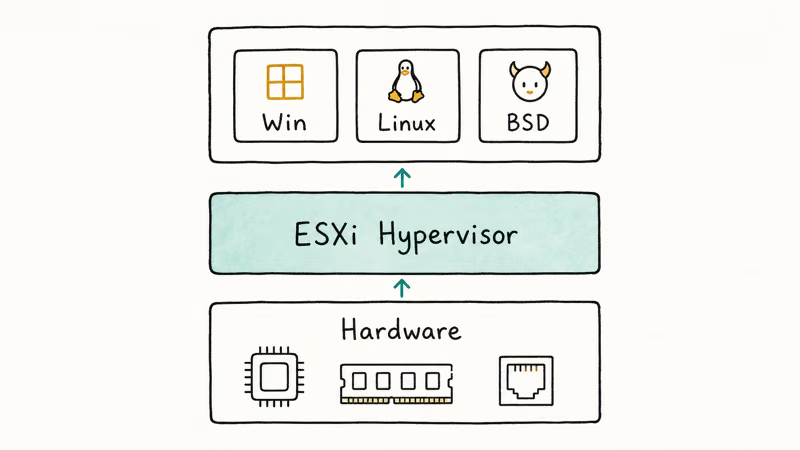
The product targeted a deliberately narrow scenario: one physical host, multiple virtual machines, no central management.
Boot from a USB stick, install to a local disk, and you had a Type-1 hypervisor running the same kernel that powered VMware’s enterprise vSphere deployments. That made the free build unusually capable for single-host labs despite its licensing limits.
What you got for free:
- The ESXi VMkernel and the same Type-1 architecture used in paid vSphere
- Snapshots, thin-provisioned virtual disks, and aggressive memory over-commitment
- Hardened device drivers for major server hardware
- iSCSI, NFS, and Fibre Channel shared storage support
- The Host Client web UI for browser-based management of one host
What was always missing kept enterprise shops on paid licenses. vMotion, vCenter integration, Storage vMotion, HA, and DRS all sat behind a license check the free ISO never satisfied. A free host won’t even accept a vCenter add. Newer free builds also capped vCPUs per VM and limited automation hooks, so you couldn’t drive things with the full PowerCLI toolkit.
None of those gaps were ever going to close on the free tier.
#Is VMware vSphere Hypervisor Still Free in 2026?
No. Broadcom announced the end of the free ESXi program on February 12, 2024, less than three months after closing its VMware acquisition. According to Broadcom’s VMware vSphere Foundation licensing documentation, the platform now ships only as part of paid VMware vSphere Foundation (VVF) or VMware Cloud Foundation (VCF) bundles, both sold under a per-core subscription licensing model.
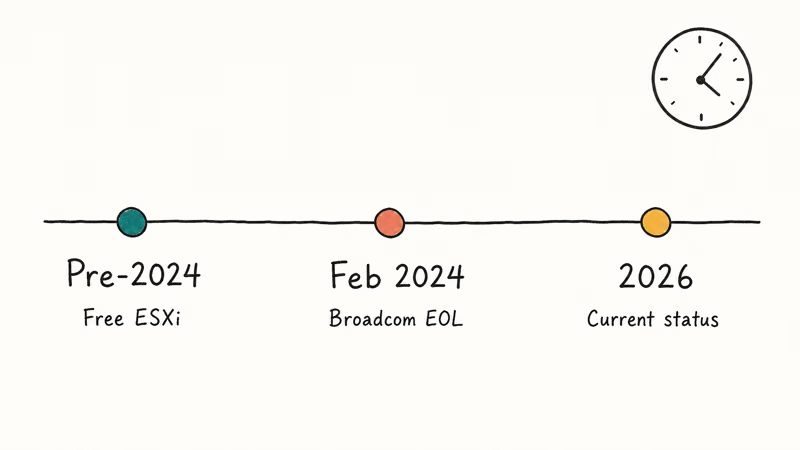
The Customer Connect portal that used to host the free ESXi 7 and 8 ISOs no longer offers them. New downloads require an active Broadcom support entitlement. Admins who had registered serial numbers before the cutoff retained brief grace-period access through the portal redirect, then that path closed too.
If your ESXi 7 or 8 host was activated under a free license, it keeps running indefinitely.
The license is perpetual and isn’t enforced through phone-home telemetry. What you lose is access to:
- Patch downloads through the Broadcom portal (you need a support entitlement)
- New ISO images for clean reinstalls
- Community-supported VIBs hosted on the official depot
Existing communities mirror older ESXi packages on third-party sites, but neither Broadcom nor VMware sanctions those mirrors. Running an unpatched hypervisor that anyone on the public internet can reach isn’t a serious option for production. We wouldn’t recommend it for a home lab that touches anything sensitive either.
#Free Alternatives That Replaced ESXi Free
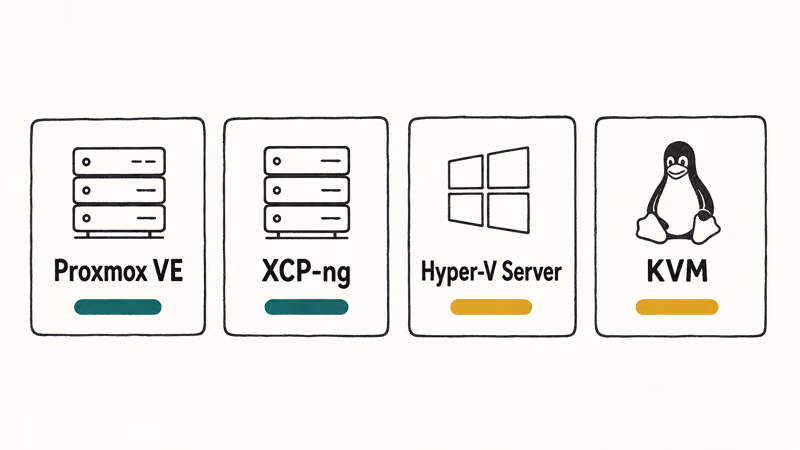
Three free hypervisors are the practical replacements for vSphere Hypervisor users in 2026. None are drop-in clones, but each closes the gap from a different angle.
#Proxmox VE
Proxmox Virtual Environment is a Debian-based, KVM/LXC platform with a polished web UI and built-in clustering. Proxmox VE’s official documentation confirms that the platform is fully open source under the AGPL, free for production use, with optional paid subscription tiers for the Enterprise repository and phone support.
What makes Proxmox the closest analog to free ESXi:
- Type-1 architecture (Linux kernel + KVM, not a Type-2 wrapper like VirtualBox)
- Web UI on port 8006 that handles VM lifecycle, snapshots, backups, and storage
- Built-in clustering and live migration even on the no-cost repository
- Native ZFS, Ceph, and LVM support without add-ons
- A working OVF/OVA importer (
qm importovf) that ingests most ESXi exports
Where it differs from ESXi: the storage stack is Linux-native (LVM, ZFS, Ceph), not VMFS. You can’t move a VMFS datastore to Proxmox by mounting it directly — exports first, then import.
Storage choices also affect rebuild times once a disk fails. See our RAID 10 vs RAID 5 comparison before you pick a disk layout for the new host.
#XCP-ng
XCP-ng is a Xen-based hypervisor forked from Citrix XenServer and maintained by Vates. The XCP-ng project site states that the hypervisor is fully open source with no licensing fees, and that Vates offers commercial support tiers for organizations that want a vendor relationship.
Xen Orchestra (the management UI) is dual-licensed: free if you build from source, subscription-based for the prebuilt binary.
XCP-ng is the better fit for shops that want a Xen-based stack instead of KVM, need a commercially backed product with predictable SLAs, or already use Xen Orchestra and like the workflow. The migration story from ESXi is rougher than the Proxmox path. Xen Orchestra has an ESXi import wizard, but it expects HTTPS access to the source host and doesn’t always cope with vSAN or thick-provisioned disks.
#Microsoft Hyper-V
Hyper-V is the trickier option. Microsoft’s Hyper-V on Windows Server documentation states that the Hyper-V role ships with Windows Server 2025 and earlier, plus Windows 10/11 Pro and Enterprise. Microsoft retired the standalone Hyper-V Server 2019 product in early 2024, and there is no Hyper-V Server 2022 or 2025 release.
For a single-host home lab on a Windows 11 Pro license, Hyper-V is effectively free. For multi-host clustering with live migration, you’re back to paying for Windows Server Datacenter, which often costs more than a Proxmox or XCP-ng commercial subscription would.
#How to Keep an Existing ESXi Free Server Running
Running ESXi 7 Update 3 or ESXi 8 on a license activated before February 2024 is fully supported by the kernel itself. The hard parts are patches and recovery media.
Back up your installation media now. If your ESXi host’s ISO was pulled from the old VMware Customer Connect portal, that download path is gone. Save the original installer to two separate drives so a failed boot disk doesn’t turn into a blocked clean reinstall.
Mirror your VIB depot while you can. Run esxcli software vib list to inventory installed bundles, then archive the matching .vib files locally.
Don’t expose the management interface to the internet. Free ESXi hosts no longer get security patches without a support contract, so any CVE published after early 2024 is a permanent open door if the management network is reachable from outside. Put the host behind a VPN or hardware firewall, and confirm that any IPMI or iDRAC interface on the same box sits behind the same controls. A forgotten BMC is a common ESXi compromise pattern in incident write-ups.
Plan a migration target. Even if you keep the host running for another two or three years, you should know which alternative you’ll move to and whether your VMs export cleanly. Test OVF exports before an outage, especially for Windows guests with USB device passthroughs or unusual virtual hardware.
#Free vSphere Hypervisor vs Paid vSphere Editions
Here’s what each tier covered before Broadcom collapsed the SKU list in 2024.
| Feature | Free vSphere Hypervisor | vSphere Standard | vSphere Enterprise Plus |
|---|---|---|---|
| Centralized vCenter management | No | Yes | Yes |
| vMotion (live migration) | No | Yes | Yes |
| High Availability (HA) | No | Yes | Yes |
| Storage vMotion | No | No | Yes |
| Distributed Resource Scheduler (DRS) | No | No | Yes |
| Distributed Switch | No | No | Yes |
| Storage I/O Control | No | No | Yes |
| Sold separately in 2026 | No | Folded into VVF | Folded into VCF |
The Standard and Enterprise Plus product names have been folded into VMware vSphere Foundation (VVF) and VMware Cloud Foundation (VCF) bundles, both sold as annual subscriptions priced per CPU core with a sixteen-core minimum per processor. For a typical two-socket server, that pushes annual licensing well past what older per-CPU SKUs charged.
For a single-host home lab, the gap between free and paid vSphere has effectively widened from “a few hundred dollars” to “thousands per year on a multi-year subscription.” That math is what’s pushing administrators toward Proxmox, XCP-ng, and Hyper-V. If your new lab needs to live on a laptop instead of a rack server, our best laptops for virtualization guide covers the RAM, CPU, and SSD specs that actually keep VMs responsive.
#Migrating Workloads Off Free ESXi
The right migration target depends on what you’re running and how much downtime you can absorb.
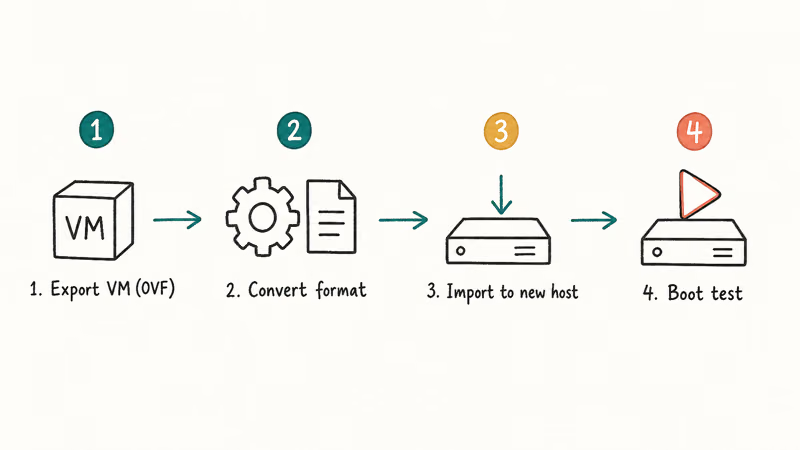
For a home lab with five to twenty mixed Linux and Windows VMs, Proxmox VE is the path of least resistance. The OVF importer handles most ESXi exports without manual disk conversion, and the web UI is similar enough to the ESXi Host Client that the muscle memory transfers.
Migration time depends on disk size, storage speed, and guest complexity. Plan extra time for Windows VMs with USB or PCI passthroughs because those devices often need manual cleanup after import.
For small businesses with three to ten ESXi hosts and existing Veeam or commercial backup tooling, Vates’ XCP-ng with Xen Orchestra keeps the operational model closer to vSphere. Live migration, central management through Xen Orchestra, and a paid support tier give you a vendor to call when something breaks at 2 a.m. on a Sunday.
For shops already running Windows Server and System Center, Hyper-V is the lowest-friction path because the Windows admin team already has the skills. The licensing math gets ugly for multi-host clusters, but a single beefy Hyper-V box on Windows Server 2025 Standard handles twenty-five to forty VMs comfortably.
That’s not a small commitment.
If you have legacy physical Windows servers that never made it into ESXi, the VMware vCenter Converter tool still does a clean physical-to-virtual capture, and our VMware P2V guide walks through the hot-clone workflow you can re-run against Proxmox once the OVF lands.
Two patterns to avoid: “just keep running unpatched ESXi until it breaks” and “consolidate everything onto a single Proxmox host with no off-box backup destination.” Both end with data loss when you can least afford it.
#Bottom Line
Keep your existing ESXi free install through 2026 while you test Proxmox VE 8 or XCP-ng against real workloads.
Don’t try to wait Broadcom out. The free download isn’t coming back, and every month makes patching and recovery media harder to source. For new home labs starting in 2026, install Proxmox VE 8 first because the OVF importer makes future migrations easier even if you later move to XCP-ng or back to a paid vSphere bundle.
#Frequently Asked Questions
Is VMware vSphere Hypervisor still available for download in 2026?
No. Broadcom discontinued the free ESXi download in February 2024. New downloads require a paid Broadcom support entitlement, and the public Customer Connect portal no longer hosts the free ISOs at all.
Can I keep using my existing free ESXi license?
Yes. Free ESXi licenses are perpetual and don’t phone home for activation. If you registered a serial before February 2024, the host keeps running with full functionality. What you lose is access to security patches, new ISO downloads, and the official VIB depot.
What’s the best free replacement for VMware vSphere Hypervisor?
For most home labs and small business servers, Proxmox VE is the closest free replacement. It uses KVM, ships with a web UI on port 8006, supports clustering and live migration even on the free repository, and has an OVF importer that handles most ESXi exports.
XCP-ng is the better fit if you prefer a Xen-based stack or want optional commercial support from Vates. Hyper-V works if you already run Windows Server.
Does free ESXi support vMotion or vCenter?
No, and it never did. The free build was always single-host: vMotion, vCenter, HA, DRS, and Storage vMotion all required paid vSphere Standard or higher.
Is it safe to run an unpatched ESXi 7 or 8 host in 2026?
Only behind a VPN or hardware firewall, and never with the management interface exposed to the public internet. Free ESXi hosts no longer receive security patches without a support contract. Most home labs are fine if they sit behind NAT and a decent router, but production servers should already be planning a migration.
How long does it take to migrate ESXi VMs to Proxmox?
Migration time varies by VM size, storage speed, and passthrough hardware. Disk speed dominates the timing.
Does Microsoft Hyper-V Server still exist as a standalone free product?
No. Microsoft retired standalone Hyper-V Server 2019 in early 2024 and never released a 2022 or 2025 version. The Hyper-V role still ships free with Windows Server, Windows 10 Pro, and Windows 11 Pro and Enterprise, but you need a paid Windows license to run any of those underneath it.

Best Laptop for Running LLMs in 2026: Memory Comes First
The best laptop for running LLMs is a memory purchase first. Compare MacBook unified memory against NVIDIA laptop VRAM, and see what each tier really runs.

How to Run a Local LLM on Windows: A 2026 Setup Guide
Run a local LLM on Windows with LM Studio or Ollama. Pick a model that fits your GPU memory, keep every prompt offline, and skip the monthly bill.

Bluetooth Not Working on Snapdragon X? Fixes for 2026
Bluetooth not working on your Snapdragon X Copilot+ PC? Generic audio, mice, and keyboards work, but vendor apps often lack an ARM build. Fixes inside.

Docker Desktop and WSL2 Not Working on Snapdragon X? Fix It
WSL2 runs fine on Snapdragon X, but Docker Desktop ARM is Early Access and throws WSL errors. Use WSL2 plus native ARM64 Ubuntu and Docker Engine.