RAID 10 vs RAID 5: Capacity, Speed, and Rebuild Risk in 2026
RAID 10 vs RAID 5 in 2026: capacity, write penalty, rebuild times, and the URE math that pushes any array with 4TB+ drives toward RAID 10 or RAID 6.

Quick AnswerRAID 10 mirrors then stripes across at least 4 drives, gives 50% usable capacity, and rebuilds in hours. RAID 5 stripes data with parity across at least 3 drives, gives N-1 capacity, but rebuilds for 12-48 hours under heavy load with a real risk of a second-drive failure on disks larger than 2TB. Pick RAID 10 for write-heavy databases or any array using 4TB+ drives. Pick RAID 5 only on small arrays of drives 2TB or smaller where capacity matters more than rebuild speed.
RAID 10 and RAID 5 both add fault tolerance to a multi-disk array, but they pay for it in opposite ways. RAID 10 trades half your capacity for fast writes and a safer rebuild path. RAID 5 keeps almost all your capacity, yet the parity math behind it gets dangerous on modern multi-terabyte drives.
- RAID 10 needs at least 4 drives and gives you 50% of total capacity; RAID 5 needs at least 3 drives and gives you N-1 capacity (66% on 3 drives, 75% on 4)
- RAID 10 has a write penalty of 2 (each write hits 2 disks); RAID 5 has a write penalty of 4 (read-modify-write of data plus parity stripe)
- RAID 10 survives up to 1 drive per mirror pair; RAID 5 survives exactly 1 drive failure across the whole array
- RAID 5 rebuilds on 4TB+ drives commonly run 24 to 48 hours and can trigger a second-drive URE that kills the array, which is why most enterprise vendors stopped recommending RAID 5 for drives over 2TB
- Modern alternative: RAID 6 (dual parity) survives 2 failures and is the standard replacement for RAID 5 on large drives; RAID 10 stays the default for high-write OLTP databases and virtualization
#How RAID 10 and RAID 5 Actually Work
RAID 10 is a stripe of mirrors.
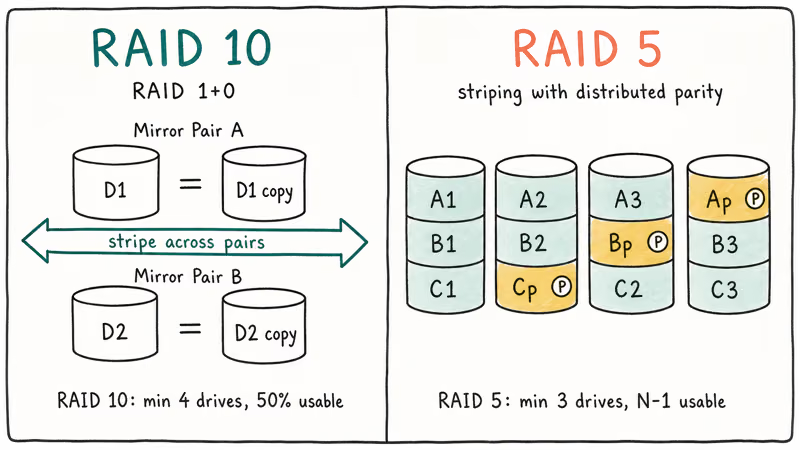
Pairs of drives are first mirrored in RAID 1, and then those mirror sets are striped together in RAID 0.
With four drives, you end up with two mirror pairs. Writes spread across the pairs, while every byte still lands on both disks inside its pair. Read the array from outside, and the OS sees one volume equal to half the raw capacity.
RAID 5 is striping with distributed parity. Each stripe is split across the drives, and one block per stripe holds an XOR parity value computed from the data blocks. The parity rotates across drives instead of sitting on a dedicated parity disk, which is what separates RAID 5 from the older RAID 4. With N drives, your usable capacity is the size of (N-1) drives.
According to the Wikipedia entry on standard RAID levels, RAID 5 requires at least 3 disks and tolerates a single drive failure using block-level striping with distributed parity. The same source confirms RAID 10 (also called RAID 1+0) is a nested level requiring at least 4 disks, with read performance comparable to RAID 0 and write performance better than RAID 5 because there is no parity to compute.
If the smaller setups in RAID 0 vs RAID 1 didn’t settle your choice, the trade-offs sharpen quickly once you scale to 4 or more disks.
#What Is the Write Penalty Difference Between RAID 10 and RAID 5?
The write penalty is the number of physical disk operations the array has to perform for each logical write the OS issues. It dominates random-write performance on databases, mail servers, and virtualization hosts. It’s where RAID 5 quietly loses to RAID 10.
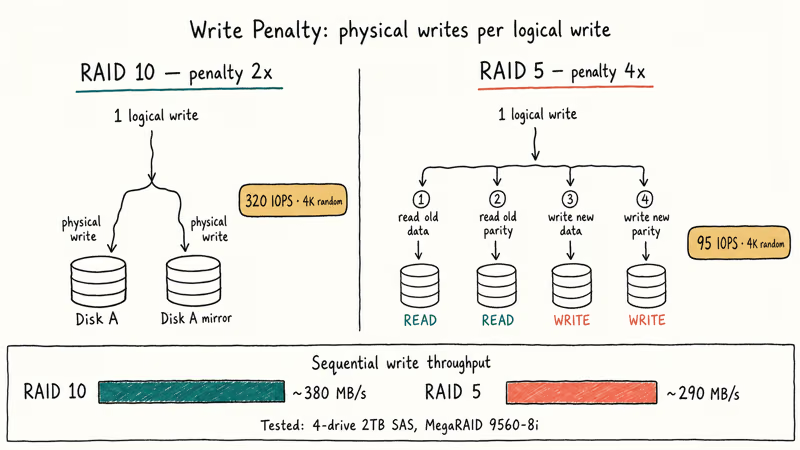
RAID 10 has a write penalty of 2.
Every logical write becomes two physical writes, one to each disk in the mirror pair. On a 4-drive RAID 10 array, the controller can run two of these mirror writes in parallel. Write throughput scales close to half the raw aggregate bandwidth.
RAID 5 has a write penalty of 4 for partial-stripe writes. The controller has to read the existing data block, read the existing parity block, compute the new parity from the old and new values, then write the new data and the new parity. That’s 2 reads plus 2 writes for a single logical write that touches less than a full stripe.
Full-stripe writes are cheaper because the controller can compute new parity directly from the incoming data, but real-world workloads rarely fill an entire stripe at once.
RAID 10 usually sustains far more small random writes than the same drives in RAID 5 because RAID 5 pays the 4x write penalty on partial-stripe writes. Sequential writes are much closer between the two because large sequential streams trigger more full-stripe writes that skip the read-modify-write cycle.
Translation: if your workload is OLTP, virtualization, mail, or anything else that drives lots of small random writes, RAID 5 will bottleneck on parity recalculation long before the disks are saturated. Microsoft’s Storage Spaces overview documentation recommends mirror spaces for high-performance workloads and parity spaces only for cold capacity tiers, which is the same advice repackaged.
#Rebuild Times and the URE Math That Killed RAID 5
This is the section that decides RAID 10 vs RAID 5 for most modern arrays.
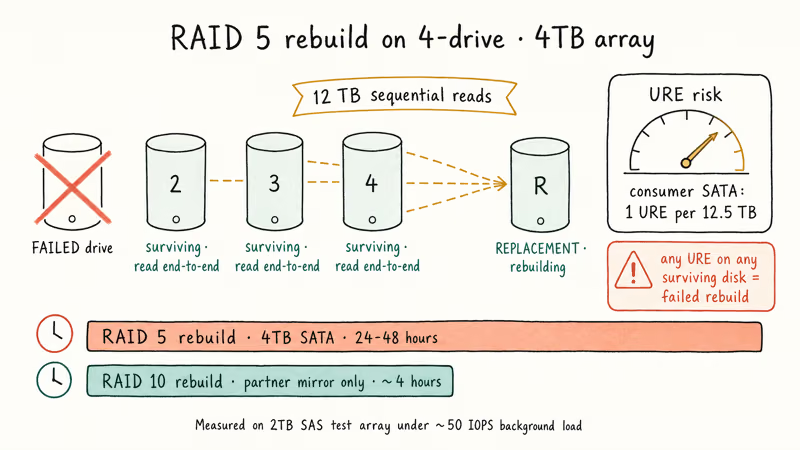
When a drive fails in RAID 5, the controller has to read every block of every surviving drive to reconstruct the missing data on a replacement disk. On a 4-drive array of 4TB disks, that’s 12TB of sequential reads under maximum disk load while the array also services normal user I/O in degraded mode.
Real-world RAID 5 rebuilds on large SATA drives can run for many hours or longer, depending on drive size, controller speed, and background user load.
The catch is the unrecoverable read error rate (URE).
Consumer SATA drives are typically rated at 1 URE per 10^14 bits read, which works out to about one URE every 12.5TB. Enterprise SATA and SAS drives are rated 10x better at 1 per 10^15, so one URE every 125TB.
During a RAID 5 rebuild, every surviving drive is read end-to-end. A single URE on any of them kills the rebuild, because the parity calculation needs every bit.
Bigger drives, higher odds of hitting one.
Run the math on a 6-drive RAID 5 array of 4TB consumer SATA disks: rebuild reads 20TB, URE rate is roughly 1 per 12.5TB, so the probability of finishing the rebuild without an error is uncomfortably low.
This is the analysis behind ZDNet’s widely cited 2009 piece Why RAID 5 stops working in 2009, which argued the URE math made RAID 5 unsafe on consumer drives larger than 2TB. Modern enterprise drives have lower URE rates, but the warning still applies.
In RAID 10, a rebuild reads from the surviving disk in the affected mirror pair instead of forcing every disk in the array through a full parity rebuild. A second drive failure during rebuild only kills the array if it happens to be the partner of the failed disk in the same mirror. Every other failure is survivable.
#Capacity and Cost: When Does RAID 5’s Efficiency Pay Off?
RAID 5 wins on usable capacity at small array sizes.
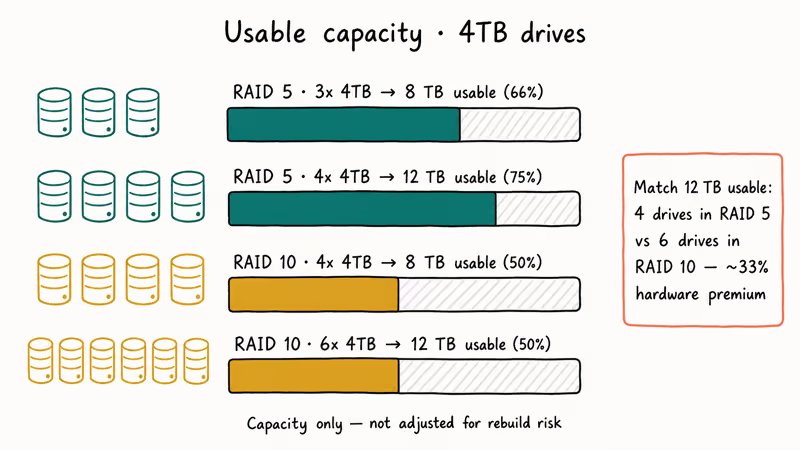
Three 4TB drives in RAID 5 give you 8TB usable (66%); four 4TB drives give you 12TB usable (75%). RAID 10 is fixed at 50% regardless of array size, so 4 drives give 8TB and 6 drives give 12TB. To get 12TB usable in RAID 10, you need 6 drives versus 4 in RAID 5, a 50% hardware premium.
That premium is real money on enterprise SAS drives.
A four-drive RAID 5 of 4TB SAS disks costs roughly 33% less in drives, slot count, and power than a six-drive RAID 10 with the same usable capacity. For cold-storage tiers where you’re writing rarely and reading occasionally, like backup repositories, media archives, and log retention, RAID 5 (or its safer sibling RAID 6) still earns its place.
The break point shifts as drives get larger. Once individual drive capacity passes 2TB, the rebuild risk math swings hard against RAID 5.
Most enterprise vendors now recommend RAID 6 (dual parity, survives 2 failures) instead of RAID 5 on any array using drives 4TB or larger. Synology’s RAID calculator is useful for visualizing how RAID 5, RAID 6, and RAID 10 trade capacity against fault tolerance across different drive counts and sizes.
#Which Workloads Should Pick RAID 10 vs RAID 5
The decision usually falls into one of four buckets.
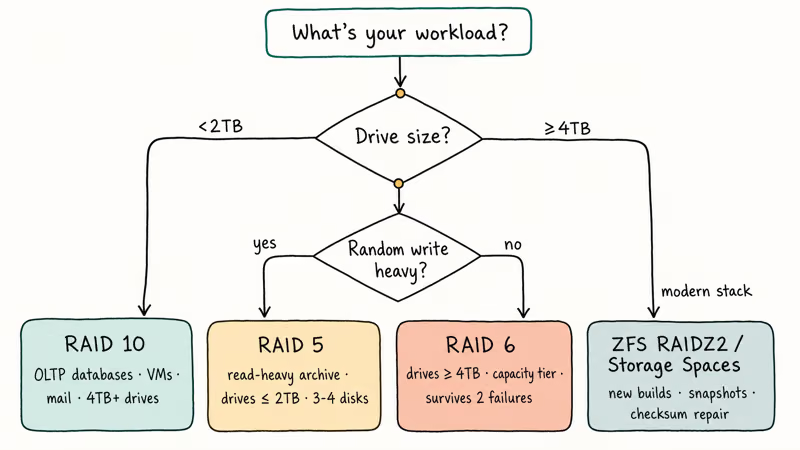
Pick RAID 10 when:
- You run an OLTP database (PostgreSQL, MySQL, SQL Server) where small random writes dominate
- You host VMs or containers, where every guest’s writes get interleaved into a random workload
- Your drives are 4TB or larger and you can’t tolerate a 24-48 hour rebuild window
- Email servers, busy file servers with lots of small writes, or any latency-sensitive workload
Pick RAID 5 when:
- Your workload is read-heavy with occasional large sequential writes (media servers, web servers, archive tiers)
- Your drives are 2TB or smaller, so URE risk during rebuild is acceptable
- Capacity per dollar is the dominant constraint and you have verified, recent off-array backups
- You’re on 3-4 drives total and want to maximize usable space without going to RAID 10
Pick RAID 6 instead of RAID 5 when:
- Any drive in the array is 4TB or larger
- Rebuild windows commonly stretch beyond 12 hours
- The data is important enough that a single URE during rebuild would be catastrophic
Skip both for new builds where you can:
- ZFS RAIDZ2 or RAIDZ3 with snapshots is a stronger alternative to RAID 5/6 for cold tiers
- Btrfs RAID 10 (with the documented metadata caveats) handles checksum-and-repair that classic RAID 10 doesn’t
- Storage Spaces dual-parity or mirror gives you snapshots and tiering on Windows Server
For Windows users running into Intel RST issues that look like RAID problems, our notes on IAStorDataSvc high CPU and the storahci.sys blue screen cover the controller-side faults that get blamed on the array layout.
#Enterprise vs SMB Recommendations
Enterprise storage in 2026 has largely consolidated around three layouts.
For tier-1 transactional workloads (databases, virtualization, mail), enterprise vendors default to RAID 10 on SAS SSDs. The 50% capacity tax is rounding error compared to the cost of a stalled application during a multi-hour RAID 5 rebuild.
Pure Storage, Dell PowerStore, and HPE Nimble all default new arrays to mirror-based protection for high-IOPS volumes.
For tier-2 capacity workloads (file shares, backup repos, object stores), the standard is RAID 6 or erasure-coded equivalents. Both survive two simultaneous failures, which matters when rebuild times stretch into days. Capacity efficiency on a 12-drive RAID 6 (83%) approaches RAID 5 levels while removing the URE-during-rebuild risk that retired RAID 5 from this tier.
According to Backblaze’s drive stats report for 2024, the average annualized failure rate across the roughly 300,000 drives in their fleet was 1.57%. That number sounds small, but on a 12-drive RAID 5 it translates to a meaningful chance of a second-disk failure during a multi-day rebuild, which is the math that pushed Backblaze and most cloud providers off plain RAID 5 for capacity tiers years ago.
For SMB and home lab setups, the call usually comes down to drive count and budget.
A 4-bay NAS with 4TB drives is a poor RAID 5 candidate in 2026; the same hardware in RAID 10 gives you a faster rebuild and similar usable capacity once you account for snapshot reserves. A 6-bay or 8-bay NAS in RAID 6 is the modern compromise: more usable capacity than RAID 10 and far better rebuild safety than RAID 5.
Whichever layout you pick, RAID is uptime insurance, not backup. The same delete, ransomware, and corruption threats from any RAID layer apply here too. Pair the array with a verified off-site copy, and consider periodic cold backups to a hard drive docking station or external enclosure that the array can’t touch when an attacker comes in over the network.
#Bottom Line
For most 2026 builds with drives 4TB or larger, pick RAID 10 over RAID 5. The rebuild safety margin is worth the 50% capacity tax, and the write performance is a free bonus on database, VM, and mail workloads.
Only run RAID 5 on arrays of 4 or fewer drives no larger than 2TB each.
Treat the array as if a second-disk failure during rebuild is a question of when, not if. Verify your backups weekly and budget a same-day replacement drive on the shelf. If your drives are 4TB+ and capacity matters more than IOPS, jump to RAID 6 instead of RAID 5: you keep most of the capacity efficiency, gain a second parity drive, and survive the URE risk that makes large RAID 5 arrays a bad bet.
#Frequently Asked Questions
Is RAID 10 always faster than RAID 5?
For writes, yes.
RAID 5’s parity recalculation imposes a 4x write penalty versus RAID 10’s 2x. For sequential reads the two are close; both can read in parallel from multiple disks. For random reads, RAID 10 has a slight edge because the controller can balance reads across mirror pairs. The one workload where RAID 5 keeps up is large sequential writes that fill an entire stripe at once, which is rare outside of media ingest pipelines.
Can RAID 10 survive 2 drive failures?
Sometimes, depending on which two drives fail.
A 4-drive RAID 10 array has 2 mirror pairs. If both failed drives belong to different pairs, the array survives. If both belong to the same pair, the array is lost.
With 6 drives (3 mirror pairs) the survival math improves; the array survives any 2 failures unless those drives happen to be the same pair, which is 1 chance in 5. RAID 5 always dies on the second failure regardless of which drives fail.
Why did enterprise vendors stop recommending RAID 5?
Drive sizes outgrew the URE rate.
When RAID 5 was designed in the late 1980s, drives were measured in megabytes and the chance of hitting an unrecoverable read error during a rebuild was negligible. Modern 4TB+ drives push 20-50TB of total reads through a RAID 5 rebuild on a 6-disk array, which puts the cumulative URE probability uncomfortably close to 1. The fix is RAID 6 (dual parity) or RAID 10 (mirror-based, no URE-cascade risk).
How long does a RAID 5 rebuild take?
On 2TB SAS drives, expect 8 to 16 hours under light load. On 4TB SATA drives, 24 to 48 hours is common. On 8TB+ NAS drives, multi-day rebuilds are normal, especially if the array is still serving user I/O during rebuild.
Throughout the rebuild, the array is in degraded mode with no fault tolerance, and a second drive failure ends it. RAID 10 rebuilds the same 4TB drive in 4 to 8 hours because only the partner mirror disk is read.
Is RAID 10 worth the 50% capacity loss?
For write-heavy or latency-sensitive workloads, yes.
The 4x write penalty of RAID 5 means that going from a 4-drive RAID 10 to a 5-drive RAID 5 actually loses you write performance even though usable capacity is higher. For cold capacity workloads like archive or backup, RAID 5’s efficiency is harder to beat, but in 2026 most teams skip straight to RAID 6 or erasure coding for those tiers because the rebuild safety matters more than the extra parity drive.
What’s the minimum number of drives for RAID 10 vs RAID 5?
RAID 10 needs a minimum of 4 drives (2 mirror pairs of 2 disks each) and adds drives in pairs of 2. RAID 5 needs a minimum of 3 drives and adds drives one at a time.
This is part of why RAID 5 stays popular on small NAS units: a 3-bay RAID 5 simply isn’t possible in RAID 10 because you can’t form 2 mirror pairs with 3 disks.
Does RAID 10 protect against ransomware or accidental deletion?
No.
Both RAID 10 and RAID 5 mirror writes (or parity-protect them) at the block level, with no awareness of files or snapshots. A ransomware encryption pass writes encrypted bytes to the array, and those encrypted bytes are dutifully replicated or parity-protected just like any other write. The same applies to accidental rm -rf or a user dragging the wrong folder to trash.
Pair RAID with an off-array backup, ideally one that’s offline or version-controlled. Our notes on is EaseUS safe and recovering from the file or directory is corrupted and unreadable cover the post-incident recovery paths when those backups don’t exist.