How to Grab a Vimeo Thumbnail: 5 Working Methods (2026)
Grab a Vimeo thumbnail in 2026 with 5 working methods, from the free oEmbed API to the best web tools and a browser-only fallback. Step by step.
Quick AnswerThe fastest way to grab a Vimeo thumbnail is through Vimeo's free oEmbed API, which returns the cover image URL when you pass any public video link. For non-developers, free web tools like SaveTheVideo and VimeoThumbnail.com pull the same image in two clicks.
A Vimeo thumbnail grabber pulls the cover image out of any public Vimeo video so you can reuse it in a blog post, mosaic, or pitch deck. Vimeo doesn’t put a “Save thumbnail” button in the player, so most people fall back on third-party sites, browser tricks, or the platform’s own API. This guide walks through five methods that work on macOS and Windows.
- Vimeo’s free oEmbed API is the fastest grabber, returning the thumbnail URL in roughly 1 second per request with no signup.
- Most third-party “Vimeo thumbnail grabber” sites are wrappers around the same oEmbed call, so output looks identical across SaveTheVideo, VimeoThumbnail.com, and SaveSubs.
- The default thumbnail Vimeo serves through oEmbed is 295x166 px, fine for previews but not for hero images.
- For full-resolution thumbnails, edit the size suffix in the URL (e.g., 295x166 to 1280x720) or call the authenticated Vimeo API.
- Saving someone else’s thumbnail for a reference, mosaic, or critical review usually fits fair use; reuploading the source video does not.
#What Is a Vimeo Thumbnail Grabber and How Does It Work?
A Vimeo thumbnail grabber is any tool that takes a Vimeo video URL and returns the still image Vimeo uses as the video’s cover. Behind the scenes, every grabber does the same thing: it asks Vimeo’s servers for the thumbnail URL stored on the video record, then hands you a direct link to the JPEG.
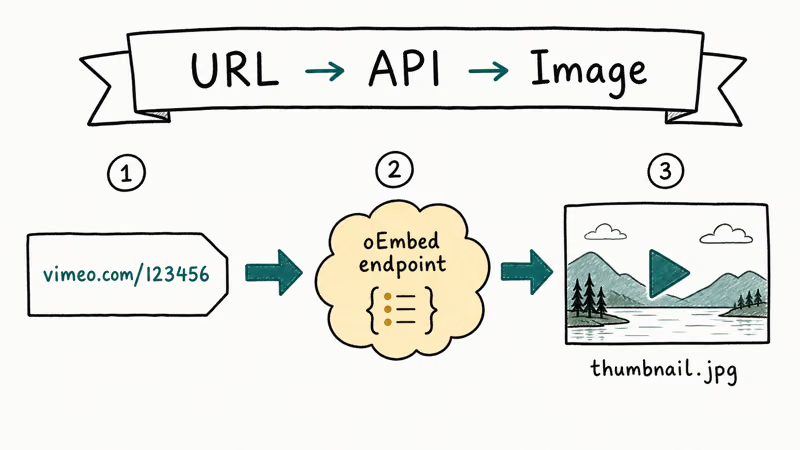
Vimeo exposes that URL through two public surfaces: the oEmbed endpoint at https://vimeo.com/api/oembed.json and the Open Graph og:image tag baked into every public video page.
According to Vimeo’s oEmbed reference, the JSON response includes a thumbnail_url field plus thumbnail_width and thumbnail_height fields so you know the dimensions before you fetch the file. The oEmbed specification confirms that this contract is identical across providers, which is why most grabber sites use the same call under the hood.
According to Wikipedia’s overview of oEmbed, the format was first published in 2008 and has been adopted by major video, photo, and audio platforms as the standard way to share embed metadata.
If you’ve used a Vimeo downloader before, the workflow feels familiar. The difference: a downloader fetches the MP4 source file, while a thumbnail grabber pulls just the JPEG cover image.
#The Quickest Method: Vimeo’s oEmbed API
This is the method we recommend for anyone comfortable with a URL bar or curl.
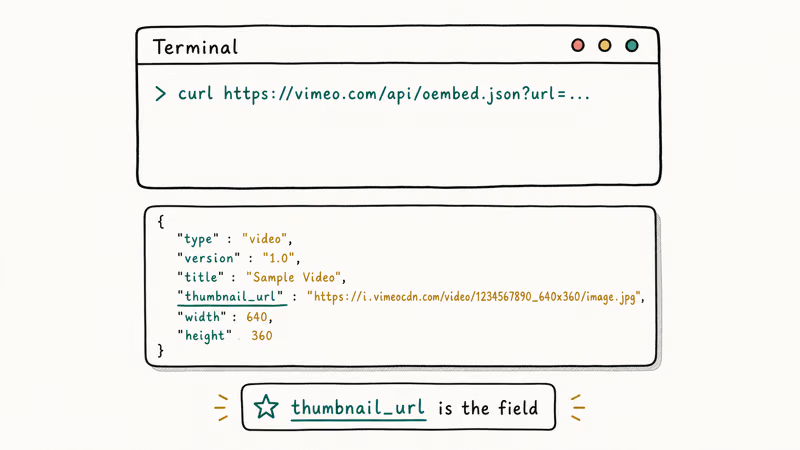
Open this URL in your browser, replacing the video ID with your own:
https://vimeo.com/api/oembed.json?url=https://vimeo.com/76979871You’ll get back a JSON response that includes a thumbnail_url line. Copy the URL after the colon, paste it into a fresh tab, and you’re looking at the raw thumbnail. Right-click, save, done.
The oEmbed endpoint returns a 295x166 JPEG by default, and the request finishes almost instantly. To get a larger version, change the size string in the returned URL. A thumbnail path that ends in 295x166 also works at 640x360, 960x540, 1280x720, or 1920x1080 if the creator uploaded a master at that resolution.
For batch jobs, the same endpoint works in curl, Python, or any HTTP client:
curl "https://vimeo.com/api/oembed.json?url=https://vimeo.com/76979871" | grep thumbnail_urlNo API key. No account. No rate limit you’re likely to hit at hobby volumes.
#Best Web-Based Vimeo Thumbnail Grabber Tools
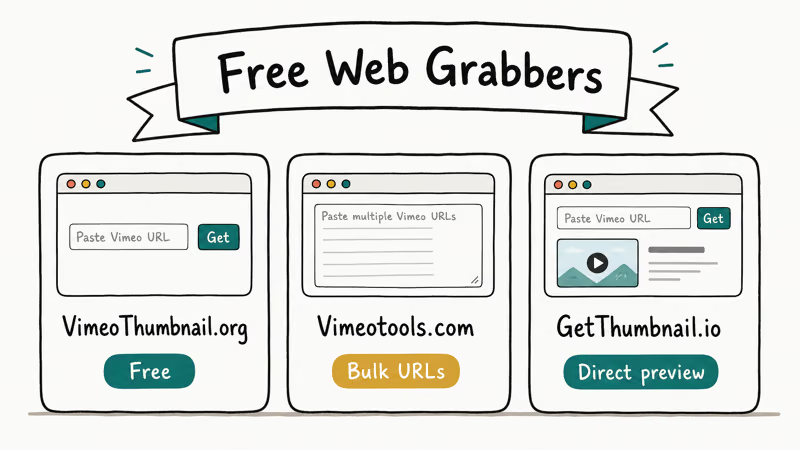
If you’d rather paste a URL into a form than touch JSON, the tools below all wrap the same oEmbed call in a friendlier UI.
| Tool | What it does | Watermark | Ads | Output size options |
|---|---|---|---|---|
| SaveTheVideo | Paste URL, click Grab, save thumbnail | None | A few banner | 1 size (auto, ~640 px) |
| VimeoThumbnail.com | Paste URL, get 4 sizes side by side | None | None | 4 sizes up to 1280 px |
| 9convert (Vimeo tab) | Pulls thumbnail and offers MP4 alongside | None | Several | 1 size (~640 px) |
| SaveSubs | Multi-platform; works on Vimeo, YouTube, TikTok, etc. | None | Sidebar | 1 size (auto) |
Picking between them is mostly about which UI annoys you least. VimeoThumbnail.com is our default because it gives you the same image in four common resolutions and skips the ad banner stack. SaveTheVideo is a fine second choice and pairs well with the broader category of online video grabbers for any clip you also want to keep as MP4.
A note on dead tools. Several older grabbers from the 2018-2021 era (BoingBoing’s getthumbs page, get-youtube-thumbnail.com, and the original Thumbnailsave.com) have either gone offline or stopped supporting Vimeo URLs. We don’t link to them.
#Pulling the Thumbnail From the Vimeo Player and Page Source
When the third-party sites are down or you want to skip them entirely, two browser-only methods get you the same file.
The right-click method: open the Vimeo video on its main vimeo.com page. Click the player to pause on the cover frame, then right-click the player. Browsers render Vimeo’s poster image as the player background, so the context menu’s “Save image as” command will save that frame as a JPEG. Resolution depends on your viewport, so resize the window wider before you save if you want a larger image.
The page-source method: right-click anywhere on the Vimeo video page and pick “View page source” (or press Ctrl+U / Cmd+Option+U). Search for og:image. Vimeo’s developer documentation confirms that every public video page emits an Open Graph image tag pointing at the same i.vimeocdn.com URL the oEmbed call would return.
On many videos the og:image URL leads to a 1280x720 JPEG, larger than the default oEmbed thumbnail. That makes the page-source path useful when you want the high-res version without changing URL parameters by hand.
#Getting an HD or Full-Resolution Vimeo Thumbnail
The default thumbnail Vimeo serves is small on purpose. Players use the small file to keep load time fast. You can get the larger original in three ways.
Edit the size in the URL. Vimeo thumbnail URLs follow a predictable pattern: a content ID followed by a size string like 295x166. Swap that suffix for 1280x720 or 1920x1080. If the creator uploaded a master at that resolution, the larger file loads cleanly.
Use the authenticated Vimeo API. Developers with a Vimeo account can hit the /videos/{video_id}/pictures endpoint and pull every poster size Vimeo generated for that clip, often up to 1920x1080 or larger. Vimeo’s API documentation states that uploaders on PRO or higher plans get richer thumbnail options than free uploads. The catch is that you need an OAuth token, which means signing up for a developer app and burning a few minutes on token setup before the first call works.
Ask the creator. If the video is on a brand’s portfolio and you need the full cover image for legitimate cross-promotion, a short email or DM is the cleanest path.
#Is It Legal to Save Someone’s Vimeo Thumbnail?
Public thumbnails sit in a softer copyright zone than the full video, but they’re not public-domain by default.
According to the U.S. Copyright Office fair-use overview, 4 factors decide whether a use is fair: purpose, nature of the work, amount copied, and effect on the market. Using a single thumbnail in a content audit, a review article, or a contact sheet generally leans toward fair use. Mass-scraping thumbnails to build a competing service does not, and rehosting them under your own brand without credit is a copyright risk.
Vimeo’s Terms of Service prohibits reuploading another user’s content without permission. Saving a thumbnail to your hard drive for personal reference isn’t reuploading; republishing it on a site that competes with the source could be.
There’s also the watermark question. The reputable grabbers don’t add a watermark, which is good, but removing a creator’s intentional logo from the thumbnail itself (a brand mark baked into the design, for example) is a separate issue from the grabber and isn’t something a reverse image search will catch after the fact.
#Bottom Line
For one-off grabs, paste your video URL into VimeoThumbnail.com and download the 1280 px version. It’s free, watermark-free, and faster than digging through page source. For batch or scripted work, hit https://vimeo.com/api/oembed.json?url=YOUR_URL directly and parse the thumbnail_url field. Skip any grabber that asks for a Vimeo password or wants to install a browser extension; the public oEmbed endpoint gives you the same image without either.
If you also need the source video, see our guide to link to MP4 converters. For animated covers, try GIF maker software on a short clip.
#Frequently Asked Questions
Can I grab a Vimeo thumbnail without an account?
Yes. Vimeo’s oEmbed endpoint and every browser-based grabber site work on public Vimeo URLs without a login, signup, or browser extension.
What size is a default Vimeo thumbnail?
The default thumbnail returned by Vimeo’s oEmbed API is 295x166 pixels.
Why does my grabbed Vimeo thumbnail look blurry?
You probably saved the 295 px preview instead of the source resolution. Edit the size in the URL to 1280x720 or 1920x1080, or use VimeoThumbnail.com, which serves the larger sizes by default. If the creator uploaded a low-res master, no grabber can produce a higher-res cover than what Vimeo has on file. This is most common on older Vimeo uploads from the 2010-2014 era, when 720p was the realistic ceiling for indie creators.
Do Vimeo thumbnail grabber sites add watermarks to the image?
The reputable sites (SaveTheVideo, VimeoThumbnail.com, 9convert, SaveSubs) don’t add watermarks. They serve the exact JPEG that Vimeo’s own CDN delivers, untouched, at whatever size the URL asks for. If a grabber site adds its own logo to the output, leave the site and use a different tool, because the underlying image doesn’t need to be modified, and a watermark suggests the site is screenshotting the player rather than fetching the original file from Vimeo’s servers.
Can a Vimeo thumbnail grabber pull private or password-protected videos?
No. Vimeo’s privacy settings block the oEmbed endpoint and the public page source for any video the uploader has marked private, password-protected, or unlisted with restricted embedding. A grabber that claims otherwise is either bluffing or phishing for credentials you shouldn’t hand to a third-party site.
Is it legal to use someone’s Vimeo thumbnail in my blog post?
Usually yes for editorial use under fair-use principles in the U.S. and similar concepts elsewhere. It becomes a problem when you rehost the image as your own work, build a service around scraped thumbnails, or remove a creator’s baked-in logo.
Are the old YouTube thumbnail grabbers still useful for Vimeo?
Most aren’t. Tools like get-youtube-thumbnail.com were built around YouTube’s /vi/{id}/maxresdefault.jpg URL pattern, which Vimeo doesn’t share. A handful of multi-platform tools still cover Vimeo, but they almost always wrap the same oEmbed call we already covered, so you don’t gain anything from them beyond a different UI. Stick with one of the Vimeo-native options on this page if you want the best image at the right size, with the least friction and the fewest ad banners.

Google Messages Error 3100: Why RCS Is Broken on Galaxy
Google Messages RCS error 3100 hits Galaxy owners after phone or carrier switches. Google told 9to5Google a fix is coming. Here's what actually helps.

Is This Bank App Real? Spot a Fake App on Your Home Screen
A bank app can land on your home screen from a web page with no install warning. Learn the checks that tell a real banking app from a phishing web app.

Apps Crashing After iOS 27 Update? Fix Order (2026)
Apps crashing after the iOS 27 update? Update the app in the App Store first, then offload and reinstall to clear stale cache, then restart. The fix order.

Do AI Translation Earbuds Work Offline? What to Know
Do AI translation earbuds work offline? A few do with downloaded language packs, but most need the cloud. Here's what works offline and what you give up.