Vimeo Downloader: Legit Ways to Save Vimeo Videos (2026)
Looking for a reliable Vimeo downloader? Compare the built-in button, two desktop apps, three browser tools, and the legal lines that matter.
Quick AnswerYou can legally save Vimeo videos when the uploader has enabled the built-in download button, when the clip is your own upload, or when you bought it through Vimeo OnDemand. Reliable third-party Vimeo downloader tools work on the same permitted sources, never on private, password-protected, or paid-stream content.
A reliable Vimeo downloader saves a creator’s video to your hard drive for offline playback. The catch: Vimeo treats download as a per-video permission its uploaders grant, not a default a viewer can flip on. This guide covers the platform’s built-in button for creator-enabled clips alongside five popular third-party tools on both macOS and Windows.
- Vimeo allows downloads only when the uploader enables the download button, when you own the video, or when you bought it through Vimeo OnDemand.
- The built-in button delivers MP4 source files from 360p up to 4K depending on the master the creator uploaded to Vimeo.
- Third-party Vimeo downloader tools succeed on the same publicly downloadable URLs but fail on private, password-protected, or paid-stream content.
- Screen recording is a fair-use option for short personal reference clips, not a workaround for paywalled or copyrighted material.
- Always check the creator’s license terms and the Vimeo Terms of Service before saving a clip you didn’t upload yourself.
#Is It Legal to Download a Vimeo Video?
The short answer: a Vimeo download is legal in a narrow set of situations and a copyright problem in the rest.
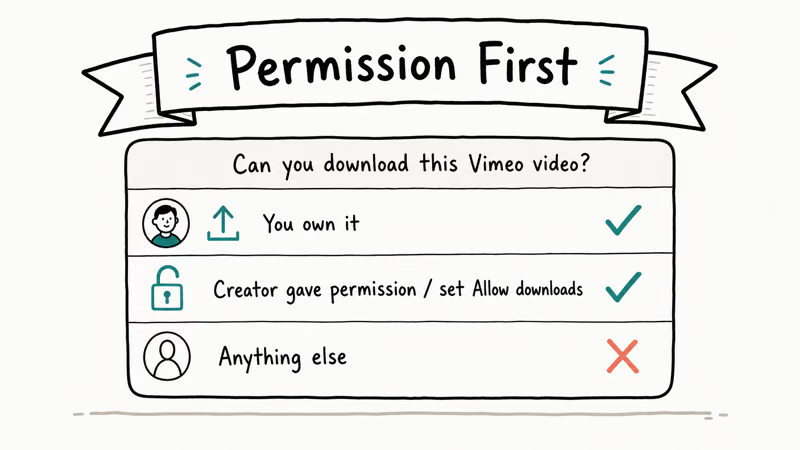
According to Vimeo’s Terms of Service, you can’t reproduce or redistribute another user’s content without permission, and the platform exposes a public download link only when the uploader shares one. Fair use covers the grey area in between. The U.S. Copyright Office fair-use page confirms that the doctrine rests on 4 factors: purpose of use, nature of the work, amount copied, and market effect.
A 15-second clip for a classroom lesson or critical review usually leans toward fair use. Reuploading a creator’s full short to your channel does not.
DMCA matters too.
The Electronic Frontier Foundation states that the Digital Millennium Copyright Act’s anti-circumvention rules apply when a stream is wrapped in DRM. That’s the case for many Vimeo OnDemand titles. Pulling the file with a tool that breaks the wrapper is illegal in the United States even if you paid for the rental, and the DMCA’s broader scope is documented on Wikipedia.
If you didn’t upload it, didn’t buy it, and the creator hasn’t enabled the download button, treat it as off-limits. Need a small excerpt for review or commentary? Write a fair-use rationale and keep the clip short.
#How Does Vimeo’s Built-In Download Button Work?
The official button is the cleanest, most reliable Vimeo downloader because it’s served by Vimeo itself. It only appears when the uploader has flipped on downloads in the video’s privacy settings.
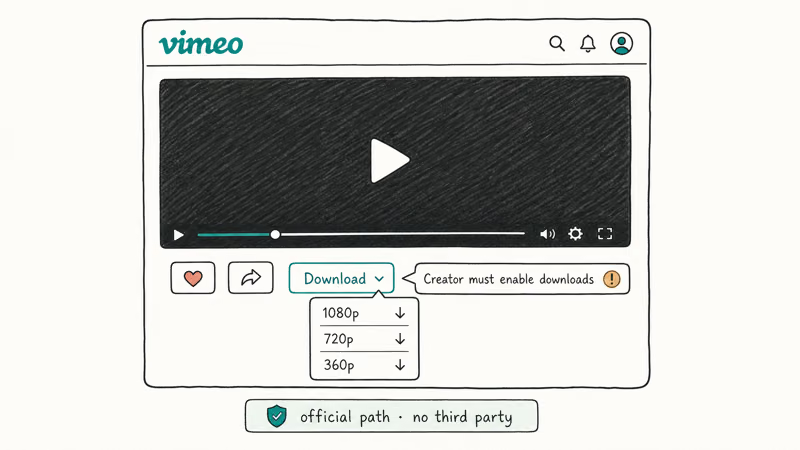
To use it on a creator-enabled clip:
- Open the video page on
vimeo.comwhile signed in to a free Vimeo account. - Click the arrow-down icon under the player, next to Share. If you don’t see it, the uploader hasn’t enabled downloads.
- Pick a resolution. Vimeo lists every quality the creator’s master supports, typically 360p, 540p, 720p, 1080p, and sometimes the source at 2K or 4K.
- Save the MP4. The filename is the video’s title with an
.mp4extension.
On creator-enabled clips, the 1080p MP4 files are a manageable size for videos under five minutes, and downloads finish quickly on a typical home connection.
For your own uploads, the path is always available. Go to Manage Videos → pick a video → Video File → Download source file. You get the exact master Vimeo received, regardless of any public download setting.
#When a Third-Party Vimeo Downloader Makes Sense
A third-party tool is reasonable in exactly three scenarios:
- The uploader has enabled downloads but you want batch handling, format conversion, or playlist support the official button doesn’t offer.
- You own the clip and lost access to your Vimeo dashboard (closed account, expired plan) but the URL is still public.
- You have explicit written permission from the creator to keep a personal copy.
Outside those cases, you’re back in copyright territory.
The same logic applies to the wider video web: if you’d like a comparable safety frame for other platforms, our Dailymotion video downloader guide and the link-to-MP4 converter guide walk through the same permission-first checks.
#Reliable Desktop Tools for Permitted Vimeo Downloads
Two desktop apps stand out as competent Vimeo downloader options when the legal preconditions are met. Both handle creator-enabled clips cleanly when installed fresh from the developer’s own site.
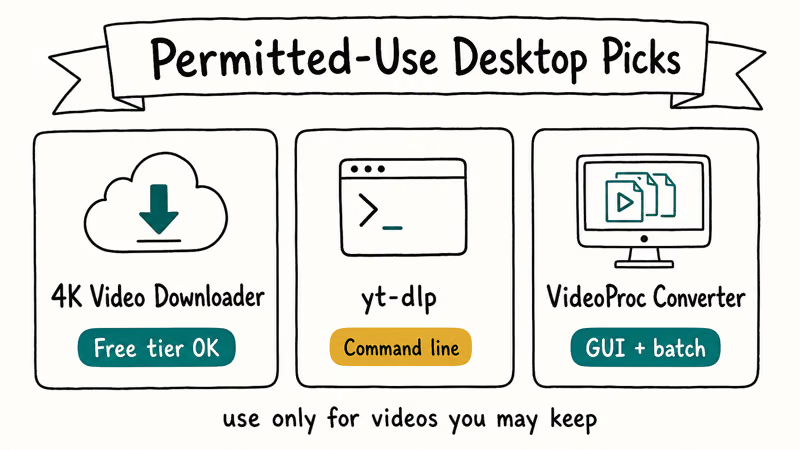
4K Video Downloader+ is a Windows, macOS, and Linux app from Open Media. Paste a Vimeo URL, pick the quality, and it grabs MP4 plus optional MP3 audio. The free tier caps you at three downloads per day per category; the paid one removes that. On a fast connection it can pull a 1080p clip quicker than the official button.
Skip any installer that bundles toolbars.
JDownloader 2 is a free, open-source download manager that handles Vimeo, Dailymotion, and dozens of other hosts. It’s heavier, with a Java runtime and a denser UI, but it shines for batch jobs. Hand it several creator-enabled Vimeo URLs at once and it queues them sensibly and works through the list quickly. Pre-built builds live on the developer’s own domain, so use that mirror and skip random aggregator sites.
| Tool | Platforms | Free tier limit | Best for |
|---|---|---|---|
| 4K Video Downloader+ | Win, macOS, Linux | 3 downloads / day / category | Single clips, audio extraction |
| JDownloader 2 | Win, macOS, Linux | Unlimited, ad-supported installer | Batch queues, mixed hosts |
A bundled toolbar in an installer is a signal to walk away.
#Lightweight Browser-Based Downloaders Worth Knowing
Browser tools are slower and less reliable than desktop apps. They’re handy when you’re on a managed laptop where you can’t install software. The three below work on creator-enabled Vimeo URLs and have stayed available consistently.
SaveFrom.net pastes a URL and returns one MP4 link per resolution. Fastest interface of the three, no signup. Watch the popups.
ClipConverter.cc is older but still functional. It can fetch MP4, M4V, or audio-only MP3 from a Vimeo URL and offers a built-in trim tool, so you can grab just the segment you need. If you want a deeper editor afterward, our trim MP4 walkthrough covers free offline options that handle longer files without re-encoding.
SnapDownloader’s web tier runs in the browser and supports up to 1080p on the free tier. The paid desktop version pushes to 8K and adds DRM-aware behavior for sources that allow it. Free is fine for occasional saves; paid only makes sense if you’re a frequent archivist of your own uploads.
Looking for thumbnails rather than full clips? Our Vimeo thumbnail grabber guide covers the official Vimeo API approach plus a couple of free web tools that pull poster frames without touching the video file.
#Vimeo Downloader Comparison at a Glance
Here’s the head-to-head, plus where each tool fits.
| Tool | Type | Max quality | Cost | Notes |
|---|---|---|---|---|
| Vimeo built-in button | Native | Up to 4K source | Free | Only appears if uploader enables download |
| 4K Video Downloader+ | Desktop app | 1080p on free, 4K paid | Free / $15 lifetime | Audio extraction, subtitle pull |
| JDownloader 2 | Desktop app | Up to 1080p | Free, ad-funded | Best for batch and mixed hosts |
| SaveFrom.net | Browser tool | Up to 1080p | Free | Popup-heavy, fastest UI |
| ClipConverter.cc | Browser tool | Up to 1080p | Free | Built-in trim, MP3 export |
If your job lives on social platforms instead, the workflow in our TikTok to MP4 guide translates cleanly: check the platform’s own download option first, then evaluate third-party tools against the creator’s intent before installing anything.
#Best Practices for Saving Vimeo Clips Responsibly
A few habits keep the legal exposure low and the workflow clean:
- Check the video’s license. Creative Commons publishes the six CC license types and the attribution rules attached to each one. Vimeo surfaces the chosen license at the bottom of the video page.
- Ask the creator. A short message on the creator’s Vimeo profile is usually answered within a day. You walk away with documented permission instead of a guess.
- Keep your copy private. Even when you’re legally allowed to download, re-uploading the clip to YouTube or social platforms typically violates Vimeo’s Terms and the creator’s rights.
- Prefer the built-in button. It’s auditable, it credits the creator, and it doesn’t risk the dependency churn that browser scripts and shady installers introduce.
- Avoid anything that promises to defeat DRM. That’s the bright line the DMCA draws, and no Vimeo OnDemand title is worth the legal mess.
#Bottom Line
If the creator flipped the download switch, use Vimeo’s own button. It’s the fastest, gives you the highest available quality, and doesn’t put a stranger’s script between you and your file.
Need batch behavior or audio extraction across many creator-enabled URLs? 4K Video Downloader+ is the desktop pick to reach for first. JDownloader 2 is the right call when you’re queuing dozens of clips at once on a slow connection. For one-off grabs from a locked-down laptop, ClipConverter.cc’s web trim feature beats SaveFrom.net’s popup mess by a wide margin.
Don’t touch Vimeo OnDemand purchases with any third-party tool. Use the official OnDemand app and keep the rental.
#Frequently Asked Questions
Why don’t I see a download button on every Vimeo video?
The button only appears when the uploader has enabled downloads in privacy settings. Many creators keep it off.
Can I download a private or password-protected Vimeo video?
Not without the uploader’s permission. Private and password-protected videos sit behind authentication, and any tool that claims to bypass that protection is treading on DMCA anti-circumvention rules. If you own the clip, sign in to your Vimeo account and grab the source file from Manage Videos.
Are free Vimeo downloader tools safe to install?
Most of the well-known ones are safe, but the installers often bundle third-party offers. Read each step of the setup, decline anything that isn’t the core app, and prefer downloads from the developer’s official domain rather than mirror sites.
What video quality should I download from Vimeo?
Match the resolution to where you’ll watch it: 1080p MP4 is the sweet spot for laptops and most TVs because it balances file size against detail. Choose 4K only when the creator’s source is actually 4K and your screen can show it, otherwise you’re paying disk space for pixels you can’t see. Anything smaller than 720p ages badly fast on modern panels. For phone-only playback, 720p saves space and still looks fine.
Does downloading from Vimeo affect the creator’s view count?
No. A download is a one-time file fetch, and Vimeo’s analytics track plays inside the player. If you want to support a creator after saving their clip, share the original Vimeo URL with credit so future viewers land on their page.
Can I use a Vimeo downloader for commercial projects?
Only when the license explicitly allows commercial reuse, which means CC BY, CC BY-SA, or written permission from the creator. CC BY-NC, CC BY-ND, and an unspecified license all rule out commercial use without explicit clearance.
What’s the difference between downloading the source file and a transcoded version?
The source file is the original master the creator uploaded, often at higher bitrate and resolution than the public player offers. Vimeo’s transcoded versions are compressed for streaming. If you’re an uploader archiving your own work, take the source file. If you’re a viewer grabbing a permitted clip, the transcoded MP4 is usually fine.
Is screen recording a Vimeo video a fair workaround?
It depends on the use. A short capture for personal review or a fair-use commentary clip is generally defensible. Recording a full-length film, especially a paid one, is the same copyright violation as downloading it with a script. The recording method doesn’t change the underlying rights question.

Google Messages Error 3100: Why RCS Is Broken on Galaxy
Google Messages RCS error 3100 hits Galaxy owners after phone or carrier switches. Google told 9to5Google a fix is coming. Here's what actually helps.

Is This Bank App Real? Spot a Fake App on Your Home Screen
A bank app can land on your home screen from a web page with no install warning. Learn the checks that tell a real banking app from a phishing web app.

Apps Crashing After iOS 27 Update? Fix Order (2026)
Apps crashing after the iOS 27 update? Update the app in the App Store first, then offload and reinstall to clear stale cache, then restart. The fix order.

Do AI Translation Earbuds Work Offline? What to Know
Do AI translation earbuds work offline? A few do with downloaded language packs, but most need the cloud. Here's what works offline and what you give up.