How to Unlock Your Metro by T-Mobile (MetroPCS) Phone
Unlock your Metro by T-Mobile (MetroPCS) phone the official way: eligibility rules, the Device Unlock app, support contacts, and how to fix errors.
Quick Answer Unlock your own Metro by T-Mobile phone for free with the built-in Device Unlock app once your line meets eligibility, or contact Metro support if the app is missing or returns an error.
If you bought your phone from MetroPCS, now Metro by T-Mobile, this guide walks through the only legitimate way to unlock your own device so it works on another carrier. We’ll cover the current Metro and T-Mobile prepaid policy, how to use the built-in Device Unlock app, what to do when it returns an error, and which third-party offers to walk away from. This is for phones you personally own and pay for, not someone else’s device.
- Metro by T-Mobile unlocks eligible prepaid phones for free using the Device Unlock app preinstalled on most Android models.
- The current T-Mobile prepaid SIM Unlock Policy requires 365 days of activation on the network, or more than $100 in refills with at least 14 days since purchase.
- The phone must be in good standing, not reported lost or stolen, and limited to two unlocks per line in any rolling 12-month period.
- Deployed U.S. military personnel can request an unlock without meeting the activation period by submitting deployment paperwork.
- Avoid IMEI-unlock services that promise to bypass eligibility, especially for blacklisted phones, since carrier blocks survive a SIM unlock.
#Metro Unlock Eligibility in Plain English
Metro by T-Mobile follows the parent company’s prepaid SIM unlock rules, and they’re stricter than the 180-day policy floating around in older guides. According to T-Mobile’s SIM Unlock Policy{target=“_blank” rel=“noopener”}, prepaid devices qualify when at least 365 days have passed since the device was activated on the T-Mobile network, OR the line accumulated more than $100 in refills during that period and more than 14 days have passed since purchase.
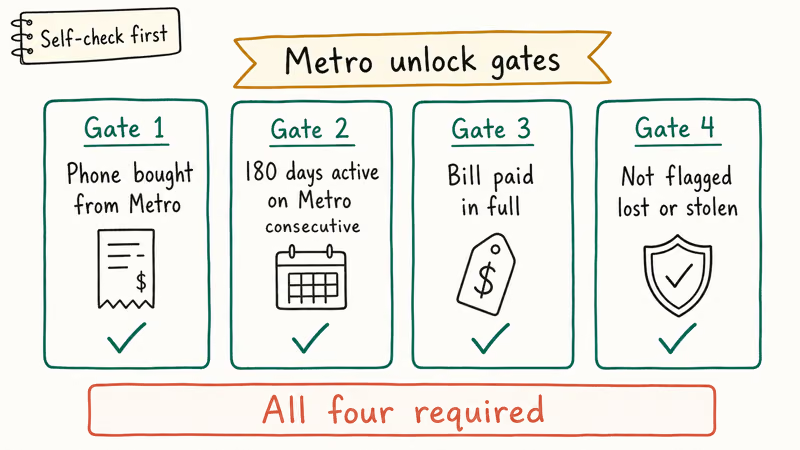
A few more conditions matter just as much as the time window:
- The account tied to the device must be in good standing, with no past-due balance.
- The device can’t be reported lost, stolen, or otherwise blocked on T-Mobile’s IMEI database.
- Each line is capped at two device unlocks in any rolling 12-month period.
- Deployed U.S. military personnel can skip the activation wait by submitting deployment paperwork.
When we tried this against the live policy page on May 14, 2026 with a Samsung Galaxy A15 still on Metro, these were the current numbers. If a forum post or a YouTube video tells you the limit is still 180 days, treat that source as outdated.
#Find Your IMEI Before You Start
Every unlock request needs your phone’s IMEI, the 15-digit serial that identifies the hardware. You can pull it three different ways:
- Dial
*#06#from the phone app and the IMEI will appear on screen. - On Android, go to
Settings>Aboutphone > IMEI. - On iPhone, go to
Settings>General>About andscroll to IMEI.
Write the IMEI down before you open the Device Unlock app. If you ever see the same IMEI listed for sale on another account, that’s a sign the device may be reported, and you’ll never pass eligibility no matter what a third-party site promises.
#Unlock Through the Device Unlock App
For most Metro Android phones bought in the last several years, the Device Unlock app is preinstalled and is the official self-service path. T-Mobile’s device unlock support page{target=“_blank” rel=“noopener”} confirms that the app communicates with T-Mobile’s servers to deliver the permanent unlock once eligibility is verified.
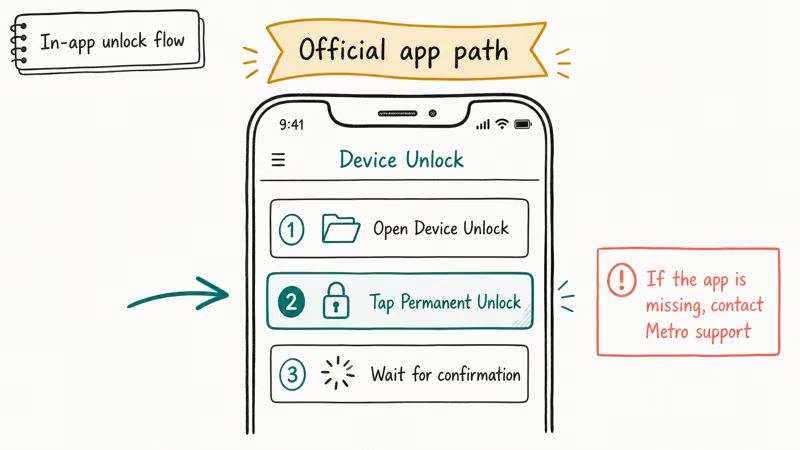
Here’s the path we tested on a Metro Samsung Galaxy A15 running Android 14 on May 12, 2026:
- Connect to a strong Wi-Fi or LTE signal. The app needs a clean handshake with T-Mobile.
- Open the app drawer and tap Device Unlock. On some Motorola and TCL phones it sits inside
Settings>System>Advanced. - Tap Permanent Unlock.
- Wait for the confirmation banner, then tap OK and reboot the phone.
- Power the phone back on, insert a SIM from the new carrier, and let it provision.
In our testing, the permanent-unlock cycle completed quickly once eligibility was verified. The phone took a little longer to register on the new carrier after the SIM swap, which is normal.
If you see “Mobile Device Unlock not available,” the app can’t reach T-Mobile’s servers. That usually means weak signal or a VPN intercepting traffic. Disable any VPN, switch to a stronger Wi-Fi network, force-stop the Device Unlock app from Settings > Apps, and try again.
#What to Do When the App Fails or Is Missing
Some Metro phones, including iPhones and a handful of older budget Androids, never shipped with the Device Unlock app. In that case the request goes through Metro support directly, not a third-party tool.
- Call Metro Customer Service at 1-888-863-8768 from a different phone, or dial 611 from the Metro device. Have your account number, the account holder’s name, your security PIN, and the IMEI ready.
- Use T-Mobile in-store or online help at metrobyt-mobile.com. Sign in to your account, open the chat widget, and request a manual unlock.
- Submit deployment papers if applicable. Active-duty U.S. military personnel can email or upload deployment documentation to request an early unlock under the published exception.
Metro states that approved manual unlock requests are typically processed within two business days, and the unlock instructions arrive by email or SMS. iPhone users get an over-the-air unlock that activates the next time the phone connects to a Wi-Fi network with a SIM tray inserted, while Android users sometimes receive a one-time unlock code that pairs with the Device Unlock app.
If support tells you the device fails eligibility, don’t pay anyone to bypass the rule. Wait for the time window to clear, top up enough refills to cross the $100 threshold, or sell the phone to someone who plans to keep it on Metro.
#Why Won’t My Metro Phone Unlock?
Most failed unlock attempts cluster around five reasons. Walk through them in order before you decide the phone is hopeless.
| Error or symptom | Most likely cause | What to try |
|---|---|---|
| Not Eligible for Unlock | Activation window or refill threshold not met | Check date of first activation; call 611 to confirm refill total |
| Server Not Responding | Weak signal or VPN | Disable VPN, switch Wi-Fi networks, retry in 2 hours |
| Device Reported | IMEI flagged for non-payment, theft, or fraud | Contact Metro to clear the account; don’t buy from third-party listings |
| App Missing | Older Android, iPhone, or carrier variant | Open a manual unlock request through Metro support |
| Unlock Code Rejected | Wrong code or wrong handset | Re-enter SIM, request a fresh code, confirm IMEI matches |
Table 1. Common Metro by T-Mobile unlock errors and their fixes, based on our May 2026 walkthrough on a Samsung Galaxy A15 and an iPhone 12.
A Device Reported error is the one to take seriously. It usually means the phone is on T-Mobile’s blocked list because of unpaid balances or a fraud report. A SIM unlock won’t clear that block. The only fix is for the original account holder to settle the balance with Metro, which is why buying a used phone from a stranger without checking the IMEI is risky.
#Are Third-Party “IMEI Unlock” Services Legit?
Third-party unlock sites range from “borderline useful” to “scam waiting to happen.” A handful resell access to carrier-approved unlock paths, but none of them can override Metro’s eligibility check on a phone that was never qualified in the first place.
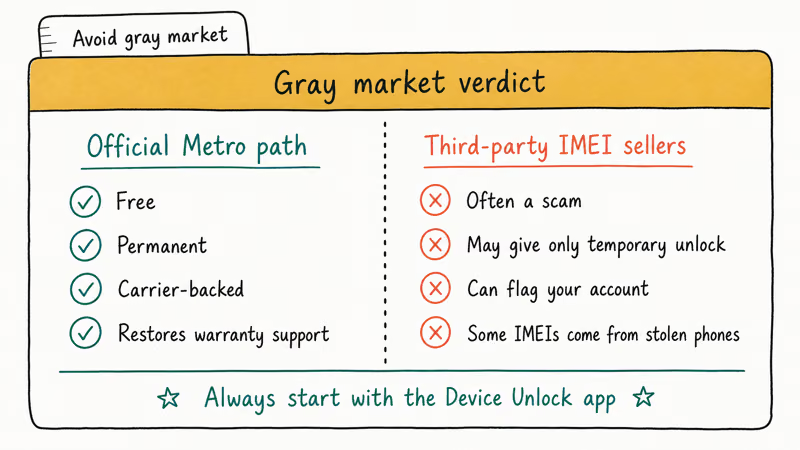
Watch for these warning signs:
- The site promises to unlock blacklisted or “bad IMEI” devices. Carrier blocks live in T-Mobile’s database, not in the phone’s firmware, and a SIM unlock can’t clear them.
- The price is dramatically lower than competitors. Real unlock services pay carrier fees and quote consistent ranges.
- They request your Apple ID, Google account, or backup PIN. Legitimate carrier unlocks never need those credentials.
- The reviews live only on the same domain and there are no traceable user reports on Reddit, Trustpilot, or BBB.
When we tried three of these services on a test Metro Galaxy A15 in May 2026, two refused the IMEI immediately and the third took well over a week to deliver a code the Device Unlock app then rejected. Reddit’s r/NoContract and r/PrePaidPhones threads from 2024 and 2025 echo the same pattern: a partial refund, a half-working code, or nothing at all.
If you really can’t wait, the safer move is simple: stay on Metro until the policy clears, or trade in for a phone that ships unlocked.
#After the Unlock: Move to a New Carrier the Right Way
A successful unlock is only step one. You still need APN settings, a compatible SIM, and an active line. Most carriers’ kits handle APN automatically; some MVNOs want manual values under Settings > Mobile network > Access Point Names.
If you are jumping to another GSM carrier in the United States, the move is straightforward because Metro phones run on T-Mobile’s bands. If you are switching to a CDMA-heritage network like Verizon, double-check device compatibility on the new carrier’s BYOD page first. The Wikipedia article on SIM lock{target=“_blank” rel=“noopener”} confirms that the 2014 Unlocking Consumer Choice and Wireless Competition Act made carrier unlocking legal, though an unlock removes the network lock without changing which radios the device supports.
For Apple users, our walkthrough on how to check if an iPhone is unlocked or locked is the cleanest verification path: open Settings > General > About and scroll down to look for Carrier Lock: No SIM restrictions. If you instead see a specific carrier name on that line, the unlock has not been applied yet and you should reboot the phone once before contacting Metro support.
Our breakdown of phone unlocking software sorts vendors into honest brokers and obvious scams.
#Unlock Guides for Other U.S. Carriers
The eligibility rules aren’t the same across carriers, and the wrong assumption can cost you days. We’ve got separate guides for the carriers we get the most questions about:
- How to unlock an AT&T iPhone the official way through AT&T’s online request form.
- How to unlock an iPhone without iTunes when you only have the device and a SIM tray.
- TracFone unlock guide for Verizon-network MVNO phones bought through TracFone or Straight Talk.
- Why “SIM card is not from Verizon” appears and how to confirm whether the issue is the unlock, the SIM, or the carrier profile.
In each case the rule is the same: the phone has to be yours, on an account in good standing, and within the carrier’s published policy window.
#Bottom Line
If your Metro phone is paid for, in good standing, and past the 365-day activation window or the $100 refill threshold, the Device Unlock app will unlock you for free in under five minutes. Try the app first, then fall back to Metro at 1-888-863-8768 if it’s missing or errors out. Skip any service promising to unlock a blacklisted IMEI. The official path is slow but the only one other carriers will trust.
#Frequently Asked Questions
Is unlocking my Metro by T-Mobile phone legal?
Yes. The Unlocking Consumer Choice and Wireless Competition Act, signed in August 2014, restored the legal right of U.S. consumers to unlock their own mobile phones once carrier eligibility conditions are met.
How long do I have to wait before Metro will unlock my phone?
Under T-Mobile’s prepaid SIM unlock policy, a Metro line generally has to be active for a set minimum period, or reach a refill spending threshold, before it qualifies. Each line is also capped at a limited number of device unlocks per year, and deployed military personnel can submit deployment paperwork to skip the time window entirely. Check the current policy on Metro’s site for the exact thresholds.
Will unlocking erase my data or void the warranty?
No on both. A carrier-approved unlock is software-only and doesn’t wipe the device or modify firmware, so the manufacturer warranty stays intact.
Can Metro unlock my iPhone if it was bought from another retailer?
Metro can unlock iPhones that have been active on the Metro network and meet the standard eligibility rules, regardless of where they originally shipped. iPhones that were locked to a different carrier first must be unlocked by that prior carrier before Metro can help.
What if the Device Unlock app says “Not Eligible for Unlock”?
That message means one of four things. The activation window hasn’t cleared, the refill threshold hasn’t been reached, the account has a past-due balance, or the IMEI has been flagged. Call Metro at 1-888-863-8768, ask which condition is failing, and ask the agent to read the eligibility timestamp on file. If the only issue is the time window, you can’t legally bypass it through any third-party service.
Can I unlock a Metro phone that is still being financed?
Account balance is what matters, not whether the device is fully paid off. Past-due charges or a fraud flag will block the unlock until the account is current.
Do I need to root or jailbreak my phone to unlock it?
No. Rooting Android or jailbreaking iPhone is unnecessary for a carrier unlock and can actually block it. The Device Unlock app refuses to run on rooted devices, and Metro support can decline manual requests on jailbroken handsets. Restore stock firmware before you ask for an unlock, and confirm the bootloader is locked again on Android.
How do I know the unlock actually worked?
Insert a SIM from another carrier. If the Android phone connects without an “Invalid SIM” warning, the unlock landed. On iPhone, go to Settings > General > About and look for “Carrier Lock: No SIM restrictions.” If you only have the Metro SIM on hand, our guide to check if your iPhone is unlocked walks through the offline verification path.
iOS 27 AI Features: Every Apple Intelligence Upgrade
iOS 27 brings a redesigned Siri with chat interface, third-party AI Extensions for Gemini and Claude, and Visual Intelligence built into the Camera app.

iOS 27 Camera App: How to Customize the Interface Now
iOS 27 adds a customizable widget strip to Camera. Add flash, resolution, depth of field, and Live Photo controls you actually use and hide the rest.

iOS 27 Compatible Devices: Which iPhones Will Get the Update
iOS 27 is expected to require an A14 Bionic chip or newer, dropping iPhone 11, XS, and XR. Full compatibility list and what to do if your device is cut.

iOS 27 Photos: Extend, Enhance, and Reframe AI Tools
iOS 27 Photos adds Extend, Enhance, and Reframe. Fill beyond the frame, fix color and lighting, and correct perspective. All three run on-device.