macOS 27 Won't Install on Intel Macs: Your Options
macOS 27 requires Apple silicon and won't install on Intel Macs. macOS 26 Tahoe is the final update. Here's what to expect and what to do next.

Quick AnswerApple confirmed macOS 27 requires an M1-or-newer Mac. No Intel Mac supports it, so macOS 26 Tahoe is Intel Macs’ final major OS; Apple announced the cutoff at WWDC on June 8, 2026.
Intel Mac owners have the answer: macOS 26 Tahoe is the last major operating system update your machine will receive. macOS 27, announced at WWDC on June 8, 2026, requires Apple silicon and won’t install on any Intel-based Mac, no matter when you bought it.
August 25, 2026 update: Apple’s macOS 27 compatibility list names only Apple-silicon Macs, confirming the cutoff announced at WWDC on June 8, 2026.
- macOS 27 requires an Apple silicon Mac (M1 or newer) and won’t install on any Intel Mac
- This is the biggest Mac compatibility cut since Apple switched from PowerPC to Intel in 2005
- macOS 27 keeps full Rosetta 2, so Intel-built apps still run; Apple plans to drop most Rosetta support in macOS 28 (2027)
- macOS 26 Tahoe will continue to receive security patches for roughly 2-3 years
- Mac mini M6 starts at $899; preorders opened August 25, 2026, and units begin shipping September 22, 2026
#Which Macs Will Not Run macOS 27?
Every Mac with an Intel processor is cut off. That’s a broad list, and it includes some machines sold as recently as 2023.
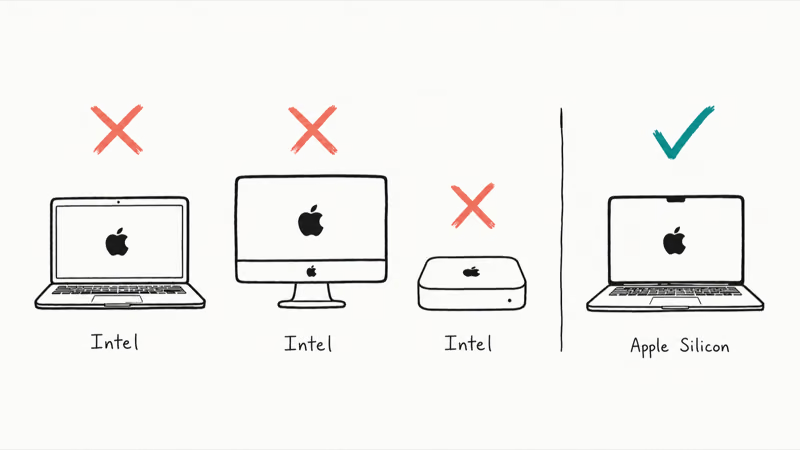
| Mac Model | Last Intel Year | Notes |
|---|---|---|
| MacBook Air | 2020 (Early) | Intel models are the non-M1 ones |
| MacBook Pro 13-inch | 2020 (Mid) | Last Intel 13-inch |
| MacBook Pro 16-inch | 2019 | The M1 Pro/Max replaced it in late 2021 |
| Mac mini | 2020 (Late) | M1 Mac mini launched November 2020 |
| iMac 21.5-inch | 2019 | M1 iMac replaced it in April 2021 |
| iMac 27-inch | 2020 | Apple never released an M-series 27-inch iMac |
| iMac Pro | 2017 (discontinued) | Discontinued March 2021 |
| Mac Pro | 2019 | Apple silicon Mac Pro launched June 2023 |
| Mac Studio | N/A | Never had Intel; always Apple silicon |
If your Mac has “Intel Core” in System Information (Apple menu > About This Mac > More Info), it won’t run macOS 27. If it shows an Apple M-series chip, it clears the Apple-silicon requirement; check the full model list for any additional cutoff.
This drop is more sweeping than any previous macOS cut. When Apple removed 32-bit app support or dropped older processors in past years, it only removed the oldest two or three machine generations. macOS 27 eliminates the entire Intel category at once. Every Intel Mac, regardless of when you bought it.
#Why Apple Silicon Is the Practical Hardware Cutoff
Apple hasn’t named a single cause for the cutoff.
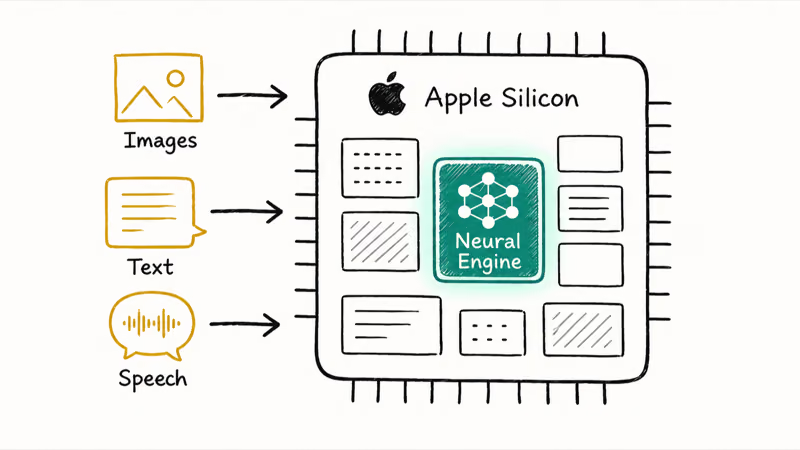
Apple silicon chips include dedicated Neural Engine hardware for on-device machine-learning tasks, while Intel Macs don’t have that hardware. Many Apple Intelligence features use the Neural Engine for local model inference and image processing. That makes Apple silicon a practical platform boundary, but Apple hasn’t said the Neural Engine alone dictated the macOS 27 compatibility list.
The unified memory architecture matters too. Apple silicon uses shared memory between the CPU and GPU, so large AI models load quickly because data doesn’t cross bus bottlenecks.
The hardware gap is the point: Apple silicon has the Neural Engine and memory design macOS 27’s AI stack expects. Intel Macs don’t, and that gap isn’t fixable in software.
Apple’s transition from Intel started at WWDC 2020. By late 2021, most product lines had Apple silicon. They gave Intel users five major macOS updates: Monterey (2021), Ventura (2022), Sonoma (2023), Sequoia (2024), and Tahoe (2025-2026). Five years is Apple’s standard support runway, and Intel hit it exactly.
#What Intel Macs Can Still Do After macOS 27 Ships
Your Intel Mac keeps working. It just stops getting new macOS versions after macOS 26 Tahoe.
What you still get:
- Security patches for macOS 26, following Apple’s historical 2-3 year post-cutoff pattern
- App updates for most apps, as long as developers continue to support macOS 26
- Full use of your hardware: nothing about your Mac physically changes
What you won’t get:
- macOS 27 or any future macOS release after Tahoe
- On-device Apple Intelligence features tied to the Neural Engine
- Any macOS feature that requires Apple silicon at the hardware level
According to Apple’s own release notes, macOS 13 Ventura received its last security update roughly two years after macOS 15 Sequoia shipped. That history suggests macOS 26 Tahoe may stay patched through roughly 2028, but Apple hasn’t guaranteed that date.
If the machine already feels slow, the Mac slow after macOS update guide has fixes for Tahoe performance issues.
#Rosetta 2 in macOS 27: What It Means for Your Apps
Rosetta 2 is Apple’s translation layer that let Apple silicon Macs run apps compiled for Intel processors. When the first M1 Macs launched in November 2020, millions of apps only had Intel builds. Rosetta 2 made those apps work automatically on M1 without any developer changes.
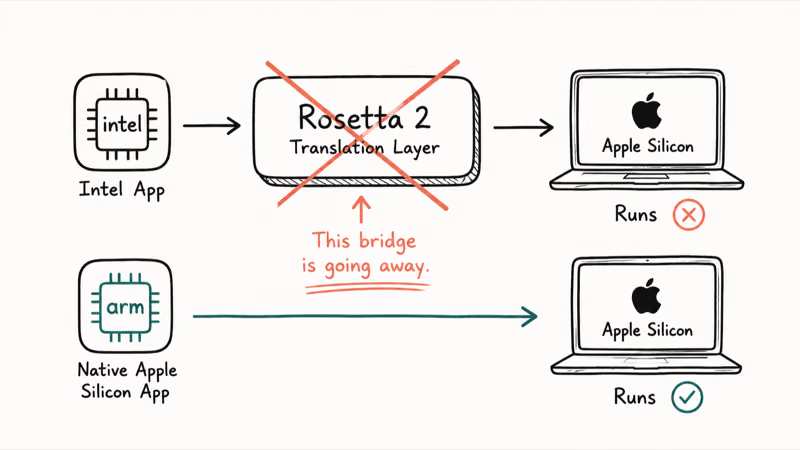
By 2026, most apps have caught up.
According to Is Apple Silicon Ready, a community tracker maintained by developers, more than 98% of apps listed have native Apple silicon builds as of 2026.
Here is the part that gets misreported: macOS 27 Golden Gate keeps Rosetta as a general-purpose tool for Intel apps. Apple’s Rosetta environment documentation says later releases will retain only a subset for older, unmaintained games.
Test niche legacy tools before upgrading; translation support doesn’t guarantee full compatibility.
Check apps at the Is Apple Silicon Ready site.
Rosetta remains a general-purpose translator through macOS 27. Later releases retain only a subset for older, unmaintained games.
#Should You Upgrade From an Intel Mac?
It depends on your budget and how much your current Mac still handles.
Good reasons to upgrade now:
- You want Apple Intelligence features (on-device AI, redesigned Siri, image generation)
- Your Intel Mac is slowing down on daily tasks (spinning beach ball, choppy video playback)
- You do video editing, coding, or other CPU-heavy work
- Your Intel Mac is getting close to the end of its security patch window
Good reasons to wait:
- Your Intel Mac still handles everything you need today
- Budget is tight right now
- macOS 26 will stay patched for another 2-3 years, so there’s no immediate rush
Battery life is another practical reason to move to Apple silicon if an older Intel Mac is already wearing down. Newer Apple silicon MacBooks are far more efficient than the final Intel MacBooks, so the switch can feel like a daily-use upgrade even before the macOS 27 feature gap matters.
Use your Intel Mac until security patches stop. There’s no rush.
The feature gap, though, won’t close. AI features on Apple silicon will keep expanding every year, and Intel Macs will fall further behind each release cycle. That’s a hardware limitation, not a software one, and it can’t be patched away with any update. If AI tools matter to you, the only path is Apple silicon.
If you do upgrade, compare the work your Intel Mac can’t handle against the model you actually need. Apple’s 2026 Mac mini announcement says the $899 M6 model opened for preorder August 25, 2026, and units begin shipping September 22, 2026. The macOS 27 AI features guide covers what you’d gain.
If your existing MacBook is showing a service battery warning before you decide, the MacBook battery service guide covers whether it’s worth a repair or a reason to upgrade sooner.
#macOS 26 Security Update Timeline
Apple doesn’t publish explicit end-of-life dates. But the pattern is consistent across recent releases.
When macOS 27 ships (fall 2026), Apple typically supports three versions at once:
- macOS 27 (current): full updates
- macOS 26 Tahoe (one version back): security patches
- macOS 25 (two versions back): critical patches only
That historical pattern points to macOS 26 security support through roughly fall 2028. macOS Ventura (2022) received patches more than two years after macOS 15 launched, and macOS Sonoma (2023) stayed patched even as macOS 26 shipped. Apple doesn’t guarantee the same timeline for Tahoe.
According to Apple’s security releases page, Apple pushes individual updates to older macOS versions on a rolling basis, with critical vulnerabilities patched first. Bookmark that page. It’s the fastest way to know when a new patch has shipped for macOS 26.
Treat 2028 as an estimate, not a promise.
For the full hardware compatibility list for macOS 27 itself, see the macOS 27 release date and compatible Macs guide.
#Bottom Line
macOS 26 Tahoe is the end of the line for Intel Macs. Recent support history suggests another 2-3 years of updates, but Apple hasn’t guaranteed that window. Keep using the Mac while it receives the patches and apps you need; the feature gap with Apple silicon will still grow over time.
Don’t rush. If you’re already constrained, compare a current Apple silicon Mac against the work your Intel model can no longer handle.
#Frequently Asked Questions
Can I still use my Intel Mac after macOS 27?
Your Mac keeps running macOS 26 Tahoe, but third-party apps, peripherals, certificates, and online services can end support independently. You also lose the ability to upgrade to macOS 27 or later releases.
Will Intel Macs still get security updates?
Probably, based on Apple’s recent pattern of patching older macOS versions for roughly 2-3 years after they stop being the latest release. Apple doesn’t publish a guaranteed support duration, so confirm each macOS 26 update on its security releases page.
Based on this pattern, macOS 26 will likely receive security updates through approximately fall 2028.
What is the cheapest Apple silicon Mac I can buy?
The Mac mini M6 starts at $899 if you already have a monitor, keyboard, and mouse. Preorders opened August 25, 2026, and units begin shipping September 22, 2026. The previous-generation Mac mini M4 launched at $599 and may still appear through third-party listings; Apple’s main purchase page no longer lists that generation, but this doesn’t prove every legacy SKU is discontinued or unavailable.
Does macOS 27 remove Rosetta 2 completely?
No. macOS 27 Golden Gate keeps full Rosetta 2, so Intel-built apps still run through it. Apple plans to reduce Rosetta 2 support in macOS 28 (2027), keeping a subset for older Intel-based games.
Can I upgrade my Intel Mac’s chip to Apple silicon?
No. Not possible.
Is macOS 26 stable enough to use long-term?
macOS 26 Tahoe remains usable while Apple continues shipping the updates your Mac needs. Apple hasn’t guaranteed support through 2028, so keep automatic updates enabled and check its security releases page rather than relying on a projected date.
When will Apple stop security updates for macOS 26?
Apple doesn’t announce end-of-life dates in advance. Based on historical patterns, macOS 26 will likely receive updates through 2027-2028. Check Apple’s security releases page for the latest status.

Mac mini M6 vs M5 Pro: Which Model Should You Buy?
Mac mini M6 vs M5 Pro compared on price, memory, ports, displays, and real workloads. Find the better 2026 Mac mini for your desk and budget.

macOS 27 Compatible Macs: Every Supported Model (2026)
macOS 27 Golden Gate runs only on Apple Silicon Macs. Here is the full list of supported M-series models and the four Intel Macs that lose support.

macOS 27 Golden Gate: Every Major New Feature Confirmed
macOS 27 Golden Gate goes Apple Silicon only, adds a Gemini-powered Siri, refines Liquid Glass, and rebuilds Spotlight. Here is every confirmed change.

macOS 27 Liquid Glass: Every Readability Fix Explained
macOS 27 Golden Gate refines Liquid Glass with an intensity slider, better contrast, cleaner window corners, and edge-to-edge sidebars to fix readability.