How to Fix "SIM Card Is Not From Verizon" Notification
Fix the SIM Card Is Not From Verizon notification with 5 clear steps. Covers carrier unlock checks, APN rebuilds, and post-update Galaxy fixes.
Quick AnswerThe notification means your phone is still carrier-locked to Verizon, or your APN settings are pointing at the wrong network. Call Verizon to confirm unlock status, then either wait out the 60-day lock or build a fresh APN profile for your new carrier.
The “SIM card is not from Verizon” notification appears the moment a non-Verizon SIM hits a phone that is still tied to Verizon’s network. The cause splits cleanly into two camps: carrier lock or stale APN. The fix in front of you depends entirely on which one you’re hitting.
This guide assumes you’re working on your own phone and account. Verizon only unlocks a device you legitimately own.
- Verizon’s 60-day lock starts on the activation date, so a phone you bought at full price still locks the moment it first connects to Verizon’s network
- The lock lives on Verizon’s servers, not on the phone, so factory resets and SIM swaps don’t clear it
- An already unlocked phone throws the same warning when APN settings still route data through vzwinternet
- A new APN profile for T-Mobile (fast.t-mobile.com) or AT&T (phone) restores data and MMS quickly once it’s set active
- Disabling the Verizon Activation Agent silences the popup, but the system app restarts itself within hours
#What Does This Notification Actually Mean?
Two scenarios trigger this alert. The fix branches sharply between them.
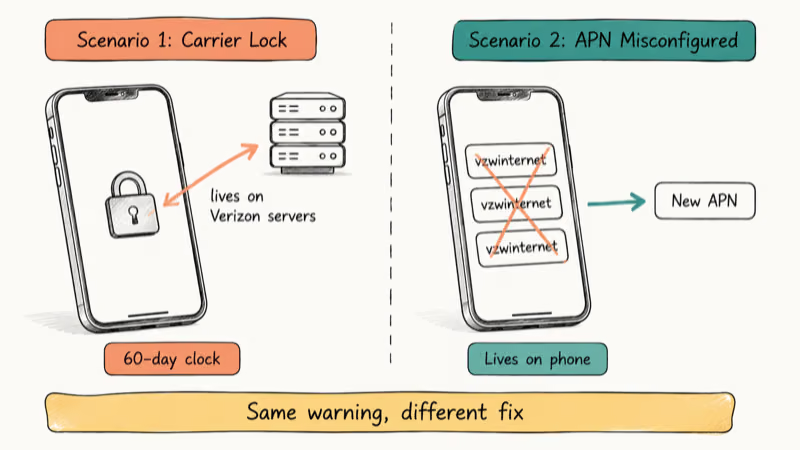
Scenario 1: The phone is still carrier-locked. Verizon clamps a network lock onto the device the first time it talks to their towers. According to Verizon’s device unlocking policy, postpaid phones stay locked for 60 days of active service before they unlock automatically. Slot in a Mint Mobile or AT&T SIM during that window, and the phone refuses it.
Scenario 2: The phone is unlocked but the APN profile still points to Verizon. When you ran on Verizon, the phone built its data routes around vzwinternet. Removing the SIM doesn’t rebuild those routes. The new SIM connects to a different network, but the phone keeps trying to reach Verizon’s servers and surfaces the warning every few hours.
Both scenarios produce identical symptoms: data drops, MMS images stuck on download, calls failing to dial out. This cellular connectivity problem is fixable. Treat the right cause and service usually returns inside a single boot cycle.
#How Do You Tell If the Phone Is Locked or Just Misconfigured?
Run one check before anything else. The answer decides which fix you need.
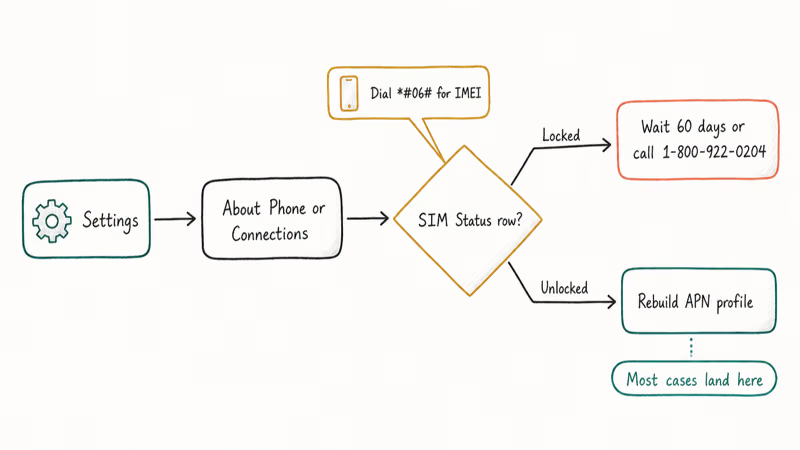
On most stock Android builds:
- Open
Settings>About Phone>SIM Status - Look for a row labeled “Network Lock” or “SIM Lock Status”
- The value reads either Locked or Unlocked
On Samsung One UI:
- Open
Settings>Connections>Mobile Networks>Network Operators - Tap Search Networks
- If the list shows only Verizon, or the search is grayed out, the phone is locked
If the menus look different on your device, dial *#06# to grab your IMEI, then call Verizon at 1-800-922-0204 and read it to the agent. They confirm lock status in under two minutes and don’t charge for the check. Our carrier lock walkthrough covers what each lock state actually permits.
Locked? Skip ahead to the unlock section. Unlocked? Jump to the APN rebuild, which is where most of these errors hide.
#Unlocking a Verizon Phone
If the lock check returned Locked, the phone won’t accept a non-Verizon SIM until Verizon clears the restriction on their side.
#Eligibility checklist
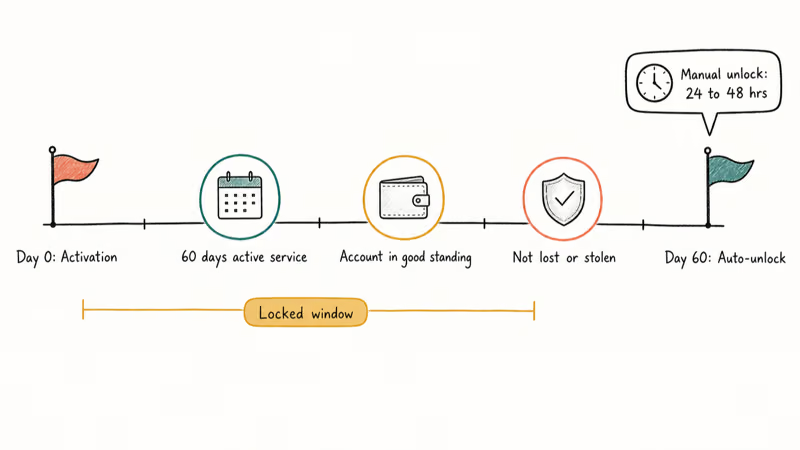
According to Verizon’s published unlock criteria, the device has to clear all of the following.
For postpaid phones:
- 60 consecutive days of active service tied to your Verizon account
- Account in good standing with no past-due balance
- Device not flagged as lost, stolen, or fraudulent
For prepaid phones:
- 60 days of continuous prepaid service on the same account
- Service active throughout the 60-day window
The clock starts on activation, not purchase. A phone bought outright at MSRP still has to clock the same 60 days once you turn it on inside Verizon’s network.
#Requesting the unlock
Verizon auto-releases most devices the moment the 60-day mark hits. The phone checks in with their servers, the lock disappears, and the warning goes quiet. No action needed on your end.
If 60 days passed and Locked still shows up, dial 1-800-922-0204 and ask for a manual unlock. Verizon’s support staff confirms that manual unlock requests process inside 24 to 48 hours, free of charge. They flag the IMEI in their system, and the next time the phone reaches their towers the lock lifts.
A faster trick worth trying: power the phone all the way off, drop in the new SIM, and power it back on. Wait five full minutes. Sometimes the unlock pushes through during that first handshake with the new carrier. Restart once more and the warning is gone.
For a deeper walkthrough of the request flow, see our guide to unlocking a Verizon phone.
#Rebuilding the APN Profile (Most Common Fix)
If the lock check came back Unlocked, the APN profile is almost certainly the culprit. Verizon’s APN settings stay buried in the phone even after the SIM leaves. The new carrier needs its own profile.
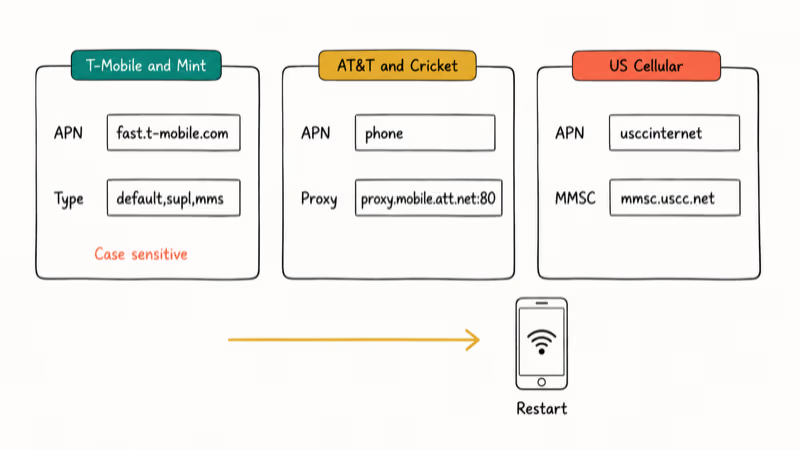
#Build a fresh profile
- Open
Settings>Connections>Mobile Networks>Access Point Names - Tap + or Add New APN (the label varies by manufacturer)
- Type the values for your new carrier (tables below)
- Save the profile and select it as active
- Restart the phone
Once the new profile is active, the connection usually comes back shortly after the reboot, and any MMS messages that had been stuck on download deliver right away.
#T-Mobile / Mint Mobile / Metro by T-Mobile
| Field | Value |
|---|---|
| Name | T-Mobile |
| APN | fast.t-mobile.com |
| MMSC | http://mms.msg.eng.t-mobile.com/mms/wapenc |
| MMS Protocol | WAP 2.0 |
| APN Type | default,supl,mms |
#AT&T / Cricket
| Field | Value |
|---|---|
| Name | AT&T |
| APN | phone |
| MMSC | http://mmsc.mobile.att.net |
| MMS Proxy | proxy.mobile.att.net |
| MMS Port | 80 |
#US Cellular
| Field | Value |
|---|---|
| Name | US Cellular |
| APN | usccinternet |
| MMSC | http://mmsc.uscc.net |
| APN Type | default,supl,mms |
Case matters. fast.t-mobile.com fails if you type Fast.T-Mobile.com. Type it exactly as shown.
According to T-Mobile’s official APN documentation, these settings activate mobile data and MMS on Android 10 and higher within minutes of a save. Older builds (Android 9 and below) need different proxy ports, and the carrier’s support page lists those.
If the Add New APN option is grayed out, Verizon locked the APN section on a small batch of older Galaxy and LG phones. Call Verizon and ask them to clear the APN restriction. They can do it remotely. The same lock can show up alongside a could not activate cellular data network error during phone setup.
#Disabling the Verizon Activation Agent (Temporary Workaround)
Killing the system app silences the popup but doesn’t fix the lock or APN issue.
- Open
Settings>Apps - Tap the three-dot menu and pick Show System Apps
- Scroll until you find Verizon Activation Agent or Verizon Auto Update
- Tap Force Stop
- Tap Disable if the option appears
The popup vanishes immediately. Android’s system process scheduler restarts the agent within six to eight hours, or sooner if you reboot, so the popup often returns after a single overnight charge cycle.
Disabling system apps doesn’t void Knox. Re-enable from the same screen anytime, which makes it safer than rooting.
#When the Notification Comes Back After Every System Update
System updates ship fresh carrier configuration files. Those files reset disabled apps and overwrite custom APN profiles with Verizon defaults. So the popup reappears every time a new One UI build or Android version lands.
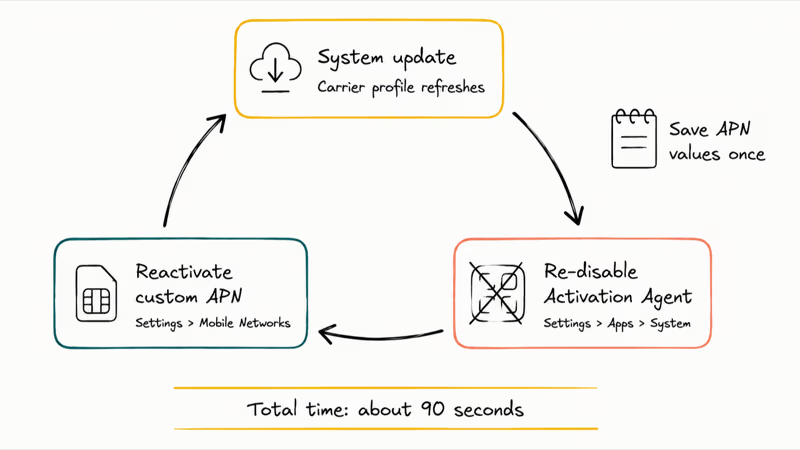
System updates also refresh the carrier profiles bundled with the phone. The intent is to fix bugs in older profiles. The side effect is that your custom APN gets buried under a default Verizon profile.
After every update:
- Re-disable the Verizon Activation Agent (
Settings>Apps>Show System Apps) - Re-add or reactivate your custom APN (
Settings>Connections>Mobile Networks>Access Point Names) - Reboot once
This pattern shows up reliably after a monthly Galaxy security patch, and the whole reset takes about 90 seconds. Save your APN values somewhere, like a screenshot or a note app, so you don’t have to retype them each cycle.
If the loop keeps coming back even after a clean APN rebuild, you may be running into a deeper provisioning problem. Our SIM not provisioned MM2 guide covers what is happening on the carrier side.
#Bottom Line
Run the lock check first. If it shows Locked, wait out the 60 days, then call Verizon for the unlock. If it shows Unlocked, build a fresh APN profile in under two minutes using the T-Mobile or AT&T values above. Skip the Activation Agent disable trick because it only buys a few quiet hours and doesn’t fix the underlying issue.
#Frequently Asked Questions
Can I use any SIM card after Verizon unlocks the phone?
Yes. After the unlock clears, the phone accepts SIMs from T-Mobile, AT&T, Mint Mobile, Cricket, US Cellular, and most international carriers. The only catch is band support. Confirm the new carrier’s frequency bands match the phone’s radio specs.
How long does the unlock actually take after I call Verizon?
Manual requests take 24 to 48 hours. Auto-unlocks happen overnight at 60 days.
Does a factory reset remove the Verizon carrier lock?
No. The lock sits on Verizon’s servers, not in the phone’s storage. A factory reset wipes apps, photos, and settings, but the network-level lock survives. Only Verizon can lift it.
Will this notification block Wi-Fi or just cellular?
Wi-Fi keeps working. The lock only blocks cellular voice, SMS, MMS, and mobile data. Apps that route over Wi-Fi behave normally until the SIM issue is resolved.
Can I unlock the phone if I still owe money on a payment plan?
Yes, Verizon doesn’t require the device to be paid off before unlocking. The eligibility check is the 60-day active service window and account standing, not the device payment balance. Pay your monthly bill on time and the phone qualifies, regardless of remaining device payments.
Why did the notification reappear after a software update?
System updates push refreshed carrier configuration profiles. Those profiles re-enable disabled system apps and replace custom APN settings with carrier defaults. After any monthly security update, head back to Settings > Apps > Show System Apps to disable the Verizon Activation Agent again, then revisit Settings > Connections > Mobile Networks > Access Point Names to confirm your custom APN is still active. The whole cycle takes about 90 seconds.
Is unlocking my phone legal in the US?
Yes. The 2014 Unlocking Consumer Choice Act made carrier unlocking legal at the federal level. The FCC requires carriers to honor eligible unlock requests.
What is the difference between a carrier lock and a SIM lock?
They describe the same restriction in most consumer contexts. Both terms refer to the network-level rule that prevents a phone from connecting to a non-Verizon carrier. Some forums use “SIM lock” for the smaller PIN protection on the SIM card itself, but in the context of this notification, carrier lock and SIM lock mean the same network restriction.

Pixel 11 vs Pixel 10: What Changed and Who Should Upgrade
Pixel 11 vs Pixel 10: same screen and camera resolution, new Tensor G6, 25W wireless, and Gemini Intelligence. Here is who should actually upgrade.

Verizon Not Receiving Texts? How to Fix It in 9 Steps
Verizon not receiving texts? Fix it in 9 steps: check Message Blocking in My Verizon, reset network settings, deregister iMessage, and call support.
Pixel Battery Drain: What Google's July Fix Really Covers
Google marked the Pixel idle battery drain bug fixed in July, but only some phones got the patch. Here is who is covered, who is not, and what to try.
iPhone Stuck on EDGE? How to Get 5G or LTE Back (2026)
iPhone stuck on EDGE with crawling data? Here's why the E icon appears, which settings force 5G or LTE back, and when the problem is your carrier.