iOS 27 Compatible Devices: Which iPhones Get the Update
iOS 27 supports every iPhone with an A13 Bionic chip or newer, keeping iPhone 11 and iPhone SE 2nd gen. Full compatibility list and what it means for you.

Quick AnsweriOS 27 supports iPhone 11, iPhone SE 2nd generation, and every newer model on Apple's list. Apple Intelligence eligibility is narrower, and individual features can still vary by hardware.
Apple’s iOS 27 list starts with iPhone 11 and iPhone SE 2nd generation. No iPhone that ran iOS 26 is dropped, but installing the OS doesn’t guarantee every hardware-dependent feature.
Revalidated August 23, 2026: This article reflects Apple’s current iOS 27 compatibility list and feature-availability notes.
- iOS 27 runs on any iPhone with an A13 Bionic chip or newer, making iPhone 11 and iPhone SE 2nd gen the oldest supported models.
- The iOS 27 device list is identical to iOS 26, so no iPhone loses support this cycle.
- The A12 phones (iPhone XS, XS Max, XR) were dropped back in iOS 26 and top out at iOS 18.
- iPhone 11 through Apple’s current iPhone 17 lineup all get iOS 27.
- Apple lists Apple Intelligence on iPhone 15 Pro and Pro Max, and on all iPhone 16 models and later; individual features can have narrower requirements.
#iOS 27 Compatible iPhone List
Apple’s official compatibility page lists every iPhone that runs iOS 27, from iPhone 11 up to the iPhone 17 lineup.
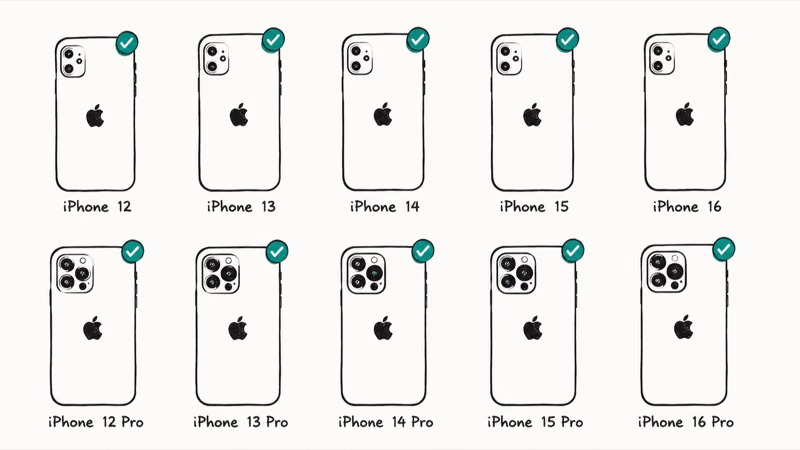
| iPhone Model | iOS 27 Support | Apple Intelligence eligibility |
|---|---|---|
| iPhone 17 Pro Max, 17 Pro, Air, 17, and 17e | Yes ✓ | Eligible* |
| iPhone 16 Pro Max, 16 Pro, 16 Plus, 16, and 16e | Yes ✓ | Eligible* |
| iPhone 15 Pro and 15 Pro Max | Yes ✓ | Eligible* |
| iPhone 15 and 15 Plus | Yes ✓ | Not eligible |
| iPhone 14 series | Yes ✓ | Not eligible |
| iPhone 13 series | Yes ✓ | Not eligible |
| iPhone 12 series | Yes ✓ | Not eligible |
| iPhone 11, 11 Pro, and 11 Pro Max | Yes ✓ | Not eligible |
| iPhone SE (2nd generation and later) | Yes ✓ | Not eligible |
*Eligibility still varies by feature, language, and region.
According to Apple’s iOS compatibility page, the A13 Bionic floor carries over unchanged from iOS 26. The iPhone 11 launched with iOS 13 and remains on Apple’s iOS 27 list.
That continued support lines up with Apple keeping the A13 floor steady into iOS 27.
Apple Intelligence requirements add a second hardware layer. According to Apple’s iOS 27 compatibility notes, Apple Intelligence is available for iPhone 15 Pro and iPhone 15 Pro Max, plus every iPhone 16 model and later. The same notes warn that availability can vary by feature, language, region, and software version.
#iPhones Dropped Before iOS 27
No iPhone that ran iOS 26 loses support in iOS 27. The device list is identical year over year.
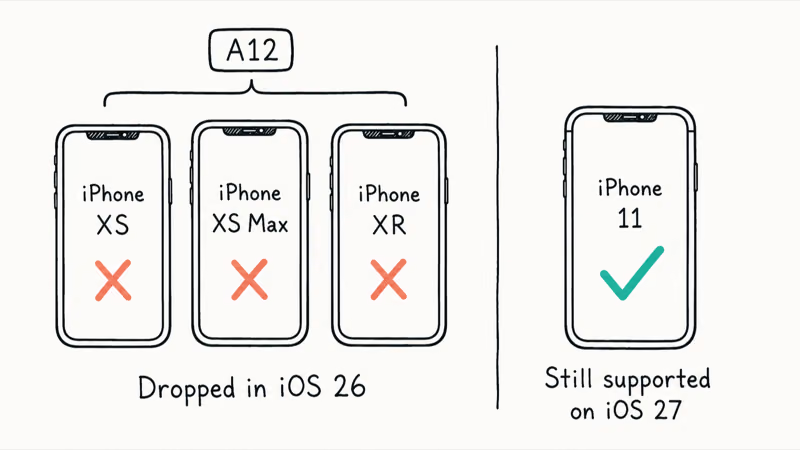
| iPhone Model | Chip | Last iOS |
|---|---|---|
| iPhone XS, XS Max | A12 Bionic | iOS 18 (final) |
| iPhone XR | A12 Bionic | iOS 18 (final) |
| iPhone X, 8, 8 Plus | A11 Bionic | iOS 16 (final) |
The phones people often expect to be cut, iPhone XS and XR, already lost support when iOS 26 raised the floor to A13 Bionic in 2025. Those A12 models top out at iOS 18. Because iOS 27 holds the same A13 line, there was nothing new to drop.
Missing iOS 27 does not automatically mean those phones have stopped receiving every security fix. According to Apple’s current security releases list, an iOS 18 update remains available for iPhone XS, iPhone XS Max, and iPhone XR. That is evidence for those named A12 models today, not a promise that every device receives patches for a fixed number of years.
That cutoff is about long-term support and feature requirements, not a claim that every A12 phone suddenly became unusable.
#iOS 27 on iPhone 11 vs. iPhone 15 Pro: Feature Differences
Getting iOS 27 installed and getting the full feature set are two separate things. The split is straightforward.
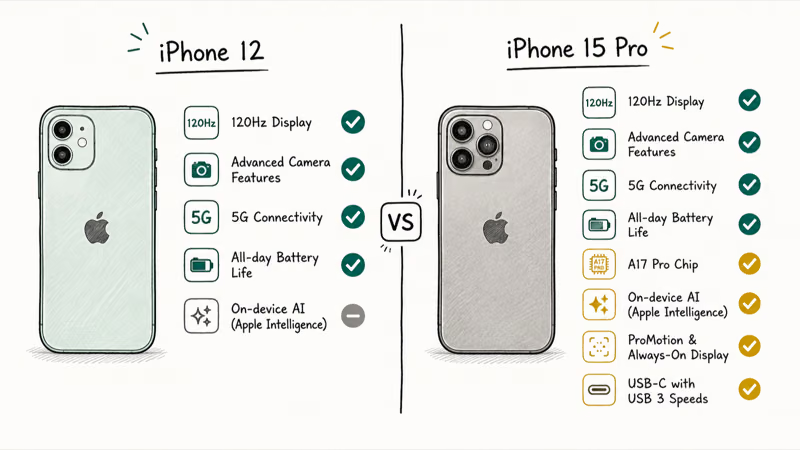
Core iOS 27 support (every compatible model): Each phone in Apple’s list can install the operating system and receive the features Apple makes available to that hardware. Camera capabilities, on-device processing, radio features, and other device-dependent functions can still differ by model.
Apple Intelligence eligibility: Apple currently names iPhone 15 Pro, iPhone 15 Pro Max, and all iPhone 16 models and later. iPhone 15 and iPhone 15 Plus can run iOS 27 but aren’t on that Apple Intelligence list.
For the full breakdown of which AI features require which hardware, see our iOS 27 AI features guide.
#What iPhone 11 Users Should Know
Good news first: your iPhone 11 gets iOS 27. Here is what to weigh.
You get the core OS, not identical features. iPhone 11 can install iOS 27, but Apple Intelligence isn’t available and other hardware-dependent capabilities can differ from newer phones.
Performance is the real question. A six-year-old A13 chip can feel slower under the newest OS.
Check the exact model before upgrading for Apple Intelligence. Apple’s current list starts with iPhone 15 Pro and iPhone 15 Pro Max, then includes every iPhone 16 model and later. Check the feature footnotes as well as the phone name before buying.
For more on where Apple drew its line last year, the iOS 26 supported devices guide covers the A13 floor and what security support looks like after major updates stop.
If you’re deciding whether to try the pre-release build, our iOS 27 beta guide walks through the risks and how to install it safely on a secondary device.
#When Can I Install iOS 27?
Apple confirmed the compatibility list at its WWDC 2026 keynote on June 8, and the developer beta dropped the same day.
June 8, 2026: Apple previewed iOS 27 at WWDC and published the official compatibility list.
During beta testing: Apple offers pre-release software through its developer and public beta programs. Beta availability is separate from the final public release.
Fall 2026: Apple’s official iOS 27 page says the finished update is coming this fall. Apple has not posted an exact public-release date there. When it becomes available, compatible devices can check Settings > General > Software Update. Our iOS 27 release date guide separates confirmed dates from forecasts.
#Will iPhone 11 Get Apple Intelligence on iOS 27?
No. Apple’s iOS 27 compatibility notes don’t include iPhone 11 in the Apple Intelligence device list.
That doesn’t mean every non-AI feature is identical across models. Apple can limit a camera, connectivity, or on-device feature to hardware that supports it. Use the footnotes on Apple’s iOS 27 page for model-specific limits, and see our iOS 27 new features overview for the broader release.
#Bottom Line
iOS 27 supports Apple’s listed models from iPhone 11 and iPhone SE 2nd generation through the current iPhone 17 lineup. The iPhone XS and XR remain on iOS 18. For Apple Intelligence, check for iPhone 15 Pro or Pro Max, or an iPhone 16 model or later, and then read the feature-specific limits.
Apple confirmed the official list at its WWDC 2026 keynote on June 8.
#Frequently Asked Questions
Will iPhone 11 get iOS 27?
Yes. Apple’s official list includes iPhone 11, 11 Pro, and 11 Pro Max. Apple Intelligence isn’t available, and some other features can still vary by hardware.
What is the oldest iPhone that supports iOS 27?
iPhone 11 and iPhone SE 2nd generation. Both use the A13 Bionic chip, and they’re tied as the oldest supported models because iOS 27 holds the exact same hardware floor that iOS 26 established back in 2025.
Does iOS 27 work on iPhone SE?
Yes. Both the iPhone SE 2nd gen (A13) and 3rd gen (A15) run iOS 27.
Do you need iPhone 15 Pro for iOS 27?
No. iPhone 11 is the iOS 27 minimum for the main iPhone line. Apple Intelligence eligibility starts with iPhone 15 Pro and Pro Max, then all iPhone 16 models and later.
Did iOS 27 drop any iPhones?
No. The iOS 27 list matches iOS 26 exactly. The iPhone XS, XS Max, and XR were already cut a year earlier.
Should I upgrade my iPhone to get iOS 27?
If your phone is on Apple’s compatibility list, you don’t need new hardware just to install iOS 27. Upgrade only for capabilities your current phone lacks, after checking the exact model requirements rather than assuming every newer iPhone has the same features.
Will iPhone 11 get all features in iOS 27?
No. iPhone 11 can install iOS 27, but Apple Intelligence isn’t available and other hardware-dependent features can vary. Apple’s compatibility and feature footnotes are the authority for each capability.

Mac mini M6 vs M5 Pro: Which Model Should You Buy?
Mac mini M6 vs M5 Pro compared on price, memory, ports, displays, and real workloads. Find the better 2026 Mac mini for your desk and budget.

Apple Siri Settlement: Who Qualifies and How to Claim
Apple's $250 million Siri settlement covers iPhone 15 Pro and iPhone 16 models bought June 2024 to March 2025. See who qualifies and how claims work.

iOS 26.6.1 Security Update: What Apple Fixed and Who Gets It
Apple released iOS 26.6.1 on August 17 with 29 security fixes, including an IPSec interception bug. See what it patches, who gets it, and how to update.

iPhone Adaptive Power: How It Works and When to Use It
Learn how iPhone Adaptive Power works, which models support it, what it changes, and when Low Power Mode is still the better battery-saving choice.