How to Fix Twitch Error 2000: Network Fixes for 2026
Twitch Error 2000 stops the stream from loading. Walk through nine browser, DNS, and network fixes that resolve the network error message in minutes.
Quick AnswerTwitch Error 2000 is a network failure between your browser and Twitch's video servers. Fix it by clearing cache and cookies, disabling ad blockers, switching to Cloudflare or Google DNS, and reloading on a wired connection.
Twitch Error 2000 lands on the player with the message “There was a network error. Please try again. (Error #2000)” and leaves the stream stuck on a black screen.
The error is almost always a handshake problem between your browser and Twitch’s video CDN. That means the real fixes live in your browser settings and your network stack, not in your Twitch account.
This guide walks through the reliable fixes in the order that usually makes the least disruption: browser checks first, then DNS and network changes.
- Twitch Error 2000 is a browser-to-CDN connection failure, not a Twitch account problem.
- A common cause is an ad blocker or privacy extension stripping the WebSocket the player needs.
- Clearing cookies and site data for twitch.tv often resolves browser-profile problems without wiping other logins.
- Switching DNS to 1.1.1.1 or 8.8.8.8 fixes it when the failure is upstream of your router.
- If status.twitch.com shows an active incident, no client-side fix will help until Twitch resolves it.
#What Is Twitch Error 2000 and Why Does It Happen?
Twitch Error 2000 is the player’s generic network error code. The Twitch web player opens several connections to load a stream: an HTTPS request for the page, an HLS manifest for the video segments, and a WebSocket for chat and player events. When any one of those connections drops or never completes, the player throws Error 2000 instead of describing the underlying cause.
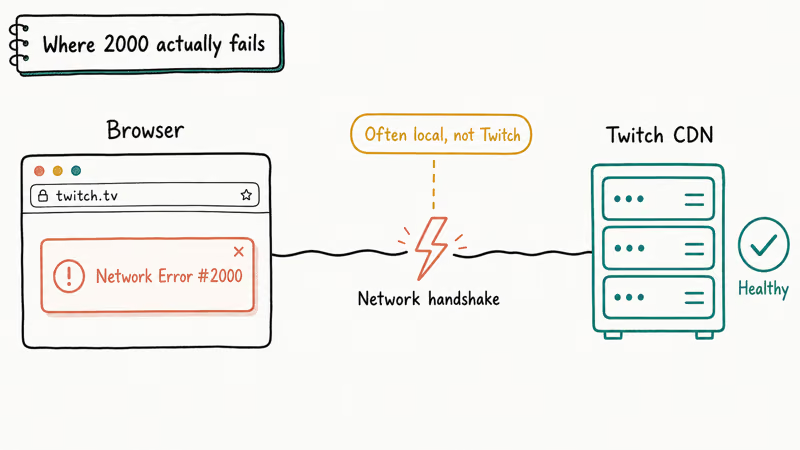
The four root causes that explain almost every Error 2000 report are:
- A browser extension breaks the connection. Ad blockers, privacy extensions, script blockers, and overly aggressive antivirus web shields are top offenders because they can block the video manifest, chat WebSocket, or player scripts Twitch needs.
- Cached browser data is stale or corrupted. A bad cookie or an expired authentication token will block the player from initializing.
- Your DNS or ISP is dropping packets to Twitch’s CDN. Twitch streams off the Amazon IVS CDN, which uses a wide pool of edge servers. If your resolver is slow or returns a stale edge, the player can stall before video starts.
- Twitch itself is down. According to Twitch’s official help center, the Twitch status page is the canonical place to check whether the platform is healthy.
If you know which of these four is most likely on your machine, you can skip ahead. If not, work through the fixes below in order, since they go from least to most disruptive.
#Quick Fixes Before You Touch Settings
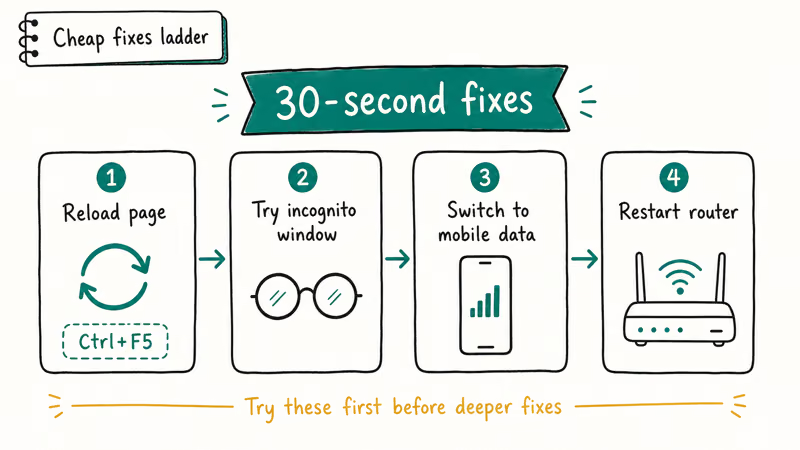
These take less than two minutes and can resolve Error 2000 before you need deeper troubleshooting. Start here before changing browser or network settings.
#Reload the stream
Press F5, or Cmd+R on macOS, to reload the page. A simple reload re-issues all the connection attempts and clears any transient packet loss.
#Open the stream in a private window
Private and incognito windows disable most extensions and start with no cookies. If the stream loads in private mode, you have proof the issue is in your normal profile’s extensions or cached data.
#Try a different browser
If Twitch works in Edge but fails in Chrome, the problem is Chrome-specific and is almost always extensions or profile data. If it fails in both, the cause is at the network or account layer.
#Check status.twitch.com
If Twitch’s status page reports an incident affecting “Video” or “Web”, stop troubleshooting. No DNS change will fix a Twitch-side outage.
#Browser-Side Fixes That Resolve Most Cases
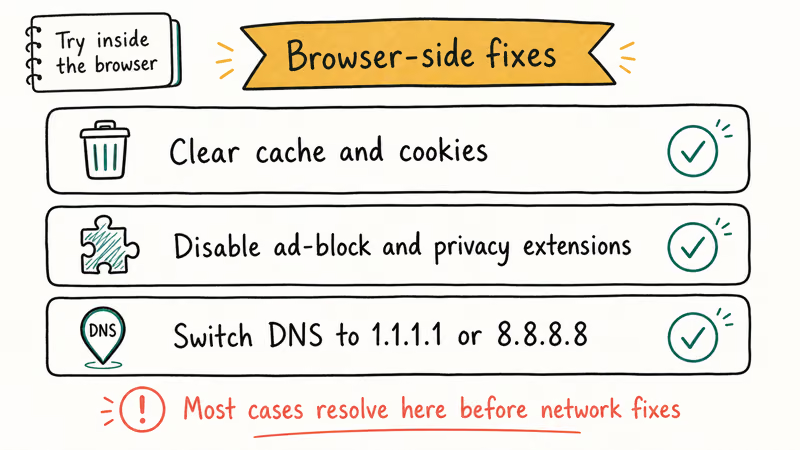
Browser state is a common Error 2000 trigger. Work through these four steps before changing your network.
#1. Clear cache and cookies for twitch.tv only
You don’t need to wipe your entire browser. Clearing site data for twitch.tv keeps your other logins intact.
- Chrome and Edge: Open the stream, click the lock icon in the address bar, choose Site settings, then Clear data. Refresh the page.
- Firefox: Mozilla’s support documentation states that the per-site Forget About This Site option clears cookies and cached files in one step. Right-click twitch.tv in your history and choose Forget About This Site.
- Safari: Open
Settings>Privacy>Manage Website Data, search for twitch, and remove the entry.
#2. Disable ad blockers and privacy extensions for Twitch
uBlock Origin, AdBlock Plus, Privacy Badger, Ghostery, and most enterprise web shields can block the m3u8 manifest or the WebSocket that the Twitch player needs. The cleanest test is to disable every extension at once, reload Twitch, and re-enable them one by one until the error returns. That extension is the culprit, and most ad blockers let you allowlist twitch.tv without disabling them globally.
#3. Update your browser to the latest stable build
Old browsers occasionally have bugs in their WebSocket or media pipeline that Twitch’s engineers have stopped working around. Chrome and Edge update automatically; in Firefox, click the menu and choose Help > About Firefox to force an update check. After updating, fully restart the browser before reloading Twitch.
#4. Disable hardware acceleration if the stream loads but stalls
When the player loads, plays a few seconds, then throws Error 2000, the culprit is sometimes hardware-accelerated video decoding fighting with your GPU driver. Open your browser settings, search for “hardware acceleration”, and turn it off. Restart the browser before retrying.
#Network-Side Fixes for Stubborn Errors
If the error survives every browser fix above, the problem is between your machine and Twitch’s CDN. These four steps target that path.
#1. Switch to Cloudflare or Google Public DNS
Slow or stale DNS is another common cause. According to Cloudflare’s 1.1.1.1 setup documentation, you can change your resolver in macOS by going to System Settings > Network, selecting your active connection, opening Details > DNS, and adding 1.1.1.1 and 1.0.0.1. On Windows 11, open Settings > Network & Internet > [your connection] > Hardware properties > DNS server assignment > Edit.
Google’s Public DNS documentation confirms that 8.8.8.8 and 8.8.4.4 are the equivalent endpoints for Google. Either works fine for Twitch; pick the one closer to you geographically.
#2. Flush your DNS cache
After changing DNS servers, flush the local cache so old records don’t linger.
- Windows: Open Command Prompt as administrator and run
ipconfig /flushdns. - macOS: Open Terminal and run
sudo dscacheutil -flushcache; sudo killall -HUP mDNSResponder. - Linux (systemd-resolved): Run
sudo resolvectl flush-caches.
#3. Restart your router and switch to wired Ethernet
Wi-Fi packet loss is invisible until a video player exposes it. Power-cycle your router by unplugging it for thirty seconds, then plug it back in.
If the error returns only when you stream on Wi-Fi, the lasting fix is a wired connection. Twitch’s player buffers about ten seconds of video, and a Wi-Fi drop longer than that triggers Error 2000.
If your internet keeps dropping under any load, that’s a separate problem worth fixing first. See our guide on why your internet keeps disconnecting before retrying Twitch.
#4. Disable VPN, proxy, or split-tunnel rules
A VPN that routes through a busy or distant exit will trigger Error 2000 even when your home connection is healthy. Disable the VPN, reload Twitch, and re-enable the VPN only after the stream plays. If you must keep the VPN on, most providers let you allowlist twitch.tv outside the tunnel. If you are also dealing with broader DNS errors like DNS_PROBE_FINISHED_NO_INTERNET, fix that first.
#When the Cause Is Twitch and Not You
Most Error 2000 reports are local, but Twitch outages do happen. Treat the platform as the cause when three signals line up.
First, the same stream fails on every device and every network you try. If your phone on cellular, your laptop on home Wi-Fi, and a friend’s computer in another city all fail at the same minute, the failure is not on your network.
Second, status.twitch.com reports an active incident. Twitch’s status page is the canonical source, and Twitch’s @TwitchSupport account on X usually announces large incidents within minutes. Third-party trackers like Downdetector are useful as a quick crowd signal but lag the official page.
Third, the error is widespread on the Twitch subreddit or in the streamer’s chat. A burst of identical Error 2000 reports inside a few minutes is a strong sign of a platform-side problem.
When all three line up, stop troubleshooting and wait. Most Twitch incidents resolve within an hour.
#Why Does Twitch Error 2000 Keep Coming Back?
If the error returns hours or days after each fix, you’re treating symptoms instead of the cause. Three patterns explain almost every recurring Error 2000.
A persistent ad blocker filter list keeps re-blocking Twitch after every browser update. The fix is to allowlist twitch.tv inside the ad blocker rather than disabling it globally. uBlock Origin’s per-site toggle in the popup is the cleanest option.
A flaky router or ISP route degrades only at peak hours. Run a 30-second ping to 1.1.1.1 during a failed Twitch session; if you see consistent packet loss, the network path is the cause and the lasting fix is at your ISP or your router. Replacing an aging consumer router is one of the highest-impact upgrades for streaming reliability.
A corrupt browser profile keeps producing the same stale cookie even after clearing site data. The drastic but reliable fix is to create a fresh browser profile and sign in to Twitch from scratch. In Chrome, open the profile menu in the top-right corner and choose Add.
#Fixing Twitch Error 2000 on Mobile Apps and Smart TVs
The web fixes above don’t all apply to the Twitch mobile app or the Twitch app on Roku, Fire TV, and Apple TV. On those platforms, the playbook is shorter.
For the Twitch mobile app on iOS and Android, force-quit the app, toggle airplane mode on and off to reset the radio, and reopen the app. If the error persists, sign out, uninstall, reinstall, and sign back in. Mobile-specific Error 2000 reports are usually solved by clearing the app’s cached data.
For Twitch on a smart TV or streaming stick, restart the device fully (unplug for 30 seconds, not just standby) and confirm the TV is on the same network you tested elsewhere. If the TV is dual-band, prefer 5 GHz Wi-Fi or wired Ethernet over 2.4 GHz.
For the Twitch app on a game console, sign out of the Twitch app, restart the console, and sign back in. Console apps share a token cache that often goes stale after long sessions.
#Preventing Twitch Error 2000 Going Forward
A few habits keep this error from coming back.
Keep your browser current. You don’t need beta channels, just the stable release. Clear twitch.tv site data once a month if you watch heavily, because a stale auth cookie is the most common cause of overnight failures. Run your home network on a public DNS resolver like Cloudflare or Google rather than your ISP’s default, which is often slower and less reliable.
If you stream from your own channel, prefer a wired Ethernet connection. Wi-Fi drops that viewers don’t notice can still produce Error 2000 in your own bitrate monitor and OBS. While you’re tuning your channel, you can also clip the best moments and download Twitch clips so a future outage never costs you a highlight you wanted to keep.
#Bottom Line
The fastest path to fixing Twitch Error 2000 in 2026 is a three-step sequence that clears the error on most machines. First, allowlist twitch.tv in your ad blocker. Second, clear cookies for twitch.tv only. Third, switch your DNS to 1.1.1.1.
Those three actions clear the overwhelming majority of Error 2000 cases, and they take under five minutes on Chrome, Firefox, or Edge. If the error survives all three, the cause is your router, your ISP, or Twitch itself, and in that order, the right next step is a wired Ethernet test followed by a glance at status.twitch.com.
If you spend significant time on Twitch, build the habits in the prevention section into your routine. They cost nothing, and they keep the player from lagging or buffering mid-stream the next time you want to cheer on a streamer you follow.
#Frequently Asked Questions
Is Twitch Error 2000 my fault or Twitch’s fault?
It depends on the scope. If you are the only person affected on your network, the cause is almost always local: an ad blocker, stale cookies, a slow DNS resolver, or a flaky Wi-Fi connection. If multiple devices on multiple networks fail at the same time, it’s Twitch.
Does VPN cause Twitch Error 2000?
Sometimes. VPNs add a hop between your machine and Twitch’s CDN, and a slow or distant exit node can cause the player to time out and throw Error 2000. Disable the VPN to test; if the stream plays, allowlist twitch.tv outside the tunnel.
Will reinstalling my browser fix Twitch Error 2000?
Usually not, because reinstalling preserves your profile data. The real fix is to create a fresh browser profile, which clears extensions, cookies, and cached site data in one step. Try the simpler “clear twitch.tv site data” fix first.
How long does Twitch usually take to fix a server-side outage?
Most Twitch incidents resolve within an hour, and status.twitch.com posts updates as engineers work the problem. Major outages have lasted longer, but they’re rare and almost always tied to broader AWS or Amazon IVS issues that Twitch reports on the same status page.
Why does Twitch Error 2000 only hit me at night?
Peak-hour congestion on your ISP or Wi-Fi network is the most likely cause. Stream a YouTube live channel at the same time to test: if YouTube also stutters, the bottleneck is your network. If YouTube plays cleanly but Twitch fails, the cause is in the path between your ISP and the Amazon IVS edge that serves your area.
Does clearing all cookies log me out of every website?
Only if you clear cookies globally. The per-site clearing path described above (Chrome lock icon, Firefox Forget About This Site, Safari Manage Website Data) only affects twitch.tv. Your Gmail, banking, and other logins stay intact.
Can a slow internet speed alone cause Twitch Error 2000?
Below about 3 Mbps of sustained throughput, Twitch will struggle to load even 480p, and you’ll see Error 2000 or repeated buffering. Run a speed test during the failure; if your download is well below 3 Mbps, the fix is at the ISP or router, not in your browser.
Should I use a Twitch desktop app instead of the browser?
Twitch’s official desktop client is essentially a wrapper around the same web player and is subject to the same Error 2000 conditions. It’s worth trying as a quick test, but it isn’t a permanent workaround if the root cause is at your network or DNS layer.

Best Laptop for Running LLMs in 2026: Memory Comes First
The best laptop for running LLMs is a memory purchase first. Compare MacBook unified memory against NVIDIA laptop VRAM, and see what each tier really runs.

How to Run a Local LLM on Windows: A 2026 Setup Guide
Run a local LLM on Windows with LM Studio or Ollama. Pick a model that fits your GPU memory, keep every prompt offline, and skip the monthly bill.

Bluetooth Not Working on Snapdragon X? Fixes for 2026
Bluetooth not working on your Snapdragon X Copilot+ PC? Generic audio, mice, and keyboards work, but vendor apps often lack an ARM build. Fixes inside.

Docker Desktop and WSL2 Not Working on Snapdragon X? Fix It
WSL2 runs fine on Snapdragon X, but Docker Desktop ARM is Early Access and throws WSL errors. Use WSL2 plus native ARM64 Ubuntu and Docker Engine.