TikTok FYP Not Refreshing? How to Reset Your For You Feed
TikTok FYP not refreshing or stuck on the same videos? Reset your For You feed, clear cache and search history, and retrain the algorithm in a few days.
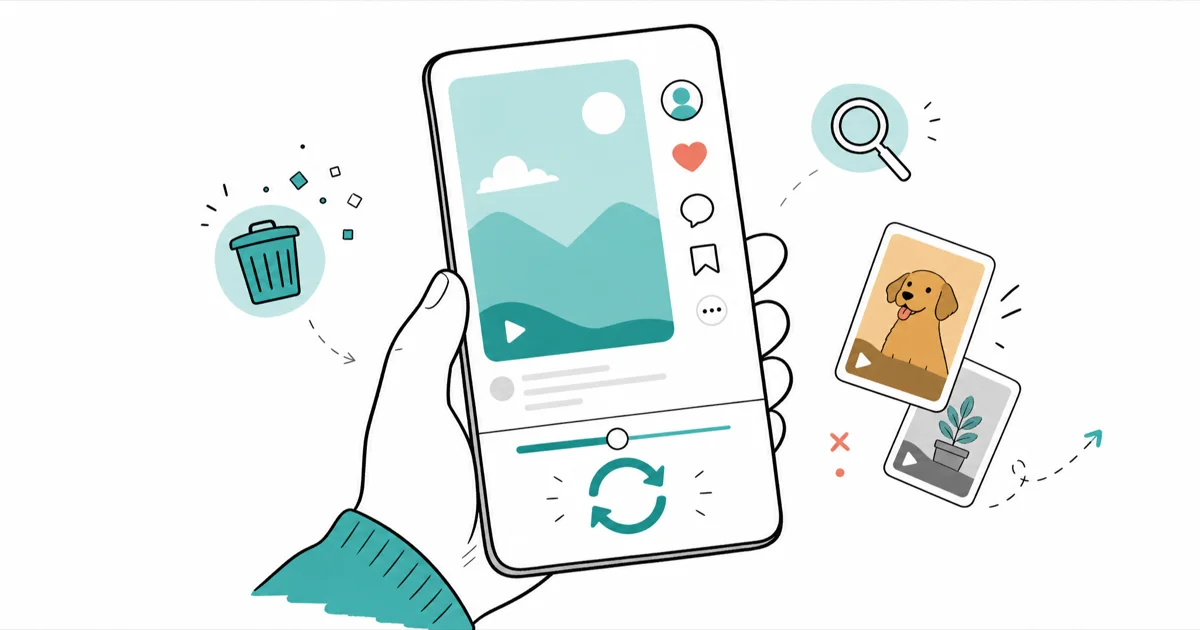
Quick AnswerA stuck TikTok FYP is almost always stale algorithm signals, not a glitch. Use the built-in Refresh Your For You Feed tool, clear your search history and cache, then start engaging with content you actually want. The feed retrains within a few days.
TikTok FYP not refreshing usually means the feed is recycling videos you’ve already seen or stuck on a topic you’ve moved past. Your For You page isn’t broken. It’s reacting to old signals from what you watched, skipped, and searched. The fix is to reset those signals and retrain the algorithm.
- A stale FYP is outdated algorithm signals, not a bug, so the fix is retraining rather than reinstalling
- TikTok has a built-in Refresh Your For You Feed tool that wipes your recommendation history
- The refresh is permanent and your feed will feel generic for a day or two while it relearns
- Clearing your search history and cache removes the data that fed the repetitive loop
- Most feeds improve within a few days of actively engaging with content you want
#Why Is My TikTok FYP Showing the Same Videos?
Your For You page is built entirely from your behavior. TikTok’s recommendation system learns from what you watch, skip, like, and search for. When the feed feels stuck, those signals have stopped matching what you want now.
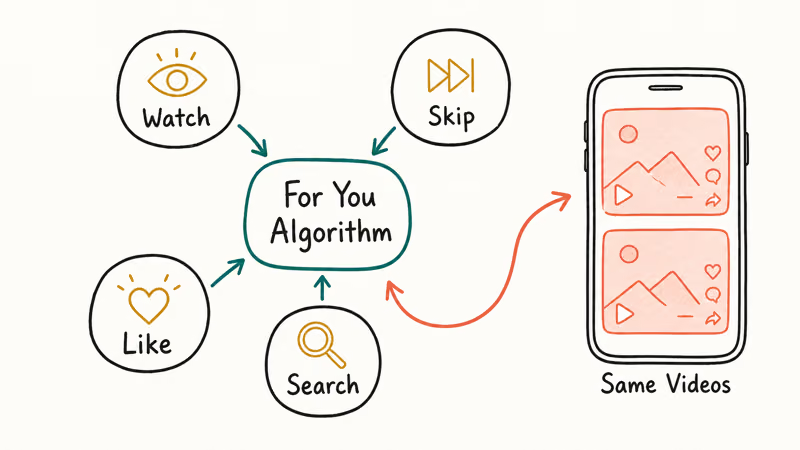
This matters because the cause is almost never a technical fault. A feed that repeats is a feed that read your recent habits and gave you more of the same. If you binge-watched one topic last week, the algorithm assumes you still want it.
So the fix is not a reinstall. It’s a reset of the signals plus deliberate retraining. Treat your FYP like something you teach, not something you repair.
#Use TikTok’s Refresh Your For You Feed Tool
TikTok built an official tool for exactly this problem, and it’s the most effective single fix. It wipes your recommendation history and starts the algorithm over with neutral content.
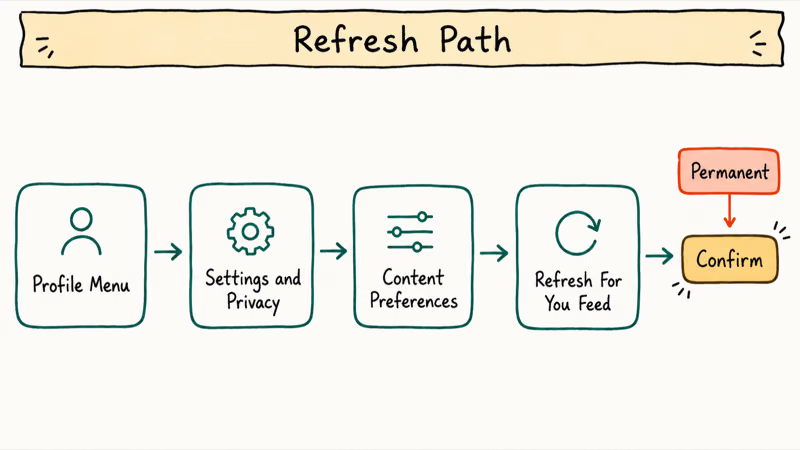
Open your profile, tap the three-line menu in the top right, go to Settings and privacy, tap Content preferences, then select Refresh your For You feed. Confirm and start it. TikTok’s support team states that 1 refresh resets your recommendations and the change applies right away, as the official refresh-feed page explains.
Two warnings before you tap it. The refresh is permanent and can’t be undone, so don’t do it on a feed you only mildly dislike. And your feed will feel generic at first, because TikTok deliberately shows broadly popular videos to test your reactions until your new watches, likes, skips, and searches give it better signals.
#Clear Your Search History and Cache
If a full refresh feels too drastic, or if the refresh didn’t fully clear the loop, target the data feeding it instead. Your search history and cached app data both shape what the FYP serves up.
Clear your search history first, then clear the app cache. In the app, go to Settings and privacy > Free up space > Clear cache. TikTok states that clearing your cache won’t delete your drafts, saved videos, or account data, so this is safe to run anytime. According to Apple’s guidance on freeing up iPhone storage, offloading apps clears their cache without deleting your data, which helps when your whole phone is tight on space and the app stutters.
Clearing search history plus cache removes stale signals without using the full refresh. It’s a lighter touch and worth trying first on a mildly stale feed.
#Retrain the Algorithm Deliberately
A reset only clears the slate. What you do next decides how fast the feed improves. The algorithm rebuilds from your very next interactions, so be intentional.
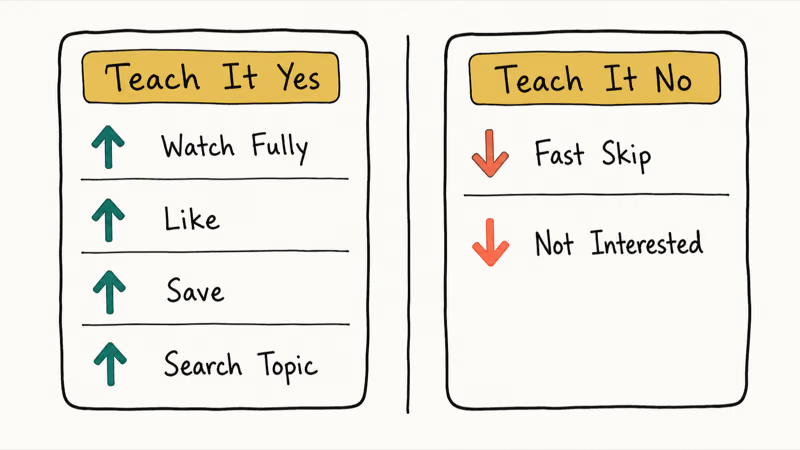
Watch videos you want more of all the way through, like and save them, and search for the topics you care about. Just as importantly, scroll past content you don’t want quickly, because a fast skip is a strong negative signal. Tap and hold a video to mark it Not interested when something really misses.
Most feeds improve within a few days of consistent engagement. If you used to follow a creator who vanished from your feed and now shows an error, that’s a separate issue covered in our account not found on TikTok guide rather than an FYP problem.
#Is My FYP Stuck or Am I Shadowbanned?
A stuck FYP and a shadowban are different problems, and people confuse them constantly. A stuck FYP affects what you see. A shadowban affects how others see your posts, suppressing your own videos in other people’s feeds.
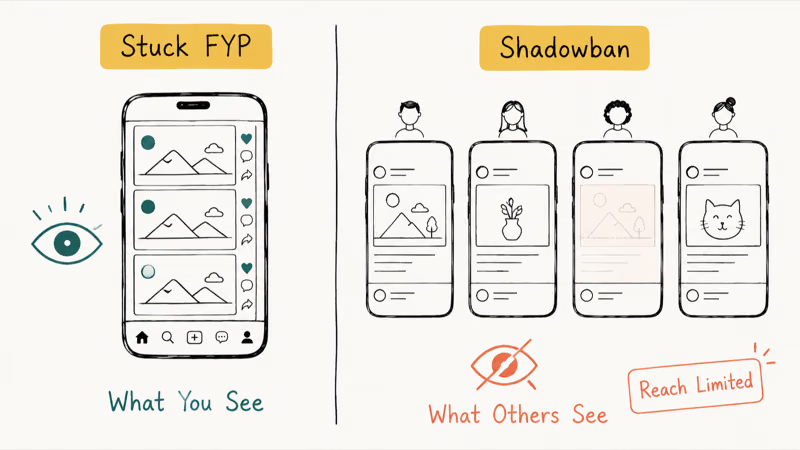
If your For You page is repetitive but your posts still get normal views, you have a feed-retraining issue, not a shadowban. The fixes above apply because the problem is on the viewing side, not the posting side.
If you suspect your own content is being suppressed instead, that’s a posting-side concern with its own causes, and our guide on whether you can swear on TikTok covers the content rules that trigger reach limits.
Curious how much data shapes your feed? Our does TikTok listen to you explainer covers what TikTok tracks, and the who views your TikTok breakdown covers who sees your activity.
#When the App Itself Is the Problem
Occasionally the feed won’t refresh because the app or connection is failing, not the algorithm. If videos won’t load at all rather than just repeating, you may be looking at a broader app fault covered in our why is my TikTok not working guide. Check your internet first and switch from cellular to a stable Wi-Fi network.
Force-close TikTok and reopen it, then update the app if one is waiting. According to Google’s Play Store update guidance, you can update apps individually or turn on automatic updates so TikTok stays current. A reinstall is the last resort here, and unlike the algorithm reset, it doesn’t touch your recommendation history.
These app-level steps only matter when nothing loads. If videos play fine but repeat, skip straight back to the refresh and retraining steps above.
#Bottom Line
Badly misaligned feed? Use the built-in Refresh Your For You Feed tool and accept a generic day. Mildly stale? Skip the permanent refresh.
Instead, clear your search history and cache, then deliberately watch, like, and search for what you want while fast-scrolling past what you don’t. Either way, give it a few days before judging the result, because the algorithm rebuilds from your behavior and your interactions over time, not from any single tap or overnight miracle.
#Frequently Asked Questions
Is the Refresh Your For You Feed tool permanent?
Yes. Once you refresh the feed, the action can’t be undone, and TikTok immediately switches to neutral recommendations while it collects new data. Some users report a newer undo option, but don’t count on it. Only use the refresh when your feed is badly misaligned, not for a minor stale patch.
Will refreshing my feed delete my account or videos?
No. It leaves your account, followers, drafts, posts, Following feed, and inbox untouched. The only thing it clears is your recommendation history.
How long until my FYP feels normal again?
Usually a few days. The exact timing depends on how consistently you engage with content you actually want. Watch relevant videos fully, like and search for your interests, and scroll past everything else quickly. The more deliberate your interactions, the faster the algorithm reshapes the feed.
Why does my FYP feel generic right after I reset it?
Because that’s by design, so don’t panic and reset again. TikTok intentionally shows widely popular videos right after a reset to test your reactions, since it no longer has your old signals to lean on. The videos you watch fully, skip, or engage with teach it what to prioritize next. Within a day or two of normal use, the feed narrows back toward your interests, so the generic phase is temporary.
Does clearing the cache reset my algorithm too?
Not fully. Clearing the cache removes temporary app data and can break a minor repetitive loop, but it doesn’t wipe your recommendation history the way the dedicated refresh tool does. Pair a cache clear with clearing your search history for a lighter reset, or use the full refresh for a deep one.
Should I clear my search history before resetting?
For a lighter reset, yes. Search history is one of the strongest signals feeding a repetitive feed, and clearing it often fixes a mildly stale feed without the permanent full refresh.
Is a stuck FYP the same as being shadowbanned?
No. A stuck FYP affects what you see, while a shadowban suppresses what others see of your posts. If your feed repeats but your own videos still get normal views, you have a retraining issue, not a shadowban. Check your post analytics to tell the two apart.

Is This Bank App Real? Spot a Fake App on Your Home Screen
A bank app can land on your home screen from a web page with no install warning. Learn the checks that tell a real banking app from a phishing web app.

Apps Crashing After iOS 27 Update? Fix Order (2026)
Apps crashing after the iOS 27 update? Update the app in the App Store first, then offload and reinstall to clear stale cache, then restart. The fix order.

Do AI Translation Earbuds Work Offline? What to Know
Do AI translation earbuds work offline? A few do with downloaded language packs, but most need the cloud. Here's what works offline and what you give up.
How to Set Up Translation Earbuds (Pairing and Modes)
How to set up translation earbuds: charge, install the app, pair over Bluetooth, pick two languages, and choose a mode. A step-by-step first-use guide.