Standard YouTube License vs Creative Commons (2026)
Compare Standard YouTube License and Creative Commons CC BY: what each one allows, who can reuse your video, and which license fits your channel.
Quick AnswerStandard YouTube License grants YouTube exclusive rights to host and stream your video. Creative Commons (CC BY) lets other creators reuse, remix, and republish your video as long as they credit you.
The Standard YouTube License vs Creative Commons question comes up every time you upload to YouTube and stare at the license dropdown. Pick the wrong one and you either lock down a video that would have spread further as CC BY, or you give up control on a piece you wanted to keep. The practical difference is what other people can do with your file after upload.
- Standard YouTube License is the default that grants YouTube exclusive hosting and streaming rights; outside reuse requires your written permission.
- Creative Commons - Attribution (CC BY 4.0) is the only CC variant available in YouTube Studio; it lets others reuse your video globally as long as they credit you.
- The license dropdown in YouTube Studio offers exactly 2 options today, even though 6 standard CC licenses exist on the wider Creative Commons system.
- You can switch a video’s license at any time, but a switch from CC BY to Standard does not pull back the reuse rights people already exercised.
- Standard videos can still be shared and embedded through YouTube’s built-in tools; CC BY videos can also be downloaded and remixed inside the YouTube Editor.
#What Does the Standard YouTube License Cover?
The Standard YouTube License is the default option YouTube assigns to every upload unless you change it. According to YouTube’s official help article on choosing a license, it grants YouTube the right to host, stream, and serve your video to viewers across the more than 100 countries where YouTube operates.
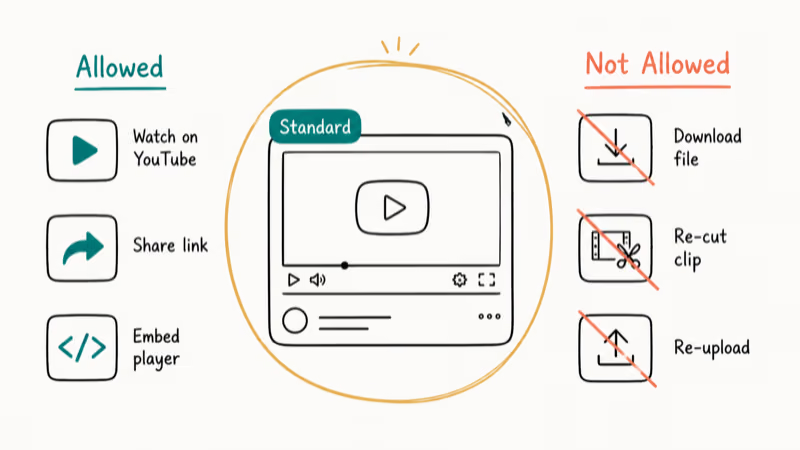
You still own the copyright. Standard simply means nobody else can take the file, edit it, and republish it without first asking you. YouTube treats Standard as the default license option, so most uploads start there unless you choose CC BY.
Viewers can do three things with a Standard licensed video without crossing any line:
- Watch it on YouTube as many times as they want.
- Click the Share button to send the YouTube link across email, Messenger, X, or Facebook.
- Embed the YouTube player on a personal blog or website using YouTube’s built-in embed code.
What they can’t do is download the video file, splice clips into a new project, or upload a re-cut version to their own channel. If somebody does that, you have a copyright takedown path through YouTube. The legality of pulling files off the platform is covered in the guide on whether downloading YouTube videos is legal.
#How Does Creative Commons (CC BY) Work on YouTube?
Creative Commons is a nonprofit licensing system that creators outside YouTube have used since 2002 to release work for reuse with attribution. Creative Commons states that 6 standard CC licenses exist, ranging from CC BY (most permissive) to CC BY-NC-ND (most restrictive).
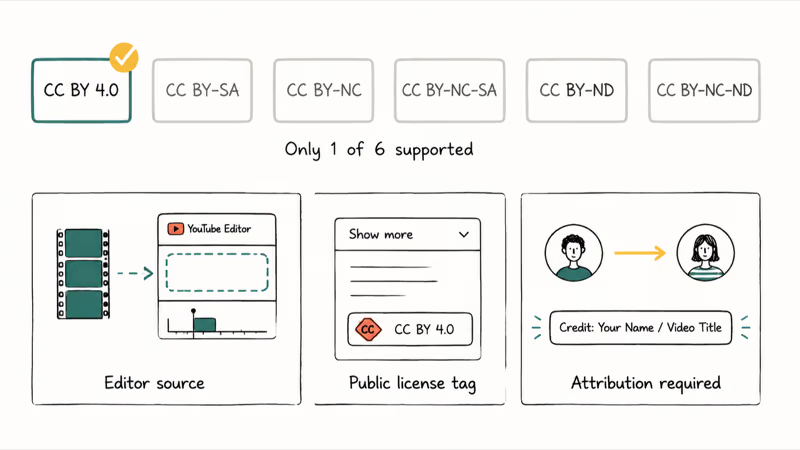
YouTube only supports 1 of those 6: Creative Commons - Attribution 4.0 International, written as CC BY 4.0.
When you pick “Creative Commons - Attribution” in YouTube Studio, you’re agreeing to those exact terms. Anybody can reuse the video for any purpose, including commercial work, as long as they credit you.
In practice, three things change the moment you flip a video to CC BY:
- Your video becomes searchable inside the YouTube Editor as a building block other creators can stitch into new uploads.
- The license is shown publicly under the video’s “Show More” panel so viewers know they can reuse it.
- Reusers must credit the original channel; they don’t need to ask you first.
The practical takeaway is simpler: CC BY removes the permission step, but it doesn’t remove the credit requirement.
#Standard YouTube License vs Creative Commons: Side-by-Side
Here’s what shifts between the 2 licenses, line by line:
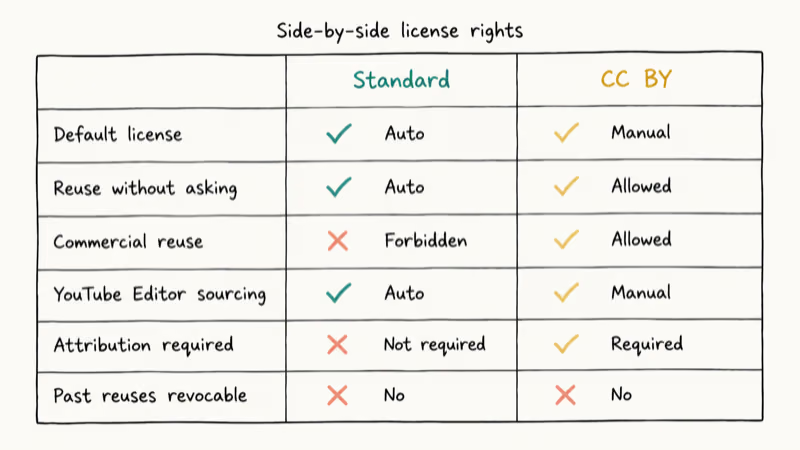
- Default: Standard is auto-assigned. CC BY must be selected.
- Reuse without asking: Forbidden under Standard. Allowed under CC BY with attribution.
- Commercial reuse by others: Forbidden under Standard. Allowed under CC BY.
- YouTube Editor sourcing: Not available for Standard videos. Available for CC BY videos.
- Attribution required: Not legally required under Standard. Required under CC BY.
- You retain copyright: Yes under both.
- You can monetize: Yes under both.
- You can change the license later: Yes, in YouTube Studio under both.
- Past CC BY reuses revocable: No. Switching back to Standard does not undo prior reuse.
YouTube’s How YouTube Works copyright page confirms that copyright ownership stays with the creator regardless of which of the 2 license options you select. The license only controls what others may legally do with the video on top of your underlying copyright.
#Choosing Between Standard and CC BY
Different creators have different priorities. The choice tends to fall along these patterns.
Pick Standard YouTube License when you have:
- Original footage you plan to license out as a paid asset later.
- Branded content where reuse outside your channel would dilute the message.
- Tutorial or course material that’s a commercial product on its own.
- Sponsored uploads where the sponsor controls reuse rights.
Pick Creative Commons - Attribution (CC BY) when you have:
- Educational explainers you want spread by teachers and other channels.
- Stock-style B-roll, time lapses, or scenic clips that work well as building blocks.
- Public-domain-adjacent footage where wide reuse helps your reach.
- Public-interest content (civic, public health, open source documentation) where attribution is enough.
A useful gut check: would you be annoyed if a smaller channel ran a 20-second clip from this video in their own upload with a credit line in the description? If yes, keep it Standard.
If no, CC BY almost always wins because it pulls in extra views from those reuses. For sharing strategies that are independent of the license you pick, see the guides on how to share a private YouTube video and what unlisted means on YouTube.
#Switching a Video’s License in YouTube Studio
The switch lives inside YouTube Studio, but the path isn’t obvious if you haven’t done it before:
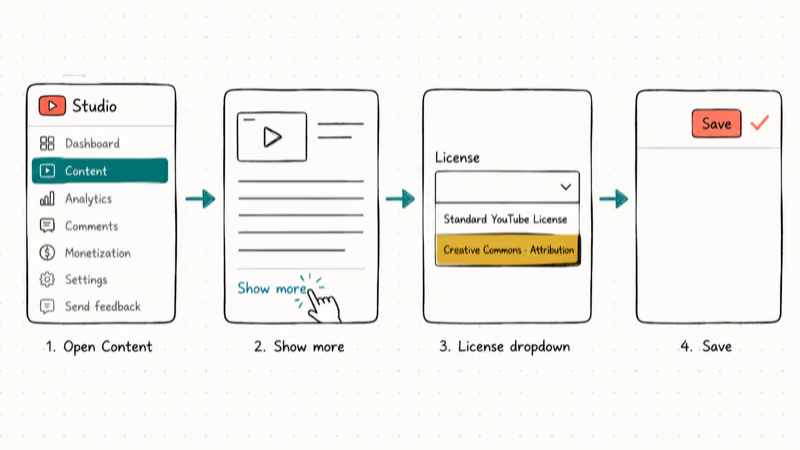
- Open YouTube Studio at studio.youtube.com on a desktop browser.
- In the left sidebar, click Content.
- Find the video you want to relicense and click its title to open the editor.
- Scroll down to Show more at the bottom of the Details section.
- Locate the License dropdown.
- Choose either Standard YouTube License or Creative Commons - Attribution (reuse allowed).
- Click Save in the top-right corner.
The change applies immediately to the video page. New embeds, downloads inside the YouTube Editor, and Search filters reflect the new license within a few minutes. Bear in mind the asymmetric rule: switching from CC BY to Standard does not retroactively cancel any reuse another creator already published while CC BY was active.
If you also need to manage what people can do with related accounts and content, the private vs unlisted YouTube videos walkthrough explains visibility settings that pair well with license choices, and is YouTube to MP3 legal covers a related question many viewers ask about reuse.
#Common Mistakes Creators Make With Licensing
Three errors come up over and over in creator forum threads. Avoid all three:
- Assuming Standard clips are fair to grab. They aren’t. The Share button isn’t a download license, and clipping somebody else’s Standard upload into your own video without explicit written permission can earn a copyright strike.
- Treating CC BY as a giveaway of copyright. It isn’t. You keep ownership and can monetize the original. CC BY is a reuse permission, not a transfer of rights.
- Switching from CC BY to Standard to “take it back.” That switch protects you against future reuse only. Anybody who downloaded the video inside the Editor while it was CC BY keeps their license to that copy.
A clean rule of thumb: pick the license once at upload time, write a 1-line note in your channel docs about why, and only switch later if your monetization or distribution plan really changes.
#Bottom Line
For most independent creators publishing original footage they care about, the Standard YouTube License is the right default and there’s no reason to switch. Keep your work locked unless you have a specific reason to open it up.
The exception is educational and stock-style content. Switch those uploads to CC BY at upload time.
Resist the urge to relicense later just because the video did better than expected. The reuse traffic those creators send back through the Editor and credit lines is the kind of compounding distribution that Standard licensing can’t give you, and it strengthens over time as your CC BY footage library builds up across hundreds of derivative videos and classroom playlists referencing your channel.
Set it once. Double-check the dropdown saved.
#Frequently Asked Questions
Can I change the license of my YouTube video?
Yes. Open the video in Studio and pick the new option from the License dropdown.
Are all Creative Commons licenses available on YouTube?
No. YouTube Studio only offers Creative Commons - Attribution (CC BY 4.0). The other 5 CC variants, including the popular CC BY-NC and CC BY-SA, are not selectable on YouTube uploads.
Can I monetize a video published under Creative Commons CC BY?
Yes. Switching to CC BY doesn’t turn off ad revenue or YouTube Premium revenue share for your video. You keep your copyright and your monetization eligibility.
Do I need to credit the original creator when reusing a CC BY video?
Yes, attribution is the entire point of CC BY. Use the original channel name plus a link or visible credit in your video, and copy that credit into the video description as well so the attribution survives even if your on-screen credit gets clipped during a re-edit. The YouTube Editor pre-fills the attribution metadata when you import a CC BY clip, which makes Editor-based reuse the easiest path.
Is sharing a Standard YouTube License video on Facebook allowed?
Yes. The Share button next to every YouTube video creates a link you can post on Facebook, Messenger, or any social network.
Can someone use my Standard licensed video without permission?
No. Reuse requires your written agreement. If somebody splices your Standard footage into another upload, you can file a copyright claim through YouTube’s takedown system. YouTube will act on properly documented claims and remove the offending video.
Does switching the license from CC BY back to Standard cancel past reuses?
No. CC BY grants are baked in at the time the reuser downloads or imports the video. A later switch to Standard tightens future reuse only. Clips other creators already published stay licensed under the CC BY terms that were in force when they grabbed the footage.

Google Messages Error 3100: Why RCS Is Broken on Galaxy
Google Messages RCS error 3100 hits Galaxy owners after phone or carrier switches. Google told 9to5Google a fix is coming. Here's what actually helps.

Is This Bank App Real? Spot a Fake App on Your Home Screen
A bank app can land on your home screen from a web page with no install warning. Learn the checks that tell a real banking app from a phishing web app.

Apps Crashing After iOS 27 Update? Fix Order (2026)
Apps crashing after the iOS 27 update? Update the app in the App Store first, then offload and reinstall to clear stale cache, then restart. The fix order.

Do AI Translation Earbuds Work Offline? What to Know
Do AI translation earbuds work offline? A few do with downloaded language packs, but most need the cloud. Here's what works offline and what you give up.