Is It Legal to Download YouTube Videos? A 2026 Legal Guide
Is it legal to download YouTube videos in 2026? A clear guide to YouTube's ToS, US and EU copyright law, fair use, and the safe legitimate methods.
Quick AnswerDownloading YouTube videos is generally not legal under YouTube's Terms of Service, except through YouTube Premium offline mode, the creator-enabled download button, public-domain or Creative Commons content, or videos you uploaded yourself.
The short answer to “is it legal to download YouTube videos” is that it depends on what you download, where you live, and how you do it. YouTube’s own Terms of Service prohibit saving videos to your device unless YouTube provides a button for it. Copyright law adds a second layer of risk on top.
This guide walks through the rules YouTube enforces, the copyright statutes behind those rules in the US and Europe, and the narrow set of cases where a download is lawful and policy-compliant.
- YouTube’s Terms of Service ban downloads except through buttons YouTube itself provides, such as YouTube Premium offline mode and the creator-enabled download option.
- US copyright law gives the rights holder (usually the creator or label) exclusive control over reproduction, and DMCA Section 1201 separately bans circumventing technical protection.
- Statutory damages under US copyright law range from $750 to $30,000 per infringed work, and up to $150,000 for willful infringement.
- Public-domain titles, Creative Commons clips with the CC-BY filter, and your own uploaded videos are the safest content classes to download.
- Fair use is a defense decided in court, not a download permission slip, and offering a downloaded video for re-upload or commercial use rarely qualifies.
#What Does YouTube’s Terms of Service Actually Say?
YouTube’s Terms of Service restrict what you can do with content on the platform. The download clause is direct.
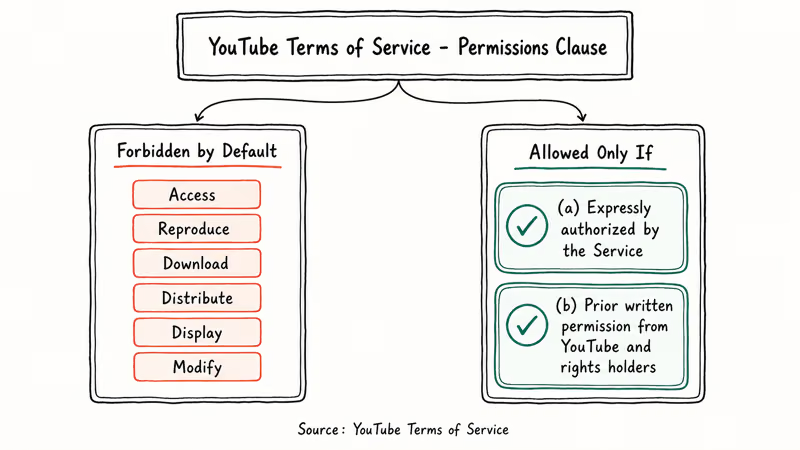
According to YouTube’s permissions section, you may not “access, reproduce, download, distribute, transmit, broadcast, display, sell, license, alter, modify, or otherwise use any part of the Service or any Content except: (a) as expressly authorized by the Service; or (b) with prior written permission from YouTube and, if applicable, the respective rights holders.” That single sentence does most of the work.
A third-party downloader, a browser extension that pulls the MP4 from the network tab, or a “YouTube to MP3” website all fall outside the “expressly authorized” exception. YouTube confirms that account-level penalties for repeated violations include warnings, channel termination, and access restrictions for the viewer. YouTube’s community guidelines page states that the platform reserves the right to terminate accounts that repeatedly break its rules.
Google has never approved a third-party YouTube downloader in the Play Store. The ToS is the gate. For unrelated access issues, our guide on why YouTube isn’t working covers the fix.
#The US Copyright Layer
Breaking the ToS is a contract issue between you and YouTube, not a criminal offense. The legal exposure in the US comes from a separate body of law: copyright.
According to the US Copyright Office’s circular on copyright basics, the rights holder of a video has the exclusive right to reproduce, distribute, and display that work. Any unauthorized copy is potentially infringing the moment it lands on your hard drive.
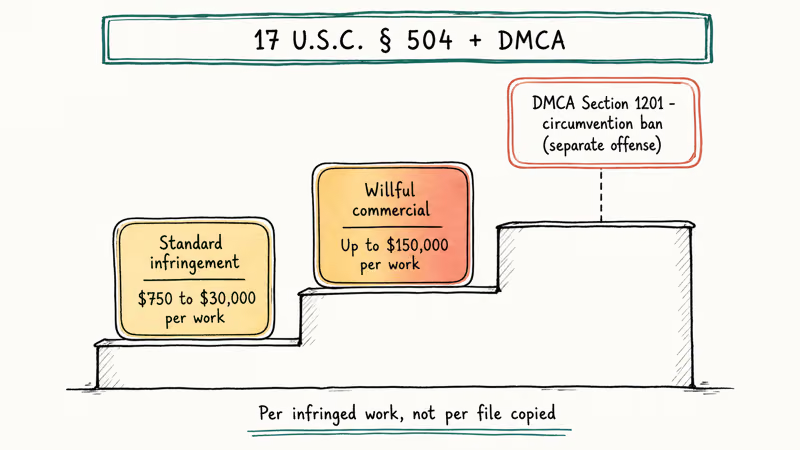
Two parts of US law sit on top of that base rule. The first is the Digital Millennium Copyright Act, which under Section 1201 prohibits circumventing technological protection measures even if you never share the file. YouTube’s streaming protocol qualifies as such a measure in the view of most copyright attorneys. That’s the legal theory behind cease-and-desist letters that the RIAA has sent to youtube-dl maintainers and clones.
The second is the statutory damages schedule. According to 17 U.S.C. § 504, an infringer can be liable for between $750 and $30,000 per work, rising to $150,000 per work for willful commercial infringement.
Personal, non-commercial downloads almost never become a lawsuit. They’re still infringing under the statute. The practical risk profile is closer to a parking ticket than a felony, but the conduct is unlawful regardless of whether anyone notices. Major US ISPs participate in copyright-alert programs, and sustained downloading of copyrighted music videos over a residential connection can trigger automated warning emails from the provider.
#How Do EU and UK Copyright Laws Compare?
European copyright is broader than US fair use. It also has a narrower set of personal-copying exceptions.
According to the European Union Intellectual Property Office’s overview of copyright in the EU, most member states permit a “private copy” exception for content you already lawfully accessed. Several countries explicitly exclude downloads from “manifestly illegal” sources, and most courts read that to include unauthorized streaming uploads.
The Electronic Frontier Foundation has tracked how the 2019 EU Copyright Directive (Directive 2019/790) shifted liability toward platforms but didn’t loosen end-user rules. In Germany, downloading a copyrighted YouTube video is treated as making an unauthorized reproduction. The rights holder can demand a settlement letter (“Abmahnung”) that typically lands between 500 and 2,000 euros.
Brexit didn’t reset UK copyright. The Copyright, Designs and Patents Act 1988 still controls.
Specific exceptions still survive in the CDPA for criticism, review, news reporting, parody, caricature, and pastiche. These mirror the narrow categories that fair-use cases tend to recognize in the US. If you live outside the US or Europe, treat your own jurisdiction’s copyright statute as the controlling rule. Treat YouTube’s ToS as a layer that applies globally regardless of local law.
#Six Cases Where Downloads Are Legal
Six legitimate paths exist. Each shares a feature: you either own the content, the creator authorized the download, or YouTube itself provided the button. None of the methods below require a third-party tool.
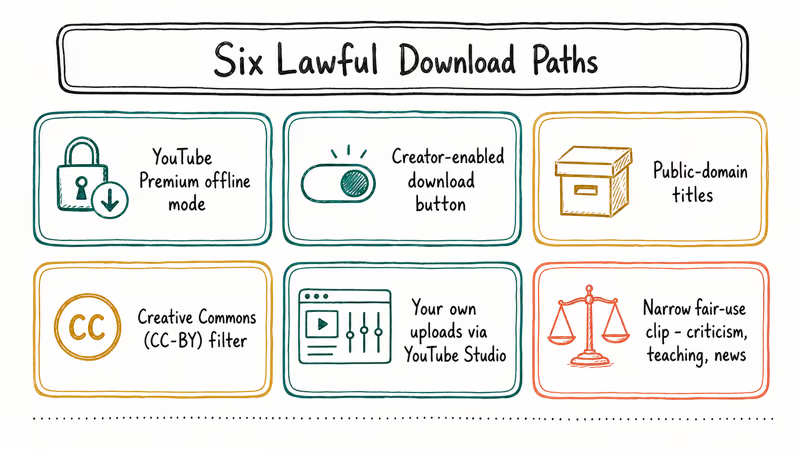
The first path is YouTube Premium offline mode. A paid YouTube Premium or YouTube Music Premium subscription unlocks an official “Download” button on most videos in the mobile app.
The file stays inside the YouTube app, expires if you go offline for more than 30 days, and is encrypted at rest. This is the cleanest legal path for personal viewing, and the one we recommend by default for plane rides or daily commutes.
Second is the creator-enabled download button. YouTube allows creators to enable downloads on individual videos. When the toggle is on, viewers see a Download option below the player on web and a built-in offline option on mobile. According to YouTube’s download eligibility help page, the feature is creator-controlled and isn’t available on every video.
Third is public-domain content. Films and recordings whose copyright term has expired can be freely downloaded, edited, and republished.
The US Copyright Office maintains the rule that anything published in the US before 1929 is in the public domain as of 2026. Many older newsreels and government productions on YouTube fall into this bucket. NASA footage and most US federal agency uploads are public-domain by statute, regardless of upload date, which is why educators lean on these archives heavily.
Fourth is Creative Commons content. YouTube has a built-in Creative Commons filter that returns videos uploaded under the CC-BY license. CC-BY allows download, remix, and even commercial reuse, provided you credit the original creator. Click the description and look for “Creative Commons Attribution license (reuse allowed)” beneath the video.
Fifth: your own uploads. If you uploaded the video, you can re-download it through YouTube Studio.
In YouTube Studio, open the video’s three-dot menu and choose “Download.” The same option even works for private and unlisted videos you control.
Sixth, narrow fair-use scenarios. US fair use under 17 U.S.C. § 107 can permit copying short clips for criticism, commentary, news reporting, teaching, scholarship, or research. Fair use is a defense, not permission. A court applies four factors: purpose, nature, amount used, and market effect.
Educators, academic researchers, and journalists have the strongest fair-use posture. Casual viewers and resellers have the weakest. If you’re unsure whether your specific use qualifies, treat the answer as “no” until a copyright attorney reviews it.
If your use case doesn’t fit one of these six categories, stay inside the YouTube player.
Related platform-specific guides that walk through similar rules:
- Link to MP4 and MP3 converters and their legal status covers when video and audio extraction is permissible.
- Downloading TikTok videos explains comparable rules on a different platform.
- Dailymotion downloads follow the same permission-and-copyright principles.
#The Real Risk of Third-Party Downloaders
Third-party downloaders are the most common way people break both YouTube’s ToS and copyright law in a single click. The technical risk profile sits on top of that legal layer.
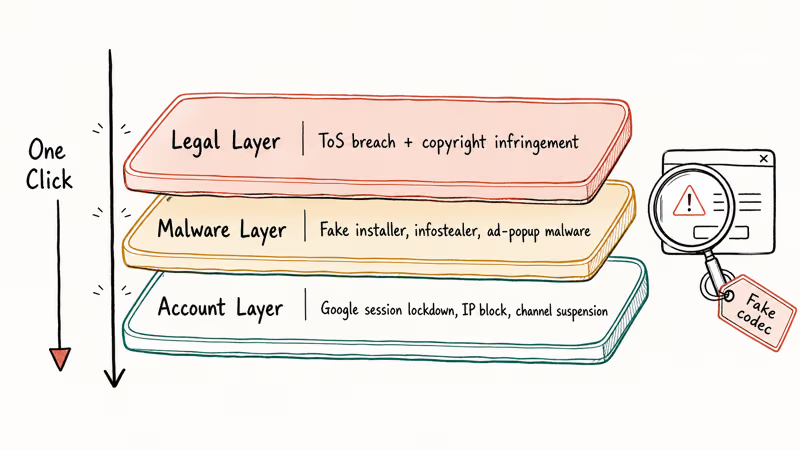
According to Malwarebytes Labs reporting, fake-installer campaigns promoted across platforms like YouTube have been used to distribute infostealers that grab browser cookies, saved passwords, and cryptocurrency wallet data. The pattern is consistent across multiple campaigns. A search-ad lookalike domain serves a Windows or Mac installer that bundles the legitimate-looking download UI with a credential stealer.
The legal layer adds account risk on top of the malware risk. When a third-party downloader uses the YouTube playback API in a way that breaks the ToS, YouTube can and does block the IP and the Google account that signed the request. A stale cookie pulled by the downloader can put your real Google account into a temporary lockdown.
Popular “YouTube downloader” sites are a known vector for this pattern. Many serve ads or popups that security tools flag as malware domains, and some push an executable disguised as a “playback codec” or required plugin.
The trade-off rarely pays off. If buffering’s the real issue, our piece on fixing YouTube buffering is a safer fix.
#YouTube Kids, Shorts, and Embedded Videos
The same ToS clause covers the entire YouTube product family. YouTube Kids doesn’t provide a download button at all. YouTube Shorts inherits the standard download rules and currently doesn’t offer offline saving even with Premium in some regions. Embedded videos on third-party sites are streamed from YouTube’s own player and so are covered by the same rules, regardless of where you click play.
Screen recording is a separate question that comes up often. Recording your own screen with a built-in tool such as macOS QuickTime or the Windows Game Bar produces a file you control. The underlying recorded content is still copyrighted by whoever uploaded it, and screen recording doesn’t convert an unauthorized copy into an authorized one. The same logic applies to phone screen recording, browser-based recorders, and OBS.
For permitted reuse, the creator-controlled embed permission lets you place a video on your own page without copying the file. This is the standard answer for blogs, news articles, and academic essays that need to surface a YouTube clip alongside commentary.
#Authorization, Privacy, and Account Safety
Download legality is closely tied to authorization. The legal cases above all share an authorization story — you uploaded the file, the creator turned on the download button, the license is permissive, or the copyright term has expired. Without one of those authorizations, the default state of any YouTube file is “controlled by the rights holder.”
Privacy law adds a related layer. If a video shows identifiable people, downloading and reposting it can also create a privacy or right-of-publicity claim, separate from copyright. According to the Federal Trade Commission’s guidance on online endorsements, commercial reuse of someone’s video presence usually requires a release. That’s why most newsroom legal teams require both a copyright license and a personal release before they republish a viral clip on their own platform.
If you manage a YouTube channel that contains videos other people uploaded, work through YouTube Studio’s bulk download tool only on content you own. Mixing creator credentials with downloader scripts is a common way creators have channels suspended for reasons that have nothing to do with the original content.
YouTube Premium downloads and YouTube Studio re-downloads don’t count against the ToS in any documented way, and have never been the subject of a public takedown action. Stay inside the official tools and you stay inside the policy.
#Bottom Line
For most viewers, treat the YouTube Premium download button as the default lawful method. Reach for any third-party downloader only when the content is your own upload, public domain, or explicitly licensed under Creative Commons. YouTube Premium runs around $13.99 per month in the US and includes legitimate offline downloads on mobile, and that subscription cost is far cheaper than the lowest statutory damage of $750 per infringed work.
Anything outside Premium, the creator download toggle, public-domain titles, CC-BY content, your own uploads, or a documented fair-use defense should be treated as both a ToS violation and a potential copyright infringement, regardless of how routine the practice has become online.
#Frequently Asked Questions
Is it illegal to download YouTube videos for personal use?
Personal-use downloads almost never become lawsuits in the US. They still violate YouTube’s Terms of Service and remain unauthorized reproductions under copyright statute. YouTube can suspend the Google account associated with the activity.
Can I download a YouTube video if the creator gave me verbal permission?
Verbal permission is a license. It’s also vague and hard to prove later. Ask the creator to enable YouTube’s built-in download toggle or send a written email release.
Does YouTube Premium make downloads fully legal?
Yes, for personal viewing. YouTube Premium downloads stay inside the YouTube app, are encrypted at rest, and expire if your device stays offline for 30 days. They satisfy the ToS because YouTube itself provides the button. They’re the cleanest path for offline viewing on a plane or commute, and the file isn’t portable to other apps.
What happens if I get caught downloading copyrighted YouTube videos?
The realistic outcome for non-commercial personal downloads is an ISP warning email and, at most, a YouTube account suspension. The worst-case civil exposure under US law is $750 to $30,000 per work in statutory damages, rising to $150,000 per work for willful commercial infringement. Criminal copyright cases are reserved for large-scale piracy operations, not individual viewers, and prosecutors rarely pursue individuals.
Is using a YouTube downloader website safer than installing an app?
Both carry meaningful risk. Browser-based downloaders typically expose you to malicious advertising and forced-redirect chains. Installable apps add the option of bundled malware that runs at the OS level. Neither route changes the underlying ToS or copyright situation.
Are videos under Creative Commons safe to download and reuse?
Yes, as long as they were uploaded with the YouTube Creative Commons Attribution license and you credit the original creator.
Can I download my own YouTube videos?
Yes. Open YouTube Studio, find the video, click the three-dot menu, and choose “Download.” This produces the original MP4 at the highest resolution YouTube has stored. You can do this for any video you uploaded, including videos that are set to private or unlisted, and there’s no usage limit beyond YouTube Studio’s normal download throttle.
Does fair use let me download whatever I want for school?
No. Fair use is a court-decided defense based on the purpose, nature, amount, and market effect of your use. Educators, students writing papers, and journalists reporting on a video have the strongest cases when they copy short, focused clips. Downloading an entire feature-length video for “research” rarely qualifies, even on a school network.

Google Messages Error 3100: Why RCS Is Broken on Galaxy
Google Messages RCS error 3100 hits Galaxy owners after phone or carrier switches. Google told 9to5Google a fix is coming. Here's what actually helps.

Is This Bank App Real? Spot a Fake App on Your Home Screen
A bank app can land on your home screen from a web page with no install warning. Learn the checks that tell a real banking app from a phishing web app.

Apps Crashing After iOS 27 Update? Fix Order (2026)
Apps crashing after the iOS 27 update? Update the app in the App Store first, then offload and reinstall to clear stale cache, then restart. The fix order.

Do AI Translation Earbuds Work Offline? What to Know
Do AI translation earbuds work offline? A few do with downloaded language packs, but most need the cloud. Here's what works offline and what you give up.