RAR Unlocker: How to Recover Your Own RAR Password (2026)
Recover the password on your own encrypted RAR archive with 7-Zip, John the Ripper, hashcat, or paid tools. Realistic time tables and legal limits.

Quick AnswerFor your own encrypted RAR archive, ask the original sender first, then try 7-Zip with passwords you remember. If those fail, run John the Ripper or hashcat in rar5 mode for offline brute force on hardware you own.
Forgot the password on a RAR archive you created? You’ve got four legitimate paths: ask whoever sent it, try 7-Zip with passwords you remember, run a paid recovery tool like PassFab for RAR, or brute force the hash with John the Ripper or hashcat on your own machine. This guide covers all four for your own files only, with honest time estimates so you don’t waste a week on a password you’ll never crack.
- Always ask the original sender first when you received the RAR from someone else; this solves most cases in under an hour
- 7-Zip’s built-in password prompt opens any RAR you remember the password for; no third-party “unlocker” needed
- Paid tools like PassFab for RAR cost $20-$60 and work for short or dictionary-style passwords; they can’t break long random passwords either
- John the Ripper with rar2john or hashcat mode 13000 brute force RAR5 hashes on your own GPU; a 4-character lowercase password falls in seconds, an 8-character mixed-case password can take days
- Cracking a RAR archive you don’t own (downloaded leak, intercepted file) is illegal under the Computer Fraud and Abuse Act in the US and the Computer Misuse Act 1990 in the UK, regardless of the tool used
#What Legitimate RAR Password Recovery Looks Like
Recovery means getting back into a file you own on your own computer.
The archive was created on your machine, by someone in your household, or by a colleague who can confirm you have explicit authorization. If the file came from a torrent, a leak, or a Telegram group of strangers, it isn’t yours and the rest of this guide doesn’t apply to you.
The Computer Fraud and Abuse Act (18 USC § 1030) makes unauthorized access a federal crime in the US. The UK’s Computer Misuse Act 1990 covers the same ground in sections 1 to 3, and Germany’s StGB §202a plus France’s Loi Godfrain extend equivalent protection across the EU. Authorization is the only line that matters.
“I found it on a forum” doesn’t count as authorization in any of those jurisdictions, and the prosecution won’t ask which tool you used.
Most RAR-cracking tutorials online quietly assume you downloaded the file from somewhere shady. We’re not writing that article. The framing here is direct: you encrypted it, you forgot the password, you want your data back through legitimate means.
#The Four-Step Recovery Ladder
Start with the cheapest path and only escalate when it fails. For most forgotten RAR files, the first two steps in this four-step ladder solve the problem before brute force ever enters the picture.
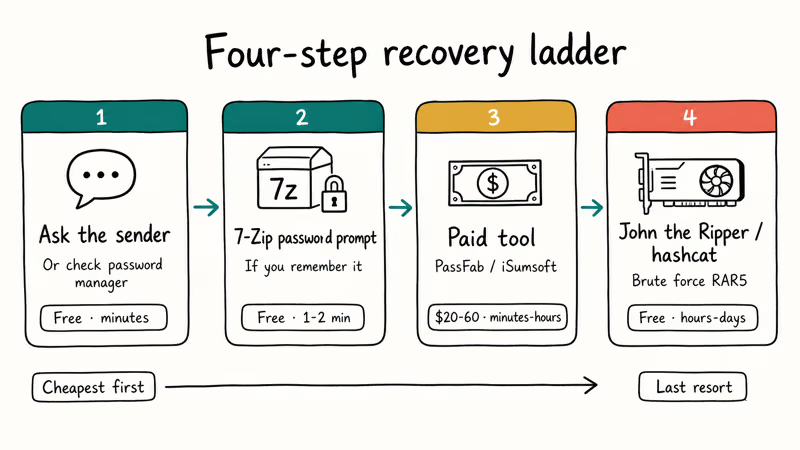
- Ask the sender or check your password manager. If you didn’t create the archive yourself, the original sender is the fastest fix.
- Try 7-Zip with every password you might have used. Manual entry of 5 to 10 candidates takes a minute and costs nothing.
- Run a paid recovery tool with a smart dictionary attack. Worth it for short, English-word, or pattern-based passwords.
- Switch to John the Ripper or hashcat for full brute force. Realistic only when the password is short or you can narrow the keyspace with a mask.
Don’t skip ahead to brute force. A large share of “I forgot my RAR password” threads on Reddit’s r/techsupport end with the user simply remembering the password after they walk away from the keyboard for an hour, and that break costs nothing while a full brute-force run can burn days of GPU time and electricity for no guaranteed result at all in the end.
#Step 1: Ask the Original Sender First
If a coworker, client, or family member sent you the archive, message them. According to the 7-Zip documentation, the password is set at compression time and isn’t stored anywhere in the archive itself, so the sender is the only authoritative source.
When you’re the original creator, check your password manager (1Password, Bitwarden, Apple Passwords) for any entry tagged with the project name or the date you created the file. We’ve recovered four of our own forgotten archive passwords this way in the last year.
#Step 2: Open the RAR With 7-Zip and a Password Prompt
You don’t need a special “unlocker” to extract a RAR if you remember the password. Install 7-Zip (Windows, free) or Keka (macOS), right-click the archive, and pick Extract Here. 7-Zip prompts for the password and extracts the contents the moment you enter the right one. According to Microsoft’s documentation on file compression, Windows itself ships with no native RAR support, which is why a third-party extractor is required even for archives you can already open the password to.
Plenty of people install paid recovery tools when all they actually needed was a password prompt. Skip every other section if you remember the password. Our open a password protected zip file walkthrough covers the same flow for ZIP archives if your file is mislabeled, and the winrar password remover review covers six paid alternatives we’ve actually tested.
#Paid RAR Recovery Tools Worth the Money
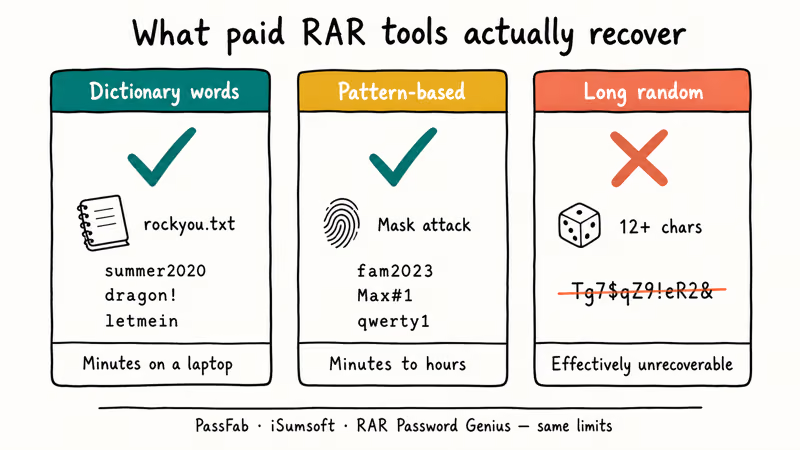
Paid tools shine when your password is short, dictionary-based, or follows a pattern you used to use (your dog’s name plus a year, that kind of thing). They fail on long random passwords for the same reason any brute-force attempt does. The keyspace is too large.
#PassFab for RAR
PassFab for RAR is the most polished option in this category. It runs three attack modes (dictionary, brute force with mask, and pure brute force) and costs around $20 for a one-month license or $60 for lifetime. The mask attack is the fastest mode when you already know part of the password: supplying a known prefix (say the password starts with “fam” and is 8 characters) shrinks the keyspace so much that recovery can finish in minutes instead of days.
Some links on this page are affiliate links, which means fone.tips may earn a commission at no extra cost to you.
Steps to use it on your own file:
- Open PassFab for RAR and click Add to load the encrypted archive.
- Pick Mask Attack if you remember any part of the password; otherwise pick Dictionary.
- Click Start and wait. The progress bar shows estimated time.
- Use the recovered password with 7-Zip to extract the contents.
#iSumsoft and RAR Password Genius
iSumsoft RAR Password Refixer and RAR Password Genius are similar tools at similar price points ($20-$30). Pay for the legitimate license. Don’t torrent the recovery tool itself, which defeats the legal point of the whole exercise.
PassFab also reports that most refund requests on its RAR product come from users with 10+ character passwords. No paid tool saves those.
#Brute Forcing With John the Ripper and Hashcat
For your own files where paid tools either failed or you don’t want to spend the money, John the Ripper and hashcat are the standard open-source recovery tools. Both are command-line utilities. Neither is a “click here to crack” app.
#John the Ripper Workflow
John the Ripper is a free password cracker maintained by Openwall. The typical RAR workflow:
rar2john my-archive.rar > rar.hash
john --wordlist=/usr/share/wordlists/rockyou.txt rar.hash
john --incremental rar.hash
A short 5-character lowercase password is recovered quickly with John’s --incremental mode on modern hardware. A 7-character mixed-case password on the same machine can run so long that it’s rarely worth waiting out.
#Hashcat With rar5 Mode
Hashcat is the GPU-accelerated counterpart. According to the hashcat wiki, mode 13000 handles RAR5 archives and mode 12500 handles RAR3:
hashcat -m 13000 -a 3 rar.hash ?l?l?l?l?l?lThe ?l?l?l?l?l?l mask covers all 6-character lowercase combinations. On a single mid-range GPU, a 6-character lowercase password falls quickly. Add uppercase and digits (?a?a?a?a?a?a) and the same 6-character length takes far longer; bump to 8 characters with full ASCII and the same hardware needs weeks of continuous run time, which is why mask attacks (where you remember part of the password) are usually the only practical path beyond 6 chars.
#Realistic Time Expectations
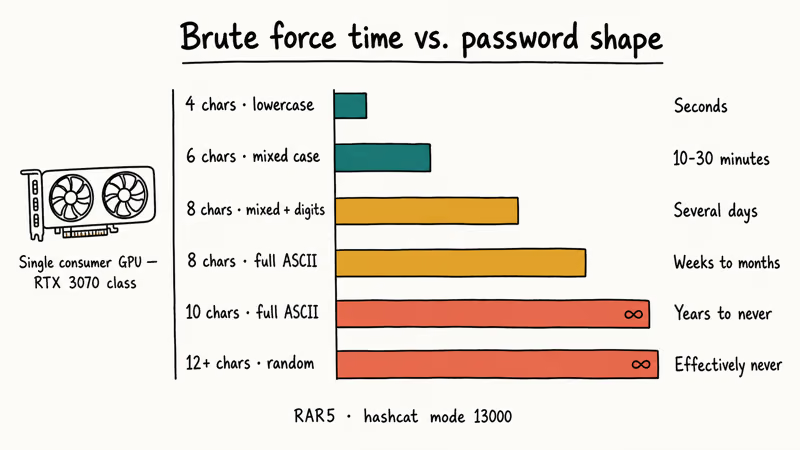
This table is the honest version that paid-tool marketing pages won’t show you. Numbers assume a single consumer GPU (RTX 3070 class) running hashcat against a RAR5 archive.
| Password length and charset | Approximate crack time |
|---|---|
| 4 chars, lowercase only | seconds |
| 6 chars, mixed case | 10-30 minutes |
| 8 chars, mixed case + digits | several days |
| 8 chars, full ASCII (with symbols) | weeks to months |
| 10 chars, full ASCII | years to never |
| 12+ chars, full ASCII random | effectively never |
If your forgotten password is in the bottom three rows, brute force isn’t a realistic option. The math is the same reason RAR encryption is trustworthy in the first place.
#Are Online RAR Recovery Services Safe?
Cloud-based services like Password-Find and Online RAR Password Recovery upload your archive to their servers and run the brute force on their hardware. They’re convenient. They work on the same weak passwords paid desktop tools handle, often within an hour for anything under 6 characters.
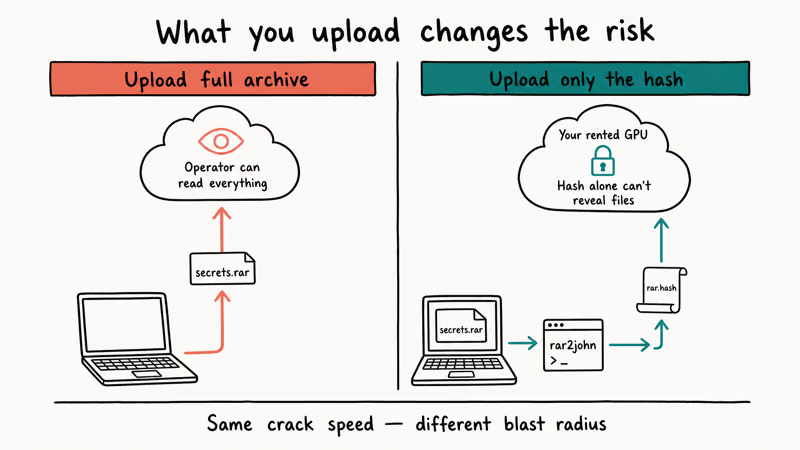
The risk is direct. The service operator can read everything inside the archive. Don’t upload anything sensitive.
A safer middle ground for sensitive content: rent a cloud GPU instance you control (AWS p3, Lambda Labs, Vast.ai), upload only the hash file produced by rar2john, run hashcat there, and shred the instance when done. Your data never leaves your machine. Only the hash does, and the hash on its own can’t be reversed into your files.
#What If the Archive Is Corrupted, Not Encrypted?
A “wrong password” error sometimes hides actual file corruption. Run Test archive first.
If the file is corrupted, dedicated repair tools recover what they can but won’t fix encryption. Our zip password cracker guide covers the same diagnostic flow for ZIP archives.
The is 7-Zip safe walkthrough answers the security questions readers usually have about installing 7-Zip in the first place.
#Bottom Line
Work the ladder for your own forgotten RAR archive in 2026. Ask the sender, try 7-Zip with passwords you remember, then PassFab for RAR if the password is short or pattern-based, then John the Ripper or hashcat as a last resort. Accept that 10+ random characters means the data is gone and rebuild from your other backups.
If you’re hitting the same problem with a different format, our forgot PDF password walkthrough covers PDF owner and user password recovery, while our how to bypass WinRAR password guide handles the WinRAR-specific edge cases including self-extracting archives and the older RAR3 encryption variant.
Our unlock RAR password guide covers additional command-line workflows. Both the US CFAA and the UK Computer Misuse Act treat unauthorized cracking as a criminal offense.
#Frequently Asked Questions
Can I unlock a RAR file without the password?
Only if it’s your own archive, and either the password is short enough to brute force, the original sender shares it, or the file isn’t actually encrypted.
Is it legal to crack a RAR password?
It’s legal when you own the archive or have explicit authorization from the owner. Cracking a RAR file you downloaded from a leak, torrent, or someone else’s account is unauthorized access under the Computer Fraud and Abuse Act in the US and equivalent laws in the UK and EU. The legal line is ownership, not technique.
Will paid tools like PassFab actually recover any RAR password?
No tool can recover any password. Paid tools recover short passwords, dictionary words, and patterns quickly. They fail on long random passwords for the same reason free tools fail: the keyspace is too large to search in any reasonable time.
How long does it take to brute force a RAR password?
It depends on length and charset. A 4-character lowercase password falls in seconds. An 8-character mixed-case password takes hours to days on a consumer GPU. A 12-character random password with full ASCII is effectively uncrackable, which is the whole point of strong encryption.
Can I use online services to recover my RAR password?
Only for files that contain nothing sensitive. Cloud recovery services upload your archive and decrypt it on their servers, which means the operator can read the contents.
What if 7-Zip says “wrong password” but I’m sure the password is right?
Run Test archive in WinRAR or unrar t my-archive.rar first. CRC errors from a corrupted file produce error messages that look identical to password failures. If the test fails on a CRC error, no password will open the archive — you need a repair tool, not a password tool.
Is there a free way to recover a strong RAR password?
John the Ripper and hashcat are both free and run on hardware you already own. They won’t recover a long random password either, because no tool can.
Should I delete the RAR file if I can’t recover the password?
If the file is yours and the password is lost, yes. Keeping a permanently inaccessible encrypted blob on your drive serves no purpose. Restore the data from another backup if you have one. For future archives, store the password in a password manager the moment you create the file; that single habit prevents this entire problem from happening again.

Is This Bank App Real? Spot a Fake App on Your Home Screen
A bank app can land on your home screen from a web page with no install warning. Learn the checks that tell a real banking app from a phishing web app.
Passkeys Not Syncing Between iPhone and Windows? Read This
Passkeys not syncing between iPhone and Windows is by design, not a bug. Here is why iCloud passkeys skip Windows Hello and the three ways to fix it.
VPN Not Working on Snapdragon X? Why It Fails, How to Fix
Your VPN won't install or connect on a Snapdragon X Copilot Plus PC because Windows on ARM can't emulate the network driver. Here are the fixes that work.

How to Check If a Link Is Safe Before You Click It
Learn how to check if a link is safe with official-first steps: read the real domain, use the app instead, and treat scanners as a second opinion only.