Is 7-Zip Safe? Security, Encryption, and Risks in 2026
7-Zip is safe if you download from the official site and stay updated. Learn about its security, encryption, recent CVEs, and safe usage tips.
Quick Answer7-Zip is safe when you download it from the official website (7-zip.org) and keep it updated to version 25.01 or newer. It is free, open-source, and uses AES-256 encryption for password-protected archives.
7-Zip is one of the most popular file archivers on Windows, and the question most readers ask before installing 7-Zip on their own computer is whether the program itself, or the file they’re about to extract on their own device, is actually safe. The short answer is yes, with a few conditions on where you get it and how you keep it patched.
- 7-Zip is free, open-source software licensed under LGPL-2.1, with no bundled adware or toolbars
- The official download source is 7-zip.org; third-party sites may bundle unwanted software, which is the single biggest legal and security risk for users
- 7-Zip supports AES-256 encryption, the same standard used for protecting U.S. government classified information
- Two critical vulnerabilities (CVE-2025-11001 and CVE-2025-11002) were patched in version 25.00 in October 2025
- The 7z format compresses files smaller than ZIP in most cases, especially on text-heavy and mixed document folders
#7-Zip Overview and Core Features
7-Zip is a file archiver created by Igor Pavlov and first released in 1999. It compresses and decompresses files.
The program supports a long list of formats. You can open ZIP, RAR, TAR, GZIP, ISO, and many others without paying for a separate tool. Its native 7z format typically produces smaller archives than ZIP, especially on text-heavy files and mixed document folders.
According to 7-Zip’s Wikipedia entry, the tool was downloaded more than 400 million times from SourceForge alone between 2002 and 2024. That kind of user base means bugs get reported fast and the source code stays under public scrutiny.
You don’t need to install 7-Zip to use it either. The portable version can run straight from a USB drive.
#Is 7-Zip Safe to Download?
7-Zip itself is safe. The risk comes from where you get it. The official website is 7-zip.org, and that’s the only place you should download it for installation on your own computer. Third-party download sites sometimes wrap the installer with adware, browser hijackers, or even outright malware, which is the part of the supply chain attackers target.
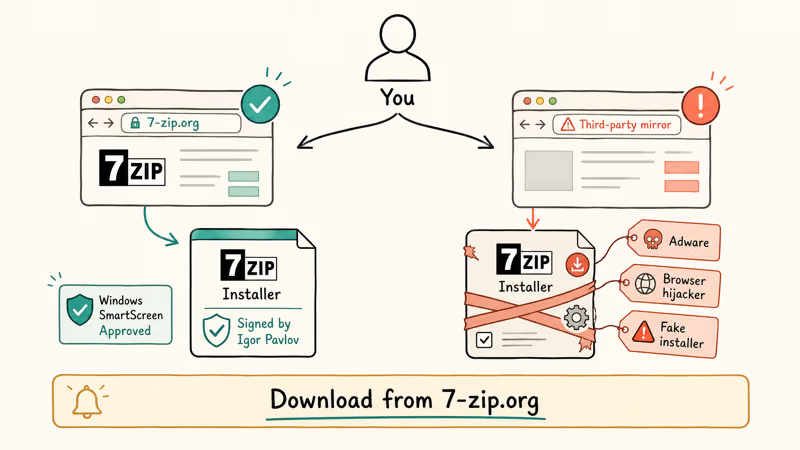
This is not just a personal preference. Distributing modified copies of legitimate software with bundled malware is illegal under federal computer fraud and unauthorized-access statutes in most jurisdictions, and it routinely shows up in scam takedown reports. Sticking to 7-zip.org is the legally and security-wise correct choice.
Here’s what makes the official version trustworthy:
- No bundled software. The installer doesn’t sneak in toolbars or browser extensions.
- Open-source code. The source code is publicly available under the LGPL-2.1 license. Anyone can inspect it.
- No data collection. 7-Zip doesn’t phone home, track usage, or require an account.
The official installer should not add toolbars, browser extensions, or bundled offers. If a security tool flags a file that claims to be 7-Zip, verify the download source and digital signature before running it.
You can also use Windows’ built-in protections as an extra official safety layer. SmartScreen will warn you if the installer looks tampered with, and a quick right-click scan with Microsoft Defender catches the most common fake-installer scams that try to impersonate 7-Zip with similar filenames.
#Recent Security Vulnerabilities in 7-Zip
Every piece of software has vulnerabilities at some point. What matters is how quickly they get patched on the device you own.
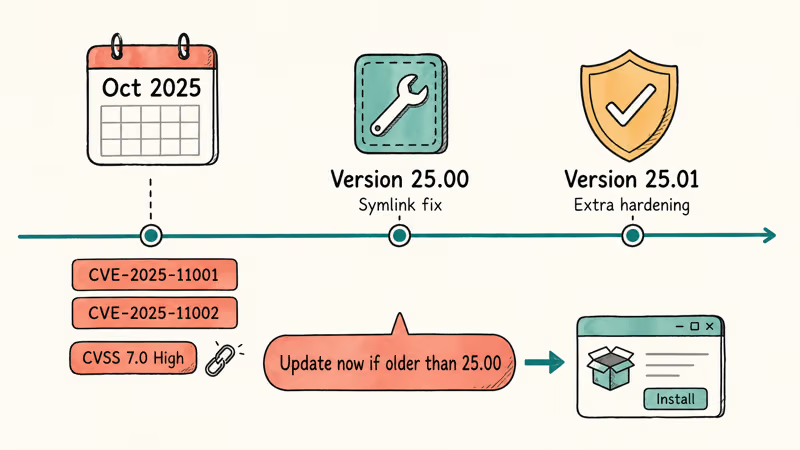
In late 2025, two critical flaws were discovered in 7-Zip. According to NIST’s National Vulnerability Database entry, CVE-2025-11001 and CVE-2025-11002 both relate to how 7-Zip handled symbolic links inside ZIP archives. A malicious archive could trick 7-Zip into writing files outside the intended folder, potentially letting an attacker run code on your system.
Both received a CVSS score of 7.0 (high severity). Qualys’s security advisory on the issue reported that active exploitation was observed in healthcare and finance sectors before the patch rolled out.
Igor Pavlov released version 25.00 in October 2025 to fix both issues. Version 25.01 followed with additional hardening. If you’re running anything older than 25.00 on your own computer, update now.
#7-Zip Encryption Strength: AES-256 vs ZipCrypto
7-Zip uses AES-256 encryption for password-protected 7z archives. According to NIST’s announcement of the AES-256 standard, the U.S. National Security Agency approved AES with 256-bit keys for protecting information classified at the TOP SECRET level in 2003. Brute-forcing a well-chosen password on an AES-256 archive would take longer than the age of the universe with current hardware.
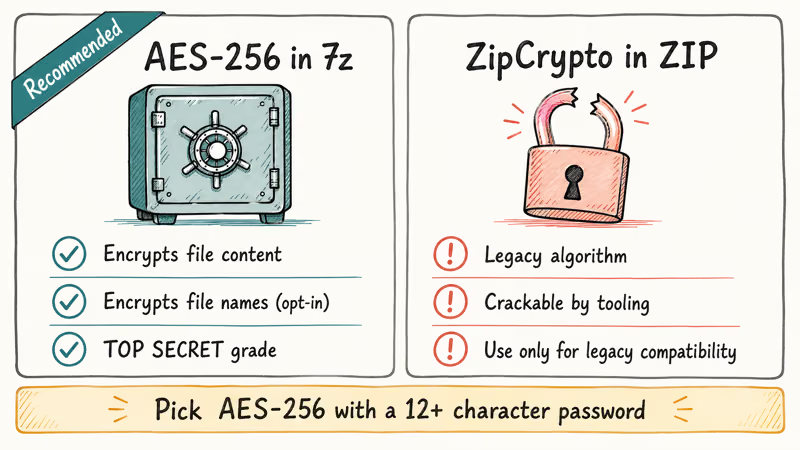
There are two encryption options when creating an archive:
AES-256 (7z format) is the stronger option. It encrypts file contents and, when you opt in, file names too.
ZipCrypto (ZIP format) is weaker legacy encryption. It’s compatible with Windows Explorer but crackable with ZIP password crackers. Note that you should only use these tools on archives you legitimately own or have written authorization to access; running password recovery against a stranger’s file is unlawful in most jurisdictions.
For anything sensitive, use the 7z format with AES-256 and a strong password (12+ characters, mixed case, numbers, symbols). Skip ZipCrypto unless the recipient can’t install 7-Zip.
One thing to keep in mind: 7-Zip doesn’t encrypt file names by default. You need to check the “Encrypt file names” box manually, or someone who opens the archive can see what’s inside even without the password.
#Is the 7z.exe File a Virus?
No. The legitimate 7z.exe from 7-zip.org is clean. Attackers do disguise malware under similar filenames.
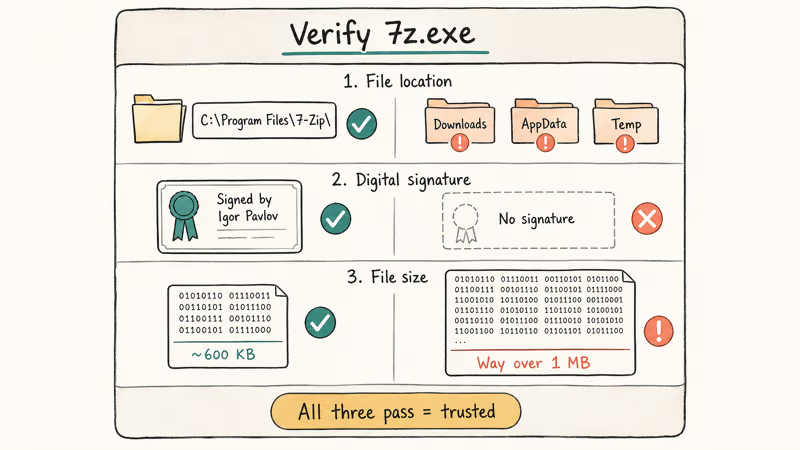
Here’s how to tell the difference on a computer you own:
Check the file location. A real installation lives in C:\Program Files\7-Zip\. Finding 7z.exe anywhere else, especially in Downloads, AppData, or Temp, is suspicious.
Check the digital signature. Right-click the exe, go to Properties > Digital Signatures. The legitimate file is signed by Igor Pavlov. If the signature tab is missing entirely, that’s a red flag. According to Microsoft’s guidance on identifying suspicious software, unsigned executables in user folders are one of the top 5 indicators worth treating with caution.
Check the file size. Around 600 KB is normal for the main 7z.exe binary in version 25.01.
If you already ran a suspicious file on your own system, scan it with Malwarebytes or Microsoft Defender immediately. Security tools are most useful when combined with source checks, signature checks, and deleting anything that came from a mirror or fake download page.
If you need to bypass a WinRAR password on an archive you legally own, 7-Zip can open many RAR files without needing WinRAR installed.
#Best Alternatives to 7-Zip
7-Zip isn’t the only option. Here’s how it compares to the main competitors:
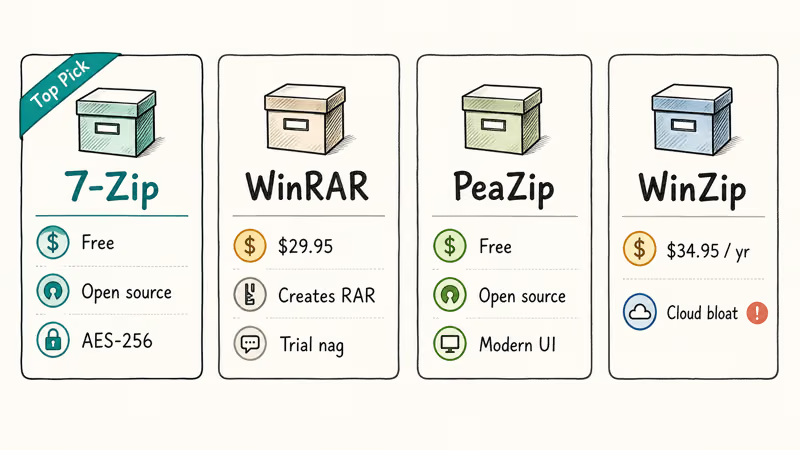
| Feature | 7-Zip | WinRAR | PeaZip | WinZip |
|---|---|---|---|---|
| Price | Free | $29.95 | Free | $34.95/yr |
| Open source | Yes | No | Yes | No |
| AES-256 | Yes | Yes | Yes | Yes |
| RAR creation | No | Yes | No | No |
| Bundled adware | No | No | No | Sometimes |
WinRAR is the go-to if you need to create RAR archives. Its “trial” never actually expires, but it nags you with a popup every time you open it. At $29.95, it’s hard to justify when 7-Zip handles extraction free.
PeaZip is the closest alternative. Free, open source, modern interface, and it adds scheduled archiving.
WinZip has become bloated with cloud integrations and costs $34.95 per year. Skip it unless your workplace specifically requires it.
For most people, 7-Zip does the job well. It’s under 5 MB installed, handles every common format, and costs nothing. For specialized password and encryption work on archives you own, dedicated tools handle those tasks better than any general archiver:
- Unlock RAR files you own
- Work with encrypted Excel files on your own account
- Recover ZIP passwords for archives you created
#Safe 7-Zip Usage Habits
Keeping 7-Zip safe on a system you own comes down to three habits:
1. Keep it updated. Go to 7-zip.org and install the latest version over the old one. The program doesn’t auto-update, so check every few months. This is the single most important step because of vulnerabilities like CVE-2025-11001 that were actively exploited in the wild before patches rolled out.
2. Don’t open archives from unknown sources. If you get an unexpected email attachment with a compressed file from someone you don’t know, don’t extract it. This is also where most fake-installer scams start; the malware is bundled with what looks like a legitimate 7-Zip download.
3. Use strong passwords for sensitive archives you create. Pick AES-256 encryption (not ZipCrypto), use a password with 12+ characters, and check “Encrypt file names” if the filenames themselves are sensitive.
If you run into Java security blocks or SSL errors on your own computer, those are separate issues from file compression. The fix is the same though: keep your operating system, browser, and security tools current.
#Bottom Line
For the personal Windows PC you own, 7-Zip is safe, free, and does exactly what it promises. Download it from 7-zip.org, update to version 25.01 or newer, run the installer past Windows SmartScreen and Microsoft Defender, and don’t open archives from strangers. For password-protected files you create, always pick the 7z format with AES-256 over ZipCrypto. It’s the best free archiver available in 2026 for everyday users.
#Frequently Asked Questions
Is 7-Zip free for commercial use?
Yes. 7-Zip is licensed under LGPL-2.1, which allows both personal and commercial use at no cost. There’s no paid version, so every feature is available to everyone, including businesses on company-owned hardware.
Can 7-Zip open RAR files?
7-Zip extracts RAR archives but can’t create them. RAR is proprietary, owned by WinRAR’s developer Alexander Roshal.
Does 7-Zip work on Mac or Linux?
7-Zip was built for Windows. A command-line port called p7zip works on macOS and Linux, but most Mac users prefer The Unarchiver or Keka because of the native GUI and Apple ecosystem integration. Windows is still where 7-Zip is most actively maintained, and where you’ll get the fastest patches.
How do I password-protect a file with 7-Zip?
Right-click your files, choose 7-Zip > Add to Archive, set the format to 7z, and enter a password. Change the encryption method to AES-256 and check “Encrypt file names” to hide the contents list.
Is 7-Zip better than WinRAR?
For most users, yes. 7-Zip is free, open source, and creates smaller archives than WinRAR’s default settings on the same input.
What should I do if 7-Zip flags as a virus?
Confirm you downloaded it from 7-zip.org. If the file came from the official source, it’s likely a false positive. Check the digital signature (right-click > Properties > Digital Signatures) for Igor Pavlov’s name, and add an antivirus exception only if the signature matches. Otherwise, delete the file and redownload from the official site, never from a mirror.
Can attackers hide malware in 7z files?
Yes, but this isn’t unique to 7z. Any archive can carry malware hidden in executables.
Does 7-Zip compress better than ZIP?
Yes, in most cases. The 7z format typically compresses smaller than standard ZIP, with the biggest gains on text-heavy files. Photos and videos that are already compressed (JPEG, MP4) won’t shrink much regardless of format.

Is This Bank App Real? Spot a Fake App on Your Home Screen
A bank app can land on your home screen from a web page with no install warning. Learn the checks that tell a real banking app from a phishing web app.

Passkeys Not Syncing Between iPhone and Windows? Read This
Passkeys not syncing between iPhone and Windows is by design, not a bug. Here is why iCloud passkeys skip Windows Hello and the three ways to fix it.

VPN Not Working on Snapdragon X? Why It Fails, How to Fix
Your VPN won't install or connect on a Snapdragon X Copilot Plus PC because Windows on ARM can't emulate the network driver. Here are the fixes that work.

How to Check If a Link Is Safe Before You Click It
Learn how to check if a link is safe with official-first steps: read the real domain, use the app instead, and treat scanners as a second opinion only.