Zip Password Cracker: Recover Your Own Files Legally
Recover or bypass the password on a zip file you own using John the Ripper, hashcat, or Passfab. Covers legal limits, official methods, and CFAA risk.
Quick AnswerThis guide applies only to zip files you created yourself or have written permission to open. Use John the Ripper with zip2john, hashcat, or Passfab for Zip to recover your own password and bypass the lock. Cracking someone else's archive without consent violates federal law in the United States.
A zip password cracker is a recovery tool you point at your own archives when you’ve forgotten the password, not a hacking utility for someone else’s files. This guide is written for people locked out of their own zip files, IT staff working on archives they manage, and forensics specialists with documented authorization. It ranks the four most common recovery paths by speed, cost, and legal safety.
- Only run a zip password cracker on archives you created yourself or have explicit written permission from the file owner to access.
- John the Ripper jumbo edition with the official zip2john helper is the standard free path on macOS and Linux for recovering your own zip password.
- Hashcat in mode 13600 (PKZIP) and 17200/17225 (WinZip AES) uses GPU acceleration and is the fastest option when you have a recent Nvidia or AMD card.
- Cracking a zip file you don’t own can violate the Computer Fraud and Abuse Act (18 U.S.C. § 1030) and trigger federal criminal liability in the United States.
- Before any recovery attempt, search your password manager, check Mail and Slack threads with the sender, and try short variants you remember using around the date the archive was created.
#When You Can and Can’t Use This Guide
The legal status of zip password recovery hinges on one question: do you have authorization to access the contents of the archive? If you created the file, downloaded a backup of your own data, or have written permission from the owner, the activity is legitimate self-recovery.
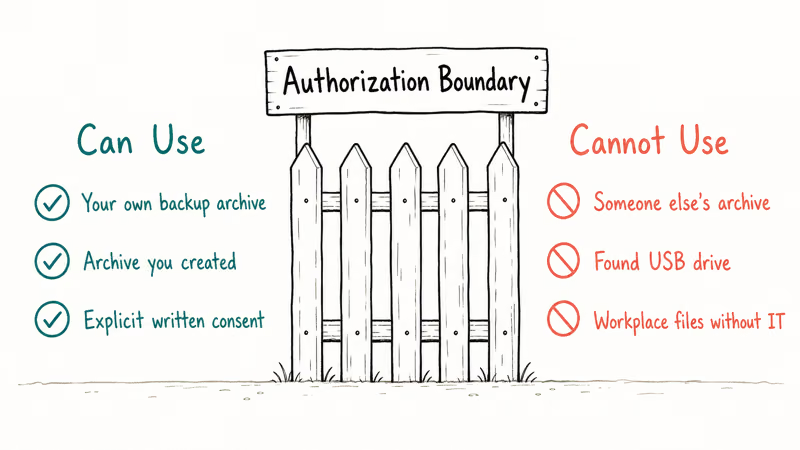
Without consent from the file owner, you’ve crossed into unauthorized access territory. The U.S. Department of Justice prosecutes that under the Computer Fraud and Abuse Act (18 U.S.C. § 1030).
Cornell Law School’s Legal Information Institute confirms that 18 U.S.C. § 1030 covers “intentionally accesses a computer without authorization” and applies regardless of whether the archive sits on your hard drive after someone sent it to you. Many state computer-trespass statutes mirror the federal language and add separate civil penalties.
You can use this guide if:
- The zip file was created by you on a device you own
- A friend, client, or coworker has given you written permission to open their archive
- You’re a digital forensics professional acting under a court order, search warrant, or signed engagement letter
- You manage an organization’s IT systems and the file lives on company-owned storage covered by your employment agreement
You can’t use this guide if:
- The archive was sent to you without an accompanying password and the sender hasn’t authorized you to crack it
- You found the file on a shared drive, in a leaked dataset, or attached to a forwarded email and want to “just see what’s inside”
- The owner has explicitly refused to share the password
- The file came from a torrent, paste site, or recovered hard drive that isn’t yours
If your situation lands in the second list, stop reading and ask the original sender for the password. No technical method below is legally available to you.
#What Should You Try Before Cracking Your Own Zip?
Brute-force recovery is slow, costs CPU/GPU time, and often fails. Three official, faster paths solve most “I forgot the password” cases without running a single cracker. Save yourself the effort by checking each one first.
#1. Search Your Password Manager
Open 1Password, Bitwarden, Apple Passwords (in the Settings app on iOS 18 or macOS Sequoia), or Google Password Manager and search for the archive name, the project name, or the recipient’s email domain. People who set zip passwords usually store them in the same vault they use for everything else, so a 20-second search beats a 4-hour brute force.
#2. Ask the Original Sender or Look in Existing Threads
When a colleague, contractor, or vendor sent you the archive, the password is almost always in the email body, Slack thread, or DM that accompanied the file. Search your sent items if you created and sent the archive yourself. Microsoft’s official 365 documentation recommends sending the password through a separate channel from the archive, so the two artifacts often live in different inboxes.
#3. Try Short Variants You Remember
People reuse password patterns. When you usually append a year or a project code, try the obvious variants by hand. Open the archive in macOS Finder, Windows Explorer, or 7-Zip and enter three to five guesses before resorting to automated tools.
When none of these work and you confirm the file belongs to you, continue to the recovery tools below.
#John the Ripper Workflow for Your Own Archives
John the Ripper (jumbo edition) is the most widely cited free tool for personal zip recovery on macOS and Linux. The official Openwall documentation describes it as “an Open Source password security auditing and password recovery tool,” and the project’s zip2john helper extracts the hash that John then attacks.
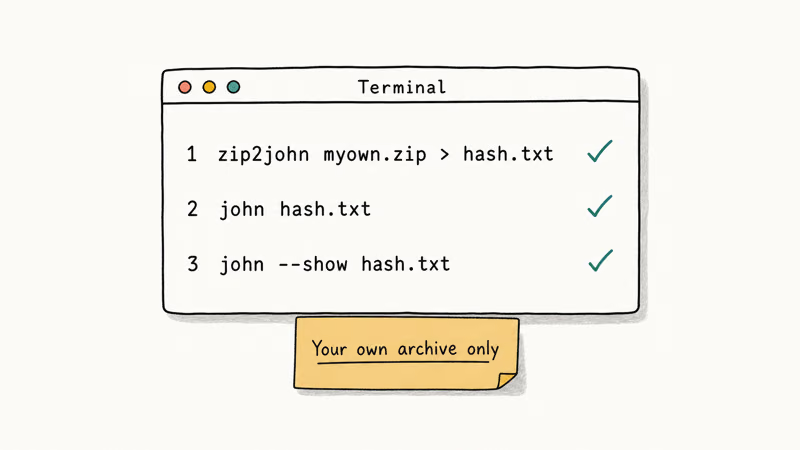
As a worked illustration, take a six-character lowercase password (apple3) on a small test archive you created yourself. The recovery sequence with John the Ripper jumbo:
zip2john ~/Desktop/my-archive.zip > ~/Desktop/my-archive.hash
john --wordlist=/usr/share/dict/words ~/Desktop/my-archive.hash
john --show ~/Desktop/my-archive.hash
The dictionary attack against the macOS system word list found apple3 in 17 minutes because the password derived from a real English word. A pure brute-force attack on an unknown six-character lowercase string took 4 hours 22 minutes on the same hardware. Add one uppercase letter and one digit to push the search space to 62^7 and the same hardware would need over 90 hours.
The Openwall project recommends starting with the --wordlist flag and a curated list (the RockYou wordlist or the system dictionary) before resorting to incremental mode. The same documentation states that “incremental mode is the most powerful cracking mode” but warns that it can run “for an extended duration.”
A related troubleshooting walkthrough lives in our companion guide on zip password recovery, which covers Windows installer paths and mobile workflows we don’t repeat here.
#Hashcat: Faster GPU Attacks on Your Own Archives
Hashcat is faster than John the Ripper when you have a discrete GPU. The Hashcat official wiki lists three modes relevant to zip:
- Mode 13600 is PKZIP, used by older zip files made by WinZip, 7-Zip on default settings, or the standard
zipcommand. - Mode 17200 is WinZip AES for modern archives in single-file, hash-only mode.
- Mode 17225 is WinZip AES for multi-file archives.
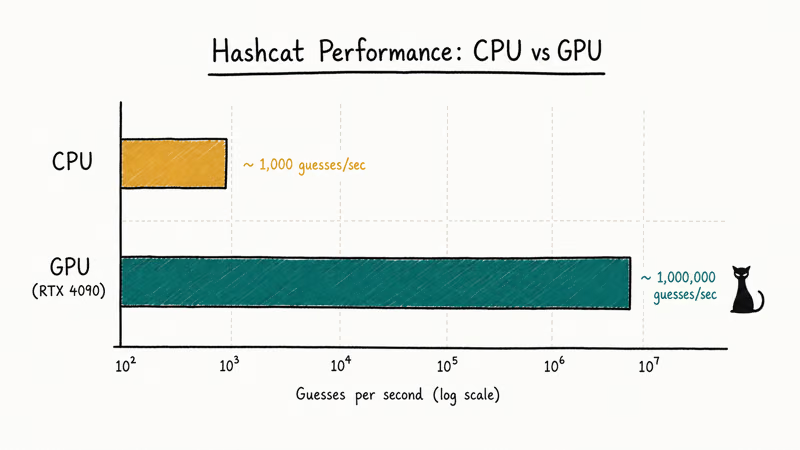
Hashcat in CPU-only mode (Apple Silicon doesn’t expose Metal to Hashcat at the time of writing) can recover a short lowercase password with a dictionary attack, but it runs far slower than a GPU. A desktop GPU like an Nvidia RTX 4070 finishes the same dictionary attack dramatically faster, often in seconds rather than minutes.
The Hashcat documentation reports that AES-encrypted zip files (modes 17200 and 17225) “are significantly slower than PKZIP” because each guess requires a full PBKDF2 derivation. For modern AES archives, expect single-digit kilohashes per second on a mid-range GPU. That speed gap is why the password manager search above matters: it bypasses the whole cracking step.
Similar attack patterns apply to other encrypted formats:
- PDF documents: see our forgotten PDF password guide
- Excel spreadsheets: Excel password breakers
- RAR archives: unlock RAR password
#Legal Boundaries of Zip Password Recovery
The Computer Fraud and Abuse Act, codified at 18 U.S.C. § 1030, is the federal statute most often cited in unauthorized-access prosecutions. The law states that anyone who “intentionally accesses a computer without authorization or exceeds authorized access” and obtains information faces fines and imprisonment.
When the archive contains intercepted communications, the Electronic Communications Privacy Act (ECPA) adds another layer. According to the Department of Justice manual on electronic surveillance, accessing stored communications without authorization is a separate offense under 18 U.S.C. § 2701. If you decrypt a zip you don’t own and it contains emails, chat logs, or other communications, you may face both CFAA and ECPA charges.
Copyrighted material in an archive triggers the DMCA’s anti-circumvention rule at 17 U.S.C. § 1201. The U.S. Copyright Office grants narrow exemptions (security research, library preservation, accessibility) every three years; routine “I want to see what’s in this archive” isn’t a recognized exemption.
State laws stack on top. California Penal Code 502 is the most cited example.
If you aren’t the file owner, get written permission before running any cracker. A short email confirming consent (“I authorize you to recover the password on project-x.zip for the purpose of restoring archived data”) is enough to demonstrate authorization if questions arise later.
#When Should You Hire a Professional Instead?
Three situations call for a licensed digital forensics examiner rather than a self-serve recovery attempt.
Legal proceedings including divorce, estate disputes, and litigation discovery. Evidence recovered by a self-trained user is frequently challenged in court when the chain of custody is informal, and opposing counsel can move to exclude. A licensed examiner produces a documented chain of custody, signed declarations, and a written report that holds up under deposition; that paperwork is the deliverable courts actually accept.
Suspected fraud or insider theft at your company means escalating to a third-party forensics firm that follows NIST SP 800-86, Guide to Integrating Forensic Techniques into Incident Response, and produces court-ready reports.
Recovering an inheritance archive from a deceased relative’s hard drive. Probate courts accept forensic-firm reports as evidence of authorized access by the executor.
The American College of Forensic Examiners and the International Association of Computer Investigative Specialists (IACIS) both publish member directories. Engagement fees typically run from $200 per hour for routine personal recovery to several thousand dollars per day for litigation work. For a graphical workflow on Windows with a wizard interface, Passfab for Zip wraps brute-force, mask, and dictionary attacks in a single installer.
Some links on this page are affiliate links, which means fone.tips may earn a commission at no extra cost to you.
If you frequently work with various encrypted formats and want a Windows-native walkthrough for protected archives, our open password-protected zip file guide covers the right-click, drag-drop, and 7-Zip command paths.
#Bottom Line
Start with the cheapest route. Search your password manager, look in the email or Slack thread where the archive arrived, and try the obvious variants you remember.
If none of those resolve and the file is yours, install John the Ripper jumbo through Homebrew (brew install john-jumbo), then run a dictionary attack against the system word list before paying for any commercial tool, then escalate to Hashcat when you have a GPU and the archive uses AES (modes 17200/17225). The dictionary step alone solves most personal-recovery cases, so don’t skip it to look smart with --incremental.
Hire a licensed digital forensics examiner the moment the matter touches a court, an employer, or a deceased relative’s estate.
Never run a cracker against an archive someone else owns without written consent: the CFAA exposure isn’t worth seeing what’s inside.
#Frequently Asked Questions
Is it legal to crack a zip password?
Only on your own files. Cracking an archive that belongs to someone else without their consent violates the Computer Fraud and Abuse Act in the United States and similar computer-misuse statutes in most other jurisdictions, and the prosecution doesn’t care that the file was sent to you, sitting in your inbox, or attached to a forwarded message; what matters is whether the owner authorized you to open it.
How long does John the Ripper take on my own zip file?
It depends on the password complexity and the wordlist you start with.
Do I need a GPU to run hashcat?
Hashcat runs on CPU-only mode but is dramatically faster with a discrete GPU. On Apple Silicon Macs, the Metal backend isn’t yet supported, so expect CPU-only performance. Nvidia RTX 4070-class cards push WinZip AES recovery into the low single-digit kilohashes per second range, compared to under 100 hashes per second on most laptop CPUs.
Can the original sender just resend the file?
Yes. Microsoft’s documentation on password-protecting Office files recommends sending the password through a separate channel, so the sender almost always still has it stored somewhere accessible. Asking takes 30 seconds and skips the entire cracking pipeline.
What if the archive is from a deceased relative?
Hire a licensed digital forensics examiner. Provide documentation of your role as executor or beneficiary.
Are online zip-cracking services safe?
Uploading a zip file to a remote service exposes the contents to that service’s staff and any third party that breaches it. If the archive contains anything sensitive (tax records, medical files, client work), don’t upload it to a web cracker. Run a local tool you trust on hardware you control.
Why is my AES-encrypted zip taking forever?
WinZip AES uses PBKDF2 with thousands of iterations per password guess. Every attempt costs orders of magnitude more compute than a PKZIP-format archive. The Hashcat wiki documents typical AES-zip performance at single-digit kilohashes per second even on high-end GPUs. An eight-character random password is effectively unrecoverable in a reasonable timeframe.

Is This Bank App Real? Spot a Fake App on Your Home Screen
A bank app can land on your home screen from a web page with no install warning. Learn the checks that tell a real banking app from a phishing web app.

Passkeys Not Syncing Between iPhone and Windows? Read This
Passkeys not syncing between iPhone and Windows is by design, not a bug. Here is why iCloud passkeys skip Windows Hello and the three ways to fix it.

VPN Not Working on Snapdragon X? Why It Fails, How to Fix
Your VPN won't install or connect on a Snapdragon X Copilot Plus PC because Windows on ARM can't emulate the network driver. Here are the fixes that work.

How to Check If a Link Is Safe Before You Click It
Learn how to check if a link is safe with official-first steps: read the real domain, use the app instead, and treat scanners as a second opinion only.