QR Code Scam (Quishing): How to Spot a Fake Code in 2026
Quishing is QR code phishing. Learn the high-risk spots, how to preview a code before opening it on iPhone and Android, and what to do after a bad scan.
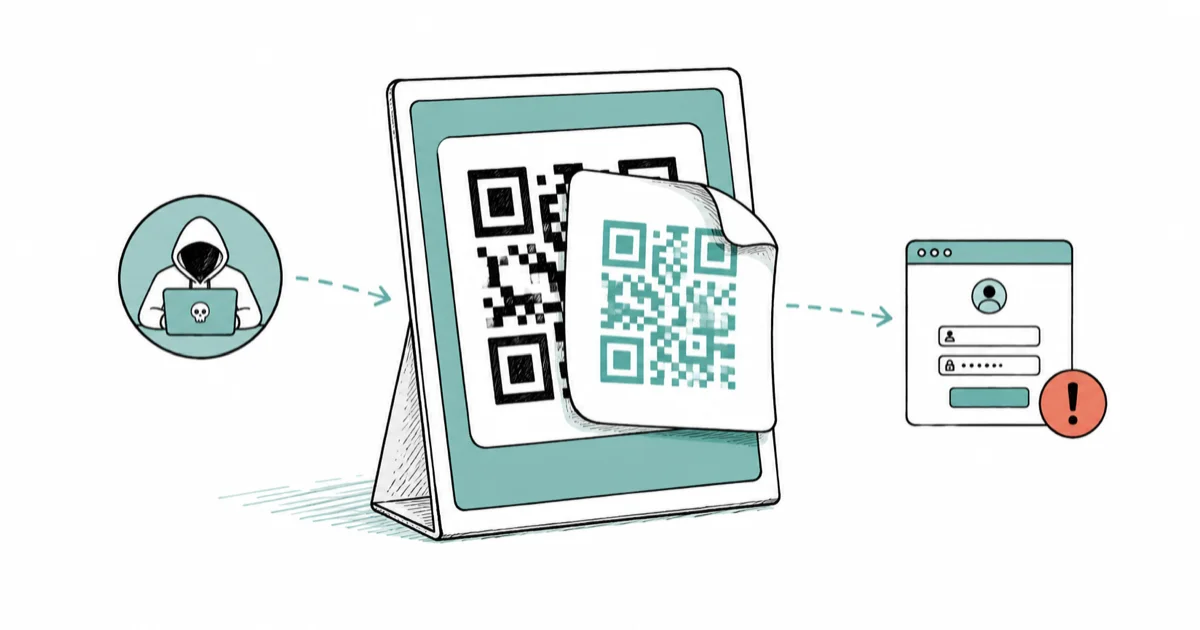
Quick AnswerQuishing is a phishing attack that uses a fake QR sticker placed over a real one. It sends you to a lookalike site that steals your login or card info.
- Quishing uses a fake QR sticker placed over a real one on parking meters, restaurant tables, packages, and flyers
- A legitimate iPhone or Android camera shows the full URL before opening, so you can read the domain first
- Lookalike domains often swap letters or add a hyphen: paypall.com, my-bank-login.co, ticket-pay-now.net
- Never enter passwords, card numbers, or app store credentials into a page reached by scanning a code in public
- If you scanned a malicious code, change the password, freeze the card if you typed it, and report the sticker
A QR code scam is one of the easiest phishing attacks to fall for in a public place. The sticker sits on a parking meter, your phone is already aimed at it, and the page looks normal. This guide explains what to check before you tap.
#What Is Quishing and Why It Works
Quishing is phishing delivered through a QR code instead of an email link.
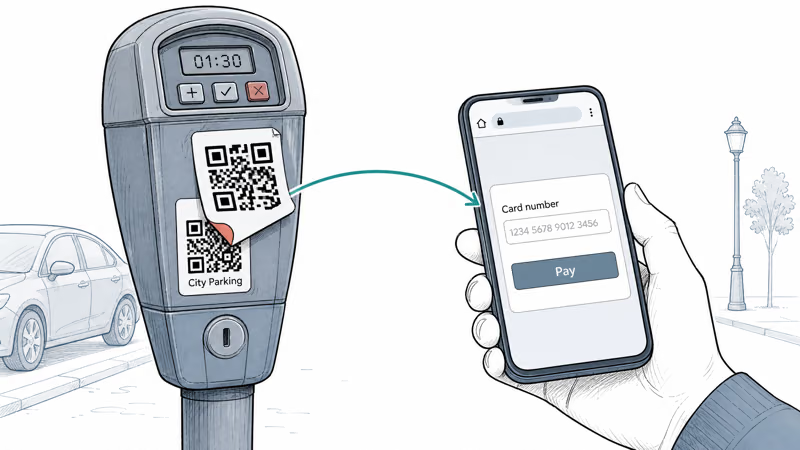
The attacker prints a sticker with their own code and places it over a legitimate code in a public spot. You scan it the same way you would any other QR code. Your phone shows a URL, you tap, and you land on a page that imitates a parking app, a restaurant payment page, or a delivery confirmation. The page then asks for the payoff: your login or your card number.
According to the FTC’s 2023 consumer alert on QR code scams, scammers have been hiding harmful links inside QR codes placed over legitimate codes in public locations including parking meters since at least 2023, with the goal of capturing payment details or login credentials. On Android, a small share of campaigns also push a drive-by app prompt after the page loads.
Three reasons it works so well.
First, QR codes look like infrastructure, not advertising, so most people trust them by default. Second, the URL stays hidden until you actually scan, so there’s nothing to inspect ahead of time. Third, the moment of scanning usually happens when you’re rushed: you just parked, you’re hungry, the package is at the door.
#Where Are You Most Likely to See a Fake QR Code?
Some physical spots get hit again and again. Foot traffic is high, the real sticker is easy to cover, and the surface is rarely supervised.
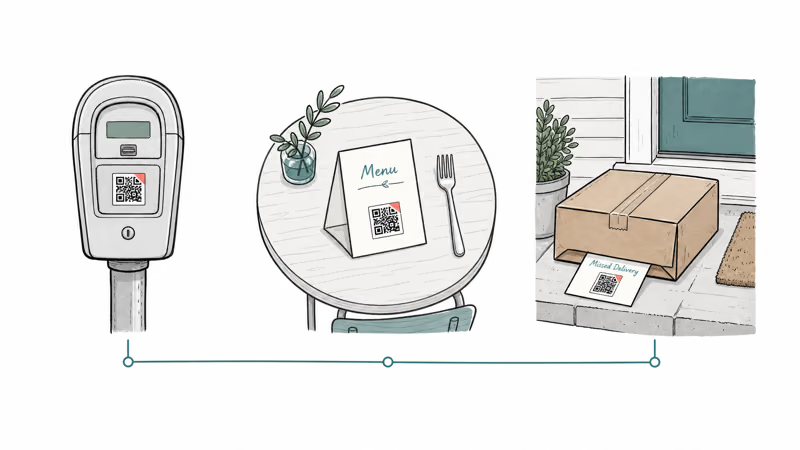
Parking meters are the classic case.
Parking meters and pay stations. The legitimate sticker carries the city’s parking app URL. An attacker prints a near-identical sticker and presses it on top, often within seconds during a quiet moment. You scan, “pay”, and the card details go to the scammer.
Restaurant tables and menus. Touchless menus and table-side payment QR codes are everywhere now. A scammer drops by, peels the corner of the real sticker, and lays a fresh one on top with an attacker-controlled URL that resembles the restaurant’s payment processor. The fake page asks for the card and a tip percentage. The card details flow to the scammer, and the diner walks out thinking the meal is paid for when the merchant never received a cent.
Packages and “missed delivery” cards. A QR code on a card claiming a missed delivery sends you to a fake carrier site. The fee is small. There was no package.
The FBI’s Internet Crime Complaint Center reports that quishing-style fraud has spread to EV charging stations, public flyers, and mailed letters dressed up as official notices from the IRS or utility companies since 2024. Real agencies don’t initiate payment through a mailed QR code.
A few physical signs that a sticker is fake: a raised edge, a slight color mismatch with the surface underneath, fresh adhesive at the corners, or a sticker that looks much newer than everything around it. If you can lift a corner without much force, it likely went up yesterday.
For deeper background on what happens after credentials are stolen, our guide on passkey vs password vs 2FA covers why a stolen password isn’t enough to break a passkey-protected account.
#How Do You Preview a QR Code’s Link Before Opening It?
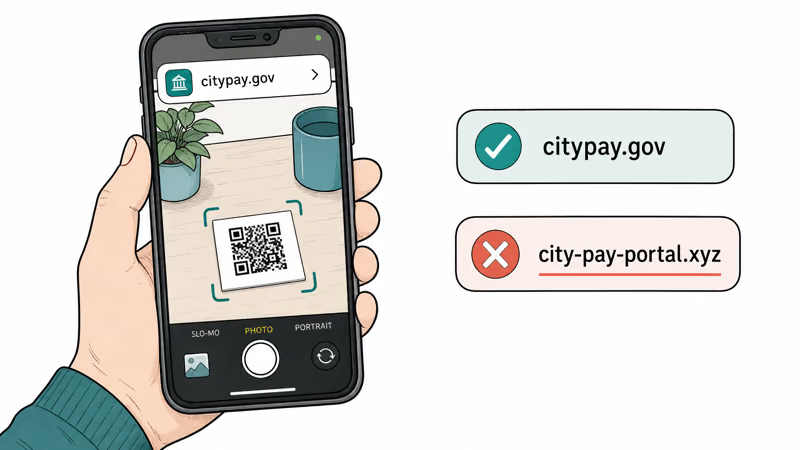
Both modern iPhones and Android phones show you the destination URL before opening it. The point of preview is to read the domain calmly, away from the rush of “just scan and pay”.
#On iPhone (iOS 17 and later)
- Open the Camera app
- Point the rear camera at the code without tapping
- A small banner slides in showing the URL and the source app
- Read the full domain before tapping the banner
On a modern iPhone, the URL preview banner appears within a second.
According to Apple’s iPhone Camera support documentation, the Camera app and Code Scanner both show a URL preview notification before opening any link, and the preview includes the source app handling the request so you can spot anything unexpected.
#On Android (Pixel and most Samsung)
- Open the Camera app
- Hover over the code for a beat, don’t tap the shutter
- The URL appears as a chip or banner near the bottom of the screen
- Tap once to expand and read the full domain before opening
If the default camera doesn’t preview the URL, use Google Lens instead. Google recommends using Lens for QR codes because the app shows the destination URL and a “where this links to” label before opening anything. On Android, the preview behavior matches that documentation.
#What to Look For in the URL
- The domain matches what you’d expect (a city’s real parking app, the restaurant’s real brand, the carrier’s real name)
- No extra hyphens or appended words:
usps.comis real,usps-redelivery-pay.comis not - No swapped letters:
paypal.comis real,paypall.comandpaypa1.comare not - No long randomized subdomain in front:
pay.cityname.govis plausible,pay-cityname-gov.secure-portal.xyzis not - The top-level domain matches the brand: a U.S. city won’t ask you to pay at
.xyzor.top
If anything looks off, don’t tap. Type the merchant’s real URL into your browser yourself, or use the merchant’s official app from the App Store or Play Store.
#What to Do If You Already Scanned a Malicious QR Code
Scanning a bad code is not the moment of harm by itself. The harm starts with what you do next on the page that loads. Work through this checklist in order, fastest items first.
One variant asks you to install rather than log in. If the page pushed an app onto your home screen, our guide to the fake bank app scam covers the checks that reveal where it actually came from, which matters because a phishing web app can install without any of the warnings you’d expect from a normal download.
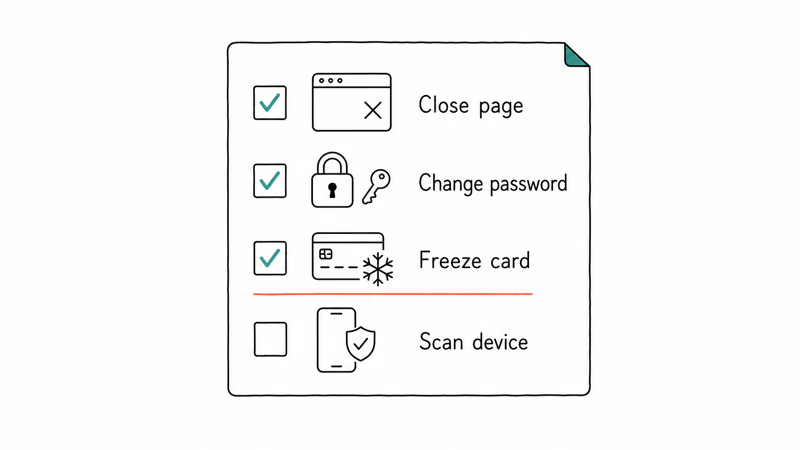
Close the page without typing anything. Close the tab. Clear site data.
If you entered a password, change it. Change it on the real site, from a known-good device. Turn on two-factor authentication if it isn’t on. Then sign out of every existing session under that account so the attacker’s session dies along with the old password.
If you entered a card number, contact the bank. Call the number on the back of your physical card, not a number from the page you scanned. Freeze the card and dispute any charges. Most banks now let you freeze a card with one tap in the bank’s official app, and that single tap stops new charges within seconds even before you reach a human on the phone.
If you entered Apple ID or Google account details, lock the account. Sign in on a known-good device you own, change the password, sign out all other sessions, and review login history. For iPhone owners, our iPhone privacy settings checklist covers the follow-on hardening steps.
Check breach dumps. Credentials from quishing pages often appear in dumps weeks later. The guide on how to tell if your email is on the dark web gives you a regular monitoring habit.
Android: check for unwanted apps. Android allows a small set of drive-by paths from a malicious page if you tap through prompts. Go to Settings > Apps and uninstall anything you don’t recognize. Then run a Play Protect scan from inside the Play Store under your profile icon.
iPhone: watch for spyware symptoms next. A successful quishing prompt rarely installs anything on iOS, but our guide on how to detect spyware on iPhone covers the rare profile-based abuse cases worth ruling out.
On any phone: review browser permissions. Some quishing pages ask for camera or location access. Revoke anything you don’t need. Our guide on preventing cross-site tracking covers the broader Safari and Chrome hygiene settings.
#How to Report a Fake QR Code
Acting fast helps the next person walking up to that parking meter.
Tell the property owner first. Tell the restaurant manager, the city’s parking department, the building’s leasing office, or the store associate. They can pull the sticker, alert staff, and notify their own payment processor.
The FTC recommends filing a report at reportfraud.ftc.gov with the location, the URL you saw, and what data the page requested. The reports feed law-enforcement partners and inform future consumer alerts.
File with the FBI if money was lost. Submit a complaint at ic3.gov with the URL, the location of the sticker, and the amount you lost. Quishing is illegal wire fraud under federal law, and the reports help prosecutors build cases against the rings printing these stickers.
Notify your bank or card issuer. Even if no money has been taken yet, a heads-up gets the merchant code flagged for unusual activity on your card.
Reporting takes about five minutes total.
It costs you nothing, and it gives the next person a chance not to scan the same sticker.
#QR Codes Are Containers, Not Threats
QR codes are just URL containers.
The danger is whatever URL the code holds and whatever page that URL leads to. A code printed by your own bank inside its own app is identical, technically, to a sticker placed on a parking meter by a stranger overnight. The difference is who you trust.
Trust the source of the code, not the code itself.
A code on the inside of a sealed restaurant menu binder is much harder to swap than a code stuck on the outside of a public-facing sign. A code generated on demand inside your bank’s official mobile app is safer than a code printed on a letter you didn’t ask for.
#Bottom Line
Preview every QR code’s URL on the lock screen banner before you tap. Don’t enter passwords, payment details, or app store credentials into a page reached by scanning a code on a parking meter, restaurant table, package, or flyer. If a sticker looks fresh, raised at the edge, or doesn’t match the surface, peel it off and report it to the property owner and to reportfraud.ftc.gov. Type the merchant’s real URL yourself, or use the merchant’s official app.
#Frequently Asked Questions
What is quishing?
Quishing is phishing through a QR code. An attacker creates a code that points to a lookalike website, then places it somewhere a victim will scan it, such as a parking meter or a restaurant table. The site asks for a password or card number.
How can I tell if a QR code is a scam?
Look at the physical sticker first. Raised edges, fresh adhesive, slight color mismatch with the surface, and a sticker that looks newer than its surroundings are all warning signs. Then preview the URL on your phone’s lock screen before tapping. If the domain has extra hyphens, swapped letters, or an unusual top-level domain, don’t open it.
Is it safe to scan QR codes at restaurants?
Often yes, but not always. A restaurant table code is a high-traffic, lightly supervised surface that a scammer can sticker over in seconds.
Before you pay through a scanned menu code, check that the URL matches the restaurant’s brand or its named payment processor. Ask staff to confirm the payment URL if you can.
What happens if I scan a malicious QR code?
Nothing happens at the instant of scanning. The harm starts when you tap through to the page and enter information. Close the page, don’t type anything, clear site data, and restart the browser. If you already entered a password or card number, follow the recovery checklist above.
How do I preview a QR code’s link before opening it?
On iPhone, point the Camera at the code without tapping. A URL preview banner appears.
On Android, open the Camera app and hover over the code, or use Google Lens. The full URL shows as a chip you can read before tapping.
Where should I report a fake QR code sticker?
Report it to the property owner first, so they can pull the sticker. File a report with the FTC at reportfraud.ftc.gov. If money was lost, also file with the FBI at ic3.gov. If a payment was taken from a card, call your bank using the number on the back of the card.

Is This Bank App Real? Spot a Fake App on Your Home Screen
A bank app can land on your home screen from a web page with no install warning. Learn the checks that tell a real banking app from a phishing web app.

Passkeys Not Syncing Between iPhone and Windows? Read This
Passkeys not syncing between iPhone and Windows is by design, not a bug. Here is why iCloud passkeys skip Windows Hello and the three ways to fix it.

VPN Not Working on Snapdragon X? Why It Fails, How to Fix
Your VPN won't install or connect on a Snapdragon X Copilot Plus PC because Windows on ARM can't emulate the network driver. Here are the fixes that work.

How to Check If a Link Is Safe Before You Click It
Learn how to check if a link is safe with official-first steps: read the real domain, use the app instead, and treat scanners as a second opinion only.