PS4 White Light No Display: Fix the Blank Screen Fast
PS4 white light but no picture? Fix the HDMI handshake failure with cable swaps, TV port checks, a Safe Mode resolution reset, and a damage test.
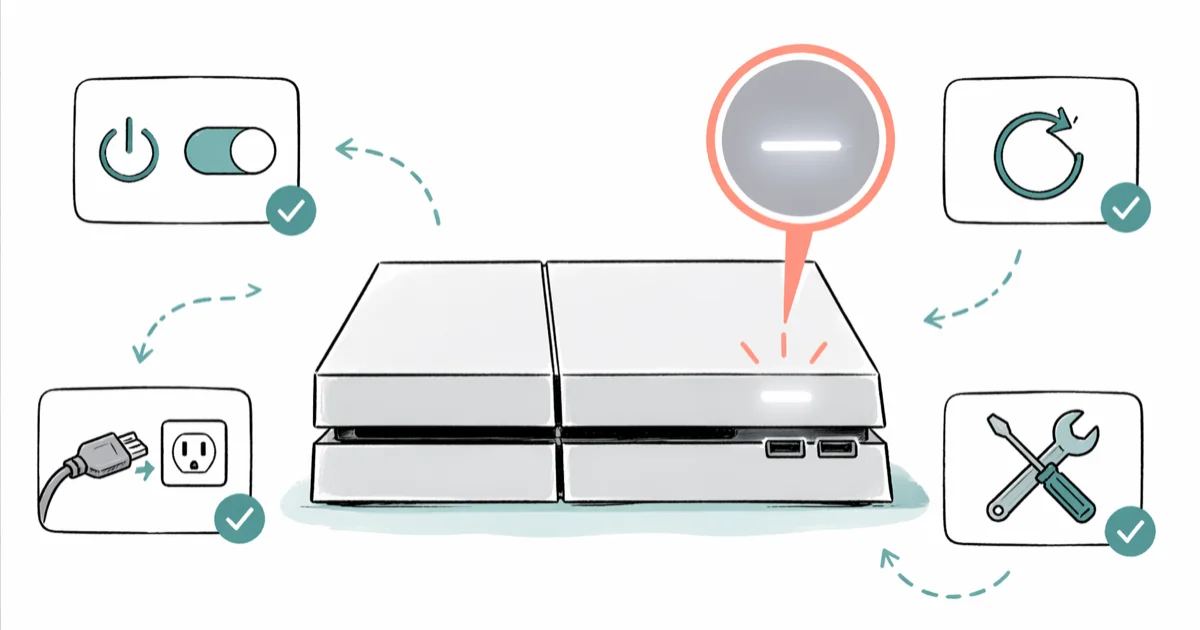
Quick AnswerA solid white light with no picture almost always means the HDMI handshake failed. Swap the HDMI cable, try a different TV port, then boot into Safe Mode and pick "Change Resolution" to force 480p output.
A steady white light on your PS4 means the console is on and running. The screen stays blank because the HDMI handshake between PS4 and TV failed, not because the console is dead. Start with a cable swap, a different TV input, and a Safe Mode resolution reset before assuming hardware failure.
A pulsing white light is different. That is standby mode, and the fix is simply waking the console. Solid white plus no signal is the case this guide covers.
- Solid white light = console powered on and nominal; the missing picture is a separate HDMI issue
- Pulsing white light = standby; tap the controller PS button to wake the console
- Cable + TV port swap is the quickest first check for blank-screen cases
- Safe Mode option 2 (“Change Resolution”) forces 480p output and clears 4K handshake failures
- Bent or recessed HDMI pins on the PS4 itself need a $25 port replacement, not a software fix
#What the PS4 White Light Actually Means
Sony’s PlayStation indicator-light reference confirms that a steady white light means the system is on and operating normally. So when you see white plus a blank TV, the console itself isn’t crashed. The video signal is the part that broke.
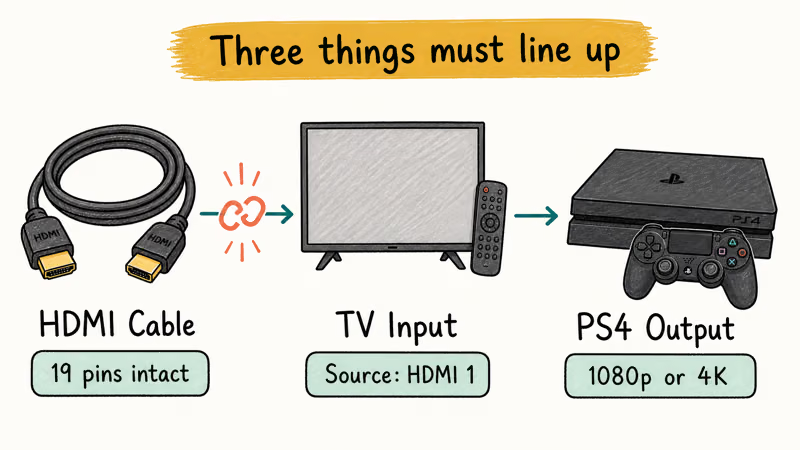
Three things have to line up for the picture to appear:
- The HDMI cable carries the signal end to end with all 19 pins intact
- The TV’s HDMI input recognizes the source and switches to it
- The PS4 outputs a resolution and color format the TV can decode
Any one of those failing produces the same symptom. Solid white light, no picture, sometimes a “No Signal” toast on the TV. That is also why the same console can output to a 1080p monitor and refuse to handshake with a 4K TV on the next port over.
#Why Does My PS4 Show White Light but No Picture?
The blank screen usually falls into six buckets:
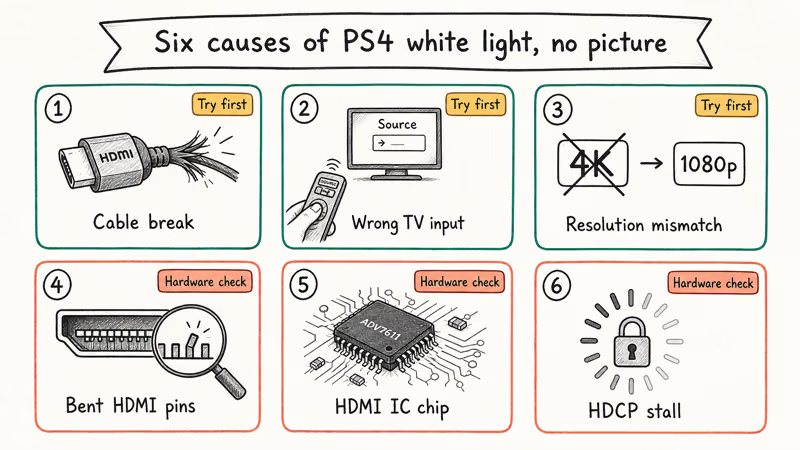
- HDMI cable failure: internal wire breaks where the cable bends near each plug
- TV input mismatch: the TV is on the wrong source or the input was never enabled in the menu
- Resolution mismatch: PS4 set to 4K/2160p output on a 1080p TV, or HDR forced on a non-HDR panel
- Bent or pushed-in HDMI pins on the PS4’s port (very common on consoles with frequent cable swaps)
- HDMI IC chip failure on the motherboard; the chip that converts video signals burns out
- TV HDCP handshake stall: the copy-protection handshake hangs and never resumes
iFixit’s PS4 Slim teardown guide shows the HDMI port sits on a thin metal frame soldered directly to the motherboard. The frame deforms inward when the cable is yanked sideways, which crushes 1 or more of the 19 thin copper pins.
That iFixit teardown also confirms that 19 fragile through-hole pins make the PS4 HDMI port vulnerable to sideways cable damage. A deformed frame or crushed pin points to a physical repair, not a settings fix.
Good news. Causes 1 through 3 cover most cases.
#Quick Fixes to Try First
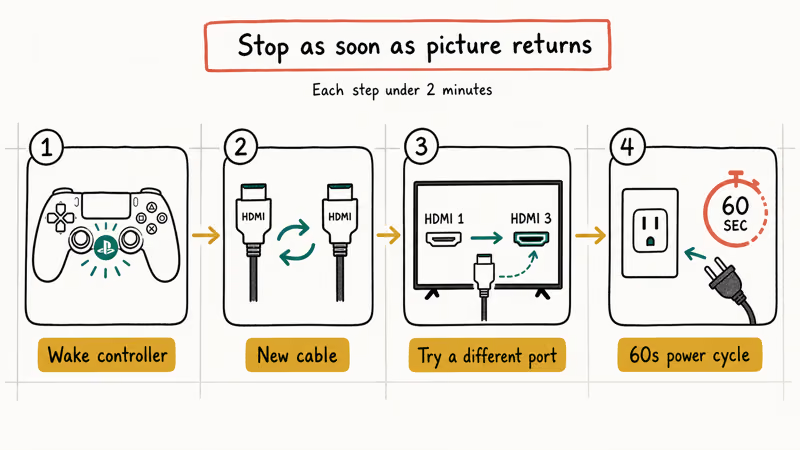
Work through these in order. Each takes under 2 minutes. Stop as soon as the picture comes back.
#Tap the Controller PS Button
If the white light is pulsing, the console is asleep. Press the PS button once on a paired controller. The light should turn solid white and the picture should appear within 5 seconds. If pulsing continues with no controller response, the controller may need a wired sync; see the PS4 controller charging fixes for the wired-sync sequence.
#Swap the HDMI Cable
Pull the existing HDMI cable from both ends and try a different one. Any HDMI 1.4 cable handles base PS4 1080p output. PS4 Pro 4K HDR needs HDMI 2.0 or higher.
Visual inspection lies. Internal wire breaks happen near the molded plug ends and look fine from the outside, even when the picture is dead.
A basic HDMI 2.0 cable is enough to rule out cable failure on a PS4 Slim or Pro. When a cable swap fixes the issue, the picture returns almost immediately. When it doesn’t, that points at the TV port or the PS4 instead.
#Try a Different HDMI Input on the TV
TVs sometimes lock an HDMI port into a state that refuses to renegotiate. Move the cable to a different HDMI port, then change the TV input source to match. A factory HDMI 1 sometimes throws a handshake error that HDMI 3 on the same TV doesn’t.
Out of HDMI inputs? Try chaining through a different device. A working streaming box can act as a quick sanity check: plug it into the TV first, get a picture, then swap in the PS4.
#Power-Cycle Both Devices
The classic fix for a stuck HDCP handshake. Order matters here.
- Turn off the PS4 with the controller PS button (hold until the menu appears, pick “Turn Off PS4”)
- Unplug both the TV and PS4 power cables from the wall
- Wait 60 seconds. This drains the capacitors and clears the HDCP cache
- Plug the TV back in first, wait for it to boot, then plug in the PS4
- Power on the PS4 last
This sequence is useful when the trigger was a TV that had been swapped between multiple HDMI devices in quick succession.
#How Do I Boot My PS4 Into Safe Mode for a Resolution Reset?
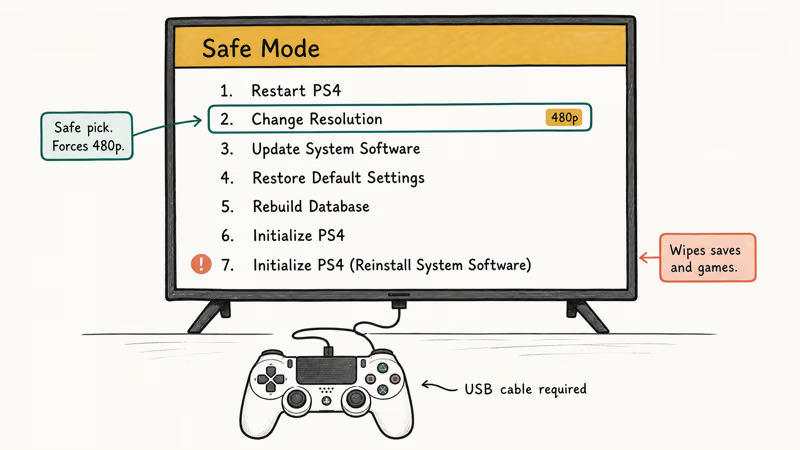
If the cable and port swaps didn’t help, the console is probably outputting a resolution your TV can’t decode. This happens after firmware updates, after you change TVs, or when HDR is on but the panel doesn’t support HDMI 2.0 HDR. Safe Mode ignores the saved video output settings and lets you force 480p, which any HDMI display will accept.
#Step-by-Step Safe Mode Entry
- Hold the PS4 power button down. Keep holding past the first beep.
- Release on the second beep, roughly 7 seconds in.
- Connect a controller via USB cable (Bluetooth doesn’t work in Safe Mode).
- Press the PS button on the controller.
- Pick option 2: Change Resolution.
- Confirm. The console restarts at 480p.
Once the picture comes back, go to Settings > Sound and Screen > Video Output Settings > Resolution and set it to 1080p (or 2160p for PS4 Pro on a verified 4K panel). Disable HDR temporarily by setting HDR to Off until you’ve confirmed the base resolution works. Re-enable HDR last.
#When Change Resolution Doesn’t Fix It
Try Safe Mode option 7: Initialize PS4 (Reinstall System Software). This wipes the console and forces a clean reinstall.
You’ll need a USB drive formatted as exFAT or FAT32 with at least 1.1 GB free. Sony’s PS4 system software documentation states that the latest firmware file (around 1.1 GB) must be saved as PS4UPDATE.PUP inside a folder structure of PS4/UPDATE/PS4UPDATE.PUP on the drive’s root.
This wipes every save, screenshot, and installed game. Back up to PS Plus cloud or a separate USB drive first if you can get into the system at all. If not, accept the data loss. A blank screen helps no one.
For deeper Safe Mode troubleshooting on database errors and corrupted file structures, the PS4 database is corrupted fix walks through the rebuild-database flow.
#Check the HDMI Port for Physical Damage
Pull the cable. Now grab a flashlight and look straight into the port. The PS4’s HDMI port sits flush with the rear case, and once the cable is out you can clearly see the 19 thin copper pins arranged in two even rows inside a square metal shroud. Two specific failure modes are worth scanning for, both visible in under 30 seconds without any tools beyond the flashlight.
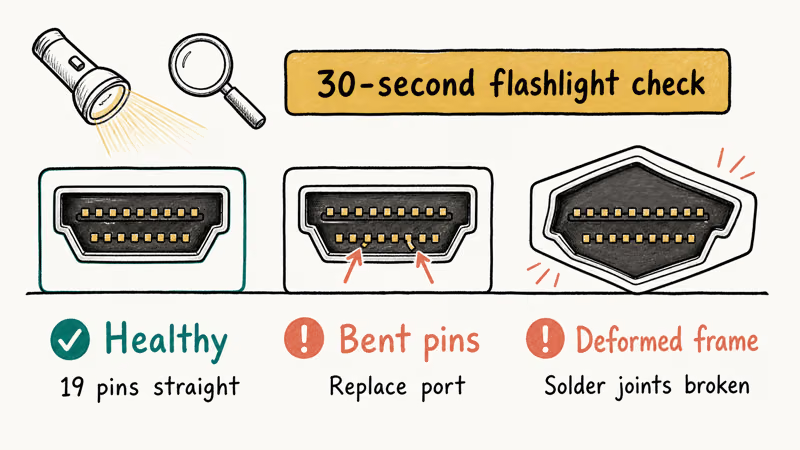
Bent pins: any pin pushed inward, sideways, or missing means the port needs replacement.
Deformed frame: the shroud should sit square. Diamond-shaped or wobbly means the cable was yanked sideways and broke the solder joints underneath the board.
iFixit recommends replacing the entire HDMI port assembly rather than trying to bend pins back. The replacement part runs $8 to $15 on iFixit and Amazon. Installation requires a TR-9 security bit, a soldering iron, and patience for desoldering 19 through-hole pins. A local repair shop charges $80 to $120 for the same job.
Spot either? No amount of cable swapping or Safe Mode resetting will fix the console. The port has to be replaced.
For broader HDMI port problems across other devices (TVs, monitors, AVRs), the HDMI port not working guide covers the same flashlight diagnostic flow to use before committing to a port swap on any HDMI device.
#Test the Console on a Second Display
Before paying for a repair, isolate the failure. Plug the PS4 into a different TV, monitor, or even a USB capture card connected to a laptop. If the picture appears on the second display, the original TV is the problem; start checking its HDMI inputs and HDCP settings. If the second display is also blank, the failure is on the PS4 side and likely a port or HDMI IC chip issue.
A cheap USB capture card can remove the TV from the equation and confirm whether the console is outputting any video signal at all.
A black capture window with the PS4 clearly powered on confirms the HDMI IC chip has failed. Board-level repair runs $150 to $200, which makes a $130 used PS4 Slim the better buy.
#Bottom Line
Start with the cable. Swap it, try a different TV input, then force a Safe Mode resolution reset. Those three steps cover the common software and cable causes. If you spot bent pins inside the PS4’s HDMI port, skip the software fixes entirely; the port needs replacement, and a local repair shop will quote $80 to $120 for the swap on either a Slim or a Pro.
Already exhausted the above and a second display still shows nothing? The console’s HDMI IC chip has probably failed, and at that point a used PS4 Slim from eBay is cheaper than the board-level repair. While you’re troubleshooting, keep an eye out for related errors like the PS4 NAT type failed and the CE-34878-0 crash error — both share Safe Mode steps with this fix.
#Frequently Asked Questions
Is solid white light bad on a PS4?
No. A solid white light means your PS4 is on and running normally. If your TV shows no picture alongside the white light, the issue is the HDMI signal, not the console.
What does pulsing white light on PS4 mean?
Pulsing or fading white light means the PS4 is in standby (rest mode). Tap the PS button on a paired controller to wake it. The light should turn solid white within 5 seconds.
Will a damaged HDMI port on the PS4 fix itself?
No. Bent pins and a deformed port frame are physical damage that won’t recover on its own.
Does Safe Mode delete my data on PS4?
It depends on which Safe Mode option you pick. Option 2 (Change Resolution) and option 3 (Update System Software) preserve all data. Option 7 (Initialize PS4) is the destructive one and wipes every save, screenshot, and installed game. Always back up to PS Plus cloud or USB before picking option 7.
Why does my PS4 work on one TV but not another?
The second TV likely has different HDMI capabilities. PS4 Pro outputs 4K HDR by default, which a 1080p TV or older 4K panel without HDMI 2.0 can’t decode. Force 480p in Safe Mode first.
How much does it cost to repair a PS4 HDMI port?
A local repair shop charges $80 to $120 for an HDMI port replacement on a PS4 Slim or Pro. The replacement part itself runs $8 to $15. DIY is possible with a soldering iron and a TR-9 security bit, but the 19-pin through-hole desolder is unforgiving for first-timers, and a botched job can lift pads off the motherboard and turn an $80 repair into a dead board. Most readers send the console to a shop and pocket the time.
Can I screen mirror to my PS4 to work around the HDMI issue?
Not really. The PS4 only outputs video, never accepts it. The how to mirror iPhone to PS4 guide covers the legitimate apps that work, but none of them get around a broken HDMI output port.

Best Laptop for Running LLMs in 2026: Memory Comes First
The best laptop for running LLMs is a memory purchase first. Compare MacBook unified memory against NVIDIA laptop VRAM, and see what each tier really runs.
How to Run a Local LLM on Windows: A 2026 Setup Guide
Run a local LLM on Windows with LM Studio or Ollama. Pick a model that fits your GPU memory, keep every prompt offline, and skip the monthly bill.
Bluetooth Not Working on Snapdragon X? Fixes for 2026
Bluetooth not working on your Snapdragon X Copilot+ PC? Generic audio, mice, and keyboards work, but vendor apps often lack an ARM build. Fixes inside.
Docker Desktop and WSL2 Not Working on Snapdragon X? Fix It
WSL2 runs fine on Snapdragon X, but Docker Desktop ARM is Early Access and throws WSL errors. Use WSL2 plus native ARM64 Ubuntu and Docker Engine.