The Real Pros and Cons of Snapchat in 2026: Honest Review
Honest pros and cons of Snapchat in 2026: Stories, Memories, Streaks, Lenses, ephemerality, and the parental controls every adult should know about.
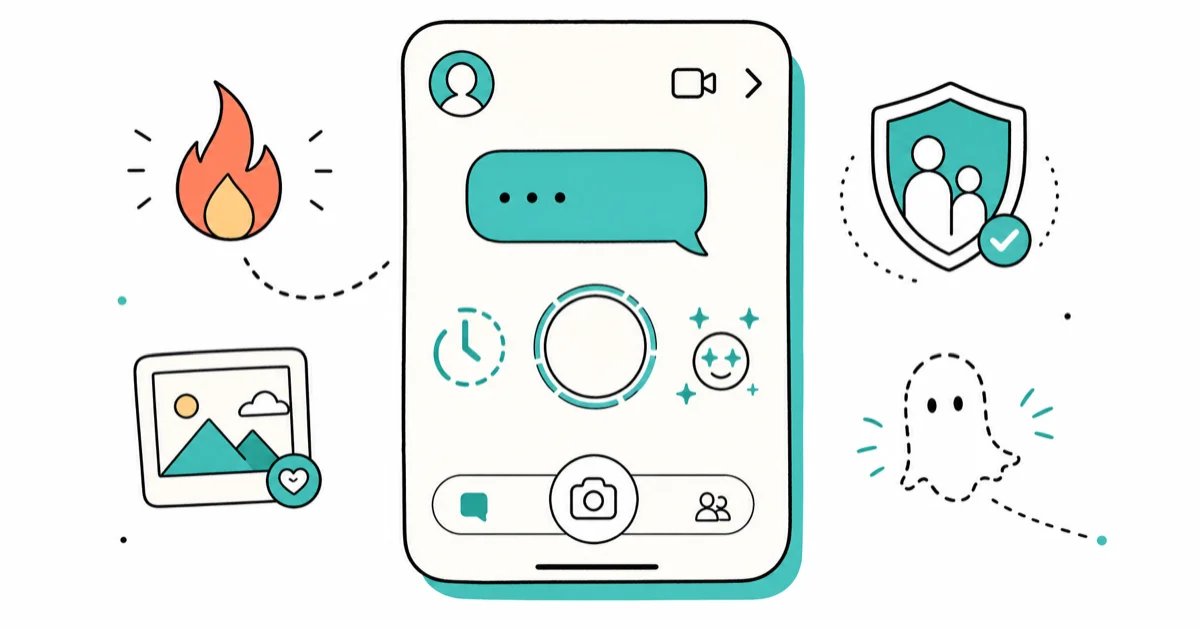
Quick AnswerSnapchat is great for casual visual chat, AR Lenses, and friend-only Stories that vanish in 24 hours. The trade-offs are addictive Streaks, age-restricted content surfaces, and the fact that nothing on the app is truly permanent or truly private.
This guide assumes you’re weighing Snapchat for your own account or your own family. We won’t cover ways to peek at anyone else’s snaps.
The pros and cons of Snapchat below reflect how the current 13.x app behaves on recent iPhone and Android builds, alongside Snap Inc.’s own official documentation.
- Snaps and Chats are deleted from Snap’s servers by default after viewing or after 30 days unopened, per Snap’s official Privacy by Design page.
- Stories vanish from friends’ feeds 24 hours after posting, but Memories keeps a private archive of anything you choose to save back to your account.
- Family Center is the official built-in parental tool that shows a teen’s friend list and recent contacts, but never the message content itself.
- Snapchat’s user base skews young, with the heaviest usage in the 13-34 age band.
- Snap Map is opt-in: Ghost Mode is the default for new accounts and keeps your location private until you flip it on.
#What Snapchat Actually Is in 2026
Snapchat is a camera-first messaging app.
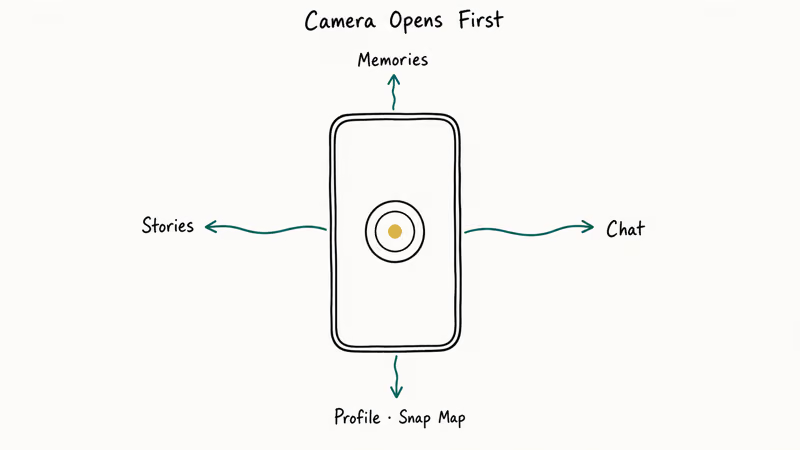
You open it and the camera’s already on; almost every interaction starts from a photo or short video Snap. Stories live for 24 hours; Spotlight and Public Stories sit in their own discovery feeds.
Snap Inc. has owned the app since 2011, and it remains one of the most widely used camera-first messaging apps. The current version installs on iOS 14+ and Android 7.0+.
The Snapchat entry on Wikipedia tracks launch history if you want background.
The interface still leans on swipes more than buttons. Swipe right for Chat, left for Stories, up for Memories, down for the Profile and Snap Map. New users find this confusing for a day or two, then it clicks.
For new accounts, our guide on how to clear recents on Snapchat covers one of the most-asked workflow questions.
#Pros of Snapchat
#A Camera-First Experience That Feels Casual
Opening the app to a live camera changes the social pressure.
You’re not staring at a feed. You’re about to send a single message. That lowers the bar for spontaneous photos compared with Instagram, where the grid implies a curated profile, and where every post drags along the weight of an existing visual identity that you have to either match or deliberately break from each time you publish.
Snaps to a friend default to a 1-10 second view window, then they vanish. According to Snapchat’s deletion policy, Snaps and Chats are deleted from Snap’s servers after they’re viewed by all recipients or after 30 days if unopened. Recipients can still screenshot.
#Stories and Memories Solve Two Different Problems
Stories let you broadcast a moment to your friend list for 24 hours. Memories give you a private, searchable archive of Snaps and posts you choose to save. The two together work surprisingly well: ephemeral by default, permanent by deliberate action.
Saving a Snap to Memories takes a single tap.
Memories also supports Camera Roll import, so you can backdate photos into the same archive without rebuilding any history you already have on your phone, which makes it useful as a long-term photo bucket separate from iCloud or Google Photos for anything you want tagged with friends or location, with search by date, by location, or by the people in a photo all built into the Memories tab.
#AR Lenses Are Best-in-Class
Snap has spent a decade on AR, and it shows in the face tracking. Snapchat’s Lenses stay locked on a face at low light and at extreme angles where many competing filters slip. Snapchat’s own Lens Studio reporting describes hundreds of millions of users engaging with its AR features daily.
Custom Geofilters are still a strong pick for weddings, conferences, and small business activations.
#Snap Map Has Real Privacy Defaults
Snap Map is opt-in. New accounts launch in Ghost Mode. Your location isn’t visible to anyone until you change it. You choose to share with all friends, with selected friends, or with no one. Snap’s Snap Map support article confirms Ghost Mode is the default, and that location updates only when the app is open.
This is the opposite of how most location features work, where opting out is the harder path. A new account stays on Ghost Mode indefinitely without any prompt nagging you to switch it off.
#Family Center Is a Real Parental Tool
If you’re a parent of a teen on Snapchat, Family Center is the official built-in parental tool. It’s the only sanctioned in-app oversight method. Linked through a parent account, it shows you who your teen has messaged in the last seven days (not the message content), who’s on their friend list, and lets you report accounts. Snap’s Family Center help page confirms message contents stay private.
Linking a parent and teen account takes only a few minutes.
Family Center won’t catch every risk. No parental tool will. But it’s built into the app, free, and respects teen privacy in the right places, which is much better than the third-party stalker-tier monitoring apps that market themselves at worried parents.
#Discover and Spotlight Surface Outside Your Bubble
Discover is a curated content feed from publishers like CNN, Vice, NBC, and Bleacher Report, plus a long tail of independent creators publishing Shows.
Spotlight is Snapchat’s TikTok-style short-video feed. Both are separate from your friend feed, which means content from strangers doesn’t invade your private chats. That separation is a small thing that matters more than it sounds, especially if you’ve been burned by an Instagram Reels feed full of accounts you never followed.
For creators, Spotlight pays out a monthly Creator Rewards pool, and Public Profiles unlock subscriber counts, story view analytics, and Lens metrics, which makes Snapchat usable as a distribution channel and not only a private chat app, especially if you’ve been treating Instagram as your primary follower-count surface and want a less crowded, less algorithm-tortured second home for short clips and AR experiments that can earn passive payouts when they catch on.
#Cons of Snapchat
#Streaks Are Engineered for Anxiety
A Snapstreak is the count of consecutive days two friends have exchanged a Snap. The number sits next to the friend’s name with a flame emoji. Lose the streak by missing a day or losing service, and the count resets to zero.
Plenty of teens maintain 30 or more daily streaks at once.
That’s 30 daily obligations multiplied across a friend group, which makes Streaks the single biggest engagement hook in the app and one of the most common parental complaints about Snapchat-adjacent stress, and it isn’t an accident: Streaks reward routine and create social pressure to never break one, which boosts daily active users in a way that is good for Snap’s business and bad for sleep schedules.
If you do break a streak, our walkthrough on how to get a Snapchat streak back covers the official appeal path.
#Discover Surfaces Age-Restricted Content
Discover and Spotlight feeds are curated, but the bar for “age-appropriate” varies by publisher. Multiple outlets have reported on the surfacing of sexualized or violent content in the Discover feed for accounts marked as 13+.
Snap has tightened publisher policies several times since 2023. The feed is still a content-moderation problem in practice, not just in theory.
Family Center can hide some Discover content for linked teen accounts, and Snap’s restricted-mode toggle filters a portion of mature publishers. Neither is bulletproof. Treat both as a soft filter, not as a guarantee that your teen won’t see something inappropriate.
#Nothing Is Truly Deleted
Snaps and Chats are removed from Snap’s servers after viewing, but the recipient may have screenshotted. Memories you save sit on Snap’s servers indefinitely. Snaps you submit to Spotlight are retained for moderation and recommendation purposes.
The takeaway: if you wouldn’t be comfortable with a Snap surviving forever, don’t send it. Ephemerality is a default, not a guarantee.
#The Interface Still Hides Settings
Snapchat buries useful settings under three or four taps. Privacy controls live under Profile (bitmoji icon), then Settings (gear), then Privacy Controls. Notification controls are split across Settings and the system notification panel.
The search bar inside Settings is often the fastest way to find the right toggle.
It isn’t unique to Snapchat. Most large social apps have settings sprawl. But it’s a real cost for new users and for parents trying to lock things down on a teen account, especially when the on-screen labels don’t always match what Snap calls the same toggle in its help articles.
#Web Reach Is Weak
Snapchat doesn’t have a meaningful web presence. There’s a basic Snapchat for Web client, but the product is engineered for the camera and the phone.
If you build a brand, marketing on Snapchat doesn’t generate Google-indexable footprint the way YouTube, Instagram Reels, or TikTok do. Cross-promotion to other platforms requires manual export, and Spotlight clips don’t appear in Google Search results the way YouTube Shorts do, which limits long-tail discovery for any creator who depends on search to compound their audience.
#Friend-Adding Friction Is High
Adding a friend on Snapchat is harder than on Instagram. You need their exact username (case-sensitive), their Snapcode (a QR code), or their phone number from your contacts. There’s no real-name search.
For private use this is a feature.
For any kind of community building it’s a wall. If you want to grow reach, growing subscribers on Snapchat requires Public Profile setup and steady Spotlight or Story output, not friend-list expansion.
#How Does Snapchat Compare to Instagram and TikTok?
Snapchat’s pitch is private and ephemeral.
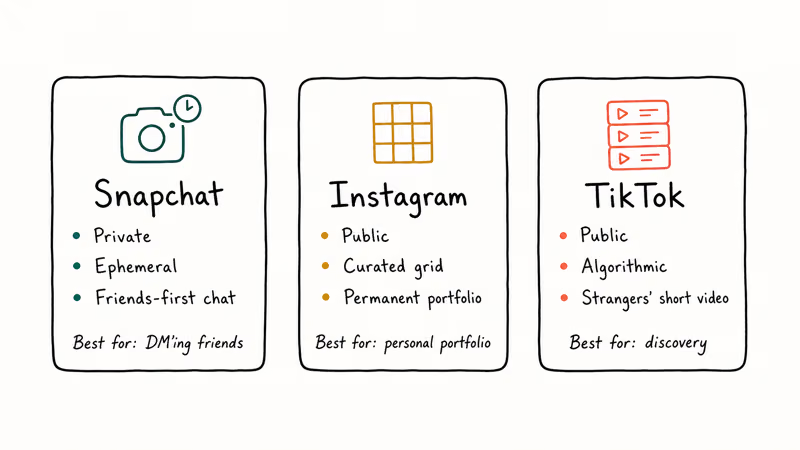
Instagram is public and curated. TikTok is public and algorithmic. The three barely overlap in core use case despite the surface similarity, even though the camera-and-short-clips wrapper looks identical from a distance to anyone who hasn’t actually used all three for daily messaging or daily content publishing alongside each other for months.
If you mostly DM friends and want a low-pressure camera, Snapchat wins. If you want a personal portfolio that lasts, Instagram wins. If you want to consume short video from strangers, TikTok wins.
Plenty of under-30 users run all three apps for different jobs.
Worth noting: filter availability differs across apps. If Snapchat filters stop working on your phone, the fix is usually a permissions reset, not an app reinstall.
#Is Snapchat Safe for a Teen Account?
It can be done safely with deliberate setup, and the combination of Family Center linkage, Ghost Mode on Snap Map, friend-only Story privacy, and strict-mode Discover filtering covers most of the headline risks, though none of them eliminate stranger-contact risk through Quick Add or shared groups, which is why the actual conversation about screenshots and ephemerality matters more than any single toggle.
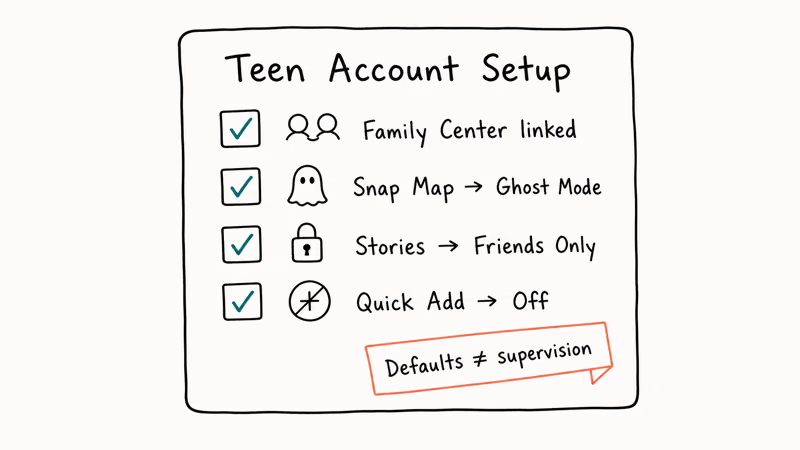
Quick checklist.
For any parent of a teen on Snapchat: link a Family Center pairing, set the teen’s account to Friends Only for Stories and Snap Map, turn off Quick Add visibility, and prune unfamiliar contacts from the friend list once a month.
The app’s defaults are better than they were in 2018. They’re still defaults. They don’t replace a parent’s attention, and they don’t catch a teen who creates a second account behind the parent’s back.
#Quick Tips for First-Week Snapchat Users
Skip the bulk-add prompt.
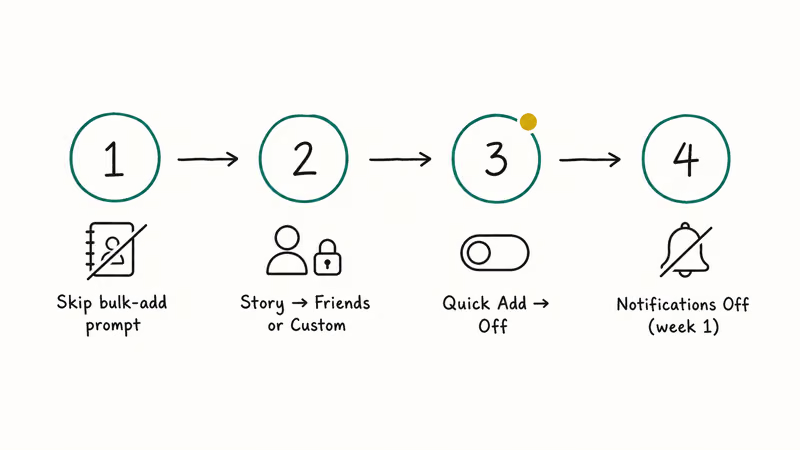
Snapchat asks for contact list access on first launch and then auto-suggests every contact as a friend; decline once and you can re-enable selectively from Settings under Privacy Controls, which gives you a far cleaner friend graph and avoids surfacing your username to people you barely know but happen to share with via a mutual phone-number contact.
Lock down Story privacy on day one. Default is Friends, but if you’ve added someone you don’t actually know, switch it to Custom and prune.
Turn off Quick Add visibility.
This single toggle, buried under Privacy Controls, removes you from the friend-suggestion graph that surfaces strangers to other accounts based on shared contacts and mutual friends, which is one of the most common entry points for unwanted-stranger DMs that parents worry about.
Keep notifications off for the first week.
If you ever need to wipe the trail, our walkthrough on downloading Snapchat stories covers the safer “save before you delete” path before nuking your archive.
#Bottom Line
If you mostly want a casual, friend-only camera and chat app with strong AR and a real ephemerality model, Snapchat earns its spot. If you want a permanent personal feed, a discovery-first video platform, or a clean parental controls story without setup work, Snapchat is the wrong tool.
For most adults: install it, set Snap Map to Ghost Mode, save the photos you actually want to keep into Memories, and skip the Streak game. For teens: insist on Family Center and a Friends Only privacy posture before the first Snap.
If you want to wind down and try other Snapchat features without committing, our guides on snapchat story games and running 2 Snapchat accounts on one iPhone cover two common follow-up questions.
#Frequently Asked Questions
Are disappeared snaps actually deleted from Snap’s servers?
Mostly, yes. According to Snap’s Privacy by Design documentation, Snaps and Chats are deleted from Snap’s servers shortly after they’re viewed by all recipients, or after 30 days if they remain unopened. Recipients may have screenshotted before the Snap expired, and Memories you save back to your account stay on Snap’s servers until you delete them. Treat ephemerality as a default behavior, not a privacy guarantee, and don’t send anything you wouldn’t want preserved.
How do parents monitor a teen’s Snapchat account safely?
Use Family Center.
It’s the official in-app parental tool, requires teen consent to link, and shows parents the friend list plus the contacts the teen messaged in the last seven days. No need for third-party apps.
What is Snap Map, and is it safe?
Snap Map shows your friends your real-time location on a world map when you open the app. New accounts launch in Ghost Mode, which hides your location from everyone. You can choose to share with all friends, selected friends, or no one. Confirm your account is in Ghost Mode under Profile, then Settings, then Snap Map.
Can I recover deleted Snapchat messages or memories?
Chat messages can’t be recovered after they expire.
Memories you deleted from your account are recoverable through the official Snap Account Recovery flow within a 30-day window after deletion, but only if you submit through Snapchat support. Snaps never saved to Memories are not recoverable at all.
Does Snapchat sell my data to advertisers?
Not directly. Snap shows targeted ads based on age, location, language, and on-platform behavior, and says it doesn’t sell raw user data to third parties; you can review and limit ad personalization under Settings, then Privacy Controls, then Ads, where turning off Audience-Based ads removes most of the cross-context targeting that follows you between apps and websites once Snap has built a profile of your interests over time.
What is the youngest age for Snapchat?
The minimum is 13.
Snap removes accounts reported and verified as under that age, matching COPPA in the US and equivalent regulations elsewhere. Many child-safety groups recommend waiting longer and pairing the first account with Family Center oversight.
Is Snapchat better than Instagram or TikTok?
It depends on what you want. Snapchat is the strongest of the three for private camera-first chat with friends and for AR Lenses, while Instagram wins for permanent personal portfolios and TikTok wins for short-video discovery from strangers. Most users run several apps for different jobs.

Google Messages Error 3100: Why RCS Is Broken on Galaxy
Google Messages RCS error 3100 hits Galaxy owners after phone or carrier switches. Google told 9to5Google a fix is coming. Here's what actually helps.

Is This Bank App Real? Spot a Fake App on Your Home Screen
A bank app can land on your home screen from a web page with no install warning. Learn the checks that tell a real banking app from a phishing web app.

Apps Crashing After iOS 27 Update? Fix Order (2026)
Apps crashing after the iOS 27 update? Update the app in the App Store first, then offload and reinstall to clear stale cache, then restart. The fix order.

Do AI Translation Earbuds Work Offline? What to Know
Do AI translation earbuds work offline? A few do with downloaded language packs, but most need the cloud. Here's what works offline and what you give up.