Passkeys vs Authenticator App: Which Is Safer in 2026?
Passkeys vs authenticator app compared for 2026: phishing resistance, account recovery, travel, shared devices, and the safest setup for most people.
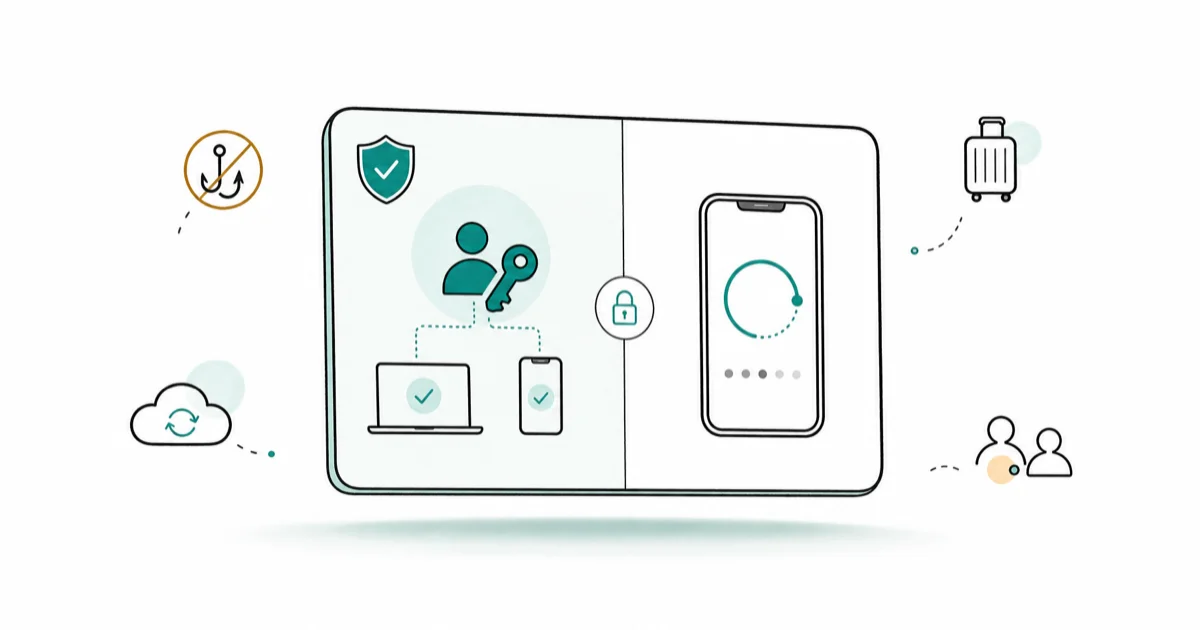
Quick AnswerPasskeys are safer than authenticator apps because they're phishing-resistant and can't be tricked into a fake login page. Use passkeys wherever a service offers them, and keep an authenticator app as backup for accounts that don't support passkeys yet.
Passkeys vs authenticator app is really a question of phishing resistance. An authenticator app shows you a six-digit code you type in, which a fake login page can steal. A passkey never reveals a secret you can hand over, so it can’t be phished the same way. A passkey sign-in is usually a device approval, while the authenticator flow means copying a code that resets on a timer.
- Passkeys are phishing-resistant because there’s no code or password to type into a fake site
- Authenticator codes can still be stolen if you’re tricked into entering them on a spoofed page
- Passkeys sync through iCloud Keychain or Google Password Manager, so a lost phone isn’t catastrophic
- Authenticator apps work on any service, while passkey support is still rolling out
- The safest setup is passkeys where supported, with an authenticator app as backup
#The Difference Between Passkeys and Authenticator Apps
The two solve the same goal, stronger sign-in, in very different ways. An authenticator app is a second factor on top of your password. A passkey can replace the password entirely.
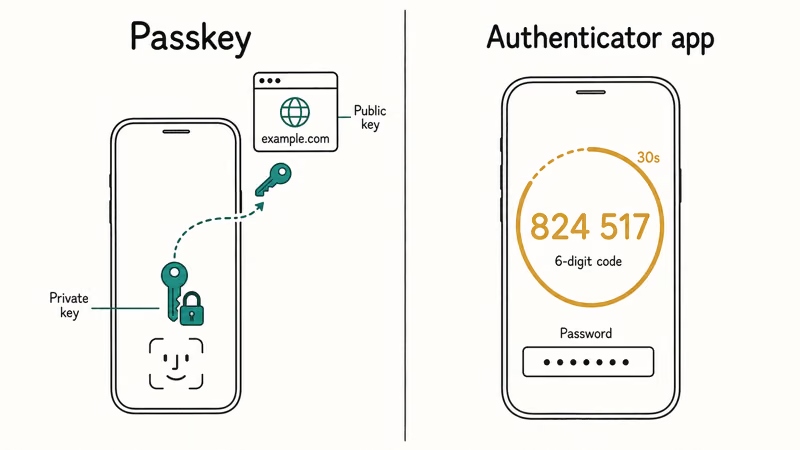
An authenticator app generates a rotating six-digit code tied to a shared secret. You enter your password, then type the code. A passkey works differently: it’s a cryptographic key pair where the private key never leaves your device, and you approve sign-in with Face ID, a fingerprint, or your screen lock. According to the FIDO Alliance’s passkey overview, passkeys are built to be phishing-resistant because there’s no shared secret a fake site can capture.
Passkeys vs authenticator app at a glance
| Factor | Passkey | Authenticator app |
|---|---|---|
| Phishing-resistant | Yes | No |
| Replaces password | Often yes | No, adds to it |
| Works on every service | Not yet | Yes |
| Syncs across devices | Yes, via platform | Some apps only |
| Recovery if phone lost | Platform sync | Backup codes needed |
If you’re new to all of this, our passkey vs password vs 2FA explainer lays out how the three approaches relate before you pick one.
#Which One Is Safer Against Phishing?
Passkeys win, and it’s not close. The whole reason passkeys exist is to kill phishing, which authenticator codes don’t fully prevent.
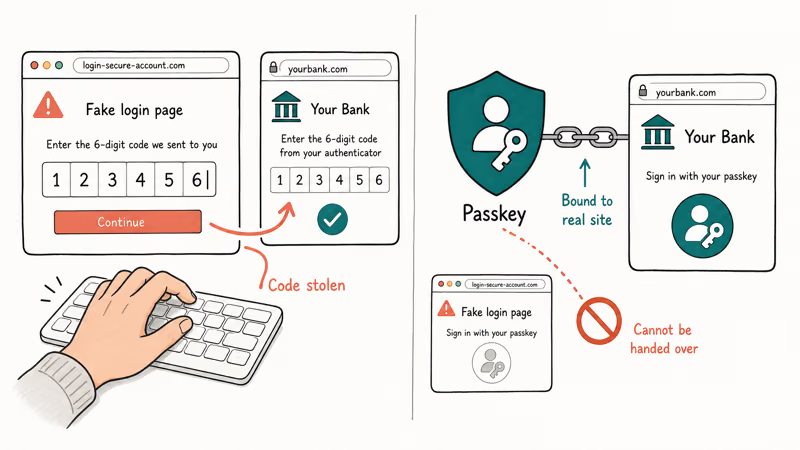
Here’s the gap. If a scammer sends you a fake login page, you might type your password and your six-digit authenticator code right into their hands, and they relay both to the real site in seconds. A passkey can’t be handed over that way because it’s bound to the real site’s domain.
Apple states that passkeys use 2 cryptographic keys, a private one that never leaves your device and a public one the site stores, which is what resists relay attacks. The Apple passkeys overview explains how iCloud Keychain stores them.
This matters most for high-value accounts: email, banking, and anything tied to money. For those, a passkey removes the single biggest weakness of code-based 2FA, since there’s no code left for a phisher to relay. Been targeted by account-takeover attempts already? Our how to prevent SIM swapping guide covers a related attack on phone-number-based codes, which the same scammers often try in the same campaign.
#Recovery, Travel, and Shared-Device Tradeoffs
This is where authenticator apps still earn their place. Recovery and shared access are messier with passkeys than people expect.
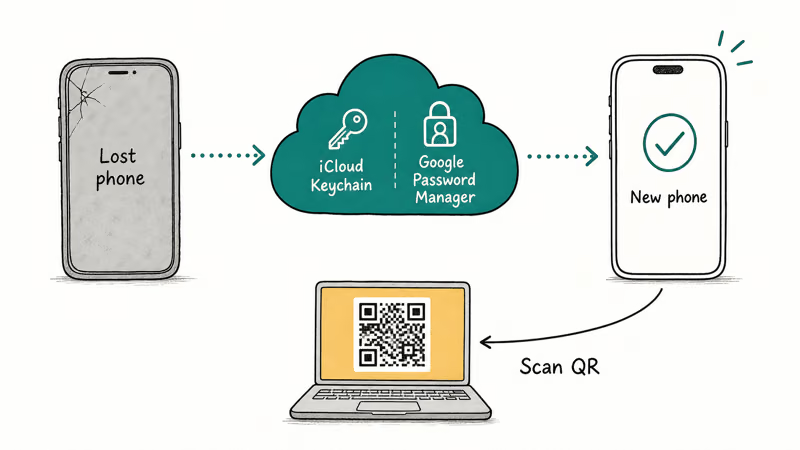
Lose your phone with passkeys, and you recover through your platform account, since passkeys sync via iCloud Keychain on Apple or Google Password Manager on Android. That’s smooth if your platform account is healthy. Authenticator apps lean on backup codes or, with Google Authenticator, cloud sync that moves codes to a new phone. According to the Google Authenticator help, the app can sync codes to your Google Account so you don’t lose them when switching devices.
Travel and shared devices add friction. A passkey tied to your personal phone doesn’t help on a borrowed work laptop unless you use the QR-code cross-device flow. On a borrowed computer, that cross-device sign-in can require scanning a QR code with the phone, which works but slows you down. For families sharing one tablet, authenticator codes can be easier to pass along, though that’s less secure.
#When Should You Keep an Authenticator App?
Keep one for any account that doesn’t offer passkeys yet, which is still plenty of them. Passkey support is growing fast but isn’t universal.
You also want an authenticator app as a backup factor in case passkey sync fails or you switch ecosystems. Moving from iPhone to Android, for example, doesn’t always carry passkeys over cleanly, so a separate authenticator gives you a fallback. If you’re planning that exact move, our guide on how to set up passkeys on Android walks through getting passkeys working on the new phone.
Avoid SMS codes where you can, though. Text-message codes are the weakest second factor because they’re vulnerable to SIM swapping, so an authenticator app beats SMS even when a passkey isn’t available.
#Best Setup for Most People
The winning combination is layered, not all-or-nothing. Use the strongest option each service supports, and keep a fallback.
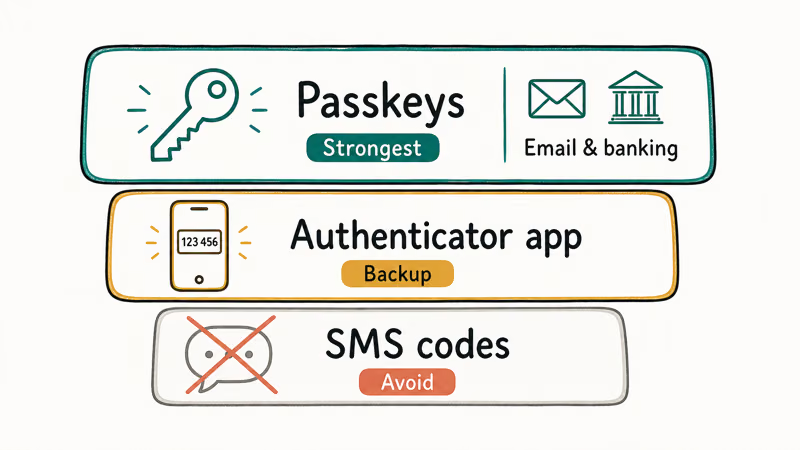
Turn on passkeys wherever a site offers them, especially for email and financial accounts. Keep an authenticator app for everything that still relies on codes, and store that app’s backup codes somewhere safe and offline. Drop SMS codes for anything important. This setup gives you phishing resistance where it counts and a reliable fallback everywhere else.
On the privacy side, only ever set up these protections on your own device and account, never on accounts you don’t legally own. Consent is required before touching anyone else’s sign-in, and your backup codes fall under each service’s privacy policy, so store them accordingly. For setting passkeys up on Apple hardware specifically, see our how to set up passkeys on iPhone guide.
#Plan for Getting Locked Out
Lockouts are the real risk with any strong sign-in method, so plan for them before they happen. The fix is always a working recovery path.
Store backup codes offline, keep at least one trusted device signed into your platform account, and write down your recovery key if the service offers one. If you’re worried your accounts are already exposed, our guide on how to tell if your email is on the dark web helps you check what leaked before you lock everything down.
#Bottom Line
Choose passkeys wherever they’re offered, because phishing resistance is the single biggest security upgrade you can make in 2026. Keep an authenticator app as a backup for the many accounts that don’t support passkeys yet, and abandon SMS codes for anything tied to money or your primary email. Set up passkeys on your main accounts first, store your authenticator backup codes offline, and you’ve covered both the security and recovery sides.
#Frequently Asked Questions
Are passkeys safer than an authenticator app?
Yes. Passkeys are phishing-resistant because there’s no code or secret you can type into a fake site, while authenticator codes can still be stolen on a spoofed login page. For high-value accounts, a passkey closes the biggest weakness of code-based 2FA.
Do I still need an authenticator app if I use passkeys?
Often, yes. Many services don’t offer passkeys yet, so an authenticator app covers those accounts. It’s also a useful backup if passkey sync fails or you switch between Apple and Android.
What happens to my passkeys if I lose my phone?
They sync through your platform account, so a new device gets them once you sign back in.
Can I move passkeys from iPhone to Android?
Not always cleanly. Passkeys are tied to your platform’s sync system, so switching ecosystems can mean re-creating some passkeys on the new phone. Keep an authenticator app or backup codes during the move so you’re never locked out mid-switch.
Is an authenticator app better than SMS codes?
Yes, clearly. An authenticator app generates codes on your device, so there’s no text for a SIM-swap attacker to intercept.
Which accounts should get a passkey first?
Start with email and financial accounts, since those are the highest-value targets and the ones a phishing attack hurts most. Once your primary email and bank use passkeys, work down to social and shopping accounts as each one adds support.

Is This Bank App Real? Spot a Fake App on Your Home Screen
A bank app can land on your home screen from a web page with no install warning. Learn the checks that tell a real banking app from a phishing web app.

Passkeys Not Syncing Between iPhone and Windows? Read This
Passkeys not syncing between iPhone and Windows is by design, not a bug. Here is why iCloud passkeys skip Windows Hello and the three ways to fix it.

VPN Not Working on Snapdragon X? Why It Fails, How to Fix
Your VPN won't install or connect on a Snapdragon X Copilot Plus PC because Windows on ARM can't emulate the network driver. Here are the fixes that work.

How to Check If a Link Is Safe Before You Click It
Learn how to check if a link is safe with official-first steps: read the real domain, use the app instead, and treat scanners as a second opinion only.