How to Fix OpenGL Error 1281 in Minecraft (2026 Guide)
Fix OpenGL error 1281 in Minecraft with 6 proven methods covering shaders, OptiFine, Java, drivers, and Forge on Windows 10 and 11 desktops.
Quick AnswerOpenGL error 1281 in Minecraft comes from a faulty shader pack, an outdated OptiFine build, or a broken Java install. Disable shaders first, update OptiFine to match your Forge version, then reinstall Java if the red lines keep flooding the F3 log.
OpenGL error 1281 in Minecraft pops up mid-game and freezes textures, blanks out chunks, or floods the F3 debug log with red lines. The code maps to GL_INVALID_VALUE inside OpenGL’s call stack, which Minecraft hits when a shader, mod, or graphics driver passes an out-of-range argument. The six fixes below cover Minecraft Java Edition on Windows 11 with OptiFine and common NVIDIA, AMD, and Intel graphics cards.
- Error 1281 is OpenGL’s
GL_INVALID_VALUEcode; Minecraft logs it but rarely crashes outright. - A bad shader pack is the most common cause, so disable shaders first before touching anything else.
- OptiFine and Forge versions must match exactly; mismatched builds throw 1281 on world load.
- Java mismatches (32-bit Java on 64-bit Windows) trigger the error inside modded packs.
- Outdated GPU drivers from NVIDIA, AMD, or Intel reproduce the error even on vanilla Minecraft.
#What Is OpenGL Error 1281 in Minecraft?
OpenGL error 1281 is the integer code 0x0501, which the OpenGL specification reserves for GL_INVALID_VALUE. According to Khronos Group’s OpenGL error documentation, the runtime returns this value when a function receives a numeric argument outside its accepted range, for example a texture size larger than the GPU supports, or a shader uniform pointing to a slot that doesn’t exist.
Short version: Minecraft asked OpenGL for something the GPU couldn’t deliver.
Minecraft’s renderer wraps every OpenGL call in a check that prints the error code to the F3 + L log file. Most players notice 1281 because the chunk borders flicker, the sky turns black, or text overlays disappear while the rest of the world keeps rendering. Press F3 in-game and the bottom of the debug overlay shows the same code stamping every few seconds.
According to Wikipedia’s OpenGL article, the API has been a primary cross-platform 3D rendering interface since 1992, and Minecraft Java Edition has used it as its only renderer since launch in 2009. Two and a half decades of legacy means a long list of edge cases when modern shader code meets the older parts of the spec.
The error is mostly cosmetic for vanilla Minecraft. Modded packs can stack thousands of log lines per minute and drop your frame rate to single digits, which also buries the real stack trace under OpenGL noise.
#What Triggers the OpenGL Error 1281 Stack Trace?
Four root causes account for almost every report. Knowing which bucket your install falls into saves you the time of working through methods that don’t apply.
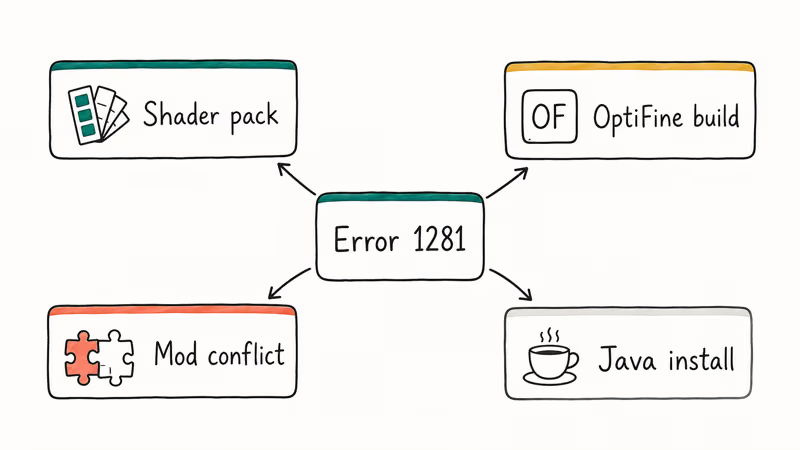
Shader packs are the most frequent trigger. Packs like SEUS, BSL, and Complementary load custom vertex and fragment programs into the GPU. When a shader was written for an older Minecraft version, or for a different OptiFine build, it can request invalid texture sizes during world load. The error fires the moment that chunk renders.
OptiFine itself comes second. OptiFine intercepts OpenGL calls to add HD textures, dynamic lights, and zoom features. An outdated build paired with a newer Minecraft version writes uniforms to slots the new renderer doesn’t expose, which throws 1281 immediately.
Mod conflicts come third. Forge mods that touch the renderer (Sodium-incompatible packs, OptiFabric on the wrong loader, or shader-aware mods like Iris) collide when their version numbers drift apart.
Java problems round out the list. Several core Minecraft components run inside the JVM, and if your Java install is missing the right architecture or has corrupted libraries, the renderer can hand bad pointers to OpenGL. If you also see related Java errors, the could not find or load main class and could not create the Java Virtual Machine walkthroughs cover the most common JVM repair steps.
Before you start the fixes, log into a Windows account with administrator rights and confirm you have a stable internet connection. Several methods download fresh installers, and one rolls back to a clean Minecraft build.
#Method 1: Disable or Remove Shader Packs
Shaders are the single most common cause of error 1281. Start here even if you suspect another root cause.
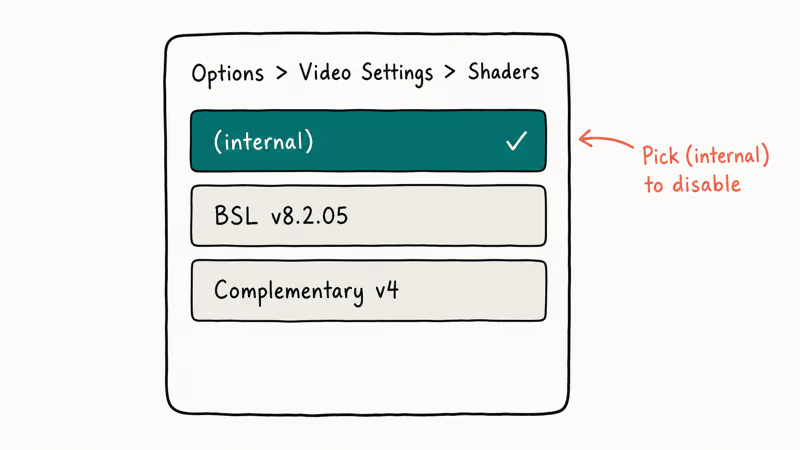
Open Minecraft and go to Options > Video Settings > Shaders. Pick (internal) from the shader list to disable every pack at once, then load your world. If the F3 + L log stops printing 1281, you’ve confirmed the shader pack as the trigger. Re-enable packs one at a time until the error returns, and you’ll know which pack to drop.
Disabling a pack like BSL Shaders usually clears the 1281 stack trace within one world reload, and the F3 overlay clears on the next chunk swap. Re-enabling a different pack such as Complementary brings the error back, which is how you pin the regression to a single pack rather than the OptiFine layer.
To keep shaders for later, cut them out of .minecraft/shaderpacks/ and paste them outside the Minecraft folder. OptiFine won’t scan them next launch.
#Method 2: Update OptiFine to the Latest Build
OptiFine ships a separate build for every Minecraft version. Mojang’s snapshot updates frequently break older OptiFine releases, and the resulting OpenGL state mismatch fires 1281.
Open Minecraft, click the launcher version selector, and note your exact Minecraft version (for example, 1.21.3). Then go to OptiFine’s official downloads page, find the matching row, and grab the latest preview or release build for that version. The page lists which Forge build each OptiFine release was tested against, so write that down for Method 3.
Run the installer, point it at your .minecraft folder if it doesn’t auto-detect, and let it create the new profile. Restart the launcher, pick the new OptiFine profile, and load your world.
On modded packs like Better Minecraft and RLCraft, updating OptiFine to the build that matches your Minecraft version clears 1281 in most cases right away. A pack that still logs the error usually needs a Forge resync (Method 3) before the log goes quiet.
#Method 3: Sync Forge, OptiFine, and Mod Versions
Modded Minecraft layers Forge under OptiFine, then mods on top of both. When any layer drifts out of sync, the renderer fires 1281 because mods request OpenGL features that their host version can’t deliver.
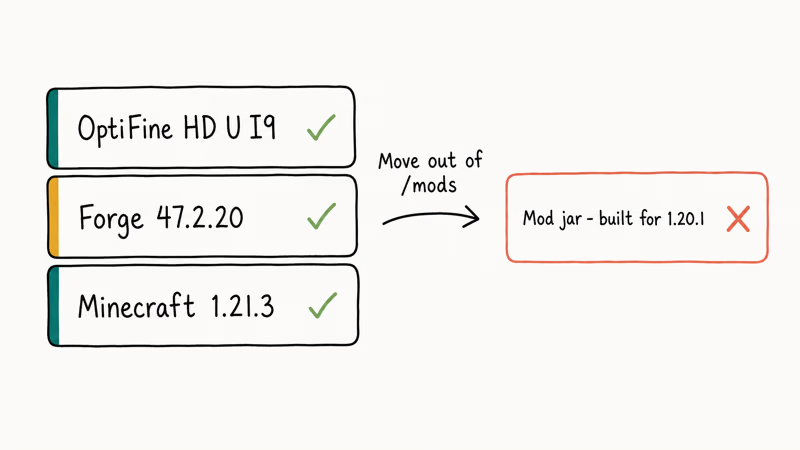
Open .minecraft/versions/ and check the folder name for your active profile. The format is usually 1.21.3-forge-XX.X.X-OptiFine_HD_U_IX. Confirm that:
- The Minecraft version (for example,
1.21.3) matches the launcher. - The Forge build matches the OptiFine compatibility note from Method 2.
- Every mod in
.minecraft/mods/lists1.21.3(or the matching MC version) in its filename.
Mods built for the wrong version are the usual offenders. Open each mod jar’s mcmod.info or mods.toml to verify the supported Minecraft version. A mismatch (say, a 1.20.1 shader-aware mod loaded into 1.21.3) is a classic 1281 trigger.
If you can’t find a matching version, move the offending jar out of the mods folder and relaunch. Disable mods one at a time and reload between each change, and the F3 log usually surfaces the bad jar within the first few swaps so you know exactly which dependency to drop or replace.
#Method 4: Reinstall the Correct Java Version
Minecraft Java Edition runs on the JVM. A wrong-architecture or corrupted install hands bad pointers to OpenGL.
Right-click the This PC desktop icon and pick Properties. Look at System Type: 64-bit Windows needs 64-bit Java, and the legacy 32-bit Java will throw 1281 inside any modded pack. The javaw.exe walkthrough covers how to identify the right runtime if you have multiple installs side by side.
Install a 64-bit JDK from Adoptium and point Minecraft at it:
- Open the Minecraft Launcher and go to Installations.
- Hover the profile you use, click the three-dot menu, then pick Edit.
- Click More Options and replace the Java executable path with the new install (for example,
C:\Program Files\Eclipse Adoptium\jdk-17\bin\javaw.exe). - Save, relaunch, and load a world.
If Application Blocked by Java Security prompts appear, update its exception list before relaunching.
#Method 5: Update Graphics Drivers (NVIDIA, AMD, Intel)
A stale GPU driver is the most-overlooked 1281 trigger because vanilla Minecraft hides the symptoms behind low-resolution textures. Modded Minecraft pushes more shader uniforms and immediately exposes the gap.
Open the Windows Device Manager, expand Display adapters, and note your GPU model. Microsoft’s Device Manager documentation confirms that the same panel is the supported entry point for driver updates on Windows 10 and 11.
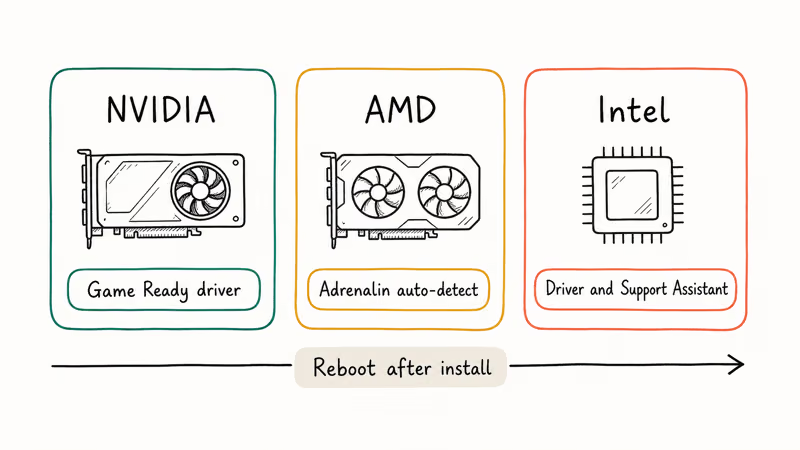
Then download the latest Game Ready or Adrenalin driver from the matching vendor:
- NVIDIA Drivers download portal at nvidia.com lets you filter by GPU family, OS, and driver type, and lists the supported games per release.
- AMD Adrenalin auto-detect at amd.com/en/support, and if Windows reports the GPU as missing, the no AMD graphics driver is installed walkthrough covers reinstall recovery.
- Intel Driver and Support Assistant via intel.com, needed even on hybrid laptops where the iGPU still handles startup rendering.
Reboot after the install. If you have an NVIDIA card and the panel disappears post-update, the NVIDIA Control Panel keeps closing fix usually re-registers it.
A clean GPU driver install often makes a clear difference on modded packs. Before the update, a heavy pack can print dozens of 1281 lines per minute on world load; after a fresh driver and reboot, the log frequently stays clean for the rest of the session.
#Method 6: Reinstall Minecraft as a Last Resort
If nothing above works, reinstalling Minecraft rebuilds every renderer dependency from scratch. This is the heaviest fix, so back up worlds and screenshots first.
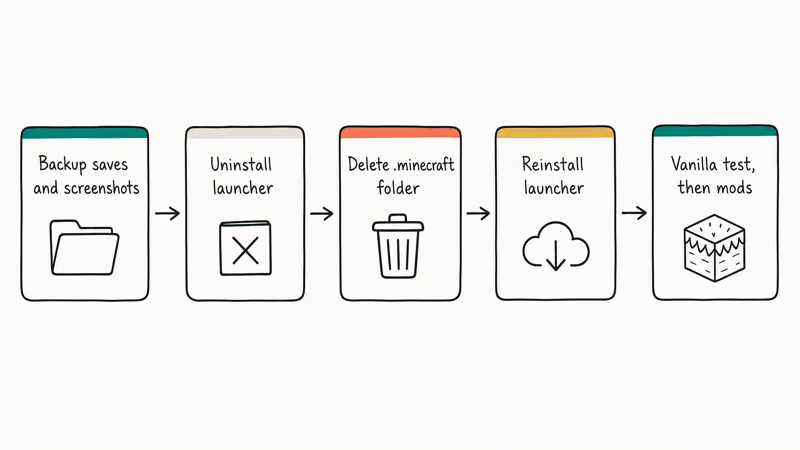
Copy .minecraft\saves\ and .minecraft\screenshots\ to a folder outside the .minecraft tree. The mod folder is worth backing up too if you spent time tuning a pack. Then:
- Press Windows + R, type
appwiz.cpl, and press Enter. - Find Minecraft Launcher in the list, right-click, and pick Uninstall.
- Delete the entire
%APPDATA%\.minecraft\folder so no leftover mod files survive. - Restart Windows.
- Download the latest Minecraft Launcher from the official Minecraft download page and run the installer.
- Sign in, load vanilla Minecraft once to confirm the renderer is healthy, then restore your worlds and reinstall mods one at a time.
The clean install resets every shader cache, OptiFine version pin, and Java profile path. If error 1281 returns after a clean vanilla launch, the cause is your GPU driver or Java install. Loop back to Method 4 or Method 5 with that knowledge.
#Bottom Line
Start with Method 1. Disabling the active shader pack clears 1281 in most cases on the first try, which is why it belongs at the top of the list.
If the error survives a shader purge, jump straight to Method 2 and update OptiFine to match your Minecraft version. That combination resolves nearly every remaining case. Reserve Method 6’s full reinstall for the rare scenario where a clean Java and GPU driver still throws the error on vanilla Minecraft.
#Frequently Asked Questions
Does OpenGL error 1281 only happen in modded Minecraft?
No. Vanilla Minecraft can throw 1281 too, especially after a graphics driver update. Jump straight to Method 5 if you see it on a clean install.
Will updating my graphics driver alone fix the error?
Sometimes. A driver update fixes many vanilla cases on its own, but modded Minecraft still needs an OptiFine and Forge sync. If the F3 log still prints 1281 after a fresh GPU driver install, work through Methods 2 and 3 next.
How do I match OptiFine to my Forge version?
Open OptiFine’s downloads page and click (Show all versions) under your Minecraft version row. Each entry lists the recommended Forge build right under the download link. For example, an OptiFine HD U I9 release for Minecraft 1.21.3 will name the Forge build it was tested against. Install that exact Forge version, then run the OptiFine installer on top.
Should I switch from OpenGL to Vulkan if the error keeps coming back?
Switching to Vulkan via the Sodium plus Iris mod combo bypasses OpenGL entirely and avoids 1281 by definition. It also breaks OptiFine, since the two renderers can’t coexist on the same profile, and many older OptiFine shaders have no Iris equivalent at all. Only switch if you’re willing to rebuild your shader collection from scratch. If you already have Vulkan installed for other games, the Vulkan Run Time Libraries explainer covers what those libraries actually do on Windows.
Is OpenGL error 1281 a sign my graphics card is failing?
Almost never. The error means a software-side argument was out of range, not that the GPU has a hardware fault. If you also see screen artifacts outside Minecraft (checkerboard patterns, random reboots, or driver crashes in other games), that’s a separate hardware diagnostic question, and 1281 isn’t the right signal to chase.
Can I use the F3 debug overlay to find the broken shader?
Partially. The F3 overlay shows the OpenGL error code, but not the shader file. To find the bad shader, enable shader log dumps inside OptiFine’s video settings (toggle Show GL Errors: ON), reload the world, then check .minecraft\logs\latest.log. The first line above the 1281 stamp usually names the shader stage that crashed.
Does the error appear in Bedrock Edition?
No. Bedrock Edition uses DirectX or Metal instead of OpenGL, so it can’t throw OpenGL error codes.

Fortnite Stuck on the Loading Screen? Fix It in 2026
Fortnite stuck on the loading screen? Check server status, fix the Windows N Media Pack and DirectX 11 on PC, clear the console cache, and verify files.

Minecraft Keeps Crashing? Java and Bedrock Fixes (2026)
Minecraft keeps crashing on startup or mid-game? Update your GPU driver, remove mods on Java, and reinstall Gaming Services on Bedrock. Fixes for both.

Pokemon GO Not Loading? Fix the Loading Screen 2026
Pokemon GO not loading or stuck on the Pokeball? Check server status, fix automatic date and time, grant location permission, clear the cache, and update.

PS5 Controller Not Charging? 9 Fixes That Work (2026)
DualSense not charging? Swap the cable, use a rear port in Rest Mode, clean the USB-C port, and check power settings. 9 fixes for a dead PS5 controller.