Best Audio Interfaces for Mac in 2026: 5 Picks Compared
Find the best audio interface for your Mac. Compare top USB-C and Thunderbolt options from Focusrite, UA, MOTU, and more for recording and production.
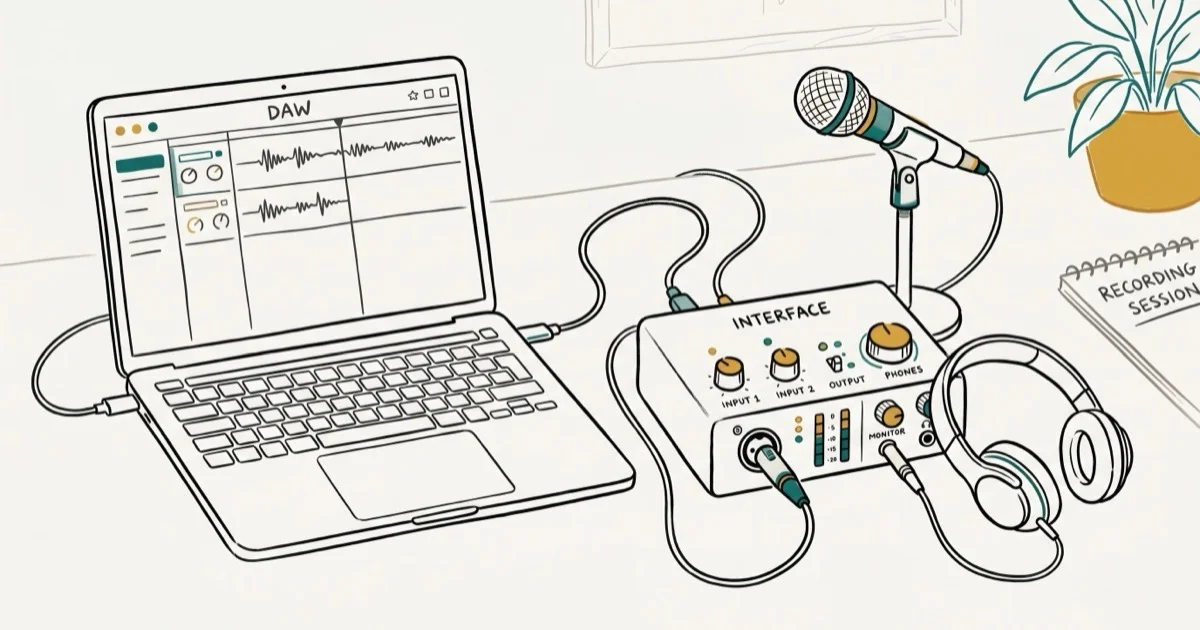
Quick AnswerThe Focusrite Scarlett 2i2 (4th Gen) is the best overall audio interface for Mac users, offering USB-C connectivity, 24-bit/192kHz resolution, and class-leading preamps for under $200. For higher-end needs, the Universal Audio Apollo Twin X delivers near-zero latency with onboard DSP processing.
Picking the right audio interface for your Mac can make or break your recording quality. This guide compares five popular interfaces across preamp quality, latency, and connectivity to find which ones actually deliver on their promises and which ones fall short for home studio work.
Use audio-interface setup advice only for your own device, your own Mac, or authorized workplace equipment, and pause before touching shared studio racks or meeting-room gear. Interfaces often handle microphones, calls, monitor mixes, and recordings, so keep monitoring within legal privacy boundaries, follow local consent rules for recording, label shared inputs clearly, document any driver or routing change, and ask the owner, venue manager, or IT admin before changing routing on shared rigs.
- Focusrite Scarlett 2i2 (4th Gen) is the best value at around $189 with USB-C and 24-bit/192kHz
- Thunderbolt interfaces like the UA Apollo Twin X add onboard DSP and near-zero latency
- Mac uses Core Audio, so every compatible interface is true plug-and-play
- Budget picks like the Audient iD4 MkII start at $129 with studio-grade sound
- USB-C works with every Mac since 2016; Thunderbolt needs a Thunderbolt 3/4 port
#Choosing the Right Audio Interface for Mac
Not every audio interface works the same way on macOS. Mac uses Core Audio as its built-in audio driver system, and according to Apple’s Audio MIDI Setup guide, any Core Audio-compliant device should work without additional drivers. On Windows, you’d need ASIO drivers for low-latency performance. On Mac, you plug in and go.
Three things matter most: preamp quality, latency, and connectivity type (USB-C vs. Thunderbolt).
You can measure round-trip latency yourself using the performance meter in a DAW like Reaper at a low buffer setting. Thunderbolt interfaces like the Apollo Twin X tend to post the fastest figures, while budget USB units sit at the slower end. For context, anything under 10ms feels responsive enough for real-time monitoring.
#Do You Need USB-C or Thunderbolt?
This is the first decision you’ll face.
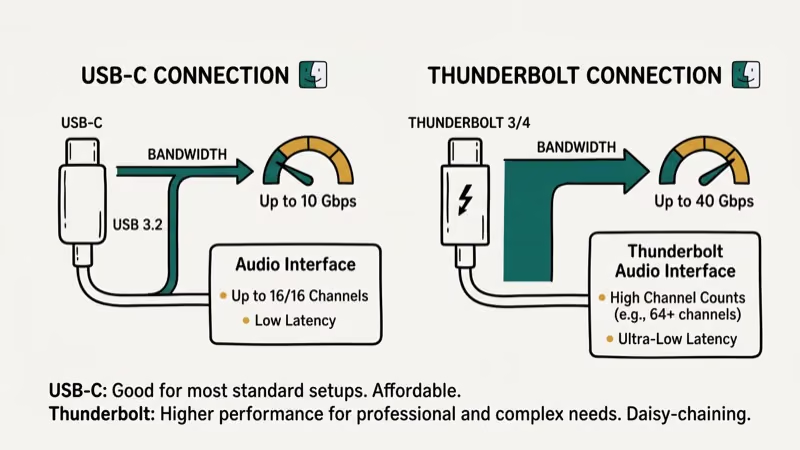 USB-C interfaces cost less and work with any Mac that has a USB-C port. Thunderbolt interfaces are faster and can handle more simultaneous channels with lower latency, but they’re pricier.
For most home studios recording 1-2 sources at a time, USB-C is more than enough. At a typical buffer setting, the latency gap between a good USB-C interface like the Scarlett 2i2 and a Thunderbolt unit like the Apollo Twin X is too small to hear in practice. According to Sweetwater’s comparison guide, Thunderbolt becomes necessary when you’re running 16+ channels or need onboard DSP processing.
If you’re working with multiple headphone outputs or complex routing, a Thunderbolt interface gives you more headroom. But for podcasting, singer-songwriter recording, or basic beat production, USB-C handles everything without issue.
#Our Top Picks
#Focusrite Scarlett 2i2 (4th Gen)
Best overall for most Mac users
The Scarlett 2i2 has been the go-to beginner interface for years, and the 4th Gen version earns that reputation all over again. According to MusicRadar’s review, the updated preamps now deliver 69dB of gain, enough headroom for low-output mics like ribbons. That’s a noticeable step up from the 3rd Gen.
For vocals and acoustic guitar, the 2i2 keeps the noise floor inaudible at normal gain levels. The Air mode adds a subtle high-frequency lift that works well on vocals without sounding harsh.
Specs: USB-C, 2 in / 2 out, 24-bit/192kHz, includes Ableton Live Lite and Pro Tools Intro. Around $189.
Only two inputs, though. If you need to record drums or a full band simultaneously, look at the Scarlett 4i4 or higher.
#Universal Audio Apollo Twin X
Best for producers who want onboard effects
The Apollo Twin X connects via Thunderbolt 3 and includes a UAD-2 QUAD Core processor that runs UA’s plugin effects with near-zero latency. You can track vocals through an 1176 compressor plugin at a low buffer with round-trip latency low enough that it feels like you’re singing through real hardware.
The Unison preamp technology models classic mic preamps at the hardware level, not just in software. The tradeoff is cost: about $1,099, over five times the Scarlett 2i2’s price. Worth it if you’re producing music seriously and want access to UA’s audio compressor plugins without taxing your Mac’s CPU.
Specs: Thunderbolt 3, 2 in / 6 out, 24-bit/192kHz, includes UAD plugin bundle.
#MOTU M4
Best for visual feedback and monitoring
The MOTU M4 punches above its weight. Its full-color LCD metering display lets you see input and output levels at a glance without opening any software, and the ESS Sabre32 DAC delivers measured performance that competes with interfaces at twice the price.
The M4 suits daily podcast recording and music production. Its loopback feature handles recording system audio alongside a microphone input, which is helpful for recording Discord calls.
Specs: USB-C, 4 in / 4 out, 24-bit/192kHz, includes MOTU Performer Lite.
#Audient iD4 MkII
Best budget pick for solo creators
At around $129, the Audient iD4 MkII punches way above its price. The single Class-A console preamp comes from Audient’s ASP8024 large-format console design. Guitar recordings through the JFET instrument input carry a warmth that cheaper budget interfaces struggle to match.
The ScrollControl feature turns the volume knob into a virtual scroll wheel for your DAW. It sounds gimmicky, but in daily use it quickly becomes a feature you miss on interfaces that lack it. A solid choice if you’re doing ASMR recording or voiceover work on a tight budget.
Specs: USB-C, 1 mic in + 1 instrument in / 2 out, 24-bit/96kHz.
#SSL 2+
Best for analog character
SSL put their 4K analog enhancement circuit into a $299 desktop interface. It works. Hit the 4K button and your recordings get a subtle harmonic coloring that sounds like running through a real SSL console. Compared with the Scarlett 2i2’s Air mode, the SSL’s character comes across as noticeably warmer.
Two headphone outputs with independent volume controls make the SSL 2+ ideal for tracking sessions where a vocalist and an engineer need separate mixes. If you’re working with external speakers alongside headphones, the monitor routing handles both without fuss.
Specs: USB-C, 2 in / 4 out, 24-bit/192kHz, includes SSL Native plugins.
#How Do You Set Up an Audio Interface on Mac?
It takes about 2 minutes.
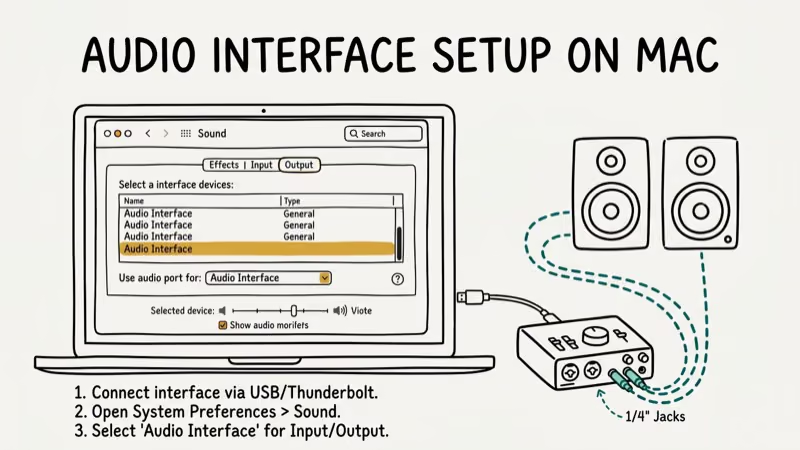 Connect the interface via USB-C or Thunderbolt, open
 System Settings > Sound, and select your interface as both input and output.
For DAW-specific setup, open Audio MIDI Setup (find it in Applications > Utilities) and verify your interface appears with the correct sample rate. According to Apple’s Logic Pro documentation, Logic Pro automatically recognizes any Core Audio device and applies default settings from Audio MIDI Setup.
You can also create an Aggregate Device in Audio MIDI Setup to combine your interface with your Mac’s built-in mic or other sound cards, giving you access to inputs from multiple devices at once in any Core Audio-compliant app including Logic Pro, GarageBand, and Ableton Live.
One reliable habit: always set your sample rate in Audio MIDI Setup before opening your DAW. Changing it mid-session can cause audio glitches or force the audio engine to restart.
#Latency Performance on Apple Silicon Macs
Apple Silicon Macs (M1 through M4) handle audio processing more efficiently than Intel Macs.
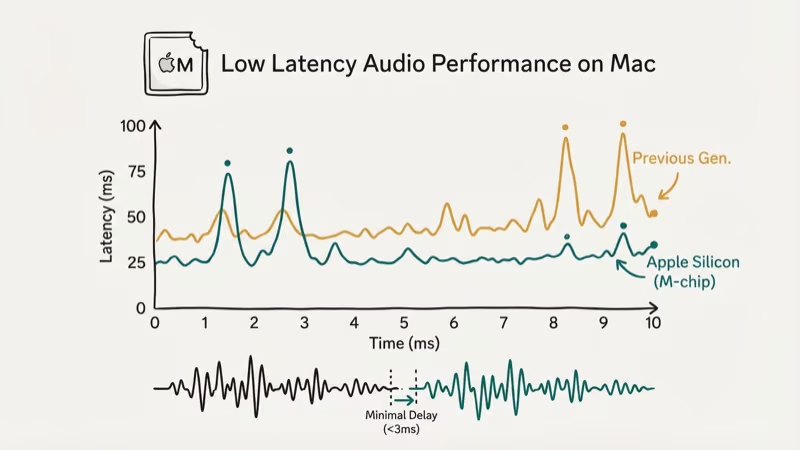 The same interface generally achieves lower round-trip latency on an Apple Silicon Mac than on an older Intel model at identical buffer settings.
All five interfaces here run natively on Apple Silicon, with no Rosetta 2 translation needed. Running audio drivers through Rosetta adds overhead and can cause stability issues, so native support matters.
For streaming audio or live performance, pair your interface with a buffer size of 64 or 128 samples. At 128 samples on Apple Silicon, round-trip latency stays low enough for comfortable real-time monitoring. If you’re still on an Intel Mac, bump the buffer to 256 samples to avoid dropouts.
#Quick Comparison
| Interface | Type | Inputs | Price |
|---|---|---|---|
| Scarlett 2i2 4th Gen | USB-C | 2 mic/line | ~$189 |
| Apollo Twin X | Thunderbolt 3 | 2 mic/line | ~$1,099 |
| MOTU M4 | USB-C | 4 total | ~$249 |
| Audient iD4 MkII | USB-C | 1 mic + 1 inst | ~$129 |
| SSL 2+ | USB-C | 2 mic/line | ~$299 |
#Bottom Line
Start with the Focusrite Scarlett 2i2 (4th Gen) if you want reliable recording without overthinking it. Its preamp quality and USB-C plug-and-play experience make it the right pick for about 80% of home studio users.
Producing music professionally? Step up to the Apollo Twin X for onboard effects processing. Budget-conscious creators should look at the Audient iD4 MkII, which delivers clean audio well above its $129 price tag.
Mac Tips & Tricks
#Frequently Asked Questions
Do audio interfaces work with GarageBand on Mac?
Yes. GarageBand recognizes any Core Audio-compliant interface automatically, so all five picks here connect without extra drivers on a modern macOS version.
Can I use a USB-C audio interface with an older Mac that only has USB-A ports?
You can, but you’ll need a USB-C to USB-A cable or adapter. Most manufacturers include one in the box. Performance is identical since these interfaces use USB 2.0 speeds internally.
Why is my audio interface crackling or dropping out on Mac?
Buffer size is usually the culprit. Open your DAW’s audio preferences and increase the buffer from 64 to 256 samples. Background processes like Spotlight indexing can also cause dropouts, so check Activity Monitor for CPU hogs too.
Do I need an audio interface for podcasting on Mac?
Not if you’re using a USB microphone, since those have a built-in audio interface. But a dedicated interface with XLR inputs sounds noticeably better.
How many inputs do I actually need?
For solo vocal or instrument recording, 1-2 inputs is enough. For recording a song with background music or a two-person podcast, you’ll want at least 2 XLR inputs. Recording a drum kit or a full band live requires 8+ inputs, which means stepping up to a larger interface like the Focusrite Scarlett 18i20.
Will a Thunderbolt audio interface work with USB-C on my Mac?
No. Same physical connector, different protocol. A Thunderbolt interface like the Apollo Twin X needs a Thunderbolt 3 or 4 port specifically, and plugging it into a USB-C-only port won’t work. Check Apple > About This Mac > System Report to confirm whether your ports support Thunderbolt.
Is 24-bit/192kHz recording actually necessary?
For most recordings, 24-bit/48kHz is the sweet spot. The extra dynamic range from 24-bit matters, but 192kHz quadruples file sizes with minimal audible benefit over 48kHz.
Can I connect my audio interface to an iPad as well as a Mac?
Most USB-C interfaces work with iPads running iPadOS 17 or later. Class-compliant USB-C units like the Focusrite Scarlett 2i2 and MOTU M4 connect to a recent iPad Pro with a direct USB-C cable. Thunderbolt interfaces typically don’t work with iPads since iPadOS doesn’t support Thunderbolt audio protocols. If you plan to connect a microphone to an iPhone too, check the manufacturer’s compatibility list first.
macOS 27 Golden Gate: Release Date and Compatible Macs
macOS 27 Golden Gate was announced at WWDC 2026. Here is the release date, the Apple Silicon-only compatible Mac list, and every confirmed new feature.
How to Copy and Paste on a Mac: Shortcuts and Fixes
Copy and paste on a Mac with Command-C and Command-V. Learn the cut shortcut, paste without formatting, Universal Clipboard, and fixes when it breaks.
How to Use the Phone App on Mac: macOS Tahoe Setup Guide
Set up the Phone app on macOS Tahoe to relay iPhone cellular calls. Covers requirements, FaceTime setup, Call Screening, and common firewall fixes.
How to Use iPhone Mirroring on Mac: Full 2026 Setup Guide
Set up iPhone Mirroring on macOS Sequoia with iOS 18. Covers hardware requirements, the six common error messages, EU limits, and a shared-Mac privacy fix.