Mailpv.exe Explained: NirSoft Mail PassView Safety & Use
Mailpv.exe is the NirSoft Mail PassView executable for recovering local email passwords. Learn safety checks, antivirus flags, and proper use.

Quick AnswerMailpv.exe is the legitimate executable for NirSoft Mail PassView, a free utility that recovers email passwords saved in clients on your own Windows PC. Most antivirus tools flag it as a HackTool because the same recovery capability can be abused, so only run it on machines you own and try the official password reset first.
Mailpv.exe is the executable for Mail PassView, a small NirSoft utility that reads email passwords saved locally inside Windows email clients. The file isn’t malware, but Microsoft Defender and most antivirus suites flag it as a HackTool because the same code that helps you recover a forgotten Outlook password can be misused on a machine you don’t own. This guide covers how to identify the real binary and use the tool only on accounts that belong to you.
- The legitimate mailpv.exe is roughly 67 KB and sits in C:\Program Files\Mail PassView\ when you install Mail PassView from NirSoft.
- Most antivirus engines, including Microsoft Defender, classify it as HackTool/Passview because password recovery utilities can be used for unauthorized access.
- Mail PassView only reads passwords already stored on the local Windows profile in clients like Outlook, Thunderbird, Eudora, and IncrediMail. It can’t crack remote mail servers.
- Always reset through the email provider first (Microsoft, Google, Mozilla) before reaching for any local recovery tool, because a fresh provider-issued password is faster and stays lawful.
- Run the tool only on a Windows account you log into yourself, and remove it after recovery so it doesn’t sit on disk waiting for misuse.
#What Mailpv.exe Is and What Mail PassView Does
Mail PassView is a desktop utility written by Nir Sofer. The mailpv.exe binary scans the encrypted password storage used by older Microsoft and Mozilla email clients on a single Windows PC.
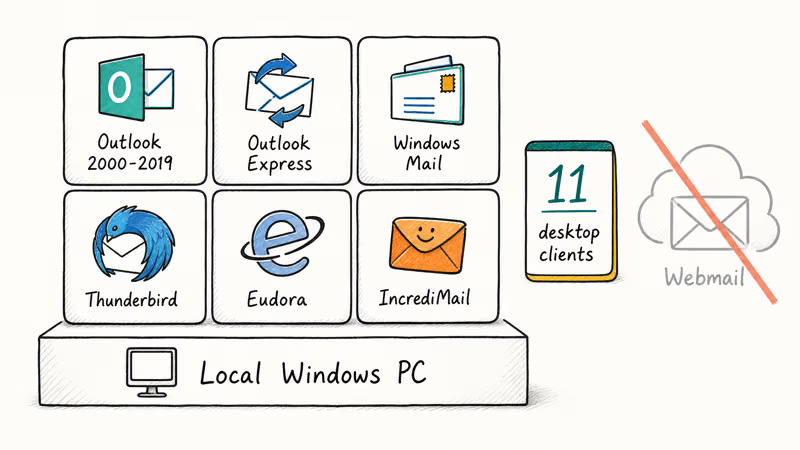
You launch it after extracting the ZIP from NirSoft. It opens a small grid that lists each email account configured on the machine, the protocol (POP3, IMAP, SMTP), the server name, the user, and the recovered password. No installer wizard, no background service.
According to NirSoft’s official Mail PassView documentation, the tool reads passwords saved by Outlook 2000 through 2019, Outlook Express, Windows Mail, Mozilla Thunderbird, Eudora, and IncrediMail, plus a handful of long-discontinued clients. That’s 11 supported clients in total, all of them desktop. It doesn’t contact any remote mail server, brute-force a login, or work against webmail accounts that store credentials in your browser instead of a dedicated client.
The tool is useful for one specific job: you own a Windows PC, you set up an email account in Outlook or Thunderbird years ago, and you’ve lost track of the password your client is silently using. Mail PassView reads what’s already on disk so you can write it down before reinstalling the OS or migrating to a new client.
#Is Mailpv.exe Safe to Run on Your PC?
The executable itself doesn’t install backdoors, contact a command-and-control server, or modify other files. NirSoft has published utilities under the same digital signature for over twenty years. The risk isn’t the binary, it’s the surface area it exposes.
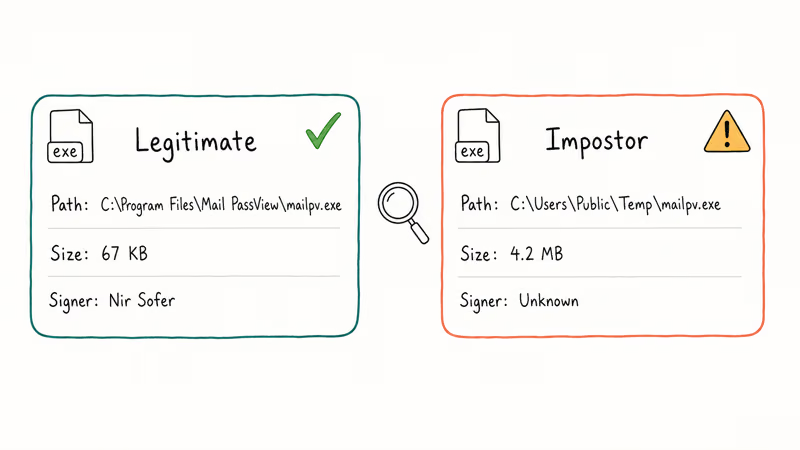
If a trojan dropper renames its own payload to mailpv.exe and places it outside C:\Program Files\Mail PassView, the file you see in Task Manager could be impersonating the real tool, similar to the spoofing pattern documented in our csrss.exe trojan walkthrough. The fix is to verify the location and signer before treating the process as legitimate.
The legitimate mailpv.exe binary is small, signed by Nir Sofer, and lives at C:\Program Files\Mail PassView\mailpv.exe. Anything outside that path with a very different size is a red flag, regardless of file name. If you also see suspicious console host activity alongside it, our notes on verifying conhost.exe cover the same signature checks for system processes.
The other safety question is human. Even on your own PC, leaving mailpv.exe in a shared user profile means anyone who later sits at that machine can dump every saved email password in two clicks.
Treat it like a one-time recovery tool. Run it, copy what you need, uninstall it.
#Why Does My Antivirus Flag Mailpv.exe as a HackTool?
When you download Mail PassView, Microsoft Defender, Norton, Avast, and most other engines quarantine the file before it can finish writing to disk. The detection name is usually HackTool
/Passview, RiskTool.PSWTool.MailPassView, or PUA/Mailpv.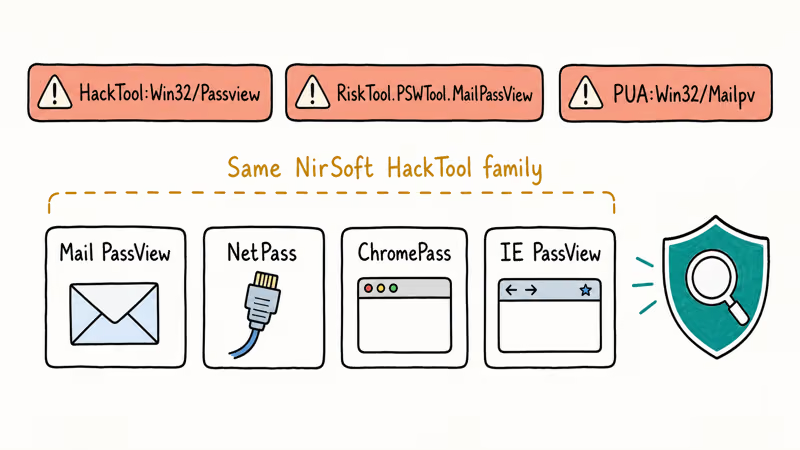
None of those are virus signatures. They’re deliberate classifications for software with dual-use potential.
NirSoft password recovery utilities such as Mail PassView, NetPass, ChromePass, and IE PassView all fall under Defender’s HackTool classification. According to Microsoft’s malware criteria reference, Microsoft classifies a HackTool as a tool that can be used to gain unauthorized access to a device. Defender quarantines these utilities on contact, even with no malicious behavior present.
This pattern shows up repeatedly with legitimate-but-flagged tools. Our FileRepMalware explainer covers the exact same reputation-based detection logic that catches small, low-distribution executables before they get a chance to build trust with the engine.
If your only goal is to recover a forgotten Outlook password on your own PC and Defender keeps deleting the download, the correct response isn’t to disable real-time protection across the entire system. The correct response is to:
- Confirm you’re the owner of the PC and the email account in question.
- Add a temporary, narrowly scoped folder exclusion for the Mail PassView install directory.
- Run the tool, copy the password, uninstall the program.
- Remove the exclusion the moment you’re done.
If you aren’t comfortable with that workflow, skip Mail PassView entirely and reset the password through the provider, as covered later in this guide.
#How to Verify the Real Mailpv.exe Process
Before trusting any process named mailpv.exe, validate four things in order: location, size, signature, and parent process.
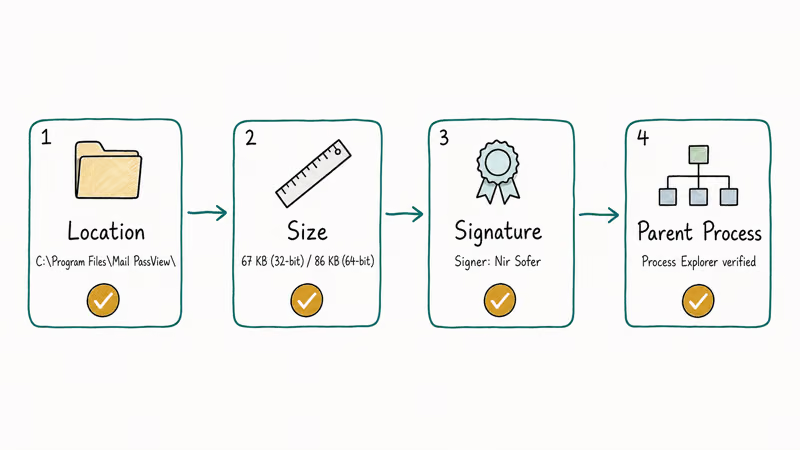
- Open Task Manager (Ctrl+Shift+Esc), switch to the Details tab, right-click mailpv.exe, and choose Open file location. The path should resolve to C:\Program Files\Mail PassView.
- Confirm the file size matches what NirSoft published for your version. The 32-bit build of Mail PassView 1.92 is 67 KB and the 64-bit build is roughly 86 KB. A 4 MB mailpv.exe isn’t Mail PassView.
- Right-click the file, open Properties, and check the Digital Signatures tab. The legitimate publisher is Nir Sofer. If the tab is missing or the signature is broken, the binary isn’t what it claims to be.
- Use Microsoft Sysinternals Process Explorer for one more layer.
Microsoft’s Sysinternals team recommends Process Explorer for verifying digital signatures, and the documented procedure adds a Verified Signer column under Options > Verify Image Signatures to flag unsigned binaries instantly. A row that returns “Unable to Verify” against a process pretending to be a NirSoft tool is enough to act on.
Anything that fails one of these checks should be quarantined like any unknown binary. Run a full scan, then remove it from Safe Mode if needed.
#How to Use Mail PassView Responsibly on Your Own Computer
Use Mail PassView only when all three of these are true at the same time: the Windows PC is yours, the Windows user profile is yours, and the email accounts configured inside the local client are yours. If any of those fails, stop and use the provider-side reset flow instead.
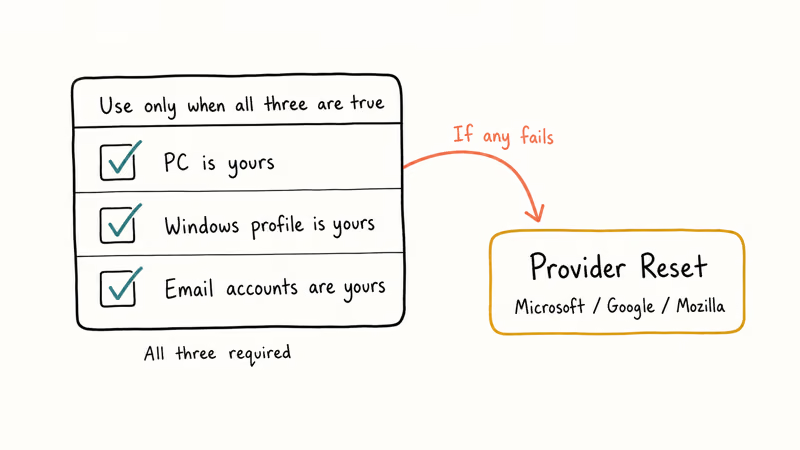
The provider path is faster anyway. Microsoft’s account recovery flow lets you reset an Outlook.com or Microsoft 365 password in under five minutes with SMS or backup email verification. It’s the same flow we recommend in our guide to Outlook prompts that keep asking for the password.
Google’s recovery wizard handles Gmail through IMAP. Mozilla Thunderbird stores credentials in its built-in password manager.
Provider reset is the lawful default.
When provider reset is unavailable, like an old POP3 account on a defunct mail host, Mail PassView reads what’s already on disk. Run it from an admin session, save the password, then uninstall.
If you’re recovering credentials for a different kind of account entirely, like an iTunes encrypted backup, the workflow is different and Mail PassView won’t help. Our notes on recovering a forgotten iTunes backup password cover that flow without involving any HackTool-flagged utility.
On a Windows machine running Microsoft Defender, Mail PassView is typically flagged as HackTool
/Passview almost immediately after download. Once the file is restored from quarantine into a controlled folder and run against an email profile you configured yourself, the tool lists the saved account passwords in plain text. Remove both the recovered password entries and the tool itself once you’re finished.#How to Remove Mailpv.exe From Windows
If you’ve already used the tool and want it gone, or if you found mailpv.exe on a PC where you never installed it, here’s the cleanup sequence.
For an installed copy:
Open Settings>Apps>Installedapps on Windows 10 or 11. On Windows 7, openControl Panel>Programs and Features.- Find Mail PassView in the list and choose Uninstall.
- After uninstall, delete any leftover folders under C:\Program Files\Mail PassView\ and C:\Users<you>\AppData\Local\Mail PassView\ if present.
- Empty the Recycle Bin so the binary can’t be undeleted.
For a copy you didn’t install yourself, the rules change. Treat the executable as suspicious until proven otherwise.
- Disconnect from the network.
- Reboot into Safe Mode with Networking using msconfig or the Shift+
Restart>Troubleshoot>Advancedoptions menu. - Run a full scan with Microsoft Defender or another reputable engine.
- If the scanner flags the file, let it quarantine the binary. Don’t whitelist it.
- After the scan completes, reboot normally and check the autorun list with Sysinternals Autoruns to make sure nothing schedules the executable on startup.
If the tool keeps reappearing after deletion, that’s a sign of separate credential-theft malware dropping it as a payload. At that point the right fix is a clean Windows reinstall, not more cleanup scripts.
#Bottom Line
Mailpv.exe is a legitimate NirSoft executable, not a virus, but it lives in the gray zone every modern antivirus calls HackTool. Use it only on a Windows PC you own to recover passwords for email clients you configured yourself, and only when the provider-side reset path through Microsoft, Google, or Mozilla is unavailable.
Verify the binary is in C:\Program Files\Mail PassView, signed by Nir Sofer, and the expected 67 KB size before trusting any process by that name. The single most defensive habit is to run the tool once, copy what you need, then uninstall it the same session, so the recovery surface doesn’t stay on disk for someone else to find later.
#Frequently Asked Questions
Is mailpv.exe a virus?
No. The legitimate mailpv.exe from NirSoft isn’t a virus, but Microsoft Defender and most other antivirus tools classify it as HackTool
/Passview because the password recovery capability can be misused. The classification is policy, not signature-based malware detection.Where should the real mailpv.exe live on my PC?
The genuine binary installs to C:\Program Files\Mail PassView\mailpv.exe. If you find a process named mailpv.exe running from C:\Windows\Temp, a user profile folder, or any path outside that location, treat it as suspicious until you can verify the digital signature.
Can Mail PassView recover passwords from Gmail, Outlook.com, or other webmail?
Only when the webmail account is already configured inside a supported desktop client through IMAP, POP3, or Exchange and the password is cached locally. Mail PassView reads what is already on disk inside Outlook, Thunderbird, Eudora, and IncrediMail. It can’t recover credentials stored only in your browser, in a third-party password manager, or directly on the webmail provider’s servers, because those credentials never reach the local profile data the tool scans.
Is it legal to run Mail PassView?
Running it on hardware and accounts you own is legal in most jurisdictions, the same way owning a locksmith’s bypass tool is legal for working on your own front door. Running it against another person’s PC, profile, or account without explicit permission is unauthorized access in nearly every jurisdiction and exposes you to criminal liability.
Why does Microsoft Defender keep deleting Mail PassView even after I download it again?
Defender enforces the HackTool classification on every download. The supported workaround is a temporary folder exclusion you remove after recovery.
Should I trust the C:\windows\zipinst.exe uninstall path?
That path is from older NirSoft documentation when Mail PassView shipped as a zipped self-extractor. On current Windows 10 or 11 installs the path may not even exist. Uninstall through Settings > Apps > Installed apps instead, then manually clean up Mail PassView folders under Program Files and AppData.
What should I do if Mail PassView shows passwords I don’t recognize?
Stop and treat the situation as a possible compromise. Unknown saved accounts mean either the PC was used by another person who configured email clients on your profile, or malware created accounts to relay mail. Disconnect from the network, run a full antivirus scan in Safe Mode, change every password through the provider’s recovery flow, and review sign-in activity in your Microsoft and Google account dashboards.

Best Laptop for Running LLMs in 2026: Memory Comes First
The best laptop for running LLMs is a memory purchase first. Compare MacBook unified memory against NVIDIA laptop VRAM, and see what each tier really runs.

How to Run a Local LLM on Windows: A 2026 Setup Guide
Run a local LLM on Windows with LM Studio or Ollama. Pick a model that fits your GPU memory, keep every prompt offline, and skip the monthly bill.

Bluetooth Not Working on Snapdragon X? Fixes for 2026
Bluetooth not working on your Snapdragon X Copilot+ PC? Generic audio, mice, and keyboards work, but vendor apps often lack an ARM build. Fixes inside.

Docker Desktop and WSL2 Not Working on Snapdragon X? Fix It
WSL2 runs fine on Snapdragon X, but Docker Desktop ARM is Early Access and throws WSL errors. Use WSL2 plus native ARM64 Ubuntu and Docker Engine.