How to Use Perplexity AI: A Complete Practical Guide
Learn how to use Perplexity AI for research, fact-checking, and deeper answers. Covers Focus modes, Pro Search, file uploads, Spaces, and free vs Pro.
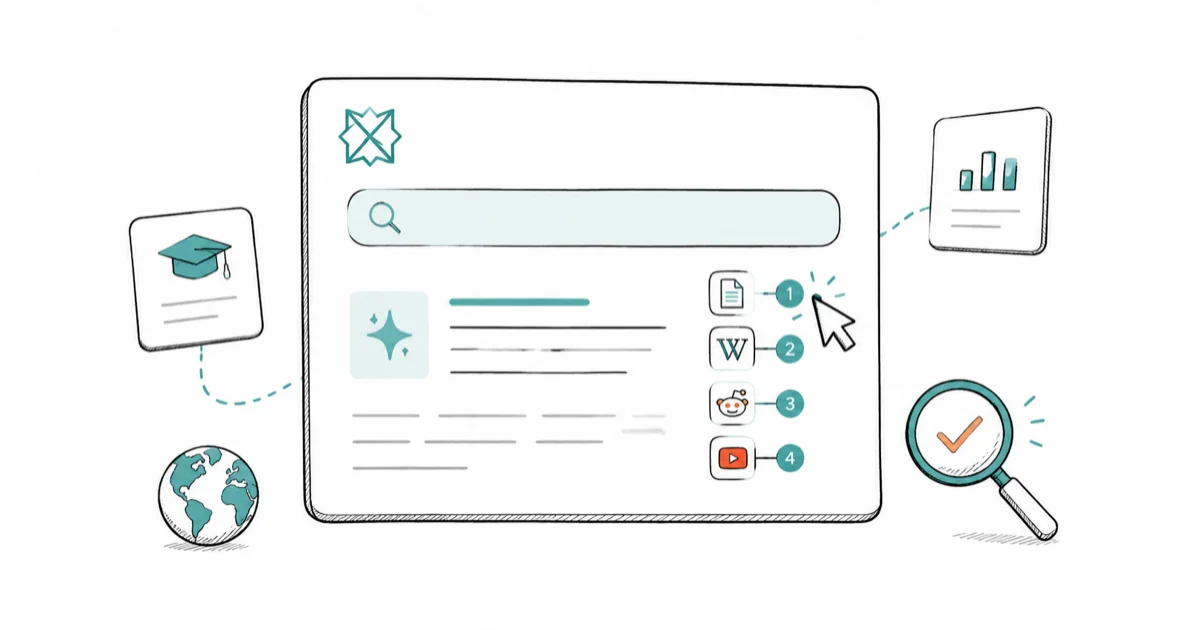
Quick AnswerPerplexity AI is a search-first AI tool that shows inline citations for every answer. Type a question, read the sourced response, click citations to verify, and use Focus modes to narrow results to academic papers, Reddit, YouTube, or other sources.
Perplexity AI stands apart from most AI chatbots by attaching live web sources to every answer it gives you. Inline citations make claims easier to verify than answers with no source links. If you want answers you can actually check, this guide walks you through how Perplexity works and how to get the most out of it.
- Perplexity shows numbered inline citations for every answer, so you can verify sources without leaving the page.
- Focus modes let you restrict searches to academic papers, Reddit, YouTube, or the web to match your research goal.
- Pro Search runs a multi-step query sequence, pulling from more sources and reasoning through complex questions.
- You can upload files (PDFs, docs, spreadsheets) and ask questions about their content directly.
- Spaces let you organize research threads, upload internal files, and collaborate with a team in one place.
#What Makes Perplexity Different From ChatGPT and Gemini?
Most AI assistants generate answers from training data and don’t always tell you where a claim came from. Perplexity runs a live web search for every query, then builds its answer from those results.
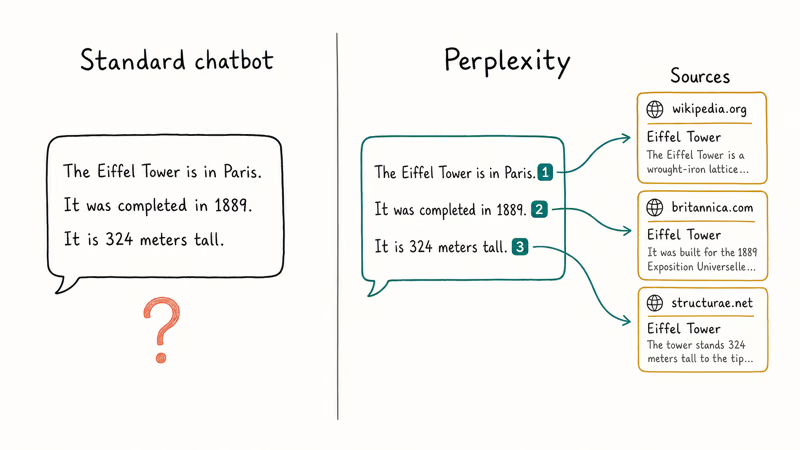
Each sentence that draws on a source is tagged with a numbered citation. Source cards appear alongside the response so you can check any claim without leaving the page.
That citation-first design is useful because it exposes the source trail behind each claim. When Perplexity is unsure, it can list conflicting sources, which is a useful signal when researching contested topics. Perplexity is strongest when you use those citations as a verification layer instead of treating the generated answer as the final source.
That said, Perplexity won’t always be the better choice. For long-form writing, coding help, or open-ended brainstorming, tools like ChatGPT, Claude, and Gemini still have an edge. Real-time sourcing matters less when you’re not trying to verify facts.
Perplexity wins on research-heavy tasks. It’s the right choice when you want to know not just the answer, but where it came from.
#How to Ask Your First Question
Getting started takes about 30 seconds. Go to perplexity.ai and type a question into the search bar. Write it as a complete sentence rather than short keywords. Perplexity returns better results when your query has context and intent built in.
Perplexity handles natural language well. “What are the side effects of melatonin for adults?” will get better results than “melatonin side effects.”
After you submit, the response appears with numbered citations bracketed inline. The source cards (showing domain, title, and a snippet) appear on the right. Click any citation number to jump to the source card. Click the source card title to open the original page.
Below the main answer, Perplexity suggests follow-up questions based on your query. Click one to continue the thread, or type your own follow-up. Each response builds on the previous context.
#Focus Modes Explained
Focus modes tell Perplexity which part of the web to search. The default Web mode searches broadly. The other modes restrict results to specific source types:
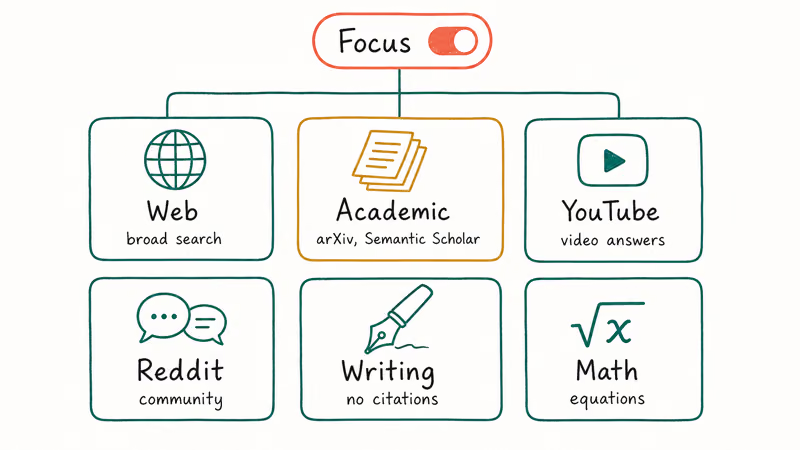
- Academic: draws from scholarly databases including arXiv and Semantic Scholar. Use it for peer-reviewed research on science, medicine, or policy.
- YouTube: returns video-based answers, useful when you want tutorial-style content.
- Reddit (Social): pulls from community discussions. Good for product opinions, software troubleshooting, and anything where real user experience matters more than editorial coverage.
- Writing: removes citations to give you cleaner, flow-focused responses. Useful for grammar checks or quick content drafts.
- Math: routes problems through a math-optimized pipeline for equations and calculations.
To switch modes, click the Focus icon in the search bar before you submit. You can also switch mid-thread if your research direction changes. Academic mode is useful when you want fewer blog results and more scholarly sources in the answer.
#Pro Search: When to Use It and What It Does
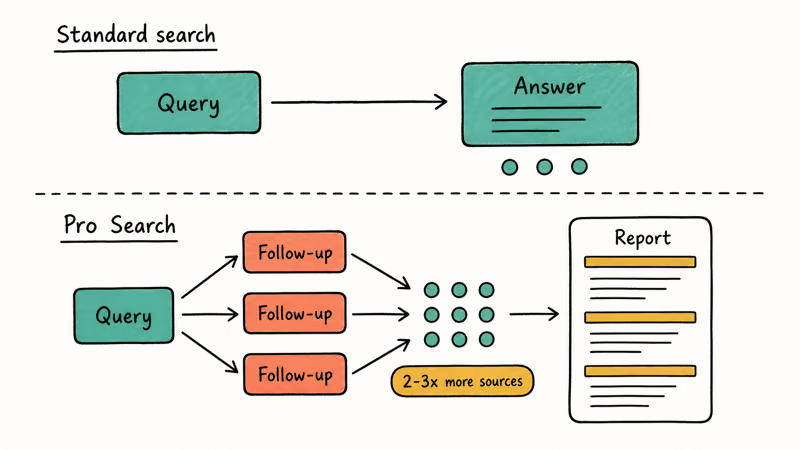
Standard search returns a single synthesized response with a handful of sources. According to Perplexity’s official Pro Search help page, Pro Search conducts multiple searches across the web, synthesizes information from a diverse set of sources, and includes direct source links so you can verify facts.
Use Pro Search for:
- Multi-part questions that need context from several sources
- Research where conflicting information needs to be compared
- Technical deep dives into software documentation, legal summaries, or financial data
Free accounts get a limited number of Pro Searches per day. Pro subscribers get unlimited Pro Searches, along with access to more capable AI models. To run a Pro Search, click the Pro toggle in the search bar before you submit.
Perplexity also has a Deep Research mode for Pro and Max users, which runs even longer multi-step queries and produces full report-length outputs with structured sections, which is useful for literature reviews or competitive analysis. Tom’s Guide reviewed Perplexity against ChatGPT for research tasks and found Perplexity’s sourcing was more thorough for fact-heavy queries.
#How to Upload Files and Ask Questions About Them
Perplexity lets you upload documents (PDFs, Word files, spreadsheets, and images) and ask questions about their content directly. This is one of the most useful features for professionals and students.
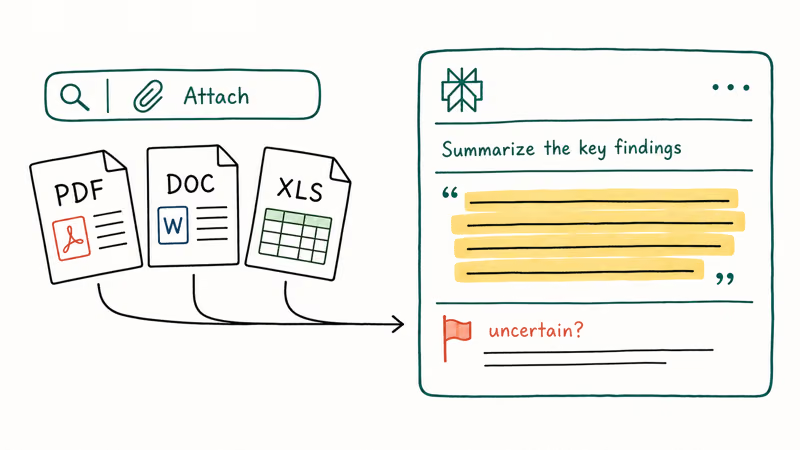
To upload a file, click the Attach icon in the search bar, select your file, then type your question. Examples of what works well:
- “Summarize the key findings in this research paper.”
- “What are the renewal terms in this contract?”
- “Which row in this spreadsheet has the highest total?”
Perplexity can answer questions about uploaded files and cite relevant passages when the document text is available. It may also flag uncertainty when a file is hard to interpret. According to Perplexity, paid users can upload files of up to 50 MB on its Spaces help page, and file attachments can be selected as a source.
Compared to Google’s NotebookLM, Perplexity’s key advantage is blending file content with live web search in a single query. NotebookLM stays strictly within your uploaded materials and won’t pull in outside sources.
#How to Organize Research With Spaces
Spaces are dedicated workspaces where you can group related threads, upload project files, set custom AI instructions, and invite collaborators. According to Perplexity’s Spaces help page, a Space acts as a centralized knowledge hub powered by custom AI instructions, file search, and shared research threads.
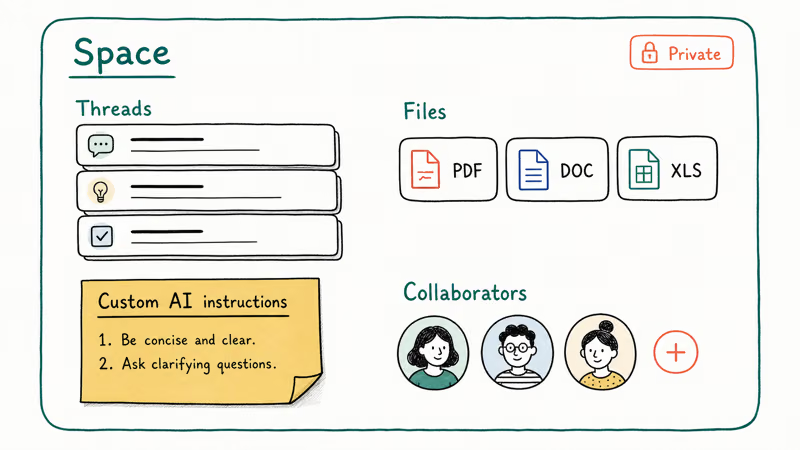
To create a Space, click Spaces in the left sidebar, then select New Space and give it a name. Upload files relevant to your project (PDF, Word, and spreadsheets are supported).
You can write a system prompt to have the AI always respond in a particular style or role. Invite collaborators by email. By default, a Space is private.
Spaces are available on the Pro plan. The Perplexity Help Center has a full Spaces section with step-by-step setup instructions.
#Who Is Perplexity Best For?
Perplexity is the right tool when you need to verify information fast, not just get an answer.
Students and academics benefit most from the Academic Focus mode and the ability to trace every claim back to its source. For coding research, it pairs well with tools covered in our best AI for coding guide.
Researchers and journalists get multi-source synthesis with citations intact, making it straightforward to check whether a source actually says what the summary implies.
Fact-checkers and analysts can use the Social mode to surface what real users are saying about a product or event before looking at edited coverage.
Anyone comparing AI tools will find that Perplexity handles current events better than models with knowledge cutoffs. For a broader look at AI assistant differences, see our comparison of Claude vs ChatGPT for writing and the guide to Gemini Gems.
#Free vs Pro: Features Comparison
Perplexity has a generous free tier. No account is required for basic queries.
Perplexity Pro adds higher limits and paid features such as expanded model access, file analysis, and Spaces for collaborative research. Check the official Pro page for current pricing, since the AI subscription market moves fast and prices have changed before.
If you do research professionally or hit the daily Pro Search limit on the free plan, the upgrade is worth evaluating. The extra reasoning depth on complex queries is the main practical difference, not just the model variety.
#Bottom Line
Start with Perplexity’s free tier: type a question, click through two or three citations to confirm the sources are real, and try a Focus mode that fits your research. If you’re doing research daily and need file uploads or collaborative Spaces, check what the Pro plan offers. For most research tasks, the citation layer alone makes Perplexity more trustworthy than a standard AI chatbot, but verify the sources yourself rather than taking the summary at face value.
#Frequently Asked Questions
Is Perplexity AI free to use?
Yes, Perplexity AI has a free tier that doesn’t require an account. Free users get unlimited standard searches and a capped number of Pro Searches per day. The paid Pro plan removes those limits and adds file uploads, Spaces, and additional AI model options.
How accurate is Perplexity AI?
Perplexity is reliable for factual queries but can misattribute sources. Click through 2-3 citations on anything important. Don’t trust the summary alone.
What is the difference between standard search and Pro Search?
Standard search returns a single synthesized answer based on a few sources. Pro Search runs a multi-step sequence: it asks follow-up queries automatically, gathers more sources, and organizes results into a more detailed response. Pro Search is better for complex, multi-part questions.
Can Perplexity AI read my uploaded documents?
Yes. Attach PDFs, Word files, spreadsheets, or images to a query and Perplexity will analyze them. Pro accounts get higher file size limits.
How do Perplexity Spaces work?
Spaces are shared workspaces where you can group research threads, upload project files, set custom AI instructions, and invite collaborators. They’re designed for ongoing research projects where multiple people need access to the same context. Spaces are included in the Pro plan.
How does Perplexity compare to Google Search?
Google Search returns a list of links for you to browse. Perplexity reads those sources and synthesizes an answer with inline citations, so you get a summarized response instead of a results page. Perplexity is faster for getting a direct answer, but the quality depends on which sources it picks. Google is better when you want to scan multiple perspectives, read primary sources yourself, or research a topic that requires editorial judgment about what’s most authoritative.
Does Perplexity AI work without an account?
Yes, basic search works at perplexity.ai without signing up. Create an account to save thread history and access Spaces. A Pro subscription adds unlimited Pro Searches and file uploads.

Is This Bank App Real? Spot a Fake App on Your Home Screen
A bank app can land on your home screen from a web page with no install warning. Learn the checks that tell a real banking app from a phishing web app.

Apps Crashing After iOS 27 Update? Fix Order (2026)
Apps crashing after the iOS 27 update? Update the app in the App Store first, then offload and reinstall to clear stale cache, then restart. The fix order.

Do AI Translation Earbuds Work Offline? What to Know
Do AI translation earbuds work offline? A few do with downloaded language packs, but most need the cloud. Here's what works offline and what you give up.
How to Set Up Translation Earbuds (Pairing and Modes)
How to set up translation earbuds: charge, install the app, pair over Bluetooth, pick two languages, and choose a mode. A step-by-step first-use guide.