How to Spot a Phishing Email: 8 Red Flags to Know (2026)
Learn how to spot a phishing email in 2026: check the real sender, hover over links, and know why perfect grammar no longer means safe. Stay protected.
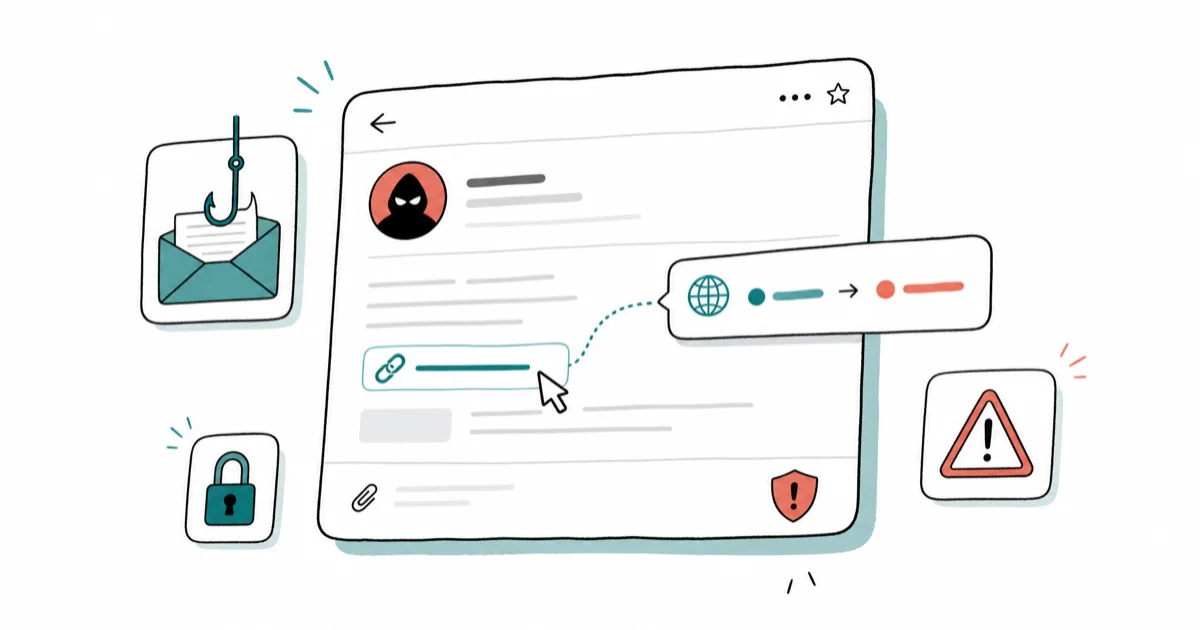
Quick AnswerCheck the real sender address, not the display name, and hover over links to see where they actually go. In 2026, stop trusting perfect grammar, since AI now writes flawless scam emails.
Learning how to spot a phishing email comes down to a few reliable checks that still work in 2026, even as scams get more polished. Two of the most useful checks are looking at the real sender address and hovering over links before you click. This guide walks through the clearest red flags, what changed this year, and what to do if you already clicked.
- The display name is easy to fake, so always check the actual sender address for lookalike domains like amaz0n.com
- Hover over any link without clicking to reveal its true destination, which often differs from the text you see
- Urgency and threats are manipulation tactics, designed to make you act before you think
- Perfect grammar no longer means an email is safe, because AI now writes flawless phishing messages
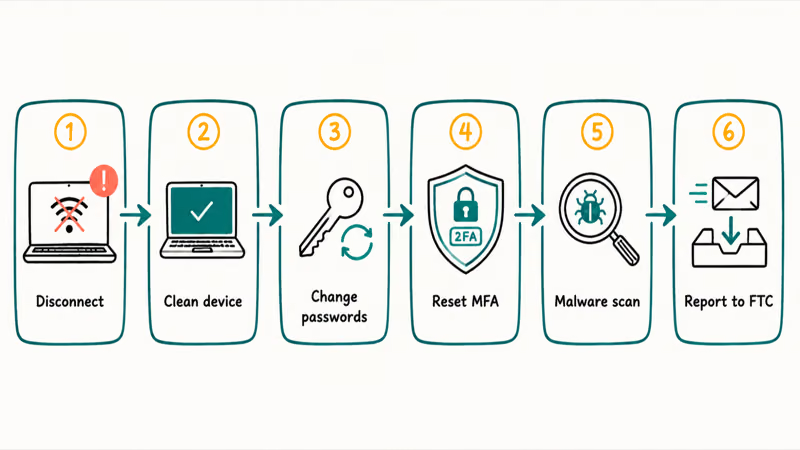
- If you already clicked, disconnect, change passwords and reset MFA from a clean device, then report the email
#What Are the Clearest Signs of a Phishing Email?
A few signs cover the core phishing pattern. None is foolproof alone, but together they form a reliable pattern.
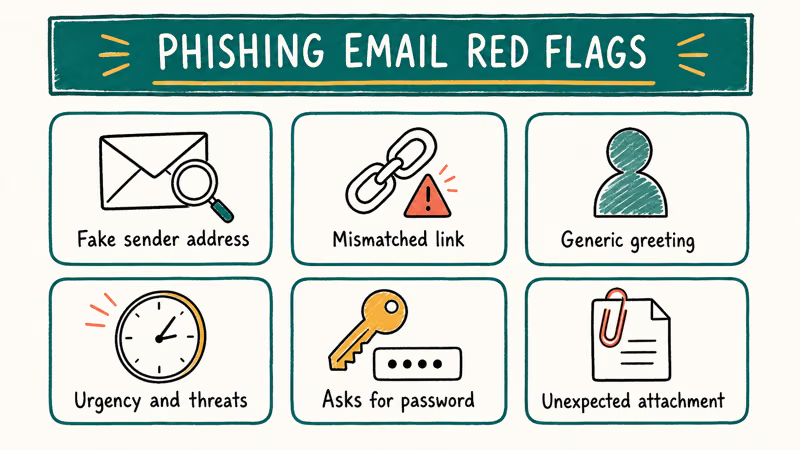
The strongest tell is a mismatched sender address. The display name might read “PayPal Support,” but the actual address is a random Gmail account or a lookalike domain. Open the sender details and read the full address character by character.
A mismatched link is the second. The visible text says one thing, but the real URL points somewhere else entirely. Generic greetings like “Dear Customer,” requests for passwords or payment details, and unexpected attachments round out the classic list.
These signs are the backbone of phishing detection. The rest of this guide shows you how to check each one.
#Check the Real Sender Address and Hover Over Links
Start with the sender. On a phone, tap the sender name to expand the full address; on a desktop, hover or click the name. Scammers use lookalike domains that swap or add characters, like amaz0n.com with a zero or paypa1.com with a one. According to Microsoft’s protect-from-phishing page, checking the sender’s real email address is one of the most effective ways to catch a fake.
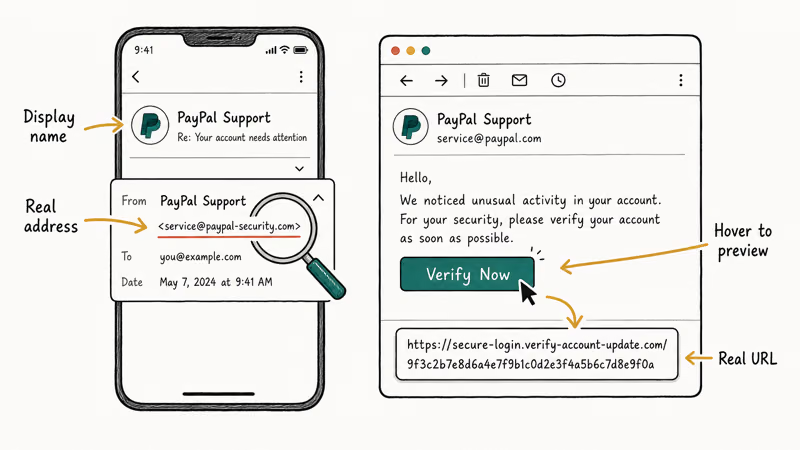
Then check the links without clicking. On a computer, hover your cursor over a link and read the URL that appears at the bottom of the screen. On a phone, press and hold the link to preview the destination.
A hover or long-press check is meant to expose a mismatched URL, even when the message looks polished. If the visible text says “yourbank.com” but the real URL is a string of random characters, that’s a phishing link.
Never trust a button that says “Verify Now” or “Update Account.” Buttons hide their destination, and that’s the point. Hover first, every time.
If anything looks off, stop. A single mismatch is enough reason to delete the email and reach the company another way.
#Watch for Urgency, Attachments, and Info Requests
Phishing runs on pressure. “Your account will be closed in 24 hours” or “Suspicious login detected, act now” are scripts designed to rush you past your judgment. According to the FTC’s recognize-and-avoid-phishing page, scammers lean on urgency precisely because it stops people from checking.
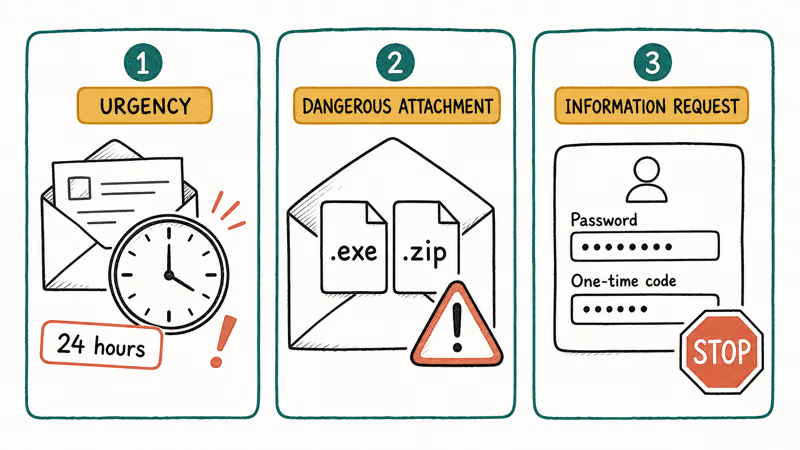
Unexpected attachments are a major red flag. Be especially wary of files ending in .zip, .exe, .docm, .html, .iso, or .js, which can carry malware. A real invoice from a company you use rarely arrives as a surprise attachment from an address you don’t recognize.
Information requests are the giveaway. No legitimate bank, government agency, or service emails you to ask for your password, full card number, or one-time code. A request for credentials is the one red flag you can treat as nearly conclusive on its own. Treat any such request as a scam.
Generic greetings still matter, too. A real service that has your account usually uses your name, while phishing blasts say “Dear User.”
#Why Has Phishing Gotten Harder to Spot in 2026?
The old advice to “watch for bad grammar” is outdated. AI writing tools now let scammers produce flawless, well-formatted emails in any language, so spelling and grammar are no longer a reliable signal at all, which means a message can read like it came straight from your bank’s marketing team and still be a complete fake. Judge the sender and the links, not the prose.
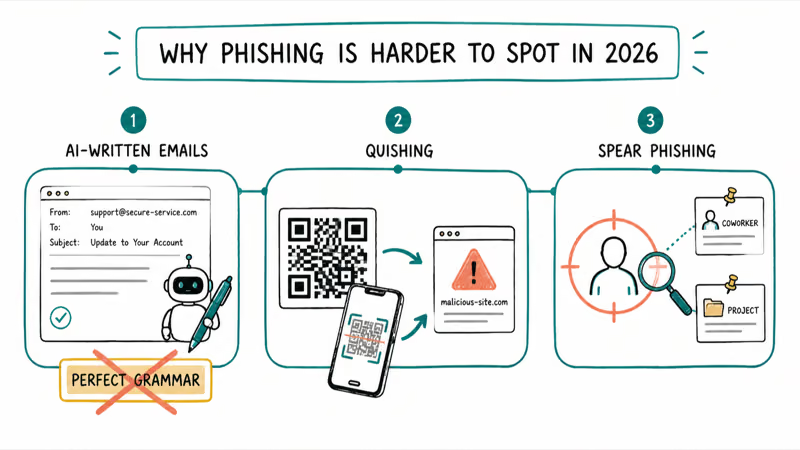
Two newer tactics matter. Quishing uses a QR code instead of a link, which sidesteps your hover check and routes you to a malicious site when you scan with your phone. The guide to QR code scams and quishing covers the mechanics in depth.
Spear phishing is the other shift. Instead of mass blasts, attackers research a target and reference real coworkers, recent purchases, or projects to seem legitimate. According to CISA’s recognize-and-report-phishing guidance, the government now recommends FIDO2-based authentication as the strongest defense, because it resists phishing even when a password is stolen.
So in 2026, assume a phishing email can look perfect. Verify the source independently anyway.
#How to Verify, Report, and Recover if You Clicked
When something feels off, verify independently. Never use the links or phone numbers in the email. Open a new browser tab, type the company’s address yourself, and log in there, or call the number printed on your bank card.
Report the email so others are protected. Phishing is illegal, so reporting it to the authorities matters: according to the FTC, you can forward suspicious texts to 7726, which spells SPAM, then report phishing emails at ReportFraud.ftc.gov. This guide is about defending your own account, not impersonating anyone, and your email client’s built-in “Report phishing” button helps too.
If you already clicked, move fast but stay calm. Disconnect the device from the internet, then on a separate, clean device change the password for the affected account and any account sharing that password. Reset your multi-factor authentication, run a malware scan, and if you entered payment details, call your bank.
Worried your address is already exposed? Check whether you can tell if your email is on the dark web and check if your email was in a data breach.
#Build Habits That Keep You Safe
A few habits make phishing far less dangerous. Turn on multi-factor authentication everywhere, so a stolen password alone can’t unlock your account. Pair that with a unique password per account, and the guide on how to create a strong password shows how. Where a service offers passkeys or a security key, use them, because they remove the password as a target.
Slow down on anything that creates pressure. The pause to check a sender address defeats many attacks. If a message claims your account has a problem, go to the site directly instead of clicking the link it gives you, because the whole scam depends on you reacting before you stop to verify where that button actually leads.
Keep your devices and browser updated, too. An unpatched device is what turns a stray click into a real compromise, the same way a phone gets infected, as the guide on how to tell if your phone is hacked explains.
#Bottom Line
Two checks matter most for phishing: read the real sender address, and hover over links to see where they actually go.
In 2026, stop relying on bad grammar as a tell, because AI now writes flawless scam emails. Watch instead for urgency, lookalike domains, and unexpected QR codes.
If something feels off, never use the links or numbers in the email. Open a new tab and reach the company through its verified site. If you already clicked, disconnect, change your passwords and reset MFA from a clean device, then report the email to the FTC and your provider.
#Frequently Asked Questions
How can I tell if an email is really from my bank?
Check the sender’s full address, not just the display name, and watch for a lookalike domain. Real banks never email to ask for your password or a one-time code. If you’re unsure, don’t click anything; open a new tab, type your bank’s address yourself, and log in there, or call the number printed on the back of your card to confirm whether the message was genuine.
Is it safe to open a phishing email if I don’t click anything?
Opening the message is usually safe on a modern email client, since most block remote content by default. The danger is interacting. Don’t click links, open attachments, scan QR codes, or reply, then delete it.
Does perfect spelling mean an email is legitimate?
No, and this is the biggest change in 2026. AI writing tools now let scammers produce flawless, professional emails, so perfect grammar is no longer a sign of safety. Judge the sender address and the links instead, because those are far harder to fake convincingly than a few sentences of clean prose.
What is quishing?
Quishing is phishing that uses a QR code instead of a clickable link. Scanning it with your phone bypasses the hover check and can route you to a malicious site.
What should I do if I already clicked a phishing link?
Disconnect the device from the internet right away. Then, on a separate clean device, change the password for the affected account and any account that shared it, reset your multi-factor authentication, and run a malware scan. If you entered payment details, call your bank, and report the email to the FTC and your provider.
Where do I report a phishing email?
Forward suspicious texts to 7726, which spells SPAM, and report phishing emails at ReportFraud.ftc.gov. Most email clients also have a built-in “Report phishing” button.

Is This Bank App Real? Spot a Fake App on Your Home Screen
A bank app can land on your home screen from a web page with no install warning. Learn the checks that tell a real banking app from a phishing web app.

Passkeys Not Syncing Between iPhone and Windows? Read This
Passkeys not syncing between iPhone and Windows is by design, not a bug. Here is why iCloud passkeys skip Windows Hello and the three ways to fix it.

VPN Not Working on Snapdragon X? Why It Fails, How to Fix
Your VPN won't install or connect on a Snapdragon X Copilot Plus PC because Windows on ARM can't emulate the network driver. Here are the fixes that work.

How to Check If a Link Is Safe Before You Click It
Learn how to check if a link is safe with official-first steps: read the real domain, use the app instead, and treat scanners as a second opinion only.