How to Create a Strong Password: 2026 Rules That Work
Learn how to create a strong password in 2026: why length beats symbols, how passphrases work, and why a manager or passkey beats memorizing it all.
Quick AnswerLength beats complexity, so a four-word passphrase like a string of unrelated words is stronger and easier to remember than a short jumble of symbols. Use a different password for every account.
Learning how to create a strong password in 2026 starts with one surprising rule: length matters more than symbols. A long passphrase made of random words beats a short string of special characters, and it’s far easier to remember. This guide covers what actually makes a password strong, how to build a memorable passphrase, and why a manager or passkeys are the realistic long-term answer.
- Length is the single biggest factor in password strength, so a long passphrase beats a short complex password
- A passphrase of four or more unrelated words is both stronger and easier to remember than random symbols
- Using a different password for every account is non-negotiable, because reuse means one breach unlocks everything
- A password manager generates and stores a unique strong password per account, which is the only realistic way to do this at scale
- Passkeys and 2FA are the layers beyond a strong password, and passkeys remove the password as a target entirely
#What Actually Makes a Password Strong?
Strength comes down to how hard a password is to guess by brute force, and that’s driven mostly by length and unpredictability, not by how many symbols you cram in. A longer password has exponentially more possible combinations, which is what defeats automated guessing.
Predictability is the other half. A password built from a dictionary word, your pet’s name, or a keyboard pattern like “qwerty” is weak no matter how long it looks. Unrelated, random elements are what make it strong.
So the goal isn’t a cryptic mess you can’t recall. It’s something long and unpredictable that you, and only you, can reproduce.
#Why Length Beats Complexity
For years, the advice was to mix uppercase, numbers, and symbols. The problem is that people respond predictably, turning “Password” into “P@ssw0rd1,” which attackers anticipate. Length is the better lever.
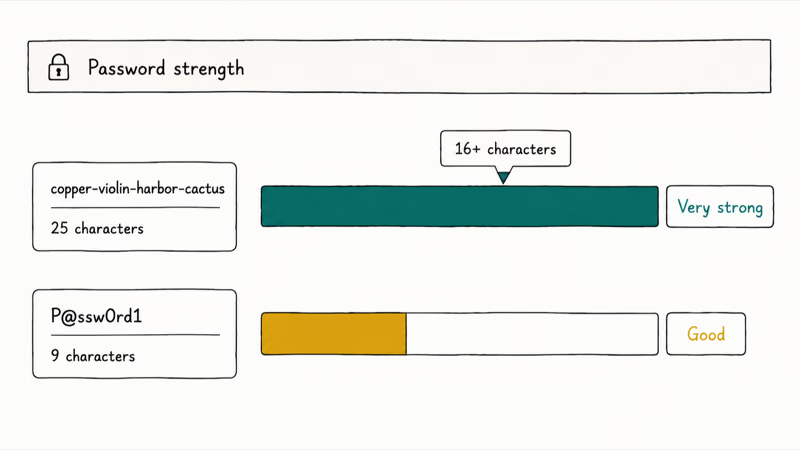
Modern guidance reflects this. According to NIST, a system should allow at least 64 characters and stop forcing the awkward complexity rules of the past, as set out in NIST’s digital identity guidelines. Aim for 16 characters or more on any important account. A random four-word passphrase gives you length and unpredictability without the predictable substitutions attackers expect.
The math is simple. Each extra character multiplies the number of guesses an attacker must make, so going longer adds far more strength than swapping one letter for a symbol. Length is the cheapest security you can buy.
Complexity still helps at the margins. But add it on top of length, not instead of it.
#How to Build a Memorable Passphrase
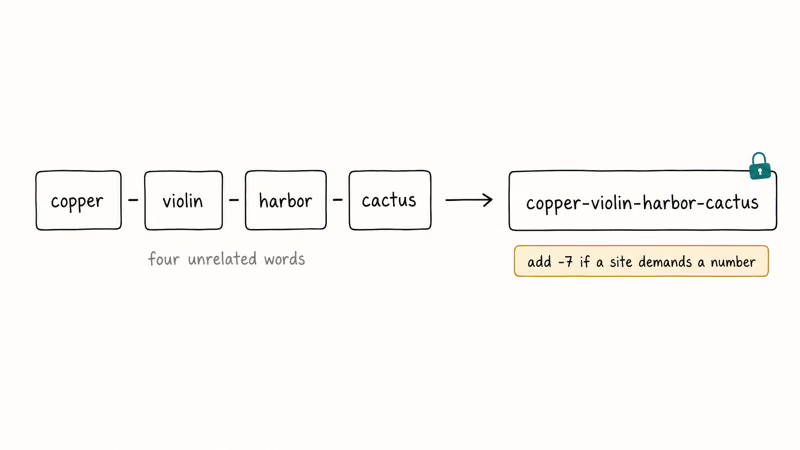
A passphrase is the practical way to get length you can remember. String together four or more unrelated words, like “copper-violin-harbor-cactus,” and you get a password that’s long, unpredictable, and easy to recall.
The trick is randomness. The words must be unrelated, because a phrase lifted from a song lyric or a common saying is guessable, and attackers feed exactly those phrase lists into their cracking tools. Pick words with no logical connection, and you defeat both the dictionary attacks and the people who happen to know you well.
You can add a number or symbol for sites that demand it, like “copper-violin-harbor-cactus-7.” That keeps the length while satisfying old complexity rules. Google’s create-a-strong-password help recommends building passwords that are long and unique to each account for exactly this reason.
A passphrase is also faster to type than a random jumble, which matters when you enter it dozens of times.
#What Should You Never Do With Passwords?
This guide is about protecting your own account, not guessing anyone else’s, which is illegal. A few mistakes undo all the good work. Never reuse a password across accounts, because attackers take credentials leaked from one breach and try them everywhere, a tactic called credential stuffing.
Avoid personal information entirely. Birthdays, names, and pet names are the first things an attacker tries, much of it public on social media. Skip common patterns like “123456” too.
Don’t lean on a single dictionary word, even a long one, since word lists are the first thing automated tools throw at a login. According to the FTC’s online-privacy advice, using a unique password for each account and a password manager to keep track is the recommended approach.
And never write passwords on a sticky note by your screen. If you must record one, store it somewhere truly secure.
#Use a Password Manager Instead of Memorizing
Here’s the honest truth: you can’t memorize dozens of long, unique passwords. Nobody can. That’s why a password manager is the realistic answer for anyone with more than a handful of logins.
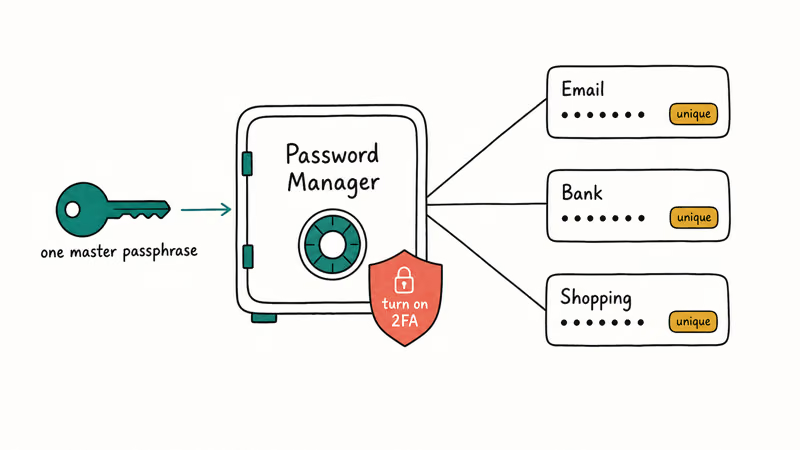
A manager generates, stores, and autofills a different strong password for every account, all locked behind one master password that you do memorize, ideally a long passphrase. It also removes most repeat typing because it can autofill saved logins while keeping each account on its own random password.
The built-in managers from Google and Apple are free and solid, and standalone apps add cross-platform features. Whichever you pick, protect that one master password fiercely and turn on its own 2FA, because it now guards everything.
This is also where your earlier work pays off. The strong passphrase you built becomes the master key, and the manager handles the rest.
#Where Passkeys and 2FA Fit In
A strong password is the base layer, not the whole defense. Two-factor authentication (2FA) adds a second step, so a stolen password alone can’t unlock the account, and you should turn it on everywhere it’s offered.
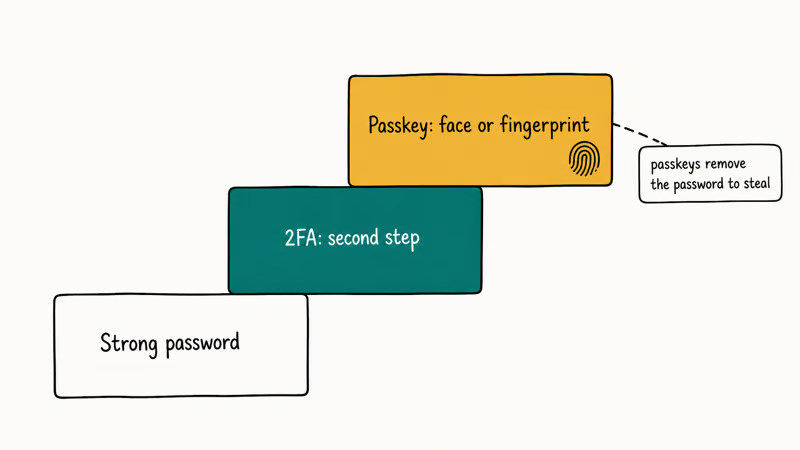
Passkeys go further by removing the password entirely. A passkey uses your device’s fingerprint, face scan, or screen lock to sign in, which means there’s no password to steal or phish. Where a service supports them, adopt them, and the guide to setting up passkeys on iPhone shows how.
To weigh the options, the comparison of passkeys versus passwords versus 2FA lays out when each makes sense.
Once your passwords are solid, lock down the accounts that matter most by securing your Google account and checking whether your router is hacked.
And since a stolen password usually starts with a scam rather than a brute-force crack, it pays to learn how to spot a phishing email before one ever reaches you, because the strongest password in the world is no help if you type it into a convincing fake login page.
#Bottom Line
The single biggest factor in password strength is length. A four-word passphrase made of unrelated words beats a short jumble of symbols and is far easier to remember.
The non-negotiable rule is uniqueness, since reusing one password means a single breach unlocks everything you own.
That’s why a password manager that generates and stores a different strong password per account is the realistic answer for anyone with more than a handful of logins. Layer 2FA on top, and where a service offers passkeys, adopt them, because they remove the password as a target entirely.
#Frequently Asked Questions
How long should a strong password be?
Aim for at least 16 characters on important accounts, and longer is better. A four-word passphrase clears that easily while staying memorable.
Is a passphrase safer than a complex password?
Usually, yes. A passphrase of four or more unrelated words is long, which is what defeats brute-force guessing, and it’s far easier to remember than a random symbol jumble. The one catch is that the words must be truly unrelated, not a song lyric or a common saying, because attackers run those exact phrase lists first.
Do I really need a different password for every account?
Yes, this is the most important rule. Attackers take passwords leaked from one site and try them on your email and bank, a tactic called credential stuffing. A unique password per account keeps a single breach contained.
Are password managers safe to use?
For almost everyone, yes, and they’re far safer than reusing passwords or writing them down. A reputable manager encrypts your data behind one master password, which is the only one you memorize, so make that master password a long passphrase and turn on the manager’s own two-factor authentication to protect the vault that now holds everything.
Should I still change my passwords regularly?
Not on a fixed schedule, which is outdated advice that just breeds weaker, predictable passwords. Change a password only when there’s a reason, like a breach notice or a sign you’ve been compromised.
Will passkeys replace passwords?
They’re heading that way for many services. A passkey uses your device’s biometrics or screen lock, so there’s no password to phish or steal, which makes it stronger than even a great password. Until every site supports them, you’ll still need strong unique passwords, ideally managed by a password manager that does the remembering for you.

Is This Bank App Real? Spot a Fake App on Your Home Screen
A bank app can land on your home screen from a web page with no install warning. Learn the checks that tell a real banking app from a phishing web app.

Passkeys Not Syncing Between iPhone and Windows? Read This
Passkeys not syncing between iPhone and Windows is by design, not a bug. Here is why iCloud passkeys skip Windows Hello and the three ways to fix it.

VPN Not Working on Snapdragon X? Why It Fails, How to Fix
Your VPN won't install or connect on a Snapdragon X Copilot Plus PC because Windows on ARM can't emulate the network driver. Here are the fixes that work.

How to Check If a Link Is Safe Before You Click It
Learn how to check if a link is safe with official-first steps: read the real domain, use the app instead, and treat scanners as a second opinion only.