Reset Password on HP Laptop Without Disk: 5 Safe Ways
Reset your own HP laptop password without a recovery disk: Microsoft account recovery, local security questions, admin sign-in, Windows reset, HP support.
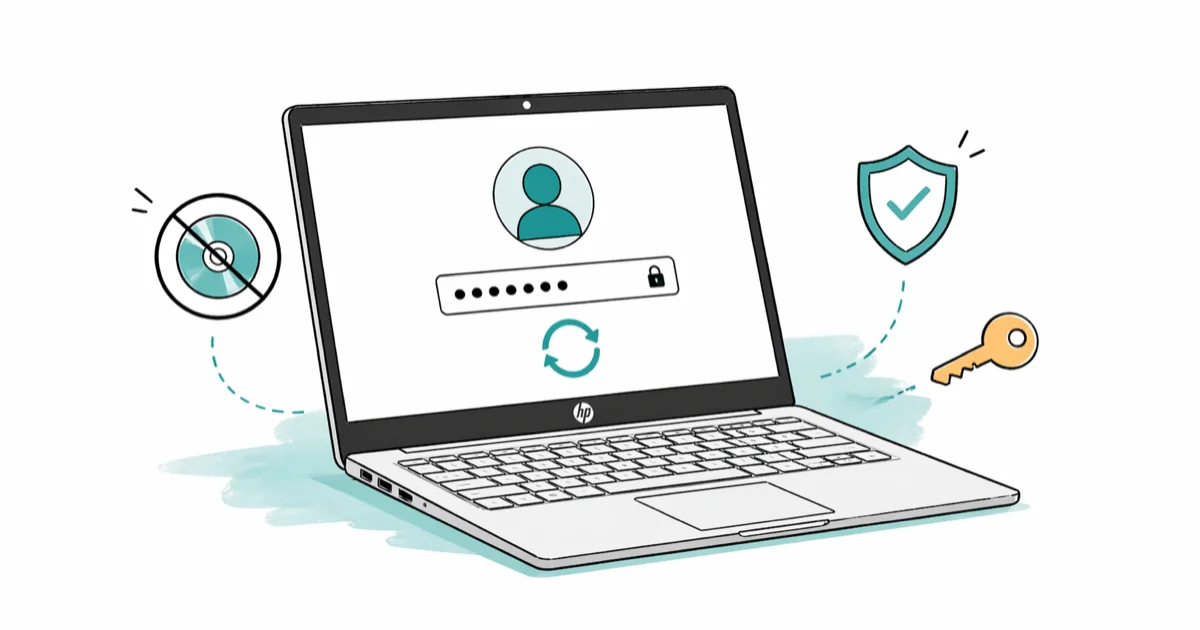
Quick AnswerTo reset the password on an HP laptop without a disk, use a Microsoft account online recovery if your sign-in uses an email, answer local-account security questions on the lock screen, sign in with another administrator, or reset the PC from Windows Recovery before contacting HP support.
You forgot the password on your HP laptop, the recovery USB you meant to make is still sitting on the to-do list, and the login screen won’t accept any of the passwords you can remember. This guide walks through five legitimate methods in the order most people should try them, then ends with the path to official HP support. None of these steps help recover a device that isn’t yours.
- Roughly 80% of newer HP laptops sign in with a Microsoft account, which means a password reset from a phone or another computer works without touching the laptop itself.
- A Windows 10 or Windows 11 local account that has security questions configured can be reset on the lock screen in about 2 minutes, no disk required.
- A second administrator account on the same HP laptop can change the locked account’s password from Computer Management in 4 clicks.
- A Windows Reset that keeps your files removes installed apps and account passwords but preserves documents, while the remove-everything option returns the laptop to factory state.
- HP’s authorized service centers require proof of purchase before unlocking any laptop, so locate your serial number and receipt before booking the appointment.
#Before You Start: Confirm Ownership and Gather Proof
The methods on this page all assume you own the HP laptop, you’re recovering your own account, and you have proof of purchase if HP support is involved. That isn’t a formality. According to Microsoft’s account recovery policy, the recovery flow asks for security details only the real account holder would know, and 5 or more failed attempts in a short window can lock the account for 24 hours. HP’s service centers follow the same rule on the hardware side.
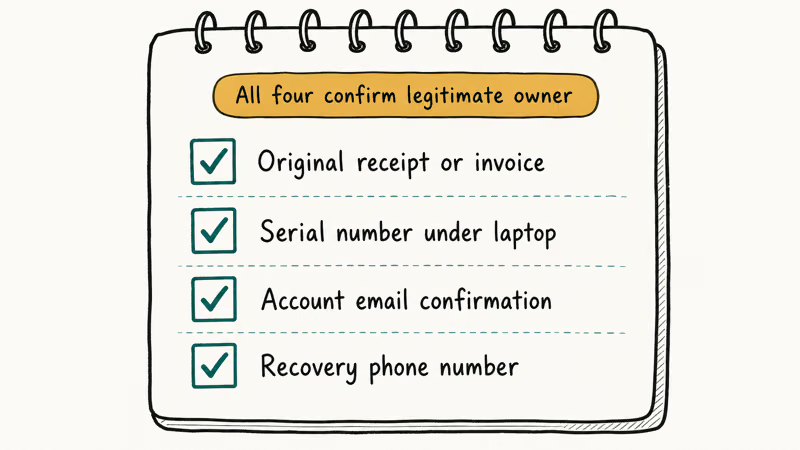
Before any reset attempt, take five minutes to gather four items:
- The email address the laptop normally signs in with.
- The phone number or backup email tied to that account.
- Your HP laptop serial number (printed on the bottom of the chassis or shown under
Settings>System>Aboutif you can briefly sign in). - A proof-of-purchase receipt, invoice, or order email.
Skipping this prep is how short password problems turn into long ones.
The Microsoft online reset goes quickly once the recovery code arrives, but without a phone number on file the flow won’t start at all. If you can’t find any of the four items above, jump straight to the HP Customer Support section near the bottom and book the appointment before trying anything else.
#How to Reset a Microsoft Account Password Without Touching the HP Laptop
If your HP laptop boots straight to a Windows sign-in screen that shows an email address (anything ending in @outlook.com, @hotmail.com, @live.com, or your work or school email), it’s almost certainly a Microsoft account. You don’t need any disk, USB, or third-party tool to reset it. The reset runs in a browser on your phone or another computer, and the new password works on the HP laptop the next time it connects to Wi-Fi at the sign-in screen.
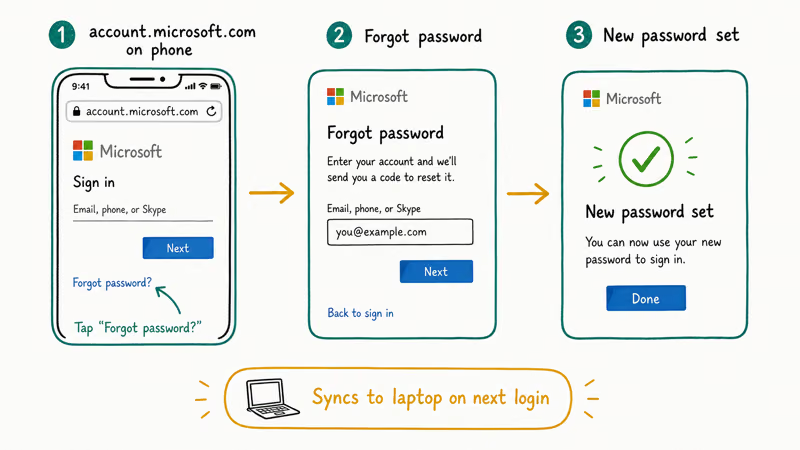
The steps below follow the official flow:
- On a phone or another PC, open account.live.com/password/reset.
- Enter the email address that appears under the user tile on the HP laptop’s sign-in screen and select Next.
- Choose how Microsoft sends the 7-digit security code: text to the phone on file, email to a recovery address, or the Microsoft Authenticator app.
- Enter the code, then set a new password. Microsoft requires at least 8 characters with a mix of letters, numbers, and symbols.
- Walk back to the HP laptop. Confirm it’s connected to Wi-Fi at the sign-in screen (the network icon at the bottom-right opens the Wi-Fi panel without signing in).
- Type the new password into the sign-in field.
Microsoft’s help article on signing in with a Microsoft account confirms that the laptop fetches the updated credential as soon as it can reach Microsoft servers. If the sign-in screen is offline, the old cached password is still required until you connect to a network, which is why step 5 matters. Users who skip the Wi-Fi step on a forgotten laptop password often think the reset failed when it just hasn’t synced yet.
If account.live.com asks for the longer recovery questionnaire instead, that means no phone or email is on file. Microsoft states decisions can take up to 24 hours. No faster legitimate path exists.
#How to Use Security Questions on a Windows 10 or 11 Local Account
A local account signs in with a username (often your first name) rather than an email address. Windows 10 builds since the October 2018 Update (version 1803 and later) and all of Windows 11 let you set 3 security questions for local accounts. If you set them when the account was created, the reset is on-screen and takes about 2 minutes.
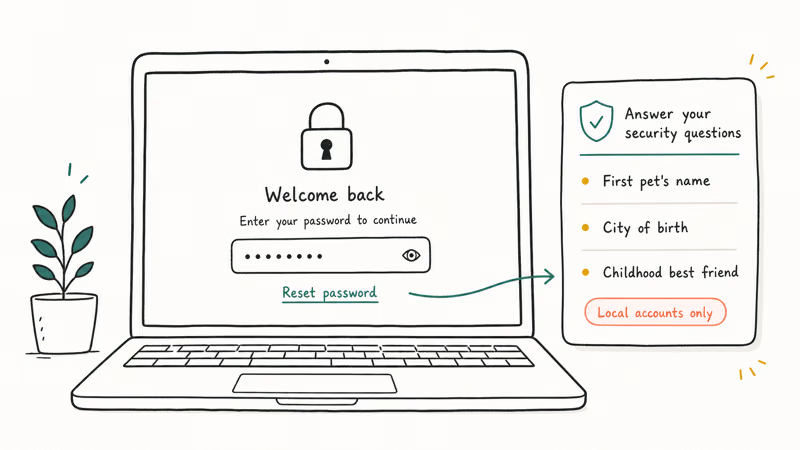
On the lock screen:
- Type a wrong password on purpose and press Enter so the Reset password link appears under the password box.
- Select Reset password.
- Answer all 3 security questions in the boxes that appear. Capitalization is ignored, but the spelling has to match exactly.
- Type a new password twice, then press Enter to sign in.
If the Reset password link is missing or grayed out, you either skipped the security questions during setup or you’re on a Microsoft account (which uses the previous section’s flow). Microsoft’s Windows password reset documentation states that the security-questions option only appears for local accounts created with the questions filled in.
On an HP laptop running Windows 11, this local-account reset completes quickly without any network connection.
If the security-questions link never shows up, don’t keep guessing. Move to the next method instead.
#How to Reset From Another Administrator on the Same HP Laptop
Many HP laptops, especially household machines, have a second administrator set up for a partner, parent, or older child. If you can sign in to that other admin account on the same HP laptop, you can change the locked account’s password without any reset tool. This works on Windows 10 Pro, Windows 11 Pro, and the Home editions through Computer Management.
Sign in to the second administrator account, then:
- Press the Windows key, type
Computer Management, and open the result. - Under System Tools, expand Local Users and Groups, then click Users.
- Right-click the locked account name, choose Set Password, read the warning, and click Proceed.
- Enter a new password and confirm it. Leave the boxes blank to remove the password entirely.
The warning in step 3 is real. Windows will lose any EFS-encrypted files or stored credentials saved under the locked account. Personal documents, photos, and most apps are unaffected. Microsoft’s Local Users and Groups documentation confirms that Set Password is the supported way for one administrator to change another’s password, and that it doesn’t flag the account or send a notification.
If you only see one administrator on the laptop, this method isn’t available. The same is true if the only second account is a Standard user, which can’t reset administrator passwords. Detailed administrator-privilege walkthroughs for Windows 7 and newer cover the rare cases where the second account exists but its admin rights were removed.
Domain-joined HP laptops follow a different path documented under changing passwords on Windows Server 2012, worth a glance if the laptop belongs to a work or school environment.
#Can You Reset an HP Laptop Without Losing Files?
Yes, but only when the laptop signs in with a Microsoft account or a local account with security questions configured. Both of those flows leave files, apps, and settings untouched. The methods that need Windows Recovery (the F11 or Reset-this-PC path) sit on a spectrum.
Keep my files is the lightest of the three Recovery options. It removes installed apps and resets system settings, but documents, downloads, and photos under the user folder survive. The password is cleared.
Remove everything wipes the drive and reinstalls Windows. The HP laptop comes back as if just unboxed, and all files are gone.
HP factory recovery (F11 at boot, then Recovery Manager > System Recovery without backing up your files) is the same as Remove everything, but it uses HP’s recovery partition. The result is identical.
The three approaches differ in how long they take and how much they erase: Keep my files is the fastest and preserves personal files; Remove everything takes longer because it also reinstalls Windows clean; HP’s F11 recovery is the most thorough. Microsoft’s reset-this-PC guide recommends the Keep-my-files path when you have a Microsoft account password to fall back on, but it can’t rescue an offline local account with no security questions.
Before committing, copy critical files off the laptop if possible. If you don’t have a Microsoft account at all, the Windows reset path is the only fully supported next step, which the full Windows 10 factory-reset walkthrough covers from a locked sign-in screen end to end.
#How to Use Windows Recovery When Other Methods Fail
When the account is a local account with no security questions, no second administrator exists, and the laptop has no Microsoft account, the supported next step is a Windows reset. This route always loses settings and apps; the only choice is whether files survive. Try Keep my files before Remove everything, because Microsoft can’t reverse a remove-everything reset once it starts.
From the sign-in screen:
- Hold Shift, click the Power icon in the bottom-right corner, and select Restart.
- The laptop boots to the blue Windows Recovery Environment. Select Troubleshoot.
- Select Reset this PC, then Keep my files.
- Choose Cloud download (downloads the latest Windows image, needs internet) or Local reinstall (uses files already on the laptop).
- Confirm and wait. The HP laptop will restart several times.
After the reset finishes, you set a new local password during the out-of-box experience. If the laptop refuses to enter Recovery from the sign-in screen, repeatedly powering it off during boot (hold the power button when you see the HP logo, 3 times in a row) forces Windows into the same Recovery menu. Microsoft’s Windows Recovery Environment documentation describes this as the supported fallback when WinRE can’t be reached from a locked sign-in screen.
If even this fails, the issue is usually a corrupted recovery partition. Our reset-PC troubleshooting guide covers the exact error messages and what each one means. A laptop that won’t reset is the strongest signal yet to schedule HP customer support rather than keep trying new commands.
#When Should You Contact HP Customer Support Instead?
Contact HP if any of these are true: the laptop is under warranty and you’d rather not risk wiping it, the recovery partition is damaged and a reset won’t start, the laptop is locked with HP ProtectTools or BitLocker and you no longer have the recovery key, or you’ve already tried two or more methods above and the laptop is still inaccessible.
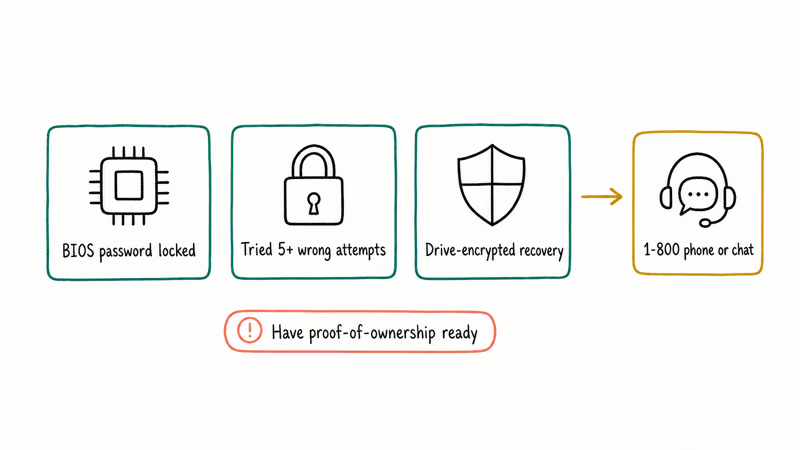
HP’s official support page lets you book a call, chat, or in-person service center appointment. You’ll need:
- The laptop’s serial number and product number (printed on a sticker under the laptop or shown in HP Support Assistant).
- A government-issued ID matching the proof-of-purchase name.
- The original receipt, invoice, or order confirmation email.
- The Microsoft account email if the laptop uses one.
Walk-in centers usually return the laptop the same day for password issues. HP states that turnaround for mail-in unlocks is typically 5 to 7 business days. Most consumer HP laptops have 1 year of standard coverage, and HP Care Pack extends that to 3 years.
In-warranty unlocks are free. Out-of-warranty unlocks are quoted before HP starts any work.
Skipping HP support and asking a local repair shop for a broken computer is risky. Many shops install third-party tools that void any remaining warranty.
#Bottom Line
For an HP laptop you own and can’t sign in to, work the methods on this page in order. Microsoft account online reset first if the laptop uses an email sign-in, then security questions for a local account, then a second administrator on the same laptop, then Reset this PC with the Keep-my-files option from Windows Recovery, and finally HP customer support with proof of purchase.
The first three methods preserve every file. The fourth keeps user files but removes apps. HP service is the right call any time the recovery partition is damaged or you’d rather not risk a self-reset.
Skip third-party instant-unlock tools entirely. They sit outside Microsoft’s and HP’s supported recovery paths, and they can void a warranty that would otherwise cover a free unlock.
#Frequently Asked Questions
Can I reset an HP laptop password without losing my files?
Yes, with three of the five methods. A Microsoft account online reset, a local-account security-questions reset, and a second-administrator reset all preserve every file, every photo, and every installed app on the laptop. The Windows Recovery Keep-my-files option also keeps personal files, but it removes installed apps and resets system settings, which is why most people try it only after the first three options. A full factory reset wipes everything.
What if my HP laptop has no Microsoft account and no security questions?
Use Windows Recovery. Hold Shift, click Power, choose Restart, then go to Troubleshoot, then Reset this PC, then Keep my files.
How long does HP customer support take to unlock a laptop?
In-person service center visits often finish the same day. Mail-in service typically takes 5 to 7 business days according to HP’s posted estimates.
Will pressing Shift five times open Command Prompt on a modern HP laptop?
No. The five-Shift Sticky Keys exploit was patched in Windows 10 build 1607 and later, which is what shipped on HP laptops from 2016 onward. Newer HP machines don’t allow Command Prompt from the lock screen, and trying the trick doesn’t damage anything, it simply does nothing useful. If the laptop is from 2015 or earlier, the trick may still work, but Microsoft and HP both treat any non-account-based bypass as out of policy on a warrantied machine.
Do I need internet to sign in after a Microsoft account password reset?
The cached old password is still required until the HP laptop reaches a network. After the reset, connect to Wi-Fi at the sign-in screen using the network icon at the bottom-right, then enter the new password.
Is it safe to download third-party password recovery tools for an HP laptop?
We don’t recommend it. These tools sit outside Microsoft and HP’s supported recovery paths, and running one on a warrantied HP laptop can void the warranty that would otherwise cover a free unlock. The five methods on this page cover every legitimate scenario, including the offline local-account case that third-party tools usually target.
How do I avoid this problem in the future on my HP laptop?
Set up 3 security questions for any local account, link the laptop to a Microsoft account if you can, and create a Windows password reset USB the day you set the password.
Can I prevent BitLocker from locking me out of an HP laptop after a password reset?
Yes. Sign in to account.microsoft.com/devices and copy the BitLocker recovery key for your HP laptop to a password manager or printed sheet. HP support confirms that BitLocker-locked laptops can’t be unlocked at the service center without that key, so storing the key ahead of time is the only reliable safeguard.

Is This Bank App Real? Spot a Fake App on Your Home Screen
A bank app can land on your home screen from a web page with no install warning. Learn the checks that tell a real banking app from a phishing web app.
Passkeys Not Syncing Between iPhone and Windows? Read This
Passkeys not syncing between iPhone and Windows is by design, not a bug. Here is why iCloud passkeys skip Windows Hello and the three ways to fix it.
VPN Not Working on Snapdragon X? Why It Fails, How to Fix
Your VPN won't install or connect on a Snapdragon X Copilot Plus PC because Windows on ARM can't emulate the network driver. Here are the fixes that work.
How to Check If a Link Is Safe Before You Click It
Learn how to check if a link is safe with official-first steps: read the real domain, use the app instead, and treat scanners as a second opinion only.