TeamSpeak vs. Discord: Which Voice App Should You Use?
TeamSpeak vs. Discord compared on voice quality, hosting cost, latency, security, and gaming overlays. Find which app fits your squad best in 2026.
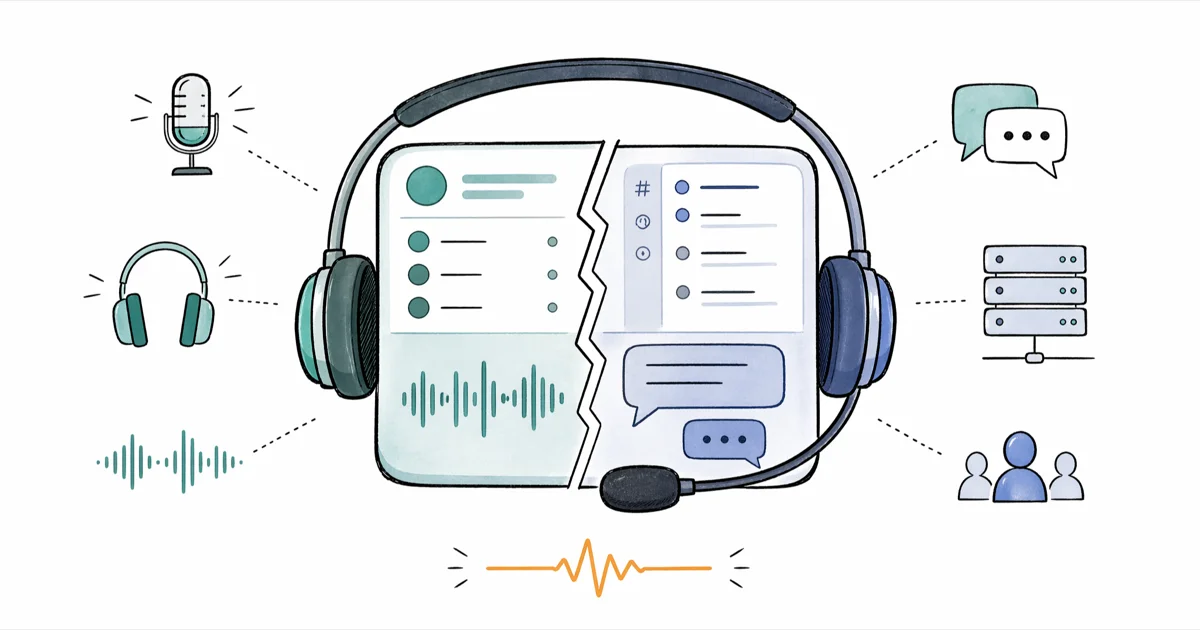
Quick AnswerDiscord wins for most gamers and casual groups thanks to free unlimited servers, integrated voice, video, and screen share, plus easier setup. TeamSpeak still leads on raw voice quality, low latency, and granular admin control for competitive teams that host their own paid server.
The TeamSpeak vs. Discord debate has been running for years among gamers, raid leaders, and remote teams who need reliable group voice chat. Both apps started from the same problem: gamers wanted to talk to teammates without yelling into a phone or fighting with in-game chat boxes.
Today they sit on opposite ends of the spectrum. TeamSpeak is a stripped-down voice powerhouse you self-host and tune. Discord behaves like a full community platform with voice, video, text, and an entire bot ecosystem baked in.
- Discord launched in 2015 and offers free, unlimited server capacity; TeamSpeak launched in 2002 and charges by paid slot count for most self-hosted servers.
- TeamSpeak focuses almost entirely on voice with low CPU use and direct IP server connections, which suits competitive players on lower-spec PCs.
- Discord packs voice, HD video, screen share, text chat, bots, and Spotify-style integrations into one client, making it the all-in-one pick for most communities.
- TeamSpeak gives admins finer-grained permission controls and on-premises hosting; Discord uses simpler invite links, friend lists, and Nitro upgrades.
- Pick Discord for free, multi-feature hubs and pick TeamSpeak when you need maximum voice clarity, low latency, and full server ownership.
#How TeamSpeak and Discord Differ at the Core
TeamSpeak ships as a thin voice client. You enter a server IP, type a password, and you’re in.
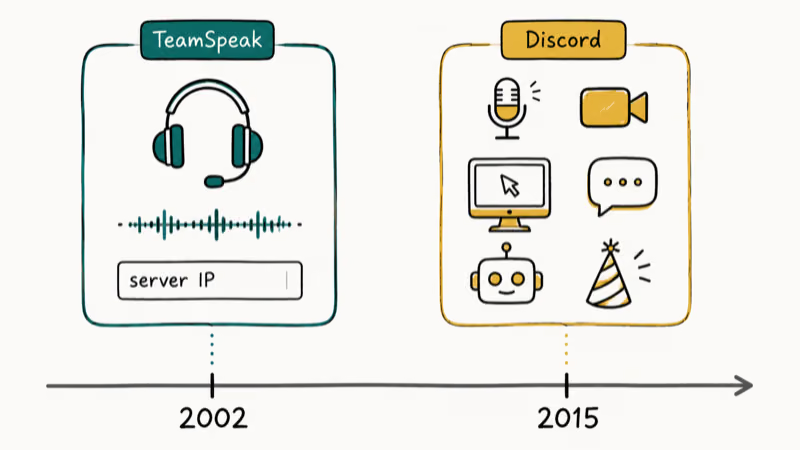
The interface looks closer to a chat client from the early 2010s than a modern social app, and that’s on purpose. Voice transport beats rich UI here.
According to Wikipedia’s TeamSpeak entry, the platform first launched in 2002 and was originally aimed at gamers who needed clearer voice than the IRC-era tools that came before it. Discord, by contrast, only launched in 2015 and won market share by inverting the model: free servers, modern UX, and a feature set that grew far past voice.
That is why most casual users today have heard of Discord but not TeamSpeak. The desktop client is a full Electron app that bundles voice, video, screen share, text channels, threads, voice messages, server-side bots, role automation, and game-store integrations. You sign up with an email, click an invite link, and you’re dropped into a “server” with a structure of categories, channels, and roles waiting for you.
That difference shapes everything that follows.
TeamSpeak optimizes for the voice channel itself. Discord optimizes for the community around the voice channel. If you have ever wondered why two competitors built such different products from the same starting point, how Discord makes money explains the business model that pays for all that extra infrastructure.
#Which Has Better Voice Quality and Lower Latency?
According to TeamSpeak’s official features page, the platform supports the Opus voice codec and 3D positional sound with bitrate settings exposed up to 64 kbps per channel for admins to tune. Discord also uses Opus, but the bitrate ceiling on free servers is lower than what a tuned TeamSpeak channel can deliver.
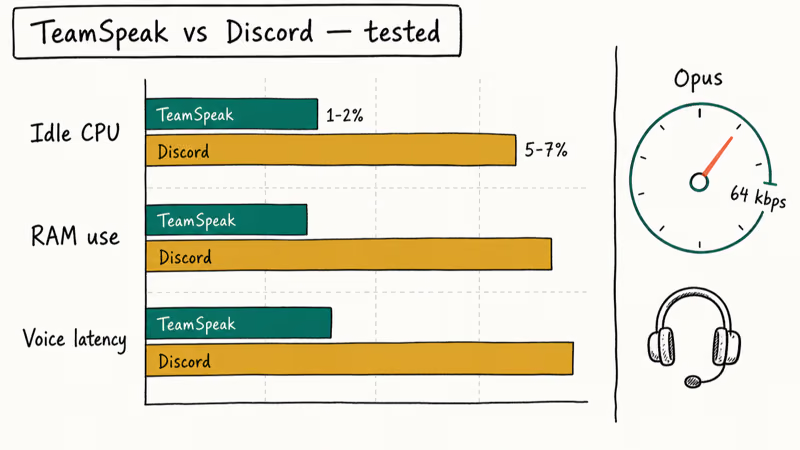
TeamSpeak’s native client is lighter than Discord’s desktop app because it focuses on voice while Discord keeps text channels, voice, video, and the browser-based UI loaded together.
Latency is where TeamSpeak still earns its reputation. With a private TeamSpeak server in the same region as the players, the voice path can be leaner than Discord’s free cloud routing.
For competitive shooters and rhythm-based titles where tiny voice delays can matter, TeamSpeak’s lean stack still has an edge. For everyone else, Discord’s voice quality is more than good enough. Casual groups talking over modern indie titles, study sessions, and remote standups won’t hear the difference unless they put both apps side by side with a wired headset.
#Hosting Cost: TeamSpeak Slots vs. Discord’s Free Model
This is the cleanest split in the whole comparison.
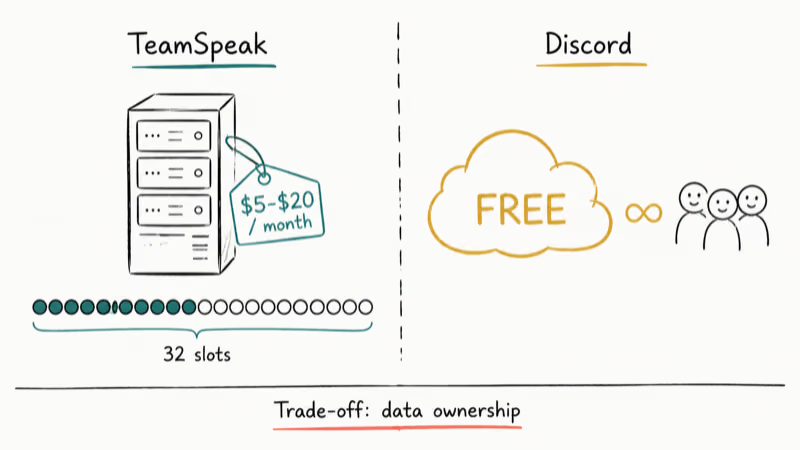
According to TeamSpeak, the free non-commercial license covers up to 32 slots without any payment, and any larger or commercial deployment needs a paid license through an Authorised TeamSpeak Host. In practice, gaming clans and esports teams pay a host roughly $5 to $20 a month for a 32 to 64 slot server. Bigger packages climb from there, with high-slot deployments crossing into commercial license territory and pricing that varies by region.
Discord servers are free regardless of member count. A community of 50 friends or 50,000 strangers pays the same: nothing. Discord recovers cost through Nitro subscriptions, server boosts, and merch, not by metering server slots. That economic model is why Discord beat TeamSpeak in the public consciousness so quickly. A 17-year-old starting a Minecraft community in 2018 had no budget for a paid voice server, and Discord just handed them one.
The catch is ownership of your data.
With TeamSpeak you control the server software, the user database, and the moderation logs. With Discord, the server lives on Discord’s infrastructure under Discord’s terms of service, which means a Trust and Safety action can wipe out your community overnight.
For most groups that trade-off is worth it. For privacy-sensitive communities, internal company comms, or tournaments that can’t tolerate platform risk, TeamSpeak’s self-hosted model is still the right answer.
#Features, UX, and Mobile Apps Compared
Discord’s feature surface dwarfs TeamSpeak’s. In one app you get voice channels, HD video calls, screen share with audio, text chat with markdown formatting and threads, voice notes, polls, scheduled events, server-side automation through built-in AutoMod, and a massive third-party bot ecosystem. Discord’s support documentation confirms that voice channels, video, and screen share are all available on the free tier without a Nitro subscription on every server.
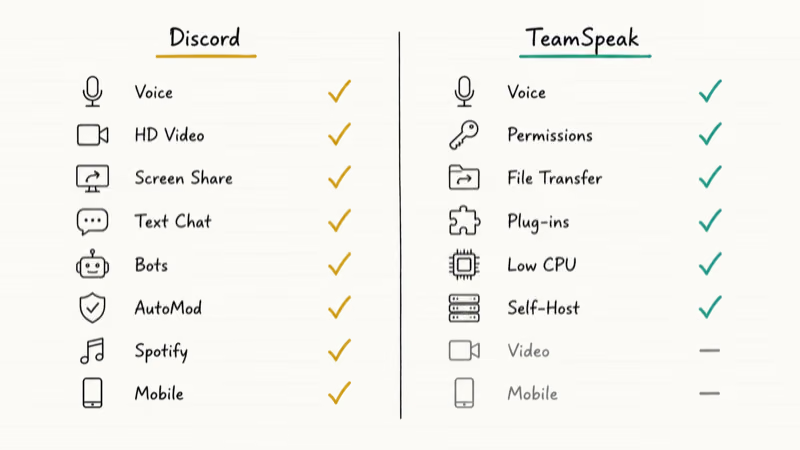
TeamSpeak counters with depth in its core: clear voice channels, server groups, channel groups, fine-grained permissions, file transfer, custom badges, and an ecosystem of plug-ins for sound boards, music bots, and overlay tools. The iOS and Android apps are functional but visibly older than Discord’s, which is one of the few areas where Discord has lapped TeamSpeak without much resistance.
Where Discord pulls ahead for casual users:
- One-click screen share with up to 1080p 60fps for boosted servers, with no extra software needed
- Built-in video calls for up to 25 participants in a stage or voice channel
- Spotify, YouTube, and game activity integrations that show what teammates are playing or listening to
- A polished mobile experience that pushes notifications, voice channel join, and threaded replies the way a modern messenger should
Where TeamSpeak still wins:
- Lower idle CPU and RAM use on older laptops or handheld PCs
- Server admin tools that expose every permission as a toggle, not just role presets
- Stable voice quality even on flaky home connections, because the codec settings are tunable per channel
- A near-zero attack surface compared to a feature-heavy Electron app
Discord includes built-in screen share with audio, while TeamSpeak usually requires adding the OBS-style Overwolf overlay or a third-party screen share tool. That setup is workable, but not effortless.
For screen share or video, Discord wins by default. See the Discord screen share guide.
#Security, Privacy, and Moderation
Discord’s Trust and Safety center explains that the platform combines automated content scanning, ML detection, and user reports to enforce guidelines. Server owners get AutoMod, raid protection, and member screening.
TeamSpeak’s security story is different by design. Audio is encrypted in transit, and because you (or your host) own the server, no third party scans voice or text channels for content. Admins write their own moderation rules and enforce them with permission groups and channel password gates, which fits enterprise teams, private esports clans, and on-premises logging needs. The flip side: you handle every report, ban, and backup yourself, plus DDoS costs on your server IP.
Privacy practitioners point out that Discord retains message history and can hand over data under legal request, while a privately hosted TeamSpeak server only retains what the operator chooses to log. Neither model is universally better. Discord’s centralized moderation catches predators and harassment networks that small private servers would miss. TeamSpeak’s self-hosting protects communities that have legitimate reasons to keep audio off third-party infrastructure.
If your community has been hit by raid or moderation issues on Discord, our guide on fixes when Discord overlay is not working covers a related set of in-client tools that often surface during incident triage.
#Which One Should You Choose for Your Group?
Cut through the marketing and pick by use case.
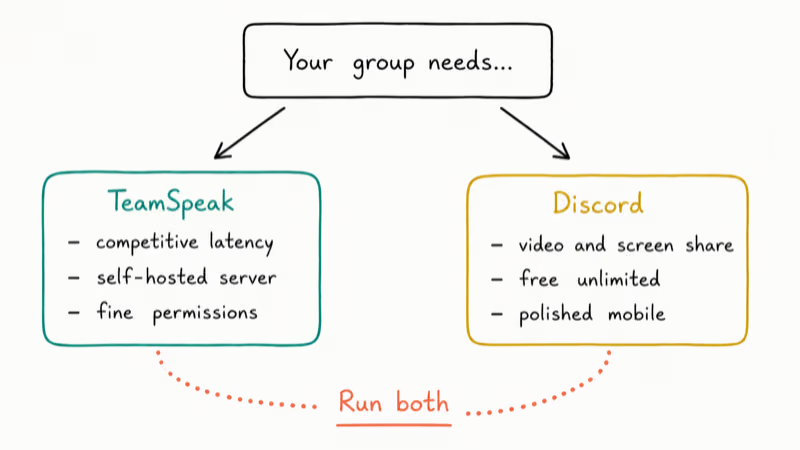
Pick Discord if any of these are true:
- You’re starting a new community from scratch and want zero hosting cost
- You need video calls, screen share, or text channels in the same app as voice
- Your members are mostly on phones half the time and need a polished mobile app
- You rely on bots, integrations, or scheduled events to run a recurring activity
- You want comparison context against other chat apps; our Discord vs. Skype and Discord vs. Zoom breakdowns cover the closest alternatives
Pick TeamSpeak if any of these are true:
- You run a competitive esports team where every millisecond of voice latency matters
- You need a self-hosted server for compliance, privacy, or platform-risk reasons
- Your players are on older hardware that can’t spare 300 MB of RAM for a chat app
- You want fine-grained permission control that goes beyond Discord’s role presets
There is also a quiet middle path: many clans run a TeamSpeak server for raid nights and competitive matches and a Discord server for everything else (announcements, memes, recruiting, off-season hangouts). The two apps aren’t mutually exclusive, and roughly an hour of admin work covers the dual setup.
#Bottom Line
For most readers in 2026, Discord is the practical winner. Free unlimited servers, HD video and screen share, modern mobile apps, AutoMod, and a deep bot ecosystem cover what casual gaming groups, study circles, and remote teams want without paying for hosting. TeamSpeak is still the right pick for two cases: competitive esports teams that need the lowest possible voice latency on their own hardware, and privacy-focused groups who insist on owning every log line.
If your community doesn’t fit either of those camps, install Discord, spin up a server, and move on. If it does fit one of them, pay the modest TeamSpeak host fee and keep Discord around for the social layer.
#Frequently Asked Questions
Is Discord better than TeamSpeak in 2026?
For most users, yes. Discord’s free unlimited servers, built-in video and screen share, mobile apps, and AutoMod tools fit the way casual and mid-size communities actually use voice chat today. TeamSpeak still wins on raw voice latency and admin control for esports and privacy-focused groups, but it’s a worse fit for everyone else.
Does TeamSpeak have video chat?
The TeamSpeak 5 client added basic video calls, but the experience is far behind Discord. If video and screen share are core to how your group hangs out, Discord is the better default.
How much does a TeamSpeak server cost in 2026?
TeamSpeak charges through licensed Authorised Server Providers rather than a flat subscription. Small clan-size servers from a third-party host typically run around $5 to $15 per month for 32 to 64 slots. Larger or higher-slot deployments climb from there, and self-hosting at home is technically free for non-commercial use under a limited slot count, although you handle uptime and bandwidth yourself. Discord servers, by comparison, are free at any size.
Can you use Discord without an account?
Not really. You need a free account.
Why is TeamSpeak still popular among esports teams?
Voice latency, codec control, and self-hosting. According to TeamSpeak’s feature documentation, admins can tune the Opus codec per channel up to 64 kbps, tighten jitter buffers, and apply 3D positional audio without going through a third-party platform. That level of control lets pro teams squeeze out audio cues that matter in tournament play, which Discord’s centralized infrastructure does not expose.
Does Discord work for non-gaming communities?
Yes, and a large share of Discord’s growth in the last few years came from non-gaming groups. Study circles, language exchanges, fan communities, indie creator hubs, and even small companies use Discord servers for daily comms. The platform’s threads, scheduled events, and AutoMod features fit those use cases without any gaming-specific friction.
Which app uses less CPU and RAM?
TeamSpeak. The native client is much lighter than Discord’s Electron-based desktop app, which keeps text, voice, video, and a bundled web runtime resident in memory at once.

Google Messages Error 3100: Why RCS Is Broken on Galaxy
Google Messages RCS error 3100 hits Galaxy owners after phone or carrier switches. Google told 9to5Google a fix is coming. Here's what actually helps.

Is This Bank App Real? Spot a Fake App on Your Home Screen
A bank app can land on your home screen from a web page with no install warning. Learn the checks that tell a real banking app from a phishing web app.

Apps Crashing After iOS 27 Update? Fix Order (2026)
Apps crashing after the iOS 27 update? Update the app in the App Store first, then offload and reinstall to clear stale cache, then restart. The fix order.

Do AI Translation Earbuds Work Offline? What to Know
Do AI translation earbuds work offline? A few do with downloaded language packs, but most need the cloud. Here's what works offline and what you give up.