How to Open a Snapchat Without the Person Knowing?
Snapchat marks chats and snaps as opened the moment you tap them. Here's what really works to preview a message and protect your privacy in 2026.
Quick AnswerSnapchat is built to notify senders the moment you open a chat or snap, so true stealth viewing isn't possible inside the app. Lock-screen notification previews and the chat-list peek gesture are the only legitimate ways to skim a message on your own account before it's marked opened.
You can’t fully open a Snapchat on your own account without the sender finding out. Snapchat marks the chat as Opened the second you tap it, and there is no in-app switch to turn that off.
What you can do is preview a chat from the lock screen, peek at the chat-list bubble, or tighten the privacy settings on your own profile. Everything else, including airplane-mode tricks and “stealth viewer” apps, is either broken, against Snapchat’s Terms of Service, or both.
- Snapchat marks chats and snaps as Opened the instant you tap them; the app has no read-receipt off switch
- Lock-screen notification previews show text-chat content without opening the conversation on iOS 15 and later and on Android 11 and later
- The chat-list peek gesture lets you see the sender’s name and bitmoji without committing to mark the chat as opened
- Stories always tell the poster who viewed them; there is no built-in stealth viewer for stories
- Trying to view another person’s Snapchat without consent violates Snapchat’s Terms of Service and likely your local privacy laws
#How Snapchat Marks Snaps and Chats as Opened
Snapchat tracks four states for any message: Sent, Delivered, Opened, and, for snaps, Replayed. According to Snapchat’s Chat & Snap States help page, a chat or snap changes to Opened after you open it, and the sender can see that state in the app. There is no toggle to turn that off.
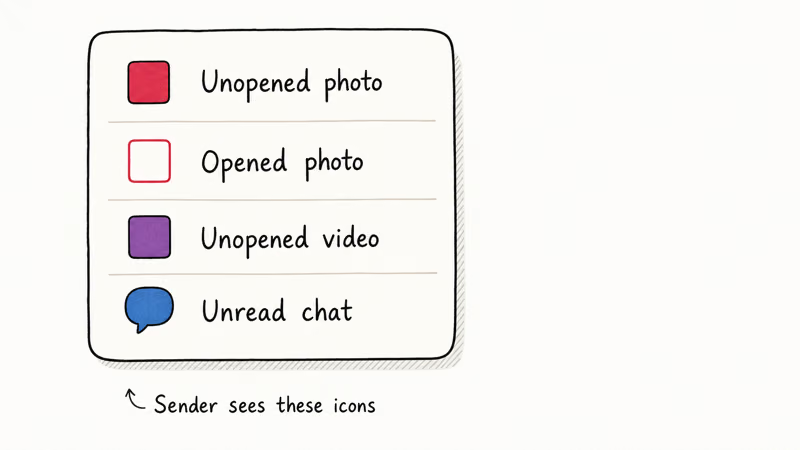
This is by design. Snap Inc. built the app around disappearing messages, so the read state has to be reliable.
That means a true full open is not private: once the app records Opened, the sender can see that state.
A few practical consequences flow from this:
- You can’t “open then unsend”; the read receipt fires before unsend would.
- Re-installing the app does not erase a state that’s already been transmitted.
- Pull-to-refresh and force-quitting don’t roll back the Opened state.
If the sender hasn’t gotten the Delivered receipt yet, because of poor signal, the app being closed, or you blocking them, the message is still in Sent limbo. Once it hits Delivered, your tap is the trigger.
#Can You Read a Snap Without the Sender Knowing?
For a snap that has already arrived in your chat list, no. Opening it in the Snapchat app will always notify the sender.
The only legitimate ways to see something of a message without firing the Opened receipt are reading the lock-screen notification or peeking at the chat-list profile shortcut. Both are limited to short text chats. Snaps (photo and video) never preview their content outside the app.
The shortcut workarounds you’ll find on older blog posts (airplane mode, clearing the app cache, signing out before opening) are either patched or have always been unreliable. The next two sections explain why.
#How to Preview a Chat Before Tapping It Opened
You have two reliable previews on your own device. Neither one is a hack; they’re standard OS notification features.
#Lock Screen Notification Preview on iPhone and Android
When Snapchat sends you a text chat, your phone’s notification system shows the sender’s username and the first 80 or so characters of the message on the lock screen. You can read the preview without touching the Snapchat icon. The read state stays at Delivered until you actually open the chat.
To make sure full previews are on:
- iPhone: Open
Settings>Notifications>Snapchat, set Show Previews to Always. Apple’s iPhone Notifications guide confirms that the preview behavior applies to every messaging app installed on the device, including Snapchat. - Android: Open
Settings>Apps>Snapchat>Notifications, and turn on Show content on lock screen.
If notifications aren’t appearing at all, Snapchat notifications not working on iPhone walks through the usual culprits.
A caveat: this only previews text chats. Photo and video snaps show a generic “You received a snap from [name]” banner. The picture or video content stays hidden until you open the app, which is when the receipt fires.
#The Chat-List Peek Gesture
Inside the Snapchat app, the Chats tab shows a row for each conversation. Tap the bitmoji icon on the left side of a row, not the chat row itself, and you see the sender’s profile card. The chat stays in its current state, Delivered, never Opened. This isn’t a bug; it’s how the profile shortcut is designed.
The peek only reveals identity and friend status, not message content. Use it to confirm who’s behind a snap before you decide whether to open it.
#Why Airplane Mode and Logout Tricks No Longer Work
A long tail of how-to articles still recommend opening Snapchat in airplane mode, then clearing the cache or signing out before reconnecting, on the theory that the app can’t fire the Opened event with no network connection. Those workarounds have the same practical problem: once Snapchat can sync again, the Opened state can appear for the sender.
| Old workaround | What actually happens |
|---|---|
| Open snap in airplane mode, force-quit Snapchat, then go online | The queued Opened event syncs after reconnecting. Sender sees the receipt. |
| Open snap in airplane mode, sign out, then sign back in | Same result; the event is stored client-side and syncs on the next session. |
| Clear cache (Android) before reconnecting | Snapchat re-downloads the conversation from the server, which already has the Opened flag. |
Table caption: Legacy airplane-mode tricks don’t prevent the Opened state from syncing.
Snapchat’s enforcement against third-party clients and modded APKs has been aggressive for years. Accounts caught running tools like Phantom or SCOthman often get a permanent ban on first detection. Don’t risk a permanent ban for a workaround that doesn’t work.
#How Can You Protect Your Own Snapchat Privacy?
You can’t stop senders from getting read receipts, but you have full control over what other people see about your activity. These privacy settings are worth checking in Settings:
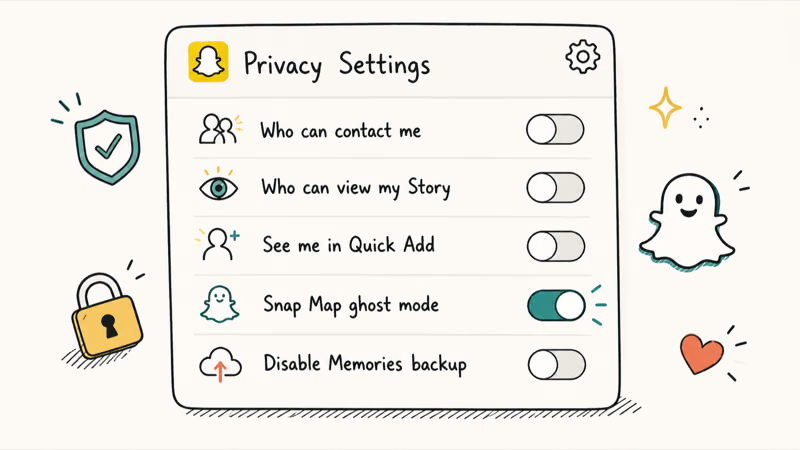
- Who Can Send Me Snaps: set to Friends (or Friends + Friends of Friends if you want some discoverability). This blocks random snap requests.
- Who Can View My Story: set to Custom and exclude anyone you don’t want watching. Or use a private story when you want to share with a hand-picked list.
- Show Me in Quick Add: turn this off if you don’t want strangers seeing your username in their suggestions.
- My Location: set to Ghost Mode on Snap Map.
- Contact Me: limit to Friends so non-friends can’t start chats.
For Memories and saved photos that you’d rather no one else see, move them into My Eyes Only. It’s a passcode-locked vault inside Snapchat that doesn’t even show locked thumbnails for files you’ve stored there. That’s the right place for anything sensitive.
If you’ve been swapping snaps with someone you want to cut off cleanly, clear your recents list and delete saved chat messages before you block them. Blocking alone leaves shared saved messages visible to both sides until one party deletes their copy.
#Parental Supervision Through Snapchat Family Center
If you’re a parent who wants to know who your teen is messaging on Snapchat, the right tool is Snapchat’s official supervision feature, not a third-party tracker.
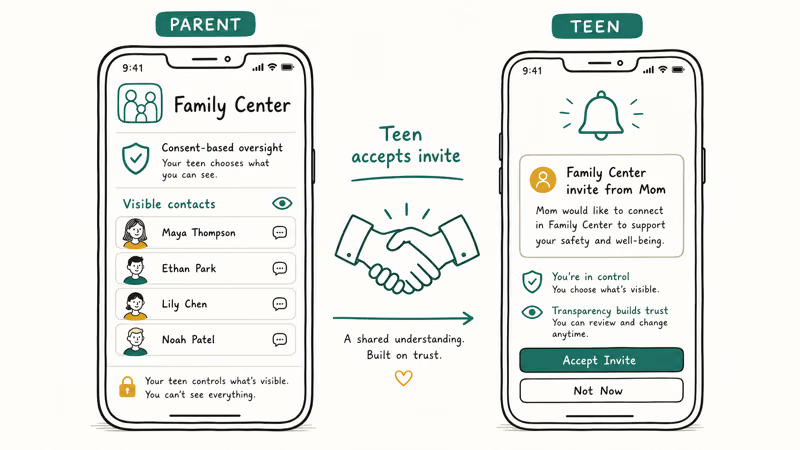
The Family Center help article states that parents can see a rolling 7-day list of who their teen has communicated with and the teen’s full friend list, but not the content of any message. That trade-off is deliberate. Snap Inc. designed the feature so parents get visibility into contacts and patterns without breaking the privacy expectations that make the app what it’s like for teens.
Setting it up takes about 5 minutes:
- Both parent and teen need their own Snapchat accounts.
- The parent opens
Settings>Family Centerand sends an invite to the teen’s username. - The teen accepts on their account.
- The parent then sees the recent chat partners and friend list.
Family Center is not a covert tool. The teen gets a notification when the parent first views the dashboard, and the supervision is mutual and visible.
That transparency is exactly what makes it consent-compliant. The third-party “spy app” route promises more (message content, screenshots) but it violates Snapchat’s Terms of Service and most jurisdictions’ wiretapping or stored-communications laws. Snapchat’s Community Guidelines confirm that automated or unofficial means of accessing Snapchat are prohibited, and third-party monitoring software can put the account at risk. Stick with Family Center.
#Bottom Line
For previewing a chat on your own account, use the lock-screen notification or tap the bitmoji on the chat row, since those two surfaces don’t fire a read receipt. For controlling what other people see about you, set Who Can View My Story to Custom, turn off Quick Add, and move sensitive saves into My Eyes Only. If you’re a parent, set up Snapchat Family Center together with your teen instead of installing any third-party tracker.
#Frequently Asked Questions
Can you read a Snapchat without the sender knowing?
Not fully. The lock-screen preview and the bitmoji-tap shortcut show some metadata without opening the chat, but the moment you tap the chat row itself, Snapchat marks it as Opened and the sender sees the receipt within seconds. There is no in-app toggle to turn read receipts off.
Does the notification preview always show the snap?
Only for text chats. Photo and video snap notifications stay generic; the picture or video stays hidden until you open the app.
Does Snapchat tell you when someone screenshots your chat?
Yes. Snapchat sends a screenshot notification for chats, snaps, and stories. The notification appears next to the affected message in the chat and shows up in the sender’s chat list. Screen-recording is also detected, with the same notification result.
Can you tell if someone replayed your snap?
Yes. Snapchat fires a Replayed state to the sender when a recipient uses the one allowed replay per snap. The replay icon shows next to the original snap entry in the chat log.
Is using a third-party Snapchat viewer app safe?
No, and the risks stack up quickly. Snapchat regularly bans accounts caught running third-party clients, using one likely violates wiretapping or stored-communications laws if the target isn’t you, and the apps themselves often contain credential-harvesting code that exposes your own password. There’s no legitimate third-party app for covert read access to someone else’s Snapchat.
Does Snapchat have a built-in read-receipt off switch?
No, and Snap Inc. hasn’t signaled one is coming.
What is Snapchat Family Center?
Family Center is Snap Inc.’s official parental supervision tool. After both parent and teen accept the invitation, the parent sees who the teen has been messaging with in the past 7 days and the teen’s friend list. It doesn’t show message content. Both parties get notifications, so it’s a transparent supervision tool, not covert monitoring.

Google Messages Error 3100: Why RCS Is Broken on Galaxy
Google Messages RCS error 3100 hits Galaxy owners after phone or carrier switches. Google told 9to5Google a fix is coming. Here's what actually helps.

Is This Bank App Real? Spot a Fake App on Your Home Screen
A bank app can land on your home screen from a web page with no install warning. Learn the checks that tell a real banking app from a phishing web app.

Apps Crashing After iOS 27 Update? Fix Order (2026)
Apps crashing after the iOS 27 update? Update the app in the App Store first, then offload and reinstall to clear stale cache, then restart. The fix order.

Do AI Translation Earbuds Work Offline? What to Know
Do AI translation earbuds work offline? A few do with downloaded language packs, but most need the cloud. Here's what works offline and what you give up.