How to Find an AirTag Tracking You (iPhone + Android)
Worried an unknown AirTag is following you? Here is how to detect, locate, and safely disable an unwanted tracker on iPhone or Android in 2026 fast.
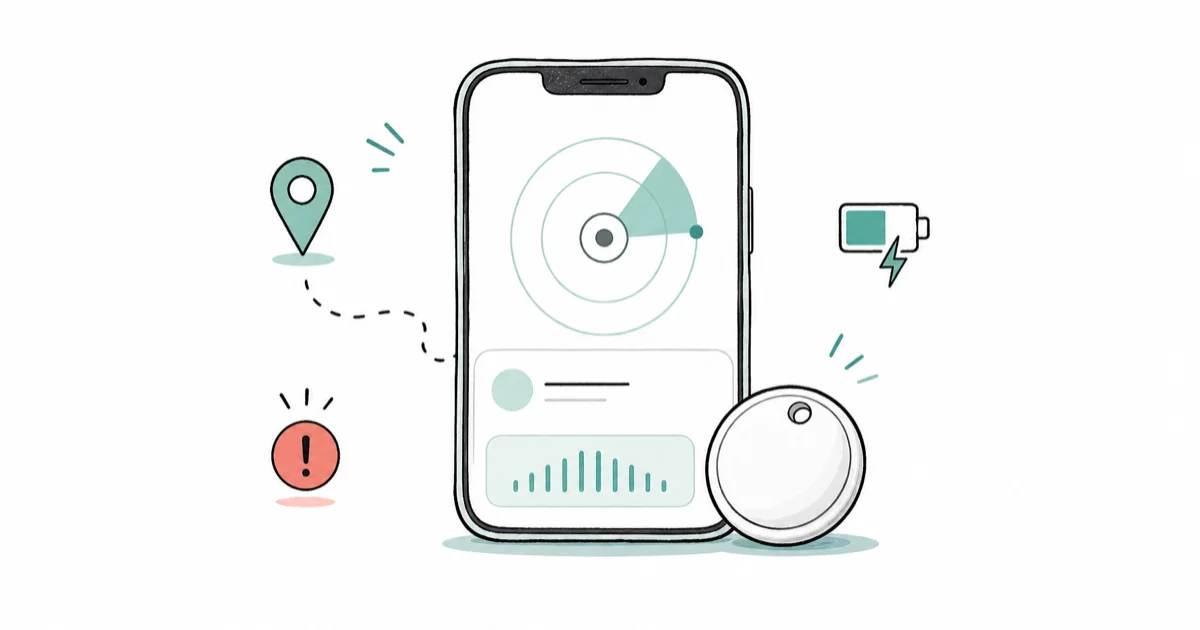
Quick AnswerOpen Find My on iPhone and tap Items > Items That Can Track Me > Search, or on Android go to Settings > Safety & Emergency > Unknown tracker alerts > Scan now. Disable a confirmed tracker by removing its CR2032 battery.
If you suspect an unwanted AirTag is tracking you, both iPhone and Android now have built-in tools that scan for nearby Bluetooth trackers. The detection paths look different on each platform, but the core idea is identical: identify the tracker, locate it with sound or distance cues, then physically disable it.
The steps below cover both the iPhone Find My scan and the Android Settings scan, so you can follow whichever platform matches your phone.
- iPhone owners on iOS 17.5 or later get automatic alerts when an AirTag or compatible tracker is moving with them
- Android 6 and later includes a built-in Unknown tracker alerts scan that finds AirTags without a separate app
- Toggling Bluetooth, Location, or Find My on your own phone does not stop the AirTag from broadcasting your location
- Removing the CR2032 coin-cell battery is the only way to fully disable a tracker you find
- Move to a safe public place before disabling a tracker if you suspect a stalking or domestic violence situation
#How Unwanted Tracking Alerts Work
Apple introduced AirTag in 2021. Within months, reports surfaced of people finding the small Bluetooth tags hidden in their bags and cars.
To respond, Apple and Google later published a joint industry specification for cross-platform unwanted tracker alerts. An iPhone can now warn you about a Google-network tracker, and an Android phone can warn you about an AirTag. If you’re shopping for your own tracker, our Samsung SmartTag 2 vs AirTag breakdown compares which network each tag rides on across iPhone and Android.
According to Apple’s unwanted-tracking support documentation, iOS uses Bluetooth signal patterns to detect when an unknown AirTag, AirPods, or compatible Find My-network accessory has been moving with you for a while after being separated from its owner.
On iPhone the alert appears as a notification.
The exact text Apple lists includes “AirTag Found Moving With You”, “AirPods Detected” (or “AirPods Pro Detected” / “AirPods Max Detected”), “[Product Name] Found Moving With You”, and “Unknown Accessory Detected” for older or third-party items. Tapping the notification opens a card with the tracker’s identifier and options to play a sound.
On Android the equivalent automatic alert reads “Tracker traveling with you” and uses the same underlying joint specification. Google’s unknown tracker alerts guide confirms the feature is built into Android 6 and later as part of Google Play services. Most modern phones get it without installing anything. The system rolled out in July 2024.
Apple’s support page states that iOS 17.5 or later, Bluetooth on, Location Services on, and Tracking Notifications enabled under Settings > Privacy & Security > Location Services > System Services are required for automatic alerts on iPhone.
The alert can appear on older iOS versions for AirTags specifically, but Apple recommends iOS 17.5+ for the broadest tracker coverage. On Android the same enabling factors apply: Bluetooth on, location on, and Google Play services up to date.
Timing is the part that confuses people most.
Apple’s safety documentation describes the alert as appearing after the tracker has been separated from its owner for a while and has continued moving with you, without committing to a fixed window. Community testing and reports from outlets like Engadget’s AirTag detection explainer suggest the practical range is anywhere from a few hours to roughly a day, and Apple has tightened that window with firmware updates.
The AirTag’s own audible chirp plays when it’s far from its owner for an extended period. It won’t start the moment you walk away from the tracker’s owner; it needs the owner to be out of Bluetooth range for hours before it sounds. That’s part of why a manual scan is useful when you have a specific suspicion.
If you also worry about software-based surveillance running on the phone itself, our guide on how to detect spyware on iPhone covers a different attack surface that often gets confused with AirTag tracking. The two threats are independent.
#How Do You Find an AirTag That Is Tracking You?
On iPhone the manual scan lives inside the Find My app.
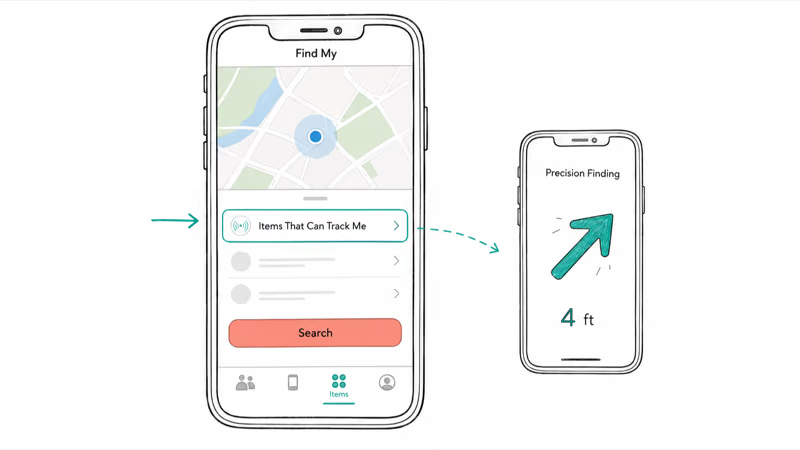
Open Find My, tap the Items tab at the bottom, scroll past your registered items, and tap “Items That Can Track Me.” Tap Search. The scan checks for AirTags, Find My-network accessories like AirPods, and third-party trackers that comply with the joint Apple/Google specification. Anything moving with you shows up here even if no automatic notification has fired.
The same Find My network powers owner-side features like locating an iPhone using Find My when your own device goes missing, which is why an AirTag doesn’t need a constant cellular connection to broadcast its position.
When the scan finds something, tap the entry to open its detail card. From there you can tap Continue to start tracing the tracker.
If your iPhone has an Ultra Wideband chip (iPhone 11 and later except the iPhone SE), you’ll see Find Nearby, which launches Precision Finding. Apple’s documentation describes Precision Finding as giving you on-screen distance in feet and a directional arrow that updates as you move, narrowing down the tracker’s position once you’re in the same room.
If you don’t have a UWB iPhone, the detail card still gives you a Play Sound button that triggers a 15-second chirp from the AirTag speaker, plus a Turn Flashlight On control for searching dark spaces like under a car seat.
For trackers that match the Find My ecosystem but aren’t AirTags, like an unfamiliar AirPods case, our guide on how to find AirPods with Find My walks through the same Find My flow from the owner side. The Find My network also covers items that are off or that fall outside cellular range. See how to locate a phone that is off for the underlying mechanism.
One step many people miss is the NFC info-retrieval flow.
Hold the white plastic side of the AirTag against the top of your iPhone. A Safari sheet opens automatically. It shows the AirTag’s serial number, plus the last four digits of the registered owner’s phone number if the AirTag has been put in Lost Mode. That serial number is the single most useful piece of evidence if you decide to escalate to law enforcement, because Apple can match it back to the owner with a court request.
Photograph the serial number before doing anything else.
#Detecting an AirTag on Android
On Android 6 and later the fastest path is the built-in scan.
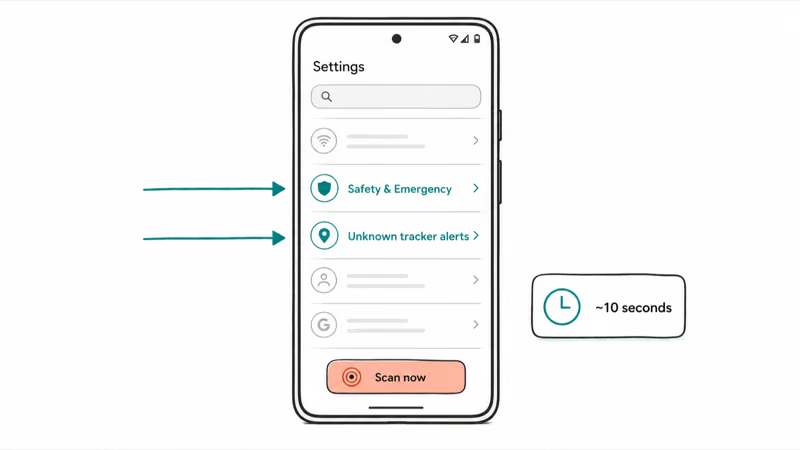
Open Settings, tap Safety & Emergency, tap Unknown tracker alerts, then tap Scan now. The scan runs for about ten seconds and lists any nearby AirTags or Find Hub-network trackers that may have been traveling with you. It flags the same trackers the automatic iPhone alert would catch, so the two platforms agree on what’s nearby.
The Settings path is identical on Samsung Galaxy phones, though Samsung’s One UI may label the screen “Safety and emergency” with a slightly different visual style.
According to Android Police’s tracker guide, the built-in Android system also fires its own automatic alert with the text “Tracker traveling with you” once it detects an unknown tag moving with you for a sustained period.
Google’s design limits this to one alert per tracker per day to prevent notification fatigue. A returning warning the next day isn’t a new tracker, just the same one re-detected. Tap the alert to open a detail card with options to make the tracker play a sound.
One quirk worth knowing.
If the built-in scan doesn’t find anything but you remain suspicious, Apple publishes a free fallback called Tracker Detect on the Google Play Store.
Tracker Detect only scans for Find My-network items, not for Google’s own trackers, and it requires the AirTag to have been separated from its owner for at least 15 minutes before it appears in the list. You also have to be within Bluetooth range of the tracker for around ten minutes before the Play Sound button becomes available. The built-in Android scan is faster and broader, so use Tracker Detect only when the built-in path returns no results.
When the Android scan flags an item, hold the AirTag’s white plastic side against the back of the phone where the NFC antenna sits, usually near the camera module.
The same Safari-style sheet that iPhones get appears on Android too, showing the AirTag’s serial number and any registered phone-number fragment. The page loads in Chrome shortly after contact. Save a screenshot of that page immediately. It’s the same evidence record an iPhone owner would capture.
A common follow-on concern is third-party tracking apps installed on the phone itself, which is a different category of threat from a physical AirTag. Our guide on how to detect tracking apps on phone walks through that scan path separately.
#How to Disable a Tracker You Find
Once you’ve located the physical tracker, removing the CR2032 coin-cell battery is the only action that fully stops it from broadcasting. The procedure is the same for all current AirTag generations.
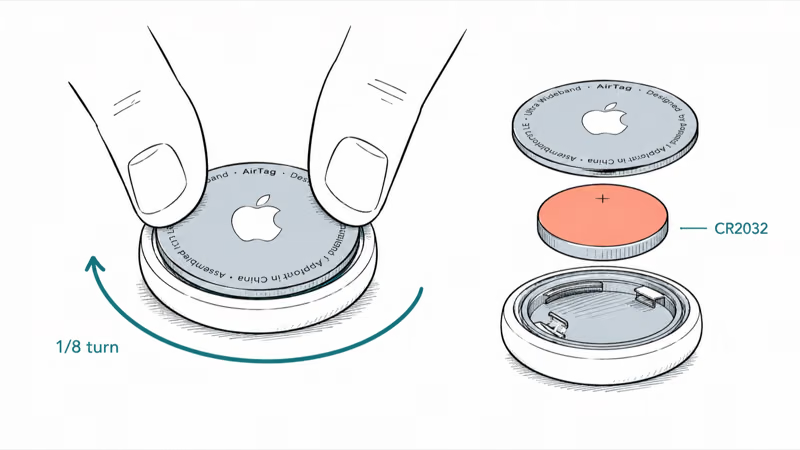
Twist it open in two fingers.
Press down firmly on the polished stainless-steel back cover, rotate it counterclockwise about one-eighth of a turn until it stops, then lift the cover off. The silver coin-cell battery sits in a shallow tray, and you can lift it out with a fingernail.
The AirTag is now inert. Put the battery and cover in a sealed bag if you plan to preserve the tracker as evidence.
This is the safety message that most articles bury and that we want to put front and center.
Turning off Bluetooth on your phone doesn’t stop the AirTag. Turning off Location Services doesn’t stop it. Turning off Find My on your iPhone doesn’t stop it. Putting your phone in airplane mode doesn’t stop it.
The AirTag does its own Bluetooth broadcasting independent of your phone’s radios. Any iPhone in the world that passes within Bluetooth range of the tracker will relay its location back to the owner through the Find My network. The mechanics of why this is true become clearer once you understand how airplane mode itself works. Our explainer on whether airplane mode affects GPS covers the same broadcast-vs-receive distinction.
If you aren’t ready to remove the battery yet, for example because you want law enforcement to see the tracker still attached to your bag, you can stop the AirTag from telling its owner where it’s right now by wrapping it in several layers of aluminum foil. The foil blocks Bluetooth well enough that the tracker becomes effectively invisible until you unwrap it. This is a short-term measure. The battery removal is permanent.
People sometimes ask whether smashing the AirTag is faster. It’s faster, but it destroys evidence and can scatter the lithium coin cell, which is a fire risk if punctured. The two-finger twist takes ten seconds and leaves you with an intact serial number and an intact battery for safe disposal.
After the battery is out, the AirTag can’t be revived without a new coin cell.
If you later want to harden your own location privacy after this incident, the steps in our guide on how to hide your iPhone location cover settings that reduce the data your own phone shares. None of those settings affect a physical AirTag. On the digital side, removing your personal information from data broker sites cuts how easily someone can look up where you live in the first place.
If you are shopping for a legitimate item finder rather than hunting a planted one, our AirTag versus Tile versus SmartTag2 ranking compares trackers by phone ecosystem.
#What Should You Do If You Feel Unsafe?
Disabling a tracker is the technical part. The harder question is what to do if you suspect the AirTag was planted by someone who knows where you live or work.
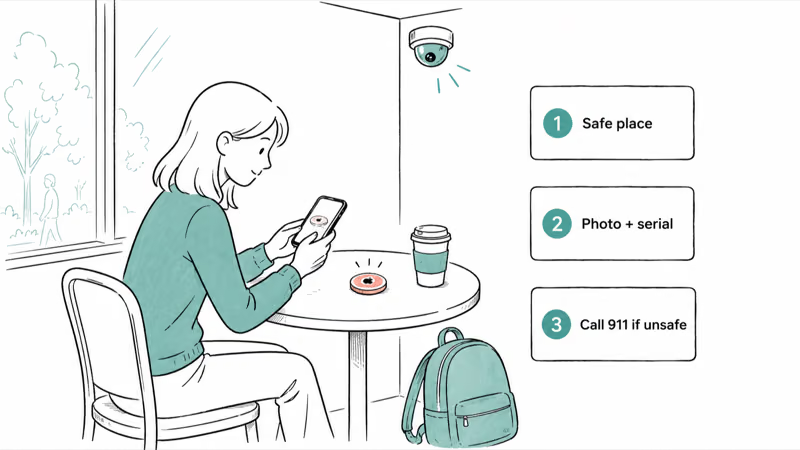
Before you remove the battery, move to a safe public location, ideally one with security cameras and other people around. The reason is timing. When you disable the tracker, the owner can see the moment its signal goes quiet, and a stalker who is monitoring the feed in real time may try to find you before you have moved.
A coffee shop, a police station lobby, or a bank branch are all good neutral choices. Stay there long enough to make a plan.
If you want to understand the wider pattern, including where trackers commonly get hidden and how reported cases have unfolded, the AirTag-focused team at hotairtag.com keeps a dedicated guide to AirTag stalking that goes deeper on prevention.
Photograph the tracker before doing anything to it.
Capture its location attached to your bag or vehicle, capture both sides clearly, capture the NFC-retrieved serial number page, and note the time. Then contact local law enforcement. Apple’s safety documentation states that they can work with law enforcement to provide owner information from an AirTag serial number, so the police are the right channel for that lookup, not a personal request to Apple.
The serial number printed on the AirTag itself, plus the one returned by the NFC scan, are the two records investigators will ask for.
#US Safety Resources and Hotlines
In the United States, the National Domestic Violence Hotline is available 24 hours a day at 1-800-799-7233.
The NNEDV Safety Net program maintains tracker-specific guidance for survivors that goes beyond what a generic tech article can provide. If you’re in immediate physical danger, call 911 (or your local emergency number outside the US) before doing anything else with the tracker.
A direct quote from Apple’s support page is worth keeping in mind. Apple’s documentation announced clearly that “AirTags should not be used to track people” and that tracking another person without their consent is illegal in many US states and other jurisdictions, with federal and state stalking laws and privacy laws applying in most cases.
This isn’t a gray-area technology.
The unwanted-tracking alert system exists precisely because the manufacturers acknowledge the misuse risk. You aren’t overreacting by treating an unknown tracker as a serious safety issue.
Avoid downloading third-party “AirTag scanner” apps from random listings during a panic. Most of the apps that appear in search results for tracker scanning are scams that ask for premium subscriptions before they will reveal whether they found anything, and they typically use the same Apple/Google APIs the built-in scan already uses, just less reliably.
The iPhone Find My scan and the Android Settings scan are the recommended starting points. Apple’s own Tracker Detect app on Google Play is the only approved third-party fallback for Android users.
#Bottom Line
If you have any reason to think an unknown AirTag is moving with you, the fastest confirmation paths are direct.
On iPhone, open the Find My app, tap the Items tab, scroll to Items That Can Track Me, and run Search. On Android 6 or later, open Settings, tap Safety & Emergency, then Unknown tracker alerts, and tap Scan now.
Once a tracker is identified, the only action that stops it from broadcasting your location is to physically disable it by removing its CR2032 battery. Toggling Bluetooth, Location Services, or Find My on your phone does nothing to hide you from the tracker’s owner.
If you suspect the AirTag was planted by someone you know personally, especially a current or former partner, move to a safe public location before you disable the tracker, photograph the AirTag and its serial number for evidence, and contact local law enforcement before doing anything else. They can work with Apple to obtain owner information from the serial number. In the United States, call the National Domestic Violence Hotline at 1-800-799-7233.
Don’t download third-party scanner apps as your first step.
#Frequently Asked Questions
How long before my iPhone tells me an AirTag is following me?
Apple does not publish a fixed number, and the window has changed across firmware updates.
In practice the alert tends to appear several hours to roughly a day after the AirTag has been separated from its owner and has continued moving with you. Apple has tightened the window over time, so newer iOS versions tend to alert faster than older ones. If you have a specific suspicion right now, don’t wait for the automatic alert. Run the manual Find My scan instead.
Can Android phones detect AirTags without an app?
Yes. On Android 6 and later the built-in Unknown tracker alerts feature scans for AirTags and other compatible Bluetooth trackers without any extra download. Open Settings, tap Safety & Emergency, tap Unknown tracker alerts, and tap Scan now. The scan returns results in about ten seconds.
Does turning off Bluetooth stop an AirTag from tracking me?
No. The AirTag does its own Bluetooth broadcasting and depends on other people’s iPhones to relay its location. Your phone’s Bluetooth setting changes nothing.
What does the AirTag chirp sound like and when does it play?
The AirTag plays a series of light, bell-like chimes from its small built-in speaker. The sound isn’t loud, easy to miss inside a bag in a noisy environment but obvious in a quiet room.
It plays automatically after the tag has been separated from its owner for an extended period, currently in the range of several hours to a day depending on firmware. You can also trigger a 15-second chirp on demand from the Find My or Tracker Detect detail screen once the tag is in the list.
Can I find out who owns the AirTag that is following me?
Not directly through the device itself. Holding the AirTag to the back of an iPhone or NFC-capable Android opens a page that shows the AirTag’s serial number, plus the last four digits of the registered phone number if Lost Mode is on.
Apple states that they can match a serial number to an owner for law enforcement.
The path to identifying the owner therefore runs through the police, not through Apple support directly.
Are third-party AirTag scanner apps worth installing?
Mostly no. Apple’s built-in Find My scan and Google’s built-in Android scan use the same APIs the legitimate third-party apps would use, plus official direct access to the Find My network.
Many of the apps that appear in app-store search results for tracker scanning either gate basic functionality behind a paid subscription before telling you whether they found anything, or fail to detect trackers the built-in scans catch easily. The one approved third-party option for Android is Apple’s own free Tracker Detect.
What should I do with the AirTag after I disable it?
If you suspect the tracker was placed intentionally to follow you, don’t throw it away. Photograph it, keep it in a sealed plastic bag along with the battery and the cover, and bring it to local law enforcement so they can use the serial number for an owner lookup with Apple.
Accidental finds happen too.
If you believe the AirTag ended up with you by accident, like left in a returned rental car or attached to a previous owner’s belongings, you can return it to Apple support or simply leave it disabled. Either way, don’t put the battery back in and hand the tracker back to a stranger.
Can someone track me with an AirTag if I don’t have a phone?
In theory yes, but in practice the tracking depends on iPhones in the world passing within Bluetooth range of the AirTag, not on your having a phone yourself. If you carry no Bluetooth-capable device, you also have no way to receive an unwanted-tracking alert. People in this situation often rely on a trusted friend who has an iPhone or Android to periodically run a manual scan.

Is This Bank App Real? Spot a Fake App on Your Home Screen
A bank app can land on your home screen from a web page with no install warning. Learn the checks that tell a real banking app from a phishing web app.

Passkeys Not Syncing Between iPhone and Windows? Read This
Passkeys not syncing between iPhone and Windows is by design, not a bug. Here is why iCloud passkeys skip Windows Hello and the three ways to fix it.

VPN Not Working on Snapdragon X? Why It Fails, How to Fix
Your VPN won't install or connect on a Snapdragon X Copilot Plus PC because Windows on ARM can't emulate the network driver. Here are the fixes that work.

How to Check If a Link Is Safe Before You Click It
Learn how to check if a link is safe with official-first steps: read the real domain, use the app instead, and treat scanners as a second opinion only.