Google One Dark Web Report Alternative: What to Use Now
Google One dark web report is gone. Here are the free and paid alternatives that actually check your email against breach databases in 2026.
Quick AnswerUse Have I Been Pwned for breach checks, then turn on iCloud Keychain or Chrome Password Checkup for daily monitoring. Both are free.
If you opened Google One looking for the dark web report and found it missing, you aren’t imagining things. Google moved the feature out of Google One. A solid alternative is easy to find, mostly free, and gives you more actionable detail than the original.
- Have I Been Pwned is the closest free replacement and checks the same breach databases Google was using under the hood.
- iCloud Keychain on iPhone and macOS surfaces compromised passwords inside Settings without sending anything to a third party.
- Google Password Manager and Chrome Password Checkup cover Android and desktop, with the same data Google One pulled from.
- Paid services like Aura and 1Password Watchtower add SSN and phone monitoring, but only matter if you’ve seen identity-theft signals.
- No service can remove your data from the dark web. Treat monitoring as a smoke alarm and act on alerts by changing passwords and enabling 2FA.
#Why Google Discontinued the Dark Web Report
Google never published a clean shutdown notice.
The timeline reconstructs from support threads. The feature launched as a Google One perk in 2023, expanded to all free Google accounts in 2024, then merged into a slimmer “Results about you” tool inside Google account settings. As confirmed in the Google account help thread on dark web monitoring, the dedicated dashboard that Google One subscribers paid for is no longer accessible at the old URL.
The consolidation has shipped, and the standalone dashboard isn’t coming back. Google’s quiet de-emphasis is consistent across help center articles and the in-product UI.
According to public reporting from security press in 2024, Google’s report sourced its data from licensed third-party breach aggregators. Those aggregators are the same pool that powers free tools like Have I Been Pwned. That’s why the free alternatives give equivalent or better coverage. You were paying for the dashboard, not for unique data.
HIBP can return breach names and exposed data types, while Google One’s old dashboard centered on a simpler “your email was found” alert. For a primer on what dark web exposure means, our walkthrough on how to tell if your email is on the dark web covers what data brokers actually have and what they can’t reach.
#The Free Alternatives Worth Using
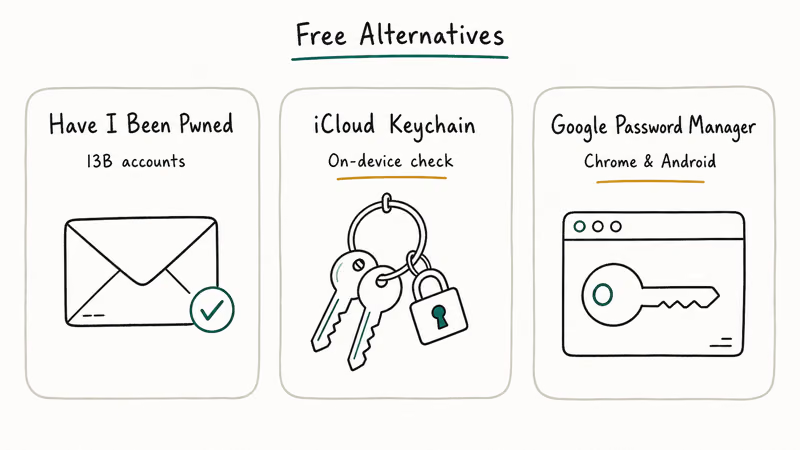
The straightforward answer is Have I Been Pwned for ad-hoc checks and your platform’s built-in password manager for ongoing monitoring. Both are free. Both pull from the same breach databases. Both are faster than the Google One dashboard ever was.
#Have I Been Pwned
Run by security researcher Troy Hunt, Have I Been Pwned is the industry reference. Enter your email. Get every breach it appears in.
The free notification service emails you when new breaches surface. According to Hunt’s public stats page, the database tracks more than 17 billion compromised accounts across over 1,000 distinct breaches as of 2026, which is the largest publicly indexed breach corpus available.
HIBP checks emails and phone numbers against known breaches. It doesn’t scan dark web marketplaces for active listings, and it doesn’t cover Social Security numbers. For most readers, that’s fine. If a breach exposed your SSN, the bigger move is freezing your credit, not subscribing to a monitor.
#iCloud Keychain Password Monitoring
On iPhone and Mac, Apple checks your saved passwords against known leaks and flags reused or compromised credentials. Open Settings, tap Passwords, then look for Security Recommendations.
Per Apple’s iCloud Keychain security overview, the check happens with end-to-end encryption so Apple never sees your actual passwords. Apple’s documentation states that the system uses a private set intersection protocol. Only your device decides whether one of your saved passwords matches the leaked credential list.
Apple’s monitor is best treated as low-noise password-level alerting rather than a full dark web scan.
If you’ve ever wrestled with accountsd wants to use the login keychain prompts or hit a forgotten keychain password wall, the monitoring still runs in the background and surfaces alerts the next time you sign in.
#Google Password Manager and Chrome Password Checkup
If you’re on Android or use Chrome on desktop, Google’s built-in Password Checkup covers the same ground. Open Chrome settings, go to Autofill and passwords, then run the checkup. Google’s Password Checkup support page states that the hashing-based check keeps your passwords on-device. Your plaintext credentials never leave Chrome.
Crucially, this tool still exists even though Google One dark web reports don’t. Google moved password-level monitoring into the password manager and kept it free.
Password Checkup tells you which passwords are weak, reused, or appear in known breaches. It doesn’t proactively notify you the way HIBP does. Run it manually once a month, or whenever you’ve reused a password you shouldn’t have.
#What About Paid Alternatives?
Most paid identity monitoring services bundle dark web scanning with credit monitoring, SSN tracking, and identity-theft insurance. They’re worth it only if you’ve already seen signs of identity theft, have a high public profile, or had your SSN exposed in a major breach.
#Aura
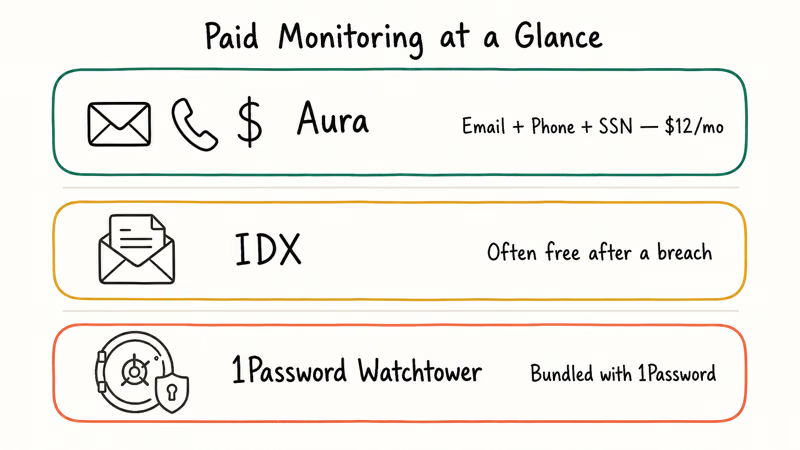
Aura monitors email, phone, SSN, bank accounts, and certain online accounts for breach activity. Per Aura’s official product page, the service includes 1 million dollars in identity-theft insurance.
Individual pricing starts around 12 dollars per month as of mid-2026. The dashboard is the cleanest in this category, and alerts include a recommended next action rather than just a notification.
#IDX (formerly ID Experts)
IDX is the service most often offered as free credit and dark web monitoring after a corporate breach. If you’ve ever received a breach notification letter, check whether it includes a free IDX subscription. Most large US breach settlements include 12 or 24 months of free coverage.
Retail pricing rarely makes sense unless you’re already entitled to a free post-breach enrollment.
#1Password Watchtower
1Password subscribers already have this baked into the password manager. Watchtower checks your saved logins against breach databases, surfaces weak passwords, and flags missing two-factor authentication in one dashboard.
If you’re paying for 1Password anyway, you’re paying for the monitoring whether you use it. Watchtower can flag reused passwords and missing 2FA, both of which would be invisible to a free email-only monitor.
#How These Tools Compare at a Glance
Layering two free tools is the move.
Comparison of free Google One dark web report alternatives
| Tool | Best for | Notifies you | Cost |
|---|---|---|---|
| Have I Been Pwned | Email and phone breach check | Yes, free email alerts | Free |
| iCloud Keychain | Password-level monitoring on Apple devices | Yes, in-Settings badge | Free |
| Google Password Manager | Password-level monitoring on Android and Chrome | Manual run | Free |
| 1Password Watchtower | Full vault audit including 2FA gaps | Yes, in-app dashboard | Paid (with 1Password) |
The combination most readers should adopt: HIBP for the email layer plus whichever password manager you already use for the credential layer. That’s the maximum coverage you can get for zero dollars, and it covers everything the Google One report did.
#Acting on a Dark Web Alert
Monitoring is the smoke alarm. The work happens after the alert. Here’s the order to follow after a breach alert.
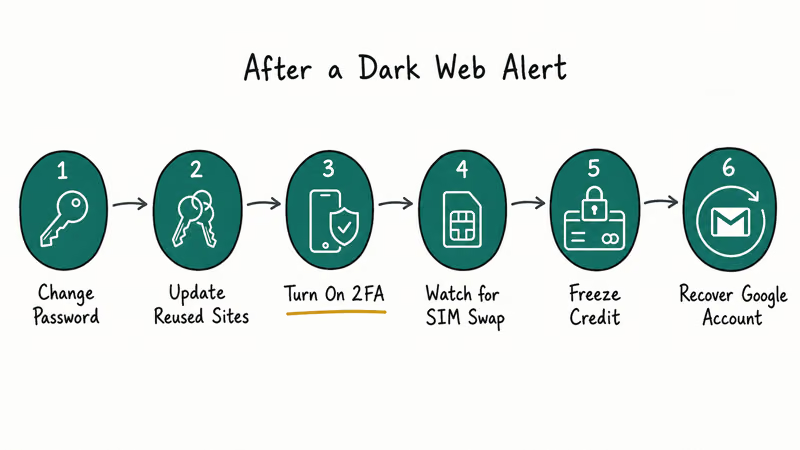
- Change the password on the exposed account immediately. Use a unique password from your manager, not a variation of an old one.
- If you used that password anywhere else, change it there too. This is the single biggest mistake people make, and it’s why one breach turns into account takeovers across email, banking, and social.
- Turn on two-factor authentication on the exposed account. Use an authenticator app or a hardware key. Avoid SMS-based 2FA when possible. SIM-swap attacks are real and rising.
- If your phone number was in the breach and you suspect SIM-swap risk, our guide on how to tell if your phone is hacked walks through the early warning signs to watch for.
- If financial data was exposed, freeze your credit at all three US bureaus. Under US federal law the freeze is free, and you can lift it temporarily when you actually need new credit.
- If your Google account itself was in the breach and you can’t get back in, the gmail account recovery walkthrough covers the official Google paths step by step.
#Can You Actually Remove Your Data From the Dark Web?
No. Once data is on the dark web, it’s been copied across enough marketplaces, paste sites, and aggregator dumps that no takedown request can recall it.
Services that promise to remove your data from the dark web are usually charging you to remove your information from public data broker sites instead. That’s a real and useful service, but it isn’t the same thing.
What you can do is reduce the value of the leaked data. A leaked email paired with a unique password and 2FA is essentially harmless, and a leaked SSN paired with a credit freeze can’t be used to open new accounts. The leak is permanent, but the risk is what you manage.
If you’re worried about an attacker pivoting from a leaked email to a SIM-swap, our breakdown of why public Wi-Fi requires a VPN and how that ties into account security covers the practical layer most people skip.
#Bottom Line
Skip the paid dark web monitoring tier unless you have identity-theft signals or had your SSN exposed in a major breach. For everyone else: run your email through Have I Been Pwned today, sign up for the free email notifications, and turn on password monitoring inside iCloud Keychain or Google Password Manager. That covers everything Google One dark web report covered, costs nothing, and surfaces alerts where you already manage passwords.
#Frequently Asked Questions
What replaced the Google One dark web report?
Google moved a slimmer version of the feature into the free account experience as part of the Results about you tool, and password-level breach checking now lives inside Google Password Manager. For email-level breach checking, Have I Been Pwned is the closest free replacement with equivalent data coverage.
Is Have I Been Pwned safe to use?
Yes. Security researcher Troy Hunt has run the site since 2013, and it’s referenced by major news outlets, government agencies, and security vendors as the authoritative breach corpus.
How often should I check for dark web exposure?
Sign up for free email notifications from Have I Been Pwned so you don’t have to remember. For password-level monitoring, iCloud Keychain and Google Password Manager run automatically in the background. Manually re-run Chrome Password Checkup once a month if you want a fresh look.
Do I need a paid dark web monitor if I have a password manager?
Probably not. Most paid services bundle dark web scanning with SSN monitoring, credit alerts, and identity-theft insurance. If your password manager already includes breach monitoring like 1Password Watchtower or Bitwarden’s HIBP integration, the dark web component is redundant. The credit and SSN monitoring is the part you might want, but freezing your credit at the three US bureaus accomplishes the same protective effect for free.
Can a dark web alert always be trusted?
Treat alerts as a prompt to act, not as proof someone’s actively using your data. Most breach alerts reflect old leaks that were aggregated and re-posted. The action steps stay the same regardless: change the affected password, enable two-factor authentication, and rotate any reused versions of that password.
What if I get a dark web alert for an account I’ve closed?
Change the password on the closed account if you still have access, then verify the account is actually closed and not just deactivated. If you’ve moved on from the email address entirely, the alert is informational. The risk only materializes if you reused that password somewhere active.
Does iCloud Keychain work for non-Apple sites?
Yes. iCloud Keychain stores and monitors passwords for any site you sign in to through Safari or any app that uses the system password autofill, and the monitoring checks the actual passwords against known leaks rather than just the sites. If you signed in to a third-party app like WhatsApp and saved that password, it’s in the monitor too. Our guide on how to know if your WhatsApp is hacked covers the WhatsApp-specific signals worth watching for.
Should I pay for a data removal service instead?
Data removal services target public data broker sites like Spokeo, BeenVerified, and Whitepages rather than the dark web. They can be useful if your personal info shows up in Google searches for your name. They won’t remove anything from the dark web because the dark web doesn’t honor takedown requests. Decide based on the search results for your name, not based on dark web exposure.

Is This Bank App Real? Spot a Fake App on Your Home Screen
A bank app can land on your home screen from a web page with no install warning. Learn the checks that tell a real banking app from a phishing web app.

Passkeys Not Syncing Between iPhone and Windows? Read This
Passkeys not syncing between iPhone and Windows is by design, not a bug. Here is why iCloud passkeys skip Windows Hello and the three ways to fix it.

VPN Not Working on Snapdragon X? Why It Fails, How to Fix
Your VPN won't install or connect on a Snapdragon X Copilot Plus PC because Windows on ARM can't emulate the network driver. Here are the fixes that work.

How to Check If a Link Is Safe Before You Click It
Learn how to check if a link is safe with official-first steps: read the real domain, use the app instead, and treat scanners as a second opinion only.