Genmoji or Image Playground Not Working? iOS 27 Fix
Genmoji or Image Playground not working on iOS 27? Turn on Apple Intelligence, free up 7 GB, drop Low Power Mode, and let the image model finish.

Quick AnswerGenmoji and Image Playground are missing because Apple Intelligence is off, still downloading, or unsupported on your iPhone. Turn it on, free up 7 GB, drop Low Power Mode, and stay on Wi-Fi until the model finishes.
Genmoji or Image Playground not working on iOS 27 usually means one thing: the Apple Intelligence image model isn’t ready yet. The Genmoji button is gone, Image Playground won’t open, or both sit on “downloading” for hours. The features work once the model lands, as our iOS 27 Image Playground guide shows.
- Genmoji and Image Playground both run on Apple Intelligence, so if Apple Intelligence is off they won’t appear at all.
- The image model downloads separately and pauses on Low Power Mode, so turn that off first.
- Apple Intelligence needs an iPhone 15 Pro or any iPhone 16, not just iOS 27.
- The features need 7 GB of free storage and a matching device and Siri language to install.
- A “downloading” or “Preparing” state for the first hour is normal, not a broken feature.
#Why Are Genmoji and Image Playground Missing?
Both features are built on Apple Intelligence, so when they vanish, the layer underneath is almost always the cause rather than the features themselves.
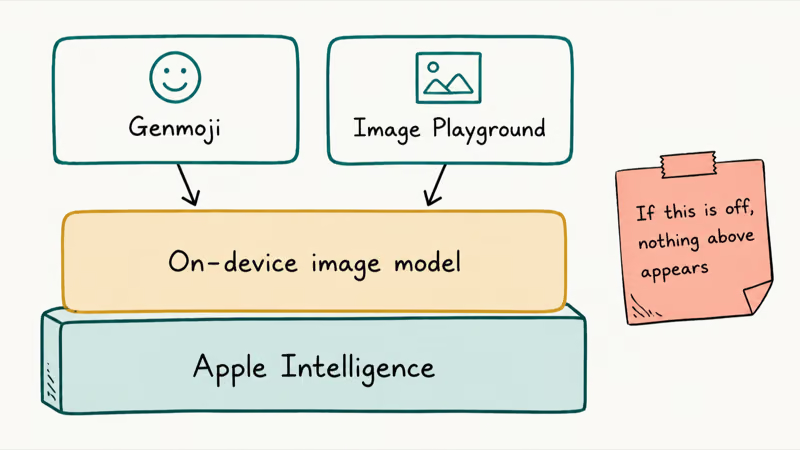
Genmoji and Image Playground aren’t standalone apps you install. They’re front ends for the same on-device image model that ships with Apple Intelligence. According to Apple’s guide to creating Genmoji, “Apple Intelligence is not available on all iPhone models or in all languages or regions,” and the guide tells you to use the latest version of iOS and have Apple Intelligence turned on. That single dependency explains most of the disappearing-feature reports.
So before you treat this as a Genmoji bug or an Image Playground bug, confirm Apple Intelligence is on and finished setting up. Open Settings, go to Apple Intelligence & Siri, and check that the main toggle is enabled. If it’s off, or if it’s stuck on “Preparing,” that’s the real problem, and our Apple Intelligence not working guide covers the full setup fix.
#Is It Still Downloading, or Actually Broken?
This is the distinction that saves the most wasted troubleshooting. A feature that’s still downloading looks identical to one that’s broken, but only one needs fixing.
When you first enable Apple Intelligence, your iPhone pulls several gigabytes of models in the background, and Genmoji and Image Playground are gated behind that download. During this window, the Genmoji keyboard button can be absent and Image Playground can show a “downloading” message. That’s expected. The download is throttled, and it runs on top of the base Apple Intelligence install, so the image features are often the last piece to arrive.
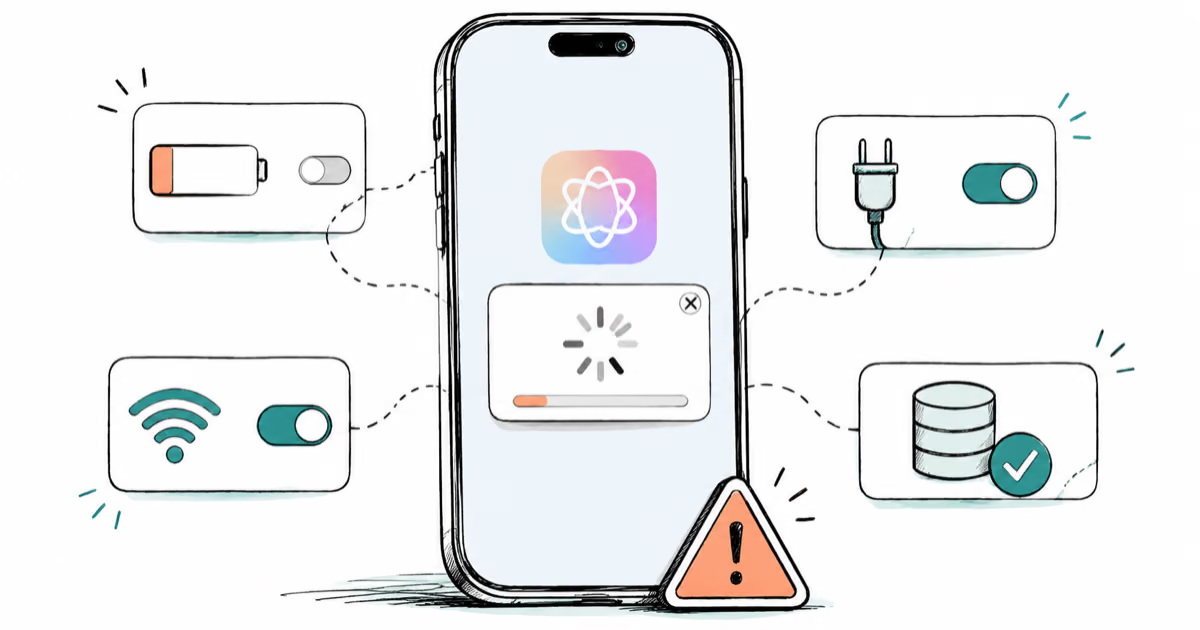
The tell is time and conditions. If you only just turned Apple Intelligence on, leave the phone on Wi-Fi and charging for a while. A download prompt can simply mean the image model is still arriving in the background. If good conditions still don’t change anything, treat it as stuck and use the fixes below.
#The Fixes, in Order
Use this symptom-to-cause-to-fix map when Genmoji or Image Playground won’t show up. Each row is independent, so scan the left column for what your iPhone is doing and jump to the matching fix.
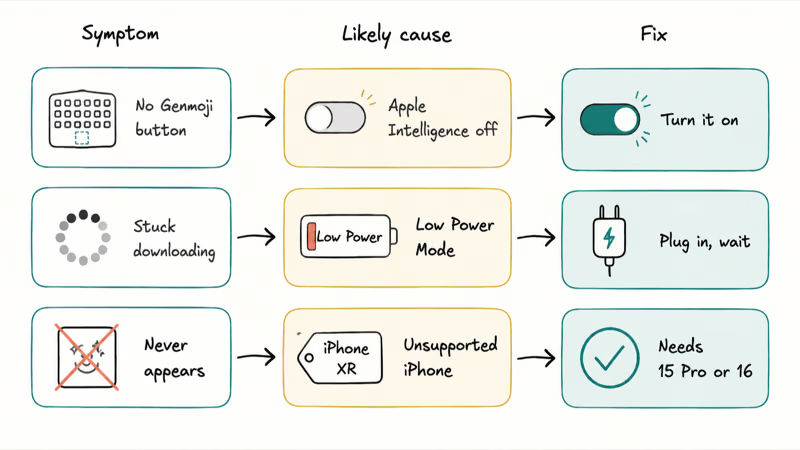
| Symptom | Likely cause | Fix |
|---|---|---|
| No Genmoji button on the keyboard | Apple Intelligence off or still downloading | Turn Apple Intelligence on, wait for the model |
| Image Playground stuck "downloading" | Low Power Mode pausing the background download | Turn off Low Power Mode, plug in, stay on Wi-Fi |
| Features never appear at all | Unsupported iPhone model | Needs iPhone 15 Pro or any iPhone 16 |
| Download starts then fails | Not enough free storage | Free up 7 GB, then re-enable |
| Genmoji greyed out or absent in a region | Device and Siri language mismatch | Set both to the same supported language |
| Image Playground opens but won't generate | Stale install after the update | Restart the iPhone while charging |
#Turn the Download Loose: Power, Storage, Language
Three quick settings changes clear most stuck downloads. Work through them before assuming the install is broken.
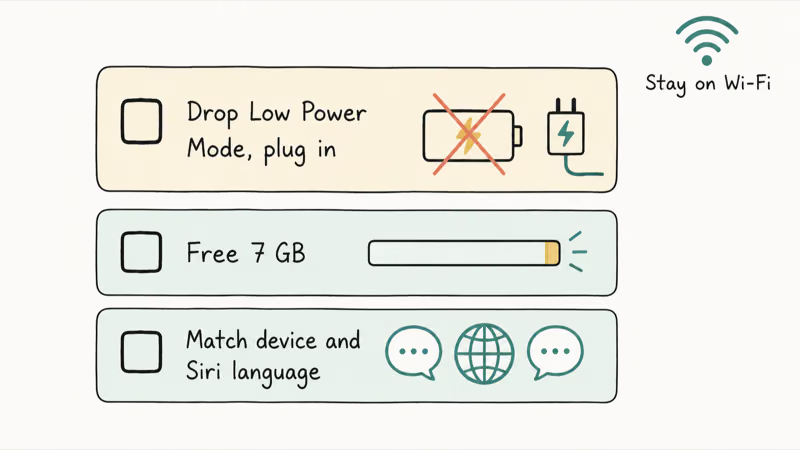
Drop Low Power Mode and plug in. The image model arrives as a background download, and Low Power Mode pauses exactly that kind of task. As Apple’s Low Power Mode support page notes, the setting temporarily reduces background activity and pauses automatic downloads to save battery. Turn it off in Settings, charge the phone, lock the screen, and leave it on Wi-Fi.
Free up 7 GB. Per Apple’s Apple Intelligence requirements page, the features need 7 GB of free storage, and a full iPhone makes the download fail quietly. Our iPhone storage almost full guide covers what to delete first.
Match your languages. Apple’s requirements page states that your device language and Siri language must be set to the same supported language, and the same page notes the features don’t currently work for devices bought in mainland China. If your phone language and Siri language don’t line up, Genmoji can stay greyed out. Set both to the same supported language in Settings, then give the model time to finish.
#Your iPhone Might Not Support It
This catches more people than any toggle, because iOS 27 and Apple Intelligence have different hardware floors.
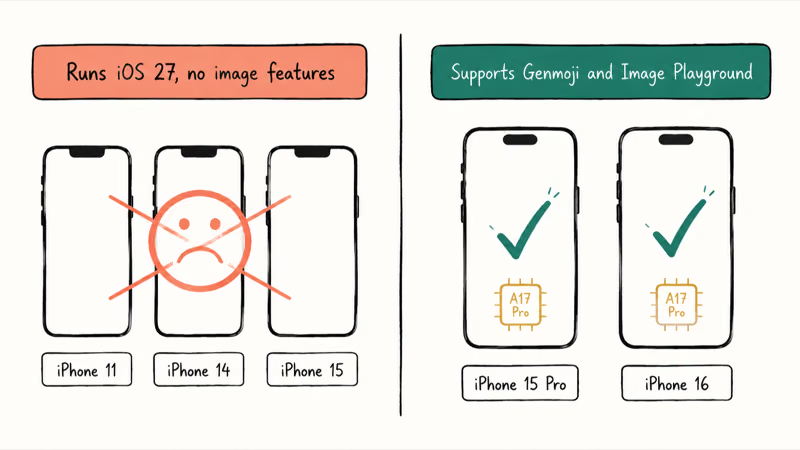
iOS 27 installs on iPhone 11 and the second-generation SE and up, but Genmoji and Image Playground don’t. Apple’s requirements page lists the supported devices as “iPhone 15 Pro models, and iPhone 16 models or later.” So an iPhone 14 or a standard iPhone 15 will run iOS 27 cleanly and still never show the image features, no matter what you toggle. The reason is the chip and memory the on-device models need, which start with the A17 Pro generation.
Check your model in Settings, General, About, and cross-reference our iOS 27 compatible iPhones guide for the full list. If you’re on an iPhone 14 or older, stop here. Nothing in this article will turn the features on, because the hardware can’t run them. The same dividing line is why our iOS 26 Apple Intelligence requirements guide flagged the exact model floor when these features first shipped.
#Where the Genmoji Button Lives
Sometimes the feature is working, but you’re looking in the wrong place. Genmoji and Image Playground each have a specific entry point.
Find Genmoji on the keyboard. Open any text field, bring up the keyboard, and tap the Genmoji button at the top right of the onscreen keyboard, then describe the emoji you want. Apple’s Genmoji guide states that you can mix and match up to seven elements to build one. If that button isn’t there at all, you’re back to the Apple Intelligence dependency, not a hidden setting.
Find Image Playground as an app. It’s its own app, and it also appears inside Messages and Freeform. If you can’t see it on your Home Screen, swipe down to search for “Image Playground” rather than assuming it failed to install. The app can already be there, just tucked into the App Library after the update.
Once it opens, you’ll see the Animation, Illustration, and Sketch styles, plus the option to create a Genmoji. For the wider set of iOS 27 image and editing tools, our iOS 27 Photos AI tools guide covers what else the update added.
#Bottom Line
For most people, the fix is patience plus one setting: turn off Low Power Mode, plug the iPhone in, and leave it on Wi-Fi for an hour so the Apple Intelligence image model can finish downloading. Genmoji and Image Playground are gated behind that download, and Low Power Mode actively pauses it.
If the features never appear and you’re on an iPhone 14 or older, stop troubleshooting. The hardware doesn’t support Apple Intelligence, so Genmoji and Image Playground will never show up.
Everyone else with a supported iPhone: confirm Apple Intelligence is on, free up 7 GB, match your device and Siri languages, and give it one restart while charging.
iOS 27 Beta
#Frequently Asked Questions
Why is the Genmoji button missing from my keyboard?
Because Apple Intelligence is off, still downloading, or unsupported on your iPhone. Genmoji is part of Apple Intelligence, so the keyboard button only appears once the feature is enabled and the on-device model has finished installing. Turn Apple Intelligence on, free up 7 GB, and leave the phone on Wi-Fi while charging.
Why won’t Image Playground open or generate images?
Most often the image model is still downloading. Image Playground waits for that background download, which pauses on Low Power Mode and stalls when storage is low. Turn off Low Power Mode, free up space, and stay on Wi-Fi. If it opens but won’t generate after the model is in, restart the iPhone while it’s charging.
Do Genmoji and Image Playground work on iPhone 14?
No. Both require an iPhone 15 Pro, iPhone 15 Pro Max, or any iPhone 16 or later. An iPhone 14 runs iOS 27 but won’t show the image features, because it lacks the chip and memory Apple Intelligence needs for on-device generation.
How long does Image Playground take to download?
Usually under an hour on a strong Wi-Fi connection with the phone charging, though it can take longer on a busy network or a nearly full device. The image features sit on top of the base Apple Intelligence install, so they often arrive last. A “downloading” state during this window is normal.
Does Low Power Mode stop Genmoji from downloading?
Yes. Apple’s documentation says Low Power Mode pauses automatic downloads and background activity, and the Apple Intelligence image model downloads as a background task. Even on fast Wi-Fi, the install won’t progress until you turn Low Power Mode off.
Why is Genmoji greyed out even though Apple Intelligence is on?
Usually a language mismatch or an unfinished download. Your device language and Siri language must be set to the same supported language, and the features stay unavailable in some regions. Line up both languages in Settings, confirm you have 7 GB free, and give the model time to finish installing.
Is Image Playground a separate app I need to install?
It’s a built-in app that comes with iOS once Apple Intelligence is supported and enabled, and it also appears inside Messages and Freeform. You don’t download it from the App Store. If you can’t see it, swipe down on the Home Screen and search for “Image Playground” before assuming it’s missing.
Apple Intelligence Not Working on iPhone? Fixes (2026)
Apple Intelligence not working on iPhone after iOS 27? Turn off Low Power Mode, stay on Wi-Fi while charging, and free up 7 GB. Step-by-step fixes.

Apps Crashing After iOS 27 Update? Fix Order (2026)
Apps crashing after the iOS 27 update? Update the app in the App Store first, then offload and reinstall to clear stale cache, then restart. The fix order.
iOS 27 Problems and How to Fix Each of Them (2026)
iOS 27 problems? Battery drain, overheating, Wi-Fi drops, crashing apps, and Apple Intelligence stuck. Each problem with its top fix and full guide here.
iPhone Overheating After iOS 27 Update? Why and Fixes
iPhone overheating after the iOS 27 update is usually normal background indexing for the first day or two. How to tell normal heat from a real problem.