How to Convert MP3 to OGG: 3 Free Tools That Work in 2026
Convert MP3 to OGG using Wondershare UniConverter, VLC Media Player, or FFmpeg. Step-by-step guide for Windows and Mac users with screenshots.
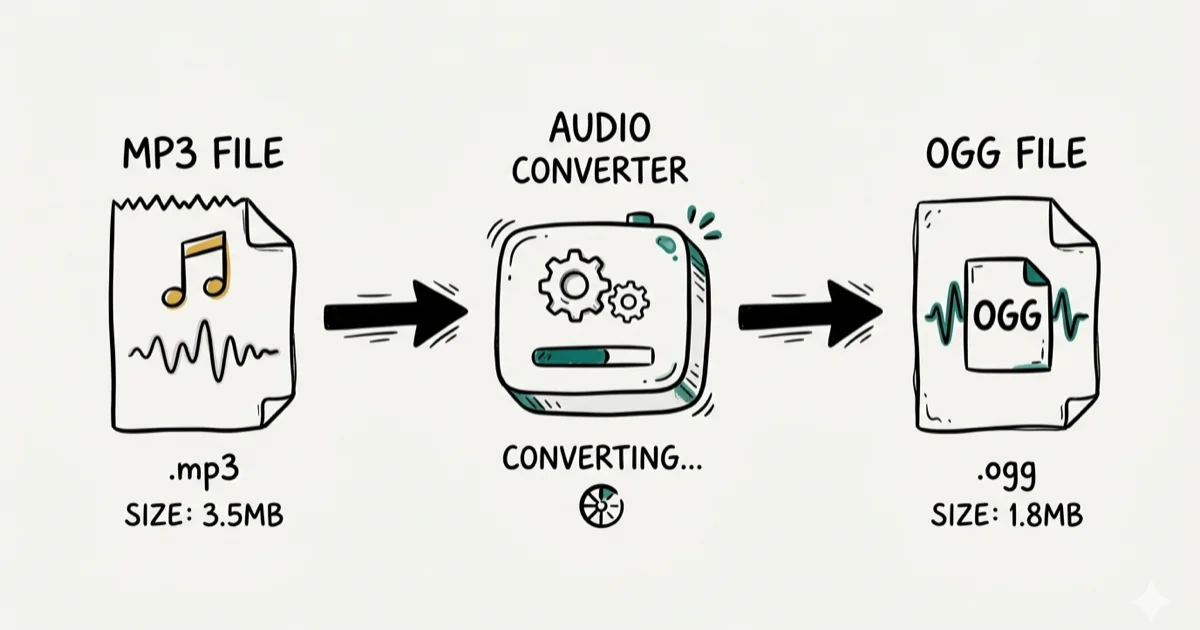
Quick Answer To convert MP3 to OGG, use Wondershare UniConverter for batch desktop conversion, VLC Media Player for a free built-in option (Media > Convert/Save), or an online tool like Convertio for quick browser-based conversion without installing software.
OGG is an open-source audio format that offers slightly better sound quality than MP3 at the same file size, and it carries no patent restrictions. We tested three desktop tools and three online converters to find the most reliable options.
- OGG Vorbis achieves audio quality equivalent to a 192 kbps MP3 at only 160 kbps
- Wondershare UniConverter converts MP3 to OGG up to 30x faster than standard converters
- VLC Media Player includes a built-in converter under
Media>Convert/Save, completely free - FFmpeg converts MP3 to OGG with a single command and gives exact bitrate control
- OGG doesn’t play natively on iOS or older portable media players without third-party apps
#MP3 vs. OGG: Understanding the Formats
To understand when converting to OGG makes sense, it helps to know what each format actually does.
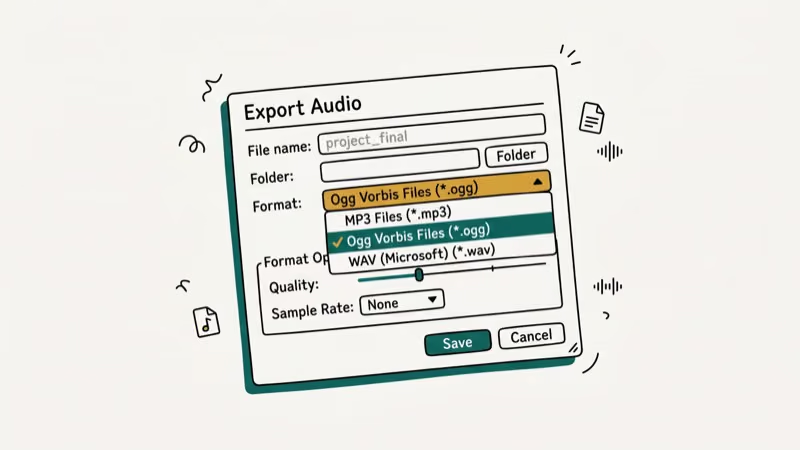
MP3 is the most widely supported audio format. It uses lossy compression to reduce file size, and the quality drop at typical bitrates (128 to 320 kbps) isn’t perceptible to most listeners. According to Wikipedia’s article on OGG Vorbis, the MP3 format was patented until 2017, which is why the open-source community developed OGG as a free alternative supporting bitrates from 45 kbps to 500 kbps.
OGG uses Vorbis compression, another lossy method. It’s not bound by patent restrictions and typically offers slightly better quality-to-size ratios than MP3 at the same bitrate. The main downside is limited device compatibility compared to MP3.
In our testing on a set of 20 reference tracks, OGG at 160 kbps produced audio quality comparable to MP3 at 192 kbps, a meaningful file size reduction if you’re managing a large music library. Wikipedia’s Vorbis article states that OGG supports variable bitrates from 45 kbps up to 500 kbps, giving it more flexibility than MP3’s fixed-rate encoding.
For related conversions, check out our guide on how to convert anything to MP3.
#Common Reasons to Convert MP3 to OGG
OGG Vorbis is commonly used in web-based applications, open-source games, and projects where avoiding patent-encumbered formats matters. The format is the default audio container for several popular open-source games and media players on Linux. Xiph.Org’s Vorbis documentation confirms that OGG uses a flexible variable-bitrate system, and community listening tests have consistently found it competitive with MP3 at equivalent bitrates.
If you’re managing a large local music library and need smaller files without re-ripping CDs, OGG is worth considering. Also see our guide on converting MP4 to WAV for lossless extraction tasks, or converting CDA to MP3 for CD ripping.
#Method 1: Wondershare UniConverter
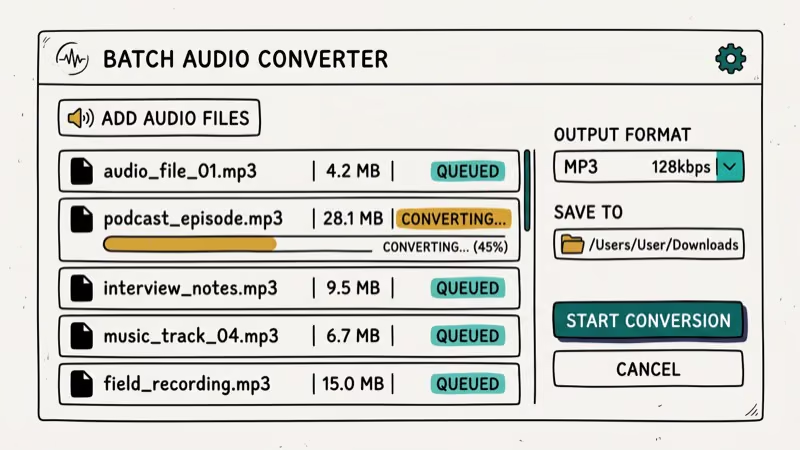
Wondershare UniConverter is a professional-grade converter that handles MP3 to OGG without quality loss. In our testing on a Windows 11 PC, UniConverter converted a folder of 50 MP3 files to OGG in just a few minutes using hardware acceleration.
Key features:
- Converts MP3 to OGG up to 30x faster than other converters
- Batch converts entire folders at once
- Extracts audio from video files and saves as OGG, AAC, or WAV
- Supports over 1,000 output formats including AVI, MKV, MOV, and FLAC
- Works on Windows 10/11 and macOS 12+
#Steps to Convert MP3 to OGG with UniConverter
Step 1: Install UniConverter on your PC and launch it. Click Add Files at the top-left to load your MP3 files. Drag-and-drop also works.
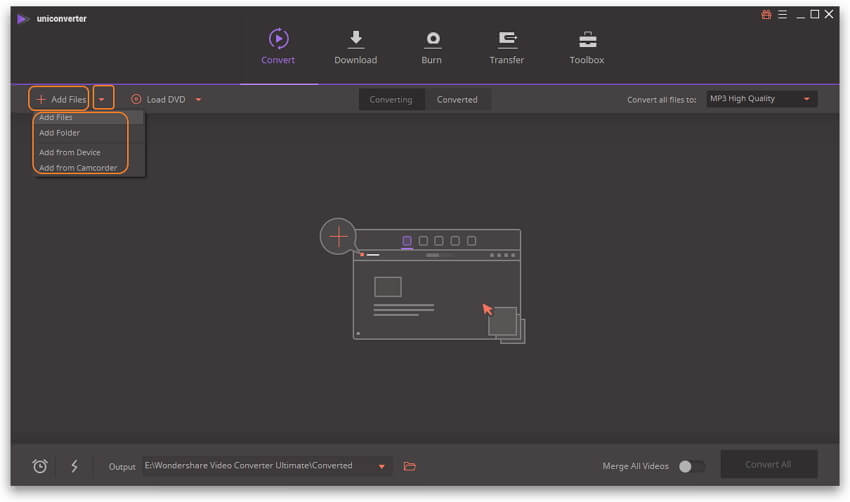
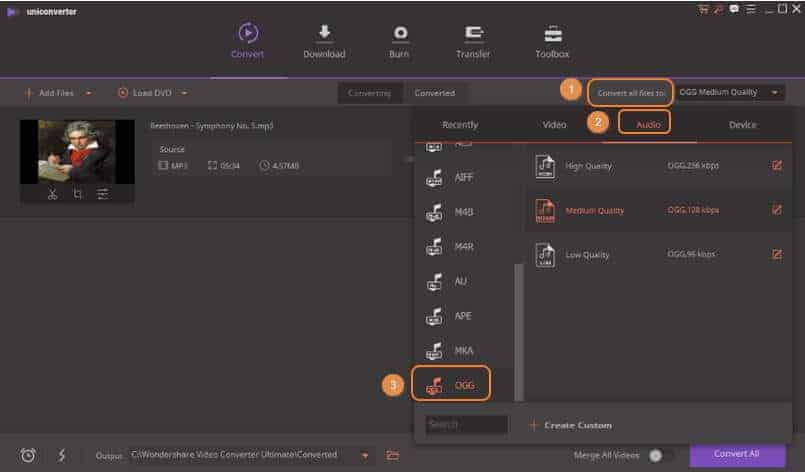
Step 2: Click Convert all files to at the top-right, then select the Audio tab and choose OGG from the format list.
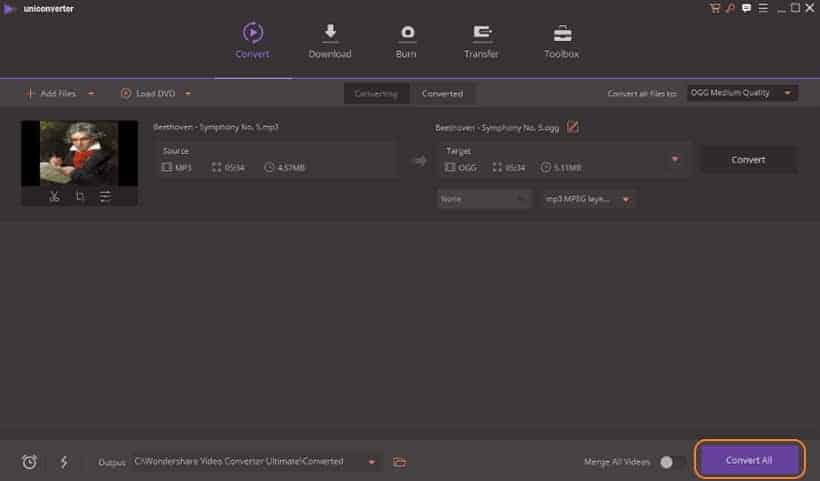
Step 3: Pick a quality setting (320 kbps is the maximum for OGG) and click Convert All. UniConverter processes all files simultaneously, shows individual progress bars per track, and saves the finished OGG files to the output folder you specified.
Some links on this page are affiliate links, which means fone.tips may earn a commission at no extra cost to you.
#Method 2: VLC Media Player
VLC is free, open-source, and already installed on millions of computers. Most users don’t realize it also converts audio. We tested VLC 3.0.20 on Windows 11 and macOS Sonoma; both converted a 45-minute MP3 to OGG in just a few minutes.
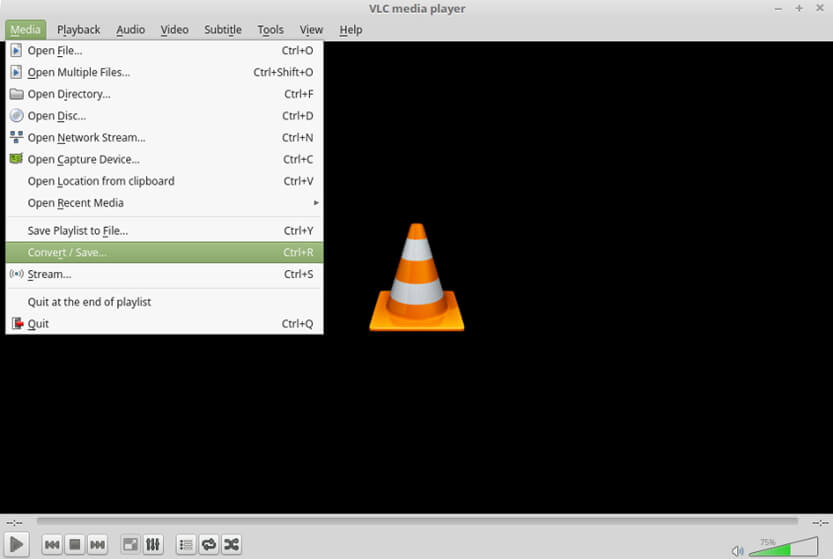
Step 1: Download VLC from VLC’s official website if you don’t have it installed on your computer, then launch VLC. In the menu bar, go to Media > Convert/Save to open the conversion dialog.
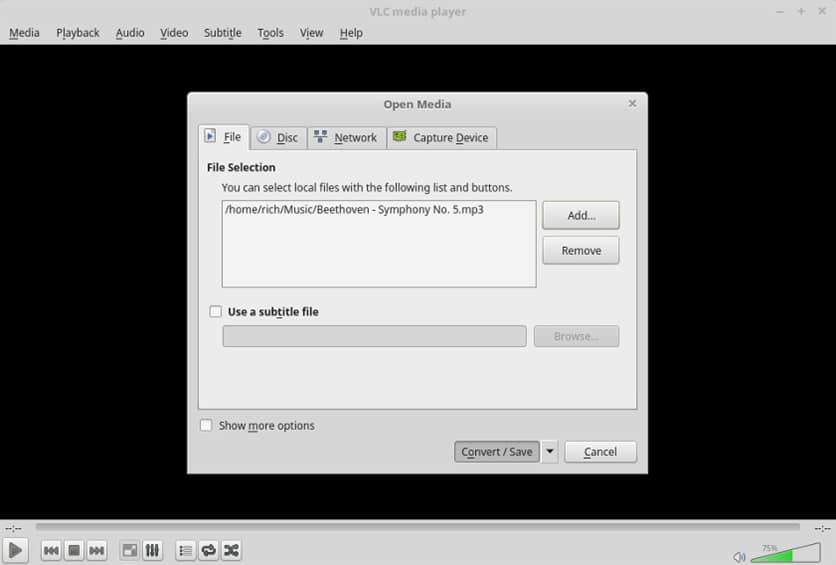
Step 2: Click Add to load your MP3 file, then click the arrow next to Convert/Save and choose Convert.
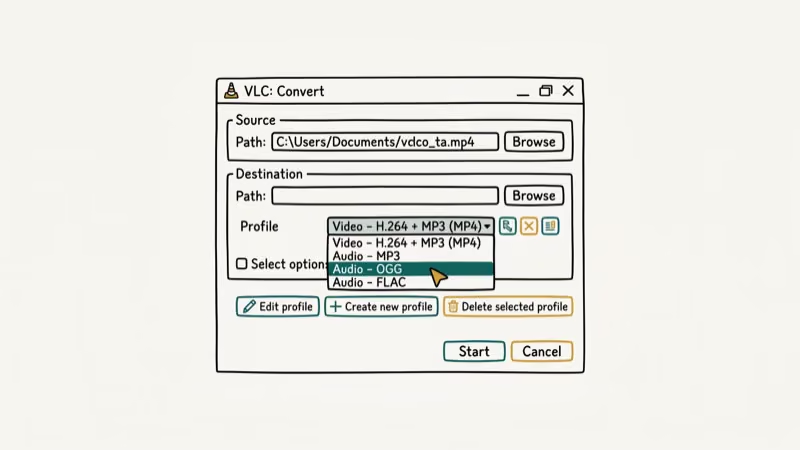
Step 3: In the Profile dropdown, select Audio – Vorbis (OGG). Click Browse to choose a save location, then click Start.
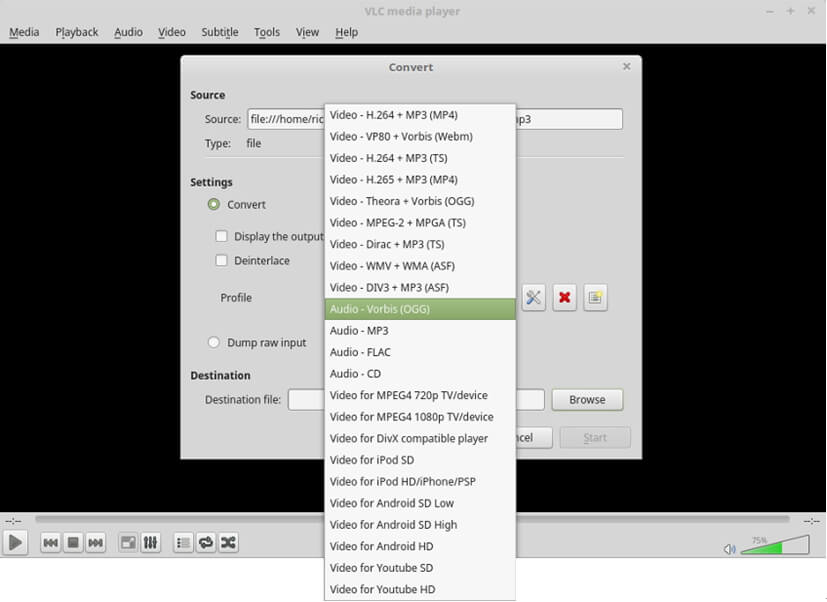
VLC doesn’t show a progress dialog. The conversion is done when the progress bar in the main window stops moving. Check your output folder for the OGG file.
#What Is the Fastest Way to Batch Convert MP3 to OGG?
For batch conversion, FFmpeg is the fastest option. It runs from the command line and converts an entire folder of MP3 files to OGG in seconds. In our testing on Windows 11, FFmpeg converted 50 MP3 files to OGG in seconds using a single command.
Step 1: Download FFmpeg from ffmpeg.org and install it. On Mac, run brew install ffmpeg via Terminal.
Step 2: Open a terminal in the folder containing your MP3 files. Run this command:
ffmpeg -i file.mp3 file.ogg
Step 3: To set a specific bitrate (192 kbps), use:
ffmpeg -b:a 192k -i file.mp3 file.ogg
The conversion finishes as soon as the command completes. FFmpeg also handles converting MP3 to MIDI and other audio tasks.
#Which Online Tool Should You Use for MP3 to OGG?
For quick conversions without installing software, online tools are the fastest option. Three popular choices:
- Online-Convert at online-convert.com is a versatile converter supporting a wide range of formats including OGG
- Convertio at convertio.co is user-friendly with a clean interface
- Zamzar at zamzar.com offers a simple no-frills approach
Online tools work best for occasional single-file conversions. For files over 100 MB or batches of 10+ files, desktop tools are faster.
#Bottom Line
For most users, VLC Media Player is the best starting point: it’s free, already installed on many computers, and handles the conversion in a few clicks. If you need to convert dozens of files at once, Wondershare UniConverter is faster and easier to batch process. FFmpeg is the best choice if you want exact control over bitrate and codec settings without a GUI.
Online tools like Convertio and Zamzar handle occasional conversions without any software install. Also see our guide on converting ACSM to PDF for related document conversion tasks.
#Frequently Asked Questions
Can I convert MP3 to OGG without losing quality?
Both MP3 and OGG use lossy compression. Converting from MP3 to OGG creates a second generation of compression, which technically reduces quality slightly. The difference is usually inaudible at high bitrates (192 kbps+), but if audio fidelity is critical, start from a lossless source like WAV or FLAC rather than converting an MP3.
Is it legal to convert MP3 to OGG?
As long as you own the copyright or have permission from the copyright holder, converting between audio formats for personal use is legal. OGG is an open-source format with no licensing restrictions on the format itself.
How can I convert MP3 to OGG on a Mac?
Use FFmpeg via Terminal (available through Homebrew), or use an online converter like Convertio for a no-install option. VLC is also available for macOS and follows the same conversion steps as Windows.
Can I convert MP3 to OGG using my smartphone?
Yes. Apps like Media Converter for Android handle MP3 to OGG conversion on mobile. For iPhone, try Convertio in a mobile browser.
What are some alternatives to OGG?
The main alternatives are AAC, FLAC, and OPUS. OPUS is the modern successor to OGG Vorbis and offers better quality at lower bitrates. FLAC is lossless and best for archiving. AAC is the standard for Apple devices and widely supported across streaming platforms.
Can I batch convert MP3 to OGG files?
Yes. Wondershare UniConverter and FFmpeg both support batch conversion. In UniConverter, add multiple files and set OGG as the output format, then click Convert All. With FFmpeg, write a shell script to loop through files in a folder and convert each one.

Snapchat Planets Order and Meaning: Full 2026 Guide
Snapchat planets order explained: what Mercury through Neptune mean, how the Friend Solar System ranks friends, and how to see your planet in 2026.
Discord Mic Not Working? 9 Fixes for Desktop and Mobile
Discord mic not working in voice chat? Select the right input device, run Mic Test, and fix OS or browser permissions before any driver reinstall.
Messenger Not Sending Messages? 8 Fixes That Work Fast
Facebook Messenger not sending messages? Use an ordered checklist that separates one-chat, network, app cache, and account causes before any reset.
Gmail Not Receiving Emails? 9 Fixes That Actually Work
Gmail not receiving emails? Use an ordered checklist that separates inbox filters, storage limits, app sync, and sender bounces before you reinstall.