macOS 27 Compatible Macs: Every Supported Model (2026)
macOS 27 Golden Gate runs only on Apple Silicon Macs. Here is the full list of supported M-series models and the four Intel Macs that lose support.

Quick AnswermacOS 27 Golden Gate runs only on Apple Silicon Macs, meaning any Mac with an M1 chip or newer. Four Intel Macs that ran macOS 26 Tahoe lose support: the 2019 16-inch MacBook Pro, 2020 13-inch MacBook Pro, 2020 27-inch iMac, and 2019 Mac Pro. Apple confirmed the cutoff at WWDC 2026.
macOS 27 Golden Gate draws the cleanest compatibility line in years: if your Mac has Apple Silicon, it’s supported, and if it has an Intel chip, it isn’t. That makes the list short and easy to check. Apple confirmed the cutoff at its WWDC 2026 keynote on June 8, ending Intel support after the seven-year transition that began with the M1.
No more guessing by model year.
- macOS 27 runs on every Apple Silicon Mac, meaning any model with an M1, M2, M3, M4, or M5 chip
- The oldest supported Mac is the M1 generation from late 2020, so most Macs sold in the last five years qualify
- Four Intel Macs that ran macOS 26 Tahoe lose support and stay on Tahoe
- If your Mac still has an Intel processor, it can’t install macOS 27 at all
- macOS 27 is expected to ship in September 2026 alongside the rest of Apple’s fall releases
#Is My Mac Compatible With macOS 27?
The test takes one click. Open the Apple menu, choose About This Mac, and look at the chip line. If it reads M1, M2, M3, M4, or M5, you’re in. If it names an Intel Core processor, you’re not.
That’s the entire rule.
According to MacRumors’ compatibility list, macOS 27 supports only Apple Silicon Macs, the first macOS release to require them. There’s no partial support tier and no exceptions for high-end Intel models, which is what makes Golden Gate such a hard break from the past. For the bigger picture on the release, see the macOS 27 Golden Gate features guide.
#The Full List of Supported Macs
Every Mac with Apple Silicon runs macOS 27. Here’s how that breaks down by model line:

- MacBook Air: M1, M2, M3, and M4 models
- MacBook Pro: every M1 through M5 model
- iMac: the 24-inch M1, M3, and M4
- Mac mini: M1, M2, and M4
- Mac Studio: M1, M2, M3 Ultra, and M4 Max
- Mac Pro: the M2 Ultra
If your Mac appears anywhere in that range, it qualifies. 9to5Mac confirms that the floor is the M1, so the oldest supported machines are the late-2020 models that kicked off the Apple Silicon era.
#How to Check Which Chip Your Mac Has
Not sure whether your Mac is Apple Silicon or Intel? The check takes ten seconds and settles it for good.
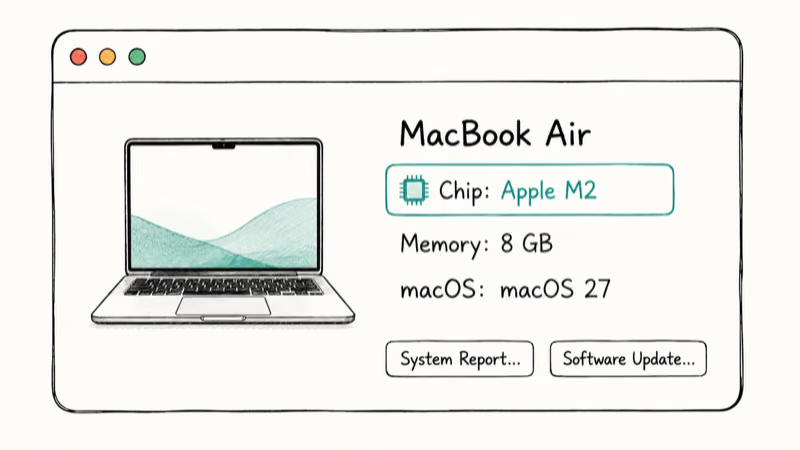
Open the Apple menu, click About This Mac, and read the line under the model name. Apple Silicon Macs show a Chip entry like “Apple M1” or “Apple M3 Pro.” Intel Macs instead show a Processor entry with an Intel Core name. If you see “Chip,” you’re compatible with macOS 27. If you see “Processor,” you’re not.
#Which Macs Lose macOS 27 Support?
Four Intel Macs could install last year’s macOS 26 Tahoe but can’t move up to Golden Gate:
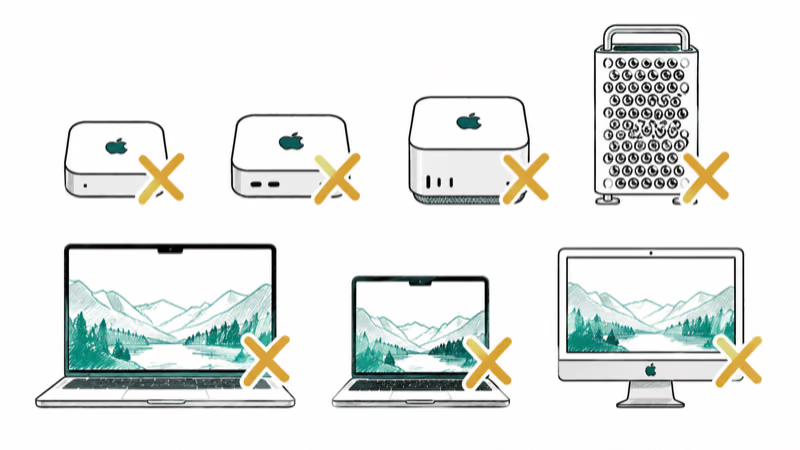
- 16-inch MacBook Pro (2019)
- 13-inch MacBook Pro (2020, four Thunderbolt 3 ports)
- 27-inch iMac (2020)
- Mac Pro (2019)
These were the last Intel Macs Apple kept supporting, and Tahoe was their final stop. If you own one, it keeps working and still gets security updates for roughly two more years. It just won’t receive the Golden Gate feature set. The macOS 27 Intel Mac guide covers what owners of these models should do next.
#Older Intel Macs Were Dropped Earlier
If your Mac is an Intel model older than the four above, it dropped off the support list before Golden Gate, in an earlier macOS version. The 2017 and 2018 Intel Macs, for example, maxed out one or two releases back.
The practical answer is the same either way.
Across the Intel-to-Apple-Silicon transition, the pattern has been steady: each release trimmed more of the oldest Intel models, and Golden Gate simply finishes the job by removing the last of them. An Intel Mac that can’t run macOS 27 isn’t broken, it just sits on its final supported version with security patches for a while longer.
#Performance on the Oldest Supported Macs
Here’s the upside of the Apple Silicon cutoff. Because Apple no longer has to support Intel hardware, Golden Gate’s performance work targets the M-series lineup directly.
The five-year-old M1 still benefits.
Macworld states that macOS 27 focuses on speed, with apps loading faster and transfers speeding up across the system. That matters most for older Apple Silicon Macs, because the M1 generation remains inside the supported hardware line instead of being treated like a cutoff-era machine.
So an original M1 owner gets a capable, supported Mac rather than a device limping toward the end of its life. The redesigned Siri and AI features do ask for newer silicon in places, but the core OS runs on every supported model, the same way the iOS 27 compatible iPhones list reaches back to older hardware.
#Bottom Line
Checking compatibility is refreshingly simple this year: Apple Silicon is in, Intel is out. If your Mac is from late 2020 or later, it almost certainly qualifies.
If you’re still on an Intel Mac, macOS 26 Tahoe is your ceiling. Plan for a couple more years of security updates, then an Apple Silicon upgrade when you’re ready. The macOS 27 release date timeline tracks the rollout.
macOS 27
#Frequently Asked Questions
Does macOS 27 work on Intel Macs?
No. macOS 27 runs only on Apple Silicon Macs with M1 or newer chips. Every Intel Mac is excluded.
What is the oldest Mac that can run macOS 27?
The M1 generation from late 2020, including the M1 MacBook Air, M1 MacBook Pro, M1 Mac mini, and 24-inch M1 iMac. Any Mac with an M1 chip or newer is supported.
How do I check if my Mac supports macOS 27?
Open the Apple menu and choose About This Mac, then look at the line under the model name. Apple Silicon Macs show a Chip entry like “Apple M1” or “Apple M3 Pro,” and any of those means your Mac is compatible with macOS 27. Intel Macs instead show a Processor entry with an Intel Core name, which means the Mac can’t install Golden Gate. It’s the single fastest way to settle compatibility without checking model years.
Which Macs are dropped in macOS 27?
The 2019 16-inch MacBook Pro, the 2020 13-inch MacBook Pro, the 2020 27-inch iMac, and the 2019 Mac Pro all lose support. They were the last Intel Macs Apple supported, and macOS 26 Tahoe is their final version.
Can I still use my Mac if it can’t run macOS 27?
Yes. It keeps working on macOS 26 Tahoe with security updates for about two more years.
When does macOS 27 come out?
Apple is expected to release macOS 27 in September 2026, in line with its usual fall schedule. A developer beta is available now, and the Apple Silicon-only list stayed unchanged through developer beta 3 on July 6, with the public beta now available.

macOS 27 Golden Gate: Every Major New Feature Confirmed
macOS 27 Golden Gate goes Apple Silicon only, adds a Gemini-powered Siri, refines Liquid Glass, and rebuilds Spotlight. Here is every confirmed change.

macOS 27 Liquid Glass: Every Readability Fix Explained
macOS 27 Golden Gate refines Liquid Glass with an intensity slider, better contrast, cleaner window corners, and edge-to-edge sidebars to fix readability.

macOS 27 Performance: What Golden Gate Makes Faster
macOS 27 Golden Gate speeds up AirDrop, network file browsing, Safari, and Spotlight, with core system improvements on the Apple Silicon-only release.

macOS 27 and Rosetta 2: Will Your Intel Apps Work?
macOS 27 is the last version with full Rosetta 2, so older Intel apps still run on Apple Silicon. The real cutoff comes with macOS 28 in 2027.