Who Follows Who on Instagram: How to Check Fast (2026)
Want to see who follows who on Instagram? Three quick methods to check followers, spot mutual connections, and track unfollows without sketchy apps.
Quick AnswerTo see who follows who on Instagram, open the profile you want to inspect, tap Following, then type a username in the search box; if the handle appears, that account follows the person you opened.
Figuring out who follows who on Instagram scratches a common itch. You might be checking if a mutual still follows back, mapping a friend group, or trying to spot a quiet unfollow. The good news: under thirty seconds once you know where to tap.
- Instagram never sends a notification when someone unfollows you, so checking is always a manual job.
- The fastest method is to open the target profile, tap Following, and search the handle you want to test inside that list.
- Public accounts expose a full Followers and Following list to anyone logged in; private accounts hide both until your follow request is approved.
- A “Followed by” line on a profile is the only built-in signal that shows mutual connections at a glance, without scrolling through any list.
- Third-party tracker apps work by logging into your account, which violates Instagram’s Terms of Use and can trigger an action block or password reset.
#How Does Instagram’s Follow Relationship Work?
Two counters tell the story.
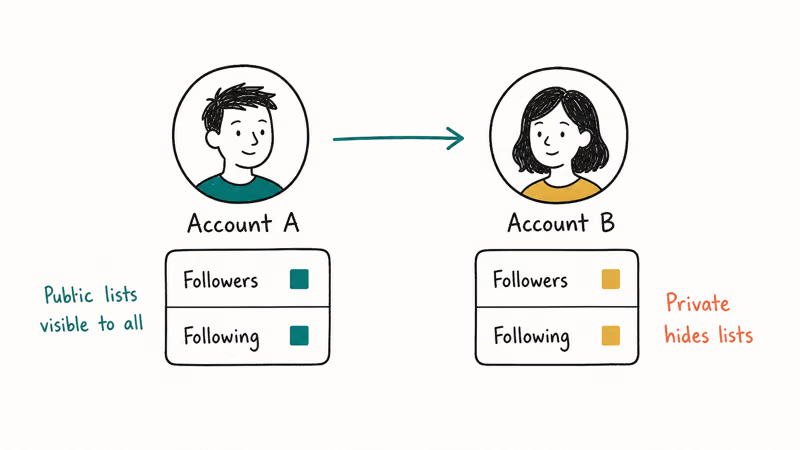
Every Instagram account has two public counters: Followers (people who follow this account) and Following (accounts this person follows). On a public account, both lists are visible to anyone who taps them. On a private account, only approved followers see the lists, and the profile shows just the counts until your request goes through.
The platform uses a one-way follow model, so A following B doesn’t force B to follow back.
That’s why “mutual followers” matters as a separate concept. When you visit a profile, Instagram surfaces a small “Followed by” line under the bio that names up to three accounts you follow who also follow that profile. That line is the cleanest single-tap signal for checking who follows who.
According to Wikipedia’s Instagram article, the platform crossed 2 billion monthly active users in 2023, which is why the follower graphs feel dense even for small accounts. Unfollows happen silently. Instagram’s Help Center on followers and following confirms that the app doesn’t push a notification when someone removes themselves from your follower list. The only way to detect an unfollow is to spot the count dropping and search the suspected handle inside your own Followers list.
#How to Check If Someone Follows You on Instagram
This is the question most people are actually asking. It has two clean answers depending on which direction you want to verify.
#Method 1: Search inside your own Followers list
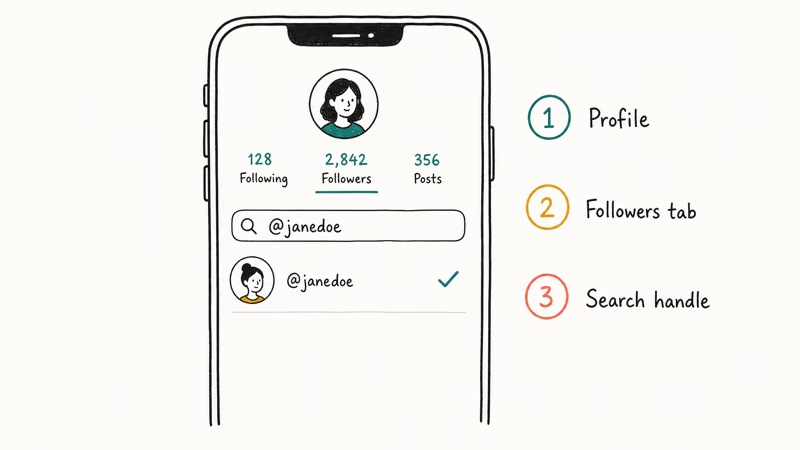
- Open your profile by tapping your avatar in the bottom-right corner.
- Tap the Followers count above your bio.
- Use the search bar at the top of the list and type the handle you want to check.
- If the account appears, that user still follows you. If you see “No users found,” they either never followed you or have unfollowed.
This is the most direct check because Instagram is searching its own server-side relationship table, not just your loaded screen. The in-list search is faster than scrolling because Instagram checks the relationship directly.
#Method 2: Check the suspected user’s Following list
- Open the suspected user’s profile.
- Tap their Following count.
- Search your own handle inside that list.
- If your account is there, they follow you. If not, they don’t.
Method 2 only works if the suspected account is public, or if you already follow a private account and your request was approved. For private accounts you don’t follow, Instagram blocks list access entirely.
#Method 3: Check the “Followed by” line on a profile
When you visit any profile, look directly under the bio. If you and that user share any mutual followers, Instagram prints a line like “Followed by jane_doe, alex.smith and 12 others.” Tap that line to open a filtered list of every shared connection. This is the fastest way to answer “do we share mutuals?” without cross-referencing two follower lists by hand.
#Checking the Follow Relationship Between Two Other Accounts
To verify a follow relationship between two accounts that aren’t yours, open one of the profiles, tap Following, and search the second handle. The platform shows exactly who’s on that list. A match means a confirmed follow.
Run the check both ways. Open A’s profile, tap Following, search for B’s handle; if B appears, A follows B. Then open B’s profile, tap Following, search for A’s handle to see the reverse. You’ve got a bidirectional picture in under a minute.
Two limits apply. First, both accounts must be public (or you must already follow each one) for the lists to load. Second, Instagram caps Following lists at 7,500 because that’s the maximum number of accounts a single user can follow, as Instagram’s Help Center confirms. Even on celebrity-tier accounts, search inside Following always returns a result quickly because the list is bounded.
If you’re trying to map the follow graph of someone else’s account, you can also check how to see who someone recently followed on Instagram for the most-recent activity view.
#Why Instagram Hides Some Follower Lists From You
Three reasons cover most of these blank-wall cases:
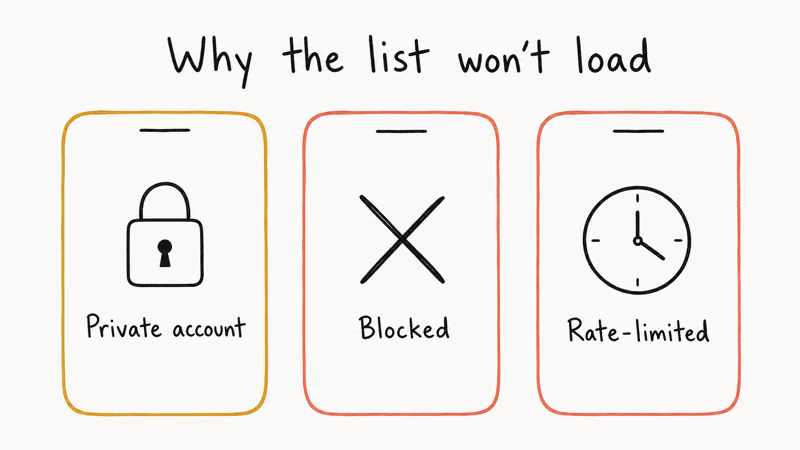
- The account is private and you don’t follow it. Private profiles hide both Followers and Following lists from non-followers. Send a follow request and wait for approval, or check the “Followed by” line for any mutuals you already share.
- You’ve been blocked. When someone blocks you, their profile shows zero posts and no follower data. Search for them from a separate logged-out browser to confirm the account still exists. We covered the full signal pattern in who blocked me on Instagram.
- Instagram is rate-limiting you. If you’ve been opening dozens of follower lists in a short window, the app may stop loading new ones for an hour or two. Logging out and back in doesn’t help. Instagram’s help page on action blocks states that the platform applies temporary limits to any session that crosses about 200 rapid actions in an hour.
A fourth, rarer case: the account itself has set its Following list to be hidden via a third-party privacy tool. Instagram’s own settings don’t expose that option directly to consumers as of 2026. If the count is visible and the list isn’t, it’s almost always one of the three reasons above.
#Third-Party Tracker Apps: Are They Worth the Risk?
Apps like Followmeter, FollowCop, Reports+, and Unfollowers Tracker market themselves as a one-tap way to see who unfollowed you. They work by asking you to log in with your Instagram credentials and then polling your follower list on a schedule.
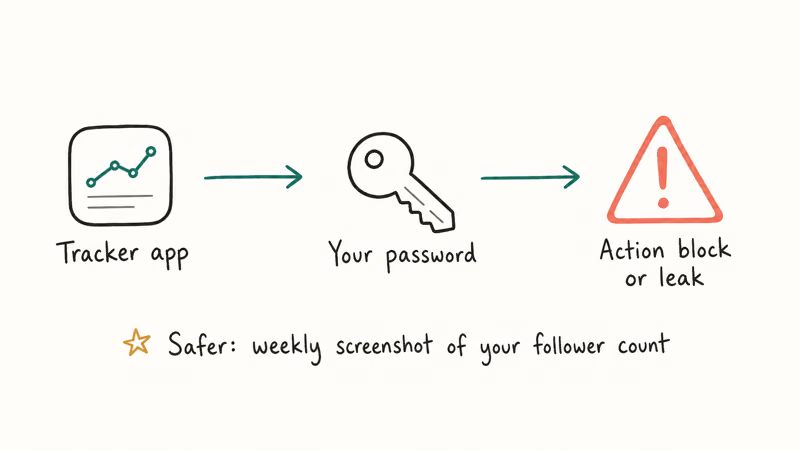
Two real problems with that model.
First, Instagram’s Terms of Use prohibit access to the service through unauthorized third parties. Logging a tracker into your account gives it API-equivalent access, which can expose the account to security challenges such as password resets or action blocks.
Second, these apps store your password on their server. If their database leaks, your Instagram login leaks with it. That’s a much bigger risk than the small convenience of an automated unfollower list.
For the people who really do want a tracker, the safer pattern is to take a manual screenshot of your follower count and the top of your Followers list once a week. Compare them. That captures the same data the app would surface and never asks for your password. If you do want a curated list of legitimate analytics tools, our Instagram tracker apps roundup walks through which ones use Meta’s official API and which don’t.
#What to Do When Someone Unfollows You
Unfollows happen for hundreds of mundane reasons. People clean up their feeds, hit Instagram’s follow limits when chasing a new niche, or simply forget which accounts they follow. Most unfollows have nothing to do with you specifically.
If you want to track who unfollowed, the manual method is:
- Note your current Followers count.
- The next time it drops, open Followers and scroll to the top.
- Search through the names you remember seeing recently.
- If a specific handle no longer appears, they unfollowed.
This is tedious if your follower count moves daily, which is why so many people reach for tracker apps. The trade-off is real: tracker convenience versus account security risk.
If you suspect someone has not just unfollowed you but blocked you, the diagnosis is different. A blocked user can’t see your profile at all, your messages to them go undelivered with no read receipt, and their handle returns “No users found” in search even when you know the account exists. The Instagram screenshot notification guide covers a related set of “did they see this?” privacy questions that come up alongside follow-tracking concerns.
#Make Your Own Account Less Visible
If the reason you’re checking who follows who is that you want to manage your own visibility, Instagram has a few built-in tools.
- Set your account to private.
Settings>Privacy>Accountprivacy. After flipping this, only approved followers see your posts and your Following list. - Remove a follower without blocking them. Open Followers, tap the three-dot menu next to a name, and choose Remove. They’re not notified, and they can refollow you unless you also block.
- Restrict comments and DMs.
Settings>Privacy>Restrictedaccounts lets you mute someone’s comments without blocking. They keep following you, and they have no way to detect the restriction. The reverse direction is covered in how to unmute someone on Instagram.
For users hitting limits in the other direction, the cap and recovery steps are detailed in why can’t I follow people on Instagram.
#Bottom Line
The three-tap loop wins every time: open profile, tap Following, search the handle. It works for any public account and for private ones you already follow. Skip third-party tracker apps. The convenience isn’t worth the account-security risk, and a weekly screenshot of your follower count gives you the same data.
Instagram Tips & Tricks
#Frequently Asked Questions
Can I see who unfollowed me on Instagram?
No, there is no built-in notification.
The only reliable manual method is to notice your Followers count drop, then search the handles you suspect inside your own Followers list. A “No users found” result confirms the unfollow. Most users only catch big-name unfollows this way; small accounts slip past unnoticed.
Does Instagram notify someone when I check their following list?
No. Viewing a Following or Followers list, even repeatedly, generates no notification on the other person’s account, and the same is true of profile views. Only Stories views, Live joins, and screenshot captures of disappearing DMs trigger notifications. Everything else, including how often you check, stays private to you.
Why does the following count look different from the actual list?
Caching. The count and the list update at slightly different speeds.
If you just sent or received a follow, refresh the app fully by pulling down on Followers, and the count should match within a minute. Force-closing the app and reopening it also clears the cache instantly.
Can I see who follows a private account?
Only if you follow that account yourself and your request was approved. Until then, you can still see mutual followers via the “Followed by” line under the bio if you share any.
How many people can I unfollow in one day on Instagram?
Instagram doesn’t publish a hard number, but the platform applies temporary action blocks when follow or unfollow activity looks automated.
Spreading actions across the day, rather than running through hundreds in a single session, keeps you well under the limit for normal personal use. Most reports suggest around 150 to 200 actions per hour is the practical ceiling.
Are third-party follower tracker apps safe to use?
Most are not safe.
They ask for your Instagram password, which violates Meta’s Terms of Use and can trigger an action block or password reset. If you want analytics, stick to tools that connect through Meta’s official Business or Creator API rather than asking for your login directly. Tools that connect through the official API also tend to give more accurate follower data because they aren’t scraping the mobile app.
Can I hide my following list from other users?
Only by switching your whole account to private. Settings > Privacy > Account privacy hides both Followers and Following from anyone you haven’t approved.
Instagram Parental Controls: Family Center Setup (2026)
Set up Instagram Family Center, privacy settings, Hidden Words, content filters, and time limits with your teen's consent on iPhone or Android.
Instagram Notifications Not Working? Quick Fixes (2026)
Instagram notifications not working? Fix push alerts, DMs, likes, and Stories on iPhone and Android in under 5 minutes with proven 2026 steps.
Instagram "We Limit How Often" Error: How to Fix It 2026
Instagram says "we limit how often you can do certain things"? Wait 24-48 hours, slow down likes and follows, then appeal through Help Center.
Instagram Name Checker: Find Available Usernames Fast
Check Instagram username availability instantly with free tools like Namechk and KnowEm. Find perfect handles and avoid the frustration of taken names.