Instagram Screenshot Notification: When It Triggers in 2026
Instagram notifies screenshots only for View Once and Allow Replay disappearing photos in DMs. Stories, Reels, and regular DMs send no alert in 2026.
Quick AnswerInstagram only sends a screenshot notification when someone captures a View Once or Allow Replay disappearing photo or video in a direct message. Regular DM text, Stories, Reels, posts, and profile pictures don't trigger any alert in 2026.
The Instagram screenshot notification is one of the most misunderstood privacy features on the platform, and the rules have shifted more than once since Instagram first tested alerts in 2018. As of 2026, the policy is narrow and specific: only one type of content actually pings the sender when you screenshot it. Everything else, including Stories, Reels, regular DMs, public posts, and profile pictures, goes through silently.
This guide walks through exactly when Instagram sends a screenshot alert, why the policy stayed narrow, and how to handle disappearing messages responsibly if you want to keep a copy for yourself.
- Instagram only sends a screenshot notification for View Once and Allow Replay disappearing photos or videos sent in direct messages.
- Regular DMs, Stories, Reels, public posts, profile pictures, and vanish mode chats don’t trigger any screenshot alert.
- Instagram briefly tested screenshot notifications for Stories in 2018 and quietly removed the feature within months.
- The “Screenshot taken” indicator appears next to the disappearing photo or video in the chat thread, visible to both sender and recipient.
- If you want a permanent copy of a disappearing photo, the safest path is to ask the sender to resend it as a regular message.
#When Does Instagram Send a Screenshot Notification?
Instagram sends a screenshot notification in exactly one situation. You take a screenshot or screen recording of a disappearing photo or video sent inside a direct message conversation, and the “Screenshot taken” indicator lands in the chat thread for both sides to see. These are the photos and videos labeled View Once or Allow Replay when the sender chose the disappearing option from the camera screen in DMs. Every other Instagram capture is silent.
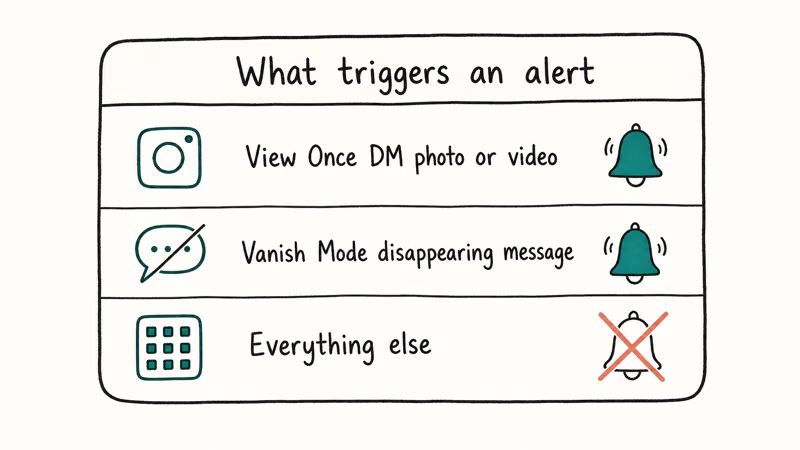
That’s it. One trigger.
The indicator appears as a small camera-icon marker next to the message bubble. Both the sender and the recipient see it. The sender doesn’t get a separate push notification, but the marker stays in the thread permanently, so the sender will spot it the next time they open the conversation.
The indicator can appear right after the capture and stays attached to the disappearing message.
Screen recordings of View Once content fall under the same disappearing-media rule as still screenshots. Mirrored or third-party captures can also leave the same chat-thread indicator because Instagram applies the rule to the disappearing message, not only to one hardware screenshot shortcut.
#Instagram Content That Does Not Trigger a Notification
This is where the policy gets practical. The list of content that doesn’t send a screenshot alert is long, and it covers almost everything most users actually screenshot day to day.
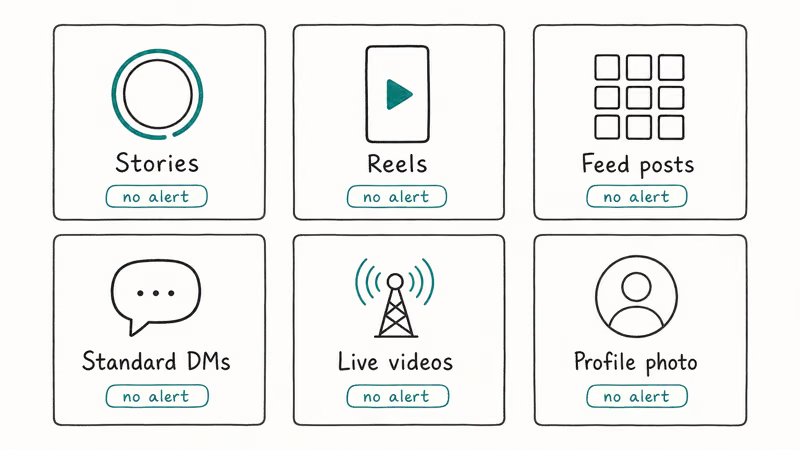
- Regular direct messages (text, emoji, voice notes, reactions)
- Permanent photos and videos shared in DMs (the default option, not View Once)
- Instagram Stories posted by anyone, including close-friends-only stories
- Reels, including those shared into DMs
- Public posts in the main feed and Explore page
- Profile pictures and bio screenshots
- Vanish mode conversations, despite the name suggesting otherwise
- Live videos (active or saved)
- Highlight covers and saved highlights
Instagram confirms that Stories no longer send screenshot alerts. The platform briefly tested this feature in mid-2018, then quietly rolled it back later the same year. The Instagram overview is the durable platform citation; current Stories behavior aligns with Facebook and most social platforms.
Stories run silent.
Regular Stories, Reels, Explore content, and profile screenshots don’t notify the poster in current app behavior.
#How Does Instagram’s View Once Policy Work in DMs?
The View Once feature is the only path where the screenshot rule matters. Here is how it works on the sender side and the recipient side.
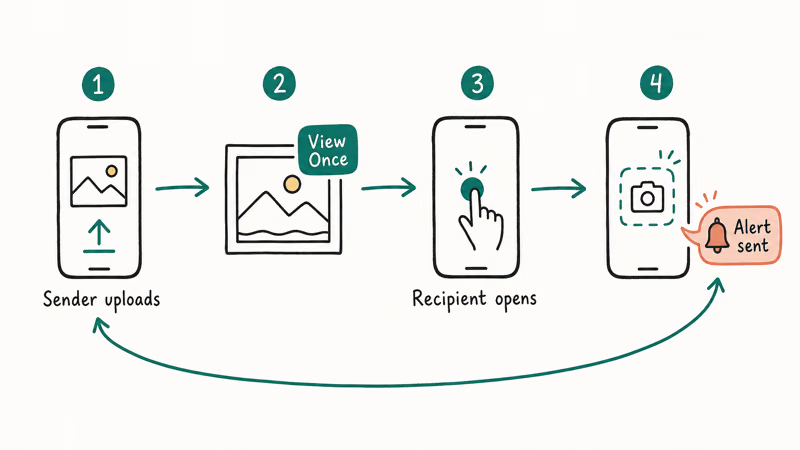
When you compose a photo or video in a DM thread, Instagram offers three send modes from the small toggle above the send button. The three modes determine whether the photo lingers in the chat history, expires after a set number of views, or vanishes after a single look. Only the latter two activate screenshot detection on the recipient’s app, and only for that single message bubble, not for the rest of the conversation thread above or below it.
- Keep in Chat: the photo stays in the thread like a normal message. No screenshot alert is ever sent.
- Allow Replay: the recipient can view the photo twice, then it disappears. Screenshot alerts are active.
- View Once: the recipient can view the photo a single time, then it disappears. Screenshot alerts are active.
According to Instagram’s Help Center article on sending disappearing photos and videos, the screenshot indicator appears in the chat for both the sender and recipient whenever someone captures a disappearing photo or video. The help center states that this indicator works the same regardless of whether the capture was a screenshot, a screen recording, or a third-party screen capture utility.
The View Once mode is intentionally narrow.
Instagram designed it as the privacy-aware option for sharing sensitive media such as financial documents, draft work, or private photos, where the sender wants the content gone after viewing. The screenshot indicator exists so the sender knows if their assumption of privacy turned out wrong.
If you find this feature confusing or worry your messages aren’t behaving as expected, the same DM issues that affect screenshot alerts can also break delivery. The Instagram DMs not working in 2026 guide covers what to do when messages stall, fail to load, or never reach the recipient.
#Why Instagram Removed Screenshot Notifications for Stories
Instagram’s Story screenshot test in 2018 generated more confusion than safety. The feature was only visible inside a small percentage of accounts, it was undocumented, and the alert format kept changing during the test window. Users on the same Wi-Fi network reported different behavior on different phones, and Story analytics screens started showing camera icons one week and hiding them the next without any product post explaining what changed.
Instagram briefly tested Story screenshot alerts, then rolled the behavior back. The Instagram overview is the durable platform citation; in current app behavior, regular Stories don’t send screenshot notifications.
The pattern matched a typical Instagram product test: the engineering team builds a small slice, ships it to one or two regions, watches sentiment for a few weeks, then either expands the slice or kills it quietly without any blog post or announcement.
The likely reason is product alignment.
Facebook and WhatsApp, both owned by Meta, don’t send screenshot alerts for regular content. Instagram aligning with those platforms keeps the entire Meta ecosystem consistent. The exception remains View Once, which mirrors WhatsApp’s own View Once feature added in 2021.
This is also why screenshotting Instagram Stories that won’t load is fine: even if the Story is stuck buffering on your screen and you grab a frame to send to support, the original poster has no way to know you did so.
#What to Do If You Receive a Screenshot Notification
If you sent a View Once or Allow Replay photo and you see the “Screenshot taken” indicator appear in the thread, here is the practical response.
First, don’t assume malicious intent. The most common reason people screenshot a disappearing photo is to keep a memory: a sweet photo from a partner, a saved meme, or a piece of information they wanted to reference later. Ask the recipient directly what they did with the image.
Second, decide what level of trust you want going forward.
Instagram doesn’t let you revoke a screenshot after the fact, and there is no built-in way to delete the captured copy from the other person’s device. If the content was sensitive, this is a moment to recalibrate what you send in disappearing mode to that person in the future. The decision lives entirely on your side. There is no Instagram-side button that revokes the captured copy or forces the recipient’s gallery to delete the image.
Third, if the screenshot involves content shared without consent, such as intimate images, identifying documents, or private financial information, Instagram has a formal reporting flow. Tap and hold the message, choose Report, and select the relevant category. Meta confirms that intimate-image abuse reports are routed to a dedicated review queue.
For parents managing a younger user’s account, the broader privacy picture matters more than any single notification. The Instagram parental controls walkthrough covers the supervision tools, time limits, and DM restrictions that prevent unwanted private exchanges in the first place.
#The Future of Instagram Screenshot Alerts
Probably no expansion is coming, based on the company’s pattern over the past four years.
Instagram has experimented with privacy alerts and pulled most of them back. The 2018 Story test was reversed, and a 2020 internal test for screenshot alerts in vanish mode never shipped publicly. Meta’s product priorities have shifted toward end-to-end encryption for DMs rather than per-action notifications. Any new screenshot-detection surface would now need to live inside the encrypted message client rather than on Instagram’s servers, which adds real engineering cost.
Meta rolled out optional end-to-end encryption for Instagram DMs in December 2023, and when a chat was end-to-end encrypted, Instagram itself could not read its contents. Server-side detection of screenshotting is structurally harder for any message the platform can’t read, even if the company wanted to add it.
Any future expansion, if it happens at all, will probably arrive inside encrypted ephemeral threads, which is the version of vanish mode that lives on top of E2EE. But Meta hasn’t announced any timeline for that change as of May 2026.
Recent keynotes back this up.
The 2024 and 2025 Meta Connect events both focused on Threads, ad placement, and Reels monetization rather than any expansion of the screenshot alert surface, which is a fair signal that the team isn’t prioritizing this kind of friction right now.
Want a paper trail without screenshots? Use Instagram’s official message export tool, walked through in the Instagram DM recovery guide.
#Instagram Compared to Other Platforms on Screenshot Alerts
The current state of screenshot policies across major social and messaging apps is uneven. Here is the quick comparison, accurate as of May 2026.
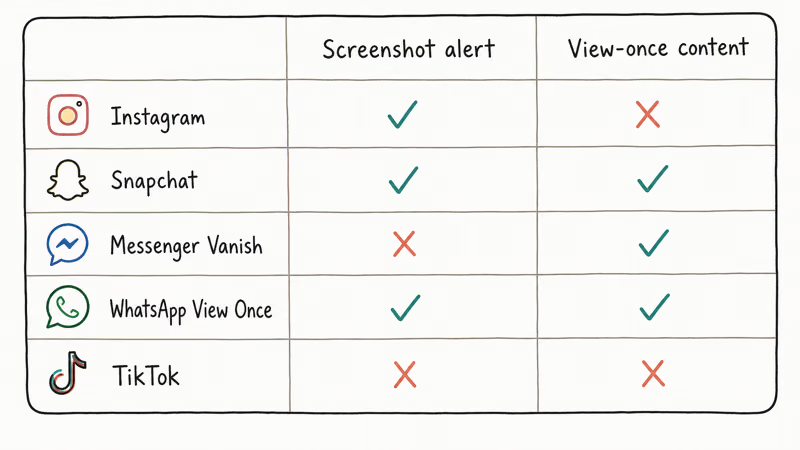
| Platform | Screenshot alerts? | What triggers them |
|---|---|---|
| Limited | Only View Once and Allow Replay in DMs | |
| Snapchat | Yes | Snaps, chat messages, Stories (the platform’s signature feature) |
| Limited | Only View Once media | |
| Facebook Messenger | No | No screenshot alerts in any chat type |
| Telegram | Limited | Only Secret Chats |
| Signal | No | Signal explicitly doesn’t implement screenshot detection |
| Tinder | No | Tinder removed screenshot alerts in 2019, and Tinder messages disappear under different rules |
| Snapchat Memories | No | Saved Memories don’t alert the original sender on screenshot |
Table caption: Screenshot notification behavior across major messaging and social apps as of May 2026.
The pattern is consistent.
Only ephemeral or expiring content categories trigger alerts, and only on platforms where ephemerality is a core feature. General-purpose messaging is screenshot-friendly across the board, and even the “limited” platforms restrict their alerts to a single content type rather than the whole app surface.
#Bottom Line
If you remember one thing from this guide, make it this: in 2026, the only Instagram screenshot that pings the sender is one taken of a View Once or Allow Replay disappearing photo or video inside a direct message. Stories, Reels, regular DMs, public posts, and profile pictures all send no alert. The 2018 Stories screenshot trial is dead and hasn’t returned.
The specific recommendation for everyday Instagram users is simple. If you want to save a memory from a disappearing message, just ask the sender to resend it in regular mode. That one short message avoids any awkwardness and gives you a permanent copy with the sender’s full consent. If you are the sender, treat View Once and Allow Replay as the equivalent of saying something out loud in a quiet room: the indicator gives you accountability, not control.
Instagram Tips & Tricks
#Frequently Asked Questions
Does Instagram notify screenshots of regular DMs in 2026?
No. Instagram doesn’t send any notification when you screenshot a regular direct message, including text, photos saved permanently in the chat, voice notes, or reactions. The screenshot alert only applies to View Once and Allow Replay disappearing photos and videos.
Does Instagram tell you who screenshots your Story?
No, Stories generate no screenshot alerts of any kind. The 2018 test of Story screenshot alerts was removed the same year.
Will the sender know if I screenshot a vanish mode chat?
The sender won’t receive a screenshot alert for content sent in vanish mode chats. Despite the name, vanish mode only auto-deletes messages after they have been seen and the chat closes. Screenshotting any vanish mode content during the active session doesn’t notify the sender.
What happens when I screenshot an Instagram View Once photo?
A small “Screenshot taken” indicator appears next to the disappearing photo in the chat thread within about two seconds, visible to both you and the sender. The sender doesn’t get a push notification, but the marker stays in the thread metadata for the life of the chat. Deleting the message from your side doesn’t remove the indicator from the sender’s side. There is no in-app option to suppress the marker after the fact.
Can Instagram detect screen recording the same way as screenshots?
Yes. Instagram treats screen recordings of View Once and Allow Replay content the same as still screenshots. The “Screenshot taken” indicator appears in the chat whether you use iOS Control Center recording, Android’s built-in screen recorder, or a third-party screen capture utility. The detection applies to the View Once viewer regardless of capture method.
Does Instagram alert me if someone screenshots my profile picture or bio?
No. Public profile screenshots, including bio, follower list, posts, and Reels, never trigger alerts.
Can I disable Instagram screenshot notifications on my account?
You can’t turn off the screenshot indicator for View Once and Allow Replay disappearing photos in DMs. The behavior is enforced platform-wide and applies to every account. The only way to avoid generating a screenshot indicator is to not screenshot disappearing photos in the first place.
Instagram Parental Controls: Family Center Setup (2026)
Set up Instagram Family Center, privacy settings, Hidden Words, content filters, and time limits with your teen's consent on iPhone or Android.
Instagram Notifications Not Working? Quick Fixes (2026)
Instagram notifications not working? Fix push alerts, DMs, likes, and Stories on iPhone and Android in under 5 minutes with proven 2026 steps.
Instagram "We Limit How Often" Error: How to Fix It 2026
Instagram says "we limit how often you can do certain things"? Wait 24-48 hours, slow down likes and follows, then appeal through Help Center.
Instagram Name Checker: Find Available Usernames Fast
Check Instagram username availability instantly with free tools like Namechk and KnowEm. Find perfect handles and avoid the frustration of taken names.