How to See Who Someone Recently Followed on Instagram?
Instagram removed the Following Activity tab in 2019. Here is what you can actually see, what you cannot, and how to sort your own follows by date.
Quick AnswerInstagram no longer shows a public Following Activity tab, so there is no official way to see who another user recently followed. You can view the static Following list on any public profile, but it is not sorted chronologically.
Short answer: you can’t, and that’s deliberate. Instagram retired the Following Activity tab in October 2019, and the public Following list on any profile is not sorted chronologically for outside viewers. No first-party tool surfaces another user’s recent follows, and no Graph API endpoint exposes that data. This guide covers what’s still visible, why Meta closed the door, and how to sort your own follows by date.
- Instagram removed the Following Activity tab in October 2019, ending public chronological tracking of anyone’s follows.
- A public profile’s Following list is still visible to logged-in users, but the order is not chronological and the count can lag behind reality by hours.
- Your own Following list has a Date Followed: Earliest and Date Followed: Latest sorter, so you can see your most recent follows on demand.
- Third-party tracker services that promise recent-follow logs sit outside Instagram’s Platform Terms and routinely trigger Instagram security challenges or temporary account locks.
- For business research, the official Meta Business Suite and the Instagram Insights tab cover your own brand metrics without scraping or surveillance tools.
#What Can You Actually See on Someone’s Instagram Profile?
A public profile still surfaces three useful signals: follower count, following count, and a static Following list. Private accounts hide both lists from non-followers entirely.
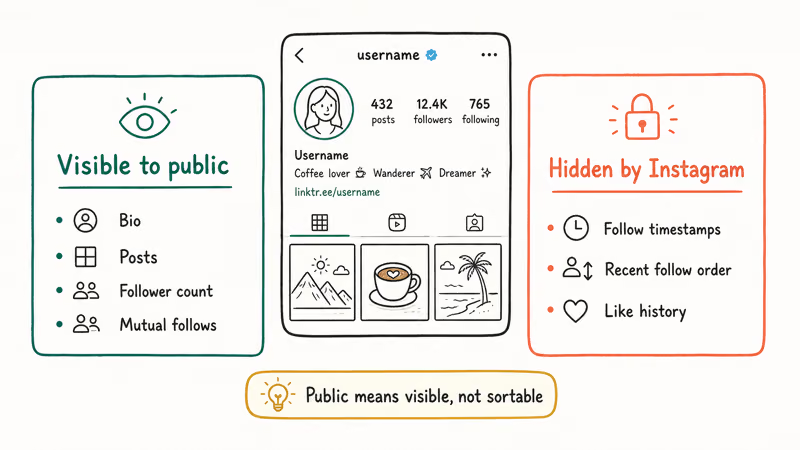
Opening a public profile’s Following count shows the list Instagram chooses to display, but that list is not a reliable recent-follow log. Instagram’s ranking system sorts the list by relevance signals, not by when each follow happened.
Mutual follows sit at the top. That’s helpful for shared-connection research. It tells you nothing about who the user followed last week.
The Instagram Help Center confirms that the Following list is not chronological for anyone except the account holder. The Instagram overview is the durable platform citation; Instagram retired public activity-style surfaces because they created more privacy surprises than discovery value.
#Snapshot data versus live activity
The number on the profile updates fast. The list inside it doesn’t.
According to Instagram’s developer reference on the Instagram Graph API, only Business and Creator accounts you own expose follow totals through an API, and no public endpoint shares another user’s follow history. Comparing a public profile’s Following count week over week would tell you that the user added or removed accounts. It won’t tell you which ones. That’s by design.
#Why Did Instagram Remove the Following Activity Tab?
Between 2011 and October 2019, the heart icon held a “Following” sub-tab that streamed every like, comment, and follow event from accounts you followed. It updated in near real time. Adam Mosseri announced on October 2, 2019 that this feed was being retired, in a Meta blog post explaining that most users were surprised to learn their public actions appeared in someone else’s refresh-able feed.
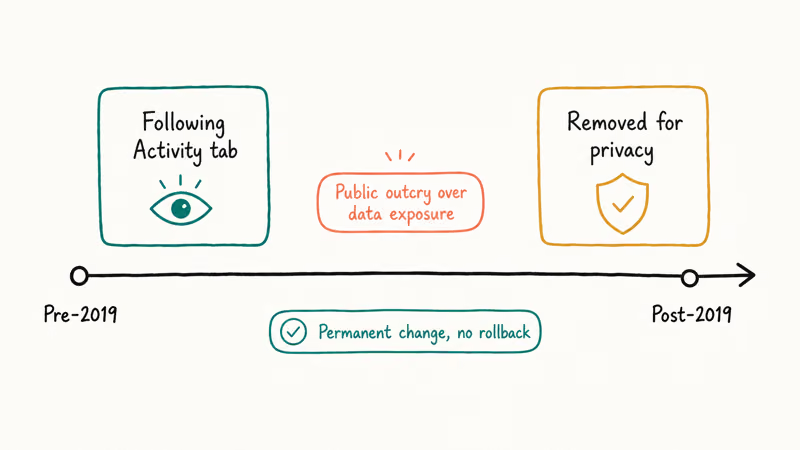
The change shut down the single biggest path for unwanted real-time tracking on the platform.
Before the removal, anyone could watch a friend like a post, follow a new account, or comment on a thread within seconds of it happening. After the removal, those actions show up only to the people directly involved. Meta’s privacy model follows the same logic: low engagement, high surprise, easy abuse.
What’s still visible now: public posts, public comments under those posts, story views (visible only to the story owner), and the static followers and following counts. That’s it.
For your own account, the next section covers the chronological-sort path.
#How to Sort Your Own Following List by Date
You can sort your own Following list chronologically inside the Instagram app on iPhone, Android, or the web. This is the only first-party method that returns a date-ordered view, and it only works on the account you’re logged into.
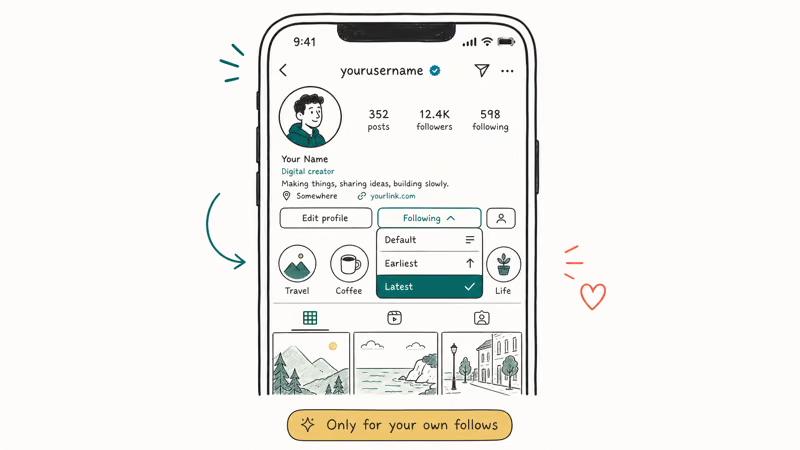
Instagram exposes the same sort menu for your own Following list on iPhone, Android, and the web.
- Open the Instagram app and tap your profile picture in the bottom right.
- Tap your Following count above your bio.
- Above the list, find the Sort dropdown labeled “Default” or “Sort by”.
- Tap Sort and choose Date Followed: Latest to put your most recent follows at the top.
- Choose Date Followed: Earliest if you want to scroll back to your oldest follows.
Same controls work at instagram.com. Sign in, click your Following count, look for the sort dropdown at the top of the modal that opens.
This is also the cleanest way to audit your own account. Sorting by Date Followed: Earliest is the fastest path to inactive or abandoned accounts you followed years ago. Instagram’s Help Center recommends reviewing your list periodically and removing accounts that no longer match your interests, which also reduces algorithmic noise in your feed.
If you also want to scrub search history, our walkthrough on how to clear Instagram search suggestions covers that flow on both iOS and Android.
#Risks of Third-Party Instagram Tracking Apps
A long list of services advertises “see who someone recently followed” features, charges monthly, and asks for your Instagram login. We don’t recommend any of them. The reasons are concrete.
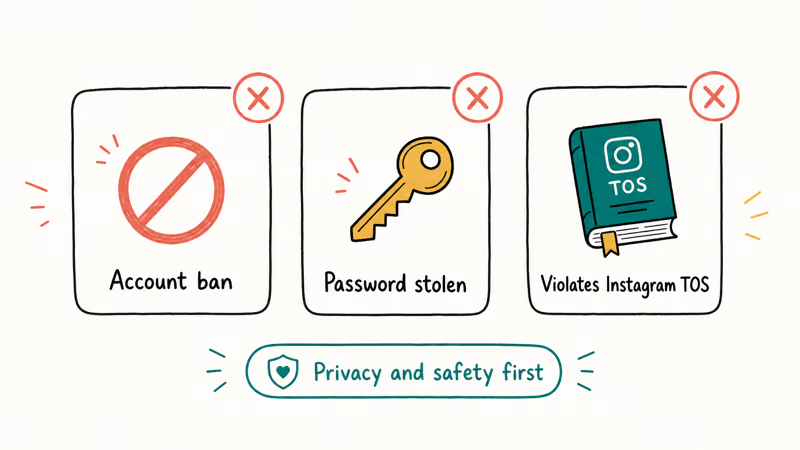
Instagram’s Platform Terms state that automated collection of data about other users’ accounts violates the agreement, full stop. The Community Guidelines add that scraping, automation, and impersonation can lead to suspension. Reports on the r/Instagram subreddit consistently show users getting hit with security challenges or temporary login locks after signing into these third-party trackers, because Instagram’s anti-abuse pipeline flags the unusual API patterns these services produce.
There’s also a credential problem.
When a tracker asks for your Instagram username and password, it stores both on its own servers. The FTC’s consumer-protection guidance on protecting your privacy online identifies handing login credentials to a third party as one of the highest-risk actions you can take with a social account. If that service is breached, the attacker walks away with your password, your recovery email, and any two-factor backup codes the service captured.
Many tracker services also show stale cached data or activity claims that Instagram itself does not expose, so their output should not be treated as reliable.
If you want legitimate Instagram metrics for your own brand, a partner brand you have permission to view, or competitor research at the public-profile level, the right tools are Instagram Insights inside the app and the Meta Business Suite.
#Privacy and Compliance Considerations
The methods in this guide stay inside two boundaries: your own account, and public information that Instagram chooses to display. Anything outside those boundaries hits multiple rules at once.
Instagram’s Terms of Use prohibit users from attempting to “create accounts or access or collect information in unauthorized ways.” That covers scraping, account takeover, and credential sharing. The Electronic Frontier Foundation’s social-network privacy guide recommends treating every public action as visible and every private action as belonging only to the account holder.
For users in the EU or UK, GDPR adds a layer.
Processing personal data about another individual without a lawful basis is itself a violation, and using a third-party tracker to log someone’s public activity won’t always qualify, especially if the data is aggregated and sold. The UK ICO’s reference on personal data walks through what counts as personal information online and which uses need explicit consent.
If you’re worried about your own follow activity being visible to others, switching to a private account is the cleanest fix. Private accounts only expose their Following list to approved followers, never to the general public. Locked out and need to recover your password first? Our walkthrough on a forgotten Instagram password covers the recovery flow Meta supports.
For the related screenshot question, our explainer on whether Instagram notifies when you screenshot a post covers the current screenshot detection rules across posts, stories, and DMs.
#How Public, Private, and Business Accounts Differ
Account type changes what’s visible. A public personal account exposes Followers and Following lists to any logged-in user. A private account hides both from non-followers. A Creator or Business account behaves like a public account for the lists themselves, but adds Instagram Insights for the owner.
If your account is private and someone asks how to view it without following, our piece on whether you can view private Instagram accounts lays out the legitimate paths (sending a follow request, mutual followers viewing) and which paths simply don’t work.
For account housekeeping like message recovery, our reference on recovering Instagram direct messages covers the export-data flow that Meta provides under its data-portability obligations.
Instagram Tips & Tricks
#Frequently Asked Questions
Can you tell who unfollowed you on Instagram recently?
Instagram does not send notifications when someone unfollows you. The only path is spotting that a specific account is missing from your Followers list. Third-party “unfollower” apps exist, but they carry the same Terms-of-Use and credential risks as tracker apps.
Does Instagram notify someone when you view their profile?
No. Profile views, post views, and Following-list checks generate zero notifications. Only story and live-video views are visible to the account owner.
Can I see who someone followed in 2019 or earlier?
The Following list is a live snapshot, so it shows current state only. Instagram does not preserve historical versions, and the brief Activity tab that exposed real-time follow events was retired in October 2019. No archive exists to query.
Will a third-party Instagram tracker get my account banned?
It can. Instagram’s automated systems flag accounts that log in from unusual IP ranges or that trigger high-frequency API calls. The common outcomes are temporary login locks, mandatory password resets, and forced phone-verification challenges. Permanent suspension is possible when the underlying service scrapes at scale and your credentials are part of that pattern.
How can I sort my own Following list to see who I followed most recently?
Tap your profile icon, tap Following, then choose Sort > Date Followed: Latest. Newest follow appears first. Works on iOS, Android, and the web.
Is there any official Instagram feature to track another user’s recent follows?
No. The Instagram Help Center confirms that activity data about other users isn’t exposed in any official Meta surface, including the Graph API for businesses, Creator Studio, or Meta Business Suite. Public follower and following counts are the only signals Meta publishes for non-owners, and they’re snapshot values that update on a delay, not live activity feeds. Any service claiming otherwise is scraping, fabricating, or working from cached data that’s already days old.
What should I do if I think someone is tracking my Instagram activity?
Switch to a private account under Settings > Privacy. Review Login Activity and sign out of unknown devices. Turn on two-factor auth. If you suspect credential theft, change your password.
#Bottom Line
You can’t reliably see who someone recently followed on Instagram, and that’s deliberate. Meta closed the Following Activity tab in October 2019 to shut down a path that had drifted toward stalking. For your own account, the Date Followed: Latest sort gives you the chronological view that’s missing for other users. For everything else, stick with Instagram Insights and Meta Business Suite, and treat anything not publicly visible as private by design.
Instagram Parental Controls: Family Center Setup (2026)
Set up Instagram Family Center, privacy settings, Hidden Words, content filters, and time limits with your teen's consent on iPhone or Android.
Instagram Notifications Not Working? Quick Fixes (2026)
Instagram notifications not working? Fix push alerts, DMs, likes, and Stories on iPhone and Android in under 5 minutes with proven 2026 steps.
Instagram "We Limit How Often" Error: How to Fix It 2026
Instagram says "we limit how often you can do certain things"? Wait 24-48 hours, slow down likes and follows, then appeal through Help Center.
Instagram Name Checker: Find Available Usernames Fast
Check Instagram username availability instantly with free tools like Namechk and KnowEm. Find perfect handles and avoid the frustration of taken names.