What Is Visa Provisioning Service on Your Statement?
Visa Provisioning Service is a $0 wallet tokenization check, not a charge. Learn when it appears, why it's safe, and how to spot true fraud.
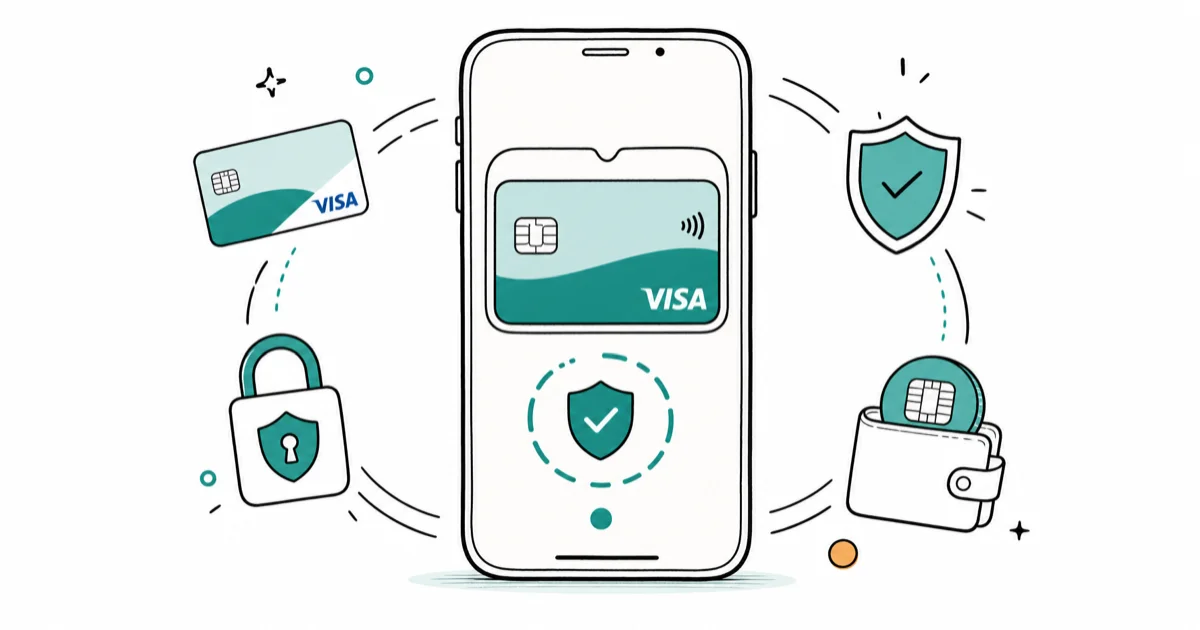
Quick AnswerVisa Provisioning Service is a $0 verification authorization that posts when you add a Visa card to a digital wallet like Apple Pay, Google Pay, Samsung Pay, Cash App, Venmo, or PayPal. It's not a charge and is almost never fraud, but a nonzero amount or a card you didn't add deserves a call to your issuer.
Seeing a line on your bank statement that reads “VISA PROVISIONING SERVICE” with a $0.00 amount can feel jarring. In almost every case it’s a tokenization check that runs when a Visa card gets added to a mobile wallet, not a charge against your balance.
The smaller risk worth taking seriously? A nonzero amount, or a card you never added.
- Visa Provisioning Service is a $0 authorization that posts when a Visa card is loaded into a digital wallet, not a real debit from your account.
- It typically appears within minutes to 24 hours of adding the card to Apple Pay, Google Pay, Samsung Pay, Cash App, Venmo, PayPal, or a merchant wallet.
- The same card can trigger multiple VPS entries if you provision it on more than one device or app, each one independent.
- Treat the entry as suspicious only if you didn’t enroll a card recently or the amount is anything other than $0.00.
- Open your wallet apps and your issuer’s card-management screen to confirm which device tokenized the card before contacting the bank.
#What Visa Provisioning Service Actually Does
Visa Provisioning Service, often shortened to VPS, is the back-end pipeline Visa runs to deliver a tokenized version of a card to a digital wallet.
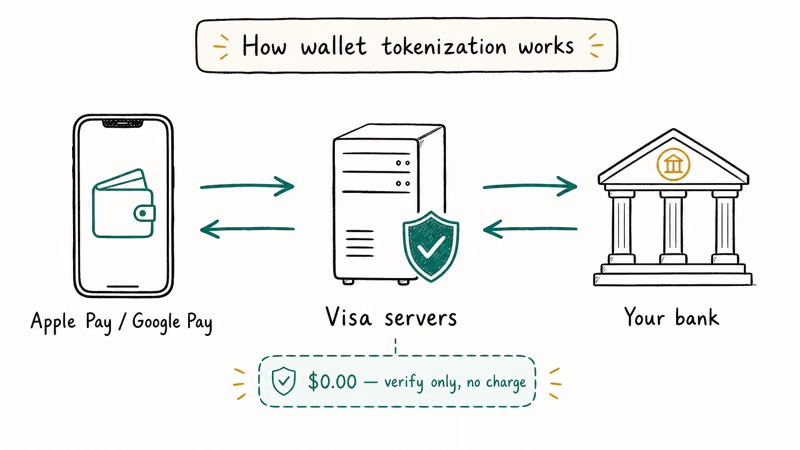
When you tap Add Card inside Apple Pay or Google Pay, the wallet asks your issuer to vend a payment token. Visa sits between the two to issue and validate that token. According to Visa’s payment tokenization overview, the token is a 16-digit surrogate number that replaces your real card details on the device, so the underlying primary account number never leaves the bank, even when you pay at a contactless terminal in another country.
The $0 line item is a side effect of the tokenization step, not the goal of it. Visa sends a zero-dollar authorization to your issuer to confirm the card is open and matches the wallet user. The issuer answers yes or no in milliseconds.
Across major issuers and credit unions, the entry usually clears in 24 to 72 hours.
#When the $0 Entry Appears
The same action triggers the entry: a Visa card is being attached to a wallet or merchant app that needs to store the credential. The line can appear within a day of that enrollment.
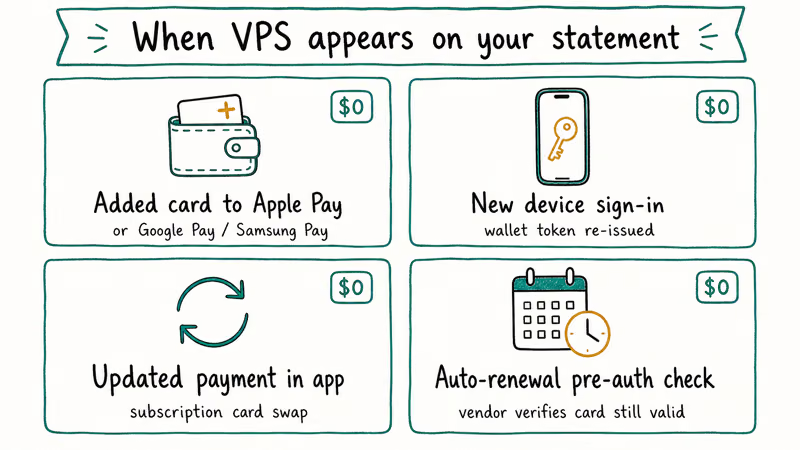
The list below covers common wallets and merchant apps that use tokenized card storage. Most of them call the Visa API the same way.
- Apple Pay on iPhone, Apple Watch, iPad, and Mac. Apple’s setup walkthrough confirms that the bank issues a Device Account Number after a tokenization request, which is the moment VPS runs.
- Google Wallet on Android. Google’s add-a-card help article states that the issuer must verify the card before it can be used at terminals, and the $0 auth is that verification.
- Samsung Wallet and Samsung Pay on Galaxy phones and watches. The flow runs end-to-end inside the Samsung Wallet app and posts the same VPS line as Apple and Google.
- Cash App, Venmo, PayPal, and Zelle. Adding a Visa funding card triggers the same tokenization, even though these apps aren’t contactless wallets.
- Merchant wallets such as Starbucks, Target Circle, Uber, DoorDash, and many airline apps. When the merchant stores a card-on-file, VPS still runs.
A single card can produce several VPS entries in one week. Adding the same Visa card to more than one wallet or device can generate a separate $0 line for each provisioning event.
#Why It Shows as Zero Dollars
The reason you see a zero-dollar line instead of nothing at all is a quirk of how issuers display pending authorizations. Visa sends an account verification message to the bank, the bank logs it like any other authorization, and some banks expose those pending auths to the consumer-facing app while others hide them. Chase, Citi, Bank of America, and Wells Fargo are known to show the entry. Several smaller credit unions silently drop it.
Because there’s no amount to settle, the auth never turns into a posted transaction.
If you watch your statement closely, you may notice the entry drops off in stages. The pending row clears first, usually within a day. Then the line disappears from any “recent activity” view a day or two after that.
Your rolling balance doesn’t move, even by a cent.
#Is Visa Provisioning Service a Scam?
The entry itself isn’t a scam. Scammers occasionally try to bait people into clicking fake “review this charge” links once they realize VPS notifications are common.
The legitimate version of the line will never come with a phone number, a clickable link inside the statement, or a request to verify your full card number. According to the FTC’s guidance on recognizing phishing scams, real banks don’t ask you to confirm an account by clicking a link in a text or email.
A real concern arises if the line appears without you adding a card. That can mean someone has your card number and is loading it onto their own device, the most common pattern of mobile wallet account takeover fraud.
In that scenario the auth is still $0, but the criminal’s next move is to walk into a store and tap the phone. Treat an unexplained VPS line as an early warning, not a charge, and act on it the same day.
#How Do You Stop the VPS Entries?
You can’t opt out of VPS itself because it’s a security layer Visa runs on every tokenization. What you can stop is the part you control, which is enrollment.
Removing a card from a wallet, declining auto-enrollment offers in banking apps, and pausing card-on-file features will all cut down on the volume of entries you see.
If you want a clean record of which devices currently hold your token, open your issuer’s mobile app and look for the “manage digital wallets,” “connected wallets,” or “device list” screen. Chase exposes this under the card tile, Citi under Account Services, and Bank of America under Card Settings. You can revoke a token from any device on that screen, which forces Visa to mark the token as removed and prevents new auths from posting from that device.
#When You Should Worry About a VPS Entry
A $0 VPS entry on the same day you added a card to a wallet isn’t a problem. A few situations do warrant a closer look. We recommend a 5-minute audit if any of them apply.
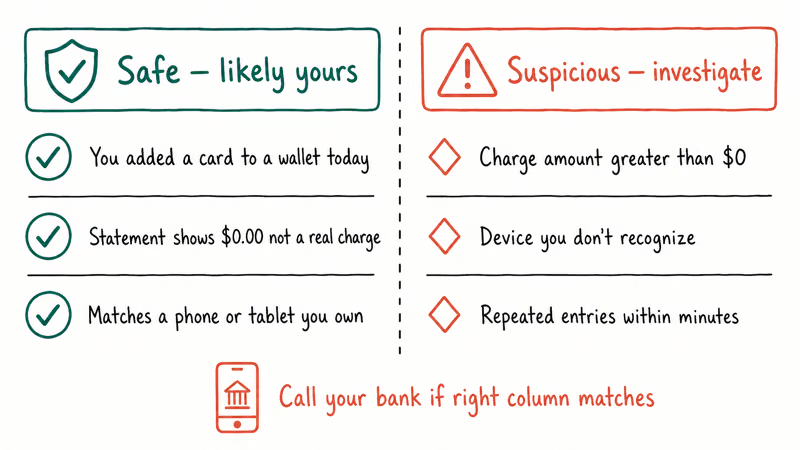
| Situation | What it means | Action |
|---|---|---|
| $0 entry, no card added | A device you don’t own may have tried to provision your card | Call your issuer immediately and freeze the card |
| Nonzero entry labeled VPS | Not a true VPS event; a normal merchant charge mislabeled or a fraud test | Dispute through your bank app |
| Multiple entries in one day | Wallet retried the provisioning or the card landed on several devices | Check each wallet for a successful add; remove if unexpected |
| Entry from a foreign region | Token was provisioned outside your usual geography | Treat as suspicious until confirmed |
| Entry persists past 7 days | Bank failed to clear the auth, rare but possible | Ask the bank to release the pending hold |
For everyday cases, the entry can be safely ignored. The audit only matters when the timing or amount doesn’t fit your own activity.
#Verifying a Provisioning Event Was Yours
The fastest confirmation lives inside the wallet app itself. Open Apple Pay, Google Wallet, Samsung Wallet, or whichever wallet you suspect, then check the list of cards under your profile. A successful provisioning will leave a tile with the matching card art, the last four digits, and the device name. If the card is there and the device is one you own, the VPS entry was yours.
If the card doesn’t appear in any wallet you control, move to the issuer side.
Open the banking app, go to the card settings, and check the “connected wallets” or “manage device” list. Every active token will show its issuing date and the device fingerprint. A token you don’t recognize is the strongest signal that someone provisioned your card without permission. That’s the moment to lock the card, request a replacement number, and report the event to fraud operations.
#How to Report Unauthorized Provisioning
The right escalation path starts with your card issuer, not Visa. Issuers can suspend the suspect token, freeze the card, and open a fraud claim that protects you under Visa’s zero-liability policy. The Visa Zero Liability page confirms cardholders aren’t responsible for unauthorized transactions reported promptly, and most issuers reissue a fresh card number within 5 to 7 business days.
If you suspect a larger identity theft pattern, file a report with the FTC at IdentityTheft.gov and place a credit freeze with the three major bureaus.
That step takes about 15 minutes and stops a thief from opening new accounts in your name. Our guide to tracing scams walks through documentation habits that help if the case ever turns into a chargeback dispute, and the PayPal chargeback walkthrough is useful when the unauthorized provisioning ends up tied to a funded P2P account.
#Bottom Line
Treat Visa Provisioning Service as your card issuer politely confirming the wallet you just used has the right to hold a token, not as a charge. The $0 entry usually clears within 24 to 72 hours and never moves money.
The one moment to act is when the line appears without you enrolling a card recently, or with a nonzero amount.
In that case, call the number on the back of your card, ask the agent to revoke any unfamiliar tokens, and request a replacement card number if any are found. Visa’s zero-liability policy and your issuer’s fraud team will handle the rest. For a deeper walk-through on adding cards safely, see our Apple Pay setup guide, and if Samsung Wallet starts misbehaving after a fresh enrollment, our Samsung Pay troubleshooting guide covers the most common fixes.
#Frequently Asked Questions
Why does Visa Provisioning Service appear multiple times?
Each device or app that holds a token generates its own $0 entry. If you added the same card to Apple Pay on your iPhone, Google Wallet on your tablet, and Venmo on your phone, you can see three separate VPS lines within a week, each one independent. They clear on their own timeline, usually within 48 hours, and the order they post depends on which app finished the bank handshake first rather than the order you tapped Add Card.
Does Mastercard have an equivalent of Visa Provisioning Service?
Yes. Mastercard runs the Mastercard Digital Enablement Service, often shown on statements as MDES or “MDES Token Authorization.” It performs the same $0 verification when you add a Mastercard to a wallet. American Express and Discover have their own variations as well.
Should I cancel my card if I see a VPS entry?
Not unless you can’t explain the entry. A $0 line that lines up with an Apple Pay or Google Pay enrollment you remember is normal. A line you can’t tie to any wallet action is the only situation that justifies asking your issuer to cancel and reissue the card.
Can Visa Provisioning Service charge me later?
No. The authorization is for $0 and doesn’t convert into a posted transaction. If you see a nonzero charge labeled VPS, treat it as a separate event and dispute it through your bank.
How long does the VPS entry stay on my account?
Most issuers clear the pending auth within 24 to 72 hours, with a few credit unions taking up to a week to drop it from the activity view.
What if my contactless wallet refuses to set up after a VPS attempt?
Sometimes the issuer rejects the provisioning request, even though the $0 line still appears. Open the wallet app, retry the add-card flow, and call the issuer if a second attempt fails. Apple’s contactless setup help recommends contacting the bank before retrying more than twice. If the wallet still can’t tokenize the card, our note on the NFC tag error covers the most common device-side blockers.
Does Visa Provisioning Service show up if I use a virtual card?
Yes. Virtual cards and Apple Pay disposable numbers still flow through the tokenization service, so the same $0 authorization can appear. The line clears on the same schedule as physical card enrollments.

Best Laptop for Running LLMs in 2026: Memory Comes First
The best laptop for running LLMs is a memory purchase first. Compare MacBook unified memory against NVIDIA laptop VRAM, and see what each tier really runs.

Pixel 11 vs Pixel 10: What Changed and Who Should Upgrade
Pixel 11 vs Pixel 10: same screen and camera resolution, new Tensor G6, 25W wireless, and Gemini Intelligence. Here is who should actually upgrade.

Best Power Bank for iPad in 2026: Pro, Air, and Mini
Best power bank for iPad in 2026. Compare mAh tiers and USB-C PD wattage for iPad Pro, Air, and mini, plus airline Wh math, cables, and travel tips.

Best Power Bank With Built-In Cable: Top 2026 Picks
Best power bank with built-in cable picks for 2026. Compare single USB-C, multi-connector, and retractable laptop banks, plus airline Wh math.