USPS Text Scams in 2026: How to Spot and Report Fakes
Got a USPS text asking for a redelivery fee or address confirmation? It is almost certainly a smishing scam. Here's how to spot and report it.
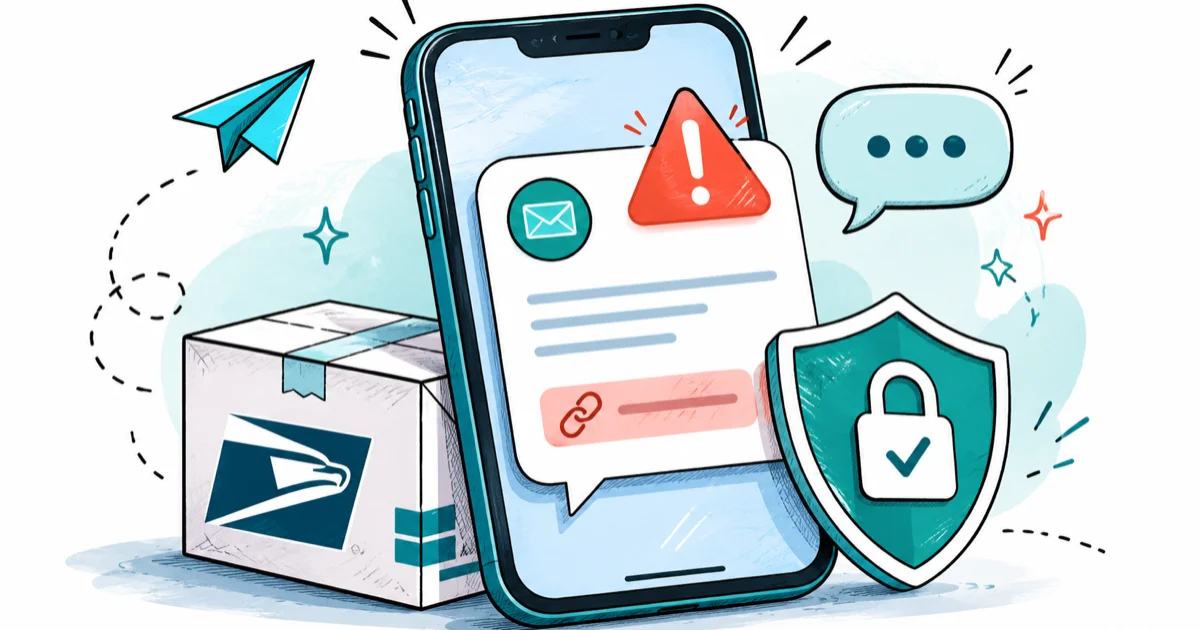
Quick AnswerAlmost every unsolicited text claiming a USPS package needs a fee or address confirmation is a smishing scam. USPS does not text you out of the blue asking for payment. Don't tap the link, forward the message to 7726, and report it to spam@uspis.gov.
USPS text scams have flooded American phones since 2023, and the wording got sharper in 2026. Current examples follow a consistent enough pattern that you can identify a fake USPS text on your own phone quickly once you know the tells.
- Real USPS only texts you about a package after you opted in to Informed Delivery or USPS Text Tracking on usps.com, and it never asks for payment, card details, or your address by reply
- The current fake texts use phrasing like “your package could not be delivered due to incomplete address” with a link that is not on the usps.com domain
- Tapping the link doesn’t infect your phone by itself, but the page you land on harvests card data, login credentials, or both
- The correct response is to forward the message to 7726 (the SPAM short code) and report a copy to spam@uspis.gov, then delete and block the sender
- Reduce future smishing volume by cutting the data-broker listings and breach exposures that feed scammers your number in the first place
#Is the USPS Text You Got Real or a Scam?
Short answer first: if it arrived out of the blue and asks for money or personal info, it’s a scam.
If you didn’t actively sign up for USPS Text Tracking and you didn’t give USPS your phone number as part of a recent shipping label, an unsolicited text claiming you owe a fee or need to confirm an address is almost certainly a smishing scam. Smishing is just SMS-based phishing, and the United States Postal Inspection Service has been warning about this pattern since at least 2022. The mechanics haven’t changed, only the wording.
According to the United States Postal Inspection Service’s smishing alert, USPS doesn’t send texts or emails without a customer first requesting the service. The agency also clarifies that it never asks for personal information or payment through unsolicited texts, period.
Fake USPS texts share four traits: unknown sender, non-usps.com link, urgent wording, and a request for money or data.
If you’ve already reduced your data footprint, the volume of these texts drops sharply. Our walkthrough on pulling your personal info from data-broker sites covers the cheapest way to make your number harder to buy in bulk.
#What the Fake USPS Text Looks Like Right Now
The current 2026 wave reuses a few message shells, swapping out a tracking number and a shortened link. Common examples land close to one of these patterns, and the small variations across batches are what make automated carrier filters miss some attempts. The scaffolding stays identical even when the sender number rotates, which is the cheapest tell once you’ve seen one fake:
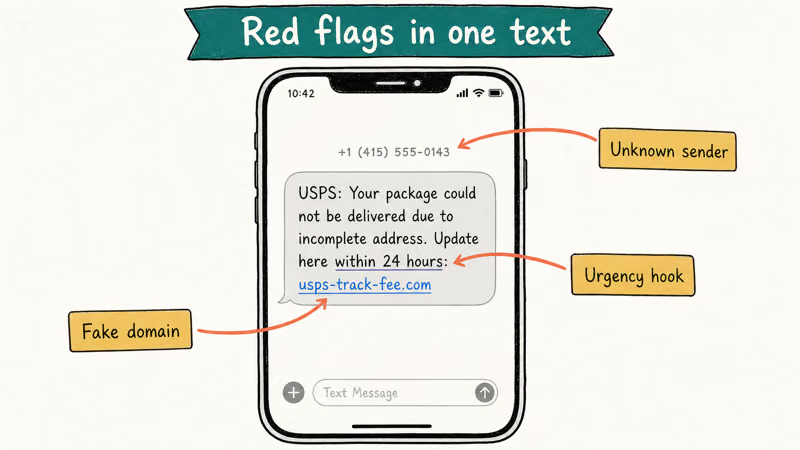
- “USPS: Your package could not be delivered due to incomplete address information. Please update your details to complete delivery: [link]”
- “USPS Notice: There is a small redelivery fee of $1.99 owed on your parcel. Reschedule here: [link]”
- “USPS Tracking: Your shipment is on hold pending confirmation. Click here within 24 hours or it will be returned: [link]”
Three structural giveaways are constant. The sender is a random 10-digit US number or a foreign short code, not the real USPS short code.
The link domain is something like usps-track-fee.com, us-postal.support, or a free hosting service, never usps.com or tools.usps.com. The message also includes a deadline to pressure you into tapping before you think it through.
The page you land on after tapping is the second half of the scam. It mimics the USPS color palette, asks for your name and address to “verify the parcel,” then quietly escalates to a card number and a CVV to settle the redelivery fee. Some variants drop straight to a fake login form to harvest reusable credentials, which can then be replayed against your real email, bank, or Apple ID.
The FTC’s consumer alert on package-delivery scams confirms that “unpaid postage” and “redelivery fee” are the most common hooks attackers use, and that real carriers don’t collect these fees by text.
#How to Tell a USPS Smishing Text From a Real One
Run the message through this four-question check before you do anything else:
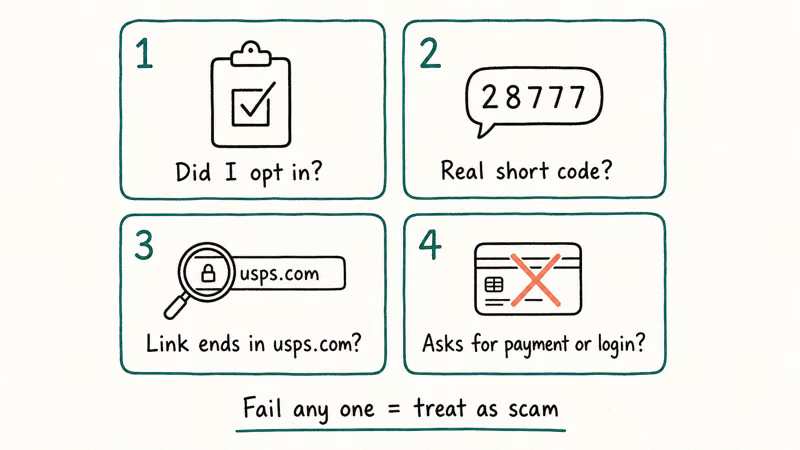
- Did I ask for SMS updates? USPS Text Tracking is opt-in. If you haven’t enrolled in USPS Informed Delivery or Text Tracking, USPS has no reason to text you.
- Is the sender a known USPS short code? Real USPS tracking texts come from short codes like 28777 (2USPS) or 21996, not from a random 10-digit phone number. Foreign country prefixes are an instant fail.
- Does the link end in
usps.com? Long-press the link to preview the full URL before tapping. Anything that isn’t ausps.comortools.usps.comdomain is fake. Watch for lookalike tricks likeuspscom.helporusps-track.co. - Is there any payment, login, or personal info request? Real USPS notifications surface delivery status only. They never solicit a card, a Social Security number, or a password by text.
If the message fails even one of these checks, treat it as a scam.
A second-order signal is how the message addresses you. Scam texts open with “Dear customer,” “USPS user,” or no greeting at all, because the attacker bought a list of phone numbers without names. A real shipping notification references the actual parcel context, never a generic greeting. The same urgency-and-link pattern applies beyond delivery brands, so learn how to spot any smishing text by its urgency and link tells.
#If You Already Tapped the Link
Don’t panic. The tap by itself rarely does damage.
Tapping the link alone usually doesn’t install anything on a modern iPhone or Android phone. iOS and Android both require an explicit user action, typically downloading and installing a .apk or a configuration profile, before a third-party app can run. The real damage from a smishing site comes from what you type into it.
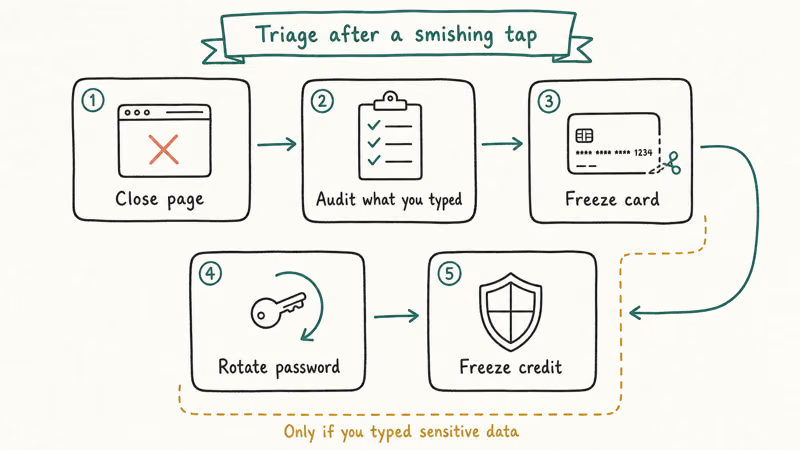
Step through this triage sequence, in order:
- Close the page and disconnect. Quit the browser, switch off Wi-Fi if you’re uneasy, and don’t enter anything else on that page.
- Audit what you typed. If you only typed your name and address, you leaked PII but you didn’t lose money or credentials. If you typed a card number, a CVV, or a password, treat those as compromised.
- Call your card issuer and freeze or replace the card. A new card number is the fastest fix for exposed card data. The bank can also reverse any pending charge from the scam page.
- Rotate any password you typed. Change it on the originating site first, then on every site where you reused it. Apple and Google password managers will flag reused credentials for you.
- Watch for follow-on accounts being opened in your name. Scammers who get a name plus address often try to apply for new credit. A free credit freeze with each of the three US bureaus is the cleanest defense.
If your phone is acting odd after the tap, like new battery drain, unfamiliar profiles, or apps you don’t remember installing, walk through our iPhone spyware detection checklist or run the dial codes in our phone-hacking self-check guide. Most users will see nothing because the scam targets your data, not your device.
If you handed over a login, our walkthrough on checking whether your email is on the dark web is the next step.
Pair the rotation with a passkey wherever the site supports one; our iPhone passkey setup guide makes that swap fast, and Apple’s official guidance on Messages safety covers the iOS-side filters that complement the steps above.
#How Do You Report a USPS Smishing Text?
Reporting feeds the carriers and USPS the data they use to block the senders. The steps are short: forward the text, send USPS a copy, then delete and block the sender.
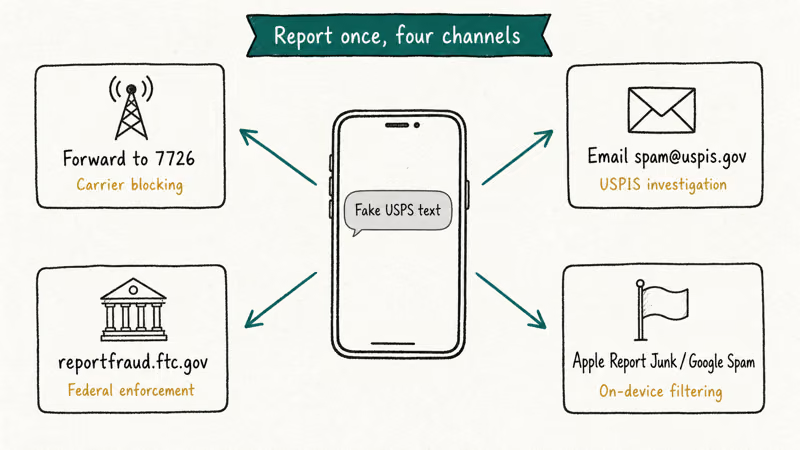
Step 1: Forward the text to 7726 (SPAM). Long-press the message in iMessage or your Android Messages app, tap Forward, and send it to the short code 7726. According to the CTIA’s text-spam reporting page, 7726 routes the report to your carrier’s spam-and-abuse team, which is shared across AT&T, T-Mobile, and Verizon. You’ll get an automated reply asking for the sender’s number, which is the only follow-up needed.
Step 2: Email a screenshot or the text body to spam@uspis.gov. This is the dedicated reporting inbox for the United States Postal Inspection Service. Include the suspect phone number, the date and time you received the text, and the URL of the link. You can long-press to copy the URL without tapping it. USPIS confirms the address on its package-tracking smishing scam page.
Step 3: Report to the FTC at reportfraud.ftc.gov. The FTC aggregates these reports for enforcement and shares anonymized data with state and federal partners. The form takes about three minutes.
Step 4: Delete and block the sender. Once the message is forwarded and reported, you can safely delete it. Blocking the number stops the same sender from reaching you, though scammers rotate numbers constantly, so blocking is a small partial fix.
| Channel | What to send | Why it matters |
|---|---|---|
| 7726 (SPAM) | Forward the full text | Carrier-level spam scoring; helps block the sender across networks |
| spam@uspis.gov | Screenshot or paste of message + sender number + link URL | USPIS investigative work and takedown requests |
| reportfraud.ftc.gov | Short narrative + sender details | Federal enforcement, aggregated trend data |
| Apple Report Junk / Google Spam button | One-tap report inside the messaging app | Apple and Google use this to fingerprint and filter future texts |
Reporting channels and what each does with the data
The Apple “Report Junk” link that appears under unknown-sender messages on iOS is worth tapping in addition to forwarding to 7726. It does the same job from Apple’s side of the pipe.
#Why Smishing Volume Will Keep Rising
The economics of smishing favor the attacker. Sending a million texts costs a few dollars on a compromised gateway, and even a 0.1 percent click-through rate clears the campaign cost many times over. USPIS has reported that package-tracking smishing complaints surged year over year through 2024 and 2025, and the 2026 wave reflects continued growth in scam-message volume.
Your number ended up on a list one of three ways: a data-broker site sold it, a breach leaked it, or you posted it publicly. The first two are fixable.
Carrier-level filtering helps but isn’t a complete shield. T-Mobile, AT&T, and Verizon all run spam-text heuristics that catch the more obvious scam batches, but the URL-shuffling attackers can usually rotate domains faster than carrier filters update.
#Bottom Line
If a text claims to be from USPS and you didn’t opt in, treat it as a scam by default.
Don’t tap the link. Long-press to preview the URL if you want to confirm, then forward the message to 7726, email a copy to spam@uspis.gov, and delete it. Verify any real package status only by typing usps.com directly into your browser and using the tracking number on the official site.
The single best long-term defense is to shrink your data-broker footprint and use unique passwords plus passkeys, so a leaked phone number leads nowhere even when the scam text does reach you.
#Frequently Asked Questions
Is the USPS text I got real or fake?
If you didn’t enroll in USPS Text Tracking and it asks for a fee, address, or personal info, it’s fake. Real USPS texts only deliver status updates and never request payment.
What should I do if I already tapped the link in a USPS scam text?
Close the page first; tapping alone usually doesn’t infect a current iPhone or Android phone. The real risk is in what you typed. If you entered card details, call your bank to freeze the card; if you entered a password, change it everywhere you reused it.
How do I report a USPS smishing text?
Forward the message to the short code 7726 to report it to your carrier, email a copy with the sender’s number and the link URL to spam@uspis.gov, and file a quick report at reportfraud.ftc.gov. Then delete and block the sender.
Does USPS ever send delivery texts at all?
Yes, but only to customers who opted in to USPS Text Tracking or Informed Delivery from their usps.com account. Those messages arrive from official short codes like 28777 or 21996, reference an existing tracking number you can match against your usps.com history, and never ask for payment, login credentials, or personal details by reply. If a “USPS” message asks any of those, it isn’t from USPS.
Will USPS ever ask me to pay a redelivery fee by text?
No. USPS doesn’t collect redelivery fees by text. If a parcel needs a redelivery action, the carrier leaves a PS Form 3849 notice and you resolve it on usps.com.
Why am I getting USPS scam texts when I am not waiting on a package?
Scammers blast lists of US phone numbers in bulk, so receiving a “missed delivery” text without any active shipment is the norm, not the exception. Your number landed on a list through a data-broker sale, a past data breach, or a public posting. Reducing your broker footprint and using a forwarding number for low-trust signups both help over time.
Can I get hacked just by reading a USPS scam text?
Reading the text by itself doesn’t compromise a modern iPhone or Android phone. The danger starts the moment you tap the link, and the larger danger is if you then type credit card or login details into the page that opens. iMessage and Android Messages both render text safely without auto-executing any link.

Is This Bank App Real? Spot a Fake App on Your Home Screen
A bank app can land on your home screen from a web page with no install warning. Learn the checks that tell a real banking app from a phishing web app.

Passkeys Not Syncing Between iPhone and Windows? Read This
Passkeys not syncing between iPhone and Windows is by design, not a bug. Here is why iCloud passkeys skip Windows Hello and the three ways to fix it.

VPN Not Working on Snapdragon X? Why It Fails, How to Fix
Your VPN won't install or connect on a Snapdragon X Copilot Plus PC because Windows on ARM can't emulate the network driver. Here are the fixes that work.

How to Check If a Link Is Safe Before You Click It
Learn how to check if a link is safe with official-first steps: read the real domain, use the app instead, and treat scanners as a second opinion only.