Types of Motherboard Form Factors: ATX, mITX and More
Compare the main types of motherboard form factors (E-ATX, ATX, micro-ATX, Mini-ITX) and pick the right size for your case, budget, and PC build.
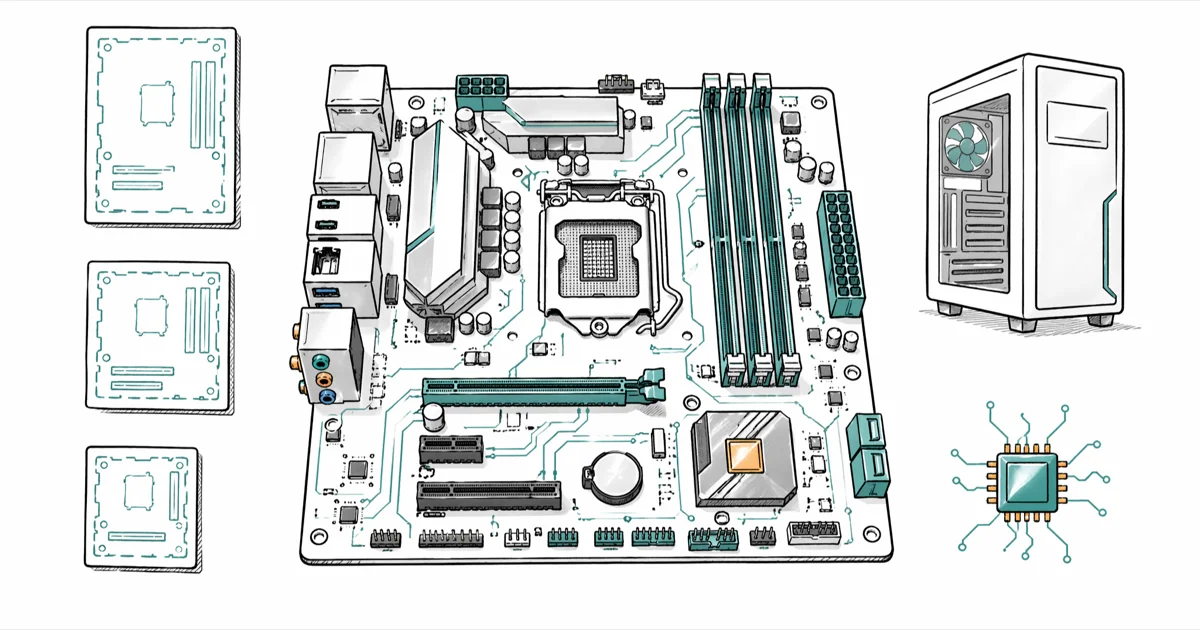
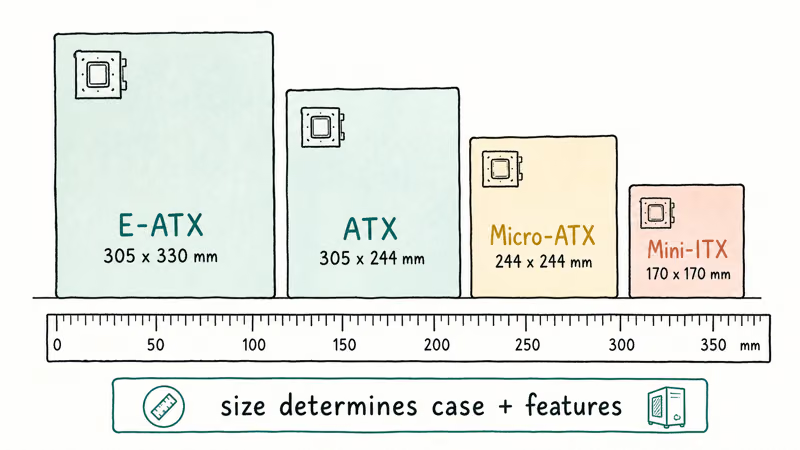
Quick AnswerThe six common motherboard form factors are E-ATX, ATX, micro-ATX, Mini-ITX, Pico-ITX, and legacy BTX. ATX (305 x 244 mm) is the mainstream desktop standard, while Mini-ITX (170 x 170 mm) fits compact and small-form-factor builds.
Types of motherboard form factors decide what case will fit, how many PCIe cards you can run, and how much RAM your build supports. The right choice depends on the parts you plan to plug in, the case room you have, and whether you want a small living-room PC or a full tower with two graphics cards. This guide compares the six form factors you’ll actually see at retail in 2026, plus a few legacy boards still worth knowing.
- ATX measures 305 x 244 mm and is the mainstream desktop standard, with four DIMM slots and up to seven PCIe expansion slots on most models
- Micro-ATX shrinks to 244 x 244 mm, keeps the ATX mounting holes, and drops to a maximum of four PCIe slots
- Mini-ITX is 170 x 170 mm, holds two DIMM slots and one PCIe x16 slot, and is the go-to size for cube and small-form-factor cases
- E-ATX is 305 x 330 mm or larger, needs a full tower, and is built for HEDT chips, dual graphics cards, and extra M.2 storage
- AT, LPX, and BTX are legacy formats. New consumer boards have not shipped in these sizes since the late 2000s
#What Is a Motherboard Form Factor?
A motherboard form factor is the published specification that fixes the board’s outline, mounting-hole pattern, I/O shield cutout, and main power connector. When two products share the same form factor, the board, case, and power supply line up at the same standoffs and the same cable runs.
According to Wikipedia’s ATX entry, Intel released the original ATX specification in 1995 to replace the older AT layout, mainly because AT cases ran out of room for the second I/O port row and modern expansion cards. The same entry confirms that the ATX 2.4 revision still defines the 24-pin main power connector and the 4 or 8-pin CPU power header that most desktops use today.
Form factor is not the same as chipset or socket.
A B650 micro-ATX board and a B650 ATX board can hold the same Ryzen CPU, but they don’t share the same case. That’s why builders pick the form factor first, then narrow down the chipset and the PCI vs PCI Express slot mix the project actually needs.
#How the Common Form Factors Compare
Here is how the six current sizes compare on the numbers that affect a build. Memory slot counts and PCIe lane budgets vary by chipset and board, so treat the columns as the typical maximum you’ll find at retail.
Table 1: Common motherboard form factors and their typical configurations.
| Form factor | Dimensions (mm) | Typical DIMM slots | Typical PCIe slots | Best for |
|---|---|---|---|---|
| E-ATX | 305 x 330 (and wider) | 4 to 8 | 4 to 7 | HEDT, multi-GPU, workstation |
| ATX | 305 x 244 | 4 | 4 to 7 | Mainstream desktop, gaming |
| Micro-ATX | 244 x 244 | 2 to 4 | 1 to 4 | Budget builds, mid-tower |
| Mini-ITX | 170 x 170 | 2 | 1 | SFF, HTPC, cube cases |
| Nano-ITX | 120 x 120 | 1 to 2 | 0 to 1 | Embedded, kiosks |
| Pico-ITX | 100 x 72 | 1 (often soldered) | 0 | Signage, industrial |
#Full-Sized Form Factors: ATX and E-ATX
ATX and E-ATX are the two boards a mainstream desktop or workstation builder picks from. Both need a full PSU and a mid-tower or larger case.
#ATX (Advanced Technology Extended)
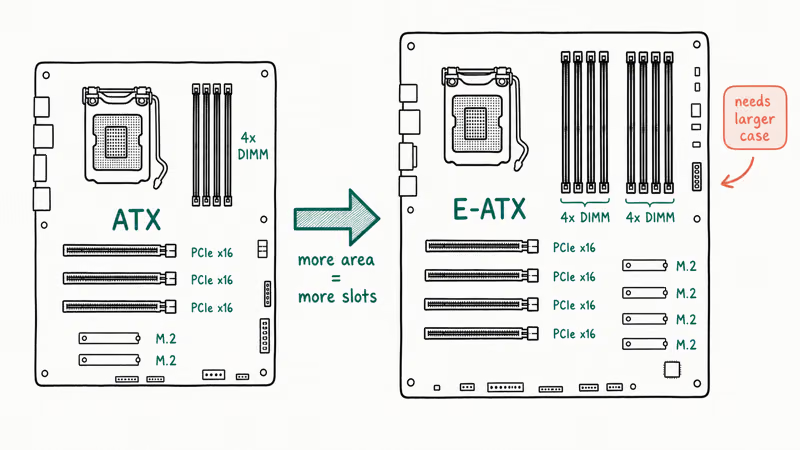
ATX is the most common size on shelves. The 305 x 244 mm outline lets the board carry four DIMM slots, a 24-pin main power header, two to four PCIe slots, and a full rear I/O bank with USB-C and Ethernet. ATX is also the easiest size to upgrade since almost every mid-tower and full-tower case supports it.
Building around AMD Zen 3 or a 3080-class GPU? The Ryzen 7 5800X motherboard roundup and best motherboard for RTX 3080 list both default to ATX boards.
#E-ATX (Extended ATX)
E-ATX boards are wider than ATX, usually 305 x 330 mm, although some vendors stretch closer to 305 x 277 mm and still call it E-ATX. Extra width lets manufacturers add more VRM phases, more DIMM slots, and a second or third M.2 slot above the primary PCIe x16. ASUS, ASRock, and Gigabyte all sell E-ATX boards aimed at threadripper, Intel HEDT, and high-end gaming.
E-ATX support varies by case depth, not just the label on the box. Some mid-towers list E-ATX support but still place front cable cutouts where a wider board can block them.
Confirm the case spec sheet calls out “E-ATX support up to 330 mm” before buying anything wider than standard ATX.
#Compact Form Factors: Micro-ATX and Mini-ITX
Compact builds favor Micro-ATX or Mini-ITX. Both keep the ATX power connectors but trade expansion slots for a smaller footprint.
#Micro-ATX (mATX)
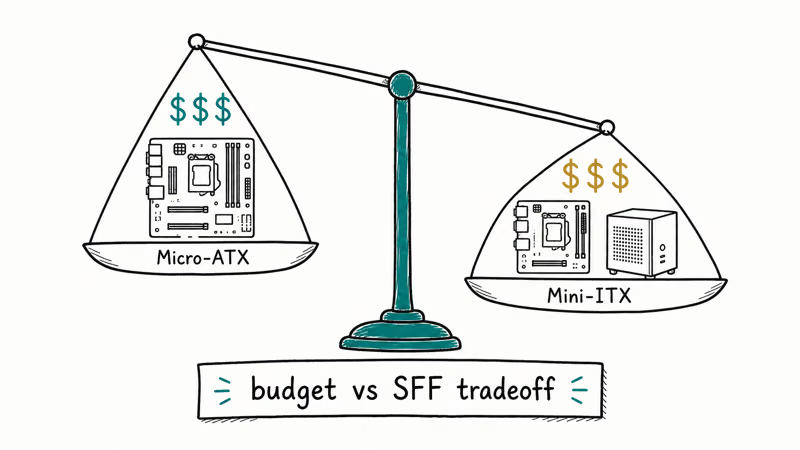
Micro-ATX uses a 244 x 244 mm square and keeps the same ATX mounting holes, so any ATX-compatible case will accept it. You typically get two to four DIMM slots and one or two PCIe x16 slots plus a couple of x1 slots. Budget AM4 builders often pair a micro-ATX board with a Ryzen APU and skip the discrete graphics card entirely.
A micro-ATX board leaves more empty space in an ATX-compatible case than a full ATX board. That can simplify lower cable routing, but it doesn’t automatically improve thermals.
Airflow still depends on the case, fan layout, and GPU cooler.
#Mini-ITX
Mini-ITX is 170 x 170 mm with two DIMM slots and one PCIe x16 slot. VIA Technologies released the spec in 2001, and Wikipedia’s Mini-ITX entry states that the format was originally designed for low-power x86 systems before becoming the go-to for enthusiast small-form-factor builds. Modern Mini-ITX boards from ASUS ROG, ASRock, and Gigabyte support full Ryzen 9 or Core i9 chips, though the smaller PCB pushes pricing closer to mid-range ATX.
Pair a Mini-ITX board with a cube PC case like the NZXT H1 v2 or Corsair 2000D to fit an entire gaming rig under a desk shelf, but budget for thicker cables and angled riser brackets since the rear I/O sits flush against the power supply shroud and leaves almost no room for standard 90-degree connectors or unsleeved 24-pin cables to bend cleanly.
#Embedded and Legacy Form Factors
Beyond the mainstream four, you’ll occasionally bump into smaller embedded boards or hand-me-down OEM hardware. These sizes are worth recognizing even if you’ll never spec a new build around them.
#Nano-ITX, Pico-ITX, and Smaller Variants
VIA’s Nano-ITX (120 x 120 mm) and Pico-ITX (100 x 72 mm) target embedded boards for kiosks, signage, and industrial controllers. They rarely show up at PC retail.
#Legacy Formats: AT, LPX, and BTX
These three boards are interesting history but not buying advice. AT was the IBM-era layout that ATX replaced. LPX, common in OEM desktops during the 1990s, used a riser card to lay expansion slots flat against the motherboard. BTX was Intel’s 2004 attempt at a thermally optimized layout that reversed the airflow path through the case.
According to Wikipedia’s BTX entry, Intel announced in 2006 that it would stop developing new BTX products, citing the lower thermal output of post-Pentium 4 CPUs. BTX boards still turn up in old Dell and Gateway OEM systems, but no current consumer chipset supports the layout.
#Matching a Form Factor to Your Case
Cases list a “motherboard support” line on the spec sheet. The rule is one-directional: a smaller board fits a bigger case, but never the reverse.
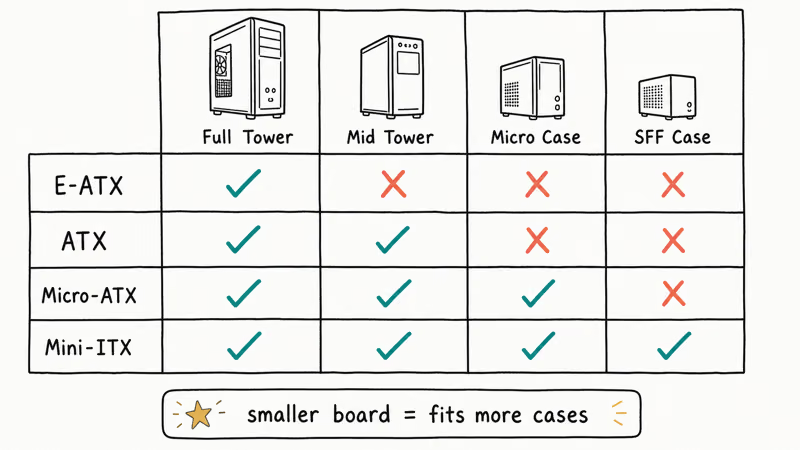
Three numbers actually matter when matching board to chassis:
- Clearance for GPU length. Long graphics cards collide with the front-panel cable cutouts on micro-ATX and Mini-ITX boards. Check the GPU clearance line on the case spec sheet.
- CPU cooler height. A 165 mm tower cooler will hit the side panel of a slim Mini-ITX case rated for 145 mm. Compact tower coolers solve this, but only if the cooler manufacturer states the exact height clearance.
- Power supply length and shroud. Mini-ITX cases often need SFX or SFX-L PSUs, not standard ATX units.
Large side-mounted AIO radiators can crowd the top edge of compact Mini-ITX boards, especially in SFF cases. Recheck the AIO clearance on the case spec sheet before pairing a large radiator with a compact build.
#Which Form Factor Should You Pick for Your Build?
There is no universal answer, but the decision usually falls into three buckets:
- You want headroom, multiple GPUs, or a workstation. Pick E-ATX in a full tower. The extra PCIe lanes, M.2 slots, and 8-pin CPU power headers earn the price difference. Add a heavy 1200 W or larger PSU and plan cable runs in advance.
- You’re building a mainstream gaming or productivity PC. Stick with ATX. The selection is the widest, prices are competitive, and most aftermarket coolers and cases assume an ATX layout. You’ll have room for at least one extra M.2 and a sound or capture card if needed.
- You want a compact desk or HTPC build. Mini-ITX gives the smallest footprint without crippling performance. Micro-ATX is the middle ground if you want a second PCIe slot and one more pair of DIMMs without going full ATX.
A good gut check: if your build only adds one PCIe x16 GPU and 32 GB of RAM, you can drop to micro-ATX or Mini-ITX and save case space. If you already know you’ll add a capture card, RAID controller, or a 10 Gigabit NIC, stay on ATX or step up to E-ATX.
#Bottom Line
For the vast majority of 2026 builds, ATX is the right starting point. It balances cost, upgrade headroom, and case selection in a way no other form factor matches. Move up to E-ATX only when the build sheet calls for multi-GPU, threadripper, or workstation memory channels. Move down to Mini-ITX when the case is the constraint, like a living-room TV stand or a backpack-portable LAN rig, and you don’t plan to add more than one expansion card.
If you’re not sure which way to lean, draw the part list on paper and count how many PCIe slots and DIMM slots the build will actually fill. An ATX board with two empty slots and four empty DIMM positions is a hint you can move to micro-ATX without losing anything real.
#Frequently Asked Questions
Will an ATX motherboard fit in a micro-ATX case?
No. ATX boards (305 x 244 mm) are too large for a true micro-ATX chassis built around the smaller 244 x 244 mm footprint.
Can I put a Mini-ITX board in an ATX case?
Yes. Mini-ITX uses a subset of the ATX mounting holes, so any ATX case has the standoffs you need. The downside is wasted internal space and longer cable runs.
Does form factor affect performance?
Indirectly. A Mini-ITX board with the same Ryzen 7 and graphics card as an ATX rig delivers nearly the same frame rates. Form factor matters most when it limits cooling capacity or restricts PCIe lane count. Threadripper and HEDT chips need the larger VRM array that only E-ATX boards reliably provide.
What is the difference between E-ATX and XL-ATX?
E-ATX is the published Intel specification at 305 x 330 mm, though some vendors ship shorter “E-ATX” boards near 305 x 272 mm. XL-ATX is a marketing term that EVGA and Gigabyte have used for boards wider than 305 x 244 mm but not a formally registered spec. Always check the exact PCB dimensions on the product page before buying a case.
Are BTX motherboards still made?
No. New consumer BTX boards stopped shipping in the late 2000s and live on only in old Dell or HP OEM desktops.
Do all form factors use the same power connectors?
The 24-pin main power and 4 or 8-pin CPU power headers are common across ATX, micro-ATX, Mini-ITX, and E-ATX. Older AT and BTX boards used different layouts and aren’t compatible with current ATX power supplies. Some small-form-factor cases use SFX or SFX-L PSUs that bundle the same connector pinouts in a shorter shell.
How many M.2 slots can each form factor have?
Mini-ITX usually has one or two M.2 slots, often stacked above and below the PCB. Micro-ATX typically has one or two, ATX boards have two to three, and E-ATX boards can carry four or more. If a board is missing an M.2 slot and the drive doesn’t show up at all, the SSD not showing up troubleshooting guide covers the common BIOS settings to check.
Should I worry about RAM size differences?
DIMM sticks are the same physical size across ATX, micro-ATX, and Mini-ITX. The difference is how many you can install, not how big each stick is. If you’re confused about the naming, see the RAM vs memory explainer for the short version.

Best Laptop for Running LLMs in 2026: Memory Comes First
The best laptop for running LLMs is a memory purchase first. Compare MacBook unified memory against NVIDIA laptop VRAM, and see what each tier really runs.

How to Run a Local LLM on Windows: A 2026 Setup Guide
Run a local LLM on Windows with LM Studio or Ollama. Pick a model that fits your GPU memory, keep every prompt offline, and skip the monthly bill.

Bluetooth Not Working on Snapdragon X? Fixes for 2026
Bluetooth not working on your Snapdragon X Copilot+ PC? Generic audio, mice, and keyboards work, but vendor apps often lack an ARM build. Fixes inside.

Docker Desktop and WSL2 Not Working on Snapdragon X? Fix It
WSL2 runs fine on Snapdragon X, but Docker Desktop ARM is Early Access and throws WSL errors. Use WSL2 plus native ARM64 Ubuntu and Docker Engine.